This MacBook malware lets Russian hackers remotely control your device
A fake job interview on LinkedIn might end with hackers accessing your MacBook with this new, dangerous malware upgrade.

Image by Cybernews

 Follow us
A fake job interview on LinkedIn might end with hackers accessing your MacBook with this new, dangerous malware upgrade.
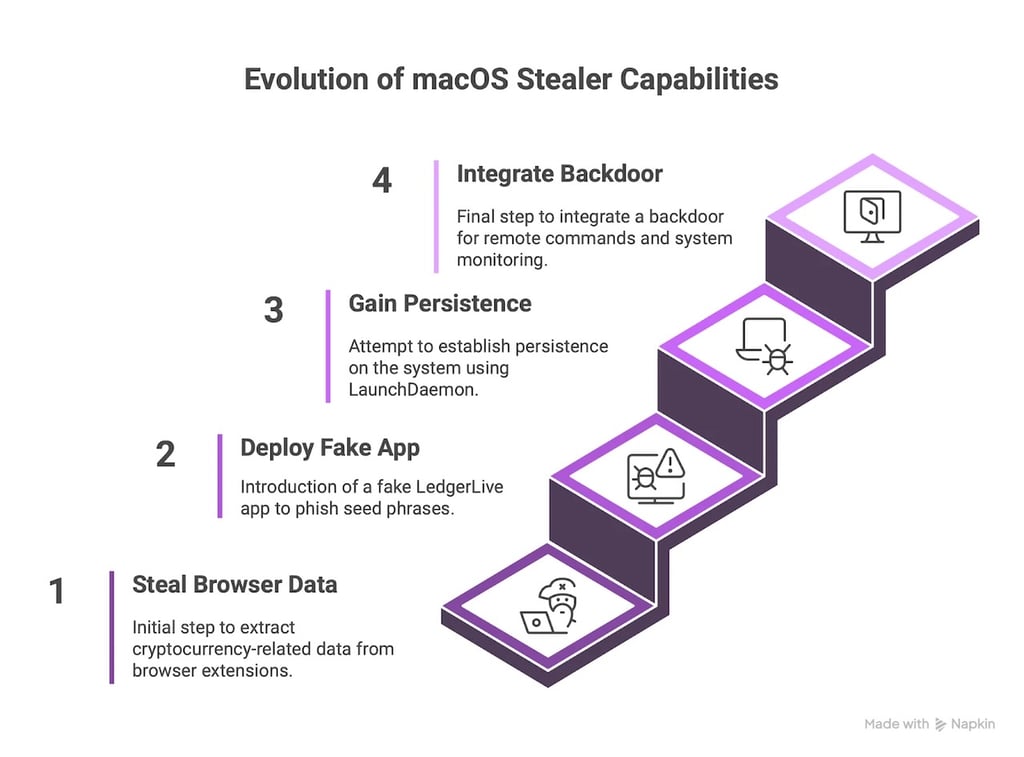
A malware campaign that once snuck into Macs to grab crypto wallets is now evolving into something far more dangerous. Atomic macOS Stealer, also known as AMOS, is a popular infostealer targeting macOS. And it has just received a major update.
The updated malware comes with an embedded backdoor that gives attackers remote access to your device long after the initial breach, also giving the green light to full system compromise.
The malware’s new capabilities allow attackers to run arbitrary commands, monitor victims continuously, exfiltrate data, and automatically reinstall after reboot. This poses a huge risk, says Moonlock Lab, the macOS security division of MacPaw, which first identified the upgrade.
AMOS is a Russia-linked malware-as-a-service (MaaS) operation that has already infected thousands of machines across over 120 countries, with the United States, France, Italy, the United Kingdom, and Canada among the most affected.




The attackers are targeting crypto-rich freelancers and artists. Victims are being lured with fake job offers via LinkedIn, only to be asked for their system password during a staged “interview” under the guise of enabling screen sharing.
According to the researchers, this is only the second known case after North Korean state actors of backdoor-equipped malware targeting Macs on a global scale. Just like their Pyongyang counterparts, the Russia-linked AMOS developers are using the same attack tactics targeting victims.
“The combination of a plug-and-play stealer with backdoor functionality not only raises the technical sophistication of the group but also significantly increases the risk to victims. It turns a one-time breach into a long-term compromise,” say the researchers.

Malware with backdoors is becoming a daily reality
Since early 2024, there’s been a noticeable surge in the number of distinct AMOS malware samples circulating in the wild.
While the volume of North Korean backdoor binaries has remained relatively steady, AMOS variants have exploded. This shows that the stealer-as-a-service market and broader MaaS ecosystem dominated much of 2024, and there is no sign of slowing down in 2025.
Looking at the data trends from 2024 onward, analysts expect a significant rise in hybrid stealer-backdoor malware through the second half of 2025.





How to stay safe?
Despite the myth that “Macs don’t get viruses,” macOS has become a high-value target for cybercriminals, and AMOS is proof that threat actors are no longer ignoring Apple’s devices. Here’s how to fight back:
- Stay aware: Knowledge is your first line of defense. AMOS campaigns often rely on social engineering. It might start with tailored messages, fake job offers, or cracked software traps. Understanding how these schemes work helps you spot red flags.
- Reduce your digital footprint: The more you post publicly, the easier it is for attackers to craft convincing phishing messages. Clean up unused accounts, limit public personal info, and think twice before sharing sensitive details online.
- Use security software: Anti-malware tools can monitor your Apple device for suspicious behavior and alert you to threats, as well as stop backdoor infections, including AMOS.
- Stay updated: Keep your macOS and all your apps patched and current. AMOS often exploits outdated systems or software vulnerabilities.
- Always double-check everything and verify: If someone offers you a job, a file, or a tool that seems too good to be true, it probably is too good. Always verify links and never reveal your system password unless you’re 100% sure why you’re doing it.