Mozilla rolls out new anti-fingerprinting protections in Firefox 145
Mozilla says it has developed “new, unique and powerful defenses against real-world fingerprinting techniques,” which are rolling out with Firefox 145. The changes are expected to halve the number of users trackable by fingerprinters.

Image by Cybernews.

 Follow us
Mozilla says it has developed “new, unique and powerful defenses against real-world fingerprinting techniques,” which are rolling out with Firefox 145. The changes are expected to halve the number of users trackable by fingerprinters.
The new privacy improvements will first be available to Firefox users who have Enhanced Tracking Protection (ETP) set to Strict mode or who use Private Browsing mode (private window).
Later, Mozilla plans to enable the new defenses for all users by default.
“Firefox is the first browser with this level of insight into fingerprinting and the most effective deployed defenses to reduce it,” Mozilla said in the announcement.
So what’s actually changing? According to the documentation, Firefox's new version implements the following features:





- To protect against canvas fingerprinting, a technique that relies on the unique ways systems render images, Firefox will add random noise to generated images when websites read back the image. The images will not be altered when the websites merely render data to the canvas element. The subtle noise might be noticeable to users on websites that track them this way.
- Firefox will not use locally installed fonts to render text on websites, and will only report standard fonts shipped by the OS.
- The number of simultaneous touches the hardware supports will be reported as either 0, 1, and for all other values, 5.
- Screen resolution and dock/taskbar dimensions will be reported uniformly: available resolution is the screen resolution minus 76 pixels.
- The number of available processor cores will always be reported as either 4 or 8, depending on whether the system has more than four cores.
The new features mark the completion of the second phase of anti-fingerprinting defenses.
“Our research shows these improvements cut the percentage of users seen as unique by almost half,” Mozilla said.
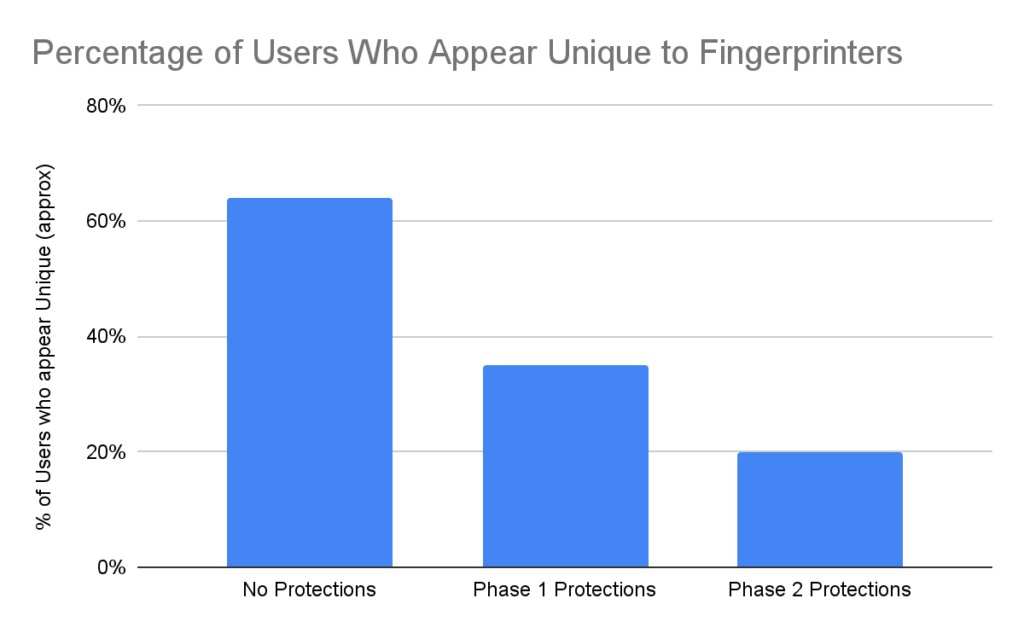
The new fingerprinting protections build upon multiple other layers of privacy and security features that have been implemented over the years. For example, Firefox has long blocked known tracking and fingerprinting scripts as part of its ETP, offered Total Cookie Protection feature and and limited other user information accessible to websites.
Firefox eliminates the most pervasive fingerprinting techniques, including the way graphics cards draw images, the fonts your computer has, and even minor differences in how it performs mathematical operations.
However, it is nearly impossible to completely remove the user fingerprint without breaking web usability.
Cybernews has previously demonstrated how users can be tracked even when all cookies and trackers are disabled.






“More aggressive fingerprinting blocking might sound better, but is guaranteed to break legitimate website features. For instance, calendar, scheduling, and conferencing tools legitimately need your real-time zone,” Mozilla explains.
Mozilla doesn’t mention if it plans to mask the user agent, like the Brave browser does. Currently, Firefox provides details about the user's browser version and the OS, and other data like preferred language, compression support, and SSL-JA3-Hash.
How to enable enhanced protections?
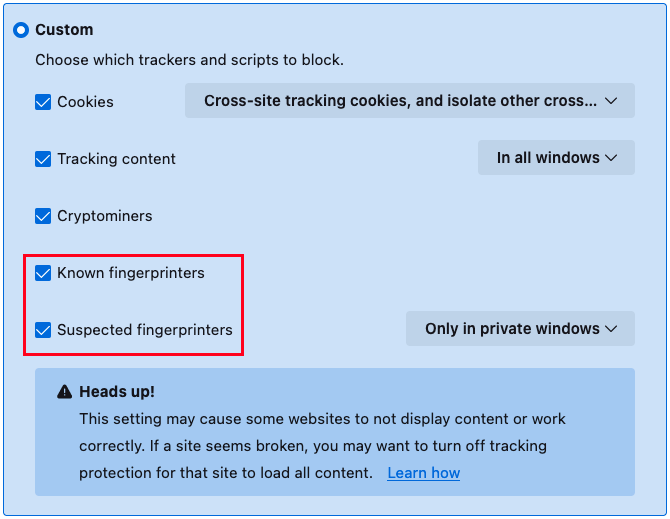
To enable the new protections for all sites, Firefox 145 users should go to Settings, head to Privacy & Security, and customize the “Enhanced Tracking Protection” to block known and suspected fingerprints.
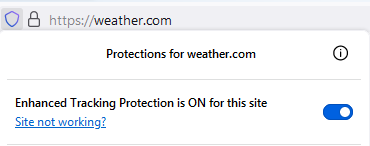
If the specific site appears to be broken, Enhanced Tracking Protection can be disabled for that site by selecting the shield icon in the address bar and toggling the switch.
Both “Known Fingerprinters Protection” and “Suspected Fingerprinters Protection” are enabled in Private Browsing (when opening a “New private window”). You can find full instructions in the Mozilla Support article.
Unlock more exclusive Cybernews content on YouTube.