PHP2Shell risks: are your old accounts safe?


An account you opened for a single purchase may still hold your personal details and a password you use elsewhere. Recent PHP flaws are a reason to revisit those forgotten logins.
A forum you stopped visiting, an old shopping account, or a booking service you used once can easily be forgotten. The problem is that the account itself may remain, along with the information you provided when signing up.
Unsubscribing from email updates or deleting an app does not remove the information either. If the website later suffers a breach, your old account could still be affected.
What does PHP2Shell mean for old accounts?
PHP2Shell refers to two critical vulnerabilities in PHP, the programming language that runs behind the scenes on approximately 70% of global websites. These flaws can allow attackers to run their own code on a website without touching a login button.
Considering the issue has been public for over a week, only a fraction of the websites have implemented the needed fixes. As of October 30th, Censys’s PHP2Shell tracker still flags approximately 29.6 million services as potentially vulnerable.
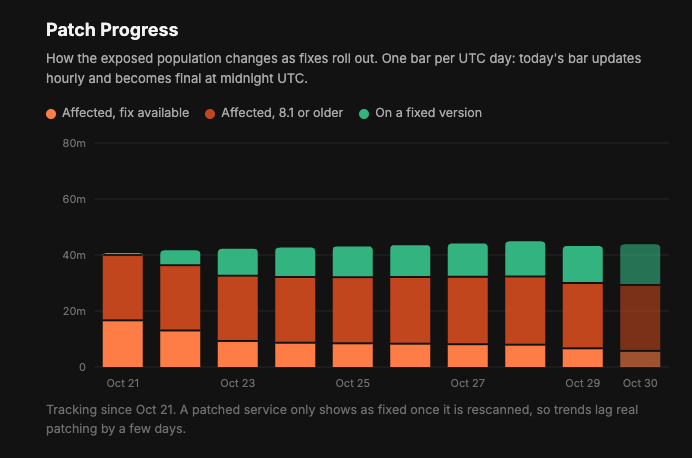
Approximate progress of PHP2Shell vulnerabilities being patched globally, by Censys
So an old shopping or forum account may still hold your email address, delivery details, messages, and password, even if you haven’t signed in for years. If that website is breached, the information you left there could be exposed.
Why can a forgotten login still matter?
A modern, well-protected website stores a scrambled version of your password, making it much harder to piece together even if its database is stolen. That said, an old forum with poor security might store passwords in a form that is much easier to read or recover.
If you use the same password for that forum and, say, your email, attackers could try the stolen password to access your inbox. This is called credential stuffing, and the email provider wouldn’t need to have a security flaw for it to work. Basically, an account you forgot about years ago could put your daily accounts at risk.
That’s why using a different password for every account matters so much, especially with accounts you rarely use. Of course, that can be extremely hard to do on your own, since we all have hundreds of different accounts these days, which is where a proper password manager can save a lot of long-term headache.

What should you do with old accounts?
Start with the logins saved in your browser or password manager. To find accounts you may have missed, search your email inbox for keywords such as “welcome”, “email verification”, and “account confirmations”. Old receipts and subscription messages can also help you find accounts linked to your email address.
If you don’t remember your account password, of course, you’ll need to reset it on the website to get back in. If you’re unsure where you’ve reused passwords, review your saved logins and set a different one for each account. This is one of the most important password management habits to get right.
That said, if you’re sure you don’t need an account, delete it altogether. Check for active subscriptions, records, or information you want to save before proceeding. Request deletion of your personal data where available, and keep the confirmation. However, keep in mind that closing it may not erase every record the company holds. You can email them separately and ask them to stop using your details for direct marketing.
For a wider cleanup, identity theft protection services such as Coveron can send removal requests to data brokers, companies that collect and sell personal information. This can help reduce where your details appear beyond your old accounts, though you’ll still need to close those accounts through the websites themselves.
For accounts you still need, check that the recovery email and phone number haven’t expired. Additionally, if you haven’t yet and it's available, always turn on two-factor authentication.
Removing a login from your browser or password manager only deletes your saved copy. You still need to close the account through the website itself.