Scammers are now skipping inboxes and going straight for your calendar
Cybercriminals are abusing calendar invites to skip inboxes and deliver fake invoices. They’re tricking victims into taking immediate action, which usually involves contacting the scammers, Malwarebytes warns.

Image by Cybernews

 Follow us
Cybercriminals are abusing calendar invites to skip inboxes and deliver fake invoices. They’re tricking victims into taking immediate action, which usually involves contacting the scammers, Malwarebytes warns.
A new malicious campaign impersonating Malwarebytes and likely other companies relies on sending fake impending payment notifications as calendar invites.
Fake invoices are inflated to several hundred dollars for multiple years of service to create a false sense of urgency and urge victims to call the provided number to dispute the charge rather than click a malicious link.
“The scammers want you to believe a considerable charge has already gone through so that you react immediately instead of thinking critically,” the report by Malwarebytes Labs reads.
Many calendar apps automatically add invites before users accept or even see them. Fake entries sync across devices and may appear legitimate.






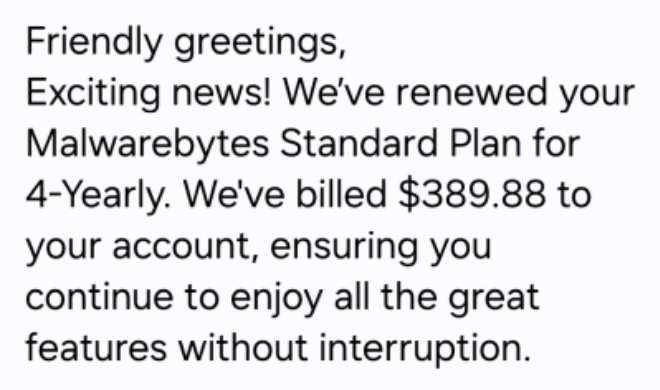
Security researchers noted that the fraudulent calendar invites mimic automated billing system notifications, even though legitimate companies don’t send invoices as calendar appointments.
The language is often inconsistent and grammatically incorrect, which suggests a scam script. However, the errors may also be deliberate attempts to evade automated security scanners.
After initial contact, the fraud follows the usual script
Once the victim calls the number, the scammers use the usual fraud tactics: attempting to steal payment card or bank details, convincing people to send money via unusual methods such as gift cards or cryptocurrency, and harvesting personal data for future scams.
Tech support scammers often ask to install legitimate remote access tools and grant them access to the victim's computer.






Malwarebytes Labs is urging users to turn off auto-add or automatic processing of invites in their calendar apps, such as Outlook Calendar, Gmail Calendar, Android Calendar, Mac Calendar, or others.
“Restrict calendar permissions so only trusted people and apps can add events, the report reads.
The Cybernews community is talking about this. Be a part of the conversation.
“Don’t engage with unsolicited events. Don’t click links, open attachments, or reply to suspicious calendar events such as ‘investment’, ‘invoice,’ ‘bonus payout,’ ‘urgent meeting’ – just delete the event.“
Unlock more exclusive Cybernews content on YouTube.