Scammers are tricking Facebook users with login pop-ups that look real
Scammers are harvesting Facebook credentials using fake login popups that are indistinguishable from the real ones, even showing what appears to be a legitimate link (URL). The scam uses so so-called “browser-in-the-browser” technique, making fake pages almost impossible to spot.

Image by Cybernews.

 Follow us
Scammers are harvesting Facebook credentials using fake login popups that are indistinguishable from the real ones, even showing what appears to be a legitimate link (URL). The scam uses so so-called “browser-in-the-browser” technique, making fake pages almost impossible to spot.
Trellix, a cybersecurity firm, alerts users to a surge in Facebook phishing scams, with attackers abusing the “browser-in-the-browser” (BitB) technique.
On malicious or compromised websites, it appears as a legitimate Facebook login pop-up window. However, it isn’t a true browser window, but rather an HTML element designed to resemble one.

“It exploits the public’s familiarity with login pop-up windows to steal user credentials,” Trellix warned in the research on the Facebook scam campaigns active in the past six months.




What are the main red flags?
This type of attack usually starts with a phishing email. While the lures are constantly changing, scammers may impersonate a law firm, send a legal notice, or mimic Facebook alerts on account suspension, unauthorized logins, or security updates.
The phishing emails contain a link disguised as a Facebook login URL. Cybercriminals abuse URL shorteners or other tactics to conceal that a site is malicious. They also host landing pages on trusted cloud platforms, like Netlify.

If opened, the fake website displays a Facebook pop-up appearing to be in a separate browser window. This is the main trick. This pop-up can’t be dragged out of the current browser window.
It’s a fake browser window inside the browser window – hardcoded in HTML. Hackers can display any URL they want, because it’s not an actual URL, just a visual element. Think of it like watching a TV inside a TV – only the outer one is real, and the inner one is just an illusion.
The fake pop‑ups within the real browser window make phishing pages look extremely authentic.
“Replicating the entire window design using basic HTML/CSS is quite simple. Combine the window design with an iframe pointing to the malicious server hosting the phishing page, and it's basically indistinguishable,” a security researcher mr.d0x detailed this technique in 2022.
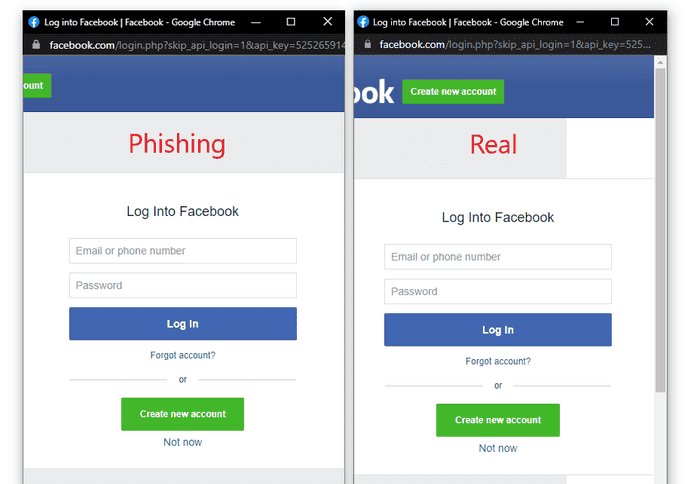
Scrutinize the actual URL bar to see if it really belongs to the official Facebook.com domain.
The researchers suggest always navigating to Facebook directly and never clicking on links in emails, especially those claiming account suspension, copyright violation, unauthorized logins, or other issues.
“Treat all login pop-ups with extreme caution: Assume that any login window appearing inside the current browser window (the BitB technique) is fake,” the report reads.
“Genuine logins almost always redirect the browser to a dedicated, full-page login URL or use the browser's integrated password manager.”






The browser-in-the-browser technique is not new. Hackers can exploit it to craft malicious ads on shady websites that appear to be virus alerts, browser updates, or mimic other apps.
Unlock more exclusive Cybernews content on YouTube.