How to watch Alone World Championship for free from anywhere
Our in-house cybersecurity experts and journalists, renowned for major reports like The Mother of All Breaches, conduct transparent, unbiased VPN testing and in-depth analysis.
With 750+ articles crafted based on real-world research, we empower readers to make informed purchasing decisions through first-hand expertise.
Learn more
Alone is back for its most ambitious season yet. Season 13, officially subtitled Alone: World Championship, premieres on TVNZ+ on June 18th, 2026, one day after its US debut on The History Channel. This time, 10 survivalists from seven countries – including a contestant from New Zealand – are dropped alone into the Arctic Circle along Canada's Richardson Mountains to battle the elements for a $500,000 prize.
New episodes drop weekly on TVNZ+, making it the free, on-demand home for the show in New Zealand. The platform is ad-supported, so no subscription is needed. If you're a New Zealand expat or a fan traveling abroad, TVNZ+ is geo-restricted and only accessible from within New Zealand – but a VPN can get you in. Read on for everything you need to stream Alone Season 13 legally and for free.
Where to watch Alone
Below is an overview of where to stream Alone Season 13 by country.
| Country | Streaming Service | Price | Notes |
| New Zealand | TVNZ+ | Free | Ad-supported; weekly episodes on demand; geo-restricted |
| United States | Hulu | From $7.99/month | Next-day on demand after History Channel broadcast |
| Australia | Stan | From AU$12/month | All seasons of Alone (US) available on Stan |
How to watch Alone for free with a VPN
TVNZ+ streams Alone Season 13 completely free in New Zealand. The platform is ad-supported, so you do not need to pay or subscribe. However, TVNZ+ is geo-restricted and blocks access from outside New Zealand. If you're traveling or living abroad, one of the best VPNs for streaming will change your virtual location to New Zealand so you can access the free stream wherever you are.
- Choose a VPN with New Zealand servers. We recommend NordVPN for streaming. It operates thousands of servers across 225 locations, including locations in Auckland, uses the fast NordLynx protocol for smooth HD playback, and supports Smart DNS – ideal for streaming Alone on TVs that do not have a native VPN app.
- Install the VPN app on your device. Download the app on Windows, macOS, iOS, Android, Apple TV, Amazon Fire TV, or another supported device. NordVPN supports multiple simultaneous connections on one account.
- Connect to a New Zealand server. Open the app, select New Zealand, and connect. This gives you a New Zealand IP address. If the stream does not load right away, try switching to a different New Zealand server.
- Go to TVNZ+. Open TVNZ+ in your browser or app and find Alone Season 13. You may need to create a free TVNZ+ account if you do not already have one.
- Start streaming for free. New episodes are available on demand with ads shortly after their New Zealand premiere each Thursday. Keep the VPN active while watching.
Why you need a VPN to watch Alone
TVNZ+ operates under a New Zealand broadcast licence, which means the platform can only legally stream its content to viewers located inside New Zealand. If you open TVNZ+ from outside the country, it will detect your IP address and block the stream immediately. This applies whether you're a New Zealand resident traveling abroad or an international fan who wants to access the free stream.
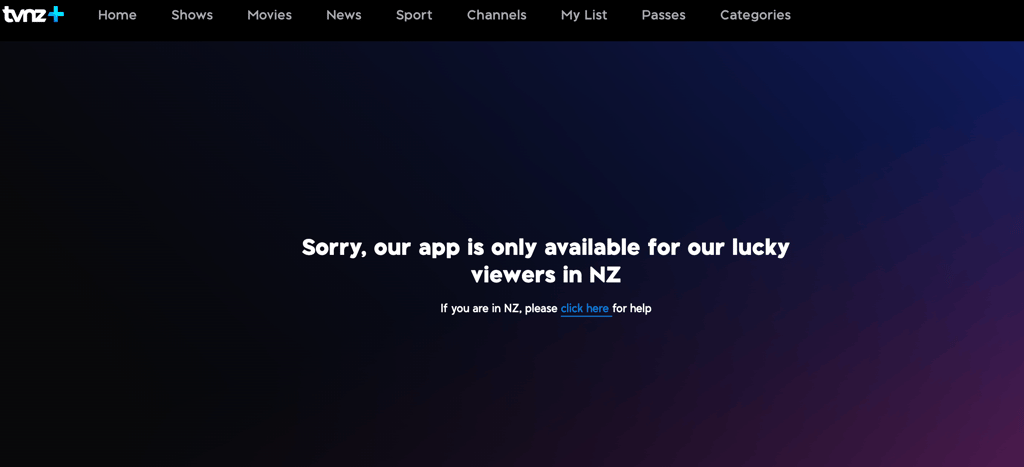
A VPN solves this by masking your real IP address and replacing it with one from a New Zealand server. The broadcaster sees a local connection and grants access just as it would for any viewer in the country. This is also useful if you already pay for a New Zealand streaming subscription and find yourself geo-blocked while on a trip.
Best VPNs to watch Alone on TVNZ+
These VPNs have been tested for streaming performance and reliable access to geo-restricted platforms like TVNZ+. All three deliver fast speeds, stable HD playback, and New Zealand server coverage – exactly what you need to watch Alone Season 13 from abroad.
- NordVPN – best overall for streaming. NordVPN starts at $3.49/month on the 2-year Basic plan and runs thousands of servers across 225 locations, including Auckland, New Zealand. NordLynx delivers ~83% of baseline speeds in our tests, which is more than enough for uninterrupted HD episodes. Smart DNS support makes it easy to unblock TVNZ+ on smart TVs without a native VPN app. Read our full NordVPN review for more detail.
- Surfshark – best budget option. Surfshark starts at $2.49/month and lets you connect unlimited devices simultaneously – useful if you want to stream Alone on multiple screens. With 4,500+ servers across 100 countries and the WireGuard protocol holding ~82-85% of baseline speeds in our tests, it delivers smooth, buffer-free on-demand streaming. See our Surfshark review for the full breakdown.
- Proton VPN – best for privacy-focused viewers. Proton VPN starts at $2.99/month and operates 20,700+ servers across 149 countries from Switzerland's strict privacy jurisdiction. It includes a solid free plan with no data caps, making it a good option if you want to test before committing. Streaming performance is reliable, with ~83% speed retention on tested servers. Our Proton VPN review covers all the technical detail.
How to watch Alone on different devices
Not every device runs the TVNZ+ app natively, and VPN availability varies by platform. The table below shows what works where so you can pick the easiest setup for your screen.
| Device | TVNZ+ | NordVPN | How to use VPN |
| Web browser (desktop) | Web | Yes | Native app |
| Web browser (mobile) | Web | Yes | Native app |
| iPhone / iPad | App | Yes | Native app |
| Android phone / tablet | App | Yes | Native app |
| Android TV / Google TV | App | Yes | Native app |
| Amazon Fire TV | App | Yes | Native app |
| Apple TV | App | Yes | Native app |
| Samsung TV (Tizen) | App (selected models) | No | Smart DNS or router |
| LG TV (webOS) | App (selected models) | No | Smart DNS or router |
| Roku | No | No | Router or Smart DNS |
| Chromecast (older) | Cast | No | Cast from VPN device |
| PlayStation | No | No | Router |
| Xbox | No | No | Router |
The easiest way to watch Alone on TVNZ+ with a VPN is through a desktop or mobile browser. No app store account or install is needed – just connect the VPN, open the TVNZ+ website, and stream. The TVNZ+ native app is available for iPhone, iPad, Android, Apple TV, and Amazon Fire TV, with the VPN running as normal on those devices.
Samsung and LG smart TVs do not have a native NordVPN app. The two practical options are using NordVPN's Smart DNS feature, which changes your apparent location without installing anything on the TV, or setting up the VPN at the router level so every device on your home network is automatically covered. If you prefer a simpler setup on a big screen, an Amazon Fire TV Stick with the TVNZ+ app and NordVPN app installed side-by-side is a reliable path. For more detail on router setup, see our guide to the best VPN routers.
FAQ
Where can I watch Alone Season 13 online?
Alone Season 13 is available for free on TVNZ+ in New Zealand and on Hulu in the United States. Australian viewers can stream it on Stan. TVNZ+ is the only free option, but it is geo-restricted to New Zealand – viewers abroad will need a VPN to access it.
Is Alone free to watch on TVNZ+?
Yes, TVNZ+ is a free, ad-supported streaming platform. You do not need a paid subscription to watch Alone on TVNZ+. You will need to create a free TVNZ+ account if you do not already have one.
How many episodes does Alone Season 13 have?
The full episode count for Season 13 has not been officially confirmed yet, as the season is still airing. Previous seasons of Alone have typically run around 10 episodes. New episodes premiere on TVNZ+ each Thursday.
Can I watch Alone on TVNZ+ from outside New Zealand?
Yes, but you will need a VPN. TVNZ+ is geo-restricted and only accessible from New Zealand IP addresses. A VPN lets you connect to a New Zealand server, which gives you a local IP address and unlocks the stream. NordVPN is our top pick for this, with New Zealand servers in Auckland and reliable TVNZ+ unblocking.
What devices can I use to watch Alone on TVNZ+?
TVNZ+ has native apps for iPhone, iPad, Android phones and tablets, Apple TV, and Amazon Fire TV. You can also watch through a web browser on any desktop or mobile device. Selected Samsung and LG smart TV models are supported. For devices without a native VPN app, such as Samsung Tizen TVs, NordVPN's Smart DNS feature or a router-level VPN setup are the recommended options.