How to watch Gogglebox outside the UK: where to watch and stream anywhere
Our in-house cybersecurity experts and journalists, renowned for major reports like The Mother of All Breaches, conduct transparent, unbiased VPN testing and in-depth analysis.
With 750+ articles crafted based on real-world research, we empower readers to make informed purchasing decisions through first-hand expertise.
Learn more
Gogglebox is back with Series 27, continuing its long-running tradition of turning everyday TV viewers into must-watch entertainment. The latest season premiered in February 2026 on Channel 4 and airs weekly on Friday nights, with new episodes quickly added to the broadcaster’s streaming platform.
The current run is already well underway, with Episode 7 having aired on March 20, 2026. As always, the show captures households reacting to the biggest TV moments of the week, from glossy dramas to reality competitions and headline-making broadcasts.
For viewers in the UK, tuning in is simple. But if you're outside the country, geo-restrictions can block access to Channel 4. Below, you’ll find everything you need to know about where to watch Gogglebox Series 27 and how to stream it from anywhere.
Where to watch Gogglebox
The show is exclusively available through Channel 4’s official streaming service.
| Country | Streaming service | Price | Notes |
| UK | Channel 4 (All 4) | Free | Ad-supported, requires UK IP |
| US | Not available | — | |
| Canada | Not available | — | |
| Australia | Not available | — |
How to watch Gogglebox with a VPN (quick guide)

- Choose a reliable VPN (NordVPN recommended)
- Install the app on your device
- Connect to a UK server
- Visit Channel 4 and sign in (free account required)
- Start streaming Gogglebox
Why you need a VPN to watch Gogglebox
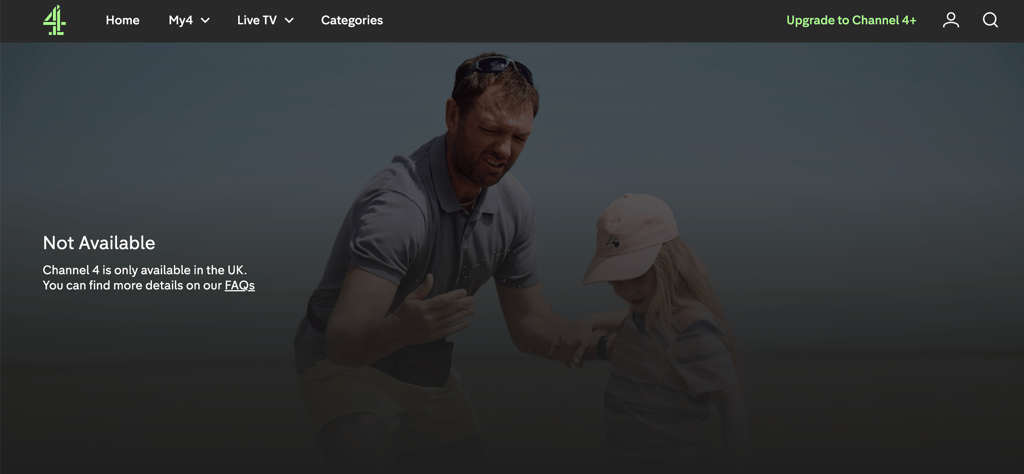
Channel 4 locks its content to UK viewers because of licensing agreements, so if you try to stream from abroad you'll get an error message instead of the show. A VPN fixes this by routing your connection through a UK-based server, making the site think you're browsing from Britain – enough to unlock Channel 4 (All 4) and everything on it.
It's worth knowing that a VPN is useful beyond just getting past geo-blocks. Your connection is encrypted so your activity stays private, it's much safer to stream on public Wi-Fi, and you can access other free UK platforms like BBC iPlayer while you're away.
What is Gogglebox about?
Gogglebox does something deceptively simple: instead of following a storyline or competition, it just films real people watching TV. Families, couples, friends – all caught on camera in their living rooms, reacting to whatever's been on that week.
It launched on Channel 4 in 2013 and built a loyal following pretty quickly. The appeal is easy to understand once you've seen it. The cast aren't actors, and that shows – their conversations wander, they argue, they crack each other up, and occasionally say something genuinely sharp about whatever they're watching. It can be a reality show, a news story, a drama, it doesn't matter. Their reactions are usually more entertaining than the original programme.

Narrated by Craig Cash, the show has a laid-back rhythm that makes it oddly easy to watch. Over the years a handful of cast members have become proper household names, which is a strange thing to happen to people who are essentially just sitting on their sofas, but that's kind of the point. It feels real because it is.
How to watch Gogglebox – detailed VPN guide
Step 1: choose a reliable VPN provider
Select a VPN with strong UK server coverage and consistent streaming performance. Services like NordVPN offer thousands of servers globally, including multiple UK locations optimized for streaming.
Step 2: install the VPN app
Download the VPN app on your preferred device – smartphone, laptop, tablet, or smart TV. Most premium VPNs support a wide range of platforms, including Windows, macOS, iOS, Android, and streaming devices.
Step 3: connect to a UK server
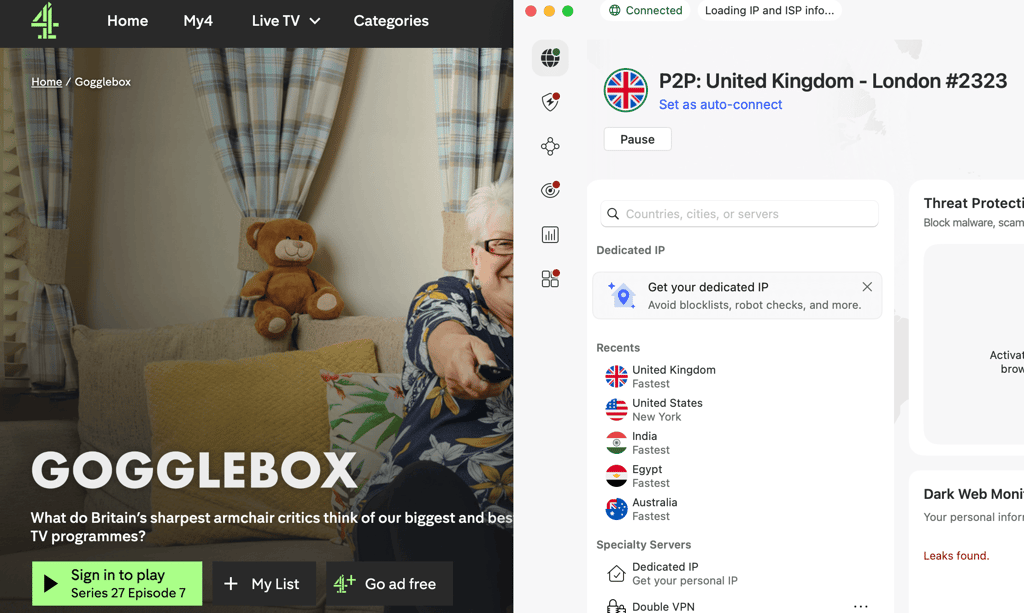
Launch the app and connect to a UK server. This step is crucial, as Channel 4 checks your IP address to determine your location.

Step 4: access Channel 4
Go to the Channel 4 website or app and create a free account if you don’t already have one. You may need to provide a UK postcode (any valid one works).
Step 5: start streaming
Once connected, you’ll be able to watch Gogglebox just like a viewer in the UK, including live broadcasts and on-demand episodes.
If you encounter issues, try switching servers or clearing your browser cookies.
How to watch Gogglebox from anywhere
Where you can watch Gogglebox depends entirely on where you are. In the UK it's straightforward – outside of it, you'll need a workaround. Here's a breakdown by country.
How to watch Gogglebox in the US
There's no US streaming home for Gogglebox, so a VPN is your only real option. Connect to a UK server and you can watch through Channel 4 (All 4), which is free with ads. New episodes go up shortly after airing on Friday evenings UK time, that's early afternoon on the East Coast.
How to watch Gogglebox in the UK
Easy one. It airs live on Channel 4 on Friday evenings, and if you miss it, All 4 has every episode on demand. You just need a free account to watch.
How to watch Gogglebox in Canada
Same situation as the US – no local platform carries it, so you'll need a VPN pointed at a UK server to get All 4. New episodes land in the early afternoon Eastern Time, shortly after the UK broadcast.
How to watch Gogglebox in Australia
Worth noting that Australia has its own version of Gogglebox, but if you want the UK original you'll need a VPN. Connect to a UK server, pull up All 4, and you're set. Because of the time difference, new episodes usually show up Saturday morning.
Top 3 recommended VPNs for streaming
- NordVPN – offers over 8,000 servers worldwide, including extensive UK coverage. It delivers strong speeds with minimal buffering and supports major streaming platforms. With features like SmartPlay and high encryption standards, it’s well-suited for accessing Channel 4 abroad. Pricing starts at around $3.49/month on long-term plans.
- Surfshark – it is a cost-effective option with unlimited device connections. It provides reliable UK servers and solid streaming performance. Features like CleanWeb (ad blocker) and strong privacy tools make it a versatile choice. Plans typically start below $2.49/month.
- ProtonVPN – focuses on privacy and transparency, with a growing server network that includes the UK. While slightly more expensive, it offers consistent streaming access and strong security credentials. It’s a good option for users prioritizing privacy alongside streaming.