How to watch New Zealand's NPC Rugby 2026 semi-finals for free
Our in-house cybersecurity experts and journalists, renowned for major reports like The Mother of All Breaches, conduct transparent, unbiased VPN testing and in-depth analysis.
With 750+ articles crafted based on real-world research, we empower readers to make informed purchasing decisions through first-hand expertise.
Learn more

-
Four teams remain: Canterbury, Northland, Otago, and Taranaki are through to the NPC 2026 semi-finals.
-
Semi-final 1: Northland vs Otago, Friday, October 16th, at 7:10 PM NZDT (7:10 AM BST / 2:10 AM ET / 11:10 PM PT on Thursday, October 15th).
-
Semi-final 2: Canterbury vs Taranaki, Sunday, October 18th, at 3:35 PM NZDT (3:35 AM BST / 10:35 PM ET / 7:35 PM PT on Saturday, October 17th).
-
Grand final: Scheduled for October 24th, 2026.
-
Free stream: TVNZ+ shows every match for free in New Zealand, while a reliable VPN like NordVPN with a free trial and New Zealand servers lets you watch from abroad.
The 2026 New Zealand National Provincial Championship (Hilux NPC) has reached the semi-finals. After the quarter-finals on October 9-11th, four teams remain in the title race: Canterbury, Northland, Otago, and Taranaki. Northland host the first home semi-final in the province's history on Friday, October 16th, and Canterbury host Taranaki on Sunday, October 18th. The grand final is scheduled for October 24th, 2026.
These kick-off times are local New Zealand time (NZDT, UTC+13), so note that most games fall on the previous day or in the early hours for viewers abroad. In the UK, Northland vs Otago starts at 7:10 AM BST on Friday and Canterbury vs Taranaki at 3:35 AM BST on Sunday. In the US, Northland vs Otago kicks off at 2:10 AM ET / 11:10 PM PT (Thursday, October 15th), and Canterbury vs Taranaki at 10:35 PM ET / 7:35 PM PT on Saturday, October 17th.
Every playoff match is available on TVNZ+, which is free to stream in New Zealand. If you're outside New Zealand, TVNZ+ is geo-restricted, but a VPN with New Zealand servers can help you access the free TVNZ+ stream from abroad by providing a New Zealand IP address.
Where to watch New Zealand NPC Rugby 2026 semi-finals
Below is a complete overview of official broadcasters showing the New Zealand NPC Rugby 2026 quarter-finals.
| Country | Streaming service | Price | Notes |
| New Zealand | TVNZ+ | Free | All 93 NPC matches live and on-demand, free account required |
| New Zealand | TVNZ 1 | Free | Selected weekly games in appointment viewing slots (free-to-air TV) |
| New Zealand | Sky Sport / Sky Sport Now | From NZ$27.00/month | Full live coverage of every NPC match, uninterrupted |
| Australia | Stan Sport | From AU$12.00/month (add-on to Stan subscription) | NPC coverage, no ad-breaks in play |
| Canada | Premier Sports | From CA$14.99/month | Select NPC matches |
How to watch NPC Rugby 2026 for free from anywhere
The 2026 NPC is free to stream in New Zealand on TVNZ+, the official streaming platform from TVNZ. The service is free-to-view and ad-supported, requiring only a free TVNZ account. However, TVNZ+ is geo-restricted and only accessible with a New Zealand IP address. If you're in Australia, the UK, the US, Canada, or anywhere outside New Zealand, you'll need a VPN to access the free live streams.
- Choose a VPN with New Zealand servers. We recommend NordVPN for streaming. It operates thousands of servers worldwide, including New Zealand locations, uses the fast NordLynx protocol for smooth HD streaming, and supports Smart DNS for compatible TVs – ideal for watching live rugby without buffering.
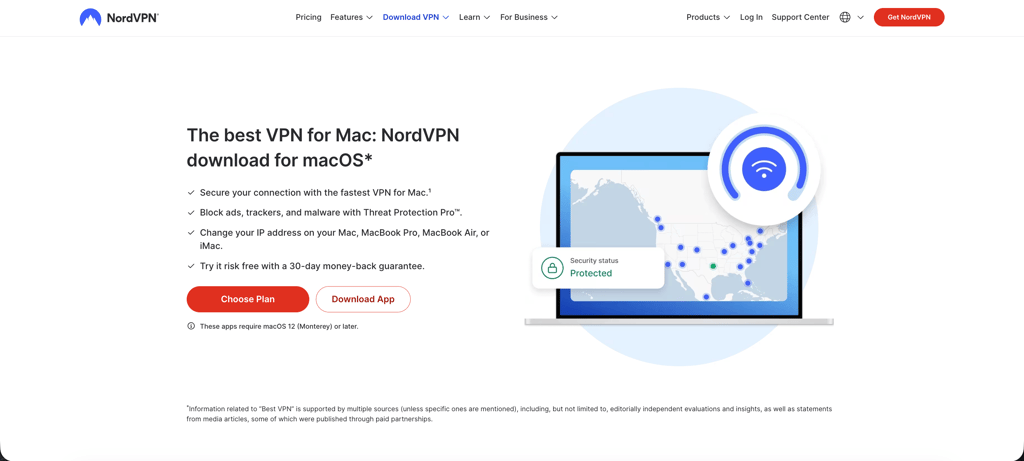
- Install the VPN app on your device. Download and install the VPN on your device (Windows, macOS, iOS, Android, or a supported smart TV).
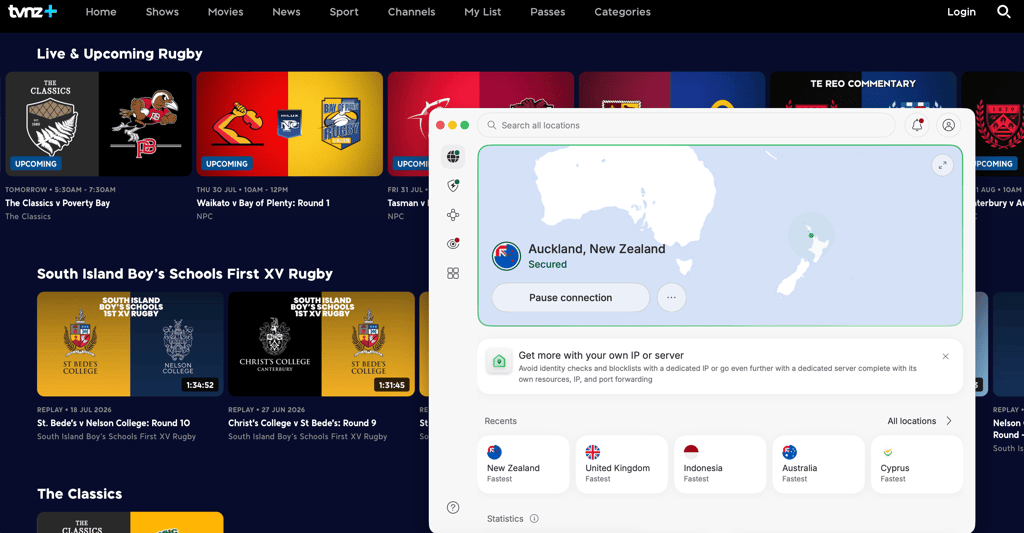
- Connect to a New Zealand server. Open the app and select New Zealand to get a New Zealand IP address.
- Go to TVNZ+. Visit tvnz.co.nz and create a free account if you don't already have one.
- Start streaming NPC matches for free. Find the Wellington vs Waikato match and start streaming. Keep your VPN connection active throughout the match.
Best VPN services to watch New Zealand NPC Rugby 2026
- NordVPN – best overall for streaming. NordVPN starts at $3.49/month and runs servers across 225 locations, including multiple New Zealand locations optimized for TVNZ+ access. NordLynx delivers ~84% of our tested baseline speeds, which is more than enough for smooth HD rugby streaming. Smart DNS support and reliable unblocking make it the strongest pick for watching NPC matches from abroad. Read our full NordVPN review for details.
- Surfshark – best budget option. Surfshark starts at $2.49/month with unlimited simultaneous connections and 4,500+ servers across 100 countries, including New Zealand. The modern WireGuard protocol holds ~83% of baseline speeds in our tests, which is enough for smooth HD coverage of TVNZ+ streams. Surfshark's unlimited device policy makes it ideal for households with multiple rugby fans streaming at once. See our Surfshark review for the full breakdown.
- Proton VPN – best for privacy-focused users. Proton VPN starts at $2.99/month and operates 20,700+ servers across 149 countries, including New Zealand, from Switzerland's strict privacy jurisdiction. A solid free plan and reliable streaming performance make it a good fit for fans who want extra privacy while watching NPC coverage. Our Proton VPN review covers the technical detail.
How to watch NPC Rugby 2026 semi-finals from New Zealand, Australia, and Canada
How to watch in New Zealand
TVNZ+ is the primary free option for New Zealand viewers. Every match of the 2026 NPC will stream live and on-demand on TVNZ+ at no cost. Selected weekly games will also air on TVNZ 1, the free-to-air television channel. Both options require only a free TVNZ account, making it the most accessible NPC season yet for New Zealand fans.
Sky Sport and Sky Sport Now continue to broadcast full live coverage of every NPC match. Sky Sport is included in Sky's premium television packages starting from NZ$27.00/month, while Sky Sport Now is the standalone streaming option at the same price point. Sky's coverage is uninterrupted and includes pre-match and post-match analysis.
The final is scheduled for October 24-25, 2026.
How to watch in Australia
Stan Sport is the official broadcaster for NPC rugby in Australia. Stan Sport is an add-on to the base Stan subscription, costing AU$12.00/month on top of the standard Stan plan. The service offers ad-free coverage during play and works across the Stan app on iOS, Android, smart TVs, and web browsers.
Stan Sport streams matches live and makes them available on-demand after the final whistle. Australian viewers can access every round of the 2026 NPC through Stan, including the playoffs and grand final.
How to watch in Canada
Premier Sports carries select NPC matches in Canada. The service is available from CA$14.99/month and streams via the Premier Sports website and mobile apps. Coverage is limited to selected fixtures rather than the full 93-match season, so Canadian fans seeking comprehensive coverage may need to explore VPN access to TVNZ+ for matches not carried by Premier Sports.
How to watch NPC Rugby 2026 – detailed step-by-step guide
This guide explains how to access TVNZ+ from outside New Zealand to watch every 2026 NPC match for free.
Step 1. Choose a VPN with strong New Zealand server coverage
Select a VPN with multiple New Zealand servers and proven streaming reliability. NordVPN runs thousands of servers across 225 locations, including New Zealand locations optimized for TVNZ+ access. The NordLynx protocol delivers fast, stable speeds – essential for live rugby streaming in HD. Surfshark and Proton VPN also maintain New Zealand servers and perform well for geo-restricted sports streams. Check our best VPNs for streaming guide for more options.
Step 2. Install the VPN app on your device
Download and install the VPN app on the device you plan to watch on. NordVPN, Surfshark, and Proton VPN all support Windows, macOS, iOS, Android, smart TVs, and Fire TV. For mobile devices, see our guides for the best VPN for iPhone and best VPN for Android. TVNZ+ works well in web browsers and the TVNZ mobile app, so most devices can stream without friction.
Step 3. Connect to a New Zealand server
Open the VPN app and connect to a New Zealand server. This changes your IP address to a New Zealand location, making TVNZ+ think you're accessing the service from within the country. If the stream doesn't load immediately, try switching to a different New Zealand server – some servers perform better than others for specific broadcasters. You can also check our guide on how to change your location with a VPN for more detail.
Step 4. Open TVNZ+ and create a free account
Go to tvnz.co.nz in your browser or open the TVNZ app. If you don't already have a TVNZ account, you'll need to create one – it's free and takes less than two minutes. Use an incognito or private browsing window if the site detects your previous location. TVNZ+ requires a valid New Zealand postal code during registration; you can use any publicly listed postal code (such as 1010 for central Auckland).
Step 5: Start streaming the Wellington vs Waikato match
Find the Wellington vs Waikato match on TVNZ+ and start streaming. Keep your VPN connection active throughout the match – if you disconnect, TVNZ+ will detect your real location and block the stream. If you encounter buffering, try switching to a different New Zealand server or restarting the VPN app. TVNZ+ streams in HD and works smoothly on most devices when connected to a quality VPN.
Best devices for watching NPC Rugby 2026 on TVNZ+
TVNZ+ works across multiple devices, but VPN compatibility and app availability vary by platform. Here's what you need to know.
Web browser (desktop and mobile)
The simplest setup. No app install required, no region lock on the browser side. Install a VPN app on Windows, macOS, or Linux, connect to a New Zealand server, and open TVNZ+ in any modern browser. This path works for travelers and viewers who don't want to manage app store regions.
iPhone and iPad
TVNZ's iOS app is available on the New Zealand App Store. If your Apple ID is set to another country, you can still watch through Safari with a VPN active – no need to switch your Apple ID region. Major VPN apps like NordVPN, Surfshark, and Proton VPN are available worldwide on the App Store.
Android phones and tablets
The TVNZ app is available on the New Zealand Google Play Store. If your Play Store country is set to a different region, use the TVNZ mobile website in Chrome with your VPN connected to a New Zealand server. Android supports NordVPN, Surfshark, and Proton VPN natively through the Play Store.
Smart TVs and streaming sticks
Samsung Tizen and LG webOS TVs do not support native VPN apps. The recommended workaround is to install the VPN on your home router – this routes all devices on your network, including the smart TV, through the VPN. Both NordVPN and Surfshark publish router setup guides. Alternatively, use the VPN's Smart DNS feature or cast from a phone or laptop with the VPN active.
Amazon Fire TV and Fire Stick support native VPN apps for NordVPN, Surfshark, and Proton VPN. Install the VPN, connect to New Zealand, and open the TVNZ app or website.
Apple TV (tvOS) supports native VPN apps. The TVNZ app is region-locked to the New Zealand App Store, so you'll need to switch your Apple ID region or use AirPlay from an iPhone with the VPN active.
For more router setup guidance, see our best VPN routers and how to set up a VPN on a router guides.
NPC 2026 semi-finals: qualified teams, fixtures, and kick-off times
Four teams survived the quarter-finals, and the semi-finals will decide who plays in the grand final. Three of the four home sides advanced, and the biggest result came from Taranaki, who won away at North Harbour.
| Quarter-final | Result | Semi-finalist |
| Northland (2) vs Tasman (7) | 26-21 | Northland |
| North Harbour (4) vs Taranaki (5) | 31-50 | Taranaki |
| Otago (3) vs Hawke's Bay (6) | 50-14 | Otago |
| Canterbury (1) vs Waikato (8) | 62-26 | Canterbury |
NPC 2026 semi-final fixtures and kick-off times
Kick-offs are listed in local New Zealand time (NZDT, UTC+13), with the equivalent in the UK (BST, UTC+1), US Eastern (EDT, UTC-4), US Pacific (PDT, UTC-7) and Eastern European Summer Time (EEST, UTC+3). Check the date in each column, because the US times fall on the previous day.
| Semi-final | NZDT (local) | UK (BST) | US Eastern (ET) | US Pacific (PT) | EEST | Venue |
| Northland (2) vs Otago (3) | Fri, Oct 16, 7:10 PM | Fri, Oct 16, 7:10 AM | Fri, Oct 16, 2:10 AM | Thu, Oct 15, 11:10 PM | Fri, Oct 16, 9:10 AM | Semenoff Stadium, Whangārei |
| Canterbury (1) vs Taranaki (5) | Sun, Oct 18, 3:35 PM | Sun, Oct 18, 3:35 AM | Sat, Oct 17, 10:35 PM | Sat, Oct 17, 7:35 PM | Sun, Oct 18, 5:35 AM | One NZ Stadium, Christchurch |
Northland's first-ever home semi-final comes after a comeback against Tasman, while Otago arrive after their biggest win of the season. Canterbury, the defending champions, have won their last five games, but Taranaki have scored 50 or more points in four straight matches. If Northland and Taranaki both win, the grand final could be played in Whangārei.
FAQ
Where can I watch the New Zealand NPC in 2026?
In New Zealand, every match streams free on TVNZ+, with selected weekly games also on TVNZ 1 free-to-air TV. Sky Sport and Sky Sport Now offer full paid coverage. In Australia, Stan Sport carries the NPC. In Canada, Premier Sports shows select matches. For international viewers, TVNZ+ is geo-restricted but accessible via VPN.
What time does the 2026 NPC season start?
The 2026 NPC regular season kicks off on July 30, 2026, when Waikato hosts Bay of Plenty at 7:10 PM NZST. The season runs through early October, with the grand final scheduled for October 24-25, 2026. All matches are available live on TVNZ+ in New Zealand.
How can I watch the NPC from outside New Zealand?
If you're traveling or living abroad, a reliable VPN like NordVPN lets you securely access your usual TVNZ+ coverage by changing your virtual location back to New Zealand. This is the legitimate use case for travelers and expats who want to watch their home broadcaster's free streams. Connect to a New Zealand VPN server, open TVNZ+, and stream as you would at home. Check our guide to the best VPNs for streaming for more details.
Can I watch the NPC for free?
Yes, every match of the 2026 NPC streams free on TVNZ+ in New Zealand. Selected weekly games also air on TVNZ 1 free-to-air television. Both options require only a free TVNZ account. TVNZ+ is geo-restricted outside New Zealand, so international viewers need a VPN with New Zealand servers to access the free coverage.
Is the NPC on Sky Sport in 2026?
Yes, Sky Sport and Sky Sport Now continue to broadcast every NPC match live and uninterrupted in 2026, alongside the new TVNZ partnership. Sky Sport is available from NZ$27.00/month. The Sky coverage includes pre-match and post-match analysis in addition to the live game feed.
Can I watch NPC replays on TVNZ+?
Yes, TVNZ+ makes all NPC matches available on demand after the final whistle. You can watch full match replays, highlights, and catch-up coverage for free with a TVNZ account. The replays remain accessible throughout the season, so you can watch matches you missed at your convenience.
What NPC matches are on TVNZ 1?
TVNZ has confirmed that selected weekly games will air on TVNZ 1 in appointment viewing slots. The specific matches chosen for TVNZ 1 broadcast will likely focus on marquee fixtures and traditional rivalries, but the full TVNZ 1 schedule has not yet been published. All 93 matches stream on TVNZ+ regardless of TVNZ 1 selection.
How many teams are in the 2026 NPC?
The 2026 NPC features the standard 14 provincial teams split into two divisions. The competition format includes a round-robin regular season followed by quarterfinals, semifinals, and the grand final. This is the 50th anniversary season of the NPC, celebrating five decades of New Zealand provincial rugby.