How to watch the Champions League on RTÉ Player in the UK
Our in-house cybersecurity experts and journalists, renowned for major reports like The Mother of All Breaches, conduct transparent, unbiased VPN testing and in-depth analysis.
With 750+ articles crafted based on real-world research, we empower readers to make informed purchasing decisions through first-hand expertise.
Learn more
The 2026 UEFA Champions League final between Arsenal and Paris Saint-Germain takes place at the Puskás Aréna in Budapest on Saturday, May 30th, 2026, kicking off at 5:00 PM BST. UK rights are exclusive to TNT Sports on discovery+, with no free-to-air option this year. That means UK viewers who do not already pay for a TNT Sports subscription cannot watch the final for free at home.
There is, however, a fully legal workaround used by thousands of football fans every season. Irish public broadcaster RTÉ has the rights to show the Champions League final live and free on RTÉ 2, with the live stream mirrored on the RTÉ Player. Commentary is in English. The catch is that RTÉ Player is geo-restricted to Ireland, so a UK IP address gets blocked at the door. A reliable VPN solves that by giving you an Irish IP address, the same way an Irish viewer would access the stream.
This guide shows you how to do it for the Arsenal vs PSG final and for every Champions League match RTÉ covers.
Why you need a VPN to watch RTÉ Player from the UK
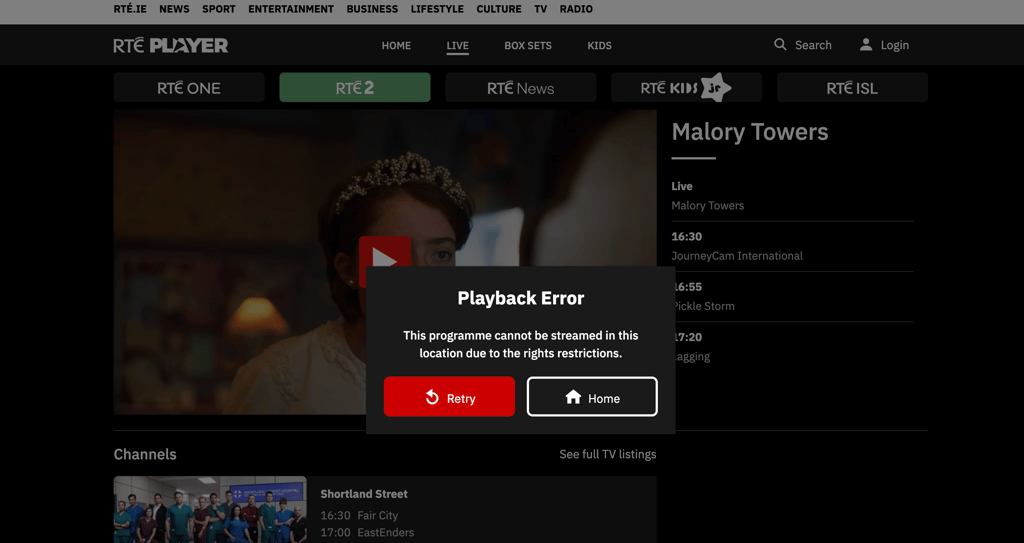
RTÉ Player is funded by the Irish TV licence fee, so RTÉ only has the rights to stream content inside the Republic of Ireland. When you open the site or app from a UK IP address, you get an error and the stream will not load.
A VPN reroutes your internet traffic through a server in another country and assigns you that country's IP address. Connect to a server in Ireland, and RTÉ Player sees an Irish IP and serves the stream like normal. Using a VPN to watch a free public broadcaster is legal in the UK and Ireland, and RTÉ does not require a paid login.
For live football, you want a VPN with fast Irish servers and a track record of unblocking RTÉ Player. The best VPNs for streaming handle this without buffering.
How to watch the Champions League on RTÉ Player from the UK
- Choose a reliable VPN with servers in Ireland. We recommend NordVPN for live sport thanks to its thousands of servers across 225 locations, multiple Irish locations, and the fast NordLynx protocol for smooth HD streaming.
- Download and install the VPN app on your device (Windows, macOS, iOS, Android, Fire TV, or smart TV).
- Open the VPN and connect to a server in Ireland.
- Go to RTÉ Player in your browser or open the RTÉ Player app. Sign up for a free account if prompted (an Irish postcode such as D02 is fine).
- Find the live RTÉ 2 channel or the Champions League fixture in the sport section.
- Start watching for free in HD with English commentary.
Best VPNs to watch RTÉ Player from the UK
These VPNs have been tested by Cybernews for live football and consistently unblock RTÉ Player and other free European broadcasters at HD quality.
- NordVPN – starts at $3.49/month and has multiple Irish server locations, and around 86% of baseline speeds in our tests. Smart DNS support helps if you want to watch on a smart TV without a native VPN app. Read our full NordVPN review.
- Surfshark – starts at $2.49/month with unlimited simultaneous connections and servers in Ireland. The WireGuard protocol holds around 82% of baseline speeds, which is plenty for live football. See our Surfshark review.
- Proton VPN – based in Switzerland and starting at $2.99/month it also has a usable free plan. A strong fit if you want a privacy-first provider that still handles live sport. Read the full Proton VPN review.
Watching RTÉ Player on different devices from the UK
The easiest setup is a laptop or mobile browser with the VPN active, then opening RTÉ Player on the web. Native RTÉ Player apps are available on iOS, Android, Apple TV, Amazon Fire TV, and most smart TVs, and NordVPN and Surfshark have native apps for the same platforms.
For Samsung, LG, and Roku TVs that do not support VPN apps directly, the cleanest options are a router-level VPN or the provider's Smart DNS feature, or casting the stream from a phone or laptop. Fire TV and Android TV offer the smoothest experience because both RTÉ Player and the VPN app run natively.
Note that RTÉ Player's iOS and Android apps are listed on the Irish App Store and Google Play store only. If you do not want to switch your app store country, the mobile browser version of RTÉ Player works fine with a VPN.
FAQ
Is RTÉ Player free in the UK?
RTÉ Player is free to use, with no subscription or TV licence required, but it is geo-restricted to Ireland. UK viewers need a VPN connected to an Irish server to access the live streams and on-demand content.
Will the Champions League final be on free TV in the UK?
No. The 2026 Champions League final between Arsenal and PSG is exclusive to TNT Sports on discovery+ in the UK, and TNT Sports has confirmed it will not offer a free-to-air option this season. A VPN plus RTÉ Player (Ireland) is the only legal way to watch the final for free in English from the UK.
What time does Arsenal vs PSG kick off in the UK?
The final kicks off at 5:00 PM BST on Saturday, May 30th, 2026 at the Puskás Aréna in Budapest. RTÉ 2's coverage will begin earlier with pre-match build-up.
Is using a VPN to watch RTÉ Player legal?
Yes. Using a VPN is legal in both the UK and Ireland, and RTÉ Player does not charge a subscription, so no paywall is being bypassed. You may technically be in breach of RTÉ Player's regional terms of service, but no UK or Irish viewer has ever been penalised for it.
Can I watch RTÉ Player on a Smart TV in the UK?
Yes, but most smart TVs do not run VPN apps natively. The simplest options are to install the VPN on your router, use Smart DNS from NordVPN or Surfshark, or cast the stream from your phone or laptop to the TV.
Does RTÉ show every Champions League match?
No. RTÉ holds Irish rights to a selection of Champions League fixtures plus the final and highlights, not the full league phase. For full UK coverage of the competition, you still need TNT Sports on discovery+.