iFytek P1 Pro review: sleek, smart, and stealthy
It’s nothing like what it seems to be.
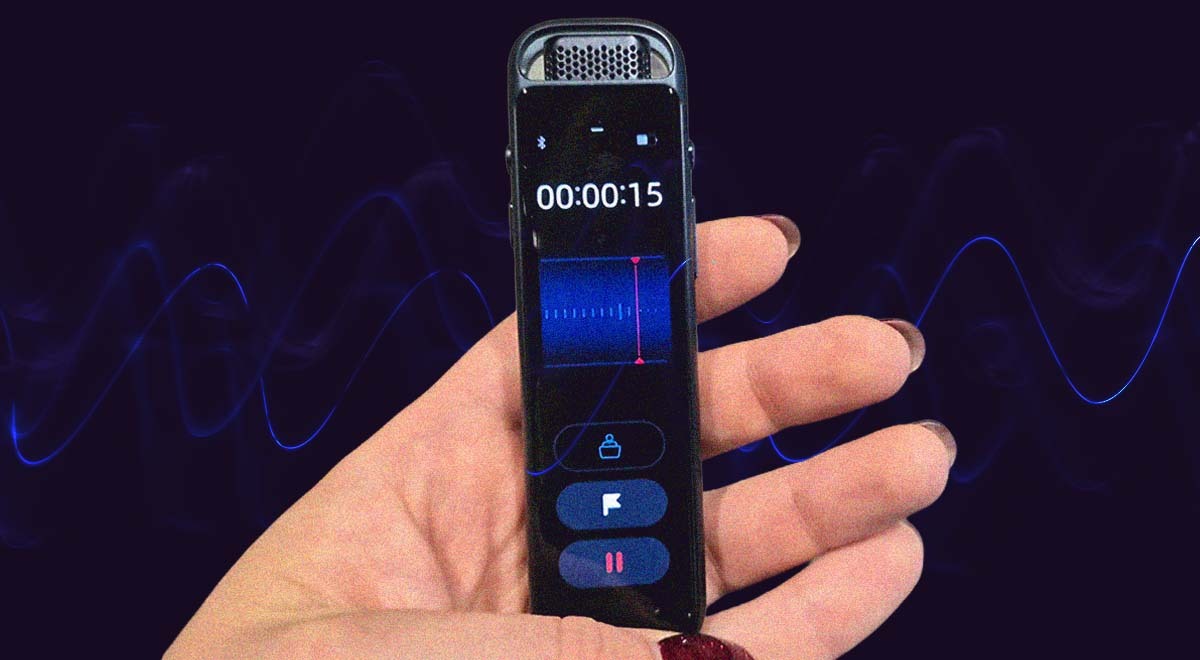
iFlytek P1 Pro. By Cybernews

 Follow us
- The iFlytek P1 Pro is a discreet $160 recorder.
- Its three microphones capture clear speech in meetings, interviews, and noisy public spaces.
- Transcriptions are nearly flawless in English, though specific terms and abbreviations can still cause errors.
- The Deepting app adds summaries and search help,
Key Takeaways by nexos.ai, reviewed by Cybernews staff.
As a journalist, I was never a fan of using my smartphone to record interviews. While convenient, holding a phone next to an interviewee’s mouth looks unprofessional, notifications are distracting, the audio quality is not always the best, and it drains the phone battery. Therefore, I’ve always been in search of a good physical recorder.
This time, I tested the iFLytek AI Recorder P1 Pro, which costs around $160. I tried it during interviews, corporate meetings with multiple speakers and different languages, on the street, simply capturing various sounds, and in solitude to record my ideas.
If I hadn't let people know I was recording, they wouldn’t have suspected a thing. They thought I was carrying a vape!
iFlytek P1 Pro specifications



- Weighs 55 grams
- 3.2-inch OLED screen
- USB C
- 64GB
- Format .txt, WAV
- Compatible devices: laptop, personal computer, smartphone, tablet
- Supports 11 languages
- 3-microphone array
Look and feel
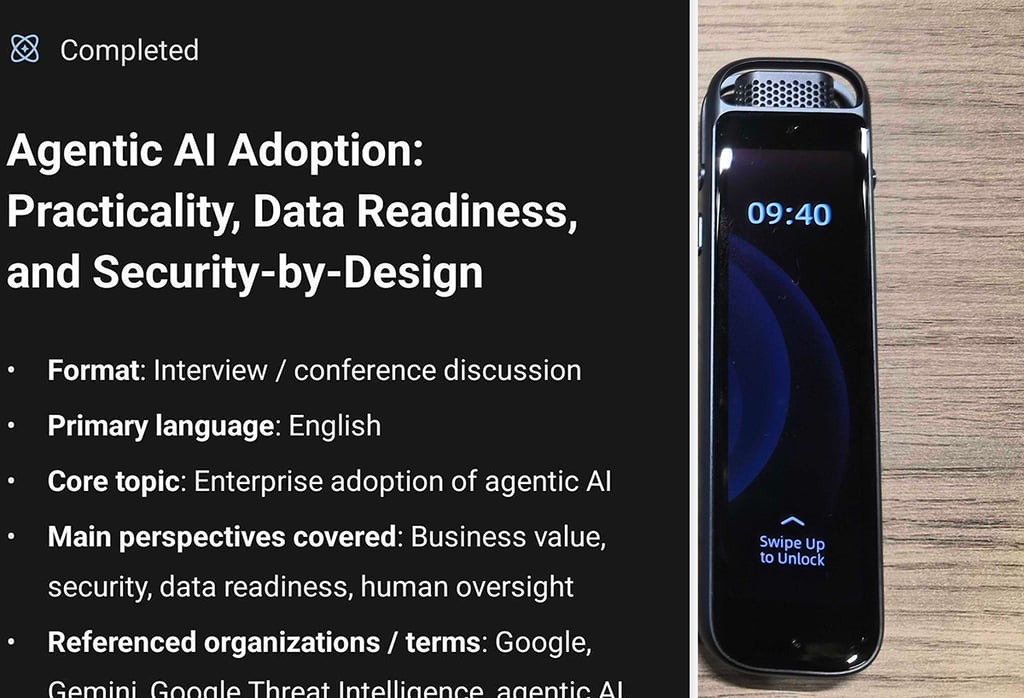
While light (55 grams) and portable, the device doesn’t feel cheap, thanks to its metal body and 3.2-inch OLED screen. Because of its sleek design, you feel professional when using it – at least once people realize it’s not an e-cigarette.
The OLED screen is a pleasant surprise. Though somewhat unnecessary, since there isn’t much you can do with it that couldn’t be done with physical buttons. The interface lets you choose between omnidirectional and directional recording, as well as listen to playback. Again, this could have been handled with physical controls, but the screen is pleasant to use.
Unfortunately, since the device comes without a protective case, my screen already has a few tiny scratches after just a month of use.
It has 4 physical buttons: power, volume, recording, and flag. The flag button allows you to mark important thoughts or interesting points as you record.



Stay updated with our latest stories and follow us on social media
Be the first to discover new stories, ideas, and updates from our team.
The setup
This is the nastiest part with innovative devices, and iFlytek AI recorder Pro is no exception. You can use the device without connecting it to your other devices. However, when you finally need to do it to transfer the file, it gets quite annoying.
You can’t just connect it via Bluetooth settings. First, you need to install the dedicated Deepting app, and then look for devices to connect.
Now, when I’m writing that down, it doesn’t seem complicated at all. However, it’s still an unnecessary complication. While I need the app for transcriptions, what if I don’t want them and don’t need any AI summaries? Would you just let me transfer my file in peace?
The audio quality
The device features a 3-microphone array, letting you record either a single person or multiple voices from different directions. I’ve tried multiple environments: a noisy meeting room, a busy street, and a one-on-one conversation in a press room with plenty of background noise.
What I enjoyed was that the recorder had no problem catching every little remark made by different people in the meeting room, including remote employees. While it didn’t give me sound that I could use for a podcast or radio broadcast, it provided a clear recording suitable for a corporate setting.
When I tried to record only ambient noise on a busy street, the recording provided a vivid picture of what was happening outside – a barking dog, a beeping pedestrian signal, a bus honking as it left the stop, and many other sounds.
I feel that with the noise-cancellation feature enabled, you get a lot of hissing. But it’s either this or background noise. There’s no toggle option to turn the noise-cancellation feature off.
The playback volume on the device itself could be a bit louder. However, it’s sufficient when you connect Bluetooth headphones to it.

Your source for trusted cybersecurity updates
The transcription quality
The big added value is, of course, the transcription function. Immediately after you finish recording, you can sync it to the app and command it to transcribe and summarize the meeting or conversation.
You can also use it for live transcription: if you open the app and start recording with your device at the same time, you will see the words you and people around you are saying appear immediately on the screen.
Personally, I haven’t used this feature much, but the automatic transcriptions generated after the recording was finished proved valuable.
Transcription services (which work best in English) have been around for quite a while.
For people like me, who spent early career days taking hours just to transcribe interviews (only to use a fraction of that material later), automated transcription is close to a miracle.
For my interview with Google, I decided to compare two recorders and transcription services: the previously reviewed Comu and the iFlytek AI Recorder P1 Pro. The latter runs on ChatGPT 5.5 – a model that has already proven rather reliable for other automated tasks, such as writing key takeaways from articles.
In both cases, the transcription was nearly flawless – it perfectly captured almost all the words, with the exception of a few specific terms and abbreviations. There were a couple of "misheard" words, such as "flesh" instead of "flash" and "2407" instead of "24/7."
Since journalists at Cybernews always review automatically transcribed interviews, this is a non-issue for us.
The Deepting app, on top of transcription, provides a summary of the recording, organizes it into convenient chapters, and highlights what ChatGPT "thinks" were the most important talking points. It also features a built-in chatbot, which is quite useful if the recording is long and you want to be directed to specific key moments in the conversation.
Overall, it’s a pro-looking, good standalone recorder, but most of the value comes from the app that comes with it.