Does your voice recorder need an AI upgrade? An honest Comu Action Pro review
Even voice recorders come with a subscription these days.
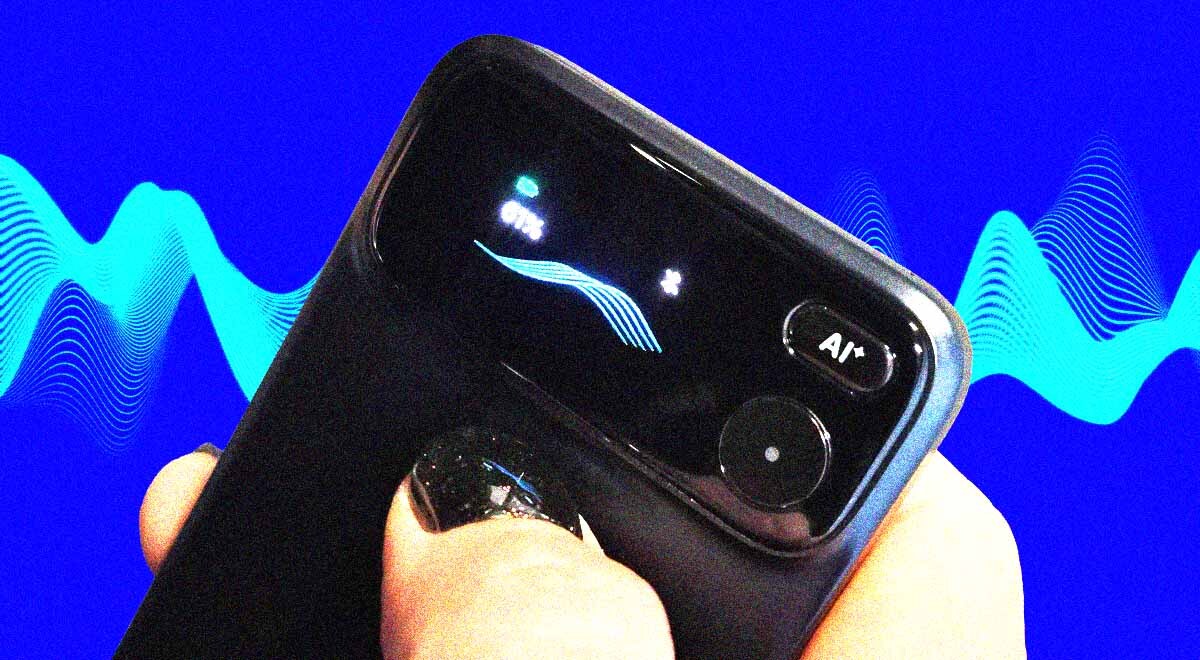
Comu Action Pro. By Cybernews

 Follow us
- Comu Action Pro records audio, then uses its app to create transcripts, summaries, and follow-up tasks.
- The device needs the Comu app for playback and AI features, so it is not a standalone recorder.
- English transcription worked well in testing.
- The recorder costs about $260, and advanced AI features require a paid subscription.
Key Takeaways by nexos.ai, reviewed by Cybernews staff.
A recorder as a separate device is like an e-book reader – you absolutely don’t need it, and yet, one function-focused device is incredibly useful because it removes most distractions.
As a journalist who also spent a significant portion of my early career as a radio reporter, I’ve always been around some sort of recording device.
Professional radio recorders would discharge really quickly, and simple recorders that you’d connect to your computer via USB would eventually break physically from that connection. Close to a dozen recorders – my partner is a journalist too, with nearly 30 years of experience – are still lying around the house.
For about a decade, I had forgotten all about them, given how convenient it was to record interviews with just my smartphone, be it a phone interview or a live discussion.




Then AI entered the mainstream, and recorders all of a sudden became more like personal assistants.
This time, I tested Comu Action Pro, an AI workmate, as they call it. Compared to the Comulytic Note Pro that my colleague reviewed this spring, Comu Action Pro has more AI workflow features built in – it generates follow-ups, action lists, and actionable next steps. Some might find its live translation or presentation generation features just as useful.
How Comu Action Pro works
Unlike a simple old-school recorder, Comu Action Pro can’t function on its own. Despite having an LCD screen, a record, and an AI button, it can’t be used without the Comu app. You can hit “record” and also task AI with a specific action, but simple playback of your audio just won’t work on the device alone.
I wasn’t particularly bothered by that, but I believe it's important to know before purchasing the device (its full price is around $260 on Amazon).
So all you have to do is set up the Comu app (you’ll need to register an account with them), and you can start recording.
The device can allegedly record for 70 hours and has 16GB of internal memory. Its charging time is about 2 hours. So, basically, it should cover a few weeks’ worth of meetings.
Once you finish the recording, it immediately syncs with the Comu app. In the app, you can play back the recording and generate a conversation summary, insights, and possible follow-up actions.
The device itself has another useful button – AI. When holding it, you can give commands to your AI assistant on the Comu app, which can sift through your uploaded recordings and also search the web.



Stay updated with our latest stories and follow us on social media
Be the first to discover new stories, ideas, and updates from our team.
Comu Action Pro transcription quality
As its predecessor, Comu Action Pro is said to support over 100 languages. I’ve tested it only in 2 languages – English and Lithuanian.
I tried the app with different recordings – some were recorded with the device, and some I recorded with my phone and just uploaded onto the app. With all the recordings I tried, the transcription feature worked really well. Except for foreign names and some slang, the app produced an accurate transcription.
Up until now, I’ve been using sonix.ai transcription software, and I never ever use automatically transcribed quotes from interviews without verifying them – listening to interviews in full before releasing any of the material to the public. Hence, Comu Action Pro service underwent some real scrutiny here.
When it comes to the Lithuanian language, the transcription, as I expected, wasn’t accurate. However, the summary and insights were on point, showing that while it might not catch the subtleties of our language, it “understands” the conversation well. So, I probably won’t be using it for verbatim interview transcripts. However, it will have to do for meeting summaries.
Oh, how the times have changed. Many aspiring young journalists like myself once began their careers transcribing interviews, often earning as little as $10 per recorded hour – a task that typically required several hours of labor. That grind has come to an end.
Comu Action Pro assistant: What can it do?
The biggest task I’ve done so far with the AI helper was transcribing the interview I did months ago. I interviewed Adam Kirsch on his upcoming book, We Want to Believe. Since the book was about to be published only on August 25th, I was asked to withhold the review and interview until then. So the recording of our conversation gathered virtual dust on my phone.
I was sort of dreading coming back to it – it’s one thing to write up a fresh interview, but working on an old one is often hard, and there’s less motivation to do it.
So I uploaded the interview for transcription to Comu Action Pro and immediately asked for a summary to refresh my memory. And it did wonders for me – a brief yet detailed recap of the interview put me right where I wanted to be – back in the middle of this conversation, feeling as if I had just read the book and had the interview yesterday.
Naturally, I didn’t use any of the text generated by the app in my article. Instead, the summary worked as a guide for where to look for the conversation highlights, and reminded me where Kirsch or I placed emphasis during the conversation.
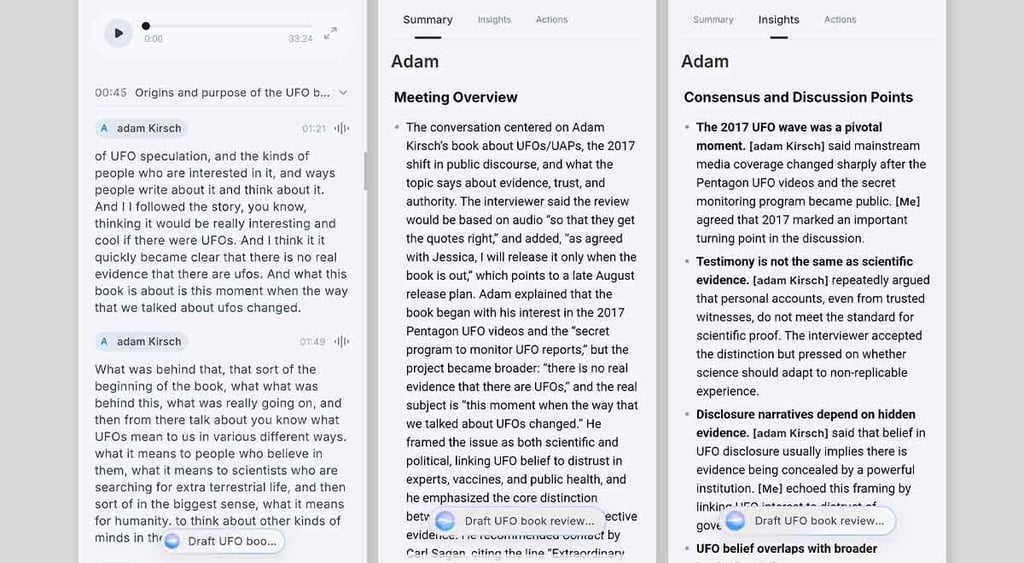
I’ve also used the Comu app to assist me in doing some follow-up after the interview. First of all, it can apparently go through all the recordings.
When I asked whether I ever talked to a guy named Adam, it immediately sent me the details and summary of our conversation. I also tasked it with pulling the review from the internet and checking whether it’s been quoted anywhere. When it found the article being quoted on Columbia Global Reports, I tasked it with crafting an email to our PR team.
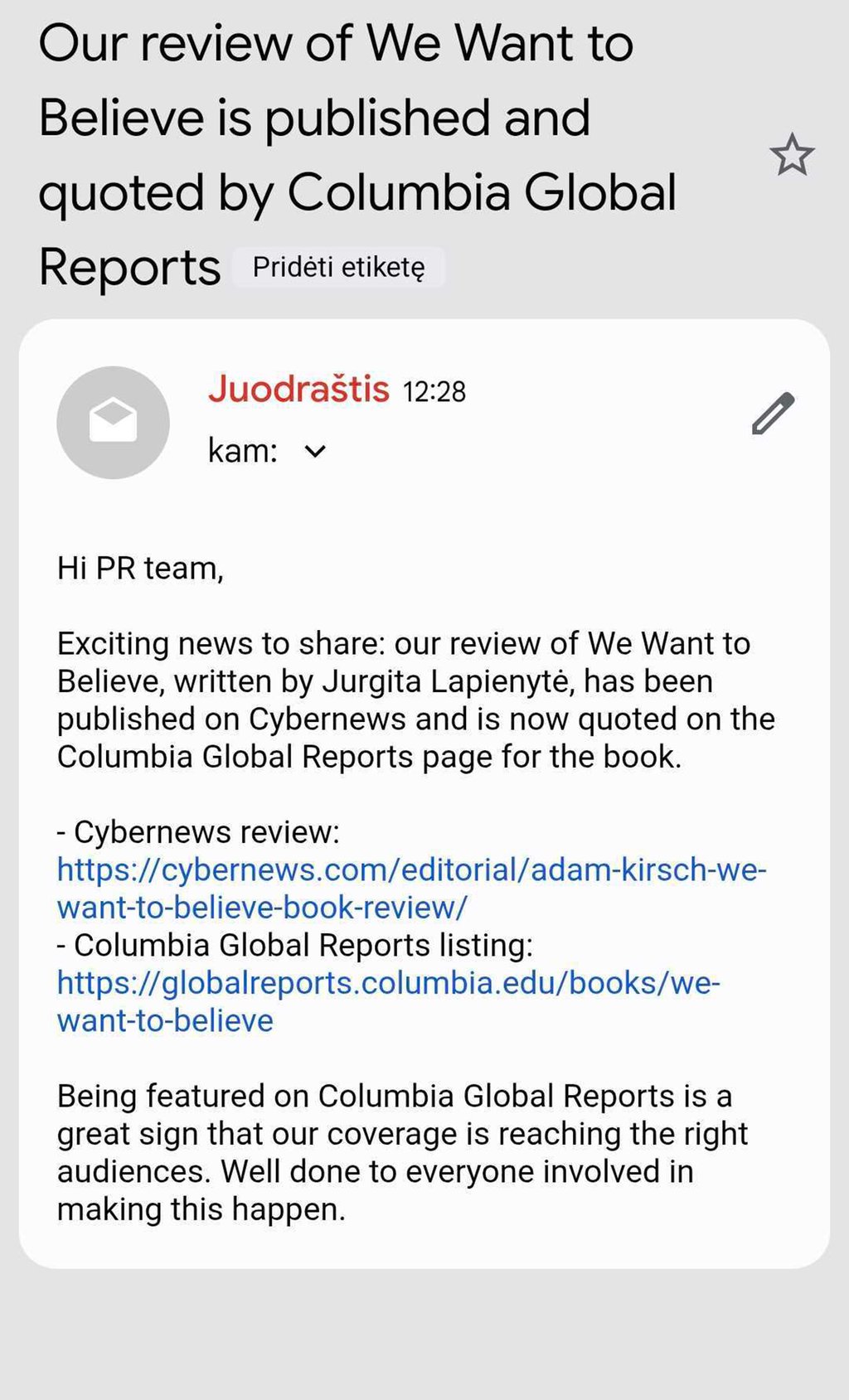
P.S. Crafting an email is a really nice feature that could help you send immediate summaries, action lists, or anything you want to project stakeholders. However, it requires you to connect the app to your email account, so you may want to consult your security team before doing so, especially if you are working with highly sensitive data.
Comu Action Pro comes with a hefty(?) price tag: Is it worth it?
The device costs around $260 full rate, and you can grab it for $180 until mid-September. There’s probably going to be some sales leading up to Black Friday and other shopping holidays.
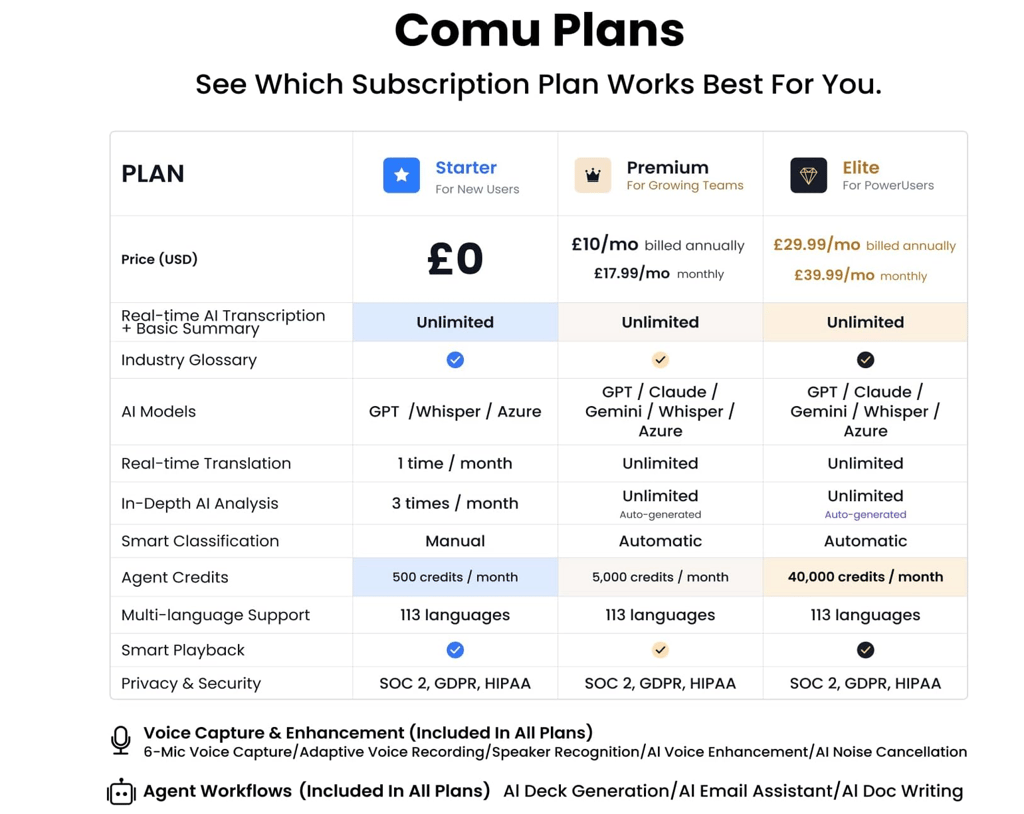
But, as with everything these days, the recorder comes with a subscription. It has a few tiers: Starter, Premium, and Elite. The biggest difference between them is that premium tiers include more AI models and more credits. In addition, premium models offer real-time translation and more in-depth analysis. Depending on whether you subscribe for a whole year or less, a premium plan could cost up to £40 per month.
Even the elite plan could still be worth it if you used the device to its full potential, including generating custom slides, translating conversations live, and sending post-meeting updates and action points to stakeholders.
It’s obvious that this device is a work buddy, though, so whether it’s worth it or not totally depends on how much you value your time and how much easier it can make your day. For me, it works better than the transcription software I relied on before. Summaries are similar to what I get from Gemini summarizing our work meetings.
I’d probably choose a standalone recorder for the same reason I choose to have a digital camera or electronic reader – it is totally unnecessary, but it helps me focus on the task at hand.