Best Disney+ VPNs in 2026
Our in-house cybersecurity experts and journalists, renowned for major reports like The Mother of All Breaches, conduct transparent, unbiased VPN testing and in-depth analysis.
With 750+ articles crafted based on real-world research, we empower readers to make informed purchasing decisions through first-hand expertise.
Learn more

Disney+ content varies by country – some titles are hidden, or the service isn’t available at all, depending on your location. This happens because of regional licensing deals. A VPN can help by masking your real location and making it appear as if you're browsing from a supported country. But here’s the catch: Disney+ actively blocks many VPNs, so only a handful can reliably bypass those restrictions.
To figure out which ones actually work, my team and I tested more than 20 VPNs to see which had the best success rates when unblocking Disney+ globally. Our tests showed that NordVPN is the best option for accessing Disney+, as well as other services we recommend.
Best VPNs for Disney+ in 2026
- NordVPN – overall the best Disney+ VPN in 2026
- Surfshark – budget-friendly Disney+ VPN with unlimited connections
- Proton VPN – privacy-focused VPN for Disney+ with free plan
- ExpressVPN – great streaming VPN
- CyberGhost – VPN with many streaming servers
Why do you need a VPN to watch Disney+?
A VPN can resolve two main issues Disney+ users might face: it helps access the platform from countries where the streaming service is not available (like when traveling or relocating abroad) and can help unblock content that is not available in your location due to local licensing rights. For example, I went on a long holiday abroad, and if it wasn’t for a VPN, I would not have been able to keep watching my show, which was not available in that location.
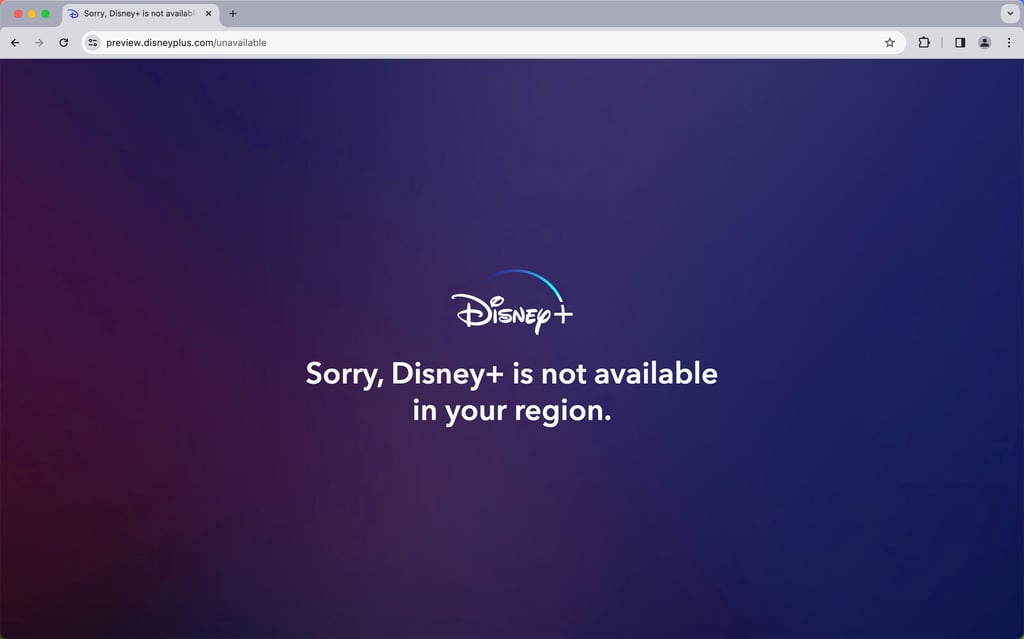
Without a VPN, attempting to access your Disney+ account from an unsupported location can lead to the following message: Sorry, Disney+ is not available in your region.
And if you want more variety, a VPN can unlock content from different libraries. For example, due to licensing restrictions, content that’s available in the US isn’t accessible in the UK, and vice versa. A VPN helps you get the most out of your subscription by providing access to a wider range of streaming options. Most streaming platforms scan IP addresses to uphold geo-blocking, but a VPN grants your device a new IP address, so the detection system thinks you’re viewing from another location.
5 best Disney+ VPNs – detailed list
After testing the best VPNs for streaming, only the top 5 managed to bypass Disney+'s detection system and deliver stable speeds
1. NordVPN – best streaming VPN for Disney+

| Works with Disney Plus: | ✅ Yes |
| Servers/countries: | Thousands of servers in 225 locations |
| Compatible with: | Windows, macOS, Linux, Android, iOS, smart TVs, Roku, Android TV, and Amazon Fire TV |
| Current deal: | Black Friday offer 78% OFF NordVPN + 3 months free |
Among the top streaming VPN providers we tested in-house, NordVPN delivered the best results when accessing Disney+ and other major streaming platforms. Users in regions where Disney+ is restricted or where libraries are limited will benefit from NordVPN’s fast speeds, stable connections, and reliable unblocking performance.
Why I picked NordVPN for Disney+
NordVPN has thousands of servers in 225 locations, so you will have plenty of choices when it comes to the variety of Disney+ libraries. Server selection includes the US (where NordVPN now has servers in all 50 states), the UK, Canada, Japan, Australia, and more. And the clear app interface makes switching servers easy.
What’s more, no matter which server you’re connecting to, you can take advantage of the SmartPlay feature that’s built specifically for better streaming. SmartPlay automatically combines VPN and Smart DNS, so even beginner users can enjoy streaming optimization without manual input. I tested the service by accessing the US version of Disney+ while in France, and the platform was stable even as I switched between shows.
Based on our tests, NordVPN’s download retention was at 86%, one of the highest scores across the tested VPNs. The provider uses the NordLynx protocol to deliver fast, reliable streaming, whether you’re watching in HD or 4K. High download speed and a consistent connection ensured my streaming was smooth.
As I found when reviewing NordVPN, the VPN can also help stream Disney+ on other compatible devices, such as smart TVs, that don’t directly support VPNs. This is done via Smart DNS, but keep in mind that it doesn’t officially support all streaming platforms or regions, so it is more limited than simply using a VPN on a computer or mobile device.
NordVPN’s plans start at $3.49/month, and the provider offers a 30-day money-back guarantee, so you can try out the service without risk.
2. Surfshark – most affordable Disney+ VPN

| Works with Disney Plus: | ✅ Yes |
| Servers/countries: | 4,500+ servers in 100 countries |
| Compatible with: | Windows, macOS, Linux, Android, iOS, Apple TV, Android TV, and Amazon Fire TV |
| Current deal: | Now up to 88% OFF Surfshark + 3 months FREE |
Surfshark is an affordable and reliable VPN that supports Disney+ and most other popular platforms with consistent speed and multi-device streaming. It gives users access to global content without regional restrictions. Surfshark stands out among other VPNs on this list for its ability to unlock different Disney+ libraries for the entire household with unlimited simultaneous connections.
Why I picked Surfshark for Disney+
Surfshark is almost as fast as NordVPN, with 80% download retention, it more than makes up for it with unlimited device support and a wide server selection. The provider has 4,500 servers in 100 countries, and you can connect to servers in countries with robust Disney+ libraries, such as the US, the UK, and Japan.
It’s worth noting that while download retention is solid, the app doesn’t automatically switch to a new server if your current one is overcrowded. I noticed this while watching Japanese Disney+ in Germany and experienced slight delays. However, with a robust selection of servers, I could easily switch to a less burdened one. What’s more, if your connection is interrupted for any reason, Surfshark utilizes an Everlink feature to keep your connection stable, which further reduces any hiccups in your streaming experience.
According to Surfshark review, the provider uses the WireGuard protocol to deliver consistent speeds, so you can stream in HD and 4K with minimal buffering. The app is available on Windows, macOS, Android, iOS, Linux, routers, and smart TVs.
Surfshark is one of the cheaper VPNs on this list, with plans starting at $2.49/month. And you can save even more with the code “Surfshark coupon 88% OFF”. You can also try out the app for 7 days for free on up to three devices.
3. Proton VPN – highly secure Disney+ VPN with a free version

| Works with Disney Plus: | ✅ Yes (paid version) |
| Servers/countries: | 20,700+ servers in 149 countries |
| Compatible with: | Windows, macOS, Linux, Android, iOS, Android TV, and Fire TV |
| Current deal: | Get up to 70% OFF Proton VPN |
Among the tested VPNs on this list, Proton VPN strikes the golden middle between accommodation and streaming experience. Its Plus plan allows users to unlock Disney+ and other streaming platforms using thousands of servers, easily bypassing regional restrictions. Proton VPN is a solid provider with a reliable free version, but Disney+ services remain locked behind a paid plan.
Why I picked Proton VPN for Disney+
Thanks to thousands of servers at its disposal, Proton VPN can unlock most global content, including Disney+ libraries in popular regions such as the US, Canada, Japan, the UK, and the rest of Europe. The provider has 20,700 servers in 149 countries, so it is fairly easy to avoid overcrowding and stream without buffering.
Proton VPN uses 10Gbps servers for high-speed performance, with download retention at 81%. The streaming experience is further enhanced by a built-in VPN Accelerator that automatically boosts your connection, regardless of which server you’re connected to. This was especially helpful when I streamed Disney+ with US servers while in Europe, as there was minimal lag, switching between content was fast, and my connection didn’t stutter even when streaming in HD.
While Proton VPN is often noted for its free version, when it comes to Disney+ access, it’s a drawback. Proton VPN’s free version is useful for security, but its limited country availability and other restrictions, such as the randomly assigned connections, make it unsuitable for Disney+ streaming. Proton VPN’s paid plans start at $2.99/month, with a 30-day money-back guarantee that lets you test the service risk-free.
4. ExpressVPN – excellent streaming VPN for Disney+

| Works with Disney Plus: | ✅ Yes |
| Servers/countries: | Servers in 113 countries |
| Compatible with: | Windows, macOS, Linux, Android, iOS, Roku, Fire TV, Apple TV, and Android TV |
| Current deal: | Now up to 80% OFF ExpressVPN + 4 months FREE |
As one of the better-known names on the market, ExpressVPN provides a reliable, steady Disney+ streaming experience and can unlock access to the most popular streaming regions. It has good speeds and device availability, and its streaming performance is compatible with Disney+.
Why I picked ExpressVPN for Disney+
ExpressVPN has servers in 113 countries, but the exact number of servers is undisclosed. It maintains 75% download speed, and the app utilizes the Lightway protocol, which boosts streaming performance. Windows users can now try out the Lightway Turbo feature for even better results.
The app is easily accessible on Windows, macOS, Android, iOS, Linux, and streaming devices, such as smart TVs. And if the device doesn’t support VPNs, you can use ExpressVPN’s MediaStreamer, a DNS service that can enable streaming on devices that normally wouldn’t support it, like consoles.
After reviewing ExpressVPN, I can safely say it offers stable access to Disney+, with reduced connection drops and minimal buffering. I found that’s it’s also easy to switch servers via the app’s clean interface, so when I noticed some stuttering during my streaming session, I could quickly jump to another server. ExpressVPN plans start at $2.99/month, which is an average cost, given what it offers. Also, it includes a 30-day money-back guarantee for testing the service. Overall, ExpressVPN is a good VPN choice for Disney+ streaming, but it falls behind some others on this list.
5. CyberGhost – affordable Disney+ VPN with specialty servers

| Works with Disney Plus: | ✅ Yes |
| Servers/countries: | Servers in 100 countries |
| Compatible with: | Windows, macOS, Linux, Android, iOS, smart TVs, Android TV, and Fire TV |
| Current deal: | Halloween offer, now with 83% OFF CyberGhost + 2 months FREE |
When tested in-house, CyberGhost was able to access Disney+ and bypass regional restrictions without much trouble. Specialized streaming servers ensure a steady connection to various platforms, even in regions where streaming is tricky.
Why I picked CyberGhost for Disney+
CyberGhost offers a streaming-optimized experience when accessing Disney+ and other platforms, like Netflix or Hulu. You can easily bypass region blocks by using servers deployed in 100 countries. The provider uses 10Gbps servers, but in our tests, this VPN's download retention was 70%, the lowest on this list but still above average.
When reviewing CyberGhost, I noticed that what sets it apart is its specialized streaming servers, which can access streaming libraries in the US, the UK, Japan, and even Australia. However, not all countries have these optimized servers, which limits global accessibility.
CyberGhost uses the WireGuard protocol to deliver fast speeds and enable HD-quality streaming. If you experience any buffering, you can quickly hop from server to server, but keep in mind that there are fewer streaming-optimized servers than regular ones.
CyberGhost is one of the more affordable VPNs out there, with plans starting at $2.19/month. It also has a generous 45-day money-back guarantee. Before committing, you can try for yourself if CyberGhost fulfills your Disney+ streaming needs by using a 24-hour VPN free trial for macOS and Windows. Mobile users can take advantage of a 3-day free trial for Android and a 7-day free trial for iOS.
Where Disney+ is available in 2026
Here's a list of some countries where you can, or cannot, access Disney+ (revised on June 11th, 2026):
| Region | Countries where Disney+ is available | Countries where Disney+ is not available |
| North America | Canada, United States, Mexico | |
| Central America | Belize, Costa Rica, El Salvador, Guatemala, Honduras, Nicaragua, Panama, Antigua and Barbuda, Bahamas, Barbados, Dominica, Dominican Republic, Grenada, Haiti, Jamaica | |
| Europe | Albania, Andorra, Austria, Belgium, Bosnia and Herzegovina, Bulgaria, Croatia, Czech Republic, Denmark, Estonia, Finland, France, Germany, Gibraltar, Greece, Hungary, Iceland, Italy, Ireland, Kosovo, Latvia, Liechtenstein, Lithuania, Luxembourg, Malta, Monaco, Montenegro, Netherlands, North Macedonia, Norway, Poland, Portugal, Romania, San Marino, Serbia, Slovakia, Slovenia, Spain, Sweden, Switzerland Turkey, UK, Vatican City | Russia, Ukraine, Belarus, Cyprus, Moldova |
| South Pacific | Australia, New Zealand | Fiji, Papua New Guinea, Solomon Islands, Vanuatu, Samoa, Tonga, Kiribati, Tuvalu, Micronesia, Palau, Marshall Islands |
| South America | Argentina, Brazil, Bolivia, Chile, Colombia, Ecuador, Guyana, Paraguay, Peru, Suriname, Venezuela, Uruguay | The French and Dutch overseas territories |
| Asia | Hong Kong, Indonesia, Japan, Malaysia, Philippines, Singapore, South Korea, Taiwan, Thailand | Bangladesh, Bhutan, India, Kazakhstan, Laos, Maldives, Mongolia, Nepal, North Korea, Pakistan, Sri Lanka, Azerbaijan, Afghanistan, Kyrgyzstan, Tajikistan, Turkmenistan, Uzbekistan, Georgia, Macau, Myanmar, China |
| Africa | Algeria, Egypt, Libya, Morocco, South Africa, Tunisia, Mauritius, Mayotte, Réunion, Saint Helena, Ascension and Tristan da Cunha | Most of sub-Saharan countries, including Kenya |
| Middle East | Bahrain, Iraq, Israel, Jordan, Kuwait, Lebanon, Oman, Palestine Territories, Qatar, Saudi Arabia, United Arab Emirates, Yemen | Syria |
Best VPNs for streaming compared
| NordVPN | Surfshark | Proton VPN | ExpressVPN | CyberGhost | |
| Ranking | |||||
| Simultaneous connections | 10 | Unlimited | 10 | 14 | 7 |
| Unblocks streaming platforms | Netflix, Hulu, BBC iPlayer, Disney+, and more | Netflix, Disney+, Amazon Prime Video, Hulu, and more | Netflix, BBC iPlayer, YouTube, HBO Max, Disney+ | Netflix, Hulu, BBC iPlayer, Disney+, and more | Netflix, Hulu, BBC iPlayer, Disney+ |
| Average download speed | 810Mbps | 748Mbps | 760Mbps | 703Mbps | 639Mbps |
| Servers | Thousands of servers in 225 locations | 4,500+ servers in 100 countries | 20,700+ servers in 149 countries | Undisclosed server count in 113 countries | Undisclosed server count in 100 countries |
| Privacy policy | No logs, independently audited six times | No logs, independently audited by Deloitte | No logs, independently audited by Securitum | No logs, independently audited by KPMG | No logs, independently audited by Deloitte |
| Starting price | From $3.49/month | From $2.49/month | From $2.99/month | From $2.99/month | From $2.19/month |
How to watch Disney+ outside the US
A VPN lets you watch Disney+ from anywhere in the world. It may sound too good to be true, but all you need to do is follow these four basic steps, and you can tune in to your favorite shows and movies, wherever you are:
- Find and download a VPN on your computer. I recommend NordVPN, now 78% OFF
- Install the VPN on your device or router
- Connect to a server in a Disney+ location, such as the US, Australia, the UK, or Canada
- Open the Disney+app or visit the website on your browser to start streaming
VPN not working with Disney+? Here’s how to fix it
In some cases, you might find that your VPN doesn’t work with Disney+. There can be several reasons for that, so here are some more common fixes for the issue:
- The Disney+ system detected a VPN. A common issue when trying to stream Disney+ with a VPN is that the app’s system detects the VPN's IP and blocks it. The quickest way around it is to switch to another server from the same location or pick a streaming-optimized server.
- The VPN server is overloaded. If the server is overburdened, it might drop connections. This reveals your true IP address, and the Disney+ platform can limit your access. The best workaround for this issue is to choose another, less crowded server. I recommend choosing a VPN with many servers, such as NordVPN, because increased server availability reduces strain on individual servers.
- Browser cookies reveal your location. Sometimes the browser or an app retains old data, such as your IP address or location. Clearing the cookies and cache usually solves this problem.
- DNS leak. Such leaks can expose your true location. Check whether your VPN has DNS leak protection and enable it. You can always use DNS leak checkers to verify that your privacy is intact and that the VPN is working as intended.
- Switch streaming method (app vs browser). Sometimes Disney+ behaves differently depending on platform. If it fails on the app, try a browser (or vice versa). This helps isolate whether the issue is device/app-specific rather than VPN-related.
- Update or reinstall Disney+ app. A surprisingly common fix is simply outdated app versions or corrupted local data. Reinstalling refreshes login tokens and cached region data.
- Try logging out and back in after switching regions. Disney+ sometimes “locks” the last detected region into the session. A fresh login can reset this.
Follow these quick troubleshooting steps:
- Disconnect from a current VPN server and pick another one.
- Clear browser cookies and the Disney+ app’s cache.
- If you haven’t done so already, turn on DNS leak protection.
- Restart the Disney+ app or browser.
FAQ
Is it safe and legal to use a VPN with Disney+?
While it's not illegal to use a VPN with Disney+, it’s against its ToS. Disney+ may block VPN users or restrict access to certain content. However, using a reputable VPN like NordVPN or Surfshark is generally safe and can improve your privacy and security online.
How can I watch Disney+ Korea in the US?
You can watch Disney+ Korea by installing a VPN, connecting to a server in Korea, and changing your IP address. This way, you will access Disney+'s Korean library.
Can I watch Disney+ in the UK with a VPN?
Yes, you can watch Disney+ in the UK with a VPN. However, Disney+ is readily available in the UK already. If you want to access video libraries from other countries, I recommend checking out NordVPN.
How to change Disney+ account profile rating?
If you want to change your Disney+ account profile rating, all you have to do is find your profile and click on Edit profiles. After that, select the profile you’d like to make changes to and select Content rating under the Parental controls section. Enter your password, click Save, and you’re good to go.