7 best ChatGPT VPS hosting providers in 2026
Our in-house experts conduct independent, hands-on testing and transparent reviews of VPS hosting providers by using real server environments, and industry-recognized benchmarking methods to ensure impartial and evidence-based assessments
Using the same criteria for all VPS services, we share our detailed methodologies and testing practices to help customers compare performance, reliability, scalability, and overall value before choosing a virtual private server.
Learn more

Running ChatGPT on your own is a way to avoid per-request fees and have more control over how everything runs. It’s great for internal tools or projects that require predictable costs and better control over your data. For this type of hosting, the most important things are GPU power, enough VRAM and RAM, fast storage, and overall stability.
To find the best options, I reviewed and compared 64 providers. After doing so, I narrowed them down to the 7 best VPS for ChatGPT hosting in 2026. Keep on reading to find the best fit for your needs.
7 best VPS for ChatGPT hosting in 2026
- DigitalOcean – best beginner-friendly GPU VPS
- Runpod – best for high-performance ChatGPT hosting
- Vast.ai – cheapest marketplace for GPU-based hosting
- TensorDock – best price-to-performance GPU hosting
- Lambda – best for enterprise-grade AI infrastructure
- Scaleway – best EU GPU hosting for compliance
- Vultr – best global GPU cloud with flexibility



Our in-house VPS research team and expert writers work together to regularly test VPS hosting services across different use cases and provide accurate, up-to-date insights. Learn more about how we test and evaluate virtual private servers.
What is ChatGPT hosting, and do you need one?
ChatGPT hosting means running a large language model on your own machine or LLM hosting server, without paying per-use tokens. This is only possible with OpenAI’s open-weight models, where you can download and run the model files, called weights, yourself.
The catch is cost. These models are large, and that means you need serious hardware, not just a basic VPS. A 20B model will need around 16GB of GPU memory, while a 120B model may need at least 80GB, plus enough RAM, storage, and the right software stack to make it run properly.
That is why self-hosting can get expensive fast. A single-GPU machine for gpt-oss-20b can cost around $3,000 upfront, while a gpt-oss-120b setup can cost over $50,000. Renting GPUs, however, is much easier on the budget, with smaller setups starting around $200/month and high-end hardware reaching around $1,000/month.
At the same time, not everything needs that level of power. Smaller models in the 3–7B range can run on a robust VPS with 8–16GB RAM, especially when quantized, making them practical for simple apps and personal projects. The tradeoff, however, is speed: they’ll be much slower than GPU-backed deployments.
Best VPS for ChatGPT hosting 2026 – detailed reviews
1. DigitalOcean – best beginner-friendly GPU VPS with reliable infrastructure

| Rating: | |
| Price: | From ~$0.76/hour |
| Money-back guarantee: | ❌ No |
DigitalOcean is a cloud provider that has recently added GPU servers to its existing Droplet system. It’s a good fit if you want to run AI models on a setup similar to a regular VPS, without dealing with marketplace-style providers where pricing and hardware can vary a lot.
What I like about DigitalOcean the most is that it really does keep things simple. The GPU Droplets are easy to understand, and the pricing is easier to follow than marketplace-style providers. It also has broad regional coverage, which helps if you care about latency or want to keep deployments closer to users.
What holds it back is its overall value. It’s not the cheapest option for raw GPU power, and the higher-end plans cost more than marketplace alternatives. However, even with the pricing, you gain a more controlled and predictable setup.
Pricing and features
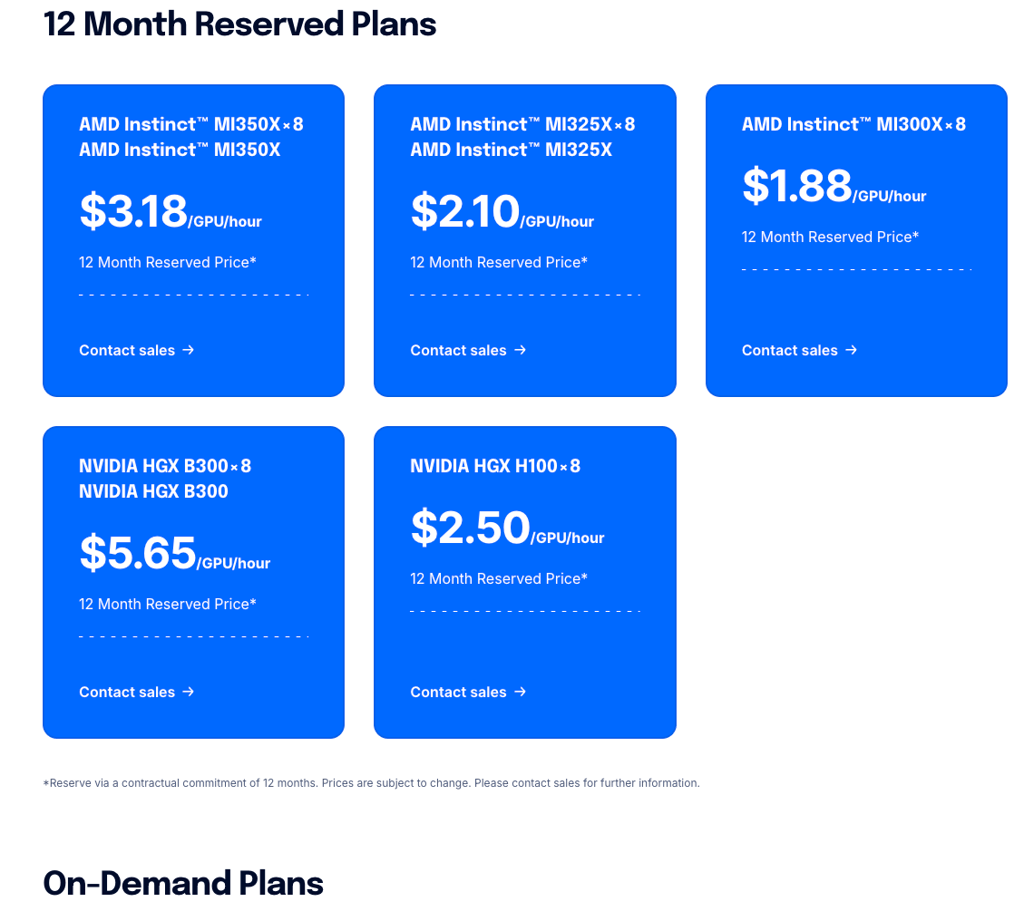
DigitalOcean’s GPU lineup is simple but not the cheapest. Here are the most relevant options for ChatGPT-style hosting:
- RTX 4000 Ada plan, from ~$0.76/hour. Entry-level option with 20GB VRAM, 32GB RAM, and 8 vCPUs. Works for smaller models like gpt-oss-20b, but you’ll need optimizations.
- NVIDIA H100 plan, from ~$3.39/hour. A better entry point for larger models. It offers 80GB GPU memory, 240GB memory, and 20 vCPUs, so it’s much more realistic for running gpt-oss-120b.
- NVIDIA H200 plan, from ~$3.44/hour. The stronger choice for heavier 120B-class hosting. With 141GB of GPU memory, it gives you more breathing room for larger loads and smoother performance.
DigitalOcean also adds useful basics like regional GPU availability, NVMe storage, and direct-to-GPU networking. That does not make it the most exciting platform on the list, but it does make it one of the easier ones to work with.
DigitalOcean is best for users who want predictable GPU hosting across many regions with a simple setup. Skip it if your priority is the lowest possible cost for large AI models
2. Runpod – best overall GPU hosting for ChatGPT
| Rating: | |
| Price: | From ~$0.59/hour |
| Money-back guarantee: | ❌ No |
Runpod is a cloud platform built specifically for GPU-powered AI rigs and is one of the most affordable ways to host ChatGPT-style open-weight models. It stands out because you can deploy a GPU pod in seconds and choose from over 30 NVIDIA GPUs depending on your needs.
I like Runpod because it has per-second billing options, so you’re not stuck paying for unused time. Plus, the sheer range of GPUs available, from consumer-class cards to H100S, means you can match your hardware to your workload.
The downside is that credits are non-refundable, so test carefully before you commit. Compared with Lambda or Vast.ai, Runpod is easier to use and more stable, but not the best choice if you want the cheapest long-term GPU rental.
Pricing and features
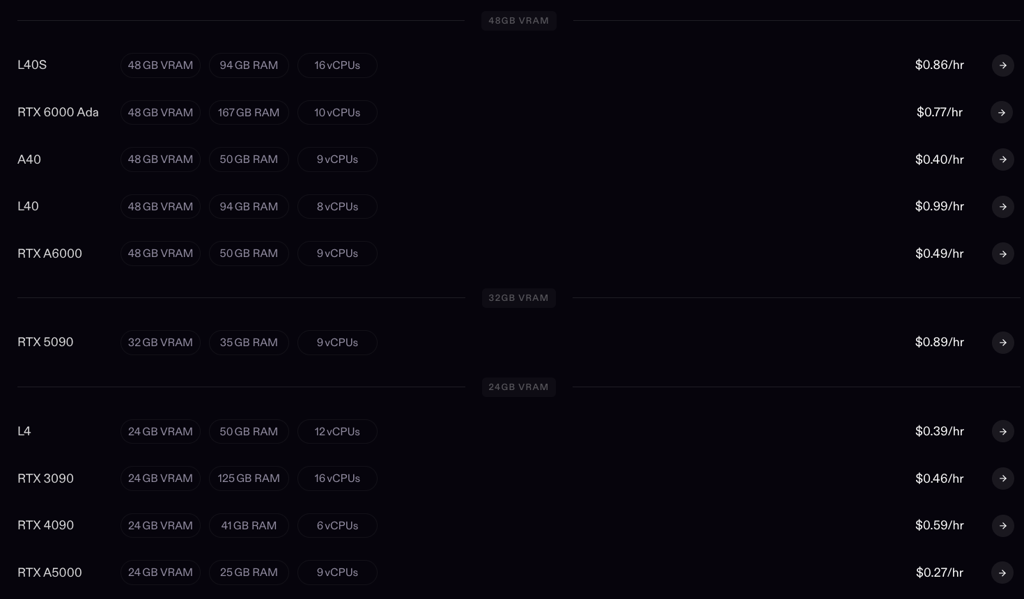
Runpod’s GPU offerings cover everything from small experiments to larger ChatGPT models. Here are just a few examples:
- RTX 4090 plan, from ~$0.59/hour. Perfect starting point for a smaller model, like gpt-oss-20b. Offers 24GB VRAM, 41GB RAM, and 6 vCPUs for an efficient, low-cost rig.
- A100 PCIe plan, from ~$1.39/hour. Middle-ground choice for models, with 80GB VRAM, 117GB RAM, and 8 vCPUs, it can already run the beefier gpt-oss-120b model. Fast storage and robust network support make deployments smoother.
- H100 PCIe plan, from ~$2.39/hour. Great option for larger models, 80GB VRAM, 188GB RAM, 16 vCPUs. Scales workloads easily and handles high-throughput inference reliably.
Runpod gives you full API access, real-time logs, monitoring, and persistent storage. It also supports global deployment and WebSocket-friendly networking, so you can place workloads closer to users and keep response times lower. For teams that need a more production-ready environment, that matters just as much as raw GPU power.
Runpod is best for developers who need flexible GPU hosting with a wide range of hardware and fast deployment options. Skip it if your priority is squeezing out the absolute lowest-cost compute from marketplace-style providers like Vast.ai.
3. Vast.ai – best low-cost marketplace for flexible GPU rentals

| Rating: | |
| Price: | From ~$0.29/hour |
| Money-back guarantee: | ❌ No |
Vast.ai is a GPU marketplace, not a typical cloud provider. Instead of fixed plans, you pick and rent specific GPUs from different providers for ChatGPT-style models. It works best if you want to match your hardware exactly, without overpaying for resources you don’t need.
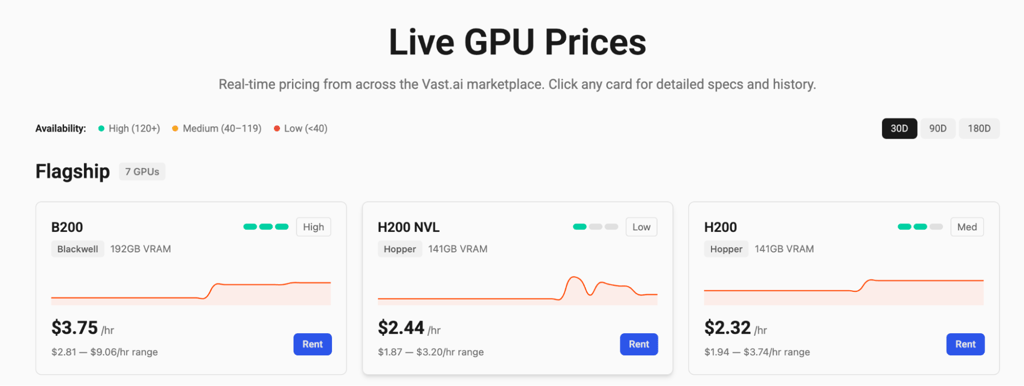
When I first saw how Vast.ai shows a live chart of the GPU rental prices on its market, I was very surprised. It gives you the sense of control over your investment like no other provider. You can start small, test a model, and move up when you need more VRAM. It also offers different instance types, such as on-demand for stable workloads, reserved, and interruptible for cheaper, non-critical tasks.
That said, with the whole marketplace concept, the main downside, of course, is that hardware quality varies across providers, since it’s scattered across different renters. That makes it less predictable than Runpod. It’s cheaper, but requires more hands-on setup, careful selection of exact rigs, and you can expect occasional downtime.
Pricing and features
Here are the plans that make the most sense for ChatGPT hosting:
- RTX 4090, from ~$0.29/hour. A good fit for gpt-oss-20b. It gives you 24GB VRAM and is the most affordable entry point for a single-GPU setup.
- H100 SXM, from ~$1.54/hour. Should be enough for the more demanding gpt-oss-120b. It gives you 80GB VRAM and enough headroom to actually run a large model without forcing the setup too hard.
- H200, from ~$2.32/hour. Better for bigger workloads and more comfortable 120B hosting. The extra VRAM makes it easier to maintain stable performance.
Vast.ai also gives you useful developer tools, including an API, CLI, and Python SDK. The trade-off is that you spend more time checking the machine, the host, and the setup details before you deploy.
Vast.ai is best for users who want one of the lowest possible GPU costs for ChatGPT-style hosting. Skip it if you want a more polished, consistent platform with less setup work and fewer marketplace surprises.
3. TensorDock – best value GPU hosting with high VRAM availability
| Rating: | |
| Price: | ~$0.35/hour |
| Money-back guarantee: | ❌ No |
TensorDock is a GPU cloud built around a managed marketplace of independent hosts, offering flexible, high-VRAM servers at prices far below typical GPU hosts. It’s ideal for hosting ChatGPT-style open-weight models when cost and GPU selection matter.
Unlike Vast.ai, where you’re often renting from anyone, TensorDock works with vetted providers, which makes performance and reliability more consistent. Personally, it’s hard not to appreciate TensorDock because its marketplace model gives access to 45 GPU types for a really small price, letting you match hardware to workloads. Deployments are quick, and you get root access, KVM isolation, and Docker pre-installed, which makes experimenting with different AI models easy.
Even though TensorDock vets its GPU providers, it’s still a marketplace, so similarly to Vast.ai, you can expect occasional downtime or high-end GPU shortages. Compared with Runpod or Lambda, TensorDock is cheaper and offers more options, but stability can fluctuate, making it less suited for critical production workloads.
Pricing and features
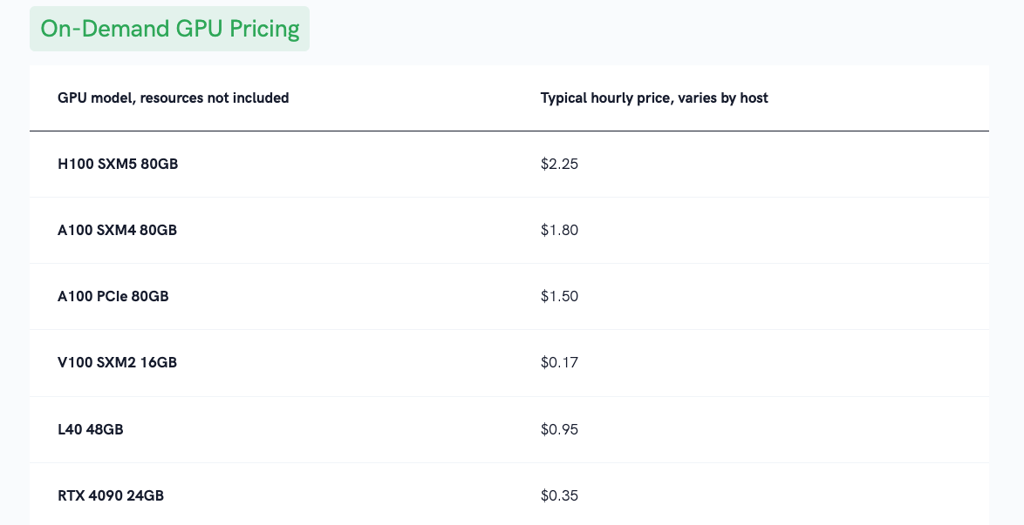
TensorDock’s pricing works well for small and large ChatGPT-style models alike. Here are the most fitting options:
- RTX 4090 plan, from ~$0.35/hour. A decent starting point for a smaller model like gpt-oss-20b. It gives you 24GB VRAM, which is enough for light to midrange inference.
- A100 PCIe plan, from ~$1.50/hour. A great fit for the larger 120B model if you want to actually run it.
- H100 SXM5 plan, from ~$2.25/hour. The safest pick for heavy 120B-class hosting when you want more room for speed, load, and larger workloads.
TensorDock also gives you KVM virtualization, root access, Docker support, and custom CPU, RAM, and storage settings. Security measures include SSH revocation from host nodes and host monitoring. Marketplace flexibility ensures global deployment, but users must plan around host availability for critical workloads.
TensorDock is best for users who want flexible, low-cost GPU hosting with strong VRAM options. Skip it if you need guaranteed uptime or the same hardware in every region
5. Lambda – best high-performance cloud for serious AI workloads
| Rating: | |
| Price: | From ~$0.69/hour |
| Money-back guarantee: | ✅ Yes, 30-day |
Lambda is a GPU cloud built for serious AI work. It’s best for users who need stronger hardware, stable performance, and more room to grow than a regular VPS can offer. It offers on-demand instances, 1-Click Clusters, and Superclusters, with options that scale from a single GPU to very large multi-GPU systems.
What I appreciate a lot is that it keeps the setup focused on raw compute power. You get NVIDIA GPUs and enough RAM and storage to handle and scale a heavier ChatGPT-style model. The 1-GPU and multi-GPU options make it easy to transition from a smaller to a larger model.
The main tradeoff is that Lambda is less beginner-friendly and better suited to users who already know they need GPU compute. It may be more than you need for small experiments, but for large models and multi-GPU workloads, it performs well.
Pricing and features
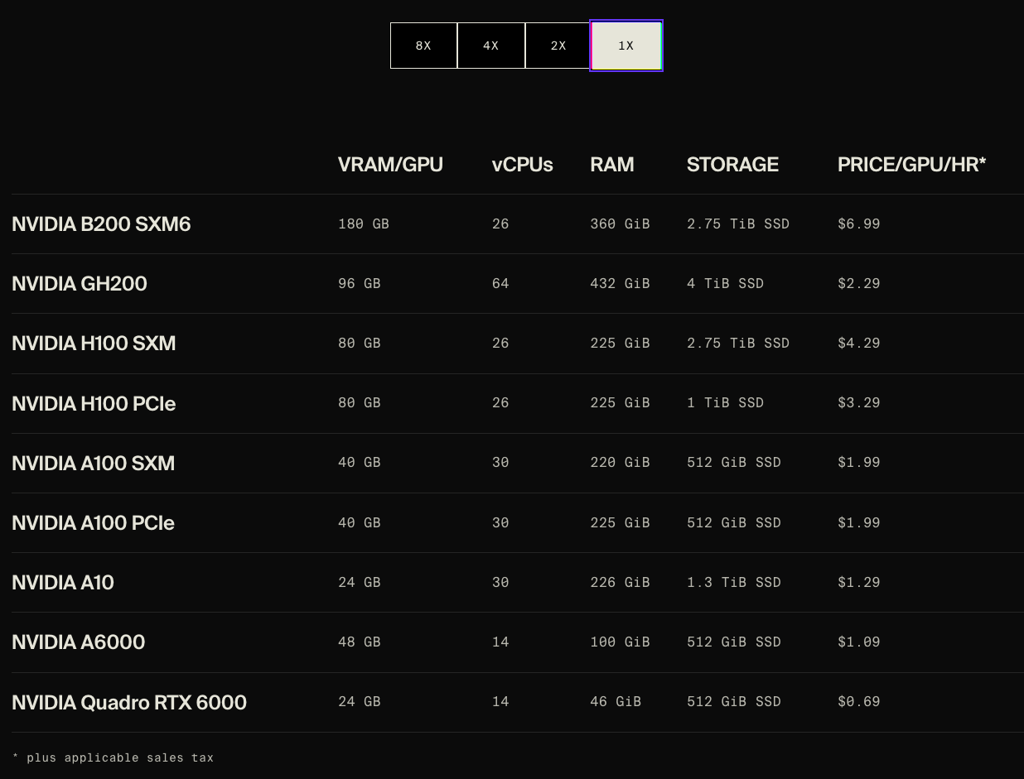
Lambdas’ GPU instances cover a wide range of AI workloads. Here are a few options that would be ideal for a ChatGPT-style AI host:
- NVIDIA A10 plan, from ~$1.29/hour. Decent starting point for a smaller model like gpt-oss-20b. It offers 24GB VRAM, 226GB RAM, and 30 vCPUs.
- NVIDIA H100 PCIe plan, from ~$3.29/hour. The bare minimum for a 120B-class model. It gives you 80GB VRAM, 225GB RAM, and 26 vCPUs.
- NVIDIA H100 SXM plan, from ~$4.29/hour. Better fit for large models if you want more headroom and smoother performance.
Lambda also adds useful production features, including SOC 2 Type II certification, strict access controls, MFA, continuous monitoring, and customer-governed access. That makes it a great fit for teams that care about security and stability, with the GPU power.
Lambda is best for AI developers needing high-performance NVIDIA GPUs and full control over their environment. Skip it if you prefer hands-off management or need widespread global availability.
6. Scaleway – best EU-based GPU hosting
| Rating: | |
| Price: | From ~$0.88/hour |
| Money-back guarantee: | ❌ No |
Scaleway is best for EU-based ChatGPT-style GPU hosting where data sovereignty and security matter most. It’s not the cheapest option on the list, but it’s better suited for serious projects that require strict compliance.
What stands out to me is the balance between security and structure. Scaleway provides private networking, IAM, MFA, and DDoS protection, which is particularly important if you are running models with sensitive data. It is also more predictable than marketplace-style providers.
The trade-off, however, is that Scaleway is not the most relaxed or budget-friendly option, and top-tier GPUs can be harder to get due to lengthy queues. But for EU-based teams, that can be worth it.
Pricing and features
Scaleway’s GPU lineup covers smaller models, larger 120B-class workloads, and even dedicated servers when you need more power.
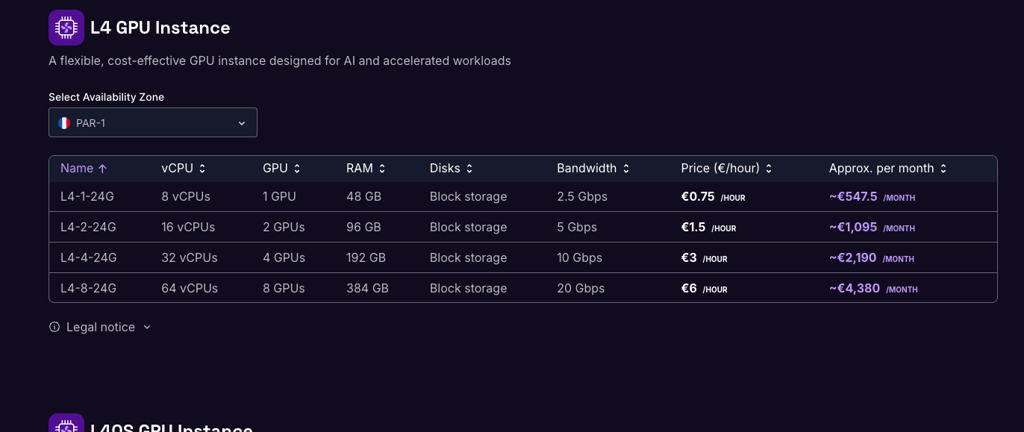
- L4 GPU Instance, ~$0.88/hour. Best starting point for smaller models like gpt-oss-20b, with 24GB VRAM and 48GB RAM
- H100 PCIe GPU Instance, ~$3.19/hour. The minimum practical choice for gpt-oss-120b, with 80GB VRAM and 240GB RAM
- H100-2-80G, ~$6.38/hour. Best for heavier workloads needing more consistent throughput
Overall, Scaleway leans more toward controlled, production-ready environments than flexible experimentation. You get solid security (VPC, IAM, EU data residency), but less instant scalability and fewer quick-start options compared to platforms like Runpod.
Scaleway is best for EU-based teams that want secure, compliant GPU hosting for OpenAI models. Skip it if you want the cheapest GPU rental or the widest global reach.
7. Vultr – best globally distributed VPS with flexible GPU deployment
| Rating: | |
| Price: | From ~$1.67/hour |
| Money-back guarantee: | ❌ No |
Vultr has one of the best global GPU hosting cloud coverage for AI workloads. It stands out for its 32 data center regions, broad GPU lineup, and self-managed setup that gives you full control over the server.
What I like most is how wide the location spread actually is. Vultr has data centers across North America, Europe, Asia, Australia, and Africa, so it’s easier to place AI workloads closer to users globally, which helps with speed and stability. I also like that it offers both NVIDIA and AMD GPU options, including larger cards like H100 and MI355X, so it’s not locked into one hardware path.
What I do not like as much is that it only offers a self-managed option. There is also no money-back guarantee, and you need to handle the setup yourself. Compared with Runpod, it’s less specialized for ChatGPT hosting, but it’s stronger if you care more about global reach and standard cloud control.
Pricing and features
Vultr’s GPU lineup leans toward larger, cluster-style deployments rather than small, single-GPU setups. Here are the most relevant options for ChatGPT-style hosting:
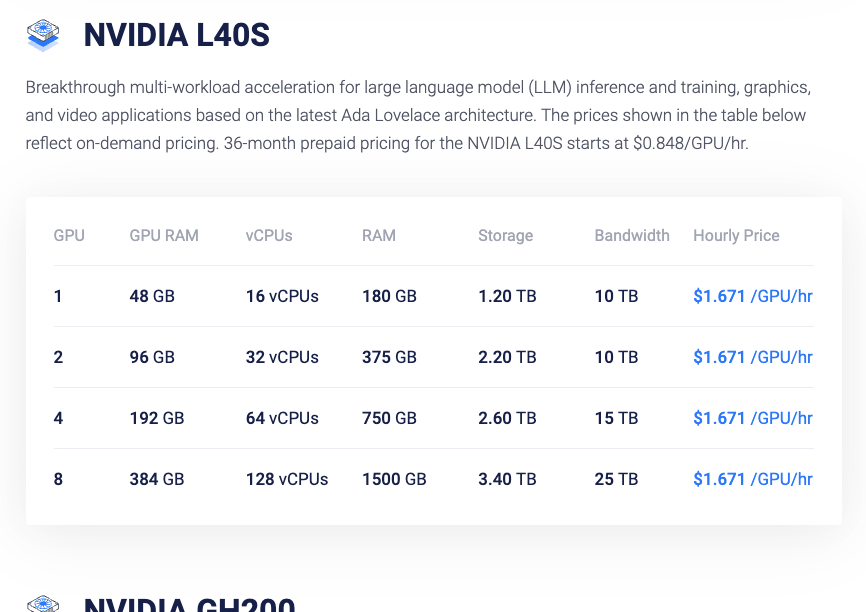
- NVIDIA L40S (1–2 GPU), from ~$1.67/hour. Practical entry point for smaller models like 20B. Offers 48–96GB VRAM, solid RAM allocation, and enough compute for stable inference without overpaying.
- NVIDIA PCIe A100 (1–2 GPU), from ~$2.39/hour. Bare minimum for 120B-class models. With 80–160GB VRAM, it does have room to run larger models too.
- AMD MI300X cluster (8 GPU), from ~$1.85/GPU/hour. Comfortable setup for 120B+ models. Massive VRAM pool (1.5TB+), high bandwidth, and strong multi-GPU scaling for production workloads.
Vultr also offers root access and pay-as-you-go billing. The biggest plus, however, is its global footprint. The main trade-off is that it’s better for users who are comfortable managing their own cloud setup.
Vultr is best for users who need globally distributed GPU hosting with flexible deployment options. Skip it if you want a more guided, AI-first platform with simpler onboarding.
How to choose ChatGPT VPS
Choosing a ChatGPT VPS comes down to the model size you want to run and how much hardware you are willing to pay for. Hosting ChatGPT is nothing like a typical hosting task, such as OpenClaw hosting, so here are the main aspects to consider:
- Model size matters most. Small models under 2B can run on a normal VPS, but 13B to 20B models need a GPU. For 70B to 120B models, you usually need high-VRAM hardware or more than one GPU.
- VRAM is the most common bottleneck. A 20B model can work on a 24GB GPU with quantization, while a 120B model usually needs 80GB VRAM or more.
- RAM and storage also matter. Large models need enough system memory and fast NVMe storage to load and run properly.
- Pricing can change fast. Marketplace providers are often cheaper, but dedicated cloud hosts are usually more stable.
- Location and reliability. This matters if you need low latency or production uptime.
- Management tools help too. Look for easy deployment, logs, scaling, and support for your setup.
Final thoughts
Running ChatGPT-style models on your own can very quicly become costly and complex. Rather than purchasing hardware, most people find it more practical to rent GPU servers through a VPS or a marketplace.
Here’s a simple way to choose:
- Easiest setup with reliable infrastructure – DigitalOcean
- Best overall balance of power and ease of use – Runpod
- Cheapest way to get strong GPUs – Vast.ai
- Best price-to-performance with more consistency – TensorDock
- Best for heavy, serious AI workloads – Lambda
- Best for EU-based projects and data compliance – Scaleway
- Best global coverage and flexibility – Vultr

FAQ
Can you self-host ChatGPT?
Yes, but only the open-weight gpt-oss models, not the ChatGPT product itself. You can run them on your own infrastructure or through GPU hosting providers like DigitalOcean or Runpod, which provide the hardware needed for deployment.
Is there a way to host ChatGPT locally?
Yes, but not the official ChatGPT itself. You can host OpenAI’s open-weight models locally on your own machine if you have a strong GPU and enough VRAM. Tools like vLLM or Ollama help with setup, though performance heavily depends on your hardware and model size.
How much RAM do you need to run ChatGPT locally?
For GPT-OSS models, RAM needs depend on size. The smaller gpt-oss-20b usually runs with 16–32GB of system RAM. The larger gpt-oss-120b needs about 64–128GB of RAM and a high-VRAM GPU like an A100 or H100 with 80GB of memory. Most of the work is done by the GPU, not RAM.
Do I need 32GB RAM for AI?
For smaller AI models, 16–32GB RAM is usually enough. However, for larger models or multitasking workloads, 32GB is safer and more stable. Big models still rely more on GPU VRAM than system RAM.