From résumés to raises: AI tools for every career stage


In a world where AI is becoming more popular every day, the idea of using it to boost your career is hard to ignore. From résumé writing to managing projects, AI career tools promise to make work easier – but do they actually help, or are they mostly hype?
To answer this question, I tried out a few tools, like Fieldy.AI, a wearable memory helper, and QuillBot, which helps with writing, to see if they could actually make my work easier. For others, like Motion, an AI calendar and task manager, and Lindy AI, which automates tasks, I relied on reviews and insights from other users and experts. So, keep reading and find out whether AI can actually help you with your career.

How I chose and tested my AI toolkit for career growth
When I wanted to see if AI could actually help with work tasks, I picked a few tools to explore. Fieldy.AI was my first choice because it’s a small wearable that captures conversations hands-free. Unlike typical meeting bots, it works in everyday chats too. I wore it for a full day to see how well it could track what I said and how useful it could be in real-world work situations.
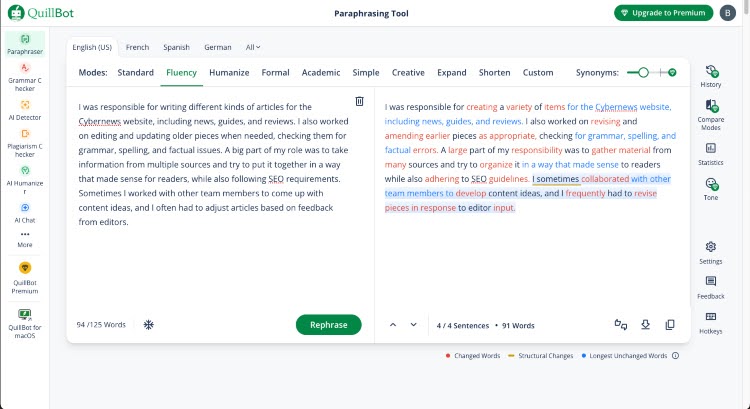
Next was QuillBot, a writing assistant that can rewrite text, check for plagiarism, and detect AI-generated content. As a technical writer, I used it in my daily work while writing different articles to see if it could make the writing and editing process faster and easier.
Motion caught my interest because it plans schedules and organizes tasks automatically. After testing it myself, I saw how it could help manage my time more efficiently by instantly adjusting my calendar when priorities changed.
Finally, Lindy AI offers no-code workflow automation and specialized AI helpers for tasks like email and sales. I reviewed it through user feedback and online reviews to see whether it could simplify repetitive tasks in a real work setting.
For all of these tools, I focused on our AI tool testing methodology. I reviewed their practical outcomes: could they save time, improve work, or reduce mental effort? I also considered the learning curve and effort required to use them effectively.
Launching your career – AI for résumés, cover letters, and interviews
Starting a career means diving into résumés, cover letters, and interviews – a process that can feel endless and stressful. I wondered if AI could actually make this process easier, and found that QuillBot and Fieldy.AI were both really useful during this stage.
Using QuillBot was surprisingly helpful. Before using it, I remember spending much time tweaking bullet points on my résumé and trying to make my cover letter more concise. However, QuillBot’s paraphrasing and grammar suggestions saved me hours and gave me ideas I wouldn’t have thought of on my own. Of course, I still had to check everything carefully, but it made the writing process feel smoother and less frustrating.
Fieldy.AI was a different kind of experience. I wore it during a few mock interviews to see how it captured my answers. Listening back to the transcripts was eye-opening – I noticed where I hesitated or repeated myself. Asking the AI questions about my performance, like “What were my key points?” helped me see patterns I hadn’t realized. It didn’t think for me, but it gave me a clear picture of where I could improve. By the end, I felt more confident in my answers and more aware of my strengths and weaknesses.
Level up at work – AI that helps you excel day to day
When you move past the job hunt and actually start your career, the challenge shifts to day-to-day work. Suddenly, it’s all about juggling meetings, deadlines, and a never-ending list of tasks. It can feel overwhelming to keep everything organized. So, I wanted to see if AI tools could make this easier – not just by saving time, but by taking away some of the stress of planning and remembering every detail myself.
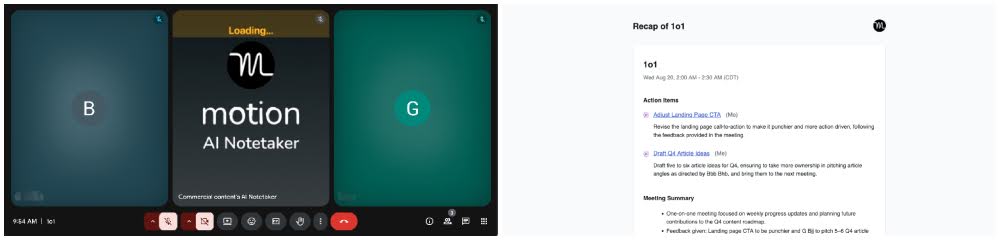
Fieldy.AI stood out here. Wearing it during meetings felt surprisingly natural, and it automatically created transcripts and summaries without me needing to take notes. I could go back later, search through conversations, and quickly find decisions or action points I might have forgotten. Instead of worrying about missing details, I could focus fully on the discussion. It felt less like a note-taking tool and more like having a reliable memory backup.
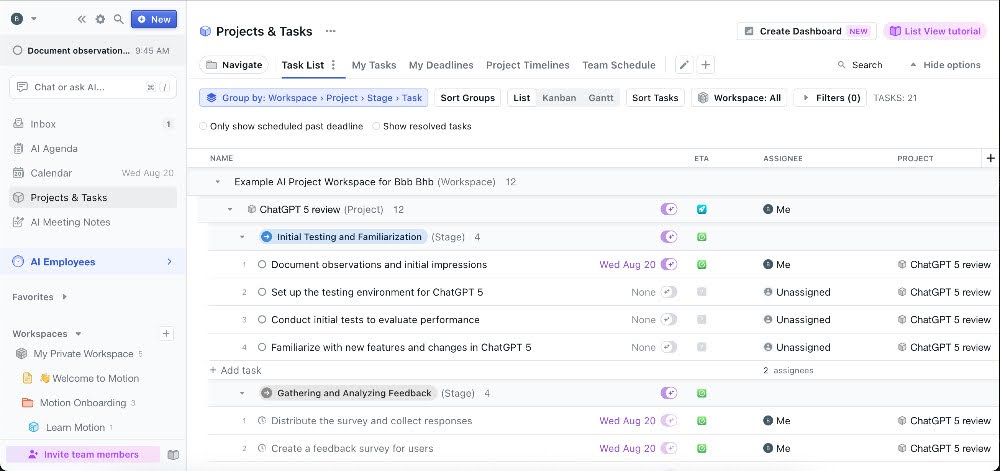
Motion works in a different way. From what I learned, you add your tasks and deadlines, and Motion automatically builds a schedule for you – even adjusting when things change. Many users say the biggest benefit isn’t just saving time, but the relief of not constantly worrying about “what should I do next?” It seems to make the day feel more organized and lighter, almost like someone else is quietly handling the planning in the background.
I also looked into Lindy AI, which lets you create simple agents that handle tasks across different apps. For example, you can set one up to sort your emails, update your calendar, and even send follow-up messages automatically. I found it helpful for cutting down on repetitive work. The only downside is that setting it up can take some effort, and the credit-based pricing can get pricey if you use it a lot.
Prepping for promotions – tracking wins, building cases, and asking for more
When it comes to promotions or asking for a raise, the hardest part is often proving your value. It’s not enough to say “I worked hard” – you need to show specific wins. That’s where I found AI tools surprisingly helpful.
With Motion, the biggest benefit people highlight is how it turns daily work into numbers you can actually point to. Its project dashboard shows deadlines being met, how tasks are distributed, and even flags bottlenecks. Instead of relying only on memory, this kind of record makes it easier to walk into a review with data to back up your work.
Fieldy.AI helps in a different way. Since it keeps a searchable history of conversations and meetings, I could easily pull up moments of positive feedback or examples where I solved a tricky problem. Normally, I’d probably forget half of those small wins by the time review season rolled around, but Fieldy acted like a personal achievement log I could tap into anytime.
Of course, AI can’t replace the human side of these conversations. Confidence, timing, and empathy still matter most when asking for more. But having concrete notes and metrics in hand made me feel a lot more prepared and less like I was relying on memory.
AI tools vs the “old way” – my honest before/after
Before using AI, my day felt scattered. I had a digital calendar, a notebook full of tasks, and meeting notes all over the place. Summarizing meetings and keeping track of essential details was manual and stressful.
However, after trying QuillBot and Fieldy.AI, things got much easier. QuillBot made writing and editing documents faster and less frustrating. Meanwhile, Fieldy.AI recorded meetings and gave me clear, searchable summaries, so I could quickly find key points without digging through notes. Using these tools made my work more organized and less stressful.
Check out the table below to see the main differences between my old and new, AI-assisted workflow.
| Task | Manual method | AI-assisted method | Time saved |
| Tracking feedback | Collecting comments from emails, chats, and meetings manually. | Fieldy.AI organizes all feedback in one searchable place. | 30-60 minutes/week |
| Taking notes from meetings | Writing notes by hand or typing during the meeting, often missing details. | Fieldy.AI records, transcribes, and summarizes the meeting automatically. | 1-2 hours/week |
| Editing for grammar and style | Reading through drafts, manually correcting errors, and improving flow. | QuillBot suggests grammar corrections, style improvements, and paraphrasing. | 1 hour/draft |
| Writing drafts | Starting from scratch, brainstorming, and structuring text manually. | QuillBot generates drafts based on input or prompts. | 2 hours/draft |
Gaps – where AI tools still fall short
While AI has improved my work in many ways, it still isn't perfect. Firstly, cost can be high – some tools require extra devices, subscriptions, or credit systems that add up quickly. Also, privacy is a concern: while tools like Fieldy.AI can look helpful, since they record conversations continuously, they also raise questions about who can access that data. This means you can't use them in meetings where confidential information can be shared.
Another problem is the learning curve of using AI. Some tools promise time savings but require time to understand features, fix errors, or troubleshoot problems. Moreover, accuracy isn't always reliable. From my experience, summaries can miss details, grammar tools may flag correct content, and multilingual support can struggle. So some parts of the work still need a human touch.
Tips and watch-outs for getting the most from AI in your career
In short, AI can make your work easier, but it’s not perfect. Here are some practical tips to get the most out of these tools:
- Start small with one big problem. Pick one part of your day that’s stressful or time-consuming, like taking meeting notes, and try using AI there first. This approach helps you see if the specific tool really helps without feeling overwhelmed.
- Use AI to help, not replace you. Think of AI as a partner that gives suggestions. Always double-check what it produces, whether it’s text, summaries, or ideas, and make it sound human.
- Know when to stick with the old way. For high-stakes moments, like asking for a raise or preparing for a promotion, trust your judgment and people skills. AI can give helpful information, but the final decision and conversation should be yours.
- Take control of your data. Be careful about what you feed into AI tools. Understand privacy rules and know what information the tool keeps. This keeps your personal and professional data safe while still letting AI help.
Final verdict: are AI tools a must-have for career growth?
To summarize this article, AI tools are not a one-size-fits-all solution, but they can be a real game-changer for certain professionals. If your work is fast-paced, detail-heavy, or requires juggling many tasks, AI tools like Fieldy or Motion can reduce mental load and help you show your impact with concrete data.
That said, these tools aren’t perfect for everyone. If you’re watching your budget or just like having complete control over how you work, you might not feel the benefit. I’ve also noticed that tools with tricky setups or confusing pricing can be more frustrating than helpful, so I tend to skip those until they get simpler. It’s all about finding what actually makes your day easier, not just trying every shiny new tool.
FAQ
Do you need to be tech-savvy to use these tools?
No, you don’t need to be tech-savvy to use AI tools. Most have simple interfaces and step-by-step guides. Some advanced features might take time to learn, but basic use is easy for anyone.
Are they secure with your personal/job data?
Yes, many AI tools have strong privacy measures, like encryption and secure servers. However, always check the privacy policy and be careful with sensitive information.
Is the free plan enough, or do you need to pay?
It depends on the tool you’re using. Free plans can cover basic tasks, but for full features, more storage, or faster results, you usually need a paid plan.
Do AI tools actually help you get interviews or promotions?
Yes, AI tools can help you get interviews or promotions. AI can save time, improve your work, and help you organize achievements, which can make a difference. However, the final results still depend on your skills and effort.
Who should skip (or double down on) these tools?
People who dislike learning new tech or are very budget-conscious might skip them. However, professionals with lots of tasks or high-complexity roles can benefit most and should consider using AI tools regularly.