Best Spotify ad blockers in 2026
Our trusted in-house research experts conduct independent, unbiased testing of ad blockers, combining internal and external evaluation data and tools for comprehensive reviews.
We maintain full transparency by sharing our methodologies and technical insights, empowering readers to make informed, independent decisions.
Learn more

Spotify is a leading music streaming platform that uses ads on the free version as a form of extra income. However, for those who use the free version of the service, ads can be a constant and unwanted interruption to their listening experience. This is where ad blockers come in.
By using Spotify ad blocker, you can enjoy uninterrupted listening without any pesky ads without getting a premium subscription.
In addition to providing an ad-free experience, reputable ad blockers can also improve the overall performance of Spotify. Ads can slow down the app and use up valuable bandwidth, which can affect the quality of the audio stream. With an ad blocker, you can reduce the amount of data used by the app and improve the sound quality of the music.
After thorough testing of ad blockers' functionality and features, such as ease of use, effectiveness, and compatibility with different devices, we’ve compiled a list of the 5 best Spotify ad blockers available. So, if you're tired of being interrupted by ads on Spotify, read on to find the perfect ad blocker for you and stream away ad-free.
Top 5 best Spotify ad blockers for 2026
- Surfshark CleanWeb – best overall Spotify ad blocker
- Total Adblock – feature-rich Spotify ad blocker
- NordVPN next-gen antivirus – high-quality ad blocker for Spotify with a strong VPN
- IPVanish Threat Protection – user-friendly Spotify ad blocker with additional perks
- Proton VPN NetShield – affordable Spotify ad blocker for all OS
📢 LIMITED OFFER: 87% OFF Surfshark CleanWeb + 3 months FREE
What to look for in the best Spotify ad blocker?
When looking for the best Spotify ad blocker, here are some things to consider:
| Ad blocking ability: | Remove Spotify audio display ads |
| Compatibility: | Android, iOS (Windows, macOS, Linux – if you listen to Spotify on a desktop) |
| Additional features: | VPN, antivirus, malware detection, and more |
| Ease of use: | Easy installation, setup process, user-friendly interface |
| Price: | Good value for money, flexible subscription plans, free trials, and money-back guarantees |
- Ad blocking ability. A reliable ad blocker will not only be able to block the notorious audio and display Spotify ads. It will also excel in detecting pop-ups, cookie consent notifications, and other intrusive ads on your devices. The more blocking options the ad blocker has, the higher possibility you’ll be protected from unwanted interruptions.
- Compatibility. The best Spotify ad blocker will offer versatile compatibility with various operating systems, especially mobile devices – Android and iOS (Windows, macOS, and Linux – if you listen to Spotify on a desktop).
- Additional features. If an ad blocker has additional features other than just blocking ads – it’s a huge plus. Look out for providers that offer a VPN, antivirus, malware and malicious website detection on top of the blocking feature.
- User-friendliness. The ad blocker should be easy to use and install, with clear instructions and a user-friendly interface.
- Price. You want to find an ad blocker that has a good balance between its functionality and price. Consider whether it would be more worth just getting a premium Spotify subscription or an all-around tool with malware detection, a VPN, malware removal, and beyond.
The best Spotify ad blockers – our detailed list
Take a look at a more detailed overview of the top-picked Spotify ad blockers in 2026. Every option we selected is a solid and reliable choice in terms of blocking ads as well as ensuring top-class privacy and security.
1. Surfshark CleanWeb – best ad blocker for Spotify overall

| Free version: | Yes (Free 7-day trial) |
| Supported platforms: | Chrome, Firefox, Edge, Windows, macOS, Linux, Android, iOS, FireTV, Android TV |
| Blocks Spotify ads: | Yes |
| Current deal: | 87% OFF Surfshark CleanWeb + 3 months FREE |
Surfshark’s CleanWeb is the ultimate Spotify ad blocker with connection for unlimited devices. It managed to successfully block all the ads in more than 40 minutes of streaming music on Spotify. This feature comes with a VPN subscription as well as an antivirus and provides overall security for your IP address and online activities.
Features. Since Surfshark’s CleanWeb is part of a security suite called Surfshark One. Not to mention that with over 4,500 servers in 100 countries, you can bypass geo-restrictions, change Spotify’s country and, therefore, receive fewer to no ads. This provider also doesn’t lack security – Surfshark with CleanWeb implements AES-256 encryption, a functional kill switch, leak protection, and more. For privacy, there’s a strict no-logs policy, which ensures that none of your data can be compromised or somehow manipulated.
Performance. Surfshark excels in performance, being one of the fastest providers on the market, which is exactly what you want while streaming music – a lag-free experience. Besides, Surfshark allows unlimited simultaneous connections, meaning that you can block ads and secure multiple devices at the same time.
Compatibility. In terms of compatibility, you can use Surfshark’s CleanWeb ad blocker on multiple operating systems – Windows, macOS, Linux, Android, iOS, and browsers, which is more than enough to block ads on Spotify both on mobile and desktop devices.
The best deal to get Surfshark’s CleanWeb is by purchasing a full security suite subscription, which is budget-friendly and starts at $3.98/month. You can also make use of a 7-day free trial or a 30-day money-back guarantee.
To learn more about the provider, check out our Surfshark CleanWeb review.
2. Total Adblock – Spotify ad blocker with variety of features

| Free version: | Yes (Free 7-day trial) |
| Supported platforms: | Android, iOS |
| Blocks Spotify ads: | Yes |
| Current deal: | Get 80% OFF Total Adblock |
Total Adblock is a great choice for reliably blocking Spotify ads. The service offers powerful apps for Android and iOS devices to ensure ad-free listening on the go. Meanwhile, desktop users can utilize the browser extensions for uninterrupted music on their workstations.
Features. Customers can use the Acceptable Ads feature to select websites where ads should remain untouched. On the other hand, the Pop-up Blocker ensures you don’t receive unwanted notifications from web pages you visit. Finally, you have the ability to adjust various filters for blocking specific types of ads like third-party widgets and online trackers.
Performance. We enjoyed an ad-free listening experience for a lengthy period while the Total Adblock app was enabled on our phones. Besides Spotify ads, Total Adblock was super-effective at eliminating unwanted ads on various sites and apps that we tested.
Compatibility. Total Adblock offers specialized apps for Android and iOS devices. Other platforms are covered with browser extensions for Google Chrome, Microsoft Edge, Opera, and Vivaldi.
You can take Total Adblock for a spin using its 7-day free trial. However, the test version has certain limitations and might not block Spotify ads. As such, you should snag the premium version for $1.59/month and utilize the 14-day money-back guarantee if the service doesn’t satisfy.
Find out more about this Spotify ad blocker in our complete Total Adblock review.
3. NordVPN next-gen antivirus – popular Spotify ad blocker with a strong VPN
| Free version: | Yes (Free 3-day trial) |
| Supported platforms: | Windows, macOS, Linux, Android, iOS, Chrome, Firefox, Safari, Brave, Opera, and Edge |
| Blocks Spotify ads: | Yes |
| Current deal: | Up to 75% OFF + 3 months extra with built-in next-gen antivirus |
NordVPN’s next-gen antivirus (formerly Threat Protection) is a decent option for blocking Spotify ads, especially if you also want broader online protection. While it focuses more on trackers, malicious websites, scams, and malware, it can still help reduce ads and comes bundled with one of the strongest VPNs on the market.
Features. NordVPN’s next-gen antivirus is included with NordVPN plans and offers more than simple ad blocking. It helps block ads, trackers, malicious websites, and phishing links, while also scanning downloads for malware. It also includes privacy-focused features like URL trimming, which removes tracking parameters from links to reduce online tracking.
Performance. One useful extra is the activity summary, which gives you an overview of blocked threats and helps show what the tool has been catching in the background. You can also toggle individual protection features on or off depending on your needs. However, there’s still no whitelisting option.
Compatibility. NordVPN supports Windows, macOS, Linux, Android, and iOS, and also offers browser extensions for Chrome, Firefox, and Edge if you only want browser-level protection. The full next-gen antivirus feature set is available on desktop, while mobile and some other platforms get lighter protection.
Pricing. NordVPN’s next-gen antivirus starts at $47.11/month with the Standard plan, while the Complete plan starts at $4.49/month and adds the VPN, password manager, and 1TB of encrypted cloud storage; both include a 30-day money-back guarantee.
To learn more about the provider, check out our NordVPN next-gen antivirus review.
4. IPVanish Threat Protection – secure Spotify ad blocker with malicious site protection

| Free version: | Yes (Free 7-day trial) |
| Supported platforms: | Android, iOS, macOS, Windows, FireTV, visionOS |
| Blocks Spotify ads: | Yes |
| Current deal: | Now up to 83% OFF IPVanish |
IPVanish offers a great Spotify ad blocker option – Threat Protection – it’s beginner-friendly and doesn’t require any technical knowledge to set it up. The ad-blocking feature is also in the VPN security suite, so you will enjoy a secure and private browsing experience too.
Features. Threat Protection is one of the features that IPVanish offers. It can also shield you from trackers, malicious websites, and cookies. Besides the Threat Protection feature, you also get a VPN, that encrypts your traffic using ChaCha20 or AES-256 encryption. It also has an audited no-logs policy, ensuring your privacy and data safety.
Performance. During our testing, IPVanish Threat Protection worked great – we didn’t encounter any ads on Spotify. Regarding other ad blocking, IPVanish needs to improve in blocking trackers, static images, and error monitoring.
Compatibility. When it comes to compatibility, the Threat Protection feature is available on Android, iOS, macOS, and Windows operating systems. You can use it on an unlimited number of devices simultaneously, which is great if you’re streaming music on more than one device.
You can get the IPVanish Threat Protection ad blocker with any of the offered subscription plans. Subscription plans start at $2.49/month. As per usual, you get a 30-day money-back guarantee, so you can try it free of charge before committing.
To learn more about the provider, check out our IPVanish review.
5. Proton VPN NetShield – compatible ad blocker for Spotify with a VPN

| Free version: | No (Only the VPN has a free version) |
| Supported platforms: | Android, iOS, Linux, macOS, and Windows |
| Blocks Spotify ads: | Yes |
| Current deal: | Get up to 70% OFF Proton VPN NetShield |
Proton VPN’s ad blocker NetShield is a great option for Spotify. It does not only block Spotify ads but protects you from pesky ads, trackers, and malicious content on other platforms or apps.
Features. You can get NetShield by subscribing to the Proton VPN security suite. It will allow you to customize the feature itself, as malware protection can be switched off if not needed. The feature is powerful, as it implements DNS filtering to prevent adware from loading. NetShield ad blocker offers two levels of protection: the first one prevents you from loading resources that have malware and spyware, while the second one, in addition to blocking malware, also blocks ads and the online trackers that companies use to target users besides malware.
Performance. During our tests, NetShield worked most of the time and missed only one ad on Spotify. It’s still a pretty solid result for the notorious Spotify ads.
Compatibility. In terms of compatibility, Proton VPN supports Windows, macOS, Android, Linux, and iOS devices. Apps for the supported platforms are neatly-designed and are easy-to-use However, it still doesn’t have any browser extensions yet.
For the NetShield ad blocker and the whole VPN security suite, you’ll be charged $2.99/month. For unlimited simultaneous connections, that’s quite a good deal, as it still comes out cheaper than Spotify Premium. Plus, there’s a 30-day money-back guarantee.
To learn more about the provider, check out our Proton VPN review.
How we selected and tested Spotify ad blockers
To select the best and most reliable ad blockers for Spotify, we tested many different capabilities of the tools. Here are some of the factors we took into consideration for picking the most solid providers:
- Ad blocking tests. After installing each ad blocker, we tested its ability to block Spotify ads on different devices and platforms. During our tests, we took into account the duration of uninterrupted listening and picked the ad-free winners.
- Compatibility. The best ad blocker will be compatible with the device that you’re listening to your Spotify music on, whether it’s Android, iOS, macOS, Windows, Linux, or a browser on any of these devices.
- Performance. We monitored ad blockers’ performance over time to ensure it is consistently blocking Spotify ads and not causing any issues. The best Spotify ad blocker is going to be able to block different types of ads consistently.
- Ease of use. Every user should know how to install an ad blocker and how to block Spotify ads easily and without any technical hurdle that takes a long time to figure out how to actually use it. We selected ad blockers that are beginner-friendly and have straightforward and easy-to-use apps.
- Additional features. Extra features like malicious site blocking, whitelisting, a VPN, or antivirus are some of the additions that an ad blocker can have. The more features it offers, the more versatile protection for your device it can offer – way more than just basic Spotify ad blocking.
Comparison of best Spotify ad blockers
Check out how the top ad blockers for Spotify compare to each other:
| Surfshark Cleanweb | Total Adblock | NordVPN next-gen antivirus | IPVanish Threat Protection | Proton VPN NetShield | |
| Free version | ✅ Yes (Free 7-day trial) | ✅ Yes (Free 7-day trial) | ✅ Yes (Free 3-day trial) | ✅ Yes (Free 7-day trial) | ❌ No (Only the VPN has a free version) |
| Price | $2.49 | $1.59 | $47.11/month | $2.49 | $2.99 |
| Passed ad blocking tests | ✅ Yes | ✅ Yes | ✅ Yes | ✅ Yes | ✅ Yes |
| Browser plugins | Chrome, Firefox, Edge | Chrome, Firefox, Safari, Opera, and Edge | Chrome, Firefox, Safari, Brave, Opera, and Edge | – | – |
| Apps | Windows, macOS, Linux, Android, iOS, FireTV, Android TV | Android, iOS | Windows, macOS, Linux, Android, iOS | Android, iOS, macOS, Windows, FireTV, visionOS | Android, iOS, Linux, macOS, and Windows |
How to enable Spotify ad blocker?
So, how do you actually enable Spotfy block Spotify ads? Here’s a quick step-by-step guide on how to avoid interruptions while streaming music on Spotify. We showcased it on Android devices, but the process is fairly similar on other devices, too:
-
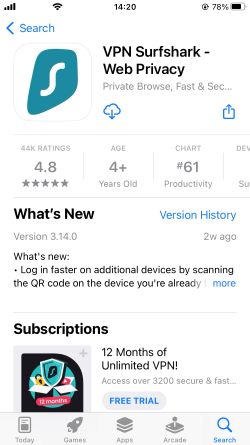
Download an ad blocker that can block Spotify ads. We recommend Surfshark (CleanWeb)
-
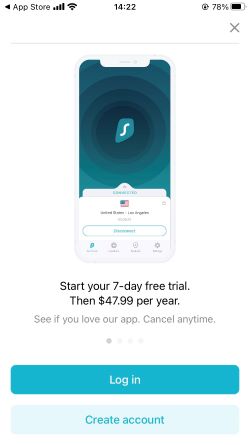
Log in to the app or create an account
-
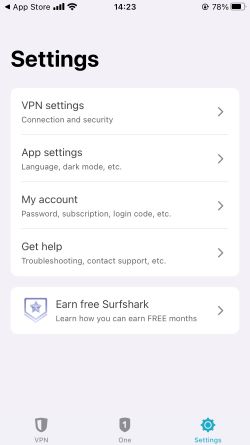
Go to settings, and click on VPN settings
-
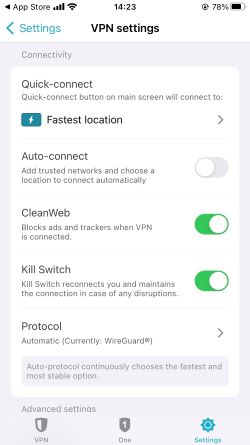
Enable CleanWeb
-
Go back and click Quick Connect to the closest server (For CleanWeb to work, you have to connect to the VPN server)
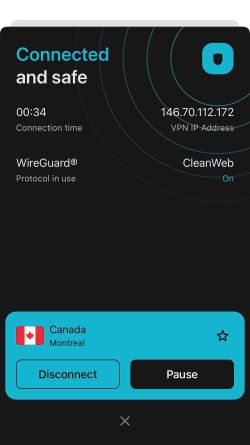
- Launch Spotify and enjoy ad-free music!
How does Spotify Advertising work?
Spotify platform generates revenue by serving ads to its free users. Spotify ads work by displaying audio, video, or display ads to users during breaks between songs or while browsing playlists.
There are different types of Spotify ads, including audio ads, video ads, and display ads. Audio ads are typically 15-30 seconds long and are played in between songs. Video ads can be up to 30 seconds long and play when a user opens the app. Display ads appear on the app's screen while the user is browsing.
Spotify uses various targeting methods to serve ads to its users. One of the most common methods is demographic targeting, where ads are served to users based on their age, gender, and location. Spotify also uses behavioral targeting, where ads are served based on a user's listening habits and preferences.
Additionally, advertisers can target users based on their interests, such as music genre, playlist, and activity type. Overall, Spotify's ad platform offers a wide range of options for advertisers to reach their target audience.
Using Spotify on the browser is much more pleasant than using a free version of the app on the phone, as in the browser, you can choose whichever playlist you want, there’s no shuffle forced as it is on the Android free app. The free version of the web browser also seems to have fewer ads.
Is Spotify Premium worth it?
Yes, Spotify Premium is definitely worth it if you're someone who listens to a lot of music and wants an uninterrupted experience. With a premium subscription, you get access to high-quality audio, the ability to download music for offline listening, and unlimited skips on playlists and albums.
Additionally, you can access exclusive content such as podcasts and live sessions. The premium plan also allows you to create and share playlists, which is great if you're someone who enjoys discovering new music and sharing it with friends.
On the other hand, if you're someone who doesn't mind ads and is looking to save money, an ad blocker can be a viable alternative. Ad blockers are software that blocks ads from appearing on websites and apps, including Spotify. With an ad blocker, you can listen to music without any interruptions, and you can also benefit from other perks such as VPN and malware detection.
At the end of the day, it’s up to you whether you want to upgrade to Spotify Premium or just use an ad blocker to enjoy an ad-free experience. It’s worth noting that some ad blocker monthly subscription plans start from $2.05, while Spotify Premium starts at $9.99/month. With a quality ad blocker and its additional features, you can definitely save a buck and avoid those pesky Spotify ads.
Wrapping up
Ad-blockers have become increasingly popular among Spotify users who want to enjoy uninterrupted listening sessions. While there are numerous ad blockers available, it's important to choose one that is effective, reliable, and easy to use.
However, after considering the features and user-friendliness of each ad blocker, we highly recommend Surfshark CleanWeb as the top provider for blocking Spotify ads. CleanWeb is a powerful ad-blocker feature that not only blocks ads on Spotify but also on other streaming platforms and websites. It is easy to use and comes with a variety of features, including protection against malware and phishing attempts. All in all, Surfshark CleanWeb is a reliable and effective ad-blocker that offers excellent value for money.
More Ad blocker guides from Cybernews
How to block Spotify ads in 2026: stream music ad-freeHow to block Hulu ads in 2026: remove ads from streamingHow to block ads on Android in 2026: secure your Android from online threats
FAQ
Can you block ads on Spotify?
Yes, you can block ads on Spotify. This can be done by getting an ad blocker, which will block audio and display ads. We would recommend getting a reliable and stable Spotify ad blocker like Surfshark CleanWeb, which will ensure your streaming will be ad-free, enhance your device’s security, and hope your IP address along with the online activity.
Is there an ad blocker extension for Spotify?
While there’s no official ad blocker extension for Spotify, some ad blocker extensions can remove audio ads on Spotify's web player, such as Total Adblock.
Is blocking Spotify ads illegal?
No, blocking Spotify ads using third-party ad-blockers is not illegal, but it is against Spotify's terms of service. Users who violate the terms of service may have their accounts suspended or terminated. Additionally, using ad-blockers may negatively impact the revenue of content creators and the overall sustainability of the platform.
What apps mute Spotify ads?
There are numerous apps that can lower the volume or mute Spotify ads. Some of those apps are Mutify (for Android users), Spotify Ad Silencer (for Google Chrome users), and more. Using an app to mute Spotify ads is an alternative way to avoid interruption and still support artists on a free version of Spotify.
How can I get Spotify without ads?
There are several ways you can get Spotify without ads. You can either get a Spotify Premium subscription, which will allow you to listen to music uninterruptedly and ad-free, or install an ad blocker, which is going to block ads completely – our top pick is Surfshark CleanWeb.