ClamXAV review 2025
Backed by leading cybersecurity experts and investigative journalists, we deliver independent, real-world antivirus testing and analysis, guaranteeing objective evaluations without undue influence or bias from outside parties.
Our transparent and consistent methodologies ensure objective, up-to-date reviews, empowering readers to make well-informed decisions.
Learn more
ClamXAV is a simple but reliable antivirus service for Mac that’s based on the open-source ClamAV. It improves upon its predecessor by offering an easy-to-use graphical user interface, making it more suitable for beginners and casual users who are unfamiliar with the command line interface.
However, does it come with anything else that would make it appealing for security-conscious Mac users? And are its malware detection features actually effective? The Cybernews research team and I conducted a thorough ClamXAV review to find out. We evaluated its scanning capabilities, pricing options, ease of use, and other crucial antivirus areas.

Overall, it showed excellent malware detection abilities, but the lack of bonus features underwhelmed me. For example, ClamXAV doesn’t offer tools to protect your online activities from phishing attacks and ransomware. This is a bit disappointing considering the provider’s price, which is why I suggest other, more comprehensive antivirus for Mac solutions, such as TotalAV or Norton.
| ⭐ Rating: | |
| 💵 Price: | From $29.95/year |
| ✂️ Free version: | 30-day free trial |
| 🖥️ Platforms: | macOS |
| 🔥 Coupons: | Cybernews antivirus coupons |
ClamXAV pros and cons
How much does ClamXAV cost?
ClamXAV is a reasonably priced antivirus service that starts at $29.95/year, although students can get a 30% discount. There’s also a plan for business users, which is priced similarly, but gets cheaper the more licenses you buy. The exact details are available on the provider’s website. For now, a quick introduction to ClamXAV’s pricing options:
| Plan name | Devices | Pricing | Duration |
| ClamXAV for Home Users | 3 | From $29.95/year | 1-2 years |
| ClamXAV Family Pack | 9 | From $59.95/year | 1-2 years |
| ClamXAV for Business and Teams | 1-150+ | From $29.95/year | 1 year |
| ClamXAV for Students | 1 | From $20.95/year | 1 year |
As you can see, the plan for Home Users is ClamXAV’s base tier, which starts at $29.95/year and will protect up to 3 macOS devices. You can also pick a two-year plan and pay $54.95 every two years, which will save you around $5. The overall price is similar to Norton Antivirus, but you can find lower providers, too, such as TotalAV and Bitdefender.
If you’re a student, you can get a 30% discount and subscribe for only $20.95/year. There’s no two-year plan, and the plan supports only one device, which makes sense since students usually have just one device.
Then there’s the Family Pack, which can protect up to 9 devices for $59.95/year or $114.95 every 2 years. It’s twice as expensive as the base tier, but the device limit increase is more substantial. However, I’m not sure if there are a lot of families that own that many Mac devices.
You can evaluate ClamXAV before subscribing using the 30-day free trial. It doesn’t have any limitations or credit card requirements, making it an excellent option to see if the service meets your expectations. Once you’re ready to commit, you can pay using a credit card, PayPal, Google Pay, or Amazon Pay.
Unfortunately, the ClamXAV website doesn’t overtly mention any money-back guarantees. A glance at the FastSpring Terms of Sale (ClamXAV’s payment processor) shows that all orders are final, non-cancelable, and non-refundable.
Meanwhile, the provider’s Terms of Service say that refunds are evaluated on a case-by-case basis, meaning there’s no guarantee that you’ll ever get a full refund. If you do get a refund, you’ll still have to pay a minimum processing fee of 15% of the subscription cost, which I haven’t seen with other antivirus providers.
Getting started with ClamXAV
Getting started with ClamXAV is pretty straightforward and the overall process is similar to installing any other software on macOS.
The first step is downloading the installer from ClamXAV’s downloads page. Once downloaded, I had to run the .pkg installation file and proceed with the installation process. It was mostly a series of clicking the Continue button before reaching the Install button. At that point, I had to enter my laptop’s password so the installation could be finalized.
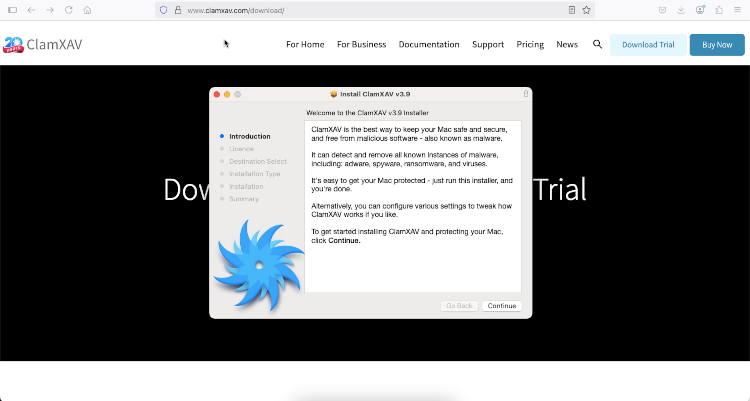
Once installation was complete, I could open the ClamXAV app and sign in. I had to choose whether I wanted to claim a free trial, subscribe to ClamXAV, or log in with an already active subscription. After that, I also had to wait for the malware database to update before I could finally start using the app.
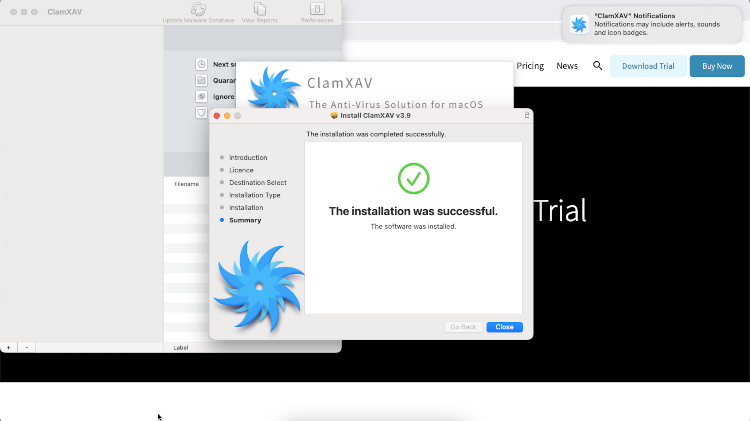
The service doesn’t offer any extensive explainers or guides when opening the app for the first time. Personally, I didn’t feel like that was necessary anyway since the ClamXAV user interface is simple yet intuitive. There aren’t that many features to confuse newcomers and all the primary features are readily available in the main menu.
Independent lab test results
Independent antivirus labs like AV-TEST and AV-Comparatives are an excellent way to determine whether an antivirus program you’re considering is actually effective. These websites conduct thorough evaluations of popular antivirus services and rank them in key areas. They’re also an integral part of our antivirus evaluation process since it allows us to see whether our performance test results align with other antivirus testers.
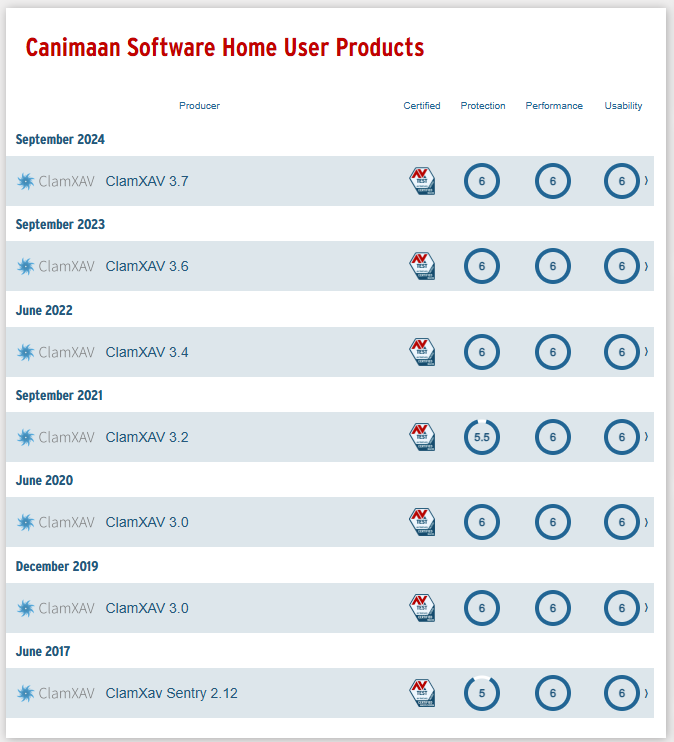
ClamXAV was tested a few times by AV-TEST and it delivered outstanding results in most cases. In fact, the last three evaluations garnered top scores in all three categories (protection, performance, and usability).
Unfortunately, the antivirus wasn’t evaluated in 2025 (as of August), which is concerning since most industry-leading antivirus services are evaluated multiple times per year. After all, it’s crucial to evaluate antivirus performance periodically to ensure it’s effective against the latest malware threats.
Another disappointment is that ClamXAV isn’t included in the latest AV-Comparatives Mac Security Test and Review 2025, which covers well-known antivirus products like Avast and Bitdefender. In fact, I couldn’t find any previous AV-Comparatives tests that would thoroughly evaluate ClamXAV. This isn’t great since it makes it a bit more difficult to confidently say that ClamXAV is entirely effective. After all, we can only depend on AV-TEST’s findings as an independent source.
Hands-on with ClamXAV
The Cybernews research team conducted in-house malware performance tests with ClamXAV to evaluate its cybersecurity capabilities. We separately evaluated its core features to check for any weaknesses or standout strengths.
Sadly, since ClamXAV doesn’t include any phishing or ransomware protection features, we couldn’t test its effectiveness in these areas.
Malware detection test
We tested ClamXAV’s malware detection using its various scanning and protection features. All tools were tested using 10 malware samples from MalwareBazaar specifically for macOS devices with .macho and .sh file extensions. The files were placed in the Downloads folder.
The testing process began with the Quick Scan, which is a common inclusion in many antivirus services. As expected, the scan was indeed quick and elapsed only 10 seconds. However, the Quick Scan didn’t find any of the 10 malware samples planted on the device, which is very disappointing. I don’t expect quick scans to work perfectly, but this time it was entirely ineffective.
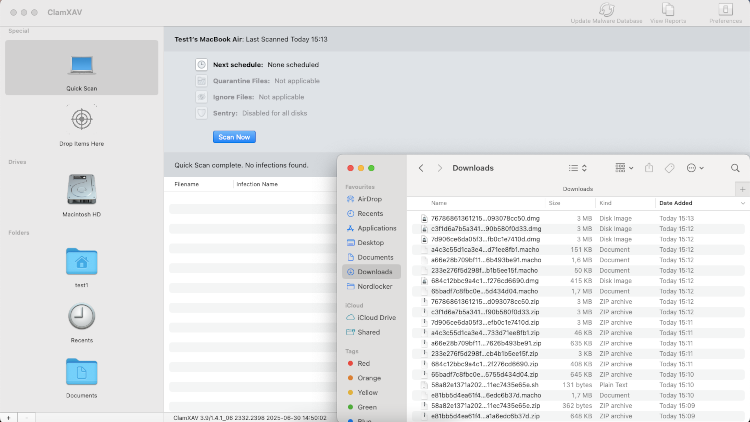
Next, we had to test the Drive Scan to see whether it’s any better than the Quick Scan. It took 1 hour to thoroughly scan the device and, luckily, the Drive Scan found all 10 of the malware samples that were planted. Additionally, once the malicious software was detected, ClamXAV automatically quarantined them and gave us the option to either restore or delete them.
Then it was time to test ClamXAV’s real-time protection, which is called Sentry. We tested it by enabling it and then extracting the malware samples from their zipped formats. The research team and I were surprised by how quickly the antivirus detected the newly-unzipped malware samples and dealt with them. Sentry found all 10 malware samples almost immediately.

Lastly, we have the unique Drop Items Here feature, which, as the name suggests, manually scans files you choose. We tested it with 10 malware samples and the feature successfully labeled all of them as malware in only 5 seconds. Overall, it’s clear that ClamXAV is more than capable of detecting macOS malware reliably.
XAV Command Line Tool
Choosing ClamXAV’s Business plan unlocks a few extra features over the regular Home User option.
One such perk is the XAV Command Line Tool, which is a command line interface for performing many of ClamXAV’s functions conveniently from one place. Naturally, it’s not the most beginner-friendly feature, but it’s a great way to do everything quickly once you get used to it.
The complete list of commands is available on ClamXAV’s documentation page. Some of the easiest commands from the list are for updating the malware database and performing a quick scan. However, you can also do more complicated tasks, such as submitting diagnostics reports to the customer support team. Overall, it’s a great addition for power users who want to automate certain tasks or make things easier for themselves using custom-made scripts.
Xenia Management Console
The Xenia Management Console is ClamXAV’s solution for enterprise management. It’s the software that controls your organization’s entire device fleet that’s protected by multiple ClamXAV licenses. As you can imagine, it allows administrators to monitor an organization’s security status from a centralized dashboard and perform certain tasks remotely.
The home screen is the dashboard, where you can see the statistics of the entire device fleet’s security status. It shows the total number of devices under your supervision and how many are working correctly or require your attention. The software can handle minor security issues automatically, but you should be ready to take action for more serious breaches.
When necessary, you can review device lists by category and see which particular devices are in each category. Then, you can zero-in on any specific device from that category and perform various actions, such as review scan results, database updates, configure client settings, and more.
Impact on PC performance
Our numerous tests with ClamXAV showed that its Drive Scan is the most resource-intensive tool in its arsenal. This isn’t surprising since it’s the most thorough device scanning feature available. As such, we monitored our device’s resource usage while the Drive Scan was doing its thing.
Additionally, we did the same with Quick Scan for comparison’s sake. We performed these tests on a MacBook Air running macOS Monterey (Version 12.7.5) with 8GB of RAM, 256GB of storage, and a 1,8GHz Dual-Core Intel Core i5 processor.
During the Drive Scan, the ClamXAV and clamscan processes on our device needed around 246MB of RAM. Meanwhile, the CPU usage fluctuated between 15% and 100%. The RAM allocation is pretty low, but the CPU usage reaching 100% means your laptop will be unusable while the antivirus is scanning.
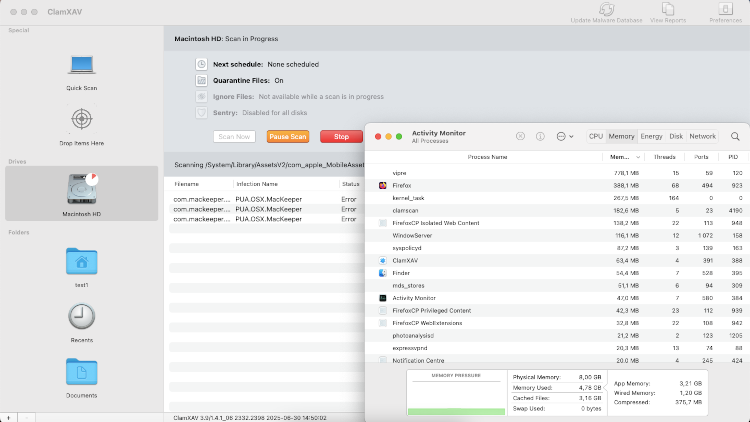
As expected, the Quick Scan didn’t need as many resources as the Drive Scan. While it was working, the app only needed 60MB of RAM, and CPU usage was just between 2% and 5%. Interestingly, we had practically the same resource usage while the ClamXAV app was idle, which makes me wonder whether the Quick Scan is even trying.
Verdict: excellent malware detection and not much else
Internal testing showed that ClamXAV offers excellent scanning capabilities and will reliably detect malware, except for its Quick Scan. Independent labs also rank this antivirus highly, but it isn’t evaluated as frequently as more popular antivirus solutions like TotalAV and Norton.
Crucially, ClamXAV doesn’t offer much else beyond malware detection, making it rather one dimensional. Personally, I think Mac users will benefit much more from web protection features that block malicious websites, ads, and trackers. After all, macOS is well protected from malware threats by default, meaning additional security services should grant other benefits. For example, you should consider antivirus software that comes with a VPN or an ad blocker to enhance your web browsing experience.
FAQ
Can I trust ClamXAV?
Yes, ClamXAV is a trustworthy antivirus service from the UK. It is developed by Canimaan Software Ltd and the software showed excellent malware detection results during our in-house tests. Independent labs also give the provider top scores regarding protection.
Is ClamXAV better than Norton?
No, ClamXAV isn’t better than Norton antivirus. The two providers cost roughly the same, but Norton includes more features to provide well-rounded online security. For example, it comes with a password manager and cloud storage on the base tier.
Is ClamXAV worth the money?
No, ClamXAV is not worth the money because it doesn’t include any substantial extra features. It offers solid malware protection for Mac devices, but nothing to protect you from malicious websites distributing malware, ransomware, and phishing attacks, all of which are a considerable threat even for macOS.