Malwarebytes review 2026
Backed by leading cybersecurity experts and investigative journalists, we deliver independent, real-world antivirus testing and analysis, guaranteeing objective evaluations without undue influence or bias from outside parties.
Our transparent and consistent methodologies ensure objective, up-to-date reviews, empowering readers to make well-informed decisions.
Learn more

Malwarebytes is one of the most recognized antivirus names in 2026, known for its lightweight design and strong focus on detecting and removing malware. The free version works mainly as an on-demand scanner, while the premium plans add real-time protection, exploit prevention, and web protection features for more complete coverage.
Our latest in-house testing at Cybernews showed mixed results, raising questions about whether Malwarebytes offers enough protection for everyday users. In this Malwarebytes review, I explore its real-world performance, features, and value to help you decide if it’s still a good option in 2026 for your cybersecurity needs.




Our team of researchers thoroughly tests antivirus software following a well-established testing process. In unison, our experts combine in-house and independent testing lab findings with first-hand experience to help you make informed decisions about each product. Learn how we test antivirus software.
Malwarebytes pricing overview
Malwarebytes antivirus offers four plans for individual use: Free, Standard, Plus, and Ultimate. The starting price for Malwarebytes Premium Standart plan is $26.99/year for 1 device, which is quite expensive compared to the prices of other top antivirus providers for the first year.
If you opt for more devices (up to 20), the total subscription price will increase significantly.
For comparison, you can get an annual Bitdefender plan for only $12.99/year, and Norton 360 for $29.99 for the first year. However, after the first year, these prices will also increase, so if you decide to stick with Malwarebytes, it will be cheaper in the long term.
| Plan | Starting price | Max devices | Best for |
| Free | $0.00 | 1 | Scanning and removing malware, but no real-time protection |
| Standard | From $26.99/year | 20 | Full antivirus protection with real-time security and safe browsing |
| Plus | From $47.99/year | 20 | Full antivirus protection plus an unlimited VPN for secure, private browsing |
| Ultimate | From $139.99/year | 20 | Antivirus, VPN, and identity protection with credit monitoring, alerts, and data removal tools |
Malwarebytes Standard plan offers real-time malware protection. It provides security tools such as daily threat scans and real-time safeguards for 1 device. Meanwhile, the Malwarebytes Plus plan is a slight upgrade – it offers everything from the Standard plan but also adds a VPN for $47.99.
The Ultimate plan costs $139.99/year, and combines all core security and VPN features with identity protection, credit monitoring, and dark web alerts. It also adds a personal data removal service and recovery support. Both plans come with a whopping 60-day money-back guarantee, so you get plenty of time to test the service yourself.
How good is the Malwarebytes Free version?
Malwarebytes Free offers a basic level of protection – it can scan and remove existing threats. This fact makes it one of the 8 best free antivirus solutions and a good option if your computer is infected. Also, it has a free Malwarebytes Browser Guard add-on, which helps block ads, scams, and tracking when browsing.
However, unlike its paid versions, the Malwarebytes free plan lacks continuous, real-time antivirus protection. This means you must run manual scans periodically to keep your device secure.
Malwarebytes antivirus performance
To evaluate Malwarebytes overall performance, I tested how quickly it completed scans and how much impact it had on system resources. I also compared its results against Bitdefender and Norton using the same Windows 11 virtual machine setup.
Real-time protection
This is a feature that is only available with the Malwarebytes Premium Security plans – and it’s quite important, too.
Real-time protection is a background process that prevents various online threats (like viruses, malware, and ransomware) from entering your device. It uses minimal system resources and has virtually no effect on CPU usage.
The real-time protection option of Malwarebytes antivirus includes Web Protection (that blocks infected websites), Malware and PUP Protection, Ransomware Protection, and Exploit Protection.
Does Malwarebytes slow down your device?
While researching how well Malwarebytes detects malware, our researchers and I also monitored how it affects the performance of our testing device.
During idle use, Malwarebytes consumed between 1% and 12% of CPU power, while RAM usage stayed around 38%. However, resource usage became more noticeable during full scans and real-time protection activity. CPU usage fluctuated between 28% and 100% during full scans and between 6% and 99% while real-time protection was active. Despite these spikes, RAM consumption remained relatively stable, ranging from 27% to 34%.
Compared to Norton and Bitdefender, Malwarebytes showed sharper CPU spikes during intensive tasks, resulting in slightly lower system stability under heavy use. However, it maintained lower RAM usage than both competitors.
I also measured the boot-time impact on a Windows 11 VM. With Malwarebytes installed, the average startup time increased from 47ms to 65ms, making boot times 38.03% slower compared to a device without antivirus software.
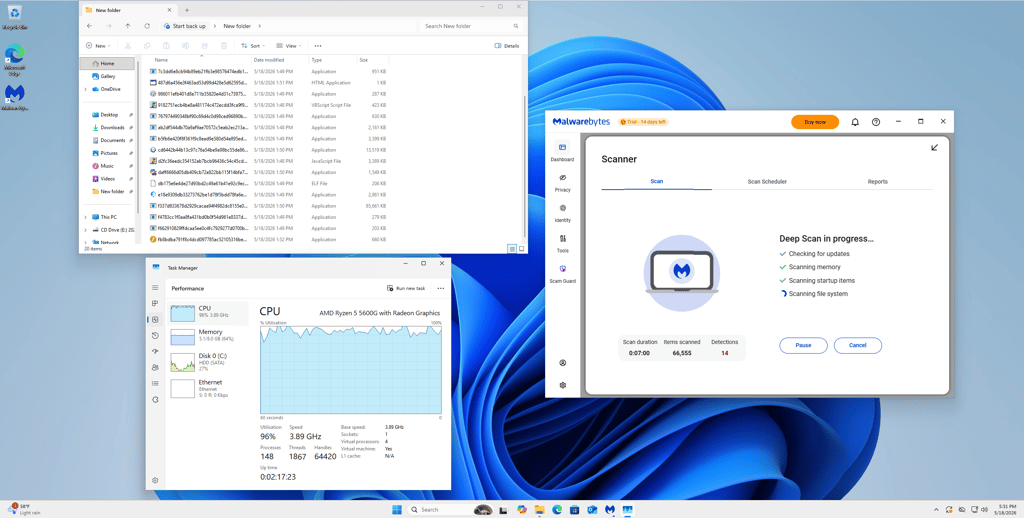
Overall, Malwarebytes had a slight impact on my PC’s performance, especially during scans and real-time protection activity. However, RAM usage remained stable throughout testing.
How fast are scans?
Malwarebytes delivered faster scan speeds than Bitdefender and Norton. The quick scan finished in just 1min 5s, while the full system scan took 39min 22s.
For comparison, Norton’s quick scan took 11min 43s, while Bitdefender completed the same task in 4min 49s. Full scans were longer with both competitors, with Norton and Bitdefender taking over 1h.
In-house tests: does Malwarebytes actually protect you?
To verify the accuracy of independent lab test results, I conducted in-house tests with our research team. This antivirus testing took considerable time, especially in curating and gathering malware samples. Therefore, I list our detailed findings in this section.
We performed all tests on a Windows 11 Home x64 VirtualBox virtual machine, running on an AMD Ryzen 5 5600G host processor. The VM was configured with 4 virtual CPUs and 8 GB of RAM.
Malware protection test
For malware detection, I tested Malwarebytes using 150 active malware samples from bazaar.abuse.ch. The antivirus was tasked with running a full system scan using its Custom Scan feature. Malwarebytes detected 59.33% of the tested samples during the full scan. Compared to previous test results, detection rates remained relatively similar, showing a slight improvement over earlier results.
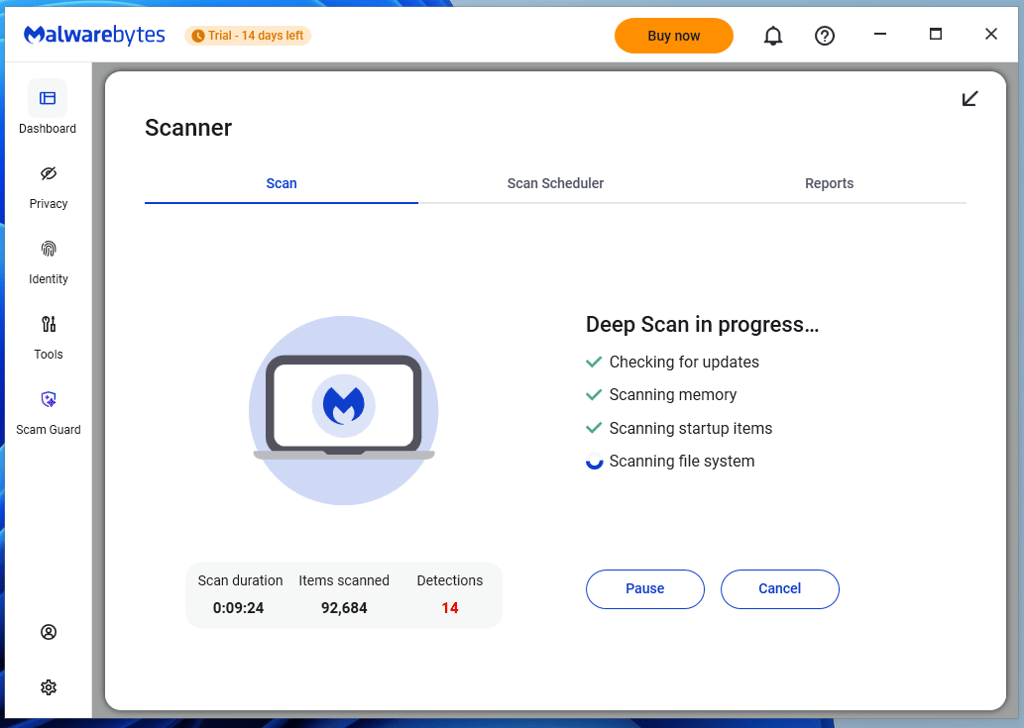
While Malwarebytes’ full scan picked up just over half of the malicious files, its real-time protection failed to catch any of the planted malware samples, resulting in a 0% real-time detection rate. This indicates that this provider’s real-time threat detection needs further refinement to match the performance of its competitors.
Overall, Malwarebytes delivered weaker malware detection results than Bitdefender, which achieved an 89.33% full-scan detection rate, and Norton, which reached 70.67%.
Phishing protection test
For phishing protection tests, I gathered phishing sites from phishtank.org and used the Malwarebytes Browser Guard extension on Mozilla Firefox. I tried to access 10 newly reported malicious links of varying threat types, including payment fraud and credential theft sites. Malwarebytes successfully blocked 4 out of 10 phishing URLs, giving it a 40% success rate.
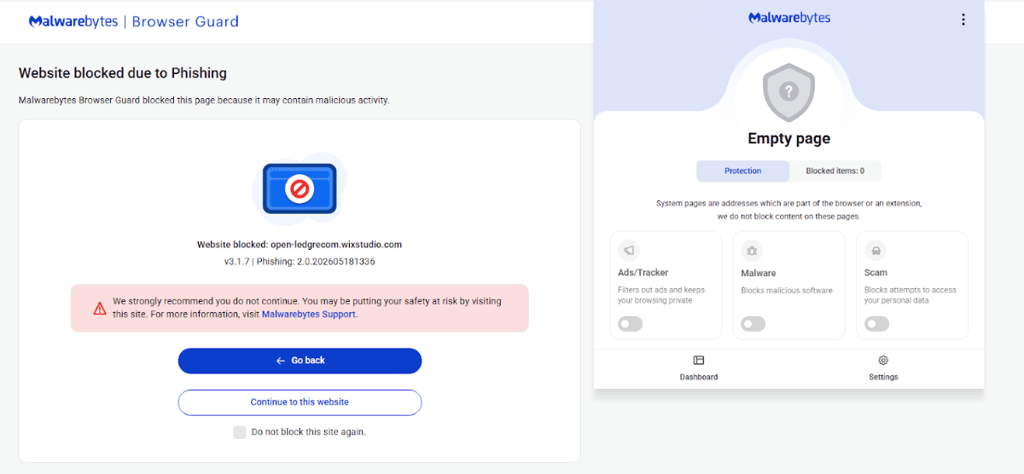
Compared to previous testing, these results were noticeably lower and placed Malwarebytes behind both Norton and Bitdefender in web protection performance. For comparison, Norton blocked 60% of phishing URLs and 100% of malware URLs, while Bitdefender blocked 80% of phishing URLs and 100% of malware URLs.
While this result shows that Malwarebytes can effectively prevent some phishing attacks, more than half of the links still loaded successfully, showing inconsistent protection.
Real-time protection results
During real-time protection testing, Malwarebytes failed to detect the planted malware samples used in our test environment, resulting in a 0% real-time malware detection rate.
Its ability to proactively block threats was also noticeably weaker than competing antivirus providers, with Norton achieving a 60.67% real-time malware detection rate, while Bitdefender reached 80%.
Malware type detection test (NEW)
To understand how Malwarebytes handles different kinds of threats, we also tested it against 20 recent malware samples. The samples included botnets, information stealers, RATs, cryptocurrency miners, and malware loaders. We placed the samples on a Windows 11 virtual machine and then ran a full system scan.
Malwarebytes took 28 minutes and 34 seconds to scan over 333,000 items and detected 13 of the 20 malware samples. It was most effective against cryptocurrency miners, malware loaders, and remote access malware, and detected almost every sample in those categories. Its weakest results came with botnet malware, where it missed both samples, and password-stealing malware, where it failed to detect three of the nine samples we tested.
Independent Malwarebytes testing
Before you download any antivirus software, it is a good idea to not only read its reviews but also check its independent testing results. After all, you don’t want your computer to become the test subject – that’s what testing labs are for. Malwarebytes first decided to participate in AV-TEST's Windows tests for home users back in 2018, and its results have been improving ever since.

The latest October 2023 Malwarebytes test results aren't perfect but still good. It garnered 5.5 points in the protection and performance categories, while usability reached the maximum of 6 points. If you've been keeping track, you'll notice that the scores dropped compared to previous tests, and Malwarebytes isn't considered a top product by AV-TEST. The latest tested 4.6 version boasts 99.9% widespread malware detection and 99.2% zero-day threat detection.
Moreover, Malwarebytes joined AV-Comparatives testing in 2021. The independent experts conducted a range of tests on it, including real-world protection, malware protection, performance, false alarm, and business security tests, as well as a mobile security review.
Real-world protection tests include using all security-related features on the web. The latest February–March 2026 tests show that Malwarebytes Premium can successfully block 100% of threats.
That said, it also produced 20 false positives, which is one of the highest results among all tested providers. This means that Malwarebytes is highly effective at blocking real threats, but it can flag legitimate files as malicious.
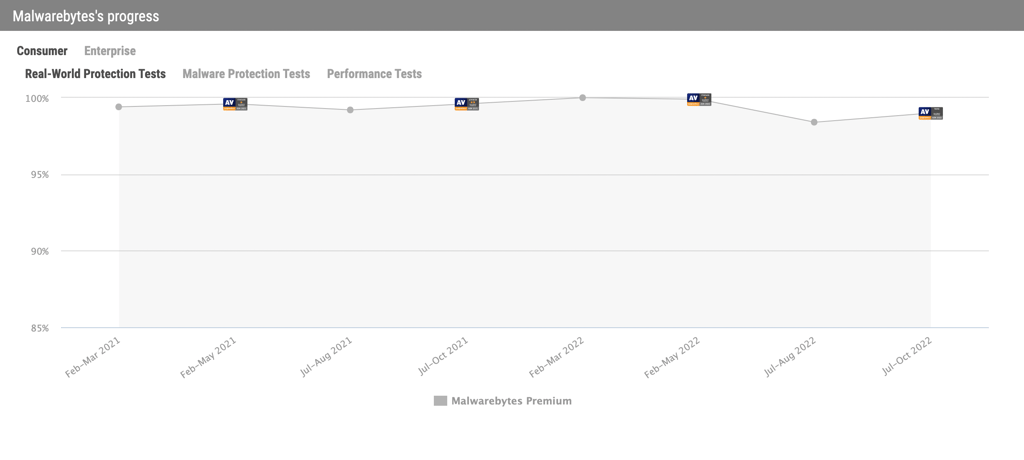
Malwarebytes is also regularly tested by SE Labs, a respected UK-based independent lab. According to its most recent report from Q1 2026 featuring Malwarebytes, the provider achieved a protection accuracy rating of 97% and a legitimate accuracy rating of 98%, resulting in an overall performance rating of 97%.
Malwarebytes security features
Even though Malwarebytes offers quite a few useful features, it is not as feature-rich as top antivirus providers, such as Norton, Bitdefender, Avast, and McAfee. For example, you won’t find Parental Controls or a password manager in your Malwarebytes antivirus package. However, you won’t miss any crucial features like virus protection or file quarantine. In other words, Malwarebytes serves as a decent, no-nonsense security software product for basic needs.
| Malwarebytes feature | What it does |
| Real-time protection | Catches threats in real time before they enter your system |
| Exploit protection | Defends against attacks that target software vulnerabilities |
| Four system scan modes | Provides 4 scan modes: Quick Scan and Threat Scan, which vary in depth, Custom Scan, which allows users to specify scan targets, and Deep Scan, which checks for threats in your computer system locations |
| Identity Theft Protection (included in Ultimate plans) | Monitors personal data across the web and sends alerts if your information appears in data breaches or on dark web sources |
| AI-powered Malware.AI detection | Uses advanced behavior-based machine learning to spot new and emerging threats, including zero-day malware |
| Privacy VPN (included in Plus and Ultimate plans) | Encrypts your internet connection to secure sensitive data, especially on public Wi-Fi networks |
Exploit protection
Even though it's included in the real-time protection list, the Exploit Protection feature deserves its own section. That’s because this is an advanced security technique that deals with exploit attacks against security flaws and software vulnerabilities in applications.
These kinds of attacks are much sneakier than regular viruses, as they only require you to open an infected page or a file. Luckily, Malwarebytes Premium Security has you covered – it shields vulnerable applications so the malicious code can’t exploit their security issues.
Four system scan modes
If you had Malwarebytes antivirus software on your Windows computer a couple of years ago and decided to reinstall it, don’t be surprised by the changes in scan mode. Malwarebytes Version 4 had three types of scans: Quick, Threat, and Custom.
However, Malwarebytes Version 5 made some changes. Now, there are four system scan modes: Quick Scan, Custom Scan, Threat Scan, and Deep Scan. It seems that Malwarebytes simply adapted to the market and adjusted some of its scan titles to more familiar ones.
Keep in mind that Malwarebytes can only run one type of scan at a time. For example, you cannot do a system scan and check a specific file for viruses at the same time. So, schedule your on-demand scans accordingly.

Here’s a breakdown of how each scan differs:
- Quick Scan. Lasting up to a minute, Malwarebytes’ Quick Scan mode scans your device’s memory and startup objects for active threats.
- Threat Scan. If you have Malwarebytes Premium, this scan will occur daily. It will scan memory, startup, registry, and file system objects and perform a heuristic analysis for better protection in the future. Keep in mind that this is not the same thing as a full scan – it doesn’t cover every single corner of your system.
- Custom Scan. If needed, the Custom Scan can check your whole system. As a result, it may last a bit longer: the scan’s duration is strongly related to the number and size of files on your computer. The more there is, the longer it takes to scan everything. You can even scan for rootkits, which are among the most difficult malware types to detect.
- Deep Scan. It inspects all files, locations, and programs on your system, including archives and hidden areas. It is designed to find deeply embedded threats that lighter scans might overlook, though it takes more time to complete.
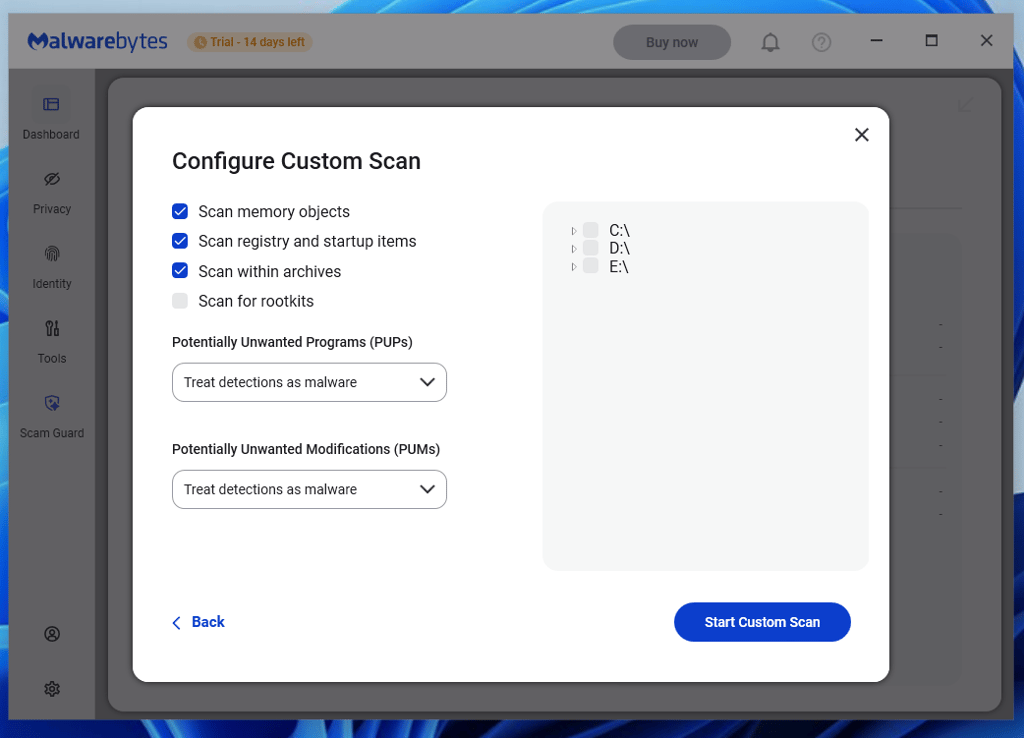
I like that no matter which type of scan you select, Malwarebytes performs it relatively quickly. However, note that during our full system scan, CPU usage fluctuated between 28% and 100%, with RAM usage remaining at 28% to 34%, which shows a moderate system impact during heavier scanning.
On the other hand, I’m a bit disappointed that the new Deep Scan mode is only available on Windows computers. This is a downside, as it’s the closest you can get to a full scan feature with Malwarebytes. Fortunately, other devices receive all 3 remaining scanning options.
However, those who prefer the DIY approach can set a full scan themselves. You can modify how often the app updates its list of known malware, what the default scan should look for, and whether you want to use it as a primary or secondary antivirus. This extends to the actions that will be taken if or when PUP or PUM is detected. So, it can be tailored to your unique preferences.
Identity Theft Protection
Whether you’re worried about personal information leaking onto the dark web or keeping an eye on credit score changes, this feature has you covered. It offers not only real-time identity, credit, and social media monitoring but also dark web monitoring. You’ll receive instant alerts if your data is being traded or leaked, plus live support to guide you through recovery if you ever encounter trouble.
There’s also solid insurance coverage (up to $2 million), with options for both individuals and families. This way, it's not just your devices getting protected, but your identity and peace of mind as well.
Malware.AI
I found Malwarebytes’ Malware.AI feature to be impressive. Instead of relying on old-school lists to identify threats, it uses machine learning to detect new types of malware.
Malware.AI scans for unusual behavior and can flag things like trojans, rootkits, and ransomware without waiting for official updates. This helps protect users against 0-day malware. So if something out of the ordinary tries to sneak in, Malwarebytes is ready to catch it before it becomes a problem.
Malwarebytes Privacy VPN
A VPN is all about keeping your online activity private. Whether you’re at home or in a coffee shop, it creates a secure “tunnel” so hackers and snoops can’t see what you’re doing. Malwarebytes’ Privacy VPN is fast enough for everyday browsing, streaming, and downloads, as it uses the industry-leading WireGuard protocol.
Pairing Privacy VPN with Malwarebytes’ other security tools means you get extra layers of protection, giving you more control over both your device and your personal info while you’re online.
Removed features
Malwarebytes has discontinued several tools in recent versions, including:
- Call Protection and SMS features. Malwarebytes removed these features on Android and ChromeOS devices after Google Play changed its call and SMS permission requirements.
- Lifetime subscription. Malwarebytes used to offer a one-time purchase option, granting users unlimited access to its features without annual renewals. However, the company decided to change its pricing strategy to a subscription-based model instead.
- Malwarebytes Endpoint Security. Malwarebytes developed a platform to protect business systems from cyberthreats, including malware, ransomware, and exploits. However, this platform was discontinued in 2021 and has not been updated since then.
Getting started with Malwarebytes
I tested Malwarebytes by installing its apps on various supported devices and subscribing to its Plus plan.
While doing that, I liked the overall setup – it was smooth, and the interface with all its features was easy to use. However, I noticed that the macOS and iOS apps were less feature-rich than their Windows and Android counterparts.
Windows
Like most antivirus programs, Malwarebytes is extremely easy to install. After a few clicks and a couple of minutes, you’re all set. Keep in mind that during the installation process, Malwarebytes will prompt you to install the Browser Guard extension as well.

At first glance, Malwarebytes looks quite simplistic. The dashboard displays the Scanner, Detection History, Real-time Protection, Malwarebytes VPN, and Trusted Advisor features. To find more, you have to dig a bit deeper. For example, to access different virus scans, you have to open the Scanner window and then click on Advanced scans.
However, if you want to have more control over how Malwarebytes functions, you’ll have to go to Settings. To do this, simply click the Settings button in the bottom-left corner of the screen.
For example, you can disable notifications, turn on device alerts, choose from over 10 languages, and even select the interface’s visual theme (light, dark, or system modes).
All in all, I can firmly say that the program’s user interface is really intuitive and easy to navigate – something that I’d expect from a popular brand like this.
macOS
Visually, Malwarebytes’ macOS app looks quite similar to its Windows one. The malware scans are about as fast, so there are no strange performance drops just because the platform is different.
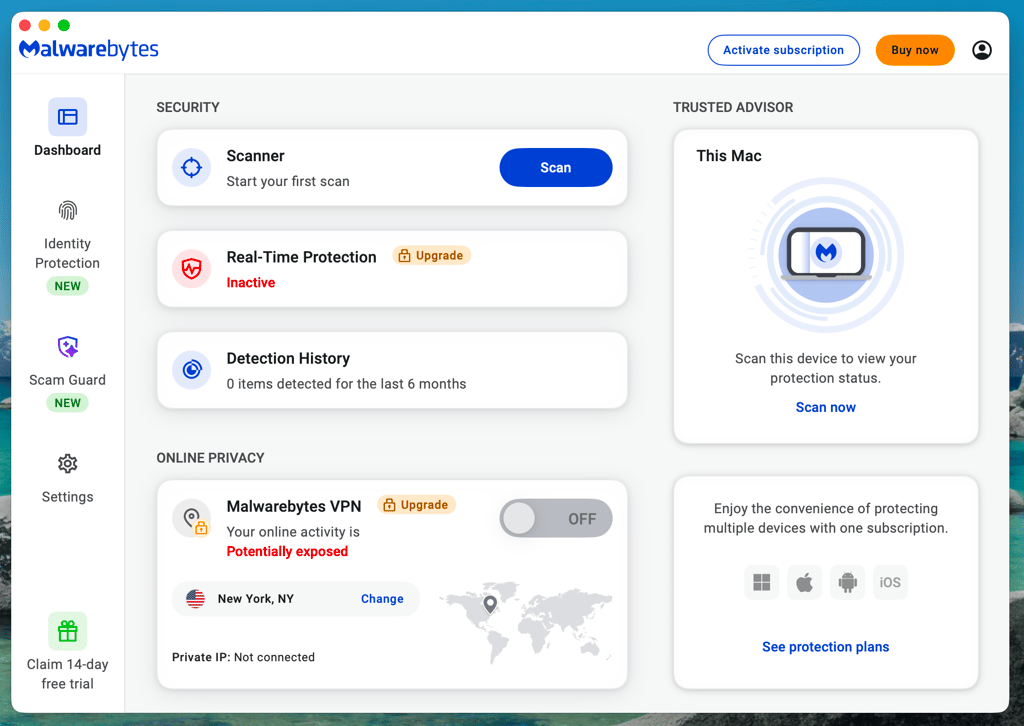
That said, the similarities end there. Apple users once again get a barebones version of what Windows users get. It does feature 3 scan types and other means of malware protection, but that's about it.
The only unique toggle included in the Mac version is the App block, which blocks untrusted apps from running in the background.
| Windows app features | macOS app features | |
| Real-time protection | ✅ Yes | ✅ Yes |
| Exclusive Browser Guard features | ✅ Yes | ❌ No |
| App block | ❌ No | ✅ Yes |
| Intelligent defense | ✅ Yes | ❌ No |
| Brute Force and Tamper Protection | ✅ Yes | ❌ No |
Malwarebytes for mobile
Malwarebytes offers mobile apps for both Android and iOS. Although they look visually the same, the features you get are different.
Android version
Android has fully fledged Malwarebytes scanning. It even informs you that you have Developer Mode and NFC enabled. The Trusted Advisor dashboard also shows Text Protection, Google Play Protect, available Malwarebytes detection database updates, and more. The app generally isn't intrusive and doesn't restrict your usage if you don't grant the app all the permissions it requests.
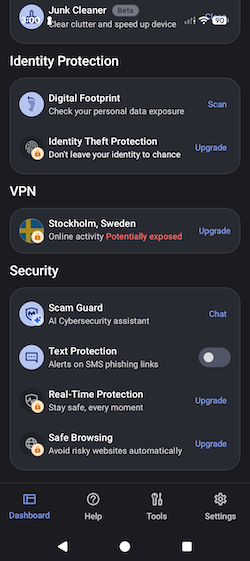
However, it does clearly explain how the permissions will be used and why they are needed. This is something that I'd like to see from more developers.
iOS version
Malwarebytes’ iOS version has protection against malicious URLs, unwanted callers, and text message filtering. Additionally, the provider has a VPN built into the same application. Still, as is often the case with iOS antivirus counterparts, its capabilities are more limited compared to full-fledged desktop antivirus programs.
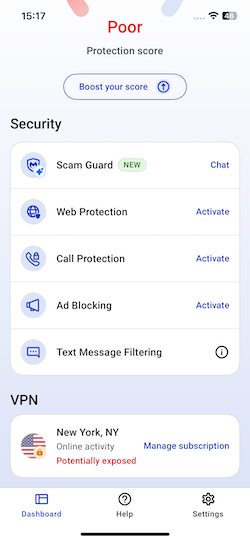
Upon opening the app, users are presented with a dashboard that displays the device's protection score. From there, you can access various features, such as web protection and call protection.
After the initial 7-day free trial, you can opt to continue with the free version, which still provides access to valuable features, including ad blocking in Safari, scam text filtering, and a digital footprint scanner. This way, you get ongoing protection without a subscription.
Customer support
If you encounter any problems while installing or using Malwarebytes, click the Help icon on the dashboard. This will open a window with various links to guides, the community forum, and a chat window.
If you choose to contact support, you will first be greeted by the Malwarebytes AI support agent, who can answer the most common questions. However, if the AI can't solve your problem, you can ask it to connect you with a live agent, who generally reaches you in a minute.
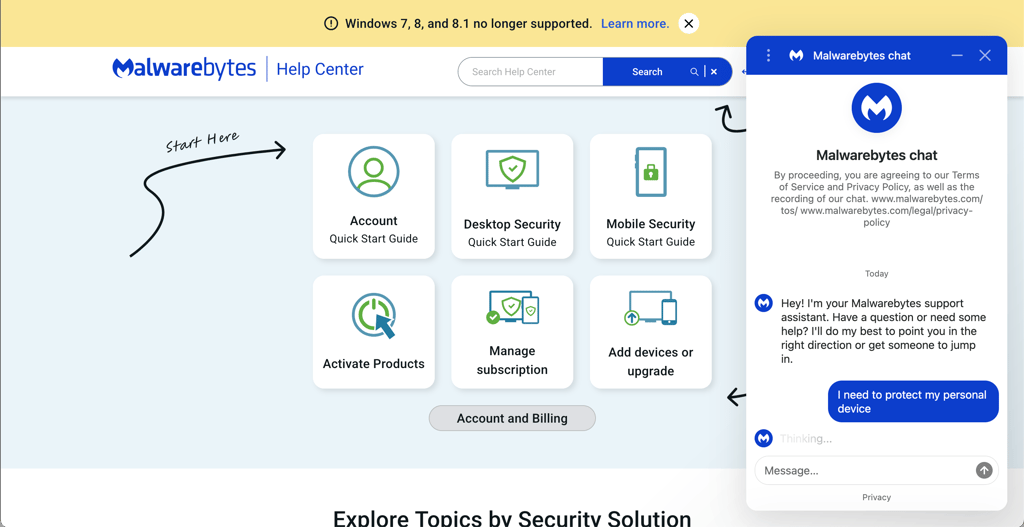
Alternatively, you can contact customer support by logging in to your Malwarebytes account on the website or visiting the My Malwarebytes page.
Video review
If you want to learn about this provider in a video format, check out our Malwarebytes review on YouTube below:
Is Malwarebytes good and worth the money?
Malwarebytes delivers fast scans, a simple user interface, and solid independent lab testing results. It also has useful features like exploit protection, Browser Guard, customizable scans, and a VPN in higher-tier plans, making it a decent option for users who prefer lightweight and straightforward antivirus software.
However, our in-house tests showed that its malware and real-time protection results are still behind top competitors like Bitdefender and Norton. While Malwarebytes handled some threats well and completed scans quickly, its detection consistency was weaker overall.
While I wouldn't recommend relying solely on Malwarebytes to protect your devices, it does offer several useful tools and has a free version. That makes it a good addition when used alongside other antivirus software.
FAQ
Is it worth buying Malwarebytes Premium?
Yes, it’s worth buying a Malwarebytes Premium Security plan, as it offers better overall protection and additional security features. These include real-time protection, ransomware protection, web protection, and many more, while the free version only offers basic malware and spyware detection and removal.
Is Malwarebytes good for Mac?
No, Malwarebytes is not the best antivirus for Mac users. This is because Mac users get only a fraction of what Windows users get. It’s best to choose a more suitable antivirus for Mac.
Is Malwarebytes safe?
Yes, Malwarebytes is safe and reliable. It protects against malware, ransomware, and malicious websites in real time, and can also remove existing infections from your device. While the free version only includes basic scanning, paid plans unlock full real-time protection and additional security tools, such as firewall controls. It’s also worth noting that in 2021, Malwarebytes experienced a cyberattack that exposed some internal emails, but there is no evidence that user data was compromised.