G DATA antivirus review
Backed by leading cybersecurity experts and investigative journalists, we deliver independent, real-world antivirus testing and analysis, guaranteeing objective evaluations without undue influence or bias from outside parties.
Our transparent and consistent methodologies ensure objective, up-to-date reviews, empowering readers to make well-informed decisions.
Learn more
G DATA is a well-established cybersecurity company from Germany that claims to have developed the very first antivirus software in 1987. If true, it means the service has an incredible level of experience and expertise in this area. Therefore, the research team and I had to test this service to determine if such bold claims translate to real-world effectiveness.
Our tests showed that G DATA is highly effective regarding malware detection and comes with several other tools to protect customers. However, some of those extra features, such as the data shredder and password manager, didn’t work during our tests.

There were also a few usability issues that made it less suitable for beginners. Other than that, G DATA is an affordable and reliable antivirus solution for protecting your device. Read the entire review to learn more.
| ⭐ Rating: | |
| 💵 Price: | From $9.95/year |
| ✂️ Free version: | 30-day free trial |
| 🖥️ Platforms: | Windows, macOS, Android, iOS |
| 🔥 Coupons: | Cybernews antivirus coupons |
G DATA pros and cons




Our team of researchers thoroughly tests antivirus software following a well-established testing process. In unison, our experts combine in-house and independent testing lab findings with first-hand experience to help you make informed decisions about each product. Learn how we test antivirus software.
How much does G DATA cost?
G DATA can cost as little as $9.95/year if you choose the Mobile Internet Security plan for one device. However, if you need all-encompassing security, then prices can go up to $49.95/year for the Total Security subscription. The details will vary depending on your chosen plan, how many devices you want to protect, and the subscription duration.
Here’s a table with your possible options:
| Plan name | Devices | Pricing | Duration |
| Mobile Internet Security for Android | 1-5 | From $9.95/year | 1-2 years |
| Mobile Internet Security for iOS | 1-5 | From $9.95/year | 1-2 years |
| Antivirus for Windows | 1-5 | From $29.95/year | 1-2 years |
| Antivirus for Mac | 1-5 | From $39.95/year | 1-2 years |
| Internet Security | 1-5 | From $39.95/year | 1-2 years |
| Total Security | 1-5 | From $49.95/year | 1-2 years |
At first glance, G DATA appears pretty affordable. However, note that the starting prices apply when picking plans for only one device, which can be pretty limiting.
For contrast, TotalAV can protect 3 devices with its cheapest plan, which costs $19.00/year. On the other hand, Bitdefender is priced similarly, starting at $12.99/year while protecting just one device. So, G DATA pricing is pretty standard compared to other leading antivirus software.
On a positive note, G DATA offers a 30-day free trial that doesn’t require a credit card. Simply download the app and activate it on your device. So, you can test the service and decide for yourself whether it’s worth the price.
Getting started with G DATA
Installing G DATA is a pretty straightforward affair, similar to the process with many other antivirus services. There are some minor quirks, but nothing that should catch any experienced user off guard. For this G DATA review, I’ll guide you through the installation process on Windows 11.

When opening the installer, the first thing you must do is pick a preferred language. Unsurprisingly, I went with English since that’s my go-to language when dealing with tech.
The next big decision is choosing between standard and custom installation. Most users will be fine with the standard installation, while the custom option is better-suited for pros. The key difference is that the custom installation allows you to pick which exact features you want to install.
After that, you must activate your G DATA license or pick the free trial version. As mentioned before, the trial lasts 30 days and doesn’t require any credit card information. Still, you must input your name and email address to qualify for the trial.

After a few more moments, the app is done installing, and you’ll get a pop-up screen asking whether you want to restart your device. It’s good practice to do that immediately to avoid issues later. Once everything is done, you can start using G DATA and its features to protect your device.
Independent lab test results
The G DATA website shows a few independent lab test awards highlighting its reliability. However, they were a couple of years out of date, which made me concerned. As such, I had to delve deeper into independent lab data on sites like AV-TEST and AV-Comparatives. Hopefully, G DATA will still be tested regularly by these well-respected labs, allowing potential users to see if this antivirus is still effective in 2026.

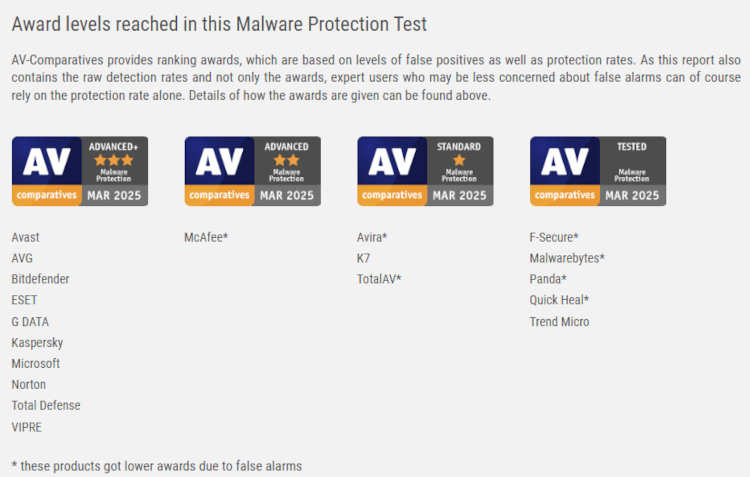
I was happy to find G DATA in the latest AV-Comparatives malware protection test done in March 2025. Not only that, the antivirus software was one of the top performers in this evaluation, earning the Advanced+ award alongside popular services like Avast, Bitdefender, and Norton. I was very impressed with the service’s consistent 99% malware detection rates and only three false positives. Additionally, G DATA is usually present in other AV-Comparatives tests, where it also delivers excellent results.
G DATA is also frequently tested by AV-TEST, which is a good sign. The latest evaluation was done in April 2025, where the antivirus garnered excellent overall scores, although it didn’t get a Top Product certification. More precisely, G DATA garnered 6/6 in protection and performance categories, while usability was 5.5/6. Previous tests show similar results and certification badges, meaning G DATA consistently delivers excellent online protection.

Overall, these independent lab test results show that G DATA is an effective and worthwhile antivirus service. It has consistently delivered excellent results that rival many of the most popular antivirus services on the market.
Hands-on with G DATA
The Cybernews research team and I conducted some of our own antivirus tests on G DATA to evaluate its performance. We prioritized the most vital features that protect users from common cyberthreats on a daily basis.
Below you’ll find detailed descriptions of our experience with the provider’s various security features.
Malware and ransomware detection test
For malware testing, we gathered 50 malicious software samples from bazaar.abuse.ch to be the basis of our evaluation. We put the files in the Downloads folder so the software wouldn’t struggle to find them. Moreover, the files were downloaded onto the device before installing G DATA, so that the software could only detect them once they were installed and a scan was executed.
It’s crucial to note that the research team and I were caught off guard by the lack of clarity regarding G DATA’s scanning features. Apparently, you have to go to the Virus Protection tab and click the Check computer button. This could cause some initial friction for users who are used to the term scanning when dealing with antivirus software.

G DATA elapsed around 24 minutes while scanning the computer, which isn’t too long for a thorough security scan. During this time, the average CPU usage was around 96%, making your device quite unusable while the scan takes place. Meanwhile, the average RAM usage was only 38%. Lastly, the average disk usage was 54%.
The research team and I were very pleased with G DATA because it found all 50 malware samples we planted in the test device. It also found 4 additional malware files in the recycle bin that we had forgotten about, which was a pleasant surprise.
While conducting the scan, G DATA didn’t bombard us with pop-ups or other signs about its progress. Instead, everything was laid out in the scanner window, which is separate from the native app. Once the scan is complete, you can choose what the AV should do with the found malware (quarantine, delete, nothing, etc). So, apart from a few issues when getting started, G DATA performed brilliantly in terms of malware protection.
Phishing test
The phishing test procedure involved manually visiting malicious websites and seeing whether G DATA would react appropriately. We tested the service using 15 malicious URL examples found on URLhaus Abuse.
Additionally, we had to install the service’s browser extension for proper real-time protection while browsing the web. To be precise, G DATA has real-time protection on its app, but it only protects you from threats once they reach your device. Meanwhile, the extension ensures you’re completely protected even when visiting dangerous websites. For this test, we used the Edge extension.

Once again, G DATA was entirely effective in this area and prevented downloads from all 15 malicious URLs. However, the extension blocked only 12/15 downloads, while the desktop antivirus software stopped the remaining 3. The application stopped the malicious download and notified us with a pop-up about the exact threat we were facing. So, that means the desktop app could compensate for where the extension failed.
Overall, G DATA did its job in the phishing test, but we would have liked it if it weren’t necessary to install an additional extension to get phishing protection. Plus, it wasn’t even entirely effective during our test, thus requiring the dedicated app to pick up the slack.
Device control
The device control tool is an interesting feature that allows you to manually configure access rights for various devices. It is extremely customizable, allowing you to adjust it to your specific needs to improve overall security without causing inconvenience.
First, you must enable the device control feature before you can configure the specifics. After that, you can restrict entire device classes by enabling the general rules. If that’s too limiting, you can edit the rules for each specific device. For example, you can set removable media devices to be read only, meaning they can’t alter your device in any way. Meanwhile, you’ll still be able to access their files.

You can go a step further and customize each class by creating user-specific or device-specific rules. Naturally, all of this can get complicated and isn’t even really necessary, but I think some security enthusiasts will appreciate this feature.
Tuner
As the name suggests, the G DATA Tuner can fine-tune your device to run smoothly and efficiently. The tool includes a wide range of settings that allow you to customize it to your liking. You can adjust the tuner to automatically optimize your device at specific times or optimize it manually whenever you need it.

For example, the feature can periodically delete temporary files that aren’t cleaned up after becoming obsolete. It can also limit the number of background updates on various apps, which can inadvertently lead to security issues.
Crucially, G DATA creates recovery data, allowing you to roll back some changes if a particular tune leads to unwanted consequences. So, I highly suggest utilizing this feature since there’s no need to worry about the tuner causing irreparable damage.
Impact on PC performance
We conducted our G DATA tests on a Windows 11 ThinkPad T14s laptop with an AMD Ryzen 5 PRO 7540U processor, a Radeon 740M graphics card, and 16GB of RAM. For safety reasons, the tests were contained on a virtual machine using Oracle VirtualBox.
As mentioned before, G DATA’s overall performance impact on our PC was pretty standard. The scan took around 24 minutes, during which time the CPU was in use pretty heavily. Its average use was 96%, while RAM usage was only 38%. Meanwhile, disk usage was 54%.
The scan time isn’t particularly fast or slow, meaning it shouldn’t distract you too much from your usual PC work. However, the high CPU usage will make the computer unusable for most other tasks. As such, I suggest stepping away from the PC for a cup of coffee while G DATA does its job.

Lastly, it’s vital to note that some of G DATA’s features didn’t work during our tests. For example, the Data Shredder feature was installed as a separate app but didn’t launch when we tried to run it. Moreover, the Password Manager is available as a separate browser extension for Chrome and Internet Explorer, yet we couldn’t find it on the Chrome Web Store. Meanwhile, Internet Explorer was replaced by Edge quite a while ago, so I don’t know why it’s still listed as an option after all these years.
Verdict: strong antivirus lacking extra features
It’s clear that the team behind G DATA has spent its time wisely improving the antivirus software’s security capabilities. The service was highly effective during our in-house security tests, and independent antivirus labs also praise G DATA as a reliable solution against cyberthreats. Moreover, the flexible pricing means you can find a suitable and affordable subscription for your particular needs.
However, for me, G DATA was a letdown in other areas. For example, it lacks VPN and ad-blocking capabilities, which nowadays are essential for daily online security. After all, many other antivirus services like TotalAV and Norton include these perks alongside their antivirus packages. Additionally, some of the service’s extra features didn’t work properly during our tests, further detracting from G DATA’s versatility. That means this antivirus is great for antivirus protection, but not much else.
FAQ
Can I trust G DATA?
Yes, G DATA is a trustworthy antivirus service that’s been around in the industry for over 35 years. The provider is based in Germany and has consistently shown excellent malware protection results on independent lab tests.
Is G DATA better than Norton?
No, G DATA isn’t better than Norton. While both are very effective regarding malware protection, Norton offers a more comprehensive feature package to protect its customers from a wide array of cyberthreats.
Is G DATA worth the money?
Yes, G DATA is worth the money since it's a highly effective and reliable antivirus. Crucially, it offers flexible pricing, meaning you can choose a cheaper subscription for one device or a pricier option if you need to protect multiple gadgets.