Jetpac eSIM review 2026
Our in-house expert researchers and journalists conduct independent, unbiased testing of eSIM services, assessing their real-life effectiveness and usability.
By staying current with industry developments and openly sharing our transparent testing methodologies, we ensure readers receive accurate, up-to-date insights so they can make informed choices about eSIM solutions.
Learn more

Jetpac is a Singapore-based eSIM provider changing how travelers stay connected abroad. Unlike regular SIM cards, eSIMs allow you to activate data instantly without swapping physical cards or searching for local providers.
After testing Jetpac, the experience stood out to me – free airport lounge access through SmartDelay made flight delays far less painful, and its roaming speeds impressed across several countries. With competitive pricing, wide coverage, and strong local telecom partnerships, Jetpac ensures smooth and stress-free travel connectivity.
In this Jetpac eSIM review, I explore its plans, pricing, ease of use, performance, and what makes it a standout choice for global travelers.
| ⭐ Rating: | |
| 💵 Price: | From $1.00/day |
| 🌏 Destinations: | 200+ |
| 🛜 Networks: | 3G, 4G, LTE, and 5G |
| 📱 Allows phone calls: | ✅ Yes, but conditions apply |
| 🔗 Supports mobile hotspot: | ✅ Yes |
| 💳 Payment methods: | Credit/debit cards, Apple Pay, Google Pay |
| Coupons: | Additional 15% OFF with ESIM15 |
Jetpac pros and cons




Our team of researchers thoroughly tests eSIM services using a clear and consistent process. We combine first-hand experience with expert analysis to evaluate features, performance, coverage, and pricing - so you can make confident decisions before your trip. Learn how we test eSIMs.
How does Jetpac eSIM work?
Jetpac eSIM works like a digital travel SIM that lives inside your phone, so you can get online abroad without hunting for kiosks or swapping tiny plastic cards. It connects you to local partner networks in places like the USA and many other destinations across the globe, giving you fast data while you keep your usual number for calls and messages at home.
Key benefits of Jetpac that make it one of the best eSIMs for travel available today:
- Quick setup and activation via QR code or the Jetpac app
- Keep your current phone number on your regular SIM
- Flexible local, regional, and global data plans for different trips
- No risk of losing a physical SIM card
- Extra travel perks like SmartDelay airport lounge access during long delays
To get started, you must purchase a Jetpac eSIM plan, install the Jetpac app, and activate the plan either before or after arriving at your destination.
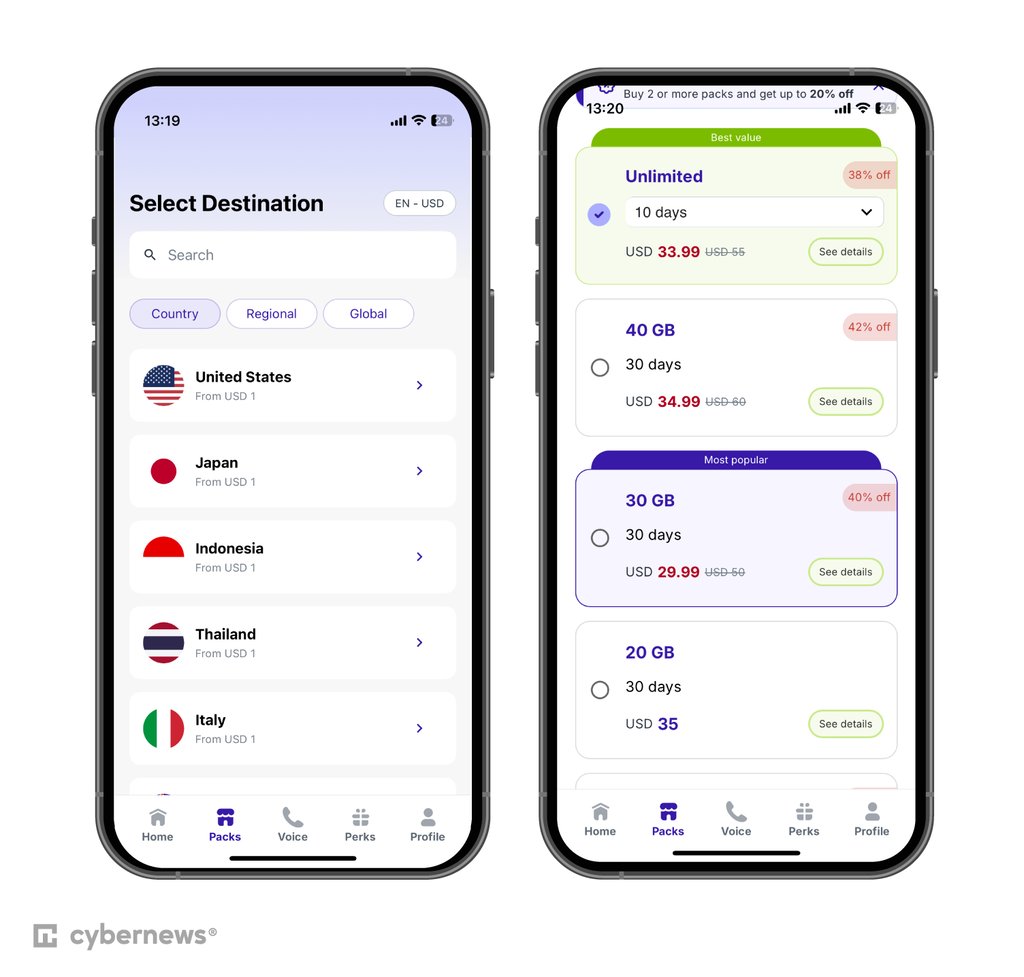
Jetpac eSIM offers flexible plans – global for multi-country travel, regional for specific areas, and local for single countries – covering 200+ destinations worldwide. Its partnerships with top local carriers like AT&T and Verizon Wireless for 5G support in the US ensure reliable connectivity, faster speeds, and competitive rates.
The Jetpac app is your main hub to buy plans, check data balance, and renew or top up. Being fully digital, Jetpac eSIM eliminates the risk of losing a physical SIM and allows easy remote activation via the Jetpac app either before departure or after arrival. In hands-on use, setup took me only a few minutes, and switching networks while traveling felt seamless. An additional perk I liked the most was having lounge access during a delay, as it made the whole experience feel more premium and less stressful.
What types of plans does Jetpac offer?
Jetpac offers internet access in over 200 destinations, covering more than 100 countries, cities, and regions. Global data plans include 1, 3, 5, 10, 15, 20, 30, 40, and 50GB options.
Prices range from $4.00 for a Global plan with 1GB (4 days) to $65.99 for an unlimited data plan (30 days) in the US. However, local plans start as low as $1.00 for 1GB (4 days), so if you need coverage in a specific country, Jetpac is one of the most affordable options you can get. Most data plans are available up to 30 days, except for the 1GB and 3GB plans.
Here's an example. Internet access in the US costs $15.99 for a 30-day plan with 10GB of data. A second example would be Europe, where you can get 10GB for 30 days for $19.99.
Also, Jetpac data packs are valid for 3 months after purchase, making it easier for travelers to plan their trips in advance.
In addition to data plans, Jetpac's global partnerships provide users with heavily discounted access to airport lounges and the ability to skip the regular security lines at the airports in many locations with Fast Track.
Global data plan
Jetpac's broad coverage spans over $1.00 destinations, making it ideal for world tours or multi-country trips. With reliable connectivity in popular global destinations, travelers can stay connected effortlessly. Jetpac is perfect for frequent flyers because it ensures seamless internet access wherever your adventures take you.
| Global data plan | Price |
| 1GB for 4 days | $4.00 |
| 3GB for 7 days | $2.00 |
| 5GB for 30 days | $30.00 |
| 10GB for 30 or 180 days | $45.00 or $50.00 |
| 15GB for 30 days | $55.00 |
| 20GB for 30 days | $100.00 |
| 30GB for 30 or 180 days | $69.99 or $99.99 |
| 40GB for 30 days | $99.99 |
| 50GB for 365 days | $249.00 |
Regional data plans
Jetpac also offers regional plans for Europe, Southeast Asia, the Asia-Pacific region, Africa, the Caribbean, Latin America, the Middle East and North Africa, North America, Oceania, as well as the China-Taiwan-HongKong-Macau plan. Uninterrupted internet access within these regions is crucial because it allows travelers to stay connected, access essential information, and navigate new environments without disruptions.
For example, here is the regional Europe plan.
| Regional Europe plan | Price |
| 1GB for 4 days | $1.00 |
| 3GB for 1, 3, or 7 days | From $8.50 |
| 5GB for 1, 4, 7, or 30 days | From $9.00 |
| 10GB for 1, 4, 7, or 30 days | From $11.00 |
| 15GB for 7 or 30 days | $19.00 or $24.99 |
| 20GB for 30 days | $40.00 |
| 30GB for 30 days | $29.99 |
| 40GB for 30 days | $34.99 |
| Unlimited GB from 3 to 30 days | From $12.99 |
Local data plans
Single-country plans are available for a vast range of countries: the United Kingdom, the United States, Mexico, Turkey, Thailand, Australia, New Zealand, Japan, Morocco, Saudi Arabia, the UAE, and many more. Jetpac eSIM's value proposition for travelers includes affordable data plans, convenient activation, reliable connectivity, lounge access, hotspot capability, and no data throttling in individual countries.
For example, here is a local data plan for the UK.
| Local data plan | Price |
| 1GB for 4 days | $1.00 |
| 3GB for 1, 4, or 7 days | From $6.50 |
| 5GB for 1, 4, 7, or 30 days | From $7.50 |
| 10GB for 1, 4, 7, or 30 days | From $9.00 |
| 15GB for 7 or 30 days | $15.00 or $19.99 |
| 20GB for 30 days | $35.00 |
| 30GB for 30 days | $25.00 |
| 40GB for 30 days | $29.99 |
| Unlimited GB from 3 to 30 days | From $12.99 |
How much does Jetpac cost?
Jetpac's partnerships with local telco providers ensure competitive pricing and contribute to enhanced connectivity and speeds in each destination. However, note that Jetpac eSIM prices vary depending on the destination country.
The table below summarizes Jetpac's prices for popular travel destinations, representing plans with 1GB data plans for 4 days.
| Local eSIM plan 1 GB for 4 days | Price |
| US | $1.00 |
| Japan | $1.00 |
| UK | $1.00 |
| Italy | $1.00 |
| France | $1.00 |
| Spain | $1.00 |
Can you make phone calls with Jetpac?
Jetpac eSIM plans are primarily data-only, so they do not include local numbers or SMS. A beta Voice feature now allows you to purchase affordable packs starting at $1.99 for outgoing calls to 50 countries, including Germany, Italy, and France. It’s available for purchase via the Jetpac app but for iOS only.
As such, I recommend using VoIP apps like WhatsApp for the best setup during travel – this way, you can keep messaging and making calls over Jetpac’s data.
What devices support Jetpac eSIM?
Most smartphone models after 2018 support eSIMs. Some newer models today don’t even have a physical SIM card slot. Exceptions include all Samsung Galaxy devices from Mainland China, Hong Kong, and Taiwan, plus US models like Galaxy S20, S21, and Note 20 Ultra. As such, you should still check your smartphone's manual for eSIM compatibility before ordering a Jetpac eSIM.
According to Jetpac, this list contains eSIM-supported devices:
| Apple iPhone | iPhone SE (2020, 2022), iPhone XR, XS, 11, 12, 13, 14, 15, 16, 17 |
| Samsung Galaxy | Note 20, Z Fold, Z Flip, Fold, XCover7, S20, S21, S22, S23, S24, S25, A23, A35, A36, A54, A55, A56 |
| Google Pixel | Fold, 2, 3, 4, 5, 6, 7, 8, 9 |
| Huawei | P40, Mate 40 Pro |
| Others | Various models from Motorola, Nokia, Oppo, Honor, OnePlus, Xiaomi, Sony, Vivo, Rakuten, and Hammer |
| Apple iPad | Only iPad devices with Wi-Fi + Cellular features are supported |
How to activate and use Jetpac eSIM?
Staying connected with Jetpac eSIM while traveling is straightforward and hassle-free. The app features a clean, intuitive design that's easy to navigate, even on the go.
When testing Jetpac myself, I outlined the essential steps for buying, activating, and managing plans. Once you ensure that your device is compatible with eSIMs, here's how to get started with Jetpac:
-
Download the Jetpac app. Go to the Google Play Store or the Apple App Store.To start with Jetpac eSIM, select your desired coverage, whether global, regional by continent, a group of countries, or local by country.

- Set up an account. After the download completes, open the Jetpac app and sign up using your Google account, Apple ID, or email.
-
Select the desired Jetpac eSIM plan. Pick the data plan for your destination by browsing available options and choosing one that suits your data usage and trip length.
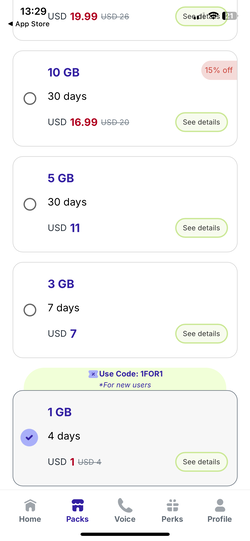
- Log in to complete the purchase. You can complete the checkout using any debit or credit card, Google Pay, or Apple Pay.
-
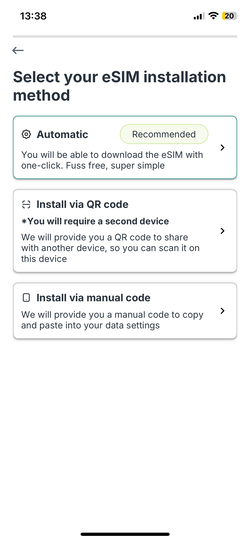
Install the Jetpac eSIM. Choose your preferred installation method – automatic, manual, or via QR code – and follow in-app prompts.
-
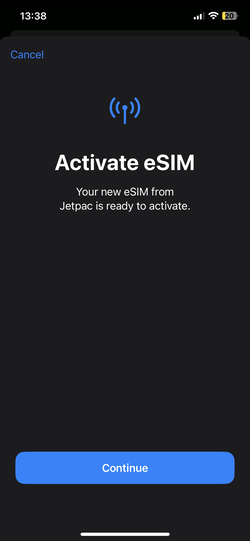
Activate eSIM in the Settings. Go to Settings > Mobile Data (iOS) or Connections > SIM Manager (Android) > Add eSIM/Plan, then scan the QR code or enter the activation code manually.
-
Prepare your eSIM for travel. Label the eSIM (e.g., "Travel"), enable data roaming, and set it as the default for cellular data. Your eSIM will automatically activate and connect to available networks as soon as your phone enters a roaming area abroad.
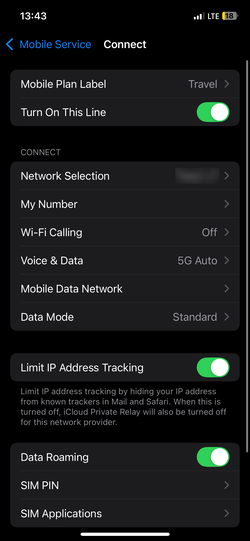
- Confirm Jetpac eSIM shows as active. Open the Jetpac app to view the balance and status, and test the internet access by loading a webpage or app. You're now all set!
This quick and simple activation process ensures you're quickly connected.
Customer support
Jetpac offers effective customer support, although it’s only available through two support channels: email ([email protected]) and WhatsApp. Fortunately, there is also a live chat feature available on both the website and app.
I noticed that user reviews praise the fast response times, with some receiving help within 28 minutes, and commend the diligent resolution of technical issues. In my case, I got answers to all my questions regarding coverage and payment options even faster.
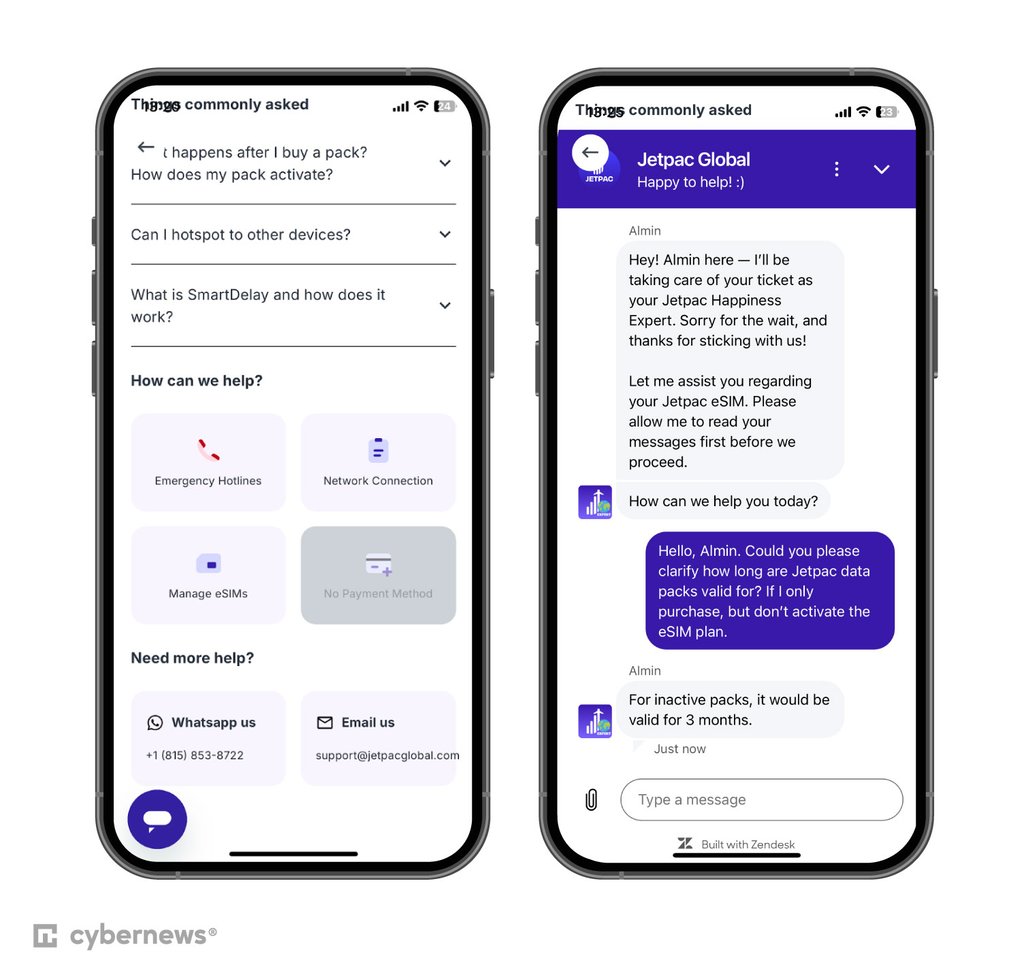
Customer support is available 24/7, ensuring assistance is accessible at any time. This allowed me to rest assured knowing that I could reach out to an agent even when traveling across different time zones and locations.
Below is a table summarizing the available customer support options:
| Live chat | ✅ Yes |
| Email support | ✅ Yes |
| Knowledge base | ✅ Yes |
| FAQs | ✅ Yes |
| Phone number | ✅ Yes, but via WhatsApp only |
| Active blog | ✅ Yes |
My final verdict: is Jetpac worth it?
For budget travelers and frequent flyers who value travel perks, Jetpac’s eSIM is a solid choice. It offers reliable coverage across 200+ destinations, including popular spots like the US, UK, Japan, Australia, and more. The provider has affordable regional and unlimited data plans, an easy-to-use app, and responsive customer support – making it an excellent all-in-one solution. Standout perks I appreciated the most include free airport lounge access during delays, discounted access to premium lounges, and fast-track airport security.
There are a couple of downsides, including its limited country list compared to some rivals and its suitability for basic browsing rather than heavy streaming. However, I recommend Jetpac as a smart choice for dependable, affordable data, plus valuable extras that enhance your travel experience.
FAQ
Is Jetpac worth it?
Yes, Jetpac is worth it for travelers seeking reliable and affordable data connectivity across various regions. It offers competitive plans, an intuitive app interface, and excellent customer support, making it a practical solution for staying connected abroad. The complimentary airport lounge access adds extra value.
When to activate Jetpac?
Activate Jetpac eSIM just before your trip or upon arrival in your destination country. Ensure your device is connected to the internet and follow the installation guide to activate the eSIM seamlessly.
Does WhatsApp work with Jetpac?
Yes, WhatsApp works with Jetpac eSIM. You can use any data plan up to unlimited GB to make calls and send messages via WhatsApp, providing an effective way to stay in touch without needing a local phone number.
Does my phone need to be unlocked to use a Jetpac eSIM?
Yes, your phone needs to be unlocked to use a Jetpac eSIM. An unlocked phone allows the eSIM to connect to local networks in your destination country, ensuring you have seamless connectivity during your travels. If your phone is locked, contact your carrier to unlock it before using Jetpac eSIM.
What makes Jetpac's connectivity unique?
Jetpac's partnerships with local telco providers in various countries result in optimized network performance, better rates, and enhanced connectivity for travelers. This localized approach, combined with perks like discounted lounge access and the ability to skip regular security lines at partner airports with Fast Track, sets Jetpac apart in the global eSIM market.