Best VPNs for Chromebook in 2026
Our in-house cybersecurity experts and journalists, renowned for major reports like The Mother of All Breaches, conduct transparent, unbiased VPN testing and in-depth analysis.
With 750+ articles crafted based on real-world research, we empower readers to make informed purchasing decisions through first-hand expertise.
Learn more
Not only can public Wi-Fi put your Chromebook at risk, but many networks also restrict access to specific sites. A VPN secures your connection, encrypts your data, and keeps your browsing private, while also letting you bypass these limits.
However, not all VPNs work well on ChromeOS. For this reason, I joined forces with our research team and tested 41 services. After conducting over 2,400 hours of research, evaluating security, speed, usability, and Chromebook compatibility, I selected the best VPN for Chromebooks and compiled a list of the top 5 options for 2026.
Best VPNs for Chromebook – shortlist
- NordVPN – best Chromebook VPN for any user
- Surfshark – affordable VPN for Chromebook
- IPVanish – Chromebook VPN with strong streaming capabilities
- ExpressVPN – secure VPN for Chromebook
- Proton VPN – Chromebook VPN with a free plan




We spare no effort to test the products & their features. All information is gathered by our in-house research team & fact-checked by our team of experts. Discover the ins and outs of our testing procedures.
The best VPNs for Chromebook in 2026 – detailed list
To select potential VPNs for Chromebook, I teamed up with our research team and evaluated a total of 41 services. Based on their compatibility with ChromeOS, effectiveness, and performance, I selected the 5 best VPN providers, which I review in more detail below.
1. NordVPN – best VPN for Chromebook in 2026

| Rating: | 4.9 |
| Servers/locations: | 8,000+ servers in 149 countries |
| Compatibility: | ChromeOS, Windows, Mac, Linux, Android, iOS |
| Price: | From $3.49/month |
| Current deal: | Get 75% OFF NordVPN + 3 months free |
NordVPN is the best VPN for Chromebooks in 2026 for a few reasons. It’s fast, offers advanced security features, and is easy to set up on a Chromebook. I’ve been using NordVPN for years on different devices, and it has never failed me. Meanwhile, using it on a Chromebook was also a seamless experience.
Performance
When, together with the Cybernews research team, we were testing NordVPN’s performance on Chromebooks, I recorded a download speed of 48.53Mbps and an upload speed of 90.05Mbps while connected to a US server.

During the NordVPN tests using servers in Germany, the download speeds were 55.56Mbps and the upload speeds were 80.57Mbps. Even when using a distant server in Japan, speeds stayed usable, although latency increased. Thanks to such speeds, everyday browsing and streaming were smooth and without interruptions. Even when I was gaming or torrenting, NordVPN worked perfectly without any slowdowns. From our testing results for NordVPN review and my personal experience, I can confidently say that NordVPN is one of the fastest VPNs currently available on the market.
Privacy and security
NordVPN uses industry-standard security, including AES-256 encryption and the NordLynx protocol, providing strong protection for your Chromebook. In my own testing, DNS and IP leak protection worked reliably, and the kill switch instantly cut off the internet access when the VPN connection dropped.
NordVPN’s no-logs policy has been independently verified 6 times (the most recent in late 2025), so I can trust that my activity was never stored. What’s more, the company is based in Panama, which means that it’s not subject to any mandatory data retention laws, further safeguarding your privacy.
Another area where NordVPN stood out was its extra privacy and security features. The next-gen antivirus (formerly Threat Protection) blocked ads, trackers, and malware, while two kill switches and a Dark Web Monitor alerted me if my data ever appeared in a breach.
Compatibility and setup
NordVPN for Chromebooks is available via the Play Store app, Chrome extension, and manual setup using OpenVPN files. All three methods have their pros and cons. The easiest way to set up NordVPN on your Chromebook is to download the Android app and follow the instructions.
If you choose to install NordVPN’s Chrome extension, navigate to the Chrome Web Store and proceed with the instructions. However, if you opt for this route, remember that it only secures your internet traffic within the Chrome browser – other services and apps running on your Chromebook won’t be protected.
Alternatively, advanced Android users can manually set up NordVPN. Since this method is more complicated, I wouldn’t recommend it to beginners.
Pricing
NordVPN offers monthly, yearly, and 2-year plans. Starting at just $3.49/month, NordVPN offers excellent value for its entry plan. There’s also a 30-day money-back guarantee applicable to all plans and a 3-day free trial available on the Google Play Store.
2. Surfshark – cheap Chromebook VPN

| Rating: | 4.7 |
| Servers/locations: | 4,500+ servers in 100 countries |
| Compatibility: | ChromeOS, Windows, Mac, Linux, Android, iOS |
| Price: | From $2.49/month |
| Current deal: | Now up to 87% OFF Surfshark + 3 months FREE |
Surfshark is the most affordable Chromebook VPN on my list. Despite its low price tag, it offers fast speeds, unlimited device connections, and strong security features. Besides, it's easy to install and set up on your Chromebook for a seamless VPN experience. While it’s already pretty cheap, you can save even more when using the exclusive Surfshark discount code OFFCN.
Performance
What I found truly impressive was Surfshark’s speed consistency across various server locations. On a US server, the download speeds averaged around 32.98Mbps, and the upload speeds were close to 49.49Mbps.
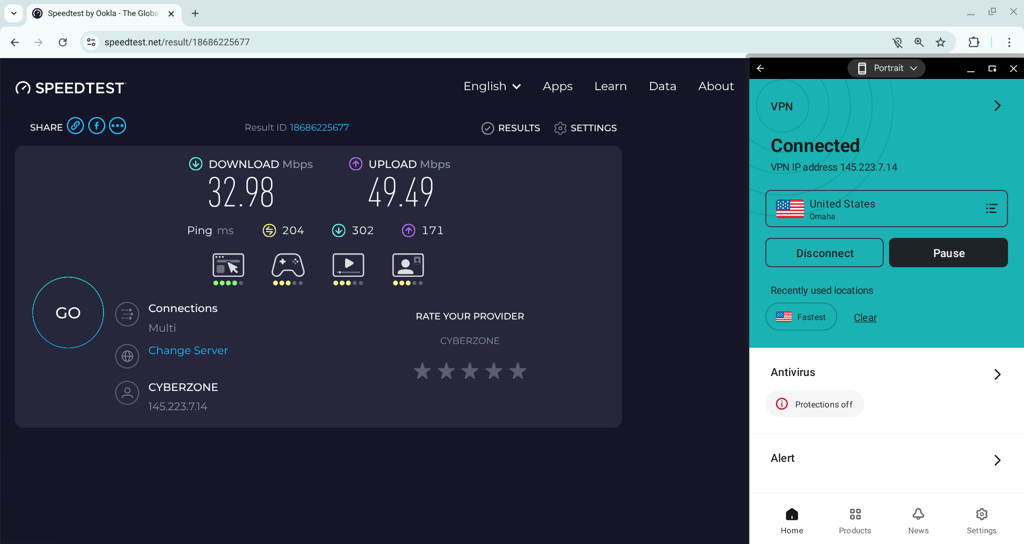
To see how Surfshark performs when connected to servers in more distant regions, I connected to a server in Japan. The speeds remained strong with 33.53Mbps download and 38.49Mbps upload. However, there was a slight increase in latency.
Throughout the testing for the Surfshark review, the VPN worked great, regardless of what I used it for. It also allowed me to stream, attend video calls, and do some everyday browsing with no issues. I experienced no connection drops and was able to enjoy the perks of this lightweight VPN.
Privacy and security
Chromebook users can rely on Surfshark due to its strong security and privacy features. It uses AES-256 and ChaCha20 encryption standards and modern VPN protocols to keep your connection secure. In my experience, the DNS and IP leak protection performed just as promised, and the kill switch on ChromeOS worked flawlessly.
What gives me extra peace of mind is that Surfshark’s no-logs policy has been independently audited multiple times. The most recent audit was carried out in 2025 by Deloitte, confirming that your activity isn’t tracked or stored.
In terms of security features, Surfshark is well-equipped in this area, much like NordVPN. When using my Chromebook, one feature that I found particularly useful was CleanWeb. It reduced online ads and eliminated trackers, which significantly improved my browsing experience. Other privacy tools, like Alternative ID and Rotating IP, are great for improving your online anonymity. These features are also included in the most basic plan, without any additional cost.
Compatibility and setup
I could set up Surfshark on my Chromebook in two ways: by downloading and installing Surfshark’s app from the Play Store or by installing its extension on Chrome. The process was fast and straightforward. First, I downloaded the Android app. I was met with the instructions that helped me throughout the setup process. Next, I wanted to test the Chrome extension – adding it to the browser was also easy.
Pricing
Surfshark is one of the cheapest premium VPNs available on the market. Prices start at only $2.49/month, and there’s also a 30-day money-back guarantee. Surfshark offers plans for a month, a year, or two years. It also offers a 7-day free trial for Chromebook users whose selected payment options are credit card or PayPal.
3. IPVanish – Chromebook VPN for streaming

| Rating: | 4.2 |
| Servers/locations: | 3,400+ servers in 112 countries |
| Compatibility: | ChromeOS, Windows, Mac, Android, iOS |
| Price: | From $2.39/month |
| Current deal: | Now up to 84% OFF IPVanish |
If you’re looking for a reliable Chromebook VPN for streaming, look no further than IPVanish. It has servers across 112+ countries, supports unlimited device connections, and offers good speeds. I was able to unlock international Netflix libraries, BBC iPlayer, YouTube TV, HBO Max, and other streaming services on my Chromebook without any issues.
Performance
For the speed test, I first connected to the IPVanish German server. The speeds reached 36.34Mbps for download and 63.46Mbps for upload. To test its performance on a farther server, I connected to Japan. The connections remained stable, reaching 36.34Mbps download and 35.52Mbps upload speeds. The latency increased, but that’s expected from distant servers.
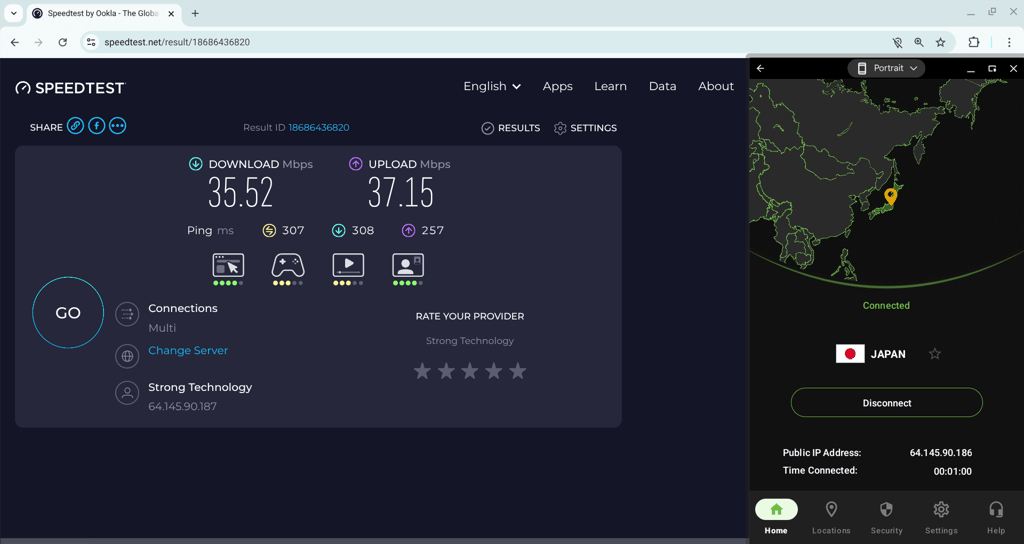
Importantly, I never experienced a connection drop throughout my testing, and daily tasks, including streaming and Google Workspace use, ran smoothly.
Security and privacy
In terms of security and privacy, IPVanish offers ChromeOS users AES-128 and AES-256 encryption, modern VPN protocols, and solid features like a kill switch, RAM-only servers, DNS/IP leak protection, and unlimited connections.
One potential drawback is IPVanish’s jurisdiction – it’s based in the US, a country that is a part of the Five Eyes alliance. However, IPVanish follows a strict no-logs policy, as confirmed by the latest independent audit by Schellman Compliance in early 2025.
While using IPVanish, I particularly liked its Threat Protection feature. It blocked intrusive ads and eliminated third-party tracking, which made me feel safer when browsing online. However, I was quite disappointed that it doesn’t scan downloaded files.
Compatibility and setup
IPVanish is fully compatible with ChromeOS. You can choose one of the three ways to set it up on your device: download an app from the Play Store, add a Chrome extension, or perform a manual OpenVPN setup.
I chose to install a dedicated Android app from Google Play. The process was quick and straightforward. All I had to do was follow the app's instructions. What I liked about IPVanish was that even after ChromeOS updates, the VPN remained stable. I didn’t experience any issues during the setup or while using IPVanish.
Pricing
IPVanish starts from $2.39/month. Like most providers on the market, it has monthly, yearly, and 2-year plans. However, it’s worth noting that a 30-day money-back guarantee applies only to yearly plans.
4. ExpressVPN – Chromebook VPN with all-inclusive security package

| Rating: | 4.3 |
| Servers/locations: | Servers in 113 countries |
| Compatibility: | ChromeOS, Windows, macOS, Linux, Android, iOS |
| Price: | From $2.99/month |
| Current deal: | Now up to 80% OFF ExpressVPN + 4 months FREE |
ExpressVPN is a great choice for Chromebook users who prioritize their security and privacy. With its all-inclusive security package, in addition to a VPN, it offers a password manager, an ad and tracker blocker, and an identity protection suite. What’s more, it’s easy to use on ChromeOS.
Performance
In terms of performance, ExpressVPN demonstrated solid speeds when connected to a German server. Its download speeds reached 58.94Mbps and upload speeds – 126.92Mbps. When connected to a more remote Japan server, it maintained consistent download speeds, reaching 59.71Mbps, but its upload speeds showed more variation between servers, this time reaching 48.43Mbps.
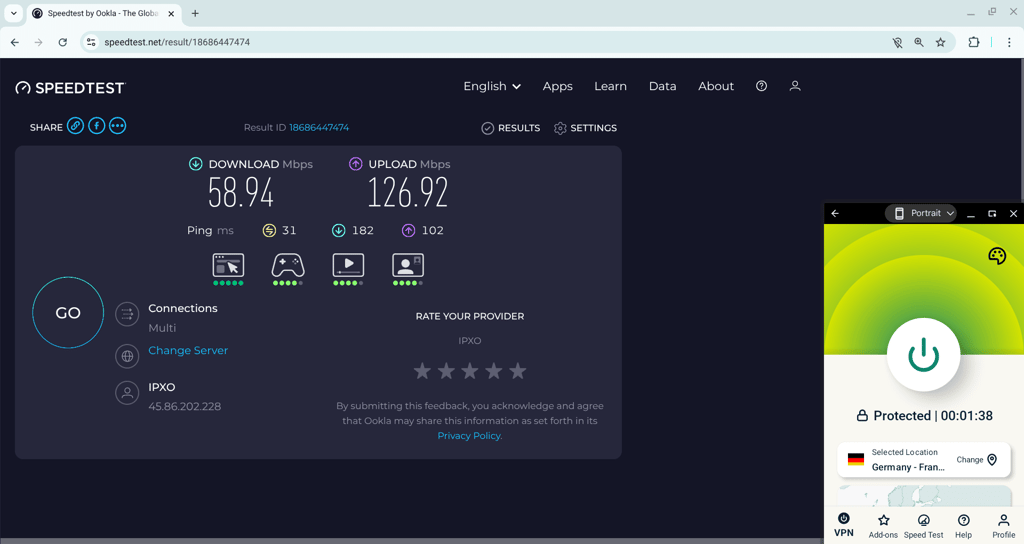
Latency increased on farther servers, as expected, but with everyday streaming, Google Workspace tasks, and video calls, I had a good experience as all remained smooth and stable. During the entire testing period, I didn’t experience any connection drops – ExpressVPN proved consistently fast and reliable for both work and entertainment.
Security and privacy
What really stood out for me was how seriously ExpressVPN takes privacy. Firstly, it has undergone as many as 23 independent security audits. This kind of commitment leaves me without a doubt that my data isn’t stored or tracked. In addition, ExpressVPN uses industry-standard AES-256 encryption and a kill switch compatible with ChromeOS. Lastly, it’s based in the British Virgin Islands, known for its strong privacy protection.
Compatibility and setup
ExpressVPN provides detailed instructions specifically for setting up a VPN on Chromebooks. To make the matter simple and fast, I too followed the instructions, which were helpful. First, I downloaded the Android app from the Google Play Store to test how well it secures my entire device. If you’re only looking to protect your online activity, it’s worth adding a Chrome extension to your browser. For a more hands-on control, ExpressVPN also offers a manual OpenVPN setup option.
Pricing
ExpressVPN is a mid-range VPN with prices starting at $2.99/month. You can pick three plan durations: monthly, yearly, or 2 years. Currently, all plans longer than one month come with a 30-day money-back guarantee.
5. Proton VPN – free Chromebook VPN with no data caps

| Rating: | 4.5 |
| Servers/locations: | 20,700+ servers in 149 countries |
| Compatibility: | Windows, macOS, Linux, Android, iOS |
| Price: | Free or from $2.99/month |
| Current deal: | Get up to 70% OFF Proton VPN |
ProtonVPN is a reliable free VPN for Chromebooks that has no data or speed limits. Although it is free, Proton VPN provides solid security and robust privacy – a perfect option if you’re looking to cut down living costs without compromising your online security. I also recommend Proton VPN due to its simple interface and good compatibility with Chromebooks.
Performance
While I was testing the Proton VPN on my Chromebook, it was stable. The connection didn’t drop once throughout the entire testing session. The download speeds hovered around 57.73Mbps, and the upload speed was 128.99Mbps. However, what I did notice was that the free version was slower compared to the paid service.
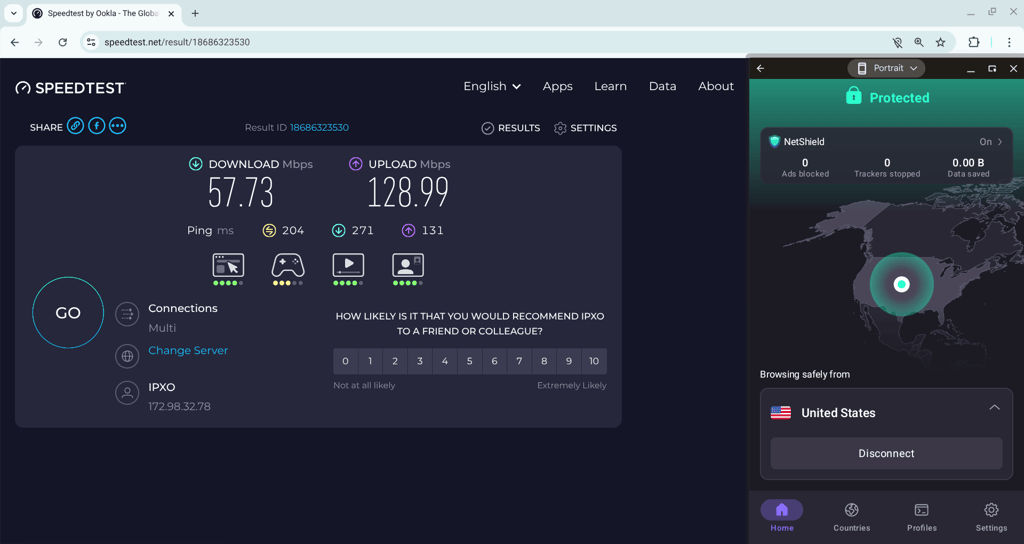
While basic browsing and video calls worked fine for me, there were definite slowdowns with some streaming content and general loading times.
Security and privacy
To start with, Proton VPN is based in Switzerland, outside major surveillance alliances. What I liked about this provider is that both the free and paid versions use AES-256 encryption and have a strict no-logs policy that’s been independently audited for transparency.
Compatibility and setup
Like other VPN providers on my list, Proton VPN has three ways for setting it up on a Chromebook: an Android app, a Chrome extension, and an OpenVPN manual setup. I opted for the quickest way, which is installing the Android app. What I liked was that ChromeOS gets frequent updates, which maintains app compatibility. Also, if your device doesn’t have the Play Store, there’s an option to download the APK from Proton VPN’s site and install it manually.
Pricing
Proton VPN is the only VPN on my list that has a completely free version. However, if you want access to Proton VPN’s full service, including its server fleet with over 20,700 servers spanning 149 countries, a subscription starts at $2.99/month. You can choose a 1-month, 1-year, or 2-year subscription. All plans come with a 30-day money-back guarantee, including a 1-month plan.
Comparison of VPNs for Chromebook
In the table below, you can find a side-by-side comparison of my top 5 picks for the best VPNs for Chromebook.
| VPN | Rating | Compatibility | Security features | Servers | Price |
| NordVPN | Windows, macOS, Linux, Android, iOS | AES-256 encryption, ChaCha20 encryption, NordLynx protocol, RAM-only servers, Kill switch, next-gen antivirus, Dark Web Monitor | 8,000 servers in 149 countries | From $3.49/month | |
| Surfshark | Windows, macOS, Linux, Android, iOS | AES-256 encryption, WireGuard protocol, Kill switch, RAM-only servers, CleanWeb feature, Surfshark Alert | 4,500 servers in 100 countries | From $2.49/month | |
| IPVanish | Windows, macOS, Linux, Android, iOS | AES-256 encryption, Kill switch, WireGuard protocol, Threat Protection, Obfuscated servers | 3,400 servers in 112 countries | From $2.39/month | |
| ExpressVPN | Windows, macOS, Linux, Android, iOS | AES-256 encryption, Kill switch, Lightway protocol, IP & DNS leak protection, Threat Manager, Malware protection | Servers in 113 countries | From $2.99/month | |
| Proton VPN | Windows, macOS, Linux, Android, iOS | AES-256 encryption, WireGuard protocol, kill switch, Secure Core servers | 20,700 servers in 149 countries | From $2.99/month |

How to set up a VPN on a Chromebook
Setting up a VPN on your Chromebook is straightforward, with a couple of easy options to choose from. You can install it directly from the Google Play Store, sideload the app, or simply use a VPN browser extension.
Here are simple step-by-step instructions for the installation process.
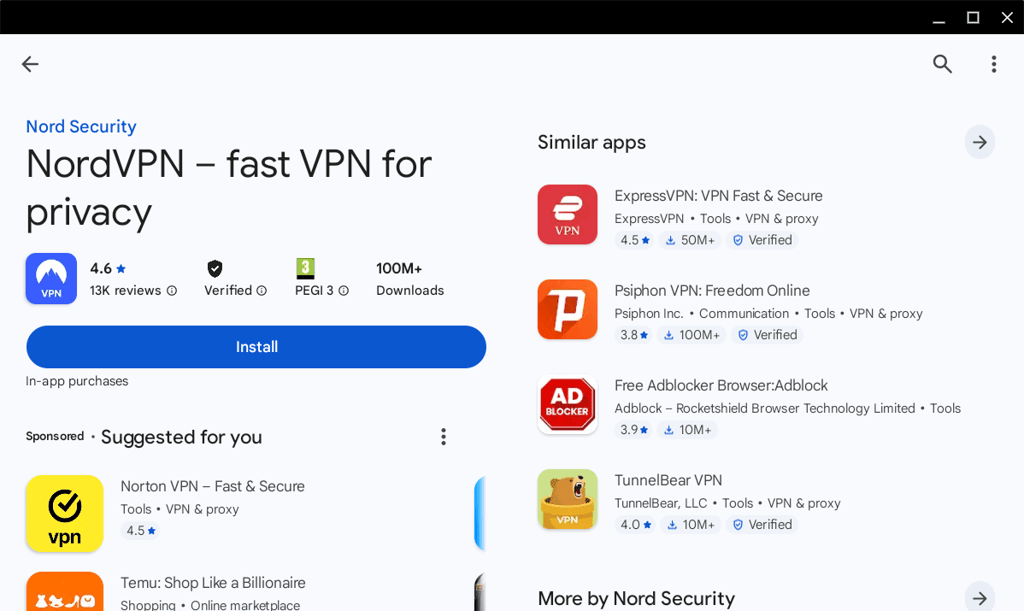
- Navigate to the Google Play Store
-
Search for your chosen VPN app and install it – I recommend NordVPN, now 75% OFF
-
Open the VPN app and sign up or log in

-
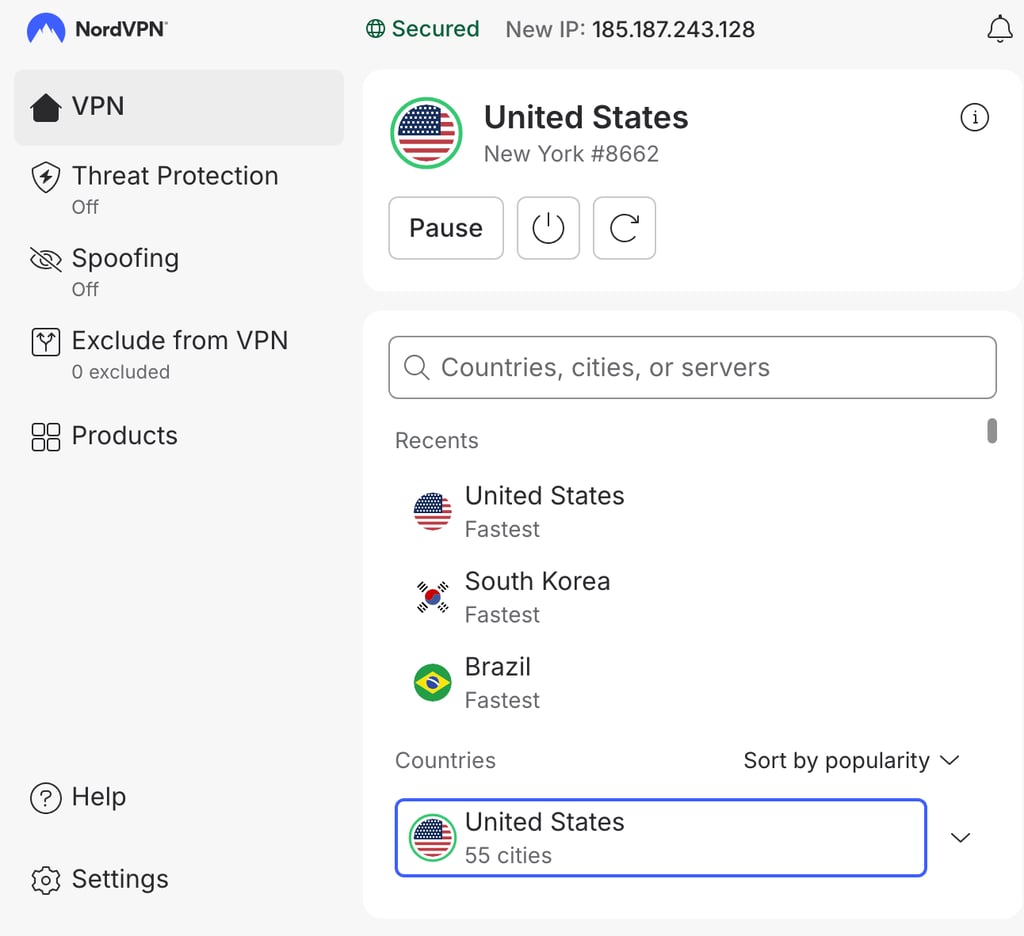
Connect to a server of your choice
Is there a free VPN for Chromebook?
Yes, you can find many proxy server providers on the Google Play Store masquerading as free VPNs for Chromebook. However, I don’t recommend using them for various security and performance reasons.
Firstly, proxies aren’t as secure as actual VPNs because they lack encryption and instead simply reroute your connection through another location. Thus, you’re missing out on the most critical privacy benefit. Moreover, proxies differ from VPNs by usually employing obsolete protocols that are vulnerable to exploitation by threat actors. Plus, these old technologies are inefficient and result in slow connection speeds.
On the other hand, you will also find reliable VPNs with free tiers that are supposedly good enough for everyday use. While this is an acceptable alternative to proxies, you will have to contend with severe limitations, such as fewer server options, slower speeds, and monthly data caps.
To escape freemium VPN limitations, I recommend using free trials of premium VPN services:
- NordVPN – includes a 3-day free trial for Android users and offers a 30-day money-back guarantee for all its plans
- Surfshark – offers a 7-day free trial for Android, iOS, and macOS, plus a 30-day money-back guarantee
Final thoughts
Using a Chromebook VPN improves your privacy and makes connections on public and shared networks safer. Besides security benefits, it can also help you access region-restricted content.
As the best Chromebook VPN I recommend NordVPN. It demonstrated excellent performance during our in-house testing and has a vast server fleet for unlocking various content libraries. However, if you are on a tighter budget, a strong alternative to NordVPN is Surfshark. It’s not only the cheapest provider on my list, but also offers great security features and can be used on an unlimited amount of devices.
FAQ
Can I use a VPN with a Chromebook?
Yes, you can use a VPN with a Chromebook. Most of the VPN providers offer apps compatible with Chromebooks for an easy installation and seamless user experience.
Can I use a VPN on a school Chromebook?
Whether you can use a VPN on a school Chromebook depends on your school's internal policy. If VPN use in your school is forbidden, refrain from it to avoid getting into trouble. However, if your school allows VPN usage, connecting to VPN can bring you benefits like better online security.
Does Chromebook have a pre-installed VPN?
No, Chromebook doesn’t have a pre-installed VPN. This means that you have to choose a reputable VPN service that best fits your needs and set it up on your Chromebook by yourself.