Mullvad VPN vs ExpressVPN: which VPN is better?
Our in-house cybersecurity experts and journalists, renowned for major reports like The Mother of All Breaches, conduct transparent, unbiased VPN testing and in-depth analysis.
With 750+ articles crafted based on real-world research, we empower readers to make informed purchasing decisions through first-hand expertise.
Learn more

Mullvad VPN and ExpressVPN are both strong contenders. Mullvad stands out for its privacy-first approach, while ExpressVPN delivers a more well-rounded experience with strong performance and advanced features.
To compare them fairly, I ran both providers through a series of hands-on tests. In this Mullvad VPN vs ExpressVPN comparison, I evaluated key areas like speed, streaming, security, privacy, features, and pricing to see how each service performs in real-world use.
So which one comes out on top? Keep reading for a full breakdown of the results and to see which VPN is the better fit for you.
Mullvad VPN vs ExpressVPN: overview
ExpressVPN is a well-known provider, often ranked amongst the best VPNs on the market. Mullvad VPN, however, is liked by privacy enthusiasts, with its anonymous login options.
| ExpressVPN | Mullvad VPN | |
| ⭐ Rating: | ||
| 🥇 Overall rank: | #4 out of #41 | #15 out of #41 |
| 🖥️ Servers: | 3,000+ servers in 113 countries | 580+ servers in 50 countries |
| 📖 No logs policy: | No logs | No logs |
| 💵 Price: | From $2.99/month | $5.00/month |
| 🔥 Coupons: | ExpressVPN coupon 80% OFF | Cybernews VPN Coupons |
| 🔒 VPN protocols: | OpenVPN, WireGuard, Lightway | WireGuard |
| 🍿 Streaming services: | Netflix, Hulu, BBC iPlayer, Disney+, and more | Netflix, Hulu, Disney+, and BBC iPlayer |
| 🖥️ Platforms: | Windows, macOS, Linux, Android, iOS | Windows, macOS, Linux, Android, iOS |
| 📥 Simultaneous connections: | 14 | 5 |
| 💁🏻 Support: | Knowledge base, email, 24/7 live chat | Knowledge base, email |





We spare no effort to test the products & their features. All information is gathered by our in-house research team & fact-checked by our team of experts. Discover the ins and outs of our testing procedures.
Recent Updates
Key differences between ExpressVPN and Mullvad VPN
In this Mullvad VPN vs ExpressVPN comparison, ExpressVPN stands out as a well-rounded, feature-rich option, while Mullvad VPN leans heavily into privacy and anonymity, even at the cost of convenience and streaming performance.
Choose ExpressVPN if:
- You want the best streaming experience. ExpressVPN easily unblocks major platforms while Mullvad struggles with almost all of them. It also includes SmartDNS and split tunneling for smoother streaming.
- You prefer a more complete, feature-rich VPN. With tools like SmartDNS, a customizable kill switch, and broader protocol support, ExpressVPN offers a more versatile experience overall.
- You need a large server network and global access. ExpressVPN has servers in 113 countries, far more than Mullvad, which improves connection reliability and access to geo-restricted content worldwide.
- You value ease of use and strong support. ExpressVPN provides 24/7 live chat and a polished interface across devices, making it more beginner-friendly compared to Mullvad’s more minimal support options.
- You want better long-term value. While Mullvad is cheaper monthly, ExpressVPN becomes more affordable on longer plans and allows more simultaneous connections.
Find out if it’s right for you in our complete ExpressVPN review.
Choose Mullvad VPN if:
- Privacy and anonymity are your top priorities. Mullvad allows completely anonymous account creation, no email required, and even accepts cash payments, making it one of the most privacy-focused VPNs available.
- You want consistently strong speeds. In testing, Mullvad delivered better download speeds across multiple locations, making it a solid choice for fast browsing and downloads.
- You prefer simple, transparent pricing. Mullvad charges a flat monthly rate with no long-term commitments, which is ideal if you only need a VPN short-term.
- You need port forwarding. Mullvad supports port forwarding, which is useful for hosting servers or certain gaming setups. ExpressVPN does not offer this feature.
- You want a straightforward, no-frills VPN. Mullvad keeps things simple with a minimal feature set and an always-on kill switch, appealing to users who want security without extra complexity.
Our Mullvad VPN review explains what you get and whether it’s worth it.
Speed, performance, and streaming
ExpressVPN runs out in front in the speed race due to a few factors. For starters, it has more tunneling protocols – IKEv2, OpenVPN, L2TP, and Lightway, compared to Mullvad VPN's OpenVPN and WireGuard. Sure, WireGuard is known to be the best protocol available, but Lightway is no slouch either (it’s based on WireGuard, after all), and the extra choice gives you more options.
Together with the research team, we ran speed tests with both providers, and here are the results:
- Baseline: 900Mbps download and 900Mbps upload
| Server | ExpressVPN | Mullvad VPN |
| Local | 724Mbps/371Mbps | 840Mbps/436Mbps |
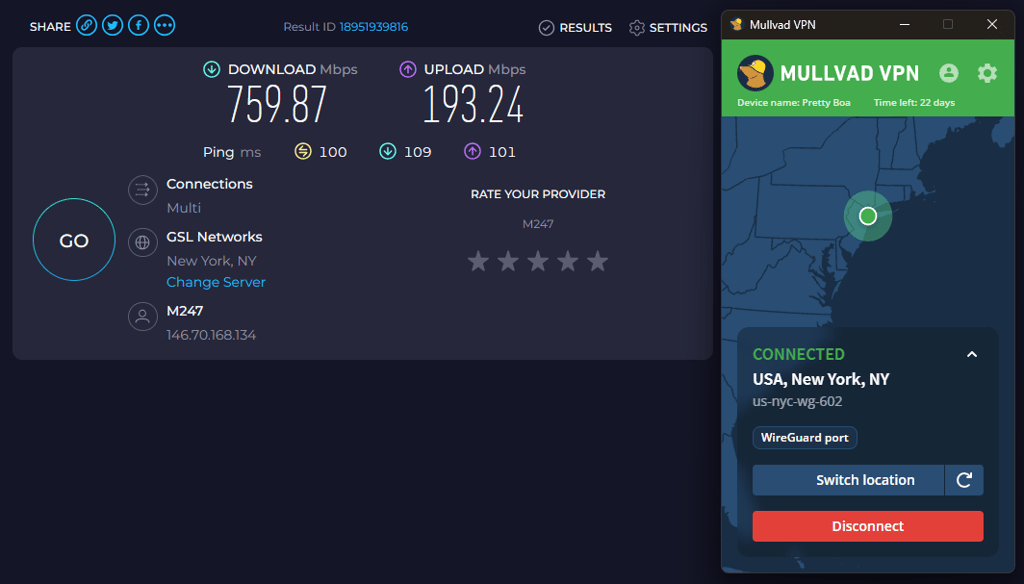
| US | 469Mbps/200Mbps | 760Mbps/193Mbps |
| UK | 575Mbps/459Mbps | 691Mbps/481Mbps |
| Australia | 382Mbps/91Mbps | 543Mbps/71Mbps |
| Japan | 301Mbps/77Mbps | 590Mbps/70Mbps |
Surprisingly, Mullvad VPN outperformed ExpressVPN in all locations in download speed. ExpressVPN maintained an average 54% of the download speed, while Mullvad VPN maintained 76%
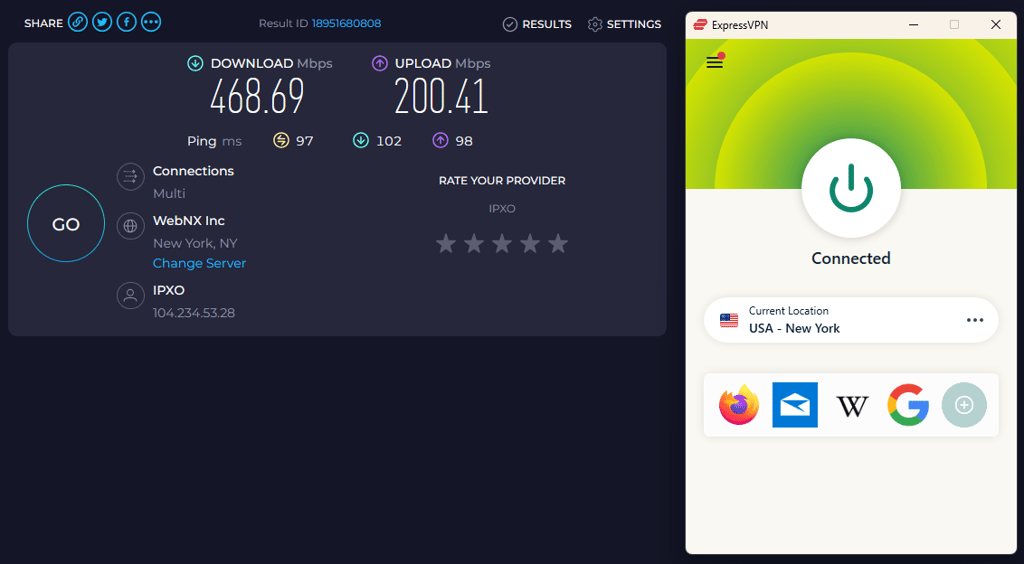
When it comes to upload speeds, the winner isn’t as straightforward. ExpressVPN maintained more speed in the US, Australia, and Japan. But, on average, ExpressVPN maintained 27% of the upload speed while Mullvad VPN maintained 28%.

Netflix and streaming performance
| Platform | ExpressVPN | Mullvad VPN |
| Netflix | ✅ Yes | ❌ No |
| Amazon Prime Video | ✅ Yes | ❌ No |
| YouTube | ✅ Yes | ✅ Yes |
| Disney+ | ✅ Yes | ❌ No |
| BBC iPlayer | ✅ Yes | ❌ No |
| HBO Max | ✅ Yes | ❌ No |
ExpressVPN is a much better pick than Mullvad VPN if you’re looking for a streaming VPN. In terms of Netflix, ExpressVPN managed to unblock most of the regions, including the US and even the notoriously difficult Japan library. Meanwhile, Mullvad VPN couldn’t access any Netflix library whatsoever.
In terms of other streaming services, we had a buffering-free experience on each platform we managed to get into with ExpressVPN. This includes Amazon Prime, YouTube, HBO Max, BBC iPlayer, Disney+, and Hulu.
ExpressVPN also provides additional features that are useful for streaming. SmartDNS enables you to unblock content on devices that don't typically work with VPNs (like a smart TV). And split tunneling runs specific apps through the VPN, so you can unblock Netflix and keep your local connection up at once.
On the flip side, Mullvad VPN wasn’t so great for streaming. We were denied access when trying to get into Netflix, BBC iPlayer, and HBO Max. We managed to unblock region-restricted videos on YouTube, but that’s it.


Torrenting
ExpressVPN is a top choice for torrenting. All of its servers allow P2P, it’s fast enough to keep your downloads/uploads stable, and it’s very secure, so you don’t need to worry about threats.
Mullvad VPN is much the same – all of its servers work with P2P, and we didn’t encounter any speed throttling during our tests. Mullvad VPN's security also ensures you won’t be compromised while torrenting.
Plans and pricing
ExpressVPN adopts the traditional pricing system you see from most providers. The longer you sign up, the less you pay each month.
The one-month option is $14.99/month, sign up for a year and it’s $4.99/month, or opt for the 2-year plan and pay $2.99/month.
In stark contrast, Mullvad VPN takes a different approach. No matter how long you sign up for – one month, six months, one year – you’ll always pay a flat fee of $5.00/month. This is an interesting strategy – you can save a good chunk of cash by choosing Mullvad VPN if you only need a VPN for a month.
| Plan | ExpressVPN | Mullvad VPN |
| 1-month plan | $14.99/month | $5.00/month |
| 1-year plan | $4.99/month | $5.00/month |
| 2-year plan | $2.99/month | $5.00/month |
| Check ExpressVPN deals | Check best VPN deals |
However, there are still a few factors to consider when deciding which provider represents the best value. Mullvad VPN only offers 5 simultaneous connections, while ExpressVPN allows up to 14 devices, depending on your plan. Both options provide a 30-day money-back guarantee, but ExpressVPN also throws in a 3-day free trial on mobile.
In terms of actual payment options, ExpressVPN takes credit cards, Bitcoin, UnionPay, PayPal, and more. Along with the usual methods (credit card, Bitcoin, PayPal), Mullvad VPN even takes payment via cash sent through the post! This is certainly unique and could appeal to ultra-private customers.
Server locations
| ExpressVPN | Mullvad VPN | |
| Servers | Undisclosed | 580+ |
| Countries (total) | 113 | 50 |
| Virtual locations | Yes | No |
| Specialty servers | No | No |
When you compare Mullvad VPN and ExpressVPN’s server locations, you’ll quickly see there’s no contest. ExpressVPN eclipses its competition in this round with undisclosed number of servers in 113 countries compared to Mullvad’s 580 servers in 50 countries.
With that many more servers available, the likelihood of having an optimized connection in the location of your choice is much greater with ExpressVPN.
Features overview
Extra features can massively improve your VPN experience. Security and servers are a given, but what other benefits can a VPN bring to the table? ExpressVPN boasts a full suite of additional settings, while Mullvad VPN's selection is more modest. Let’s see how they compare over some key areas.
Split tunneling
Split tunneling is a useful feature that enables you to pick which apps you want to go through the VPN and which to leave on your standard connection. It's handy if you want to access restricted content while staying connected to your localized work platform. Both providers offer it, but does one do it better?
Mullvad VPN's split tunneling works on Android, macOS, Windows, and Linux devices. ExpressVPN delivers the feature on Windows, Android, Linux, and Mac.

With that in mind, ExpressVPN ever-so-slightly comes out on top.
Smart DNS
This excellent feature is geared toward streaming. It helps you unblock content without connecting to the VPN, which means your speeds will be faster. It also works on devices that otherwise don’t support VPN installation – like your games console or smart TV – by changing the device’s DNS settings.
ExpressVPN’s version of this feature is called MediaStreamer. It’s easy to use and will be a godsend if you’re keen to access geo-blocked streamers. Mullvad VPN doesn’t have smart DNS, so ExpressVPN gets another top mark.
Ad blocker
Ad blockers are found on most VPNs. ExpressVPN has a threat manager tool, which blocks malicious ads and trackers.
Mullvad VPN does have an ad blocker, so you can banish those annoying pop-ups. It also doubles up to stop websites from tracking your activity, so it’s a useful weapon in the fight against trackers and advertisers.

Port forwarding
If you’re trying to access a device remotely or are creating your own gaming server, port forwarding is a feature you’ll want to hear about. Port forwarding enables devices and remote servers to connect to your private network.
Mullvad VPN port forwarding works well. We tested it out with a Minecraft server to great success. ExpressVPN doesn’t offer port forwarding.
Kill switch
The kill switch is a vital feature of a VPN. It protects your anonymity by killing your internet connection if the VPN drops out. This stops your IP address or identity from being revealed to snoops and sneaks. You should always have a kill switch ready when you’re on a public wifi connection.
ExpressVPN’s kill switch is called Network Lock. You can customize it to work on specific apps and even disable/allow connections to local devices. It’s available on Windows, Android, Linux, and macOS, while iOS has the feature built in.

Mullvad VPN's kill switch is built into the VPN and is always on, you don’t even have to go to settings to enable it.
Mullvad VPN vs ExpressVPN: which is more secure?
| ExpressVPN | Mullvad VPN | |
| Encryption | AES-256 and ChaCha20 | AES-256 and ChaCha20 |
| Hash | SHA-512 | SHA-512 |
| RAM servers | Yes | Yes |
| Outside the Fourteen Eyes alliance? | Yes | No |
| No-logs policy | Audited | Audited |
| Kill switch | Yes | Yes |
| Ad blocker | Yes | Yes |
| DNS leak protection | Yes | Yes |
You can rely on Mullvad VPN and ExpressVPN to keep you protected. Both shield your data in AES-256 data encryption and offer an impressive suite of security features. But which is most secure overall? Let’s take a look.
Infrastructure
ExpressVPN operates RAM-only servers via its TrustedServer technology – all user data is deleted whenever the service reboots.
Mullvad VPN keeps its servers fully encrypted and uses optimized ‘bastion host’ computers to block hacks and attacks.
Furthermore, ExpressVPN’s tunneling protocols include IKEv2, OpenVPN, L2TP, and its in-house Lightway. Mullvad VPN only supports OpenVPN and WireGuard, but they’re two of the best protocols you can use.
Privacy
ExpressVPN and Mullvad VPN both ensure your data is secure with military-grade AES-256 encryption. Essentially impenetrable, it's even able to withstand brute-force attacks, which means your sensitive info will always be safe from hackers and snoops.
One factor in ExpressVPN's favor is its location. This provider is based in the famously-private British Virgin Islands, where there are no laws on data retention. Mullvad VPN, on the other hand, is located in Sweden, a country that’s a member of the Fourteen Eyes initiative.
Some users may deem that a privacy concern, but Mullvad VPN makes up for it in other ways. Accounts can be created with total anonymity – you don’t have to enter an email address, and you can even pay in cash.
Logging
A VPN should never hold onto your personal data. Thankfully, Mullvad VPN and ExpressVPN enforce strict no-log policies to ensure your info is never stored.
This has been verified for both providers by way of independent audits. ExpressVPN has had its service checked by KMPG and Mullvad VPN was evaluated by the X41 D-Sec auditing company. Both providers were awarded top during their respective audits.
Platforms, interface, and ease of use
| ExpressVPN | Mullvad VPN | |
| Supported OS | Windows, macOS, Linux, Android, iOS | Windows, macOS, Linux, Android, iOS |
| Browser extensions | Chrome, Brave, Opera, Edge, and Firefox | Firefox |
| Other software and devices | Android TV, Fire devices, routers | Android TV, Fire devices |
| Simultaneous connections | 14 | 5 |
| Usability level | Easy to use | Easy to use |
Both ExpressVPN and Mullvad VPN are very easy to set up. The apps download and install in a matter of minutes, if not seconds. Plus, both providers have dedicated apps for Windows, Android, macOS, iOS, and Linux. Yet, where ExpressVPN takes the edge is its app for Aircove routers.
In terms of browser extensions, ExpressVPN provides them for Chrome, Brave, Opera, Edge, and Firefox, while Mullvad VPN only supports Firefox.
That said, ExpressVPN supports more simultaneous connections and has a SmartDNS feature for devices that don’t support direct VPN installation. These extra devices give ExpressVPN the upper hand here.
Desktop apps
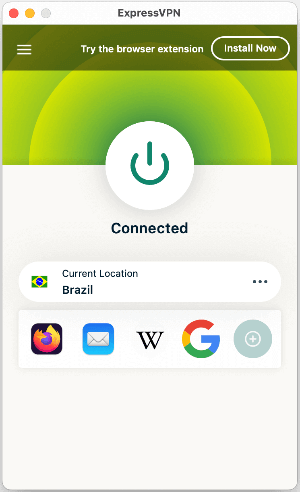
Mullvad VPN and ExpressVPN’s desktop apps both provide a user-friendly experience. ExpressVPN’s no-frills interface is easy to navigate, and you’ll also find its Windows and macOS apps are near-identical. You won’t have any issues finding features, connecting to servers, or setting shortcuts.
Mullvad VPN also delivers simple desktop apps that users of all levels will find easy to get around. Preferences, servers, and the advanced settings menu are all front and center, so you can access the main features as soon as you load up the app.

However, unlike ExpressVPN, you may notice a few differences between the Windows and macOS apps. The general feel of the app may also seem a bit outdated.
Mobile apps
Mullvad VPN's mobile apps work well on Android and iOS, you’ll get the same ease of use as on a desktop. But if you’re on an Apple device, you’ll lose a few features on the iOS app, such as split tunneling.
ExpressVPN’s mobile apps are also pleasingly easy to use. The Android version is a perfectly shrunken-down version of the desktop app – it’s quick, responsive, and has all the same features.
Customer support
| ExpressVPN | Mullvad VPN | |
| 24/7 live chat | ✅ | ❌ |
| ✅ | ✅ | |
| Phone line | ❌ | ❌ |
| Guides or articles | ✅ | ✅ |
| FAQ | ✅ | ✅ |
ExpressVPN offers top-quality customer support. You can get a query answered quickly on a 24/7 live chat, or shoot over a request via email. In both cases, we received replies promptly – instantly via live chat and no longer than a couple of hours over email.
You can also explore the extensive knowledge base to find guides, tutorials, FAQ, and more, in a wide range of language translations. It’s safe to say that ExpressVPN wants to give you all the help you need to get the best out of its service.
Mullvad VPN's customer support options include a knowledge base with FAQ and guides and an email address. You’re also encouraged to reach out on social media (Facebook, Twitter) with queries. Unfortunately, there’s no live chat, which is disappointing.
Mullvad VPN vs ExpressVPN – which one wins?
ExpressVPN stands out with superior streaming, a larger server network, richer features, and better customer support. Mullvad VPN, however, excels in privacy with anonymous sign-up and delivers faster download speeds alongside simple, transparent pricing.
While both are secure and reliable, ExpressVPN’s all-around performance and versatility make it the better choice for most users, especially those who want a premium, feature-complete VPN experience.
| Feature | ExpressVPN | Mullvad VPN | Verdict |
| Pricing | Mullvad VPN offers simple flat-rate pricing that’s cheaper short term, but ExpressVPN provides better long-term value with lower extended plans and more connections. | ||
| Speed | Mullvad VPN delivers faster download speeds overall, maintaining higher performance across locations, while ExpressVPN offers more balanced upload speeds and consistency. | ||
| Privacy | Both providers excel with audited no-logs policies and strong encryption. Mullvad emphasizes anonymity, while ExpressVPN benefits from a more privacy-friendly jurisdiction. | ||
| Features | ExpressVPN offers a broader feature set, including SmartDNS and more protocols, while Mullvad keeps things simpler with fewer extras but still covers essential tools. | ||
| Streaming | ExpressVPN is far superior for streaming, reliably unblocking major platforms, while Mullvad struggles to access most services beyond basic YouTube content. | ||
| Torrenting | Both VPNs perform equally well for torrenting, offering strong security, stable speeds, and full P2P support across their server networks. | ||
| Support | ExpressVPN provides more comprehensive support with 24/7 live chat and faster responses, while Mullvad relies on email and guides without real-time assistance. |
FAQ
Which is cheaper – Mullvad VPN or ExpressVPN?
ExpressVPN is cheaper than Mullvad VPN. Mullvad VPN charges a flat-rate sum of $5.00/month for all its subscription options. In contrast, ExpressVPN plans start at $2.99/month, making it a cheaper option long-term.
Is ExpressVPN faster than Mullvad VPN?
No, ExpressVPN isn’t faster than Mullvad VPN. Based on our in-house test, Mullvad VPN showed better speeds, maintaining 76% of the download speed, compared to ExpressVPN’s 54% retention.
Is Mullvad VPN safe?
Yes, Mullvad VPN is a very safe VPN. This provider offers full AES-256 data encryption and a kill switch to keep your data under wraps at all times. It’s also strongly privacy-focused, no personal details are required to sign up, and you can even pay in cash.