How to buy a VPN with crypto, and what VPNs support crypto payments
Our in-house cybersecurity experts and journalists, renowned for major reports like The Mother of All Breaches, conduct transparent, unbiased VPN testing and in-depth analysis.
With 750+ articles crafted based on real-world research, we empower readers to make informed purchasing decisions through first-hand expertise.
Learn more
If you're looking to buy a VPN, you might just be looking for privacy and anonymity on the internet. If you want to reduce your digital footprint, paying for a VPN with cryptocurrency is an excellent choice. When you buy a VPN with crypto, you avoid sharing your personal and banking details, helping you stay safe and anonymous online.
In this article, I show you the best VPNs to buy with crypto in 2026, listing providers that accept cryptocurrency payments while offering strong security, fast speeds, and reliable privacy features.
What you need to know before paying for a VPN with crypto?
Before you buy a VPN with crypto, it’s important to understand how these payments work. Crypto can improve payment privacy, but it also comes with limitations compared to traditional payment methods. Here are the main things to know before choosing a VPN and paying with cryptocurrency.
- Crypto payments are usually irreversible. Cryptocurrency transactions cannot be chargebacked. Once confirmed on-chain, payments cannot be canceled, and refunds depend on the VPN’s internal policy. Some providers still offer money-back guarantees for crypto payments, but this depends on the service and plan.
- Paying with crypto does not automatically make you anonymous. An anonymous payment does not mean anonymous VPN usage. Your privacy still depends on the VPN’s logging policy, the data collected during signup, and the provider’s jurisdiction. Crypto protects payment privacy, not browsing activity.
- You may still need an account before paying. Many VPNs require an email address or account creation before checkout, while others allow payment first and account setup later. For better anonymity, use a privacy-focused email and avoid addresses linked to your real identity or crypto exchanges.
- Extra fees and exchange-rate differences are normal. Crypto payments are often converted to USD or EUR during checkout, and network or processor fees may apply. The final charged amount may slightly differ from the displayed price.
- Auto-renewal usually does not apply to crypto payments. Most VPNs do not automatically renew crypto subscriptions, so you will need to renew the plan manually when it expires.
VPNs that accept crypto compared
Not all VPN providers handle cryptocurrency payments the same way. Some accept multiple cryptocurrencies, while others rely on third-party processors or limit crypto payments to certain plans. The table below compares major VPN providers, showing which ones offer cryptocurrency payments and which do not. Here you can also see payment processing methods, account requirements, refund policies, and auto-renewal options.
| Accepts cryptocurrencies | Cryptocurrencies accepted | Payment processor | Account required before payment | Refund policy with crypto | Auto-renewal with crypto | |
| NordVPN | ✅ Yes | Bitcoin, Ethereum, Litecoin, USDC, TRON, Solana, Binance Coin, XRP, Polygon, Dogecoin, Bitcoin Cash | CoinGate | ✅ Yes | ✅ Yes – direct (30-day money-back guarantee applies) | Manual renewal only |
| Surfshark | ✅ Yes | Bitcoin, Ethereum, Litecoin, USDC, TRON, Solana, Binance Coin, XRP, Polygon, Dogecoin, Bitcoin Cash | CoinGate | ✅ Yes | ✅ Yes – direct (30-day money-back guarantee applies) | Manual renewal only |
| Proton VPN | ✅ Yes | Bitcoin | BitPay | ✅ Yes | ✅ Yes – direct (30-day money-back guarantee applies) | Manual renewal only |
| ExpressVPN | ✅ Yes | BTC, BCH, ETH, USDC, and more. | BitPay | ✅ Yes | ✅ Yes – direct (30-day money-back guarantee applies) | Manual renewal only |
| CyberGhost VPN | ✅ Yes | Bitcoin | BitPay | ✅ Yes | ✅ Yes – direct (45-day money-back guarantee applies) | Automatic renewal |
| PureVPN | ✅ Yes | Bitcoin, Ethereum, Litecoin, USDC, TRON, Solana, Binance Coin, XRP, Polygon, Dogecoin, Bitcoin Cash | CoinGate | ✅ Yes | ✅ Yes – manual support request needed | Manual renewal only |
| Ivacy VPN | ✅ Yes | Bitcoin and others | CoinPayments | ✅ Yes | ✅ Yes – manual support request needed | Manual renewal only |
| PIA VPN | ✅ Yes | Bitcoin | BitPay | ✅ Yes | ✅ Yes – direct (30-day money-back guarantee applies) | Automatic renewal |
| Hide.me | ✅ Yes | Bitcoin, Dogecoin, Ethereum, Litecoin, Monero, Solana, KuCoin, *Tether, *USD Coin | CoinPayments | Partial (email required) | ✅ Yes – manual support request needed | Manual renewal only |
| Windscribe | ✅ Yes | Bitcoin, Litecoin, Velas EVM, BF Token, BitTorrent, Dash, DigiByte, Dogecoin, Ethereum, Ethereum Classic, Firo, PIVX, Quantum, Ravencoin, Shiba Inu, Solana, Syscoin, TRON, USD Coin, NEM, Monero, Verge, Zcash, and Horizen | CoinPayments | Partial (email optional) | ✅ Yes – manual support request needed | Manual renewal only |
| Mullvad | ✅ Yes | Bitcoin, Bitcoin Cash, Monero | Direct / crypto wallet | ❌ No | ❌ No – crypto refunds not supported | Manual renewal only |
| IPVanish | ❌ No | – | – | – | – | – |
| Hotspot Shield | ❌ No | – | – | – | – | – |
| TunnelBear | ❌ No | – | – | – | – | – |
| Bitdefender VPN | ❌ No | – | – | – | – | – |
| Total VPN | ❌ No | – | – | – | – | – |
| Norton VPN | ❌ No | – | – | – | – | – |
| iTop VPN | ❌ No | – | – | – | – | – |
| AVG VPN | ❌ No | – | – | – | – | – |
| Avast VPN | ❌ No | – | – | – | – | – |
How to buy a VPN with crypto
Buying a VPN with cryptocurrency is a simple process and usually takes only a few minutes. While the exact layout may vary between providers, the steps below follow the standard flow you’ll see when you buy a VPN with crypto.
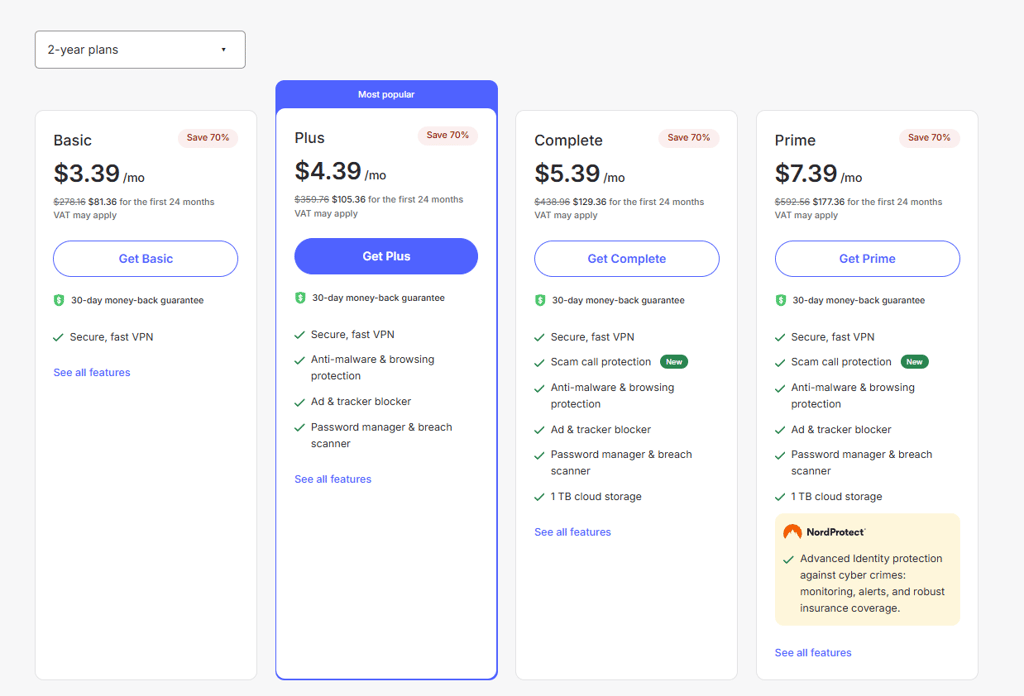
1. Choose a VPN and plan
Select your VPN provider and choose a plan length. Since crypto payments usually don’t auto-renew, longer plans help avoid manual renewals later.
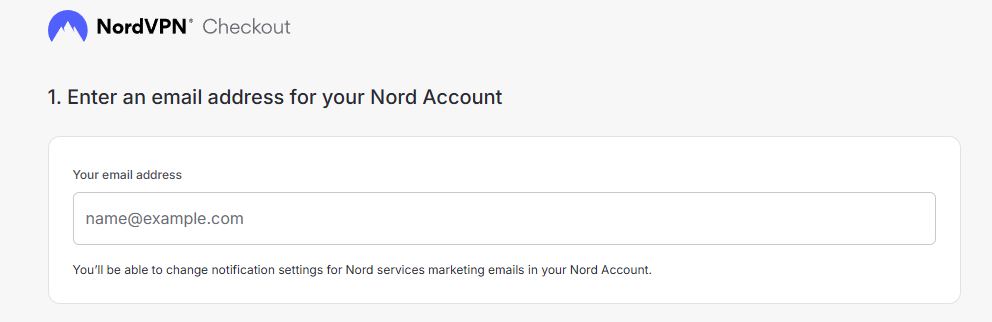
2. Start checkout and enter an email (if required)
Many VPNs require an email address during checkout to create an account or send confirmation details. If anonymity matters, use an email not tied to your personal identity.
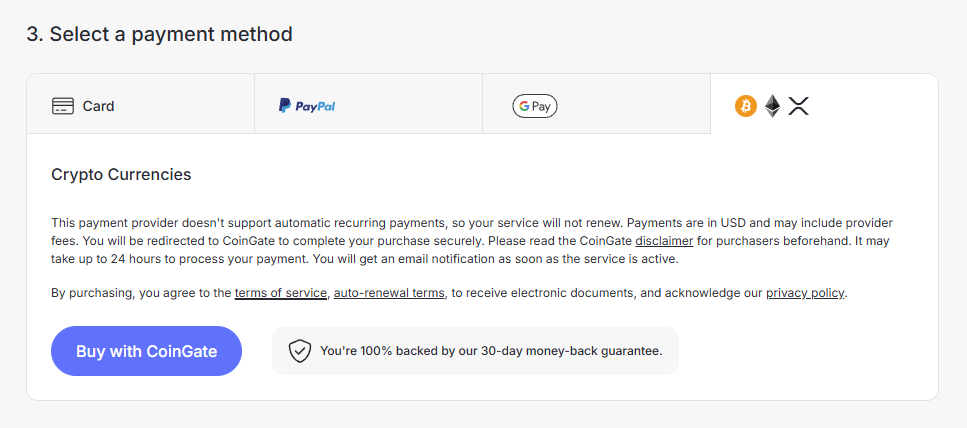
3. Select cryptocurrency as the payment method
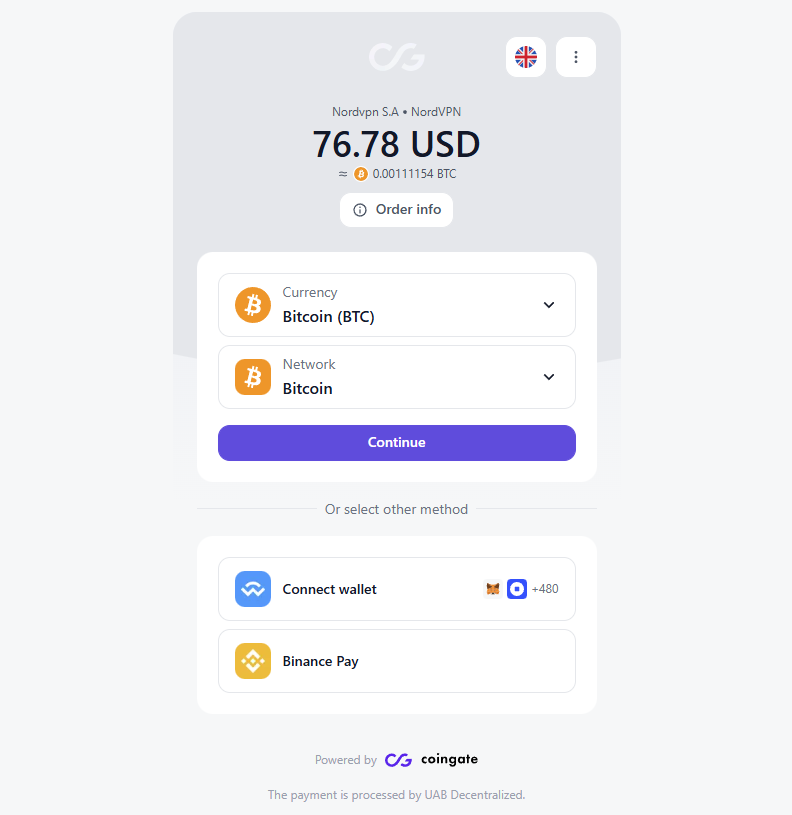
Choose Cryptocurrency, Bitcoin, or a similar option on the payment screen. A payment processor such as CoinGate or BitPay may appear to handle the transaction.
4. Pay from your wallet (QR code or address)
Send the payment using your wallet by scanning the QR code or copying the provided address. Always double-check the wallet address and network before confirming the transaction.
5. Finish setup and download the VPN app
After payment confirmation, your account is activated, and you’ll receive access to download the VPN app. Log in, install the app, and connect to start using the VPN.
Anonymity checklist when paying for a VPN with crypto
Paying for a VPN with cryptocurrency can improve your privacy, because it reduces the amount of personal and financial data shared during checkout. However, crypto payments alone don’t guarantee full anonymity – a few additional steps can help minimize the information linked to your VPN account.
1. Use a burner or privacy-focused email address
Many VPNs require an email during signup, and this becomes the main identifier tied to your account. Use an email address that isn’t linked to your real identity or personal accounts.
2. Share as little personal information as possible
Most VPNs don’t require a real name, physical address, or phone number. Only provide the information strictly needed to create the account and skip optional profile fields whenever possible.
3. Practice basic wallet hygiene before paying
Crypto payments expose your wallet address to the payment processor, and your wallet history is publicly visible on the blockchain. For better privacy, avoid paying directly from exchange accounts tied to KYC or wallets you publicly use elsewhere.
4. Double-check invoice details and network before sending
Always verify the selected cryptocurrency, blockchain network, and destination address before confirming payment. Sending funds on the wrong network or paying an incorrect amount can delay activation and may be unrecoverable.
Final thoughts
Buying a VPN with cryptocurrency is a simple way to improve payment privacy while keeping your browsing secure. It reduces the amount of personal information shared during checkout, especially when combined with good anonymity practices.
Among the available options, NordVPN is my recommended choice to buy with crypto thanks to its reliability, strong security standards, and straightforward crypto payment process. If you choose a trusted provider and follow basic privacy steps, buying a VPN with crypto is an easy way to improve online privacy in 2026.
FAQ
Can I pay for Surfshark with crypto?
Yes, Surfshark accepts cryptocurrency payments through third-party processors such as CoinGate. You can pay using Bitcoin and several other cryptocurrencies, and the standard money-back guarantee still applies, although refunds may require contacting support.
Can I pay for a VPN with Bitcoin?
Yes, many VPN providers accept Bitcoin as a payment method. Popular options like NordVPN, Surfshark, ExpressVPN, Proton VPN, and others allow users to buy VPN subscriptions with Bitcoin for improved payment privacy.
Can I get a refund if I pay for a VPN with crypto?
In many cases, yes, but it depends on the provider’s policy. Some VPNs include crypto payments in their money-back guarantee, while others process refunds manually or do not support crypto refunds at all. Always check refund terms before paying.
Do I need to create an account before paying with crypto?
Usually, yes. Most VPN providers require an email address or account creation before checkout so they can activate your subscription. A few providers allow payment first and account setup later, but this is less common.
Is paying with crypto safer than using a credit card?
Yes, crypto payments are more private because they don’t require sharing banking details. However, they are not automatically safer – transactions are irreversible, and your overall privacy still depends on the VPN’s logging policy and security practices.