TunnelBear VPN review
Our in-house cybersecurity experts and journalists, renowned for major reports like The Mother of All Breaches, conduct transparent, unbiased VPN testing and in-depth analysis.
With 750+ articles crafted based on real-world research, we empower readers to make informed purchasing decisions through first-hand expertise.
Learn moreTunnelBear is a basic VPN providing a large server network and unlimited simultaneous connections. Headquartered in Canada, TunnelBear falls under the watchful eye of the Five Eyes alliance. It employs the industry-standard AES-256 encryption algorithm; however, it fails to deliver fast speeds and advanced features.
| Price: | From $3.33/month |
| Servers count: | 8,000+ servers in 47 countries |
| No logs policy: | No logs |
| Simultaneous connections: | Unlimited |
| Streaming services: | Netflix, BBC iPlayer, YouTube |
| Coupons: | Cybernews VPN Coupons |
-
Unlimited simultaneous connections
-
Free plan with a monthly 2GB data cap
-
Basic yet intuitive interface
-
Slow speeds, particularly noticeable when streaming
-
Inconsistent with overall performance and features
-
Unreliable at unblocking geo-restricted content
-
Can’t unblock Netflix, and other major streaming platforms
-
No router support


TunnelBear is a less-known VPN with a free version. Sounds like a good deal but is it any good? We’ve put it to the test and here’s what we found.
While TunnelBear employs the industry-standard encryption and follows a strict no-logs policy, it left a poor impression when it comes to speed and overall performance. During our tests, we were not able to unblock Netflix and other major streaming platforms. Torrenting with TunnelBear was also less than ideal.
Nonetheless, TunnelBear stands out among competitors with a free version you can use indefinitely, but we found it’s quite limited.

I collaborated with our research team and thoroughly tested TunnelBear to see if it’s a VPN I’d recommend. I evaluated security, plans and pricing, streaming and torrenting capabilities, server network, speed, ease of use, features, and customer support. Here’s what I found.
| NordVPN | TunnelBear | |
| ⭐ Rating: | ||
| 🥇 Overall rank: | #1 out of #41 | #34 out of #41 |
| 🖥️ Servers: | Thousands of servers in 225 locations | 8,000+ servers in 47 countries |
| 📖 No logs policy: | No logs | No logs |
| 💵 Price: | From $3.49/month | From $3.33/month |
| 🔥 Coupons: | NordVPN coupon 75% OFF | Cybernews VPN Coupons |
| 🔒 VPN protocols: | OpenVPN, NordLynx, NordWhisper | OpenVPN, IKEv2 |
| 🍿 Streaming services: | Netflix, Hulu, BBC iPlayer, Disney+, and more | Netflix, BBC iPlayer, YouTube |
| 🖥️ Platforms: | Windows, macOS, Linux, Android, iOS | Windows, Mac, Android, and iOS |
| 📥 Simultaneous connections: | 10 | Unlimited |
| 💁🏻 Support: | Knowledge base, email, 24/7 live chat | Knowledge base, FAQs, support tickets |


Instead of TunnelBear, I recommend NordVPN. With over 8,000 servers in 149 countries, it’s one of the best VPNs for unblocking streaming platforms like Netflix, Disney+, Max, and others. Surfshark, on the other hand, is cheaper than TunnelBear, and offers way more features. Most importantly, both of these providers retain around 90% of the original internet speed, meaning you’ll experience little to no buffering.


We spare no effort to test the products & their features. All information is gathered by our in-house research team & fact-checked by our team of experts. Discover the ins and outs of our testing procedures.
Is TunnelBear safe?
Yes, TunnelBear is safe because it employs industry-standard AES-256 and ChaCha20 encryption to secure your internet traffic. The main downside is that TunnelBear is headquartered in Canada, which is less than ideal when it comes to privacy laws.
Infrastructure and encryption
TunnelBear upgraded its infrastructure by fully implementing the WireGuard protocol across all platforms as of mid-2023. This addition is a significant step for TunnelBear, as WireGuard is known for faster connection times, efficient encryption, and a reduced attack surface due to its simpler codebase. It complements TunnelBear's existing VPN protocols, which still include OpenVPN and IKEv2, giving users more choice in connection methods. I appreciated the Auto protocol option, which automatically selects the optimal protocol based on network conditions, usually prioritizing WireGuard for its speed and security.
| Protocol | OS Support |
| WireGuard | Windows, macOS, iOS, Android |
| IKEv2 | Android |
| OpenVPN | Windows, macOS, iOS, Android |
However, while TunnelBear's encryption remains standard with AES-256 for data protection, the service doesn’t offer protocol flexibility for users who might want more control over their settings. Still, TunnelBear's "double-hop" encryption (unofficial terminology referring to an extra encryption layer before reaching the server) and a network of approximately 8,000 servers across 47 countries are structured to offer solid, stable connections, though slower speeds might occur for users outside central regions like the US and Europe.
Jurisdiction
TunnelBear is headquartered in Canada, a member of the Five Eyes intelligence-sharing alliance, which may raise concerns for privacy-conscious users. This jurisdiction means data could be subject to intelligence-sharing agreements between Canada, the US, the UK, New Zealand, and Australia. While TunnelBear has undergone regular independent security audits, these primarily assess its security infrastructure rather than confirming a strict no-logs policy.
By comparison, top VPNs like NordVPN is based in Panama, which is outside of international surveillance alliances. This distinction means they operate under privacy-favorable jurisdictions, allowing them to offer strong user data protection without government-mandated logging requirements. NordVPN has also undergone multiple no-logs audits, and Surfshark has had third-party audits to validate its commitment to privacy.
While TunnelBear's jurisdiction might be a drawback for privacy-focused users, its regular third-party audits help provide some reassurance regarding data security. Still, users who prioritize jurisdiction as part of their VPN choice may prefer providers in more privacy-friendly regions.
TunnelBear's kill switch: VigilantBear
VigilantBear is TunnelBear’s kill switch feature. Its main function is to protect your privacy during those brief moments when the connection between your device and the VPN server gets disrupted.
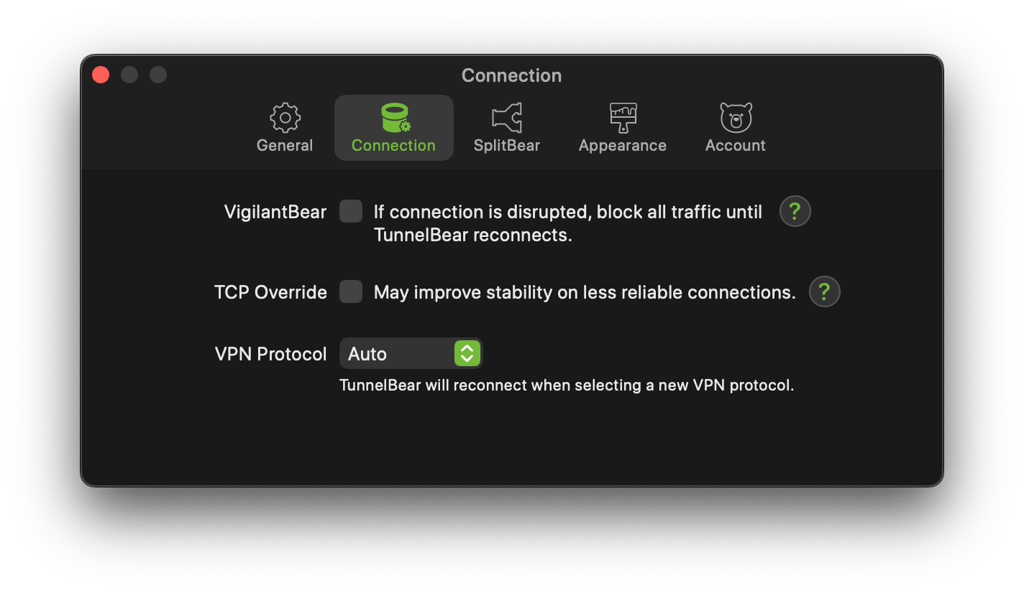
VigilantBear puts your internet connection on hold while it waits for the VPN server to respond. If it does, data is allowed to pass, enabling you to do whatever you were doing before the interruption. This feature protects you from an unwanted IP address or location exposure. VigilantBear is available on all supported platforms, including Windows, macOS, Android, and iOS devices.
However, keep in mind that disconnection and disruption notification alerts are toggled off by default. So, in cases when VigilantBear is triggered, you won't get any notifications. If it gets activated while the connection is trying to resolve itself, you may start troubleshooting other network components that may be working perfectly fine.
Privacy policy and logging
TunnelBear doesn't monitor or log your activity. In simple terms, it means they don't collect information on what you're doing online while using the service.

However, the VPN provider does collect some personal data via their website and some non-personal data via the app. As they claim in their privacy policy. For example, TunnelBear VPN knows:
- Your email address
- Twitter ID (if you opted in for their special promo)
- OS version
- Total data used this month
- Cardholder's last name
Also, they can access the data stored by their third-party payment companies like Stripe and PayPal. This may include your card billing address.
All in all, this isn’t the most privacy-friendly VPN on the market. It’s also based in a Five Eyes alliance country.
Independent audits
TunnelBear has undergone a security audit every year since 2016. The audits are performed by Cure53, a German security firm that checks for vulnerabilities in their apps and infrastructure. Cure53 has also audited big names like NordVPN, Surfshark, and ProtonVPN. The latest TunnelBear audit was performed in 2023, where Cure53 pointed out a few issues, but TunnelBear quickly fixed most of them, staying on top of user safety. This consistent audit history shows a real dedication to transparency, which isn’t as common across all VPNs.
Nonetheless, in a field where regular audits give peace of mind, other top VPNs like NordVPN and Surfshark are also increasing their audit frequency. I appreciate TunnelBear’s track record, but without recent audits, some might consider other options with fresher verifications.
How much does TunnelBear cost?
TunnelBear has one plan with four subscription tiers. Prices depend on how long you’re willing to commit to a plan. Features-wise, it doesn’t matter which plan you get, since you’ll get all of the same features no matter which subscription length you choose.
The 3-year plan is the cheapest but is too big of a commitment for a lot of people. I’d recommend the 2-year plan, which costs $4.17/month. Comparing this to one of my personal favorites, NordVPN, you can see that TunnelBear is slightly more expensive and offers fewer features, slower speeds, and a less intuitive user experience.
| Subscription length | TunnelBear | NordVPN Basic |
| 1-month | $10.99/month | $14.99/month |
| 1-year | $5.83/month | $5.49/month |
| 2-years | $4.17/month | $3.49/month |
| 3-years | $3.33/month | - |
Unfortunately, unlike NordVPN and Surfshark, TunnelBear does not have a 30-day money-back guarantee. In fact, its refund policy is blurry; TunnelBear’s official website says:
“TunnelBear may offer refunds on a case-by-case basis. If you are unsatisfied with your purchase for any reason, you can request a refund by contacting our friendly Support Bears. As per our Terms of Service, all refund requests are subject to review.”
So, if TunnelBear doesn’t deem your reasoning to be valid, you won’t be getting a refund. Furthermore, since it provides a free version, there’s no free trial for the unlimited version.
TunnelBear accepts credit/debit cards when purchasing a subscription through its website.
Free version of TunnelBear
TunnelBear’s free plan is popular for its simplicity and solid security features, but like any free service, it comes with both advantages and limitations.
TunnelBear’s free version is easy to set up and doesn’t require much technical knowledge, making it accessible for beginners. Security-wise, it includes AES-256-bit encryption and an automatic kill switch, essential for basic online privacy. Another strong point is the lack of annoying ads, which many free VPNs include. TunnelBear also has a playful, user-friendly interface that stands out from competitors, which makes navigating its features straightforward. It’s also one of the few free VPNs that undergoes annual independent audits, providing some extra transparency and confidence in its security standards.
One of the major downsides of TunnelBear’s free version is that you’re limited to 2GB per day, meaning you won’t be able to use it all day, especially if you’re streaming videos. If you’re looking for a free VPN, there are better alternatives, like Proton VPN. Its free version has no data cap and unblocks geo-restricted content.
While TunnelBear’s free version can be suitable for occasional use or quick connections, the limitations on data and features might drive more regular users towards a paid plan or a different VPN provider.

TunnelBear servers and locations
TunnelBear offers over 8,000 servers in 47 countries, which offers a pretty decent global coverage, comparable to that of NordVPN and Surfshark server-wise. However, it doesn’t have a huge coverage when it comes to countries, so you may not be able to unblock geo-restricted content in less-known countries.
| TunnelBear server regions | Number of countries |
| Europe | 27 countries |
| Americas | 8 countries |
| Asia and Oceanic region | 9 countries |
| Africa | 3 countries |
In terms of server count, this VPN provider can’t compete with our best options like NordVPN, which has over 8,000 servers in 149 countries, or Surfshark, with 4,500+ servers in 100 countries. However, you should be able to find the needed server location.
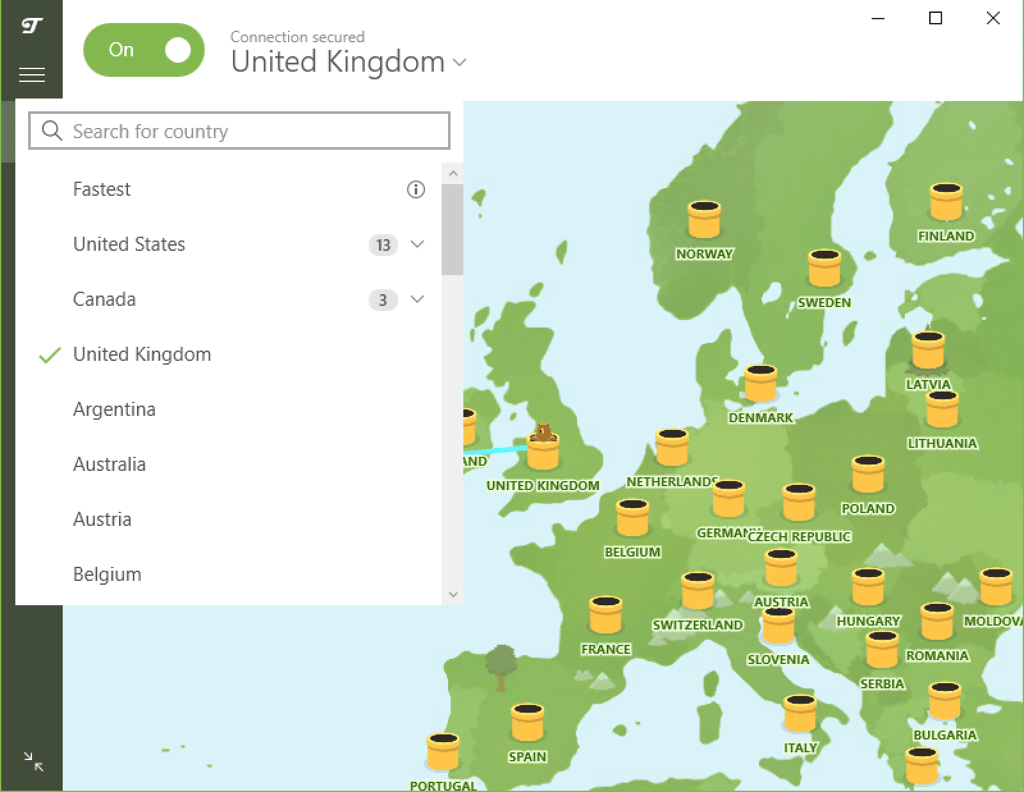
While they have a high server count, TunnelBear covers only almost 50 countries, which is half than what NordVPN offers. I was a bit disappointed that the most restrictive countries that are most in need of VPNs are generally further from their offered locations.
Specialty servers
TunnelBear doesn’t offer specialty servers, which is a bit of a letdown if you’re looking for advanced options for tasks like streaming, gaming, or torrenting. Unlike some top competitors like NordVPN and Surfshark, which include specialty servers (like P2P servers for torrenting or obfuscated servers for bypassing strict internet restrictions), TunnelBear focuses more on simplicity than on advanced configurations. IPVanish also includes a variety of servers that optimize for speed and specific protocols, whereas TunnelBear sticks to its standard, single-type servers for all users.
For casual browsing and basic security needs, TunnelBear’s server structure works fine, especially for those who prioritize ease of use. But if you’re looking for a VPN with a more flexible and optimized setup for specific online activities, then NordVPN or Surfshark would offer more tailored options.
How fast is TunnelBear?
TunnelBear is a hit or miss when it comes to speed and overall performance. On some servers it performs pretty well, in the same league as NordVPN. On others, it becomes so slow it’s nearly unusable. This lack of consistency is a huge drawback of using TunnelBear.
Our research team tested TunnelBear’s speed retention rates in February 2025. We used the WireGuard protocol to connect to a TunnelBear server and measured the speed drop. Here’s what we found.
| Speed without VPN | US server speed | UK server speed | Japan server speed | |
| Ping | 5ms | 116ms | 38ms | 281ms |
| Average download speed | 500Mbs | 196Mbs | 418Mbs | 257Mbs |
| Average upload speed | 500Mbs | 61Mbs | 162Mbs | 50Mbs |
Note. The table above shows download speed retention compared to 500Mbps internet baseline speed.
It’s important to note that the results greatly vary depending on how far away you are from the VPN’s data center. Other aspects that have an impact include server load and your internet speed.
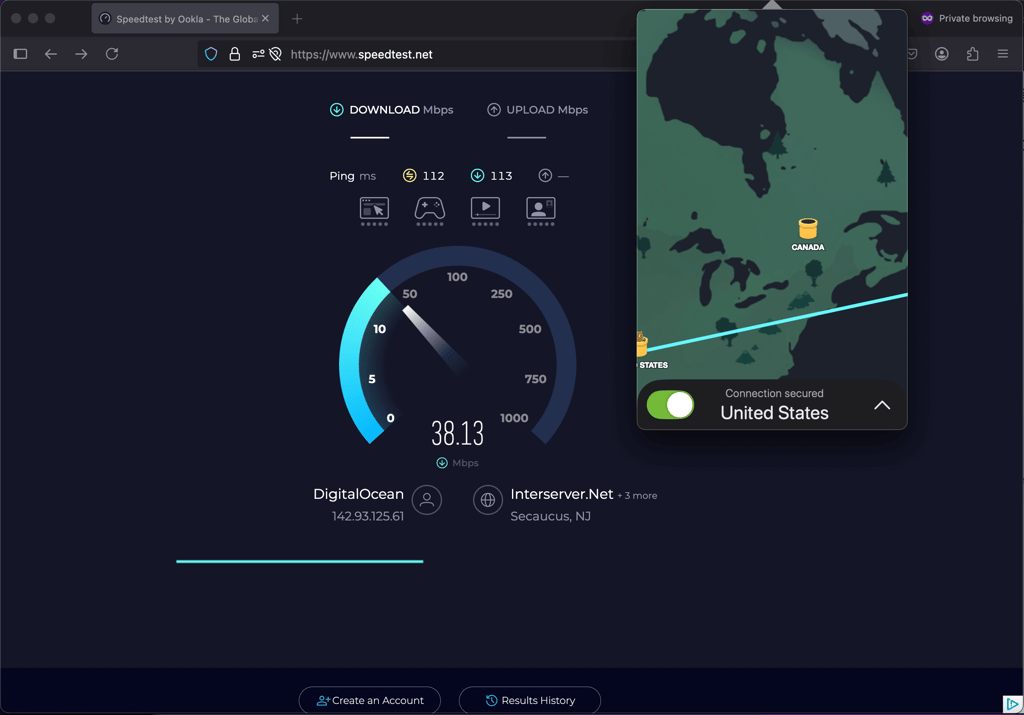
TunnelBear maintained around 39.2% of the original internet speed when connected to the US server from Lithuania. Compared to NordVPN, which retained around 90% of the original internet speed, this is a poor result and will significantly impact your streaming experience. However, it may be okay for simple browsing.
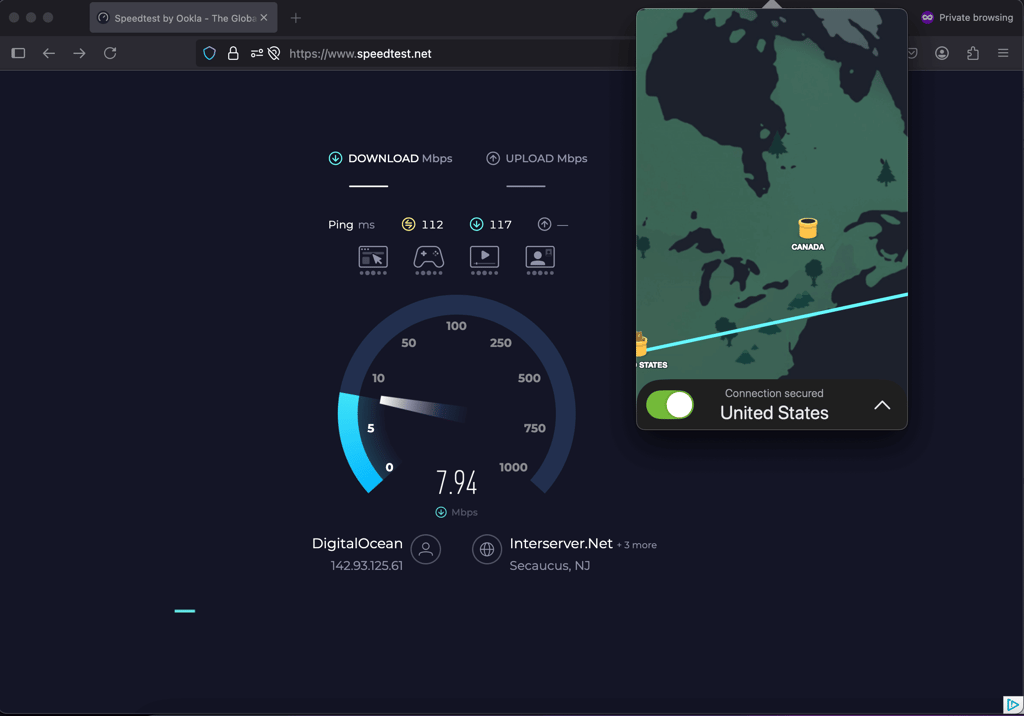
TunnelBear performed way better when connected to a server that’s not too far from our physical location. While connected to UK server while in Lithuania, TunnelBear retained around 83.6% of the original internet speed. This is a decent result, good enough for streaming with minimal buffering.
For comparison, here are the speed test results we did on other VPNs.
| Speed retention in the US | Speed retention in the UK | Speed retention in the Japan | |
| NordVPN | 84.8% | 97% | 94.4% |
| Surfshark | 83.4% | 94.4% | 93.2% |
| Proton VPN | 81.2% | 93.6% | 92% |
| ExpressVPN | 84% | 91.8% | 87.8% |
| Cyberghost | 93.6% | 94% | 96% |

Is TunnelBear good for streaming?
TunnelBear wouldn’t make it onto our list of the best VPNs for streaming. While it can unblock a range of streaming platforms, the video quality often falls short, and you may experience buffering. I also ran into some issues where my VPN connection dropped.
| Platform | Does it work? |
| Netflix | ✅ Yes (is unreliable with the US, unblocked Canada, Mexico, Australia, Japan, Nigeria on the first try) |
| Disney+ | ❌ No |
| BBC iPlayer | ❌ No |
| Hulu | ✅ Yes |
| Amazon Prime Video | ✅ Yes |
| YouTube TV | ❌ No |
| Max | ✅ Yes |
During my testing, TunnelBear successfully accessed Netflix US, but the process was rather complicated. I couldn’t unblock it at first, even though I was connected to the US servers. Then, I connected to Canadian servers, and was strangely able to unblock the US Netflix library. While I was able to unblock the US servers, it was by accident, so I would say that TunnelBear is a bit unreliable.
Other Netflix libraries, such as Mexico, Australia, Japan, and Nigeria worked, while others like France and Germany didn’t connect at all. Hulu was accessible but also required several tries.
TunnelBear was able to stream Max, Amazon Prime Video, and Hulu without issues, but it couldn’t unblock BBC iPlayer, which is not surprising since many VPNs struggle with this platform. Interestingly, it was able to unblock BBC iPlayer in our previous tests performed in 2024.
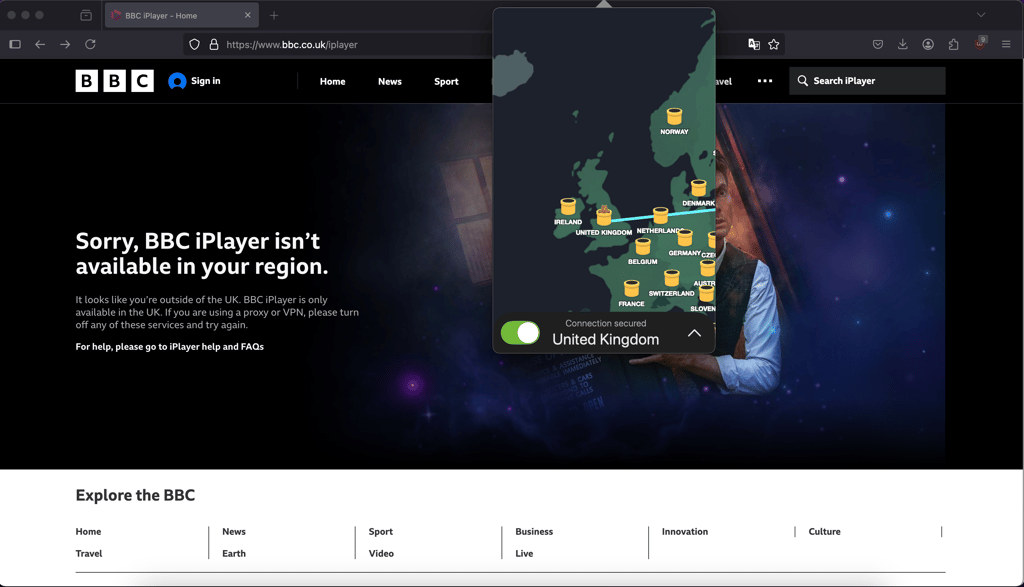
It also struggled with Disney+ and YouTube TV. While TunnelBear has some success with streaming, its limited server options and frequent reconnection needs make it less reliable for seamless streaming on all platforms.
Additionally, there’s no way to set up TunnelBear on your router. Also, this VPN has no apps for Amazon Firestick or Android TV, and there’s no Smart DNS tool. So you won’t be able to stream anything on your smart TVs.
Unblocking Netflix with TunnelBear
I put TunnelBear’s ability to unlock Netflix libraries to the test, and the experience left much to be desired. While I eventually accessed Netflix US, the process was strange, as I was connected to the Canadian servers. Canadian, Mexican, Australian, Japanese, and Nigerian libraries were easily accessible, but France, Germany, and Finland wouldn’t connect at all, highlighting TunnelBear’s limited reliability for global streaming.
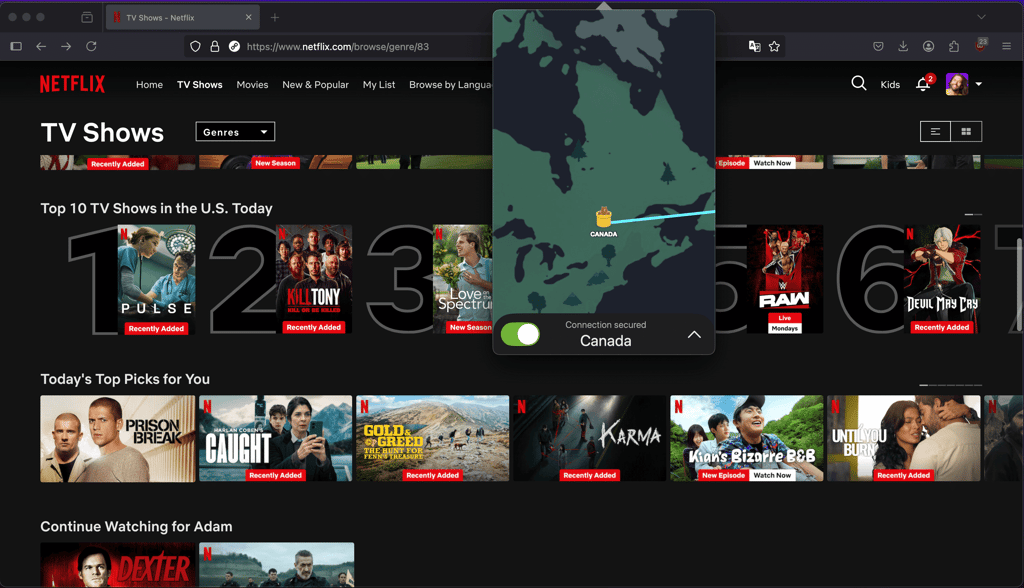
For users who prioritize consistent and broad access to Netflix and other streaming services, NordVPN offers a significantly better experience. With NordVPN, you get reliable, first-try access to a wide range of Netflix libraries worldwide, smooth high-quality streaming, and a larger server network designed specifically to bypass regional restrictions. If you’re looking for a VPN that truly excels at streaming, NordVPN is the clear choice over TunnelBear.
Is TunnelBear good for torrenting?
Even though it supports P2P, TunnelBear isn’t ideal for torrenting. While it does allow access to popular torrent sites like The Pirate Bay, 1337x, and Torrent Galaxy, it lacks advanced features commonly found in VPNs optimized for P2P sharing, such as specialized servers for faster speeds and enhanced security tools during downloads. Additionally, TunnelBear’s speeds are inconsistent, which can be frustrating when downloading larger files.
While TunnelBear can handle basic torrenting needs, users looking for a faster, more secure torrenting experience may want to consider other VPNs better suited for P2P activities.
If you need a secure and reliable VPN for torrenting, I recommend heading to our article where we pick best VPN for torrenting. There, you’ll find all of the providers we’ve tested and deemed as secure options for torrenting, like NordVPN.
Platforms, interface, and ease of use
TunnelBear offers apps across major platforms, but the user experience varies significantly depending on the device. While it aims for a friendly, engaging interface, the heavy use of animations and graphic elements can sometimes affect performance and usability.
| Platform | Experience |
| Windows | Heavy on your computer system due to extensive animations |
| macOS | The animations look fun, but there’s nothing groundbreaking |
| iOS and Android | Cluttered with graphics but otherwise very basic |
When developing the app, TunnelBear seems to have spent plenty of time integrating as many bear animations and graphics as they possibly could. It’s cute but does more harm than good. In fact, the animations actually slow down the app and can be real performance killers on lower-end devices.
Apart from desktop and mobile apps, Tunnelbear offers Chrome and Firefox extensions.
Desktop apps
TunnelBear only offers apps for Windows and macOS, while Linux doesn’t have a client and receives very limited support, which isn’t surprising, given that Linux is less commonly used. You'll only get configuration files that you'll have to add to your manual configuration.So, if you're planning to use it on Linux and want a dedicated Linux app, you should probably look elsewhere.
The Windows client download seemed huge for a VPN – 131MB. Perhaps all the animations are the culprit. If you have a lower-end device, you should keep this in mind. It might not seem like much, but it can quickly add up to a heavy load. Even on idle, TunnelBear consumed 2-5% of our CPU resources during testing.
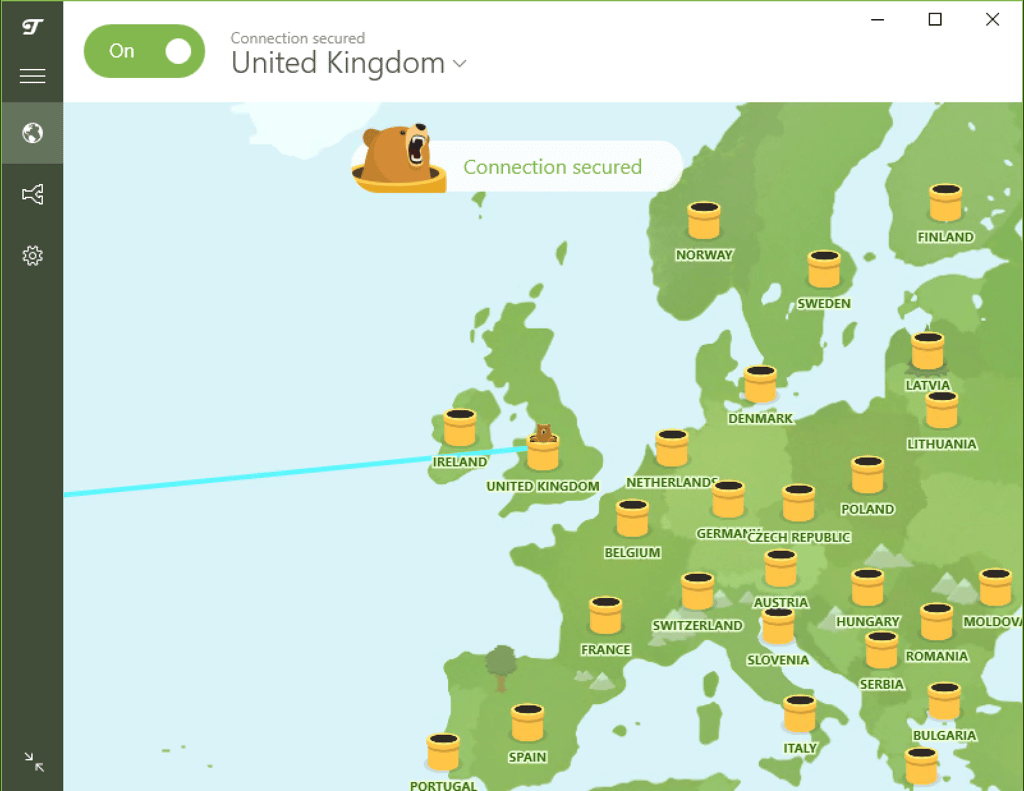
On macOS, there aren't any significant differences from the Windows version. The app feels a bit smoother, but I was disappointed that it can only be accessed from the tray. I also found it strange that accessing settings is only possible via status bar as it doesn’t exist within the interface. Depending on your preference, it enables system-wide dark or light themes.
Generally speaking, the most prominent quality of TunnelBear desktop apps is their design. It isn't the most convenient, but betting on all the cute illustrations and bear jokes does distinguish the service from competitors. Whether it's a selling point that redeems the lack of specialized servers or the fact that you can't manually select tunneling protocols is another question.
TunnelBear mobile apps
When it comes to mobile, the iOS version is just objectively much worse than the Android version. First of all, it doesn't have a kill switch. So, in cases when your connection to a VPN server cuts off, you might unknowingly transition into direct browsing, leaving traces of your location and IP address.
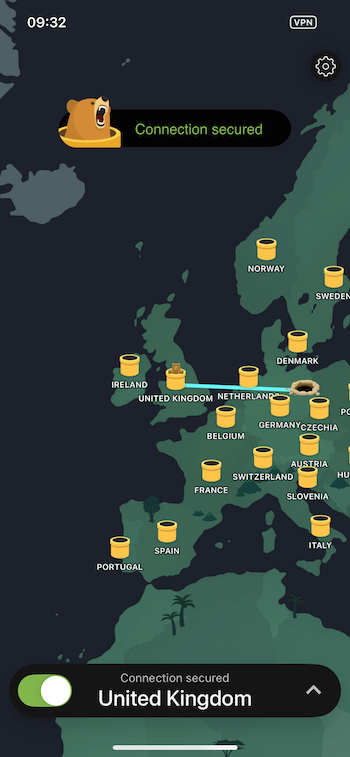
The second edge that the Android version has over the rest of the apps is the Encrypted Server Name Indicator. This built-in feature uses encryption to bypass DNS-level VPN blocking.
Otherwise, both versions feel and work similarly. The app itself looks quite cluttered yet basic, with elements and menus being all over the place.
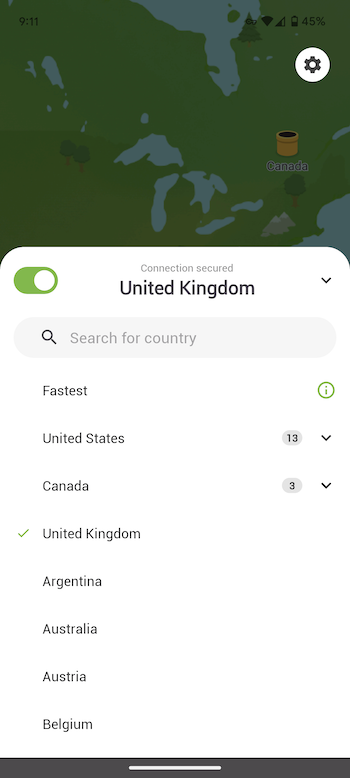
The mobile version has just as many animations as the desktop version. I also found the Bear sounds, which are enabled by default, quite annoying. So, on your first click to a VPN server, if you're not careful, you will hear a loud bear roar announcing to everyone around you that you're using a bear-themed VPN.
TunnelBear features
TunnelBear offers a moderate amount of features to enhance your security. In this part, we’ll look deeper into which of them work well and how much additional safety they provide.
SplitBear
SplitBear is TunnelBear’s version of the split tunneling feature. It allows you to select which apps or websites require a VPN connection and which can be excluded. So even if you have the VPN connection on, if the app has been excluded, you’ll open it with your real IP address.
This feature is available on all supported operating systems. On Windows, you can exempt both apps and websites from the VPN connection. On macOS and iOS, you can only exclude websites, with no option to exempt apps. And on Android, you can only exempt apps and not websites. During our tests, SplitBear worked well and excluded pre-selected apps from the VPN connection. While it worked well, I’m missing consistency across all operating systems.
Encrypted Server Name Indicator
In our testing, this feature worked smoothly on Android, successfully bypassing common DNS-level blocks without causing any noticeable drop in connection speed. While it’s a valuable tool for navigating restrictive networks, I found it limited in scope since it’s only available on Android. Competing VPNs like ExpressVPN and NordVPN offer similar obfuscation features across all platforms, providing broader flexibility.
Overall, I liked the functionality TunnelBear brings with this feature — it’s effective where it’s available, but expanding it to more platforms would make it a more robust option for users in censored regions.
GhostBear
TunnelBear’s GhostBear feature is designed to hide the fact that you’re using a VPN. It uses obfuscation technology and can be quite useful in bypassing geo-restrictions at the cost of speed.
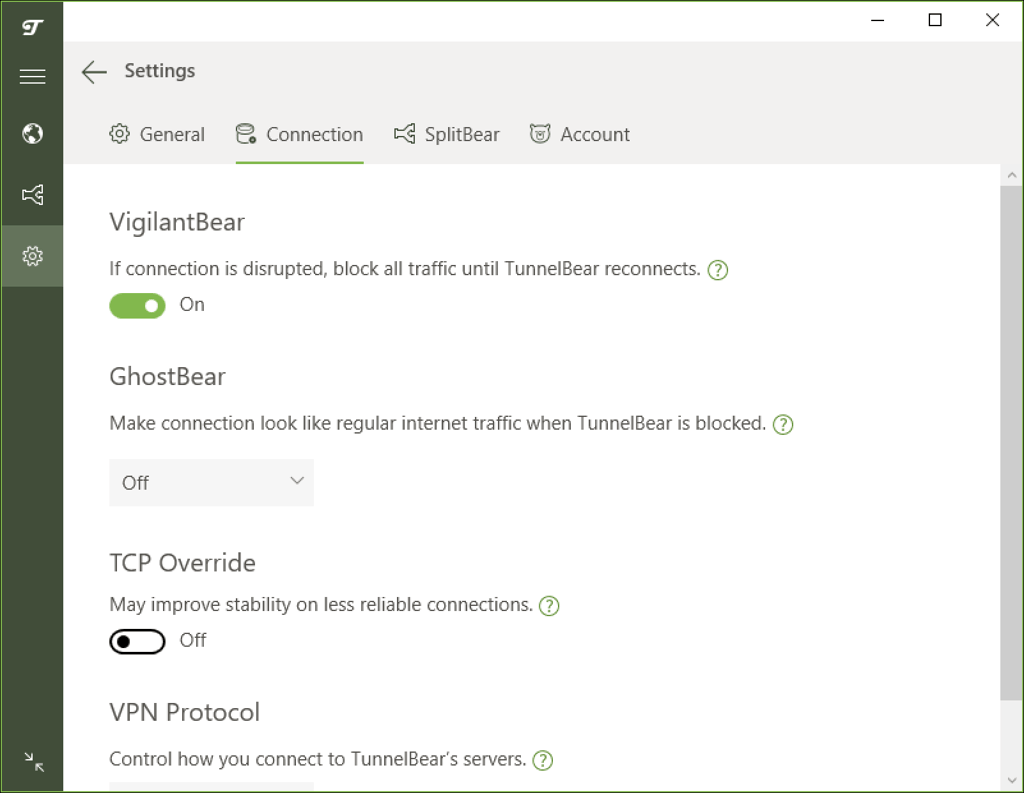
We toggled on the GhostBear feature and put it to the test. Just like during our speed tests, TunnelBear showed inconsistent results. In our most recent tests it worked pretty well on my Android phone, and I was able to unblock geo-restricted content on the first try. I was pleasantly surprised that it hardly impacted speed. However, our previous tests were less than impressive, with GhostBear significantly slowing down our internet speed. Furthermore, this feature is only available on desktop and Android apps. Nonetheless, it almost always unblocked geo-restricted content and bypassed VPN detectors. If obfuscation is a priority, I recommend opting for NordVPN or Surfshark, both of which retain decent speeds even while connected to obfuscated servers.
Customer support
Customer support is also a hit or miss. We contacted TunnelBear several times and got wildly different results. The first time, we got a response within 3 hours, which is not ideal, but still fast enough. The second time, it took TunnelBear more than 24 hours to get back to us. Considering that you can only contact TunnelBear via a ticketing system, the results are hardly surprising. I was also a bit annoyed that you must have an account to submit a ticket.
| TunnelBear | |
| 24/7 live chat | ❌ No |
| ✅ Yes | |
| Phone line | ❌ No |
| Guides or articles | ✅ Yes |
| FAQs/Forums | ✅ Yes |
There’s also a knowledge base, although it’s pretty basic, especially when compared to services like NordVPN and Surfshark. TunnelBear provides only short tutorials and answers to some FAQs.
How we tested TunnelBear
To provide a thorough and accurate review of TunnelBear, I collaborated with our research team and tested TunnelBear following our VPN testing methodology. Here are the devices we used for testing:
- Android – version 14 on a Pixel 9
- iOS – version 15.7.1 on an iPhone 7 model MN8X2
- Windows – version 11 on a Lenovo ThinkPad T14s Gen 4
- macOS – version Sequoia 15.3 on a MacBook Air M2
Additional research also explored TunnelBear’s compatibility with streaming devices and platforms.
Here’s a summary of the tests we conducted for TunnelBear:
- DNS and IP leak test. To check if TunnelBear effectively conceals your IP and DNS requests in case of accidental leaks.
- Kill switch test. We evaluated TunnelBear’s VigilantBear kill switch to ensure user privacy is protected if the VPN connection unexpectedly drops.
- Malware protection. Although TunnelBear doesn’t include dedicated malware-blocking features, we assessed how well its encrypted tunnels help keep devices protected from external threats.
- Privacy policy and transparency. We analyzed TunnelBear’s privacy policy and its independent audits to ensure transparency and adherence to privacy standards.
- Speed test. To determine TunnelBear’s speed performance across different servers and compare with past results.
- Usability. We examined ease of use in cases like switching servers, streaming, and torrenting, noting any limitations or strengths.
- Feature functionality. Testing included evaluating if TunnelBear’s features, such as GhostBear (stealth mode), work as described in restricted networks.
- Cross-platform compatibility. TunnelBear was downloaded and tested across various platforms for seamless functionality.
- Customer support. We tested responsiveness by reaching out to TunnelBear’s support via email to assess their efficiency in handling issues, as live chat is still unavailable.
- Connection consistency. To ensure a stable user experience, we tested TunnelBear’s connection consistency across different servers.
This thorough testing process allowed us to evaluate TunnelBear’s strengths and limitations for users looking to secure their online activities.
Is TunnelBear worth getting?
All in all, TunnelBear is a decent VPN with a cute design. It covers almost 50 countries, which can come in useful when unblocking geo-restricted content. Unfortunately, TunnelBear performed poorly and was unable to unblock most streaming platforms, including Netflix. When it did unblock something, I often ran into speed and overall performance issues, such as buffering or loss of connection. Nonetheless, TunnelBear secures your internet traffic with the industry-standard AES-256 encryption, which is virtually uncrackable. It also regularly undergoes independent security audits, showing its commitment to security and privacy.
However, there are plenty of VPNs that offer a better value at a lower price. My favorite is NordVPN. With 8,000 servers across 149 countries, NordVPN easily unblocks international Netflix libraries without compromising on streaming quality. It’s also more intuitive and easy to use, even for complete beginners.
FAQ
Is TunnelBear trustworthy?
Yes. TunnelBear sticks to the claim of being a no-activity-logs VPN service. Also, they have performed independent security audits five years in a row. This does put them among other trustworthy VPN service providers.
Does TunnelBear collect data?
TunnelBear does collect some data on its users. However, it doesn't include the IP addresses, DNS queries, or other accessed content details.
How well does TunnelBear VPN work?
TunnelBear performance was pretty average for us. During our tests, we did experience some random disconnects. It's unclear whether it was a server or the larger infrastructure problem, but it does happen.
What are the disadvantages of TunnelBear?
Its streaming capabilities are inconsistent; while it can unblock some platforms like Netflix US and Amazon Prime, it struggles with others, such as Disney+ and YouTubeTV. Torrenting is supported but lacks optimized servers for better speeds and performance. TunnelBear also has no live chat support, so users must rely on email for assistance, which can be slow. Lastly, TunnelBear’s best pricing is only available on long-term plans, making short-term use more expensive.