8 Best cheap Windows VPS providers in 2026
Our in-house experts conduct independent, hands-on testing and transparent reviews of VPS hosting providers by using real server environments, and industry-recognized benchmarking methods to ensure impartial and evidence-based assessments
Using the same criteria for all VPS services, we share our detailed methodologies and testing practices to help customers compare performance, reliability, scalability, and overall value before choosing a virtual private server.
Learn moreIf you need to run Windows-specific software, such as Microsoft SQL Server or .NET applications, a Windows VPS lets you do it without restrictions. It also gives you full control over the server and access to features like Remote Desktop.
When choosing a cheap Windows VPS, it’s important to look at CPU, RAM, storage, uptime, and support. For this list, together with the Cybernews research team, I tested 64 providers and selected the 8 best cheap Windows VPS providers.
8 best cheap Windows VPS in 2026
- Contabo – best overall value Windows VPS
- IONOS – best for fixed pricing and long-term stability
- Kamatera – best Windows VPS for customization and scaling
- Liquid Web – best managed Windows VPS
- InterServer – best Windows VPS for price stability
- Vultr – best Windows VPS for global reach
- Hetzner – best European VPS
- Hosting.com – best Windows VPS for high-speed applications and eCommerce



Our in-house VPS research team and expert writers work together to regularly test VPS hosting services across different use cases and provide accurate, up-to-date insights. Learn more about how we test and evaluate virtual private servers.
What is Windows VPS and who needs it?
Windows VPS hosting is a virtual server running a Windows operating system on a physical server. Unlike shared hosting, it gives you dedicated CPU, RAM, and storage, and full administrative access, so you can install Windows-only software, configure the server, and run multiple websites or applications independently.
Windows VPS is needed for projects that require Microsoft SQL Server, .NET applications, or Remote Desktop access. If your project doesn’t specifically need Windows, other cheap VPS hosting options may be more affordable and still deliver solid performance.
Best cheap Windows VPS hosting 2026 – detailed reviews
1. Contabo – best value-for-money Windows VPS

| Rating: | |
| Price: | From $14.88/month |
| Money-back guarantee: | ✅ Yes, 14-day |
| Special deal: | Get Contabo for just $5.28/month! |
Contabo is my top pick for raw specs per dollar on a Windows VPS. Where most budget providers force a trade-off between price and resources, Contabo's entry VPS plan gives you 4 vCPUs, 8GB RAM, and 100GB SSD for $5.28/month before you add a Windows server, with the full Windows setup costing you under $15.00/month. These are the specs that competitors on this list typically charge two to three times as much for.
During testing, the setup process felt more hands-on to me than managed alternatives. Since Windows isn't the default OS, you need to select it as an add-on, with its own license fee, when configuring the server in Contabo's Customer Control Panel. Also, there's no live phone support, just ticket, email, and AI chatbot options. That's a real trade-off if you’re new to VPS overall, but it keeps the base price remarkably low.
Performance held up well for typical workloads throughout our testing: Remote Desktop stayed responsive, and general-purpose apps ran smoothly. The one nuance I think is worth noting is that disk I/O on the standard shared-storage plans can vary slightly during peak hours, which is only really noticeable on disk-intensive tasks like SQL Server or heavy logging. For the vast majority of budget Windows VPS use cases, performance felt more than adequate for the price.
Pricing and features
Contabo offers several Cloud VPS tiers with Windows available as an add-on license. Here are the plans I recommend for affordable Windows hosting:
- Cloud VPS 4 Windows Server (from $14.88/month) – 4 vCPU cores, 8GB RAM, and 100GB SSD storage, with 200 Mbit/s port speed and unlimited traffic. A strong entry point with more RAM than most competitors offer at this price.
- Cloud VPS 6 Windows Server (from $27.60/month) – 6 vCPU cores, 12GB RAM, and 200GB SSD storage, with 2 snapshots and a 300 Mbit/s port. A good step up for more demanding Windows workloads, such as SharePoint, or for moderate SQL Server use.
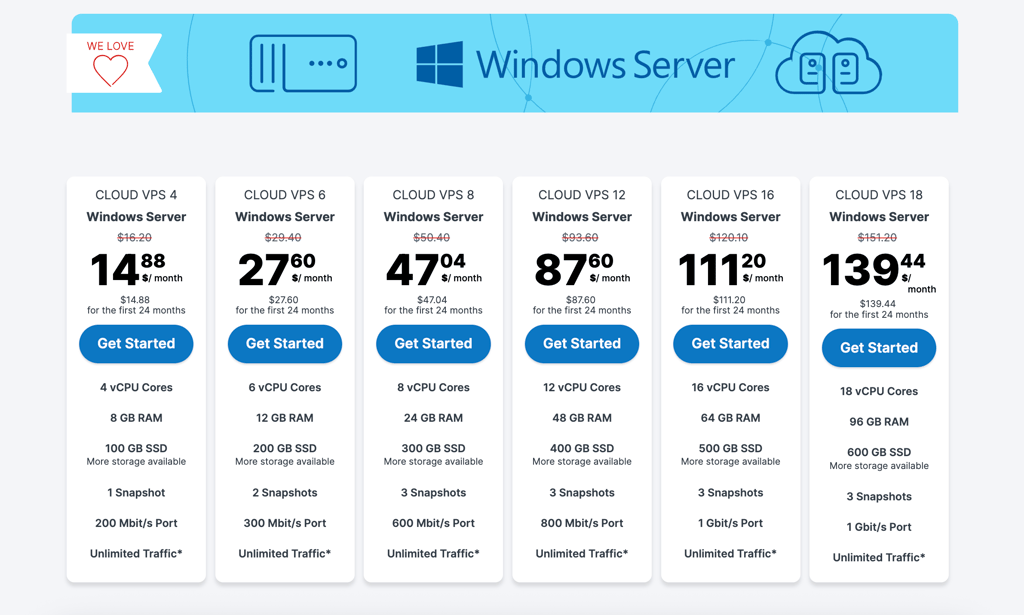
Contabo includes unlimited/high-cap bandwidth and free DDoS protection on every plan, plus access to 11 global data center locations, so you have real flexibility in choosing a region close to your users. You can also scale all the way up to the Cloud VPS 18 tier (18 vCPU cores, 96GB of RAM, 600GB of SSD storage) for heavier enterprise workloads.
Contabo is best for budget-conscious users who want maximum RAM and CPU for the price and don't mind a more hands-on, self-managed setup. However, avoid it if you need managed support, live chat, or guaranteed high disk I/O for storage-heavy workloads.
2. IONOS – best Windows VPS with fixed pricing

| Rating: | |
| Price: | From $11.00/month |
| Money-back guarantee: | ✅ Yes, 30-day |
| Special deal | Get up to 94% OFF IONOS |
IONOS is an excellent pick for a Windows VPS because of its fixed monthly price and strong data privacy. It works best for long-term projects that don’t require too much flexibility.
During testing, I noticed its structured setup. It doesn’t provide the same quick scaling abilities as providers like Kamatera or Vultr do, but it is designed for more permanent deployments. This makes it easier to manage costs over time, but it is less convenient for short-term use.
Its Dedicated Contact feature is one of IONOS’ main advantages. Having a single point of contact who understands your setup makes support more useful than standard ticket-based help. Performance was also reliable – NVMe SSDs kept Windows responsive, and unmetered traffic means you don’t have to worry about bandwidth limits.
The main drawback is the Cloud Panel. It feels more limited compared to other providers and takes some time to get used to. If you need fast scaling, other options are a better fit. But for stable pricing and consistent performance, IONOS delivers strong value.
Pricing and features
IONOS offers 5 Windows VPS plans to choose from, but if you need an affordable pick, I recommend the plans below:
- Windows S (from $11.00/month) – 2 vCores CPU, 2GB RAM, and 80GB NVMe storage. This is the best option for absolute beginners, perfect for a lightweight remote desktop (RDP) or a simple background task.
- Windows M (from $13.00/month) – 2 vCores CPU, 4GB RAM, and 120GB NVMe storage. This is the sweet spot for more demanding tasks and projects. This is also the minimum I'd suggest for running Docker for dependency management or basic web streaming.
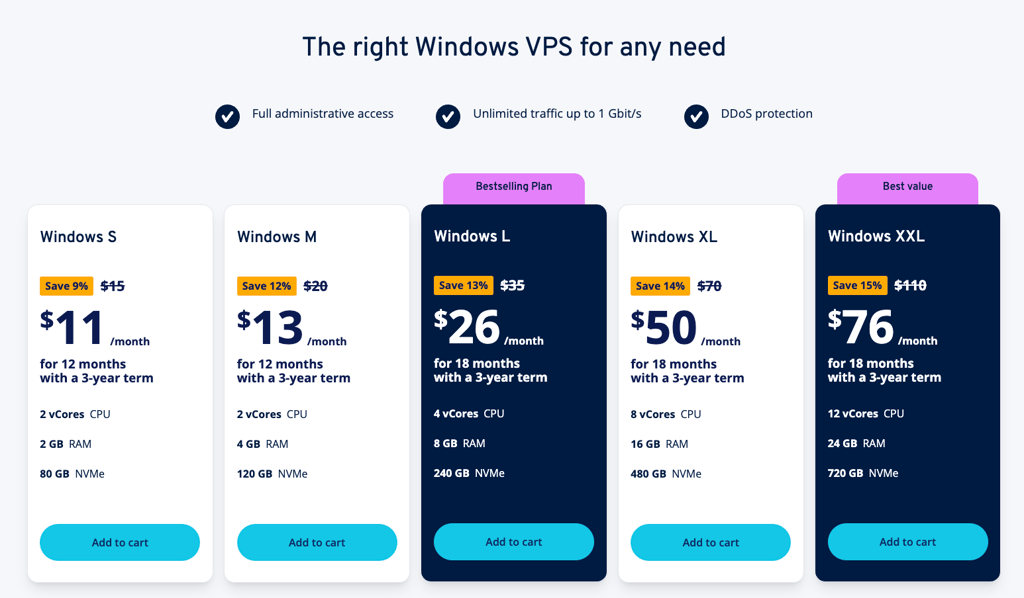
IONOS includes NVMe storage, DDoS protection, and up to 1Gbit/s bandwidth, which helps maintain stable performance for Windows workloads and real-time data transfer. Security is also strong, with ISO-certified data centers, DDoS protection, and firewall controls built in.
IONOS is best for predictable, long-term projects with stable workloads. Avoid if you need fast scaling or short-term deployments.
3. Kamatera – best Windows VPS for flexible scaling and customization

| Rating: | |
| Price: | From $8.00/month |
| Money-back guarantee: | ❌ No, but offers a 30-day trial |
| Special deal | Get Kamatera now, starting at only $4.00/month |
Kamatera is my top pick if you want full control over your Windows VPS setup. It works best for tech-savvy users who need precise resource allocation and the ability to scale quickly, especially for demanding workloads like databases or AI projects.
During testing, Kamatera stood out for its flexibility. You can choose the exact amount of CPU, RAM, and storage, and adjust these resources at any time without moving to a new server. This makes it much more adaptable than providers like IONOS.
Performance was strong throughout testing. Intel Xeon Platinum processors made a noticeable difference when running heavier workloads. I also liked how easy it was to scale resources when needed, which is useful if your project grows or has fluctuating traffic.
The main drawback is that Kamatera is unmanaged by default. This means you’re responsible for configuring and maintaining your Windows environment, and the documentation can feel limited at times. If you’re not comfortable managing a server yourself, a provider like Liquid Web will be a better fit. But if you want control and scalability, Kamatera is one of the most flexible options available.
Pricing and features
Kamatera offers 3 pre-configured Windows-specific plans. However, it also allows you to fully customize your plan, which is a more convenient option for most. Here are the plans I recommend looking at for affordable hosting:
- Basic (from $8.00/month) – 1 vCore CPU, 2GB RAM, and 30GB NVMe storage. This is a basic entry for those who just want Kamatera's high-availability network and robust WebSocket support for real-time streaming.
- Customized (from $27.00/month) – you can create a custom plan by choosing the server type, Windows OS, vCPU, RAM, NVMe SSD storage, and data center location, with options scaling up to 40 cores, 512GB RAM, and 4000GB storage.
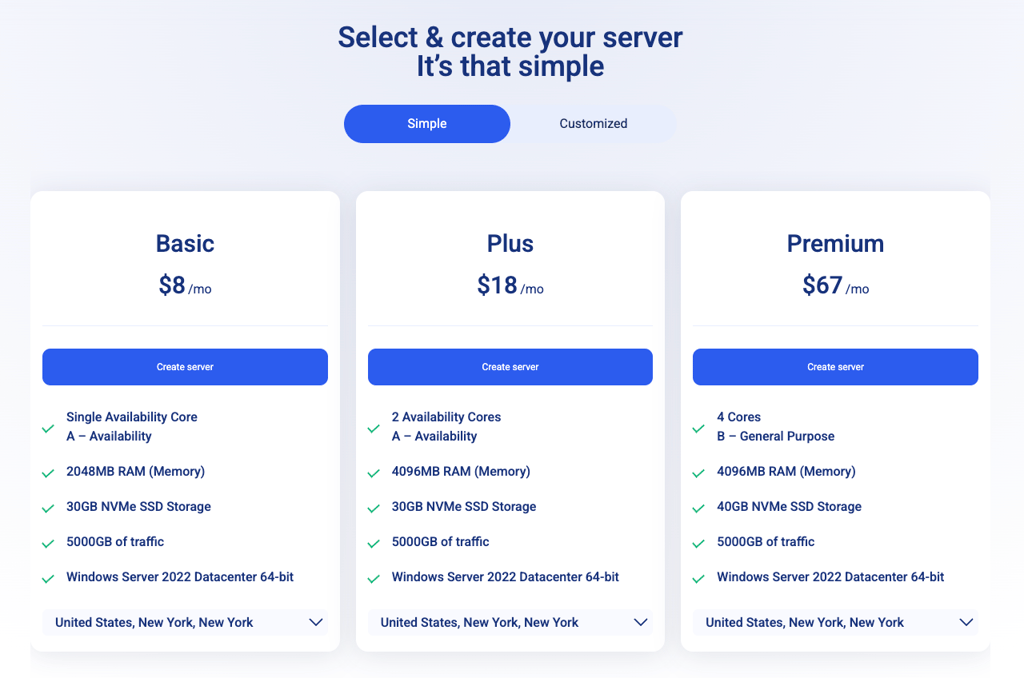
Kamatera allows precise scaling, so you can add RAM in small increments as your workload grows. You can also adjust resources instantly without migrating servers. Plus, it offers strong WebSocket support for low-latency, real-time data transfer.
Best for full customization and control over scaling. Avoid if you want a managed or beginner-friendly setup.
4. Liquid Web – best fully managed Windows VPS

| Rating: | |
| Price: | From $54.00/month |
| Money-back guarantee: | ❌ No |
| Special deal | Get up to 50% OFF Liquid Web VPS |
Liquid Web is my top pick if you want a fully managed Windows VPS where most of the technical work is handled for you. It’s best suited for business-critical projects where uptime, stability, and expert support matter more than keeping costs low.
Liquid Web offers fully managed Windows VPS, handling updates, monitoring, and maintenance for you, which makes it easier to run complex applications. However, I’d recommend going with its self-managed plans instead, as managed services significantly increase the overall cost.
Performance was one of the strongest points. In independent tests, Liquid Web delivered top-tier VPS performance and very stable uptime, even under heavier workloads. I also liked that backups, security features, and monitoring are built in, so you don’t have to set everything up yourself. The 100% uptime guarantee adds extra reassurance if you’re running important apps or websites.
The main drawback is the price. Even entry plans cost more than providers like IONOS or InterServer, especially if you choose the managed option. If you want flexibility for less, Kamatera is a better fit. But if you prefer strong performance with optional management, Liquid Web is still one of the most reliable choices.
Pricing and features
Liquid Web offers both managed and self-managed Windows VPS plans, but for a cheaper setup, I recommend going with the unmanaged options. These give you solid performance without the added cost of full management. Here are the plans worth considering:
- 4 GB RAM (from $54.00/month) – 2 vCPU cores, 4GB RAM, 80GB storage, and 100GB Acronis Cyber Backups. A solid entry point with ServerSecure hardening included.
- 8 GB RAM (from $82.00/month) – 4 vCPU cores, 8GB RAM, and 240GB storage. Better suited for more demanding workloads or real-time applications.
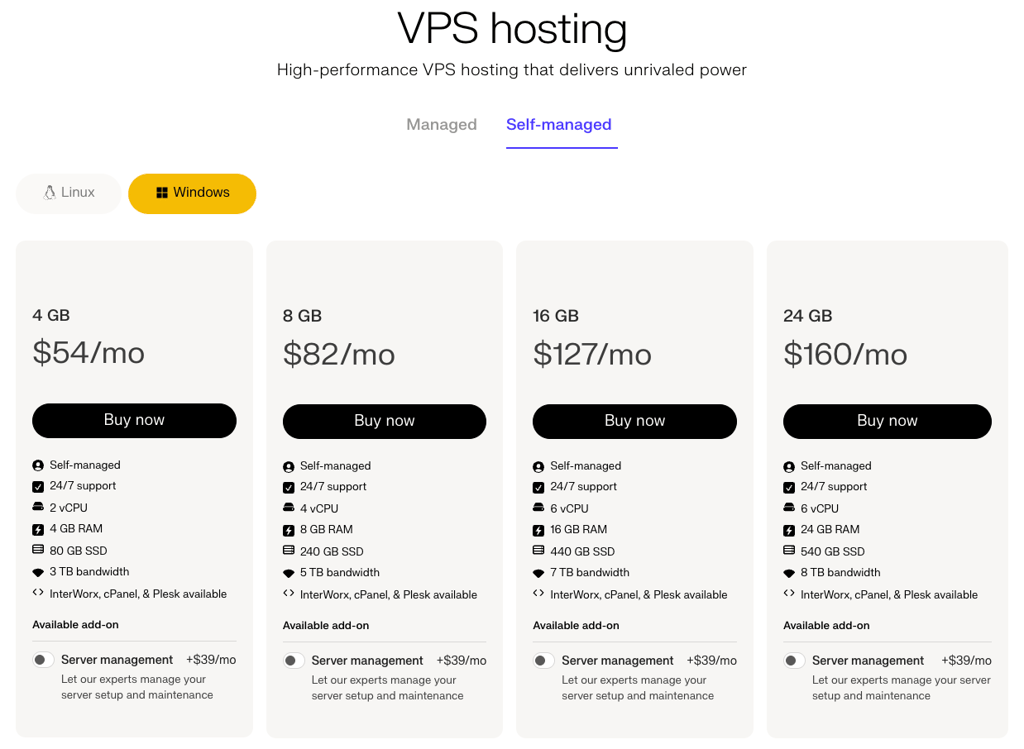
Liquid Web provides high-performance infrastructure, built-in security features, and reliable uptime.
Best for business-critical projects needing fully managed hosting and top reliability. Avoid if you’re on a tight budget or prefer full control with an unmanaged VPS.
5. InterServer – best Windows VPS with consistent pricing

| Rating: | |
| Price: | From $10.00/month |
| Money-back guarantee: | ❌ No |
| Special deal | Get Interserver VPS for just $3.00/month |
InterServer is my top pick if you want a Windows VPS with stable, predictable pricing. It works best for small to mid-sized projects that you plan to run long-term without worrying about renewal price increases.
During testing with Cybernews researchers, pricing consistency was the main thing that stood out. InterServer uses a slice system, where you scale resources in fixed increments. This makes it easy to understand what you’re paying for and avoid the unexpected price jumps common with other providers.
In terms of performance, it handled basic workloads well. I found it reliable for simple apps and always-on tasks, but not as strong under heavier loads compared to Kamatera or Liquid Web. The platform also includes helpful extras, such as managed updates and support, which add value at this price point.
The main drawback is location and flexibility. Most of InterServer’s infrastructure is US-based, so Remote Desktop performance can feel slower if you’re far from those data centers. It’s also not as customizable or powerful as more advanced VPS providers. But if your priority is predictable pricing and a straightforward setup, InterServer is one of the most dependable budget options.
Pricing and features
InterServer offers a slice-based system, where you scale resources in fixed increments. This makes pricing easy to predict and avoids unexpected increases. Here are the plans I recommend for affordable Windows VPS hosting:
- 2 Slices (from $10.00/month) – 1 CPU core, 4GB RAM, and 80GB SSD storage. This is a basic entry-level option, best suited for testing or very light Windows tasks.
- 3 Slices (from $15.00/month) – 2 CPU cores, 6GB RAM, and 120GB SSD storage. This is a more practical setup for Windows workloads, especially if you’re running background apps or Docker containers.
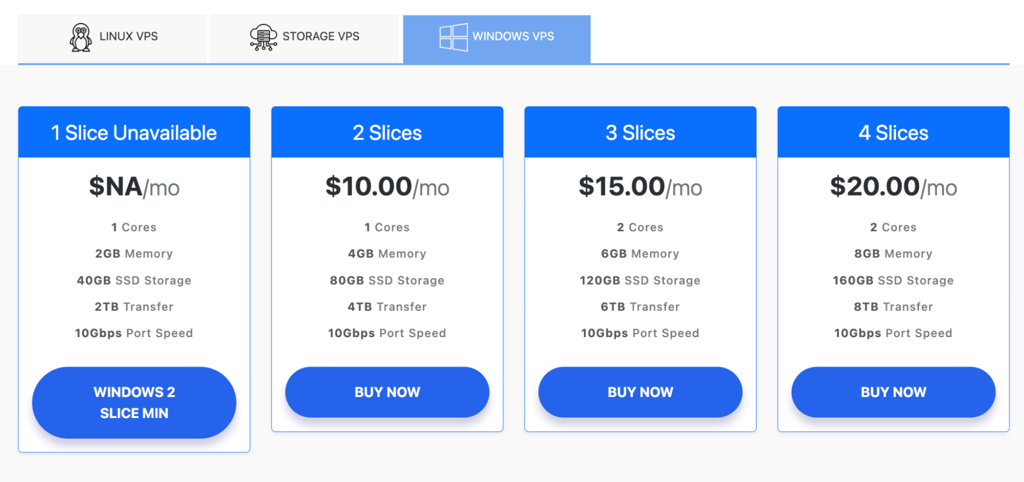
InterServer offers SSD storage, a built-in price-lock guarantee, and optional managed support, making it a stable choice for long-term projects. It also handles Windows updates and container-based setups reasonably well, although performance is better suited for steady workloads than heavy scaling.
Best for long-term projects needing predictable pricing and simple scaling. Avoid if you need high performance, global data centers, or advanced customization.
6. Vultr – best Windows VPS for global coverage

| Rating: | |
| Price: | From $6.00/month |
| Money-back guarantee: | ❌ No, but offers a 30-day trial |
| Special deal | Available now for only $2.50! |
Vultr is my top pick if you need a Windows VPS close to your users, no matter where they are. It works best for projects with a global audience, or for developers who want low latency and fast deployment across multiple regions.
During testing with Cybernews researchers, Vultr stood out for its global infrastructure. It offers 32 data center locations worldwide, which makes it easy to deploy your server near your target audience and reduce lag. Compared to providers like InterServer, which focus on a single region, Vultr gives you much more flexibility in where your server runs.
Performance was also strong. The high-frequency CPUs handled demanding tasks well, and I liked how quickly you can deploy or clone servers using snapshots. The platform is also one of the few budget-friendly options that offers dedicated NVIDIA GPUs, which makes it a good fit for AI workloads or more demanding Windows applications.
The main drawback is the interface. The dashboard can feel crowded because Vultr offers many different services, which makes it less beginner-friendly than simpler providers. It’s also unmanaged, so you need to handle your own setup and maintenance. But if your priority is global reach and performance, Vultr is one of the most flexible options available.
Pricing and features
Vultr offers several Windows VPS options, but its high-frequency and GPU plans stand out for performance-focused use cases. Here are the most relevant options for affordable setups:
- Cloud Compute High Frequency (from $6.00/month) – 1vCPU, 1GB RAM, and 32GB NVMe SSD. Powered by 3GHz+ Intel Xeon CPUs, this plan works well for lightweight apps, development, or small databases.
- Cloud GPU (from $0.12/hour) – 1/20 NVIDIA A100 GPU with 4GB VRAM, 6GB RAM, and 70GB NVMe SSD. This setup is designed for AI inference, machine learning, and other GPU-intensive workloads.
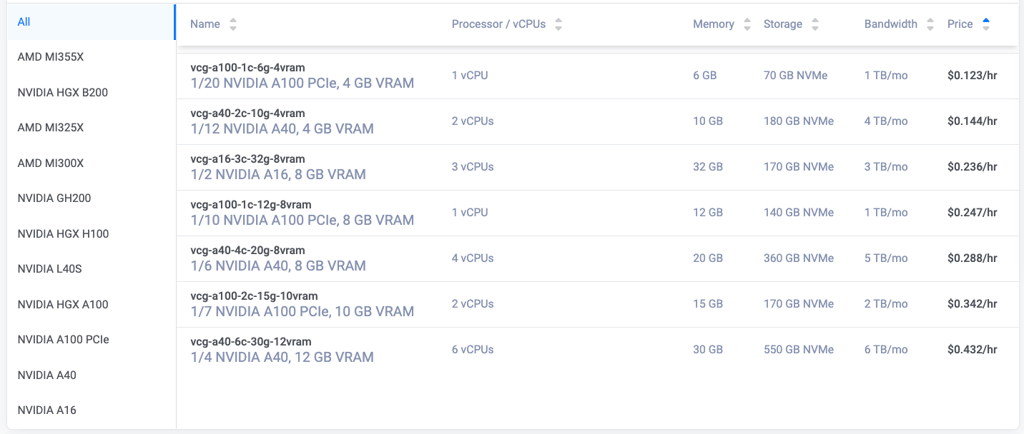
Vultr combines high-frequency CPUs, NVMe storage, and global data centers, which helps reduce latency and improve Remote Desktop performance. It also supports GPU acceleration and real-time workloads, making it a strong option for both standard apps and more advanced use cases.
Best for global projects needing low latency and flexible deployment locations. Avoid if you want a beginner-friendly interface or a managed Windows VPS setup.
7. Hetzner – best VPS option in Europe

| Rating: | |
| Price: | From $6.00/month |
| Money-back guarantee: | ❌ No |
| Special deal | Available now for only €1.60! |
Hetzner is my top pick if you want a low-cost VPS in Europe with strong performance. It works best for developers and businesses targeting European users who want maximum resources for the price and don’t mind a more hands-on setup.
During testing with Cybernews researchers, Hetzner stood out for its price-to-performance ratio. You get more RAM and CPU for the same price compared to most US-based providers, and the NVMe storage keeps everything running smoothly. Its data centers in Germany and Finland also mean strong privacy standards and better latency for European audiences.
That said, Hetzner is not built for beginners. Windows support is not as straightforward as with other providers. You often need to install and configure it manually, and there’s no built-in support for Windows environments. This makes it less convenient than options like IONOS or Liquid Web, which include easier setup and support.
The main advantage is cost. With very low starting prices and hourly billing with monthly caps, you only pay for what you use. But this also reflects the trade-off. You get excellent value and performance, but less guidance and fewer managed features. If you’re comfortable managing your own server, Hetzner is one of the best budget options in Europe.
Pricing and features
Hetzner offers very competitive pricing with hourly billing and monthly caps, which makes it one of the most cost-efficient VPS providers. Here are the plans I recommend for affordable setups:
- CX23 (from €4.49/month) – 2vCPU (Intel/AMD), 4GB RAM, and 40GB NVMe SSD. A solid baseline with strong performance for the price, especially for users who value EU data privacy.
- CAX11 (from €4.99/month) – 2vCPU (Ampere), 4GB RAM, and 40GB NVMe SSD. Similar specs to CX23, but uses ARM-based processors, which can be more efficient.
- CX33 (from €6.99/month) – 4vCPU (Intel/AMD), 8GB RAM, and 80GB NVMe SSD. A more powerful option that handles heavier apps, containers, and larger workloads more comfortably.
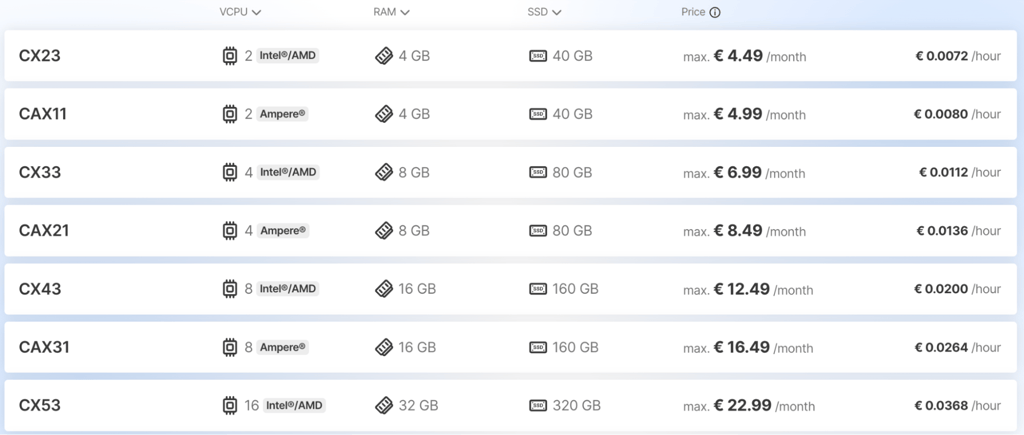
Hetzner includes NVMe storage, high-performance CPUs, generous traffic limits, and strict German data privacy standards. It also supports Docker and custom setups, but Windows requires manual installation and configuration.
Best for EU-based projects needing strong performance at a low cost. Avoid if you want easy Windows setup, built-in support, or a beginner-friendly VPS experience.
8. Hosting.com – best Windows VPS for fast apps and eCommerce

| Rating: | |
| Price: | From $29.99/month |
| Money-back guarantee: | ❌ No |
| Special deal | Get up to 50% OFF hosting.com VPS |
Hosting.com is my top pick for Windows VPS setups focused on performance-heavy apps and online stores. It works best for eCommerce sites, databases, and applications that need consistent speed and stable server resources rather than constant manual tuning.
During testing with Cybernews researchers, Hosting.com performed well on speed and reliability thanks to its NVMe storage and modern AMD EPYC infrastructure, which helps keep Windows workloads responsive under load. It also benefits from a global network of data centers, which reduces latency for customers in different regions.
Compared to lighter providers like InterServer, Hosting.com feels more optimized for production use cases. Managed and unmanaged VPS options are available, so you can either handle configuration yourself or rely on support to manage parts of the setup. This makes it a solid fit for eCommerce stores that need stability during traffic spikes.
The main drawback is that Windows VPS is not its primary focus, so setup flexibility and deep Windows-specific tooling are more limited than with providers like Kamatera or Liquid Web. Support quality can also vary depending on the plan level, which may matter if you rely heavily on hands-on assistance.
Overall, Hosting.com is a strong option when you want fast, reliable VPS performance for business workloads, especially eCommerce, rather than a highly specialized Windows-first environment.
Pricing and features
Hosting.com offers Windows VPS plans focused on performance, with higher starting prices but strong hardware. Here are the most relevant options:
- Windows VPS XS (from $29.99/month) – 2 CPU cores, 4GB RAM, and 80GB NVMe SSD. A solid entry-level setup for basic Windows tasks and smaller projects.
- Windows VPS S (from $59.99/month) – 4 CPU cores, 8GB RAM, and 160GB NVMe SSD. A much stronger option, suitable for real-time applications, WebSockets, and running multiple Dockerized apps.
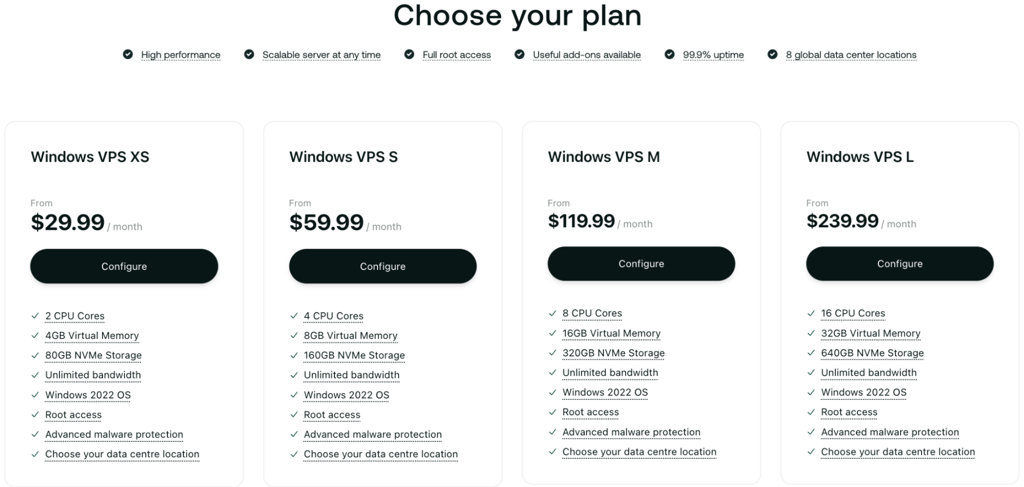
Hosting.com includes NVMe storage, performance optimizations, and infrastructure designed for speed, which helps with database-heavy workloads and eCommerce. It also supports real-time data handling and caching, making it a good fit for high-traffic applications.
Best for fast Windows VPS setups powering eCommerce and performance-heavy apps. Avoid if you need deep Windows specialization or a provider fully focused on Windows VPS.
How to choose a cheap Windows VPS
Windows needs more resources than Linux, so choosing the wrong plan can make your server slow or unstable. The most important thing is to make sure the server has enough CPU, RAM, and NVMe storage to handle Windows properly, especially if you plan to use Remote Desktop or run business apps.
I recommend starting with at least 2vCPU and 4GB RAM. Anything lower is usually only suitable for testing. Storage also matters, and NVMe SSDs are the best option for faster boot times and smoother performance. It is also important to check whether Windows licensing is included in the price, since this can significantly increase your overall cost.
You should also look at scalability and data center location. If you expect traffic growth, make sure you can easily upgrade resources without downtime. A closer data center will also improve Remote Desktop responsiveness. Finally, consider whether you want a managed or self-managed setup, since managed plans cost more but reduce the amount of work on your side.
Final thoughts
Choosing a cheap Windows VPS comes down to balancing price, performance, and how much control you actually want to handle yourself. Here’s my quick decision guide:
- Best for overall value – Contabo
- Best Windows VPS with stable pricing – IONOS
- Best for flexible scaling and customization – Kamatera
- Best fully managed Windows VPS – Liquid Web
- Best for predictable long-term pricing – InterServer
- Best for global coverage and deployment flexibility – Vultr
- Best budget VPS in Europe – Hetzner
- Best for fast apps, databases, and eCommerce – Hosting.com
If you’re keeping costs low, IONOS is the strongest option. For more control and scalability, Contabo is a reliable pick. And if you want performance without worrying about server management, Liquid Web is the safer but more expensive option.

FAQ
How much is cheap Windows VPS in 2026?
Cheap Windows VPS typically starts at around $5.00–15.00/month for basic specs like 1–2 vCPU and 2–4GB RAM. More realistic setups for stable use usually fall between $10–$30/month depending on storage, performance, and Windows licensing.
Which providers have cheap Windows VPS?
IONOS, Contabo, and Kamatera are some of the most affordable Windows VPS providers. They differ in pricing models, performance levels, and how much setup or management they require.