Best dedicated IP VPNs in 2026 – tested and ranked
Our in-house cybersecurity experts and journalists, renowned for major reports like The Mother of All Breaches, conduct transparent, unbiased VPN testing and in-depth analysis.
With 750+ articles crafted based on real-world research, we empower readers to make informed purchasing decisions through first-hand expertise.
Learn more

If you’re constantly dealing with CAPTCHAs, suspicious login alerts, or endless verification requests while using a VPN, you’re not alone. The root cause of this is the fact that most VPNs rely on shared IP addresses used by thousands of people. Websites flag these IPs as suspicious and restrict access to them.
The best VPNs with a dedicated IP address can actually fix this. Unlike shared VPN IPs, a dedicated IP gives you a unique address assigned only to you, helping you build a more stable and trusted online identity while still maintaining your privacy. This way, you can reduce the number of verification checks, improve access reliability, and lower your chances of getting blocked by websites or online services.
In this guide, I reveal my 5 top VPNs with dedicated IPs and explain how dedicated IPs work overall. Our research team and I spent weeks testing the leading VPNs with dedicated IP addresses, evaluating their security, performance, pricing, and ease of use. So, keep reading to explore their features, strengths, drawbacks, and setup process.
Our 5 best VPNs with a dedicated IP address
- NordVPN – overall best dedicated IP VPN in 2026
- Surfshark – budget-friendly dedicated IP VPN
- Proton VPN – secure dedicated IPs for businesses
- ExpressVPN – privacy-focused VPN with dedicated IP support
- CyberGhost – dedicated IP VPN servers with extra security measures




We spare no effort to test the products & their features. All information is gathered by our in-house research team & fact-checked by our team of experts. Discover the ins and outs of our testing procedures.
Best dedicated IP VPNs – full coverage
To compare the best VPNs with dedicated IP addresses, I compiled the key details in a structured overview below. This includes the number of available locations, pricing, supported platforms, and any important limitations that might affect your choice. Here you can evaluate which provider offers the best value in terms of coverage, cost, and flexibility – whether for streaming, remote work, or improved account stability.

1. NordVPN – overall best dedicated IP VPN in 2026

| Rating: | |
| Dedicated IP available: | ✅ Yes |
| Number of dedicated IP locations: | 46 |
| Starting price: | From $8.99/month (with a VPN included) |
| Dedicated or shared IP: | Fully dedicated |
| Supported operating systems: | Windows, Linux, macOS, iOS, Android, Android TV, Amazon Fire TV, browser extensions |
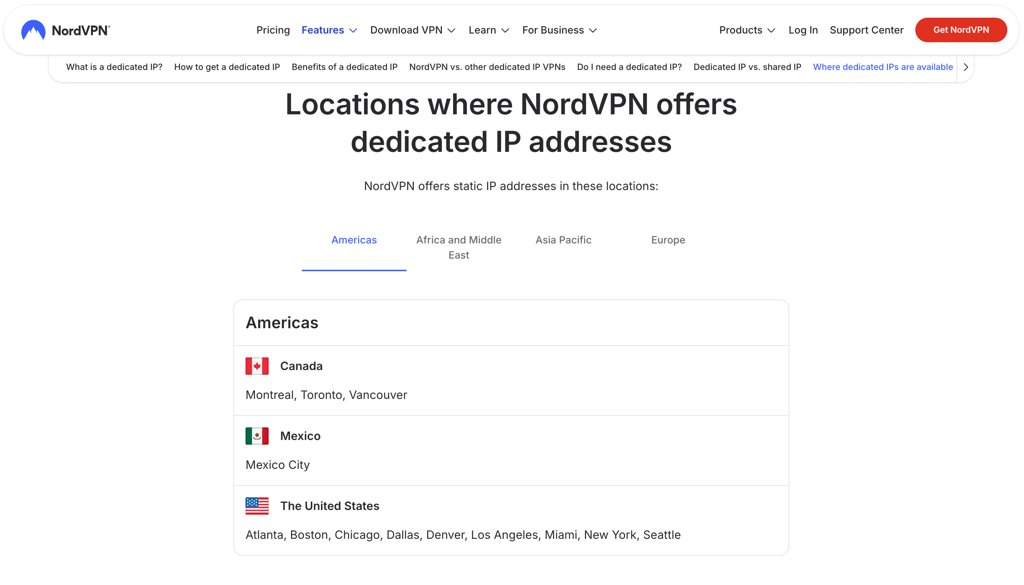
NordVPN is the best dedicated IP VPN if you’re looking for the widest coverage without sacrificing speed or security. Overall, I counted dedicated IPs in 46 locations across 28 countries (13 countries more than Surfshark). What I really appreciate is that, despite its premium feature set, NordVPN’s pricing stays affordable – starting at $8.99/month (cheaper than Proton VPN’s entry plan with fewer dedicated IP locations).
Security and privacy. NordVPN combines AES-256 encryption with its proprietary NordLynx protocol based on WireGuard (the same encryption banks rely on). Its biggest advantage for dedicated IP users is jurisdiction: Panama, a privacy-friendly location outside the 14 Eyes alliance (unlike Surfshark in the Netherlands). Finally, it includes Threat Protection, which blocks malicious domains and trackers that could otherwise put your dedicated IP address at risk.
Performance. A dedicated IP only helps if the connection behind it stays stable, and NordVPN delivered the highest download retention at 86% in our in-house tests, ahead of Proton VPN (80%) and Surfshark (79%). Ping averaged 87ms, the lowest of the five providers and noticeably faster than ExpressVPN (108ms) and CyberGhost (107ms), meaning it’s suited for streaming, banking, and remote access. Upload retention was 38%, lower than ExpressVPN (51%) and CyberGhost (47%), so heavy upload users might find other providers more suitable.
Coverage and pricing. NordVPN has the broadest dedicated IP network on my list, with 46 dedicated IP locations across 28 countries. This is especially important when you need a local IP address for regional streaming libraries, work systems, or account verification. The dedicated IP add-on costs $3.69/month on top of the VPN subscription, and it works across desktop, mobile, and browser extensions.
If you’d like to learn more about this provider, read our in-depth NordVPN review.
2. Surfshark – budget-friendly dedicated IP VPN

| Rating: | |
| Dedicated IP available: | ✅ Yes |
| Number of dedicated IP locations: | 6 |
| Starting price: | From $3.75/month (with a VPN included) |
| Dedicated or shared IP: | Fully dedicated |
| Supported operating systems: | Windows, macOS, Android, iOSLinux, Surfshark browser extension |
For budget-conscious users, Surfshark offers a low-cost dedicated IP VPN at $3.75/month with unlimited devices and solid performance. I should note that it has the fewest dedicated IP locations on my list – 6 locations across 6 countries, especially compared to NordVPN’s 28 countries. However, our testing shows this is still sufficient for everyday tasks like streaming and account access.
Security and privacy. Surfshark uses AES-256 encryption with WireGuard (the same protocol used by NordVPN) and its new Dausos protocol to improve connection stability and keep logins more consistent. From a feature perspective, it offers CleanWeb, which blocks ads and trackers and lowers the risk of IP restrictions. However, since it’s based in the Netherlands (14 Eyes-aligned jurisdiction), it’s less privacy-friendly than NordVPN, which operates in Panama.
Performance. In our testing, Surfshark delivered 79% download retention, behind NordVPN’s 86% but still ahead of CyberGhost’s 67%, so it’s suitable for streaming and daily browsing. Ping averaged 103ms, slower than NordVPN (87ms) but slightly better than ExpressVPN (108ms). Lastly, upload retention reached 37%, just below NordVPN (38%) and lower than ExpressVPN (51%), meaning it is less suitable for heavy upload workflows.
Coverage and pricing. One of Surfshark’s biggest drawbacks is its limited dedicated IP coverage – 6 locations across 6 countries. This is fewer than NordVPN’s 28-country network, but it still includes major regions like the US, the UK, and Japan for streaming libraries and login stability. On the positive side, it offers the lowest dedicated IP add-on price at $3.75/month, available only as an extra purchase on top of an active subscription.

Read our full Surfshark review to learn more about this provider.
3. Proton VPN – reliable VPN with dedicated IP for businesses

| Rating: | |
| Dedicated IP available: | ✅ Yes |
| Number of dedicated IP locations: | 29 |
| Starting price: | From $49.99/month (with a VPN included) |
| Dedicated or shared IP: | Fully dedicated |
| Supported operating systems: | Undisclosed |
Proton VPN focuses on businesses that care more about privacy and infrastructure than the price (its starting plan is at $49.99/month). Its dedicated IP addresses are available in 29 locations across 22 key regions – that’s fewer locations than NordVPN’s 28-country network, but more than Surfshark’s 6 countries. Overall, considering strong performance and security features, it’s a capable dedicated IP VPN.
Security and privacy. Proton VPN uses AES-256 and ChaCha20 encryption, secured by WireGuard and its VPN Accelerator feature for performance stability. Like NordVPN, it operates from a privacy-friendly jurisdiction – Switzerland – which is outside the 14 Eyes alliance. It also offers an independently audited no-logs policy and open-source apps, which strengthen trust when a fixed dedicated IP is tied to business activity.
Performance. Our testing showed that Proton VPN is best suited for general business use and secure remote access. It delivered 80% download retention, slightly below NordVPN’s 86% but ahead of CyberGhost’s 67%. Ping averaged around 100ms, slower than NordVPN (87ms) but faster than CyberGhost (107ms). Where it stood out was upload retention at 40%, slightly above Surfshark (37%), proving its reliability for workloads that involve both uploads and downloads.
Coverage and pricing. With 29 dedicated IP locations across 22 countries, Proton VPN gives you greater flexibility to access region-specific services and reduce login and verification issues. In comparison, it covers more countries than Surfshark (6 countries), but slightly fewer than NordVPN (28). Pricing starts at $49.99/month, making it the most expensive option in this comparison – expensive for regular users, but understandable for businesses given its infrastructure focus.

For more insights, refer to our detailed Proton VPN review.
4. ExpressVPN – privacy-focused VPN with dedicated IP support

| Rating: | |
| Dedicated IP available: | ✅ Yes |
| Number of dedicated IP locations: | 30 |
| Starting price: | From $8.99/month (with a VPN included) |
| Dedicated or shared IP: | Fully dedicated |
| Supported operating systems: | Windows, macOS, Linux, iOS, Android, smart TVs, browser extensions |
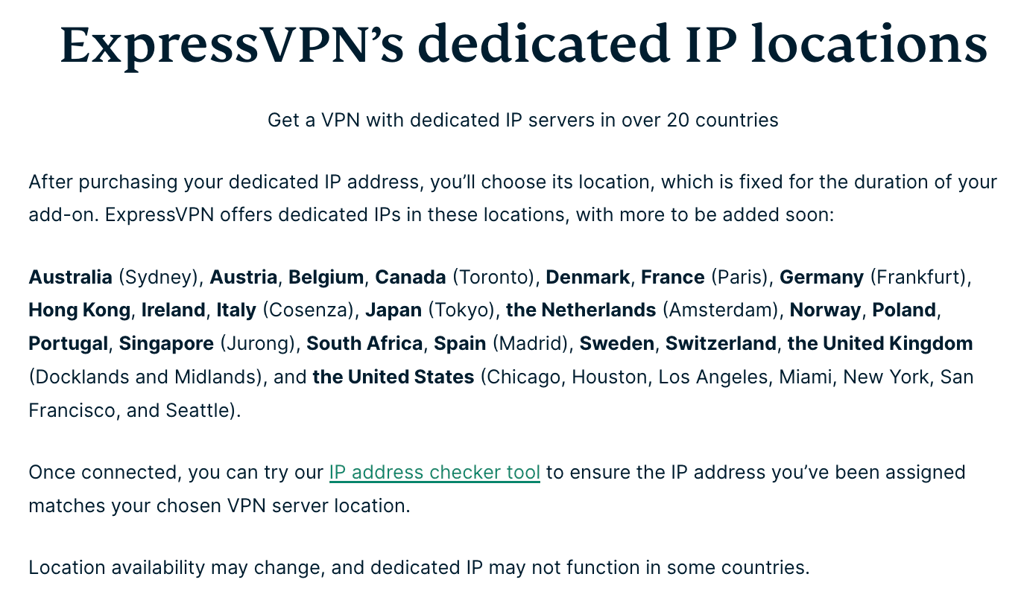
There are three reasons why I like ExpressVPN as a dedicated IP VPN: simplicity, strong privacy standards, and reliable cross-device support. I also appreciate that its number of dedicated IP locations (30 in 21 countries) is similar to Proton VPN (29) and CyberGhost (30). While its pricing isn’t as low as Surfshark’s $3.75/month, it’s still fairly affordable, with plans starting at $8.99/month (the same as NordVPN).
Security and privacy. ExpressVPN uses AES-256 encryption along with its proprietary Lightway protocol, which helps ensure stable connections and reduces drops. Like NordVPN and Proton VPN, it operates under a privacy-friendly jurisdiction outside the 14 Eyes alliance (the British Virgin Islands), meaning your personal data isn’t shared with third parties. Finally, it also maintains a strict no-logs policy, so dedicated IP activity isn’t stored or linked to user behavior.
Performance. ExpressVPN’s performance falls slightly behind the top providers. In our testing, it showed the lowest download retention at 74%. By comparison, NordVPN reached 86% and Proton VPN 80%. Its ping was also higher at 108ms, making it slower than NordVPN (87ms) and Proton VPN (100ms). However, surprisingly, it delivered the highest upload retention at 51%, outperforming Surfshark (37%) and NordVPN (38%), making it suited for upload-heavy tasks such as backups or file transfers.
Coverage and pricing. ExpressVPN offers dedicated IPs in 30 locations across 21 countries, giving you a decent spread for accessing geo-restricted services that require a consistent identity. This is more than Surfshark’s 6 countries, but still less flexible than NordVPN’s broader multi-country coverage. Pricing starts at $8.99/month for full VPN functionality, dedicated IP support, and broad compatibility across all major platforms.
Read our full ExpressVPN review to determine where it stands out.
5. CyberGhost – dedicated IP VPN servers with advanced security tools

| Rating: | |
| Dedicated IP available: | ✅ Yes |
| Number of dedicated IP locations: | 30 |
| Starting price: | From $5.00/month (with a VPN included) |
| Dedicated or shared IP: | Fully dedicated |
| Supported operating systems: | Windows, macOS, Linux, iOS, Android, smart TVs, browser extensions |
CyberGhost is a budget-friendly dedicated IP VPN with a strong set of privacy and security features, so it’s appealing if you’re looking for extra protection without premium pricing. Compared to NordVPN’s 43 dedicated IP locations across 28 countries, CyberGhost offers 30 locations, which is fewer in coverage but still competitive against Proton VPN’s 29 and ExpressVPN’s 30. It positions itself as a more affordable alternative while still maintaining solid security fundamentals.
Security and privacy. CyberGhost features AES-256 encryption and an audited no-logs policy, similar to NordVPN and Surfshark. While NordVPN benefits from a Panamanian jurisdiction outside the 14 Eyes, CyberGhost operates under Romanian law, which is also privacy-friendly but slightly less off-grid than Panama-based providers. Extra features, such as RAM-only servers and dark web monitoring, can help you reduce the risk of IP restrictions issues.
Performance. Performance is where CyberGhost trails the leaders, with our in-house testing showing lower and less consistent speeds. It delivered weaker download retention compared to NordVPN (86%) and Proton VPN (80%), placing it behind both in overall throughput. Its ping performance also typically sits above 100ms, whereas NordVPN averages 87ms and Proton VPN around 100ms, making it less suitable for tasks like gaming or real-time communication.
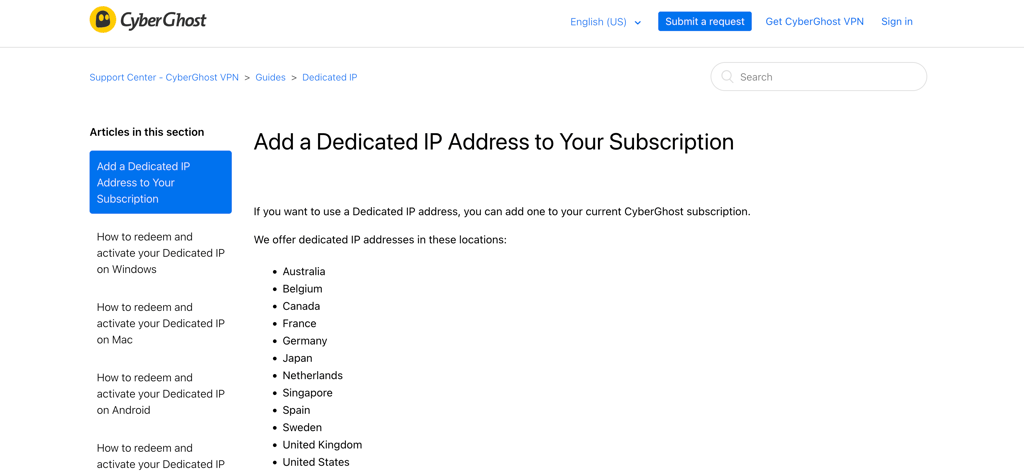
Coverage and pricing. CyberGhost provides 30 dedicated IP locations, matching ExpressVPN and slightly ahead of Proton VPN, but far behind NordVPN’s 43-location network. Its broader server footprint spans 100 countries, helping compensate for fewer dedicated IP addresses when accessing geo-restricted services. Pricing starts at $8.99/month, similar to NordVPN and ExpressVPN.
We also have a full CyberGhost review if you’d like to learn more.
VPNs we don’t recommend
Not all VPNs are suitable for secure browsing, especially when privacy and dedicated IP addresses are a priority. Some providers have been flagged for questionable privacy practices, weak security standards, or misuse of user data. Just to give you some examples of VPNs you should avoid:
- Hola VPN. This VPN uses a peer-to-peer network, allowing users’ internet connections to be shared with others. It was also exposed in 2015 for selling users’ bandwidth and involvement in botnet activity.
- SuperVPN. Its privacy policy includes user data logging, and the service lacks proper encryption standards, raising serious security concerns.
- Turbo VPN. This VPN has a history of privacy issues, including allegations of selling user data to third parties, which undermines user anonymity.
Key differences between dedicated and static IP addresses
The bottom line is that a dedicated IP address is reserved for one user only, whereas a static IP address can be shared between multiple users and organizations.
| Exclusivity | Purpose | Examples | |
| Dedicated IP | Unique to you | Advanced uses | Web hosting, email marketing, remove access |
| Static IP | Can be shared | Consistent connection | Remote work, network devices |

Differences between shared and dedicated IP addresses
The main difference between shared and dedicated IP addresses is that a dedicated IP address belongs to only one user (or account) at a time, while a shared IP address is used by many different users at the same time.
Additionally, the dedicated IP address will always be in the same location, the one that you initially choose when purchasing a dedicated IP subscription. Meanwhile, you can connect to a shared IP address in any location that your VPN service offers.
However, shared IP addresses tend to be dynamic most of the time, meaning that you get assigned a new address every time you reconnect, or it just generally periodically changes. Meanwhile, dedicated IP addresses are always static.
Why you should use a VPN with a dedicated IP address
A dedicated IP address has substantial advantages when it comes to both functionality and security. Here are the key benefits that you can gain from opting for a dedicated IP VPN:
- Secure access to remote networks. With a dedicated IP, you can join remote networks safely and protect your sensitive data from unauthorized access.
- Improve deliverability rates in email marketing. A dedicated IP that only you use is better at avoiding spam filters, thus enhancing your email marketing campaigns with higher deliverability rates.
- Bypass IP restrictions and blacklisting. Some sites already block IP addresses associated with the VPN address pool. A dedicated IP can help overcome these restrictions, gaining uninterrupted access to any content.
- Improve gaming experience. Since you’re the only one using a dedicated IP, you get to enjoy a more stable connection and lower ping time.
- Avoid CAPTCHAs. A dedicated IP VPN is known to reduce the frequency of CAPTCHA prompts, so you can browse without interruptions.
- Improve file transferring. Since you’d be the only one using the IP address, file transfers would be a lot safer and faster. This is because your IP is less likely to be blacklisted due to malicious activity by other users on a shared IP.
Disadvantages of a dedicated IP
While a dedicated IP can improve connection stability and reduce repeated verification requests, it’s not without trade-offs. Here are some of the main disadvantages you should be aware of:
- Less anonymity compared to shared IPs. Since you're assigned a unique IP address, your online activity is no longer blended with that of thousands of other users.
- Potential for easier tracking. Websites can more easily recognize and associate activity with a single user over time.
- Additional cost. Dedicated IPs are usually paid add-ons, which means your overall VPN subscription price might increase.
- Limited IP rotation. Unlike shared VPN IPs, you can’t switch between multiple IP addresses for added privacy or bypassing restrictions.
- Possible blacklisting risk. If the IP is flagged by a service, you don’t benefit from other users sharing the reputation cleanup, since it’s tied only to you.
How to get a dedicated IP address? Full guide
Getting a dedicated IP address is not very complicated. Here’s a simple step-by-step guide on how to get it:
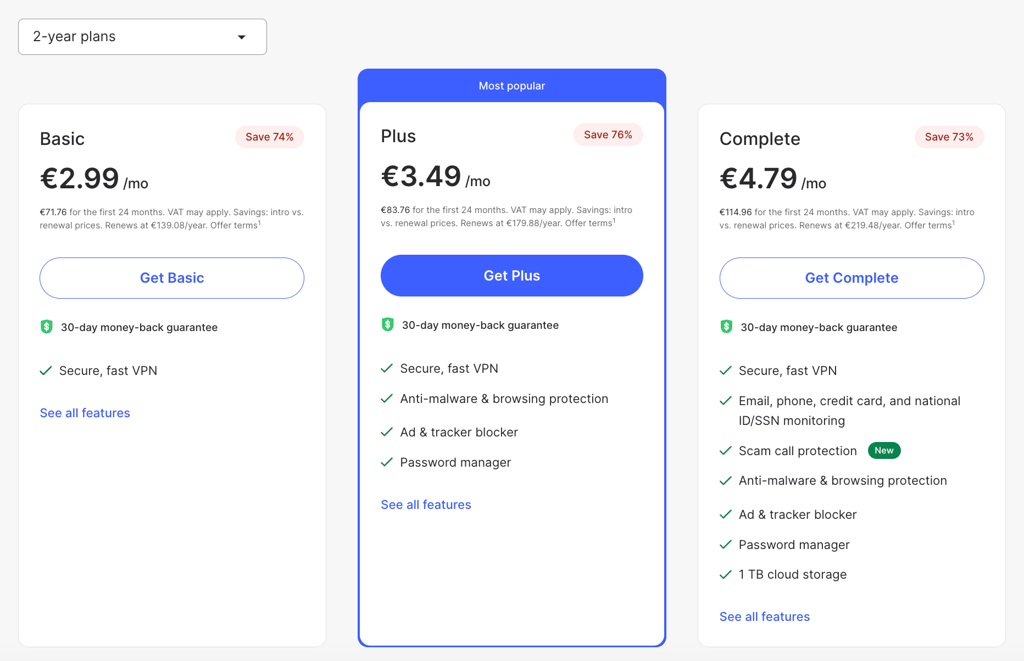
- Head over to your chosen VPN’s pricing page – my top pick is NordVPN, now 75% OFF
-
Select the plan and its duration
-
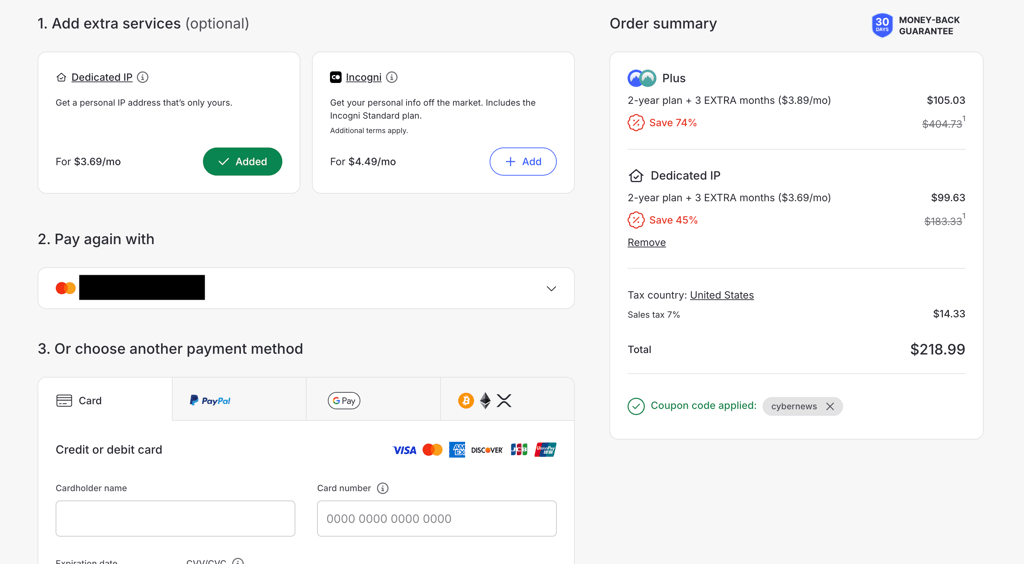
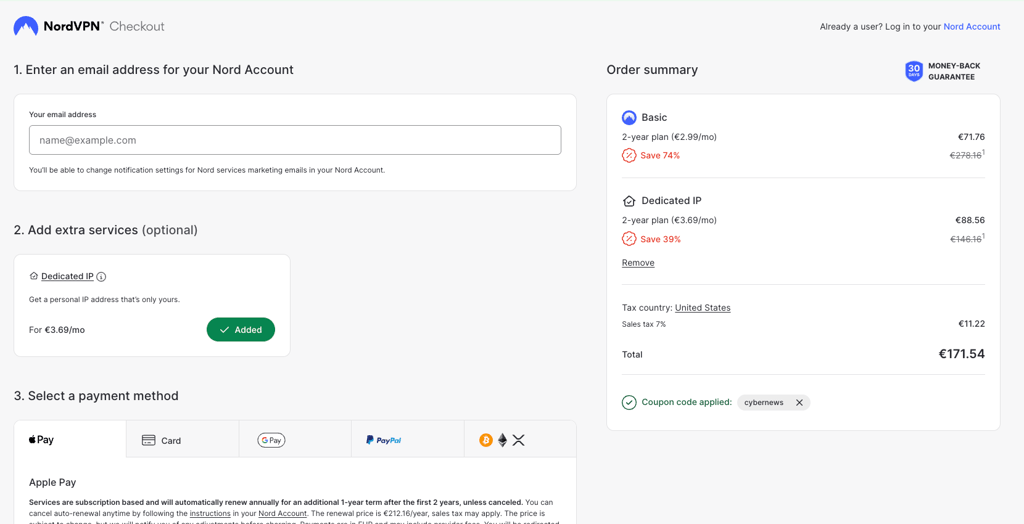
At the checkout, fill in the required information, payment method, and add Dedicated IP
-
After completing the payment, open your Nord Account and set up your dedicated IP service location
Note: this how-to guide is the same for most VPN providers that offer a dedicated IP. If you already have a NordVPN subscription and want to add a dedicated IP feature, visit NordVPN's support page for dedicated IP for more information.
Do I recommend using a free dedicated IP VPN?
I don’t recommend using a dedicated IP from a free VPN service for a couple of reasons.
Firstly, free VPNs mostly use dynamic shared IPs. This means that each time you connect to a server, your IP address will change and also be used by many other people at the same time. While some free VPNs offer static IPs, they are still shared and not dedicated.
Secondly, free VPNs often offer poor security and questionable privacy policies. They tend to log and sell user data for profit, which does not provide any privacy for the VPN user. Additionally, free VPNs might not frequently update or maintain their security measures, which can lead to leaks and hacks.
So, instead of using a free VPN, I recommend trying a freemium VPN such as Proton VPN. Its free version has no data cap and includes servers in five countries.
Alternatively, you can always use a free trial and a 30-day money-back guarantee from a paid provider.
Final thoughts on dedicated IP VPNs
If you keep bumping into websites with specific location restrictions, then a dedicated IP is an excellent choice for the job. However, static or dedicated IP shouldn’t be the only choice criteria when picking a VPN.
I recommend opting for a VPN provider that offers high-level encryption, fast performance, and additional security features, such as threat protection.
In such cases, NordVPN is the best VPN for a dedicated IP address, with 67 servers across 34 countries, top-notch security, and versatile features for an excellent, all-around experience online. Surfshark is a strong alternative with an affordable dedicated IP add-on and a user-friendly interface. Proton VPN is another reliable contender, offering a privacy-focused approach with solid security features and reliable performance.
FAQ
Do I need a dedicated IP for a VPN?
Whether you need a dedicated IP for a VPN depends on your specific use case. If you frequently experience streaming restrictions, annoying CAPTCHAs, or repeated login verification requests, a dedicated IP might be worth considering. However, it’s not strictly necessary for most users.
Is dedicated IP faster?
No, having a dedicated IP isn’t faster than using a regular VPN. This is because the server where dedicated IPs are stored is used by many people at once, just as with shared IPs. The only difference is that each user gets assigned a different IP address.
Does NordVPN provide a dedicated IP?
Yes, NordVPN offers an excellent dedicated IP service for an additional cost of $3.69/month. Combined with the cheapest VPN plan, that brings the total to $8.99/month for a reliable VPN with a dedicated IP.
How much does a dedicated IP cost?
On average, dedicated IP's price can vary between $2.00 to $5.00 per month (excluding the VPN subscription). For example, with Surfshark, you get a dedicated IP for $1.76/month, while NordVPN offers a dedicated IP for almost $3.69/month. There are also free options that come along with VPN subscriptions.
What is the cheapest dedicated IP VPN?
Currently, the cheapest dedicated IP VPN is Surfshark. With a dedicated IP price starting at $1.76/month, this provider offers 6 dedicated IP locations in 6 countries. Plus, it’s renowned for its robust security and an abundance of privacy features.