Best NBA League Pass VPNs to watch local NBA games
Our in-house cybersecurity experts and journalists, renowned for major reports like The Mother of All Breaches, conduct transparent, unbiased VPN testing and in-depth analysis.
With 750+ articles crafted based on real-world research, we empower readers to make informed purchasing decisions through first-hand expertise.
Learn more

Trying to watch your local NBA team on NBA League Pass only to see a blackout message? Even with an active subscription, regional and national blackouts can prevent you from watching certain live games. That's because the NBA sells exclusive broadcast rights to networks such as NBC, ESPN, ABC, and Amazon Prime Video. Therefore, some games are reserved for those broadcasters and can't be streamed live on NBA League Pass.
Before using a VPN, check whether there's an official way to watch the game. Many matchups are available through broadcasters or streaming services, and blacked-out NBA League Pass games might appear in the archive after the blackout period.
If a game is still unavailable in your region, a VPN can help by routing your traffic through another supported location. However, a VPN only changes your IP address – it can't change your device's GPS location, give an NBA League Pass subscription, create an account, or bypass every location check. On mobile devices, apps might use GPS in addition to your IP address, so a VPN alone isn't always enough.
What you actually need to watch blacked-out NBA games
If you're trying to watch a game that's blacked out on NBA League Pass, a VPN can only change your IP address. Whether you can actually watch the game still depends on broadcast rights, your subscription, and, on mobile devices, GPS location checks.
A VPN only affects your IP address and doesn’t change your NBA account region, billing country, or payment eligibility, which are required for subscription activation and renewal.
Here’s what you actually need:
| What you need | What it requires | Can a VPN help? |
| An eligible regional IP address | A US or Canadian IP address (or another region where the game is available) | ✅ Yes, a VPN can change your IP address |
| Payment method/billing region | A valid payment method issued in the supported subscription country (US/Canada/etc.) | ❌ No, VPN doesn’t change billing country or payment eligibility |
| An active NBA League Pass subscription | A valid League Pass subscription | ❌ No, a VPN can't create or replace a subscription |
| Matching GPS location (for mobile) | Some mobile apps use GPS or other location signals in addition to your IP address | ❌ No, as a VPN changes your IP but doesn't change your device's GPS location |
If you have the NBA League Pass, you can watch out-of-market games without a VPN – they are already available through your subscription. You also don’t need a VPN if your local broadcaster or TV provider already carries the game, since the content is already accessible through official channels. A VPN is only worth considering when content is unavailable due to geo-restrictions, and even then, it isn’t guaranteed to work in every case. In many situations, a VPN is unnecessary altogether, such as when:
- You’re watching out-of-market games already included in your League Pass subscription
- The game becomes available after the blackout window (typically around 48 hours after game day)
- Your local broadcaster already carries the game live
Before using a VPN, note that accessing NBA League Pass content outside the service's intended availability or circumventing blackout restrictions may violate NBA League Pass's Terms of Service. This could result in content being unavailable or, in some cases, affect your account. If an official viewing option is available in your region, it's generally the best way to watch the game.
Comparison of the best VPNs for NBA League Pass
I've compiled key details into a table to help you choose the right VPN for NBA League Pass. It highlights each provider’s number of US server locations, speed retention test results, and pricing, allowing you to compare them side by side.
| VPN | Rating | Can bypass NBA League Pass blackouts? | Locations in the US | Speed retention | Starting price |
| 1. NordVPN | ✅ Yes | 55 | 84% | $3.49/month | |
| 2. Surfshark | ✅ Yes | 24 | 83% | $2.49/month | |
| 3. Proton VPN | ✅ Yes | 22 | 81% | $2.99/month | |
| 4. ExpressVPN | ✅ Yes | 50 | 78% | $2.99/month | |
| 5. CyberGhost | ✅ Yes | 11 | 75% | $2.19/month |
How to watch blacked-out NBA games with a VPN

First, check whether the game is available through your local broadcaster or an official streaming service. Many NBA games are shown on national or regional partners such as ESPN, ABC, or League Pass itself after the blackout window, so a VPN might not be needed at all. If a game is still unavailable, a VPN might help in some cases by changing the location your internet traffic appears to originate from. However, it only changes your IP address – it doesn’t affect your NBA account, subscription status, payment method, or device GPS location – and it might not work reliably in mobile apps that use additional location signals.
- Subscribe to a reputable VPN and download the app.
- Install the VPN app on your device.
- Connect to a server in a state that streams your local team.
- Open NBA League Pass in a browser (desktop is generally more reliable than mobile). Note: You must already have an active NBA League Pass subscription and a valid account. A VPN can’t create a subscription, activate League Pass, or bypass payment restrictions during signup.
- Clear browsing data and cookies, as they can give away your location. I recommend using incognito mode for streaming.
- Start streaming and check if the game is accessible.
Keep in mind that NBA League Pass might still block access due to broadcast rights, account region, or mobile GPS detection, even when a VPN is active. Using a VPN to access sports content might also be restricted by the service’s Terms of Use, and repeated violations could lead to content restrictions or account limitations.
What are NBA League Pass blackout restrictions?
NBA League Pass is designed for watching out-of-market NBA games, meaning you can’t use the service to watch local games that are typically blacked out. These blackouts occur because local TV providers or national TV channels, such as NBC, ESPN, and ABC, own rights to these games. As such, League Pass doesn’t have the rights to these games and can’t stream them. This means that, even with an active subscription, League Pass doesn’t include every live NBA game in every region, depending on local and national broadcast rights.
This year, the NBA season has roughly 1,230 regular-season games, and around 250 of those games are exclusively available on NBC, Peacock, ESPN, ABC, and Amazon Prime Video. Moreover, local team games are blacked out because of regional broadcasters owning the rights. That leaves roughly 900 out-of-market games available on NBA League Pass.
If a game is blacked out in your region, it’s either being shown on a local or national broadcaster or subject to regional licensing restrictions that delay its availability on League Pass.
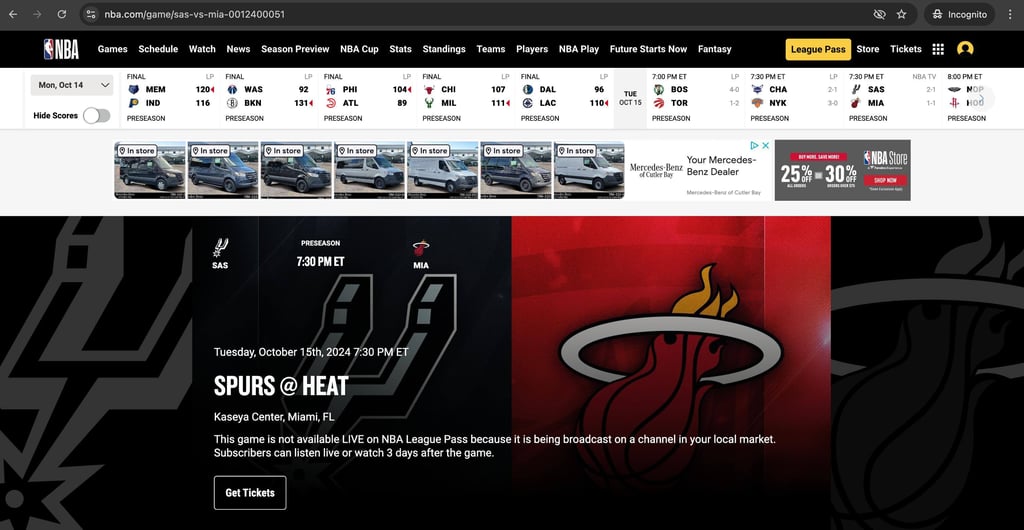
Determining which games are blacked out in your area is simple. If you try to stream a game that’s subject to a local blackout on NBA League Pass, you’ll see a message like this: "This game is not available LIVE on NBA League Pass because it is being broadcast on a channel in your local market. Subscribers can listen live or watch 3 days after the game."
Why is NBA TV blocked in my area?
NBA TV is subject to the same blackout restrictions as the rest of the content on NBA League Pass. If a local team’s game is being broadcast on NBA TV, it will be blacked out for viewers in that area.
NBA League Pass subscriptions include NBA TV, which functions similarly to sports channels like ESPN or ABC. It offers access to additional games throughout the season. However, just like with NBA League Pass, local broadcast rights still apply, and blackouts will occur if the game is being shown on a regional channel.
Can a VPN help with NBA blackout restrictions?
Yes, in some cases, a VPN might help you access NBA League Pass content that’s geo-restricted. The service determines your location based on your IP address, and a VPN lets you change your IP address so it appears you're in a different state or country.
However, NBA League Pass access is also tied to your account region and payment method, meaning a VPN can’t create eligibility, change your billing country, or unlock subscriptions in unsupported regions.
It’s also important to understand that a VPN only changes your IP address. It doesn’t override broadcast rights, account-level restrictions, or other location signals, such as GPS used by mobile apps.
With a secure and reliable VPN, you might be able to connect through servers in different US or Canadian regions, but results can vary depending on how League Pass applies its location checks and the device you are using. This means a VPN might help with IP-based access, but it doesn’t guarantee access to all blacked-out games or bypass all restrictions.
How to watch blacked-out NBA games on mobile
Watching NBA League Pass on a mobile device can be more challenging than on a desktop browser. While a VPN can change your IP address, the NBA League Pass app might also use your device's GPS location or other location signals. Because of this, a VPN alone might not be enough to access games that are unavailable in your area. If you want to try using a VPN on Android or iPhone, follow these steps:
- Choose a reputable VPN with plenty of servers in the US and Canada.
- Install the VPN app and connect to a server in a location where the game is available.
- Review your phone's location permissions. If appropriate, revoke location access for both the NBA League Pass app and your device's App Store (iPhone) or Google Play Store (Android). This might reduce the number of location signals, but it doesn't change your App Store or Google Play country/region, your device's GPS location, or let you download region-locked apps.
- Open NBA League Pass and check whether the game is available.
Note: Using a VPN doesn't change your App Store or Google Play country/region, create an NBA League Pass subscription, or bypass every location check used by the app.
If you're using a VPN, the desktop browser version of NBA League Pass is a better option than the mobile app, since desktop browsers rely more heavily on IP-based location than GPS.
NBA League Pass VPN not working?
Before troubleshooting, it’s important to understand that a VPN only changes your IP address and can’t bypass broadcast rights, account restrictions, payment requirements, or GPS-based location checks on mobile devices. Here are some practical checks that might help:
- Try different servers or protocols. Some servers can reject connections if they’re overcrowded. Try reconnecting to different servers or using different protocols, such as OpenVPN or IKEv2.
- Try using different browsers. Some browsers handle streaming sessions differently, so switching browsers may improve loading behavior.
- Make sure to clear the browser cache and cookies. Doing this will refresh the website and solve the loading issues.
- Reconnect the VPN service. Try disconnecting and reconnecting the VPN service. If you’ve recently updated the app, there might be some connection issues.
- Check your internet connection. A poor internet connection might be part of why NBA League Pass or your VPN is not working. Make sure your internet connection has stable speeds and that the router is functioning properly.
- Change DNS settings. With the default DNS settings, the majority of streaming services and smart TVs perform at their best. Hence, switching to the default setting might be beneficial.
- Try a better, reputable VPN. Use a trustworthy premium VPN like NordVPN or Surfshark with updated software to maximize your streaming performance.
Even if the VPN is working correctly, access may still be blocked due to the NBA League Pass account region, subscription limitations, or mobile GPS-based detection.
FAQ
What’s the best NBA League Pass VPN?
NordVPN is the best NBA League Pass VPN. It covers multiple US locations and has more than 3,440 servers in the US alone. It’s the most reputable VPN on the market with fast protocols, speedy streaming, and next-gen encryption.
Are NBA Playoff games blacked out?
Yes, NBA Playoff games can be subject to blackouts. According to the NBA Help Center, Canadian and US fans won’t be able to access All-Star Weekend or the playoff games, as these will be televised locally and only available in the NBA League Pass archives later.
What NBA teams are blacked out in my area?
You can find out which NBA teams are blacked out in your location by going to the official NBA League Pass page and entering your zip code.