Will PayPal refund your money if you get scammed? (the 2026 reality check)
Our in-house experts test identity theft protection services themselves, using real-world scenarios and established testing methods. We look at how well each service monitors personal information, how quickly and clearly it sends alerts, what recovery support it offers, and how it handles customer data.
We assess every provider using the same criteria and explain our testing process clearly, so readers can compare services and make a more informed choice.
Learn more
Losing money on the internet to a scam is among the most stressful online experiences. You’re never sure whether you will get your money back, even using a payment provider like PayPal. While the company has been fighting scams with a robust purchase protection program, its defenses aren’t perfect. Unfortunately, even the best program won’t totally eliminate human error, which is the most common avenue scammers use.
After all, everyone has bad days sometimes. We're often reading our emails and texts when we're tired, in a hurry, or distracted. Sometimes, a good deal clouds our judgment, and we end up sending money to an untrustworthy seller. PayPal often helps in such cases, but given its strict conditions, the Purchase Protection program doesn't guarantee you'll get your money back.
To help you get your money back, in this article, I explain how you can boost your chances of recovering stolen funds. I dive deep into PayPal's policies and give you hints on how to protect yourself from scammers in the future, so you won’t have to relive the stress.
The golden rule: Goods and Services vs Friends and Family
This aspect is crucial for understanding whether you have a chance to get a refund. While Goods and Services are protected with buyer protection at the cost of a mandatory fee, Friends and Family transactions are treated as gifts, meaning that the purchase isn’t protected.
You can’t get a refund on Friends and Family money transfers. That’s why, if you’re making a purchase and the seller insists on that method of transfer, treat it as a red flag and avoid it, as it’s likely a scam.
Understanding the PayPal Purchase Protection blueprint
PayPal’s Purchase Protection program is a great way to protect yourself from scammers who pretend to be legitimate sellers but don't send you the product you purchased or send you a product that differs from what you ordered.
Essentially, PayPal buyer protection applies to two situations. First, we have a case where the items are not being delivered. If you make a purchase and never receive a tracking number or receive a fake tracking number for a product that never arrives, you can open a dispute within 180 days of purchase. Secondly, if your purchase is delivered but significantly differs from its description (e.g., you buy an iPhone 16 on Facebook Marketplace but receive an iPhone 11), you can report it to PayPal within 30 days of receiving your package.
While these general guidelines may seem straightforward, PayPal includes many exceptions. For example, Purchase Protection doesn't apply at all to real estate, motor vehicles, personal services, or gift cards, among others. On top of that, the significantly different clause doesn't apply to custom items, so if you buy a bespoke suit that doesn't match the description, PayPal won't help you.
So, even if a seller doesn't ask you to use the Friends and Family option, they may still be trying to scam you. Be very wary when making deals not covered by PayPal Purchase Protection. You can do so by verifying the seller's reputation or by using a payment method like a credit card to enable wider chargeback coverage.
Step-by-step recovery: filing a dispute in the Resolution Center
Starting a refund process on PayPal at first seems straightforward, but it is a bit more complicated than you may expect. Here's what you have to do to maximize your chances of getting your money back.
If your item hasn't arrived, or was significantly different from what you ordered, the first thing you should do is contact the seller. Before you write them, make sure you take screenshots of the original ad or item page and the tracking number. Screenshot your conversation with the seller for the future as well. Note that legitimate sellers will often offer you a refund at this stage, and you should accept it as long as it's satisfactory.
If the seller hasn't responded to your refund request, it's time to escalate the dispute through PayPal. To do so, head to the PayPal Resolution Center. Once there, find the transaction you want to report and click on it. Note that you must file your claim within 180 days of payment or 30 days of item delivery. That said, I recommend filing your dispute as soon as possible, as disputes filed within 48 hours of a seller violating your contract have a history of being slightly more effective.
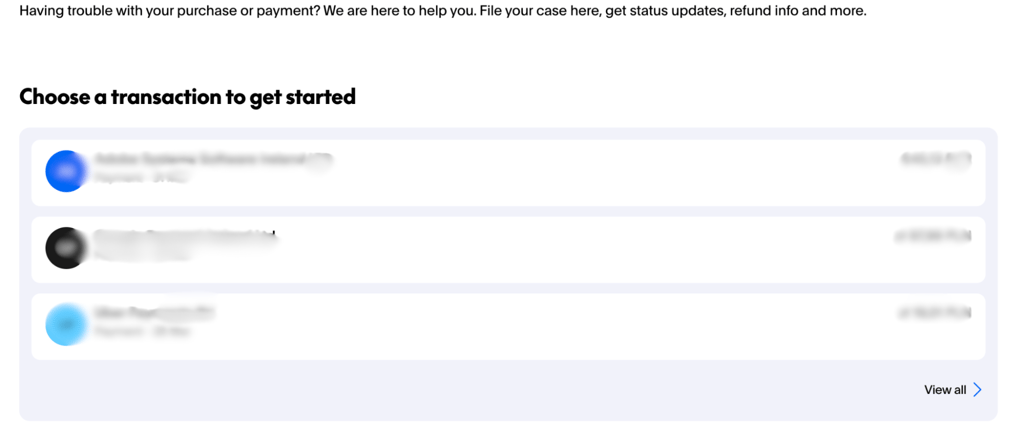
On the following screen, you may be prompted to contact the seller. Since you already did that, click "Report Issue to PayPal” and then pick the answer that matches your issue.
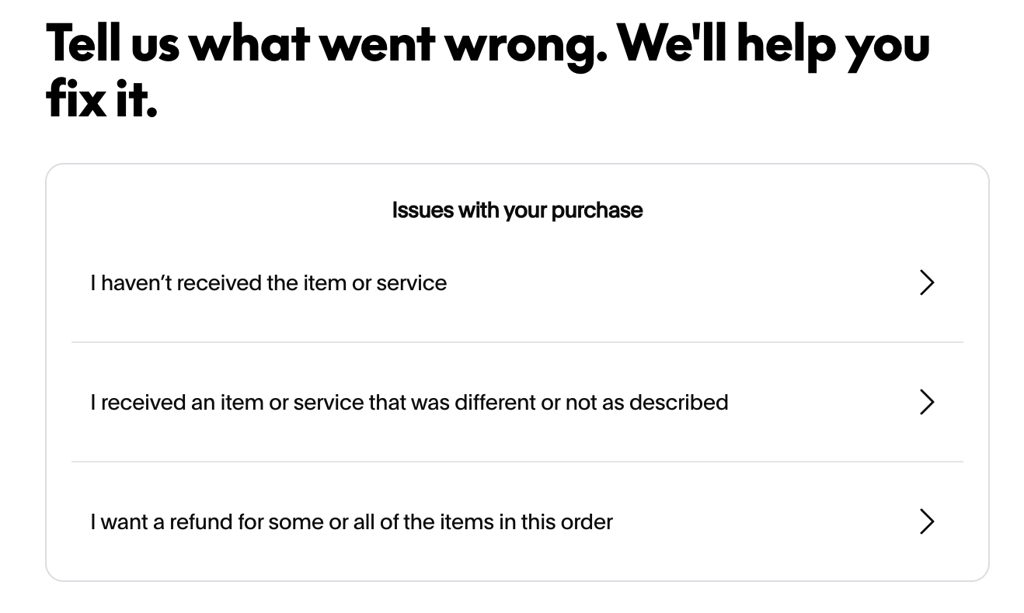
Follow this by thoroughly describing your problem and providing any evidence you may have. This will open a dispute. In this phase, you can still communicate with the seller. If you feel that the seller isn't going to honor your dispute, you can then click "Need help?” and "Review my case” to escalate the dispute into a claim. This option is usually available 7 days after purchase; PayPal reviews the claim and decides whether to issue a refund to you.
Note that the dispute has to be escalated within 20 days for PayPal to act on it. Afterward, the refund process can take from 14 to 30 days, although in complicated cases PayPal may take longer.
Why refunds often fail (and how scammers bypass them)
PayPal refunds aren't a guarantee. Unfortunately, there are situations where PayPal denies refunds. This can happen when you fail to provide trackable proof of your return, or when you fall for a smishing link that allows scammers to access your account directly. In these cases, scammers often use the Friends and Family option to quickly and irreversibly transfer money from your account.
PayPal also doesn't accept refunds from certain purchase categories. Here's a breakdown of which categories are ineligible for refunds:
| Item category | Eligibility status |
| Physical goods | ✅ Eligible |
| Digital goods and tickets | ✅ Eligible |
| Real estate | ❌ Ineligible |
| Motor vehicles and boats | ❌ Ineligible |
| Businesses and investments | ❌ Ineligible |
| Industrial machinery | ❌ Ineligible |
| Prepaid cards and cash equivalents | ❌ Ineligible |
| Gold and financial products | ❌ Ineligible |
| Non-fungible tokens | ❌ Ineligible |
| Gambling and gaming | ❌ Ineligible |
| Donations and crowdfunding | ❌ Ineligible |
| Custom-made items | ❌ Ineligible for not-as-described claims |
| Items for resale | ❌ Ineligible |
| Friends and Family payments | ❌ Ineligible |
Unfortunately, PayPal support isn't known for being the most helpful. User reports on websites like Reddit point to PayPal's resolution team often doing everything they can to avoid issuing a refund. This is why you should document your purchases as thoroughly as possible, screenshotting the product page, ad, product photos, and communication with the seller. Essentially, it's almost like a court case, where you need to convince the judge that you've actually been scammed.
If you were hacked, PayPal does technically refund unauthorized transactions. Unfortunately, users have reported that this process is often exhausting, and PayPal support is rarely helpful. On top of that, scammers using SMS phishing (smishing) methods may have presented you with a link that actually offered them the authorization for the transaction.
These tactics are why scam prevention is so important. If you avoid purchasing from a scammer or clicking the wrong link, you won't have to count on PayPal's refund process to save your money. That's why you should always avoid clicking links from unknown sources and check the seller’s reputation before you commit to a purchase.
How Bitdefender orchestrates your “pre-scam” command center
Verifying links and purchases can be hard. Even cybersecurity experts sometimes fall for scam tests. All it takes is a bad day, being tired, or being in a hurry to give cybercriminals access to your account.
Luckily, you can use Bitdefender to avoid PayPal scams. Treat it as your second set of eyes, constantly looking over your shoulder and making sure you don't click the wrong link. Bitdefender security solutions achieve this by introducing several features I discuss below.
Bitdefender Scam Protection Pro
Bitdefender has an entire anti-scam suite that analyzes the emails and text messages you receive to see whether they're likely to be scams, and includes an AI chatbot to help you avoid cybercriminals. This way, you're warned before you click a malicious link or authorize a fake payment.
After blocking a link, Bitdefender Scam Protection Pro will explain why it blocked the website, and educate you on the methods used by scammers to help you avoid scams in the future. For example, scammers recently used the fact that the FTC issued refunds through PayPal to pretend to be the institution. If you received an email from a scammer posing as an FTC employee, Bitdefender Scam Protection Pro would note that the email is not based in the .gov domain, explaining that FTC doesn't require you to click links in emails.
Antiphishing and antifraud protection
Bitdefender doesn't just scan your emails or links; it also stops you from landing on fake PayPal login pages. With scammers using more and more complex methods to spoof websites, Bitdefender Anti-Phishing scans your activity and stops you from entering known scam websites.
For example, scammers often use Google Ads to redirect you to a fake eBay website, where they trick you into giving your PayPal data. Bitdefender will detect spoofed websites and block them, preventing the cybercriminals from stealing your credentials.
Digital privacy and identity protection
Bitdefender doesn't just scan your activity. It actively monitors the dark web to check whether your credentials are secure and notifies you if your personal information has been leaked. This means that if your password is leaked, you will be able to change it before cybercriminals can access your accounts.
Note that you shouldn't use the same password on multiple websites. Select Bitdefender plans like Total Security, Premium Security, and Ultimate Security also include a password manager, which helps you store and generate credentials. This way, you don't have to reset them every time you forget a password, while reducing the impact of a single leak.
Total peace of mind
Bitdefender's automated safety net works 24/7, actively protecting you from PayPal scams. This means that you'll decrease the likelihood of dealing with PayPal support by avoiding scams.
Just like in medicine, prevention is easier than treatment. In cybersecurity, prevention is the best way to avoid scams. Once you fall victim to one, getting your money back can be a tough challenge, requiring you to spend hours documenting them and talking to PayPal (or any other provider's) customer support. By using Bitdefender, you can ensure the safety of your money and data, avoiding the traps set by scammers, rather than finding methods to get out of them.
FAQ
Does PayPal refund Friends and Family payments?
No, PayPal explicitly doesn't refund Friends and Family payments. If you paid a scammer using this option, PayPal won't be able to help you and your money is almost certainly gone.
How long does a PayPal scam refund take?
PayPal refund claims usually take 10 to 14 days to process. However, in more complex situations, this may take 30 or more days.
Can I get a refund if my PayPal account was hacked?
Yes, as long as the transaction in question is marked as unauthorized. Unfortunately, many scammers use SMS phishing methods to get you to authorize transactions, thus stopping you from receiving a refund. I recommend using Bitdefender to avoid this issue.
What if the seller provides a fake tracking number?
A tracking number is not enough to prove that an item is being shipped to you. If you have a tracking number, but your item still hasn't arrived in the agreed-upon time, you can escalate the claim to PayPal. Remember to always purchase from parties that use legitimate and trackable carriers so you can actually track your package.
Is Bitdefender better than PayPal’s built-in security?
Bitdefender complements PayPal’s security. While PayPal handles your money, routing it from your bank or credit card to the recipient, it doesn't protect the steps leading up to the transaction. Bitdefender handles the "human layer”, preventing smishing and phishing attacks to ensure that your PayPal account doesn't fall into the wrong hands.
Does Bitdefender Scam Protection Pro work on my phone?
Yes, Bitdefender Scam Protection Pro offers anti-smishing and anti-phishing protection on iOS and Android, keeping you protected even on the go.