How to bypass Twitter’s (X) age verification in 2026
Our in-house cybersecurity experts and journalists, renowned for major reports like The Mother of All Breaches, conduct transparent, unbiased VPN testing and in-depth analysis.
With 750+ articles crafted based on real-world research, we empower readers to make informed purchasing decisions through first-hand expertise.

-
Twitter (X) may require age verification to access certain content, with requirements varying by location
-
Proton VPN is a reliable choice for improving online privacy and securing your connection while browsing X without an ID
X (formerly Twitter) now requires age verification in certain regions to comply with online safety laws in countries such as the US, the UK, the EU, and Australia. These regulations are designed to prevent minors from accessing age-restricted material, such as pornography and alcohol-related advertising. To comply, X uses a multi-layered age assurance system to determine whether a user is likely to be 18 or older.
Age checks on X can be triggered when users try to view sensitive content or when the platform cannot confirm their age in regulated locations. Depending on local requirements, posts may be blurred or blocked altogether. Currently, X only offers manual age verification for Premium subscribers, which requires submitting a selfie or government ID. Free users may have limited or no options to complete verification, potentially leaving some restricted posts inaccessible.
Affected users may encounter a notice stating: “Due to local laws, we are temporarily restricting access to this content until X estimates your age.”
In tests conducted in October 2026, I explored several approaches for accessing restricted content. Using a VPN proved to be one of the most reliable options. Connecting through a server in another country can change your virtual location and, where local rules differ, may allow access to content restricted in your region, while adding an extra layer of privacy to your connection.
Is it possible to get around Twitter’s (X) age verification?
Absolutely. If you’d rather not submit personal documents like an ID or selfie, you can bypass X's (formerly Twitter) age verification by using a VPN for age verification. X determines whether to show age checks based on your location, so connecting through a VPN server in a country without strict verification rules can help restore access to restricted content – without compromising your privacy.
How to bypass Twitter’s age verification with a VPN
To get around age verification and keep your personal data private, a VPN can help you appear as if you’re browsing X (formerly Twitter) from a country without strict age-check laws, such as the US or Canada. Here’s how to set it up:
- Get a VPN with servers outside the UK, Australia, and the EU. I recommend Proton VPN, now 70% OFF, as the best VPN for Twitter to bypass age verification. It offers high speeds, advanced protection, and servers in countries where age verification isn’t enforced.
- Install the VPN app. Most VPNs are available as apps for phones, laptops, and tablets and as browser extensions. Set it up on the device you use to access Twitter.
- Connect to a server in a country without Twitter ID checks. Countries like the US, Canada, and Switzerland don’t enforce X age verification. Once connected, your VPN will change your IP address, making it appear as though you’re accessing Twitter from that selected location.
- Change your country in Twitter account settings. After connecting to the VPN, go to Settings & Privacy > Your account > Account information. Update your country to match the VPN location.
- Adjust sensitive content settings. Go to Settings > Privacy and safety > Content you see. Enable “Display media that may contain sensitive content”. Also, check that your search settings allow sensitive content.
- Reload Twitter. Revisit the content that was previously restricted. If all steps were followed correctly, you should no longer see the age verification prompt.
Based on my tests, the most reliable Proton VPN servers for bypassing Twitter age verification are in cities like New York, Los Angeles, Chicago, Toronto, Vancouver, Mexico City, São Paulo, Buenos Aires, and Santiago. These locations don’t enforce strict age verification on X and are less likely to trigger additional checks.
How does Twitter age verification work?
X has introduced age checks in response to legal requirements. Laws such as the UK's and Australia's Online Safety Act, Ireland’s Online Safety Code, and the EU Digital Services Act now require platforms to implement highly effective age-assurance systems to prevent minors from viewing harmful content.
Twitter’s new policy checks for the following:
- Verified birthdate showing you’re 18+. If you’ve entered your date of birth in your account profile and it indicates that you are over 18, X may use this as a first-level check. However, since minors can fake their birthdate, this alone may not always be accepted unless combined with other data.
- Previously uploaded ID (e.g., for X Premium). If you subscribed to X Premium (formerly Twitter Blue) and completed the ID verification process, your age may already be confirmed. X uses this information as a trusted signal and may skip further verification steps for your account.
- Long-standing account (e.g., created before 2012). Accounts created more than a decade ago are presumed to belong to adults today. For instance, if your account was opened in 2011 or earlier, X assumes you were likely at least 13 then, making you at least 27 now – safely over the age threshold.
- Other trusted signals, like business or government verification. If your account is linked to an official organization, such as one with a gray verification checkmark (government bodies or officials) or gold checkmark (verified businesses), X treats these accounts as operated by adults and typically excludes them from verification prompts.
If your account lacks these, X may restrict access to sensitive posts and prompt you to take a live selfie for facial age estimation or to upload an ID to prove you're over 18.
These measures are active in the United Kingdom, Ireland, European Union member states, and other countries with similar online safety legislation.
How to actually verify your age on X
If you’re unable to view sensitive content on X (formerly Twitter) because of age restrictions, you do have the option to verify your age through the platform’s official process. Here’s a step-by-step breakdown of how it works and what choices are available.
- Wait for the age verification prompt. You’ll only be asked to verify your age if Twitter cannot determine your age from existing account data. When trying to view restricted content, you’ll see a prompt asking you to confirm your age.
- Choose a verification method. The first method is selfie-based age estimation. Just upload a live selfie using your phone or webcam, and Twitter’s AI tool will estimate your age based on facial analysis. The other method is uploading a government ID. Submit a photo of a valid government-issued ID, such as a passport or driver’s license, and Twitter will use AI to estimate your age from the document.
- Wait for approval. Once you complete these steps, your account will be reviewed. If successful, you’ll regain access to sensitive media marked as 18+.
How to verify age on X without Premium?
At the moment, X (formerly Twitter) does not offer a full manual age‑verification option for free accounts in the UK or other regulated regions. ID or selfie verification is only available to X Premium subscribers, leaving free users dependent on indirect checks, such as the birth date in their account, account history, and location data. If these signals don’t confirm you’re over 18, X blocks sensitive content by default.
X age verification not working
Many users report getting stuck in an endless age-verification loop on X, where the platform repeatedly asks for verification but never grants access. This issue is widely discussed in communities like Reddit. Based on user reports and my testing, this problem is usually caused by incomplete age signals, failed verification attempts, or regional restrictions incorrectly re-triggering checks.
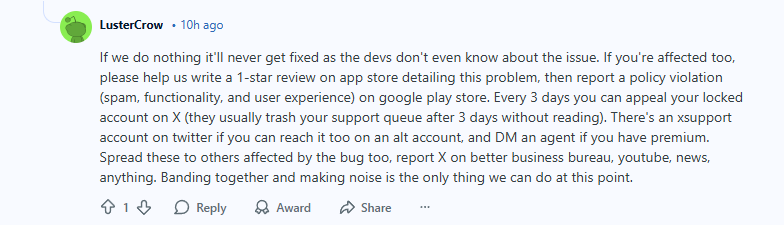
To fix X age-verification issues, you can try a few methods that I’ve personally tested. Let’s go through them.
Fix 1. Verify with ID (most reliable):
- Open the X app and wait for the verification prompt
- Choose Verify with ID instead of selfie
- Upload a passport or driver’s license
- This method typically persists and prevents repeated prompts
Fix 2. The “Long press” trick (mobile):
- Long press (tap and hold) on blocked content
- The share menu appears
- Content may load in the background – tap to view
- Works best for videos
Fix 3. Media tab workaround (desktop):
- Go to the user’s profile
- Open the Media tab
- Some sensitive posts might appear without triggering verification
Fix 4. Use a VPN:
- Connect to a server in the US or the UK
- Reload the page or app
- X often enforces strict age checks only in certain regions, so changing your location can remove the prompt
These methods rely on the platform’s current behavior, so their effectiveness can change as X updates its system.
Is it legal to bypass X age verification with a VPN?
Yes, using a VPN to bypass X (formerly Twitter) age verification is legal in most countries, including the UK and Australia. VPNs are legitimate privacy tools that let users encrypt their internet traffic and route it through servers in different regions. This can help you appear to be browsing from a country where age verification isn’t legally required, allowing access to restricted content on platforms like X.
While it’s legal for individuals to use a VPN in this way, platforms like X are still obligated to comply with local laws — such as the UK’s Online Safety Act — which may require age verification for NSFW or regulated content. This creates a gray area: the platform cannot officially recommend VPNs as a workaround, but users who value their privacy can still use them without breaking the law.
If you’re concerned about sharing sensitive documents or undergoing facial scans just to view content, a VPN offers a secure and private solution. Just make sure to choose a trustworthy VPN provider with fast speeds and servers in countries like the US or Canada, where age verification laws for platforms like X are not enforced.
Final thoughts
The Twitter age verification rollout reflects tougher online safety requirements now affecting users in the UK, Ireland, Australia, and across the EU. Although these measures are intended to protect minors, they can create friction for adults, particularly when verification involves submitting a government ID or selfie. Free users may face additional limitations if they are not offered a way to complete the verification process.
Some users have also reported being asked to verify their age more than once, even after completing the process successfully. This may indicate inconsistencies in how X stores or reassesses age signals. If age-related restrictions vary by location, changing your virtual location with a VPN may affect which content is available. In our testing, Proton VPN stood out as a strong VPN for Twitter without age verification thanks to its fast performance, privacy features, and straightforward setup across major devices.
Does X offer age estimation to free users?
As of October 2026, only X Premium subscribers have access to the manual age‑estimation process, where you can submit an ID or selfie for verification. Free users do not have this option yet.
Is Twitter age verification mandatory in the UK?
Yes, as of July 2025, UK users are required to verify their age to access sensitive or NSFW content on X (formerly Twitter). This is part of the UK’s Online Safety Act, which mandates age checks to protect minors.
Is Twitter age verification mandatory in Australia?
Yes, as of December 10th, 2025, all Australian users must verify their age on X. The platform uses in-app, privacy-focused methods such as AI-based age estimation or government ID checks to estimate or confirm a user’s age. If a user’s age cannot be verified, access to sensitive content may be restricted until verification is completed through the available process.
Why does Twitter keep saying identity verification failed?
This happens when the submitted ID or selfie cannot be clearly processed or doesn’t match the account’s age signals. It can also occur due to technical errors, poor image quality, or temporary issues with X’s verification system.
Can I bypass X's age verification with a VPN?
Bypassing Twitter age verification is possible by using a VPN. First, get a reliable VPN like Proton VPN, connect to a country without strict policies (like the US), and you can now access and view restricted posts without triggering the age check.
Will using a VPN to bypass age verification affect my Twitter account?
No, using a VPN doesn’t violate Twitter’s Terms of Service, but it’s best to choose a reliable provider to avoid connection issues.
How to enable 18+ content on Twitter?
To enable 18+ content on X (Twitter), log in via a web browser (x.com), go to Settings > Privacy and Safety > Content, and check Display media that may contain sensitive content. Also, deselect Hide sensitive content in search settings to allow NSFW content in search results.
How to resolve “due to local regulations, this content is restricted on X”?
This message appears when X cannot confirm your age or when local laws require stricter controls on sensitive content, so you may need to verify your age and ensure your account details are accurate. If the issue persists, check your privacy settings, allow sensitive content, and update your app or browser to rule out temporary glitches.