Best NVMe SSD options compared


NVMe SSDs have become the default storage choice for modern computers. Compared to older SATA SSDs, they offer faster boot times, quicker file transfers, and noticeably smoother system responsiveness. For most users, upgrading to an NVMe SSD is one of the simplest ways to make a PC or laptop feel faster.
We, the Cybernews Smart Savings team, together with the wider Cybernews research team, reviewed and investigated the best NVMe SSDs currently available on Amazon. We did not physically test these drives ourselves. Our evaluation is based on publicly available specifications, manufacturer disclosures, and consistent patterns found in user feedback and expert discussions online.
In this guide, we rank the best NVMe SSDs from best to worst based on overall performance balance, reliability, and value. We also explain how NVMe SSDs differ and what to consider before buying one.
The best NVMe SSDs compared
Before diving into individual reviews, it helps to compare NVMe SSDs side by side. While many drives look similar on paper, differences in PCIe generation, DRAM usage, and thermal design can significantly affect real-world performance.
|
|
|
|

|
|
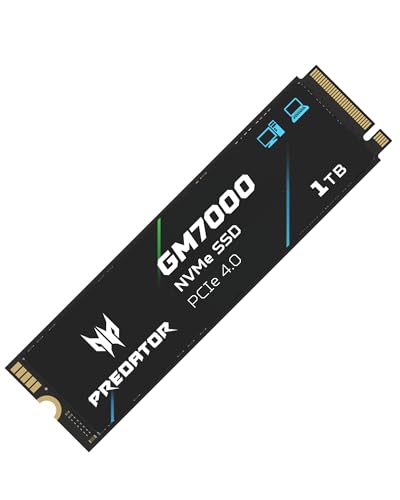
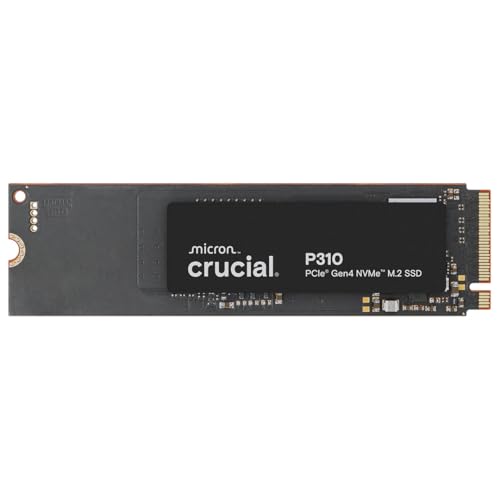
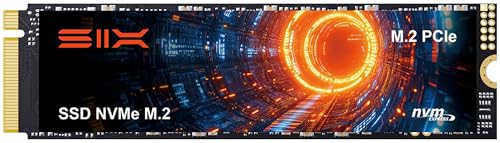
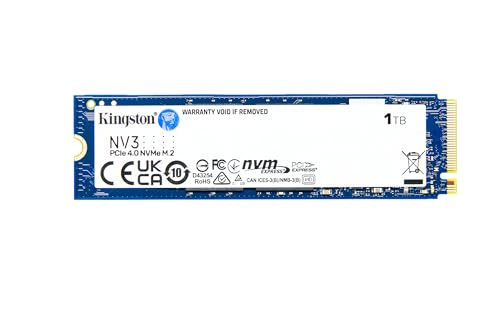
| Title | Acer Predator GM7000 | Crucial P310 | SIX SSD Expansion with Heatsink | Kingston NV3 | ANACOMDA Gen4 DRAM-less |
| Price | $170.02 $178.55 -5% | $174.99 | $156.99 $215.99 -27% | $179.99 | |
| Interface | PCIe Gen4 | PCIe Gen4 | PCIe Gen4 | PCIe Gen4 | PCIe Gen4 |
| Form factor | M.2 2280 | M.2 2280 | M.2 2280 | M.2 2280 | M.2 2280 |
| DRAM | Yes | Yes | Not specified | DRAM-less | DRAM-less |
| Best for | High-performance systems | All-around use | Sustained performance | Everyday computing | Budget upgrades |
| More info | Buy on Amazon | Buy on Amazon | Buy on Amazon | Buy on Amazon | Buy on Amazon |
5 Best NVMe SSDs – our detailed list
1. Acer Predator GM7000 – best NVMe SSD overall
The Acer Predator GM7000 ranks as the best NVMe SSD overall thanks to its strong PCIe Gen4 performance and DRAM-equipped design. It is built for users who want fast and consistent speeds across gaming, productivity, and heavy multitasking.
Based on specifications and recurring user feedback, the GM7000 delivers quick load times and stable performance even during longer sessions. It is frequently recommended for modern desktops that can fully take advantage of PCIe Gen4 bandwidth.
2. Crucial P310 – best NVMe SSD for balanced performance
The Crucial P310 is a well-balanced NVMe SSD that combines solid Gen4 speeds with a strong reputation for reliability. It is designed to handle a wide range of everyday and advanced tasks without unnecessary complexity.
User feedback often highlights consistent performance during booting, application loading, and file transfers. For users who want dependable speed without chasing peak numbers, the P310 is a safe and practical choice.
3. SIX SSD Expansion with Heatsink – best NVMe SSD for sustained workloads
The SIX SSD Expansion with Heatsink is designed for scenarios where thermal control matters. NVMe SSDs can throttle under prolonged workloads, and the integrated heatsink helps reduce performance drops.
Based on available information and user discussions, this drive maintains more stable speeds during long transfers. It is a good option for compact systems or environments with limited airflow.
4. Kingston NV3 – best NVMe SSD for everyday upgrades
The Kingston NV3 is aimed at users who want a straightforward NVMe upgrade. It focuses on compatibility and efficiency, making it a good fit for laptops and home PCs used for daily tasks.
User feedback frequently mentions easy installation and noticeable improvements over SATA SSDs, especially for browsing, office work, and light gaming.
5. ANACOMDA Gen4 DRAM-less – best budget NVMe SSD
The ANACOMDA Gen4 DRAM-less NVMe SSD is targeted at budget-conscious users who want faster storage without paying extra for premium features. While it lacks a DRAM cache, it still offers a clear upgrade over SATA SSDs.
It is best suited for light to moderate workloads where sustained write performance is not critical.
Our methodology
To rank these NVMe SSDs, we relied on a structured evaluation framework developed together with the Cybernews research team. The goal was to reflect how these drives perform and are perceived in real-world use, not just how they look in synthetic benchmarks or marketing materials.
Each NVMe SSD was evaluated using the following weighted criteria:
- Performance and responsiveness (25%). We looked at advertised speeds, controller design, DRAM usage, and how users describe everyday responsiveness during booting, gaming, and multitasking
- Reliability and brand reputation (25%). We considered manufacturer track record, warranty expectations, and recurring user feedback related to long-term stability or failures
- Thermal behavior (20%). We assessed whether the drive includes thermal solutions and how often users report throttling under sustained workloads
- Value for the target audience (20%). We evaluated whether the feature set makes sense for the intended user, such as gamers, everyday users, or budget buyers
- Compatibility and ease of use (10%). We reviewed form factor compatibility, installation ease, and reported issues across different systems
This approach helps ensure the rankings reflect practical usability rather than headline speed claims alone.
Factors to consider when choosing an NVMe SSD
Choosing the right NVMe SSD depends largely on how you plan to use your system. While most NVMe drives offer a noticeable speed upgrade, not all of them are equally suited for every workload.
Before buying, it is worth paying attention to the following factors:
- PCIe generation support. Make sure your motherboard or laptop supports PCIe Gen4 if you want to benefit from higher speeds, otherwise a Gen3 drive may be sufficient
- DRAM vs DRAM-less design. Drives with DRAM generally handle sustained workloads better, while DRAM-less models are often more affordable and fine for everyday use
- Thermal management. Heatsinks or good airflow help prevent performance drops during long file transfers or heavy use
- Intended workload. Gaming, office work, and content creation place very different demands on storage
- System compatibility. Check the M.2 size, clearance for heatsinks, and overall system support before upgrading
Understanding these factors makes it easier to choose an NVMe SSD that matches your actual needs.
Best NVMe SSD according to users
User feedback provides valuable insight into how NVMe SSDs perform beyond specifications. By reviewing recurring discussions and opinions across forums, reviews, and retailer feedback, several clear patterns emerge.
Based on consistent themes in user feedback:
- Acer Predator GM7000 is frequently praised for its speed, stability, and ability to handle demanding workloads without noticeable slowdowns
- Crucial P310 is valued for its reliability and balanced performance, especially among users who want a dependable primary drive
- Heatsink-equipped NVMe SSDs are often preferred by users who run sustained workloads or use compact systems with limited airflow
- Budget NVMe SSDs are commonly recommended as effective upgrades from SATA SSDs, particularly for everyday computing
At the same time, users often caution that budget and DRAM-less drives may show slower performance during long write-heavy tasks.
Final verdict
The best NVMe SSD depends on how you use your system. For most users seeking top performance, the Acer Predator GM7000 stands out as the strongest option. Users who want balance and reliability may prefer the Crucial P310, while everyday upgrades and budget builds are well served by Kingston NV3 and ANACOMDA alternatives.
No matter which model you choose, upgrading to an NVMe SSD is one of the most impactful improvements you can make to a modern computer.