This Android malware is nuts: it connects to your phone like a developer, but from the inside
The game-changing Android malware abuses the legitimate developer ADB tool to gain access it should never have.
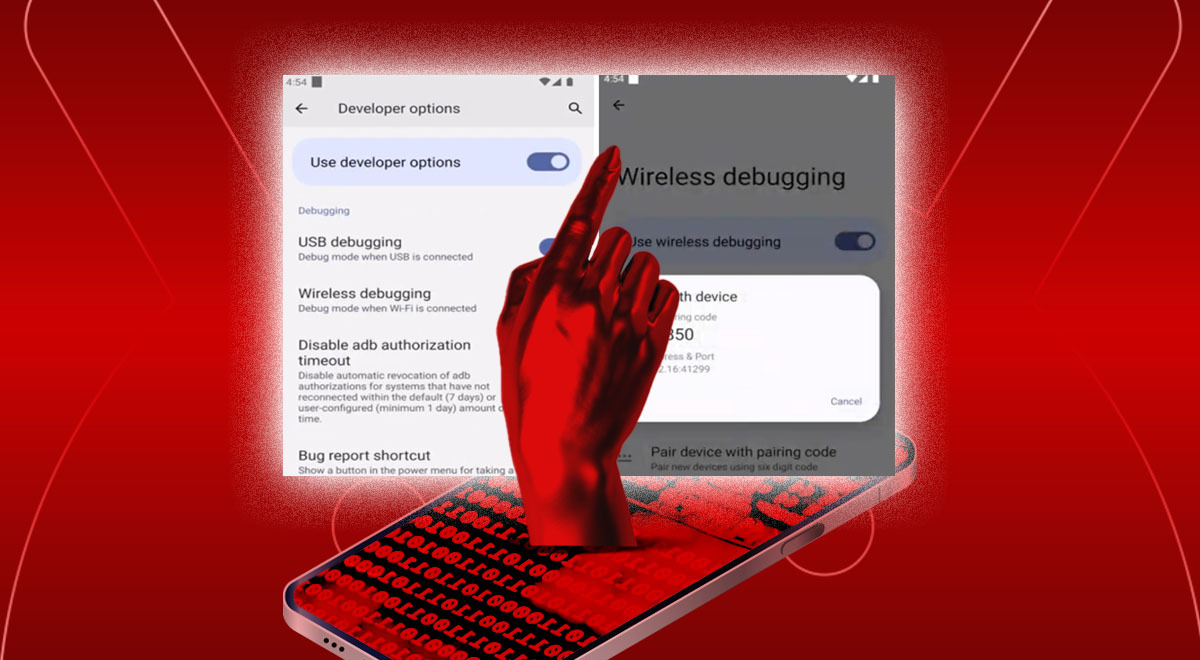
Android malware. Image by Cybernews, Unsplash/Pham Nhat, Shutterstock/Overearth

 Follow us
- Researchers found 162 malicious apps using RatHat to gain deep Android access.
- RatHat abuses Android Debug Bridge from inside the phone after users grant accessibility permission.
- Attackers use the malware to steal banking logins, intercept codes, control screens, and block removal.
- Experts advise Android users to avoid third-party app downloads, especially from unsolicited links.
Key Takeaways by nexos.ai, reviewed by Cybernews staff.
Developers can connect an Android phone to a computer via USB or WiFi to gain powerful debugging access. Now, one nasty piece of malware has figured out how to establish the same access from inside the smartphone itself. And it's steered by AI.
It will only ask for a single permission – accessibility. It will wear many faces, like “Chrome” or a popular streaming app, changing icons and labels on the fly. Even if the user taps uninstall, it will cancel the removal.
The malware sample from China, obtained by Zimperium researchers, has nearly no direct access to the data and device yet uses an unconventional technique to gain near-complete control over the phone. It steals banking credentials, PINs, passwords, intercepts data, controls the screen, logs keystrokes, and can do almost anything else.
How? It connects to the device from inside the device using Android Debug Bridge (ADB).




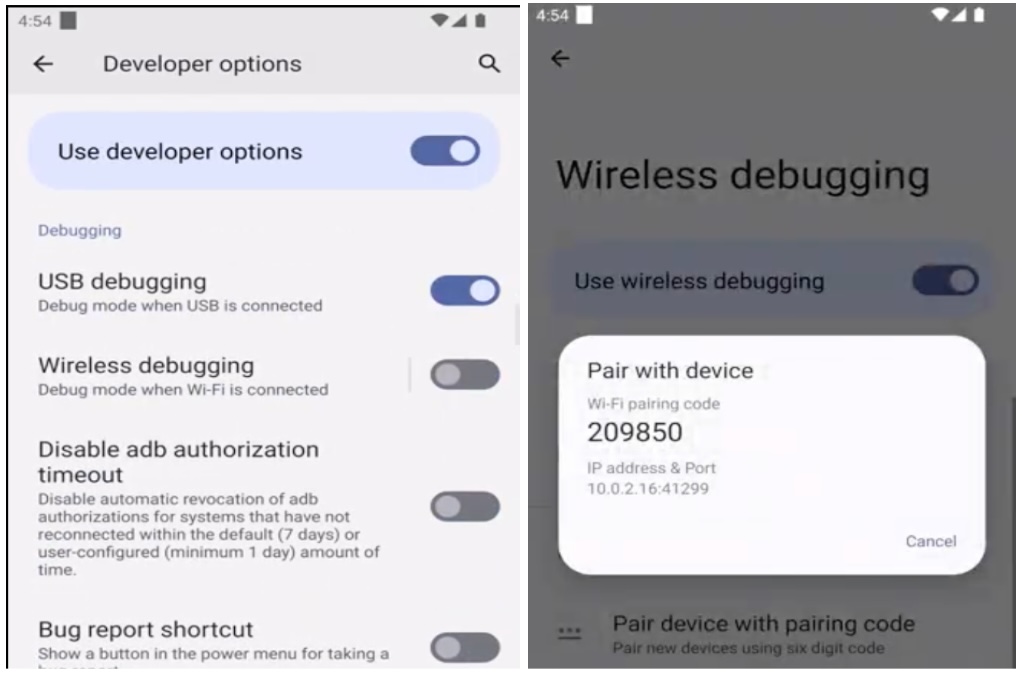
Developers use ADB when they want deeper administrative access – they connect to the phone via USB or WiFi, launch the command-line tool, and can run commands, install apps, transfer files, fix code, etc.
The malware, dubbed RatHat, establishes the same connection from inside the phone and connects to an external server, where an AI agent sits and issues new commands remotely.
At least 162 malicious apps have been found in the wild that use the novel payload. Attackers have established over a dozen command-and-control servers to supervise the infected devices.
“Threat actors are constantly refining their malware to gain undetected, unauthorized access to sensitive financial information,” Zimperium researchers said in their report.



Stay updated with our latest stories and follow us on social media
Be the first to discover new stories, ideas, and updates from our team.
How do you get infected?
The operators will buy ads and send targeted SMS messages, leading to deceptive third-party phishing sites that offer downloads mimicking legitimate apps. The sites lure victims into manually downloading and sideloading malicious APKs to bypass stringent Play Protect security controls.
Researchers say the deployment method has been refined to bypass Android's real-time detection by using sophisticated anti-analysis mechanisms.
Installation is not enough. The malicious app can dynamically change its appearance, pretending to be a browser, a streaming app, or something else. It uses sophisticated social engineering to obtain a single critical dependency – Accessibility Service.
In some countries, it claims permission is needed "due to network restrictions" and offers financial bait,the Zimperium researchers said.
Once a user grants this permission, there’s no turning back.
The accessibility service enables the malware to perform synthetic tap gestures – it clicks its way into Settings, enables Developer Options by tapping the “Build Number” 7 times, then initiates the Wireless Debugging pairing, captures the pairing PIN, authenticates, and gains shell access.
This ADB connection is then abused for spying, data extraction, and deployment of additional payloads.
How do attackers exploit this powerful access?
The malware gives attackers direct control over the network by establishing a persistent, real-time command-and-control channel.
In real-world attacks, the malware also pulled two additional payloads:
- The Go agent, which turns ADB access into persistent control. This package executes commands that bypass the user-facing application limitations, making the malware harder to stop, preventing it from sleeping, disabling other apps, or even uninstalling security-related apps.
- Reverse-proxy client, frpc. Its only function is to maintain a secure persistence tunnel to the command-and-control server.
The main app already contains plenty of spyware capabilities, enabling credential theft, screen and input capture, data interception (such as SMS or 2FA/OTP codes), and even wiping the entire device.
“The app can request Device Admin rights, which grants it the capability to wipe the device if an uninstall attempt is made,” the researchers said.
The conversation on this topic is live. Join in the discussion.
However, the malware intercepts any uninstall confirmation dialogs and renders a fake failure overlay, canceling the user’s action. Even if users manage to uninstall the app, the attacker still retains access to the shell, and the malicious service automatically reinstalls it.
A particularly unique feature is that malware constantly communicates with an AI agent. The report cites “one of the world’s most popular Generative AI assistants.”
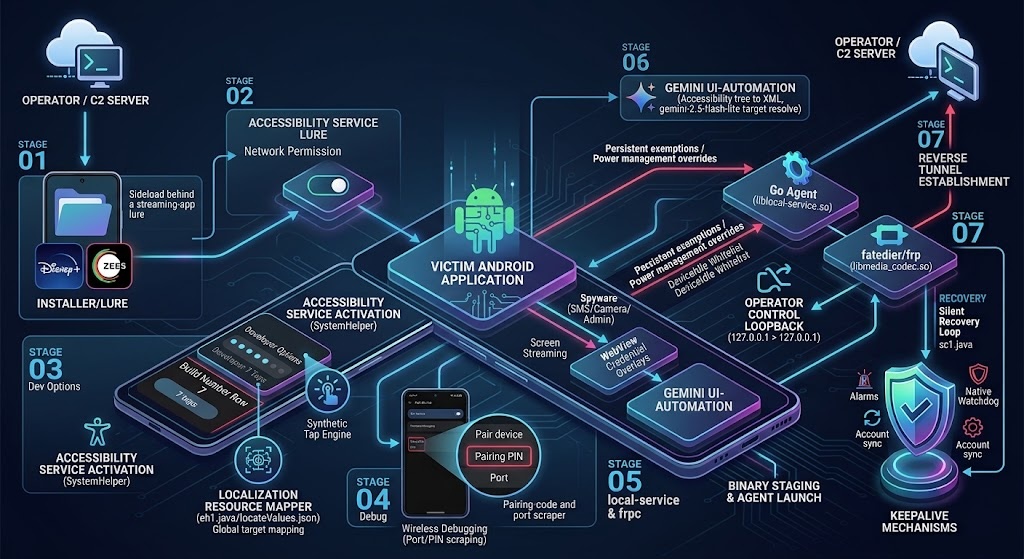
RatHat uses AI for non-malicious actions, such as understanding’ what’s going on on the screen, and deciding where to interact.
The operator focuses on banking and payment credentials.
“RatHat is able to steal the credentials of some banking/crypto applications: the malware monitors the foreground application and, upon detecting a targeted package, triggers the corresponding HTML injection mechanism,” the report explains.
Fake login screens designed to steal credentials can be displayed for other payment apps, such as WeChat and Alipay.

Check if your data was exposed
Find out if your email and related personal information have appeared in known data breaches.
Paradigm shift
Cybernews previously reported that attackers were leveraging ADB on weak devices with default credentials to hijack them through residential proxy networks. However, RatHat malware takes ADB abuse a step further, demonstrating a new escalation path.
Once attackers gain access to an ADB shell, they can do a lot more than steal credentials: they can manipulate app data, access system-level data unavailable to ordinary apps, change important system settings, interact with other running processes, read personal communications, etc.
“RatHat highlights a distinct paradigm shift in the mobile threat landscape: moving away from static, easily disrupted automation toward adaptive, AI-assisted execution chains that operate outside the constraints of traditional mobile app sandboxes,” the Zimperium researchers conclude.
For ordinary Android users, the big takeaway is to avoid installing third-party apps, especially from unsolicited links and unofficial websites.
Google is already closing the door on unrestricted sideloading on Android, which could significantly limit the blast radius of such exploits. Google Play security doesn’t make the risk disappear entirely, but it makes it harder for malicious apps to reach users.