Canary tokens: threat hunting with digital trip wires
Canary tokens are digital "tripwires" that function like honeypots, designed to send a notification when triggered by a threat actor.

Image by Cybernews.

 Follow us
Canary tokens are digital "tripwires" that function like honeypots, designed to send a notification when triggered by a threat actor. They can provide details such as the intruder’s IP address, browser fingerprint, timestamp, and geolocation. What’s particularly interesting is their versatile deployment – and better yet, there are free services available to implement them.
While commonly used by cybersecurity professionals and IT administrators as an early warning system for malicious activity, anyone can use canary tokens to enhance personal security.
I know individuals who have suffered advanced persistent attacks by sophisticated actors who are nearly untraceable. Given the complexity of these intrusions, canary tokens can provide critical leverage against a skilled attacker.
We live in a world where cyber threats surround us, and often, the ones we don’t see cause the most harm. In my line of work, most threat actors operating in the spaces I observe rely on conventional attack methods and information gathering.
Regardless of their skill level, I want to know who is doing what so I can anticipate the shadowy plans of others and remain vigilant. As Sun Tzu and Rage Against the Machine put it: “Know your enemy.”








The versatility of digital tripwires
In the same way that canaries are birds that can mimic the songs of other birds, canary tokens function similarly in cybersecurity.
For example, tokens can be deployed as fictitious AWS credentials, API keys, PDFs, Word documents, database records, or even DNS requests. They can also be used in legitimate files and this isn’t even the tip of the iceberg.
Embedding token URLs in email
You can upload an image attached to a canary token almost anywhere. This includes hosting images on a website, embedding an image in an email via a URL, and, of course, adding them to PDFs and other documents. For example, I emailed myself a white 1x1 pixel image, which appears invisible. However, as soon as I opened the email, the image loaded, triggering the token and sending a notification.
The following method can be implemented to fit whatever need arises. It’s also of equal importance to devise creative ways to secretly lure unsuspecting targets into triggering the token.
For example, let’s say hypothetically, you are hunting an elusive threat actor across the web and need to gather more information on your target without raising suspicions. You know the target is interested in information related to Cobalt Strike post-exploitation privilege escalation, so you create a PDF tutorial, embed a tracking link or URL token as an image, and share it where the target is likely to find and access it.
Important considerations before deployment
Before you get started, please note that some PDF readers may not automatically load external images or offer an option to do so due to security settings. PDF readers that do may simply cause the image to appear broken.
Also, in some web browsers, mixed-content restrictions (HTTP vs HTTPS) might prevent the image from loading. This is why it's important to run tests before deployment.
Here’s how to embed a tracking link:
- Visit https://canarytokens.org or a similar service to generate the canary token.
- Select ‘Web Image’’ as the token type.
- Enter your email address to receive the notifications and a custom alert message for yourself.
- Copy the generated tracking URL, which will appear like the following: http://canarytokens.com/tags/terms/et4txs649l0i1g0yg925lw19gP/submit.aspx
- To embed it, simply add an html image source tag: < img src="http://canarytokens.com/tags/terms/et4txs649l0i1g0yg925lw19gP/submit.aspx" >
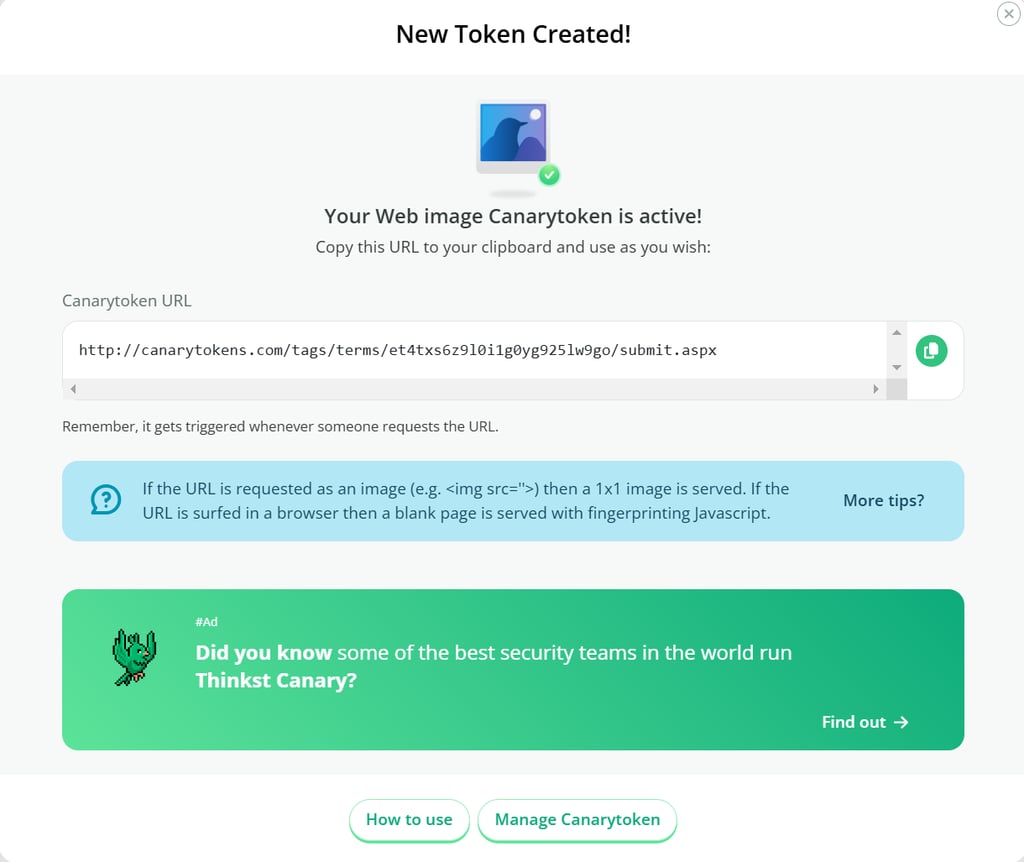
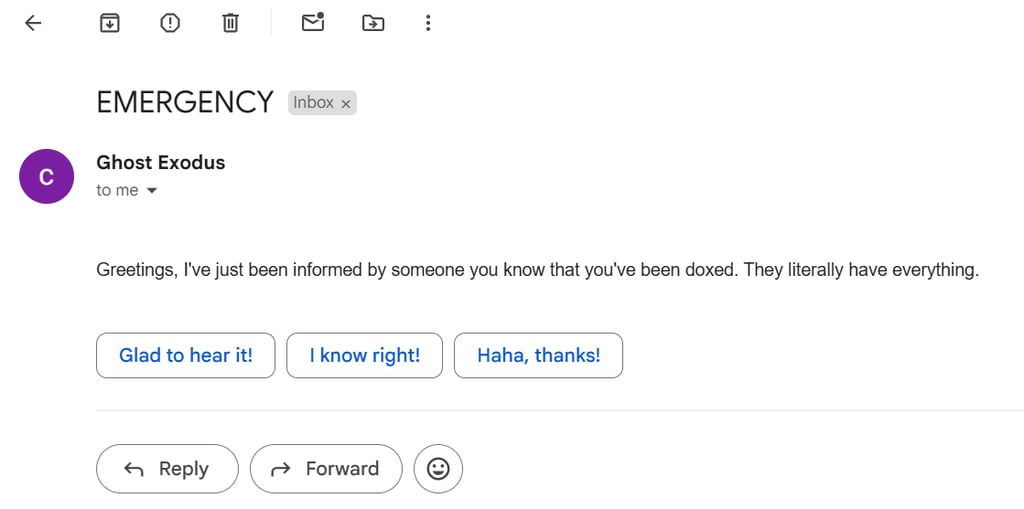
Let’s embed! The following method adds an invisible image hyperlink to Gmail. This does not work with Protonmail by default without user interaction because the platform has tracking protection, so the image will appear broken. However, if they click “Load,” the image will be retrieved, and the token will be triggered.
Once the email is opened, the document attempts to retrieve the embedded image in the URL, triggering a request that can be traced. With that aside, sending a 1x1 image pixel in Gmail is very easy, as the platform automatically loads embedded images by default.
Compose a new message and enter the recipient and message body. Select the Insert Photo icon, choose 'Web Address (URL),' and paste your token into the input box. A preview will load, inevitably triggering an alert. However, confirm it by clicking INSERT IMAGE and sending the email.
The only user interaction required to trigger it is for the individual to open the email, causing the invisible image to load from the web.
How to embed canary token in EXIF data
Let’s say your target is a proficient OSINTer and some basic digital forensic skills. Whatever the case is, you can manipulate EXIF data by embedding a canary token for them to extract and execute.
To accomplish this, let’s download ExifTool. It’s cross-platform compatible. For MacOS users, you can find it using homebrew by typing "brew install exiftool."
In this example, I’ll be using Windows.
- Select Web Bug from canarytoken.org and generate the token.
- Now let’s open exiftool by simply typing "exiftool" in the Windows command prompt or Linux terminal.
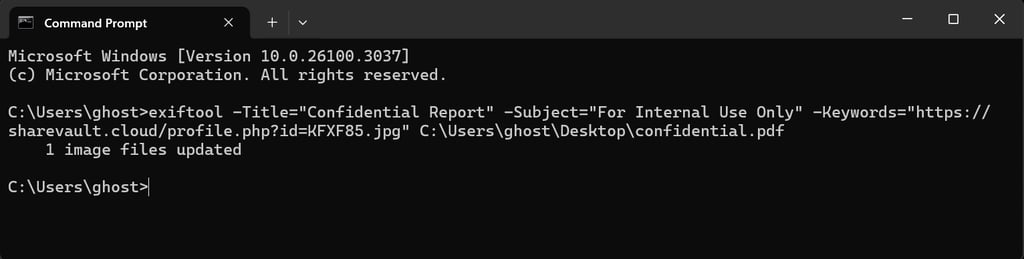
- Now type exiftool -Title="Confidential Report" -Subject="For Internal Use Only" -Keywords="EnteryourtokenURLhere". Next, drag and drop the image, document, or file you want to embed the exif data and hit enter.
Be sure to enter your generated canary token URL in the keywords section. If the threat actor you are hunting is sophisticated enough to extract EXIF metadata from files, you might want to use a URL shortener to mask the canary token address – just as I did in the example below. Furthermore, if the attacker is smart, they will likely use a virtual machine or sandbox to open the web address.
I wanted to test the modified metadata to ensure the command was carried out successfully without any issues. To do this, simply type exiftool, then drag and drop the modified file and hit enter.

As you can see, at the bottom to the right of “Keywords” is my URL shortener, which will redirect the attacker to execute the token.
When the token is triggered, you can view the results by clicking ‘Alerts History’ in the upper right-hand corner of the Canary Tokens website. This allows you to manage the results efficiently.
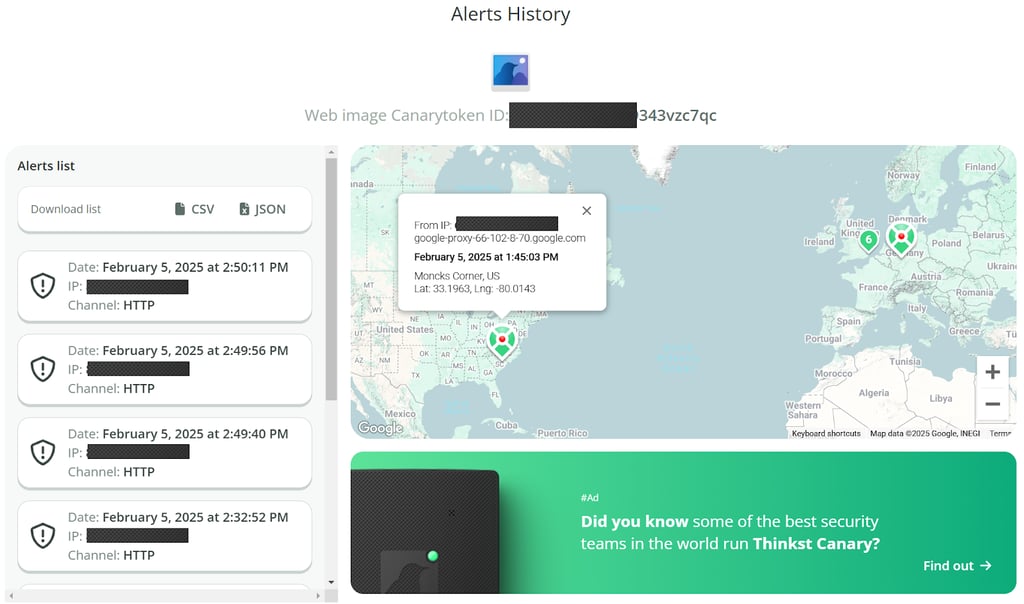
By clicking “Manage,” you can access your token URL, toggle email alerts, and activate the browser fingerprint scanner. This scanner provides details on the browser type, version, and operating system of the individual who triggered the token.
