Millions of smart homes at risk as Shelly flaw lets hackers open doors and garages
Ethical hackers have uncovered a flaw in a new generation of popular smart-home devices that could allow someone standing outside a property to open the owners’ doors, garages, or gates via WiFi.

Image by Cybernews

 Follow us
- The flaw Gen 4 Shelly devices leave WiFi setup access points open after installation, allowing nearby attackers to control doors, garages, and gates—or pivot into home networks.
- Scale 5.2 million homes use Shelly devices globally. Thousands of vulnerable networks have been mapped across Europe, some labeled "Garage."
- Shelly's position Shelly calls this an intentional feature, not a vulnerability. It claims users receive multiple warnings during setup and must actively ignore them for the AP to remain open.
- The fix A firmware update coming next week will auto-disable unsecured APs after 15 minutes. Until then, users should manually disable the AP in settings
Ethical hackers have uncovered a flaw in a new generation of popular smart-home devices that could allow someone standing outside a property to open the owners’ doors, garages, or gates via WiFi.
Researchers at Pen Test Partners found that fourth-generation devices from smart-home brand Shelly leave a wireless access point (AP) active by default, even after installation on a home network.
This contrasts with earlier Shelly models, which automatically disabled this setup network once the configuration was complete.












The flaw was discovered when Pen Test Partners researcher Alan Monie found that one of the many Shelly devices he uses around his home had stopped working after five years. He replaced it with one of the new fourth-generation Shelly 1 devices.
While connecting it to a home network and updating firmware, Monie noticed the device still broadcast its “Shelly” setup WiFi alongside its normal connection, effectively giving it two IP addresses and a persistent entry point.
“The only clue that the Shelly also has an access point available is in the top status bar. However, this could be easily missed,” he writes.

If the device's setup access point is left enabled and unsecured, someone within WiFi range could connect and send commands to the device.
In simple cases, that could mean switching lights on or off. But many users deploy Shelly units to control garage doors, gates, and other physical access points, meaning a single unauthenticated request could trigger a relay and open an entrance.
“A more malicious attacker could set the device to power off and on every second, possibly causing damage to the appliance,” says Monie.
Pivoting to other IoT devices
The researcher warned that the exposure goes further. Once connected to the Gen 4 device, an attacker could upload modified firmware, monitor activity, or pivot deeper into the home network.
“An often-overlooked issue of being able to compromise devices is that it’s likely also connected to another wireless network. This means that an attacker can pivot from one device to other devices on a different network.”Pen Test Partners researcher Alan Monie
Tests showed compromised units could send commands to older Shelly devices on the same network and potentially interact with non-Shelly systems due to a transport layer security (TLS) handling weakness in earlier controllers.
Additionally, because the APs remain publicly visible, they can also be discovered at scale.
To prove this, another researcher on the team used the WiFi mapping platform wigle.net to locate thousands of Shelly networks across Europe, some labelled with identifiers such as “Garage,” making their purpose obvious.
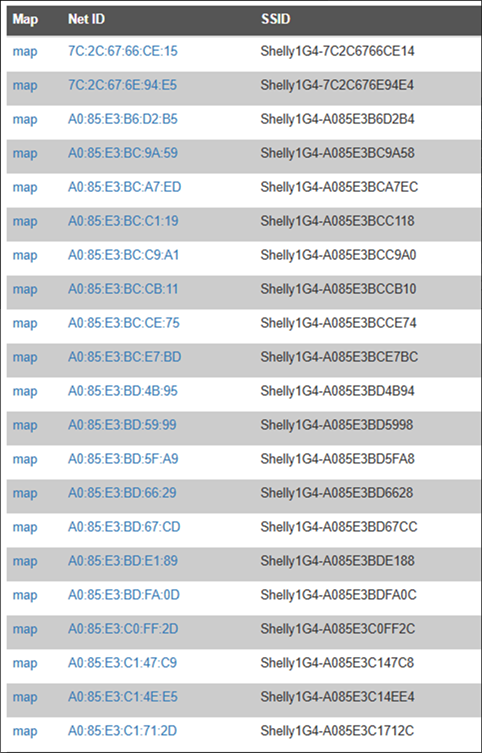
In terms of location tracking, the research team claimed they were able to drill “right down to the house number.”
Bulgarian-based Shelly operates globally with offices in Germany, Slovenia, China, and the US, and its products are used in more than 5.2 million homes.
While the firm’s products are not as mainstream as Amazon, Google, or Philips, they are pretty popular within the DIY smart-home and installer communities, raising concerns about the potential footprint of the vulnerability.
Pen Test Partners disclosed the issue to Shelly in October 2025 and were told that firmware version 1.8.0 would disable the access point outside the setup window.
The Cybernews community is talking about this. Be a part of the conversation.
However, the researchers say they received “no timeline for release and no customer warning advising users to turn the feature off manually.”
Security experts say the fix is straightforward: owners can disable the AP in device settings once installation is complete (the report demonstrates how).
But without clear communication, many users – especially those familiar with older Shelly models – may not realise the risk.
The researchers say they published details "after more than 90 days of limited response" from Shelly, citing the need to alert users.
In a statement issued to Cybernews following publication, Shelly said the access-point behavior is an intentional installation feature rather than a vulnerability and requires someone to be physically within WiFi range.
The company added users are warned during manual setup if the AP remains unsecured and that devices configured via its Smart Control app do not leave the access point active unintentionally.
"We would like to explicitly clarify that throughout the manual configuration process the user is repeatedly warned that the device AP is open and unsecured. Multiple warning messages are shown during setup and must be intentionally ignored for the AP to remain accessible."Shelly Support Team
Shelly added that a firmware update due to roll out next week will automatically disable unsecured access points after 15 minutes and prevent them restarting once the device is connected to a home network.
"Next week we will release a firmware update introducing an automatic protection mechanism.
- If no password is configured, the device AP will automatically disable after 15 minutes
- If the device has Wi-Fi credentials configured, the AP will not start again after restart unless the customer performs a factory or network reset
"This update strengthens security while preserving the practical installation workflow required by both professionals and advanced users," the support team added.
As adoption of Gen 4 IoT devices grows, Ken Munro, founder at Pen Test Partners, warns, a single misconfigured smart switch could become a gateway not only to a home network but also to its physical networks.
Munro adds that these issues tend to arise when smart-home vendors “ship fast and layer on features”, inadvertently creating insecure defaults and ‘convenience’ configuration paths that lead to a common class of problems.
"In the Shelly Gen4 case, the concern isn’t just the initial setup access issue but what it enables. If a device exposes an open setup access point, a nearby attacker can get a foothold. From there, the real risk is lateral movement."Ken Munro, founder at Pen Test Partners
“Secure-by-default has to mean closing setup interfaces automatically, enforcing authentication on local control paths, and not relying on homeowners to hunt through settings to make a product safe,” he added.
Unlock exclusive Cybernews content on YouTube.