How to watch Major League Cricket 2026 for free
Our in-house cybersecurity experts and journalists, renowned for major reports like The Mother of All Breaches, conduct transparent, unbiased VPN testing and in-depth analysis.
With 750+ articles crafted based on real-world research, we empower readers to make informed purchasing decisions through first-hand expertise.
Learn more
Major League Cricket 2026 continues with Washington Freedom vs Los Angeles Knight Riders on July 9th, 2026. The match starts at 7:30 PM CT / 8:30 PM ET / 5:30 PM PT at Grand Prairie Stadium in Dallas.
The game is part of the final league-stage run before the playoffs. Viewers in other regions can watch on July 10th, including 1:30 AM BST in the UK, 6:00 AM IST in India, and 10:30 AM AEST in Australia.
Every MLC 2026 match streams live and free on 7plus in Australia. The service is geo-restricted, so you need a VPN with Australian servers to watch the free stream while traveling outside Australia.
Every match streams live and free on 7plus in Australia. The stream is geo-restricted outside Australia, so you need a VPN to watch from abroad. We recommend NordVPN for reliable unblocking, fast HD streaming, and Australian server coverage.
Where to watch Major League Cricket 2026
| Country | Streaming service | Price | Notes |
| United States | Willow TV | Subscription required | Official US broadcaster; all matches |
| Canada | Willow TV | Subscription required | Official broadcaster for Canada |
| Australia | 7plus | Free | Free to air via Seven Network; all matches |
| United Kingdom | Sky Sports / NOW | Subscription required | NOW available without a full Sky subscription |
| Ireland | Sky Sports / NOW | Subscription required | Same Sky Sports deal as UK |
| India | JioHotstar | Subscription required | Star Sports carries the TV broadcast |
How to watch Major League Cricket 2026 for free with a VPN
7plus carries every MLC 2026 match live and on demand in Australia, completely free and ad-supported. Outside Australia, the stream is geo-restricted, but a VPN with an Australian server unlocks it from anywhere in the world.
- Choose a VPN. We recommend NordVPN for streaming MLC 2026. It retained 86% of base connection speed in Cybernews testing using the NordLynx protocol, covers Australian server locations, and includes Smart DNS for smart TVs that don't support native VPN apps.
- Download and install the app. NordVPN apps are available for Windows, macOS, iOS, Android, and several TV platforms.
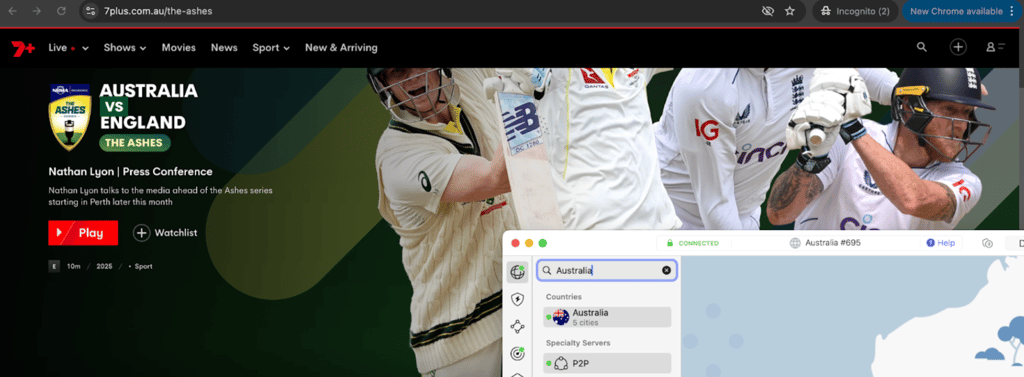
- Connect to an Australian server. Open the app and select a server in Australia. This gives you an Australian IP address that 7plus recognizes.
- Go to 7plus.com.au. Create a free account with a valid email address if you don't already have one.
- Find the MLC 2026 live stream. Browse the sport section or search for Major League Cricket to find the current or upcoming match.
Why you need a VPN to watch Major League Cricket 2026
The only confirmed free live streaming option for MLC 2026 is 7plus, Australia's Seven Network platform. The service requires no subscription and streams every match, but it is geo-restricted to Australian IP addresses. Attempting to access it from the United States, United Kingdom, or anywhere outside Australia will result in a blocked stream.
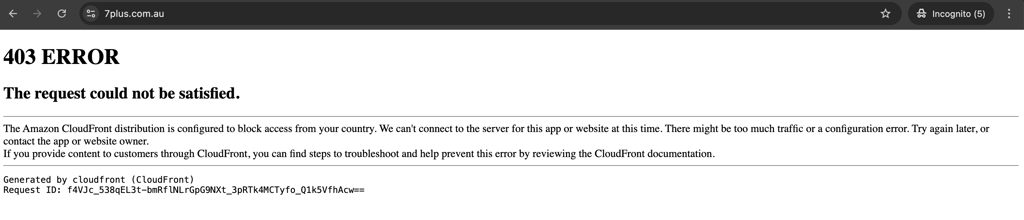
This restriction exists because broadcasters only hold rights to show content in specific territories. A VPN changes your apparent location by routing your connection through a server in Australia, giving you an Australian IP address that 7plus accepts. This is particularly useful for Australian fans traveling during the June 18 to July 18 tournament window who want to keep watching on their usual platform.
For a full breakdown of the best options, see our guide to the best VPNs for streaming.
Major League Cricket 2026 schedule
MLC 2026 runs from June 18th-July 18th. The tournament includes 30 league-stage matches, followed by the Qualifier, Eliminator, Challenger, and Final.
The remaining league-stage matches are split between Pomona and Grand Prairie. The playoffs take place in Oakland.
Match times vary by venue and date. Check the latest fixture before each game, especially on double-header days.
Phase 3: Pomona leg (July 1-5)
Pomona's Knight Riders Cricket Field at Fairplex makes its MLC debut this phase, hosting seven matches including two on July 4.
| Match | Date | Teams | Approx. ET |
| Match 16 | July 1 | LA Knight Riders vs Washington Freedom | 10:30 PM ET |
| Match 17 | July 2 | Seattle Orcas vs MI New York | 10:30 PM ET |
| Match 18 | July 3 | LA Knight Riders vs Texas Super Kings | 10:30 PM ET |
| Match 19 | July 4 | Washington Freedom vs San Francisco Unicorns | 10:30 PM ET |
| Match 20 | July 4 | LA Knight Riders vs MI New York | 10:30 PM ET |
| Match 21 | July 5 | Seattle Orcas vs Texas Super Kings | 10:30 PM ET |
| Match 22 | July 5 | San Francisco Unicorns vs MI New York | 10:30 PM ET |
Phase 4: Dallas return leg (July 8-12)
The final round of league matches determines playoff seeding. Every game carries direct qualification implications.
| Match | Date | Teams | Approx. ET |
| Match 23 | July 8 | MI New York vs San Francisco Unicorns | 8:30 PM ET |
| Match 24 | July 9 | Washington Freedom vs LA Knight Riders | 8:30 PM ET |
| Match 25 | July 10 | MI New York vs Seattle Orcas | 8:30 PM ET |
| Match 26 | July 10 | San Francisco Unicorns vs LA Knight Riders | 8:30 PM ET |
| Match 27 | July 11 | Texas Super Kings vs Washington Freedom | 8:30 PM ET |
| Match 28 | July 11 | Seattle Orcas vs San Francisco Unicorns | 8:30 PM ET |
| Match 29 | July 12 | MI New York vs Washington Freedom | 8:30 PM ET |
| Match 30 | July 12 | Texas Super Kings vs LA Knight Riders | 8:30 PM ET |
Playoffs (July 15-18, Oakland Coliseum)
The top four teams from the league stage advance. The playoff system gives the top two finishers two chances to reach the final.
| Match | Date | Approx. ET |
| Qualifier (1st vs 2nd) | July 15 | 10:30 PM ET |
| Eliminator 1 (3rd vs 4th) | July 15 | 10:30 PM ET |
| Eliminator 2 (Qualifier loser vs Eliminator 1 winner) | July 16 | 10:30 PM ET |
| Final | July 18 | 10:30 PM ET |
All times are approximate based on MLC's standard 7:30 PM local start time. Exact schedules will be confirmed by the league closer to each match day.
How to watch Major League Cricket 2026 on different devices
The simplest way to watch MLC 2026 with a VPN is in a web browser on a desktop or laptop, with no app store account or app installation needed beyond the VPN itself. Other devices, especially smart TVs and streaming sticks, often require an extra step such as changing the app store country or running the VPN at the router level. The sections below explain what each device needs to access 7plus.
Web browser (desktop and mobile)
Install a VPN, connect to an Australian server, and open 7plus.com.au in any modern browser. No app download is required. If 7plus detects your previous location, clear cookies or open a private window before loading the site.
iPhone and iPad (iOS / iPadOS)
NordVPN, Surfshark, and Proton VPN are all available on the App Store worldwide, so installing a VPN is straightforward. The 7plus app is primarily listed in the Australian App Store. If you prefer not to switch your Apple ID country, the easiest option is to watch in Safari with a VPN connection to Australia active. The 7plus mobile site streams live matches without requiring the app. If you do want the native app, our guide on how to change your Apple App Store country explains the steps. Apple requires a valid Australian payment method or gift card to switch your account region. For the top VPN picks for Apple devices, see our best VPN for iPhone guide.
Android phones and tablets
Install a VPN from Google Play, connect to Australia, and open 7plus.com.au in Chrome. The mobile site plays live streams without the app installed. If you want to install the 7plus Android app, note that changing your Google Play country can only be done once per year and requires a payment method registered in Australia. The mobile browser path avoids this entirely. Our best VPN for Android guide covers the top picks for Android streaming.
Smart TVs (Samsung, LG, Google TV, Android TV)
Samsung Tizen and LG webOS app stores are tightly region-locked and unlikely to carry 7plus outside Australia. Google TV and Android TV have a broader catalog and support native VPN apps. For Tizen and webOS TVs, Smart DNS from NordVPN or Surfshark changes your apparent location without requiring a native VPN app. Alternatively, a router-level VPN routes all home network traffic, including the TV, through an Australian server. Our best VPN router guide covers compatible hardware and setup options. See also our guide on how to set up a VPN on a router for step-by-step instructions.
Streaming sticks (Amazon Fire TV, Roku, Chromecast, Apple TV)
Amazon Fire TV and Fire Stick support native VPN apps from NordVPN, Surfshark, and Proton VPN. Install the VPN from the Amazon Appstore, connect to Australia, and open the 7plus app or website. If the 7plus app is not listed in your regional Amazon Appstore, it can be sideloaded through the Downloader app using the official 7plus APK from the Seven Network. Roku has no native VPN app support and relies on router-level VPN or Smart DNS. Chromecast with Google TV runs Android TV and supports native VPN apps. Older Chromecast models require screen mirroring from a phone or laptop already running the VPN. Apple TV (tvOS) supports native VPN apps, but the tvOS App Store shares the same regional restrictions as iOS. For Fire TV-specific recommendations, see our best VPN for Fire Stick guide.
Game consoles (PlayStation and Xbox)
Neither PlayStation nor Xbox supports a native VPN app. The only practical path is a router-level VPN, which routes all console traffic through an Australian server automatically. A laptop, phone, or Fire Stick connected to the same TV is a simpler alternative for most viewers.
Frequently asked questions
Is Major League Cricket 2026 free to watch?
Yes, in Australia. 7plus from the Seven Network streams every match live and on demand at no cost. Outside Australia, a paid subscription is required: Willow TV in the US and Canada, Sky Sports or NOW in the UK and Ireland, and JioHotstar in India.
When does Major League Cricket 2026 start?
The season runs from June 18 to July 18, 2026. The opening match is Texas Super Kings vs Seattle Orcas at Grand Prairie Cricket Stadium in Dallas.
When is the MLC 2026 final?
The final takes place on July 18, 2026, at Oakland Coliseum, California.
Can I watch Major League Cricket 2026 outside Australia for free?
Yes. Connect to an Australian VPN server, open 7plus.com.au, and the live stream is available at no cost. This is the only confirmed free option for international viewers.
Which VPN is best for watching MLC 2026 on 7plus?
NordVPN is our top pick. It retained 86% speed in Cybernews testing, covers Australian server locations, and includes Smart DNS for TVs without native VPN app support. Plans start from $3.49/month on the 2-year Basic plan.
Where can I watch MLC 2026 in the UK?
Sky Sports and NOW both carry MLC 2026 in the UK. NOW lets you access Sky Sports content through a sports pass without a full Sky subscription.
Who are the defending MLC champions?
MI New York are the defending champions, having won MLC 2025 by defeating Washington Freedom by five runs in the final.