Best VPNs for MLB.TV in 2026
Our in-house cybersecurity experts and journalists, renowned for major reports like The Mother of All Breaches, conduct transparent, unbiased VPN testing and in-depth analysis.
With 750+ articles crafted based on real-world research, we empower readers to make informed purchasing decisions through first-hand expertise.
Learn more

If you want to watch MLB.TV blackout games in 2026, you'll need a reliable VPN. A VPN changes your IP address so it appears you're streaming from another state, helping you bypass MLB.TV regional blackout restrictions and watch every game with your regular subscription.
While MLB has started offering in-market streaming options through ESPN, the feature costs an extra $19.99/month per team or $99.99 for 22 out of 30 teams for the full season. For most fans, a VPN remains the simplest and most affordable way to avoid blackout restrictions. And you don’t have to pay additional fees on top of an existing MLB.TV subscription.
I tested multiple VPNs to see which ones could reliably bypass MLB blackout games without lagging. My results showed that NordVPN is the best VPN for MLB.TV thanks to its fast speeds and reliable performance, while Surfshark is the best budget-friendly option. If you're looking for a free solution, Proton VPN stood out as the best free VPN for streaming blackout games.
Best VPNs for MLB.TV in 2026: shortlist
- NordVPN – fastest and most reliable MLB.TV VPN in 2026
- Surfshark – budget-friendly MLB.TV VPN supporting unlimited simultaneous connections
- Proton VPN – best free VPN to get around MLB blackouts


We spare no effort to test the products & their features. All information is gathered by our in-house research team & fact-checked by our team of experts. Discover the ins and outs of our testing procedures.
How to watch blackout MLB games with a VPN
MLB.TV blackouts happen when games are broadcast on local channels or restricted due to league contracts. A VPN helps bypass these restrictions by changing your virtual location, allowing you to access blackout games and stream them from anywhere, even while traveling. Follow my guide to change your location with a VPN and avoid MLB regional blackouts.

- Sign up for a VPN that works with MLB.TV – I recommend NordVPN, now 75% OFF
- Download and install the VPN app on your device
- Connect to a server in a location where your game isn't blacked out (check MLB.TV's website for blackout restrictions in your region by entering your ZIP code)
- Go to MLB.TV or open up the MLB.TV app and search for your game
Why do you need a VPN to watch MLB.TV in 2026?
With a VPN, you can watch blackout MLB games live on MLB.TV by changing your virtual location. This way, the platform will think you’re outside of the blackout area, and you’ll be able to stream the MLB game wherever you are.
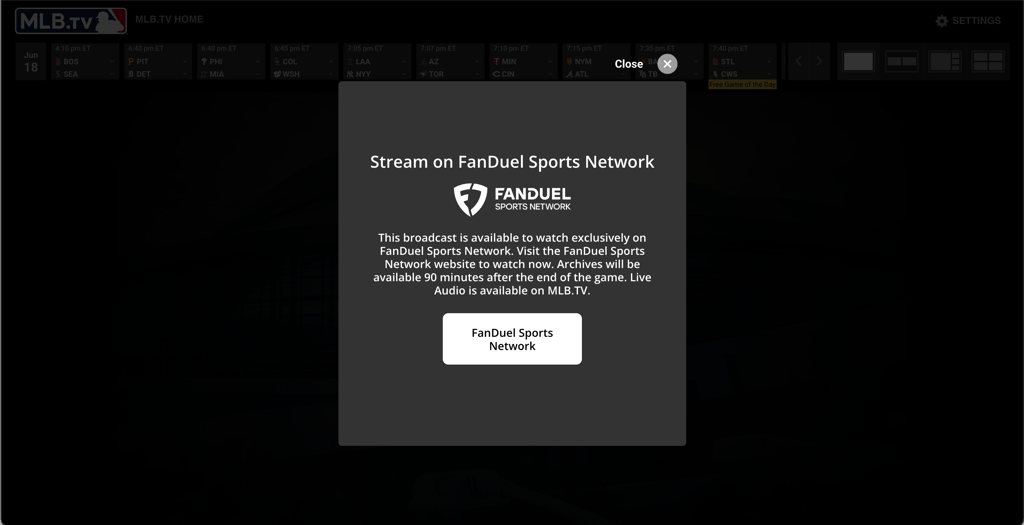
MLB.TV is a streaming service designed to broadcast out-of-market MLB games, both live and on demand. However, it does not have the rights to show local games, meaning if your hometown team is playing, the game will be blacked out in your area, as only local cable providers have exclusive broadcasting rights.
It's also worth noting that MLB has been cracking down on VPN usage on its standalone app and website. If you run into issues, try accessing your MLB.TV subscription through ESPN instead, as we've found it easier to bypass blackout restrictions through ESPN's platform.
Best VPNs for MLB.TV in 2026 – detailed reviews
Together with the Cybernews research team, I reviewed and tested several popular VPN providers to see if they can successfully bypass blackouts on MLB.TV. Of all the providers we tested, only three met our selection criteria for reliable blackout bypassing, fast US streaming speeds, and strong security.
1. NordVPN – best VPN for MLB.TV in 2026

| US server locations: | 3,300+ servers in 55 cities |
| Simultaneous connections: | 10 |
| Coupons: | NordVPN coupon code |
NordVPN is my top recommendation for an MLB.TV VPN in 2026 because of how fast and reliable it is when bypassing MLB blackouts. With its extensive network of over 3,300+ US servers, I was able to watch the blacked-out games of my favorite team, the Detroit Tigers, on MLB.TV.
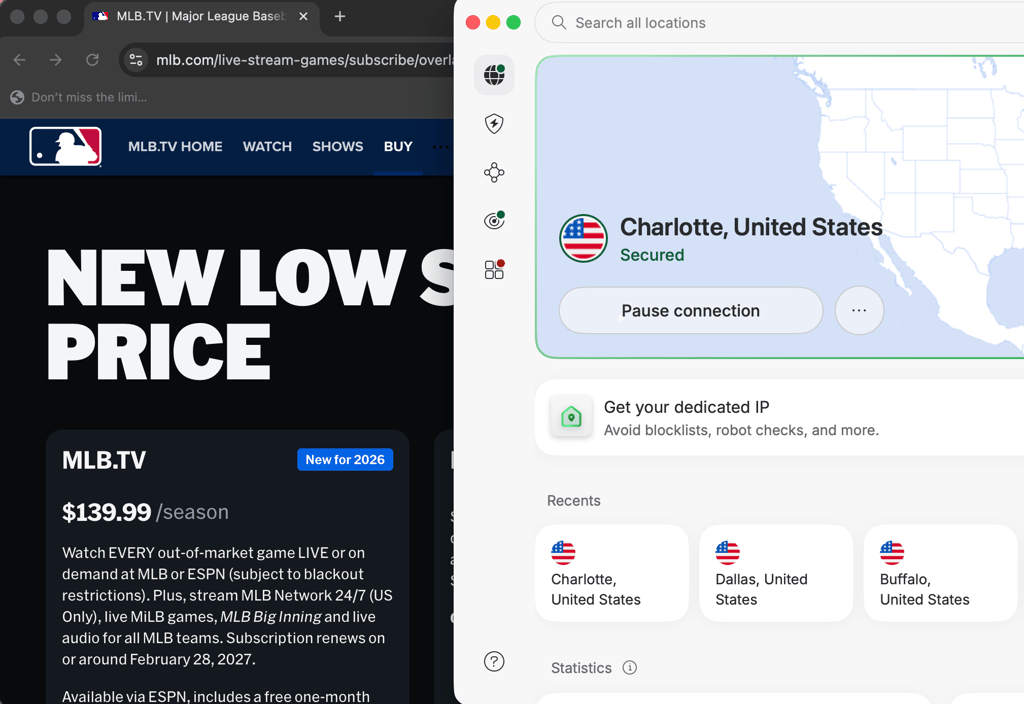
During our in-house tests of different VPNs for this guide, NordVPN was the fastest provider on US servers. When I streamed MLB.TV during our NordVPN speed test, I was impressed by how smooth the experience was – even while watching baseball games in 4K. Thanks to the NordLynx protocol – a faster and more secure version of WireGuard – I retained about 88–94% of my original internet speed when connected to different servers across the US. This meant I could enjoy high-definition, buffer-free baseball action without any interruptions.
I also enjoyed the SmartPlay feature that is integrated into all NordVPN apps. With it, streaming is not only fast but also completely private. SmartPlay changes the DNS server, hides your IP address, and encrypts the connection. For extra privacy, NordVPN also offers double VPN servers, which route your traffic through two separate servers instead of one.
With servers in 225 locations, NordVPN is a great VPN not only for streaming MLB.TV games, but also for unblocking the main streaming platforms, including Amazon Prime Video, YouTube TV, Sling TV, and BBC iPlayer.
NordVPN users get access to 24/7 live chat customer support, which is handy if you face any issues. To bypass MLB.TV blackouts, you can get the NordVPN Basic plan for as low as $3.49/month. Plus, there’s a 3-day free trial and a 30-day money-back guarantee.
2. Surfshark – affordable and fast VPN for MLB.TV

| US server locations: | 600+ servers in 24 cities |
| Simultaneous connections: | Unlimited |
| Coupons: | Surfshark coupon code |
Surfshark remains one of the best – and most affordable – VPNs for streaming MLB.TV in 2026. The best part – low pricing comes with great services. The VPN offers over 600 US servers across 24 US cities, including major hubs like Chicago and Denver. This makes it easy to bypass MLB blackouts wherever you are. Its global network includes 4,500+ high-speed servers in 100 countries, ensuring reliable access to content worldwide.
The provider leverages the advanced WireGuard protocol and, as shown during our Surfshark speed tests, consistently retains over 84% of original internet speeds on US servers, making it an excellent option for baseball fans expecting to watch live MLB games without buffering.
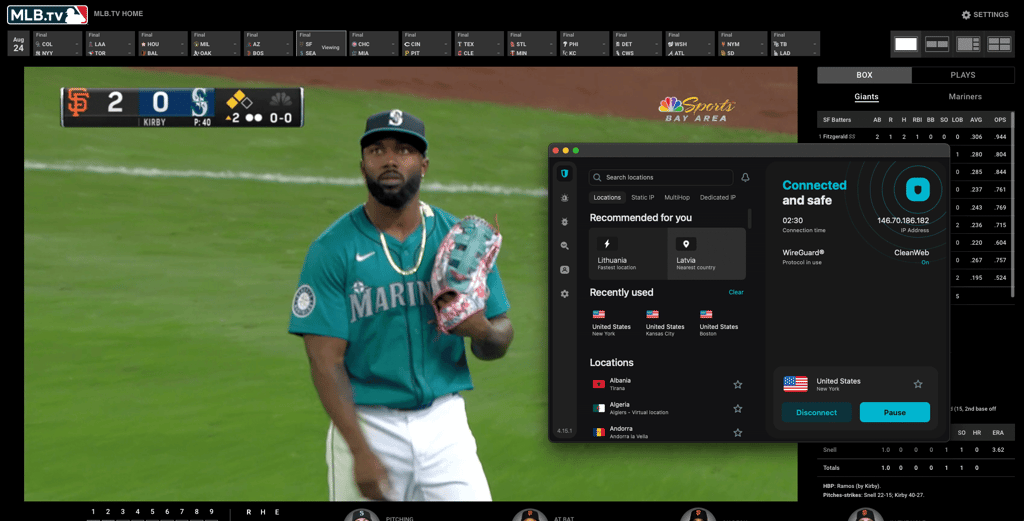
One of the main reasons I’ve placed Surfshark in second place is that it supports unlimited simultaneous connections. That means everyone in my household could enjoy unrestricted MLB.TV on different devices at the same time — something that gives Surfshark an advantage over NordVPN, which limits the number of connected devices.
Everyone under the same account could also unblock the most popular streaming services, including Netflix, Disney+, and Amazon Prime Video. I was also pleasantly surprised by its nifty CleanWeb feature, which helped me avoid all ads, even while streaming on a smart TV.
Surfshark is budget-friendly, but only if you opt for long-term plans – this can be a downside if you only need a VPN connection to watch MLB.TV. A monthly subscription costs $16.45/month, which is more expensive than NordVPN ($14.99/month) and Proton VPN ($9.99/month) monthly subscriptions. Fortunately, if you opt for the 2-year plan, you can enjoy Surfshark without a huge investment. Pricing starts at just $2.49/month. Plus, there’s a 30-day money-back guarantee and a 7-day free trial for first-time users on all 12-month and 24-month plans.
3. Proton VPN – best free VPN to bypass MLB.TV blackouts

| US server locations: | 5,250+ servers in 21 cities |
| Simultaneous connections: | 10 |
| Coupons: | Proton VPN coupon code |
Proton VPN is our top pick for a free VPN for MLB.TV because it offers free US servers without limiting bandwidth or speed usage. The only downside is that the free plan randomly assigns you a server, so you may need to reconnect a few times to land on a US server, let alone one in a specific state needed to bypass blackout restrictions. While the free version works well for occasional streaming, a paid plan offers a much smoother experience for watching MLB.TV.

Like Surfshark, Proton VPN uses WireGuard to provide blazing-fast speeds. However, the tunneling protocol is supplemented with the unique VPN Accelerator feature to further improve its performance. Therefore, the provider demonstrated an excellent 83% average speed retention rate during our Proton VPN speed tests on US servers.
Proton VPN includes a few specialty servers, such as the streaming category, for improved geo-unblocking. I could easily access different MLB.TV live streams and recordings using Proton VPN’s various US servers. Naturally, the VPN is compatible with other popular streaming platforms, such as Netflix, Hulu, HBO Max, and Disney+. Plus, Proton VPN’s network spans 20+ servers across 149 countries, making it larger than NordVPN’s as of writing.
Proton VPN’s NetShield ad blocker will remove most display advertisements online, although it doesn’t always work with video ads. Either way, the tool will improve your security while browsing and increase loading times since less content will be displayed on web pages. Another noteworthy similarity with NordVPN is that Proton VPN permits 10 simultaneous device connections, which should be enough for most users.
Proton VPN pricing starts at $2.99/month, which is slightly less than NordVPN and more than Surfshark. However, the provider offers a completely free tier, making it more appealing to budget-conscious users.
Top 3 VPNs for MLB.TV compared
If you're unsure which VPN works best with MLB.TV, I’ve put together a comparison table to help you evaluate and choose the right one for you.
| MLB.TV VPN | Starting price | Bypass MLB blackouts? | US servers | Total servers | Unblocks streaming services | Free trial or money-back guarantee | |
| 1. NordVPN | From $3.49/month | ✅ Yes | 3,300+ in 55 cities | 8,000+ servers in 149 countries | Netflix, Hulu, BBC iPlayer, Disney+, and more | 3-day trial on Android and a 30-day money-back guarantee | |
| 2. Surfshark | From $2.49/month | ✅ Yes | 600+ in 24 cities | 4,500+ servers in 100 countries | Netflix, Disney+, Amazon Prime Video, Hulu, and more | 7-day trial on Android, iOS, and macOS and a 30-day money-back guarantee | |
| 3. Proton VPN | From $2.99/month | ✅ Yes | 5,250+ servers in 21 cities | 20+ servers in 149 countries | Netflix, BBC iPlayer, YouTube, HBO Max, Disney+ | 7-day trial on Android and iOS and a 30-day money-back guarantee |
Still wondering what an MLB blackout is?
MLB blackouts are instances when certain games (including playoff games) aren't streamed on MLB.TV for users in the opposing or home team's region. For example, when the Atlanta Braves are playing, you won’t be able to see the game on MLB.TV, if you’re in Atlanta, regardless of whether local television is broadcasting it. Or, if the Houston Astros are playing at home and you’re also based in Houston, the match will be blacked out on MLB.TV, unless you use a VPN to change your virtual location or watch the game on the local channel that has the broadcasting rights.
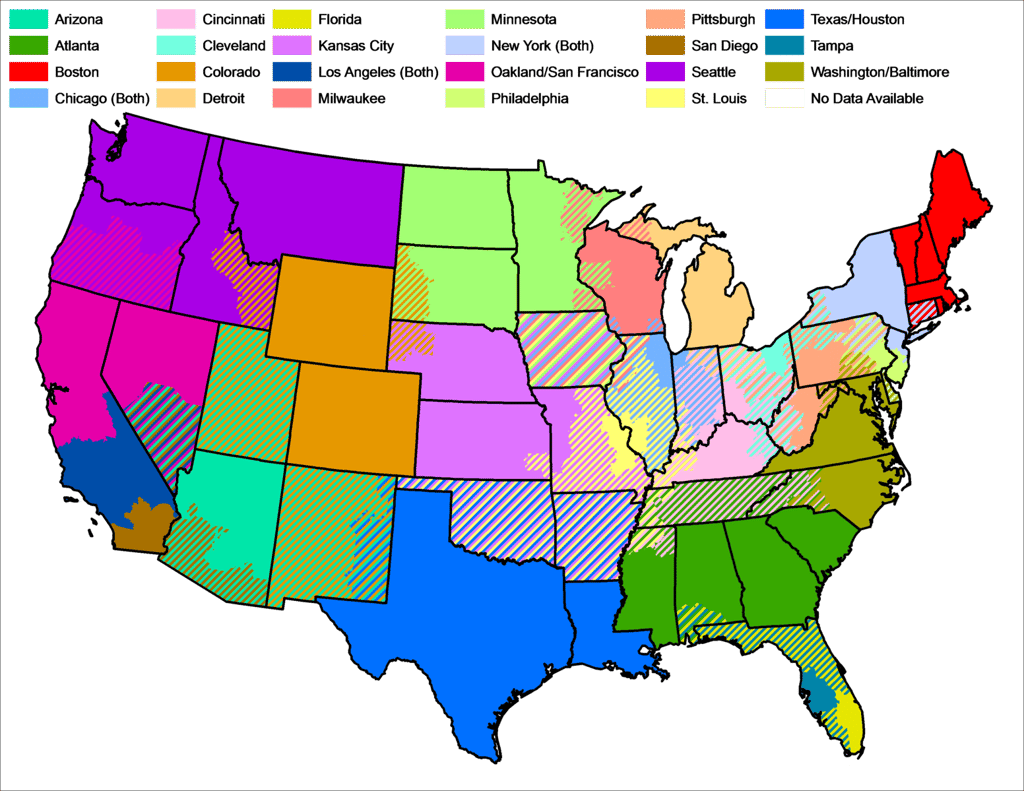
MLB blackout restrictions occur primarily for two reasons. Firstly, it’s because broadcasting companies in the US and Canada have exclusive streaming rights to certain games. Secondly, MLB wants to encourage fans to attend the stadiums and watch the matches live.
Please note that the MLB.TV rules indicate that your location may be determined using various methods, including checking your IP address and the addresses users provide when registering.
You can check which MLB blackout restrictions apply to your region on MLB.TV's website by entering your zip code.
MLB.TV 2026 key schedule dates
Here you can find the key MLB schedule dates:
| MLB opening day (start of regular season) | March 25th, 2026 |
| Rivalry Weekend | May 15-17th, 2026 |
| MLB All-Stars Game | July 14th, 2026 |
| Roberto Clemente Day | September 15th, 2026 |
| End of regular season | September 27th, 2026 |
Can you get around MLB TV blackouts with a free VPN?
Unfortunately, it’s very unlikely that a free VPN for MLB.TV will be of any use. Free VPNs almost always have a poor server infrastructure, meaning MLB.TV will probably detect them.
Besides, most free VPNs don’t provide adequate connection speeds for streaming, are often unsafe, and usually make money by selling your data to third parties. Consequently, I don’t recommend using a free VPN for MLB.TV.
For example, even with Proton VPN’s completely free plan, which offers decent performance across its US server locations, I wasn’t able to reliably bypass MLB.TV blackouts.
Windscribe is another notable free option that does work with MLB.TV on its free US servers, but its 10GB monthly data cap limits you to roughly four hours of HD streaming per month, which won't get you through a single series. As such, for a better and more consistent streaming experience, especially if you want access to more servers and faster speeds, a paid VPN is usually the smarter choice.
The best option is to take advantage of freemium VPNs, free trials, or money-back guarantees that premium providers often offer.
Troubleshooting: what to do if your VPN isn't working with MLB.TV
MLB has stepped up its efforts to detect and block VPN connections. If you're having trouble, try these fixes:
- Switch to ESPN: Rather than using the MLB.TV app or website directly, access your MLB.TV subscription through ESPN. MLB.TV is now distributed through ESPN, and we've found that bypassing blackouts is more consistent through ESPN's platform.
- Connect to a different server: If one server is detected, try another in a different city or state. VPNs like NordVPN and Surfshark rotate IP addresses regularly, so switching servers often resolves the issue.
- Clear cookies and cache: After switching servers, clear your browser's cookies and cache, then reload MLB.TV. On mobile, force close the app and reopen it.
- Check the GPS on mobile: MLB.TV checks the GPS location on mobile devices in addition to your IP address. On Android, Surfshark's GPS spoofing feature can override this. On iOS, there is no built-in GPS spoofer, so you may need to stream through a browser instead of the app.
FAQ
How to trick MLB.TV location?
To trick MLB.TV location restrictions, you’ll need a VPN because it changes your IP address and makes it look like you’re streaming from another state. This helps bypass blackout restrictions. NordVPN is the best option for MLB.TV thanks to its fast speeds, reliable connections, and wide selection of US servers.
Why does my MLB app show a blackout restriction?
If you’re blocked from watching a particular baseball match because of blackout restrictions, it means that the game isn’t available to watch in your region. Still, you can bypass these restrictions by using a VPN to connect to a server in a location that does have access to the match.
Does MLB.TV block VPNs?
Yes, MLB TV actively tries to block VPN servers. So, if your provider doesn’t rotate its IP addresses on its servers regularly or keeps connecting you to the same server by default, you might find your VPN not working with MLB.TV. Considering the massive fleet of 8,000+ reliable servers in 149 countries, NordVPN is your best bet for accessing MLB.TV.
Why does MLB.TV have blackout restrictions?
MLB blackouts occur because streaming providers seek to have exclusive broadcasting rights in their local networks and aim to attract MLB fans to live stadium games.
Is MLB.TV blackout based on billing address?
MLB blackout games are based on your location, which is determined by several methods, including checking your IP address. Your billing address may also be used to determine your location, but MLB.TV does not explicitly state this.