Xreal 1S AR glasses review – what do these glasses actually offer?

AR glasses increasingly blur the line between true augmented reality and portable display technology. Rather than aiming for full mixed reality, many models now focus on delivering a large virtual screen in a lightweight, glasses-style form factor. The Xreal 1S AR glasses follow this approach closely.
This review examines how the Xreal 1S performs in real-world use, how its AR implementation works in practice, and which types of users are most likely to benefit from it.
What are Xreal 1S AR glasses and how do they work?
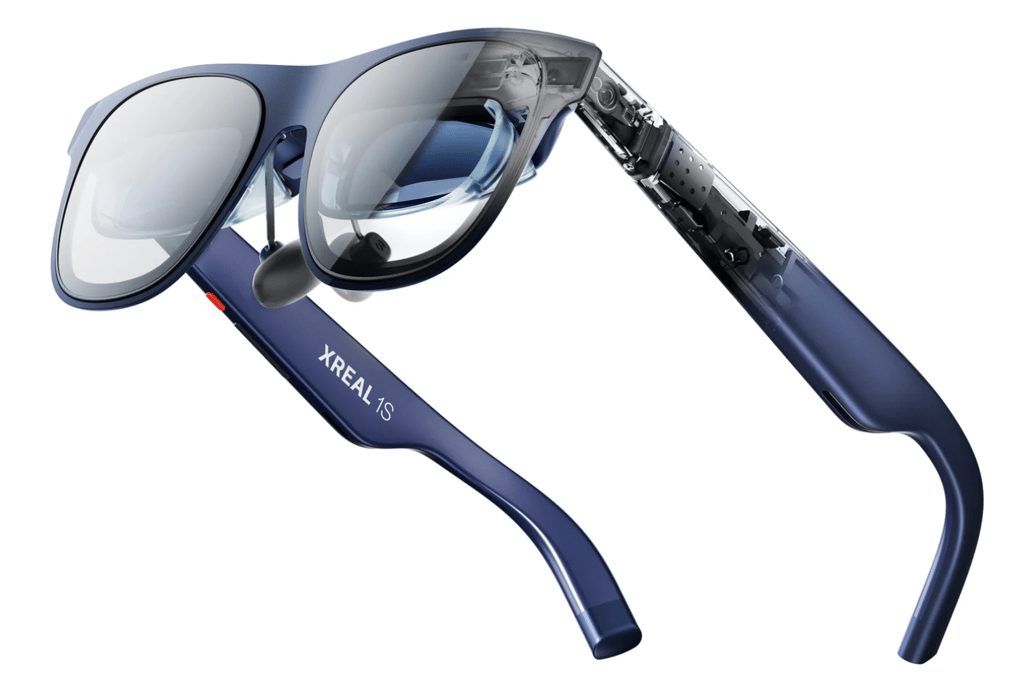
The Xreal 1S is designed as tethered AR glasses rather than a standalone spatial computing device. When connected to a compatible device, the glasses project a large virtual display that appears in front of the user while allowing the real world to remain visible through the lenses.
| Feature | XREAL 1S AR glasses |
| Category | Wearable display glasses |
| Primary use | Media consumption and gaming |
| Display | Virtual projected screen |
| Audio | Built-in open-ear speakers |
| Connectivity | USB-C (DisplayPort Alt Mode) |
| Standalone use | No |
Unlike full mixed reality headsets, the Xreal 1S does not scan or understand the surrounding environment. Its AR functionality is limited to overlaying digital visuals within the user’s field of view rather than anchoring virtual objects to real-world locations.
Xreal 1S AR glasses features
Display and AR experience
The display and AR presentation are the main reasons to consider the Xreal 1S AR glasses. The glasses create the impression of a large virtual screen positioned in front of the user, which feels significantly bigger than a phone or laptop display.
Text remains readable for menus and subtitles, while motion appears smooth during video playback and gaming. Brightness is sufficient for indoor use, though performance can vary depending on ambient lighting.
The Xreal 1S also includes a built-in 3D mode that can add depth to standard 2D content. While interesting, this feature feels more like an optional extra than a core selling point.
Audio
The glasses feature built-in open-ear speakers that allow audio playback without headphones. This is convenient for casual viewing and short sessions.
However, audio quality is limited, especially in noisy environments. As with most AR glasses, external headphones or earbuds provide a noticeably better experience.
Build quality and comfort
The Xreal 1S is sturdier than it looks, with a frame designed to support the internal display hardware. While heavier than regular eyewear, the weight is reasonably balanced.
Comfort largely depends on fit and session length. The glasses are suitable for short to medium viewing sessions, but extended use may cause fatigue for some users.
Connectivity and compatibility
The Xreal 1S relies entirely on a connected device for power and content. It connects via USB-C to devices that support DisplayPort Alt Mode, including many smartphones, laptops, and handheld gaming devices.
Because the glasses do not run apps on their own, the experience remains simple and reliable, but also limited compared to standalone AR devices.
Xreal 1S vs competitors: how does it compare?
The Xreal 1S competes in a growing category of AR and smart glasses, but its priorities differ noticeably from some of the better-known alternatives. Instead of focusing on smart features or adaptive lenses, Xreal positions the 1S as a display-first AR device designed primarily for media consumption and gaming.
The table below highlights how the Xreal 1S compares to other popular competitors with different use cases.
| Xreal 1S AR glasses | Viture Pro XR | Chamelo Music Shield | |
| Category | AR display glasses | XR / AR glasses | Smart sports glasses |
| Primary focus | Large virtual screen | AR productivity and media | Outdoor sports and lifestyle |
| Display type | Virtual projected screen | Micro-OLED AR display | Electrochromic lenses (no display) |
| AR capabilities | Screen overlay without spatial mapping | Screen overlay with software features | No AR display |
| Audio | Built-in open-ear speakers | Built-in spatial audio speakers | Integrated open-ear speakers |
| Standalone use | No | No | Yes (for audio and tint control) |
| Best suited for | Gaming, streaming, travel | Media, multitasking, productivity | Running, cycling, outdoor activities |
Xreal 1S use cases
The Xreal 1S fits best into a few clear usage scenarios:
- Watching movies and streaming content on a large virtual screen
- Gaming on handheld consoles, laptops, or smartphones
- Using a portable secondary display while traveling
It is less suitable for users who want advanced AR interaction, spatial computing, or long, productivity-heavy work sessions.
Xreal 1S AR: Pros and cons
Understanding where the Xreal 1S excels and where it falls short helps put its overall experience into perspective. As with most wearable AR glasses, the strengths are closely tied to portability and display quality, while the compromises come from limited AR depth and reliance on an external device.
Our methodology
At Cybernews, we aim to balance practical testing with broader market context. To review the Xreal 1S AR glasses, I followed a weighted evaluation framework similar to other Cybernews AR and smart glasses reviews, focusing on how these glasses perform as a wearable AR display in everyday use.
The assessment is based on four core areas:
- Feature and display testing (40%). I evaluated display clarity, perceived screen size, brightness, refresh behavior, and the AR overlay experience during video playback, gaming, and general navigation.
- User feedback and reported experience (30%). I analyzed verified user reviews and discussions on platforms such as Reddit and tech forums to identify recurring strengths and common complaints related to comfort, compatibility, and reliability.
- Industry comparison (20%). I compared the Xreal 1S with similar wearable AR glasses to assess how it stacks up in terms of display quality, usability, and AR capabilities.
- Value for money (10%). Finally, I considered how well the overall experience aligns with the expected price range of wearable AR displays and whether the feature set justifies the cost.
This methodology reflects how most users are likely to evaluate AR glasses today, prioritizing real-world usability over experimental features.
Bottom line
The Xreal 1S AR glasses are best described as practical, display-first AR glasses built around a large virtual screen rather than advanced mixed reality features. They do not aim to deliver full mixed reality or spatial computing, but instead focus on providing a large, portable virtual screen that works reliably across devices.
For users primarily interested in watching content, gaming, or extending a screen while traveling, the Xreal 1S offers a balanced mix of image quality, portability, and ease of use. Those expecting deeper AR interaction or standalone functionality may find the experience limited.
FAQ
Are the Xreal 1S AR glasses true AR?
The Xreal 1S qualifies as AR glasses in a technical sense because it overlays digital visuals onto the user’s field of view using optical waveguides. However, it does not offer full mixed reality features such as environment mapping or interactive object placement.
Do the Xreal 1S glasses work without a phone or computer?
No. The Xreal 1S does not have built-in computing or a battery. It must be connected to a compatible device that supports video output over USB-C to function.
What devices are compatible with Xreal 1S AR glasses?
The glasses work with many smartphones, laptops, and handheld gaming devices that support DisplayPort Alt Mode over USB-C. Some consoles and other devices may require additional adapters or accessories.
Can Xreal 1S AR glasses be used for work?
They can be used for light productivity tasks such as reading, browsing, or using a single application. However, they are not designed to replace a full monitor setup for long or multitasking-heavy workdays.