Your questions, answered by Cybernews: here’s how to keep your AI chats private
A Cybernews reader was worried that their private conversations with ChatGPT and Grok models could end up on Google search. Each week, our team selects a pressing and common reader issue and deconstructs it to help readers stay safe online.

Image by Cybernews

 Follow us
A Cybernews reader was worried that their private conversations with ChatGPT and Grok models could end up on Google search. Each week, our team selects a pressing and common reader issue and deconstructs it to help readers stay safe online.
Google has already indexed over 370,000 user conversations with xAI’s Grok chatbot. News about the leak came straight after another scandal involving OpenAI’s chatbot ChatGPT, which also leaked thousands of user chats to search engines.
While OpenAI rushed to remove the dangerous feature, our readers have raised the question: Is it possible to take proactive steps to protect your privacy while using AI chatbots?
In response to reader concerns, the Cybernews editorial team has checked what could be done to prevent Google from indexing your conversations with an AI model.






Key advice about sharing AI conversations
- The first and golden rule is to avoid using the “share” function unless you’re completely comfortable with the conversation going public. Better to be safe than sorry.
- If you’ve already shared a chat and want it removed, locate the link on Google and submit a request through Google’s Content Removal Tool. However, this process may take a long time, and there is no guarantee that Google will ever remove the indexed page.
- If you really need to share bits and pieces of your chat with AI, you should use screenshots rather than live links. A screenshot does not create crawlable pages and is easier to delete from your communication channels.
- Never share private data with an AI model. If it does not end up on Google search, the private data almost always ends up in the hands of a tech company, which it uses to train its AI models.
How to make your ChatGPT and Grok conversations private
When you generate a shared link in ChatGPT, the platform creates a static, read-only version of your conversation hosted on an OpenAI page.
OpenAI had a “Make conversation discoverable” box, which made these pages publicly accessible and indexable by search engines. While the company removed this feature, users should check what they’ve shared in the past to stay safe.
Deleting the chat in your ChatGPT account does not delete the shared URL page. The shared page remains live unless you explicitly delete the shared link. OpenAI explains in its help section that if you create a link you no longer want to be public, you can delete it or clear the conversation.
The conversation will no longer be accessible via the shared link. However, if another user imported the conversation into their chat, deleting your link will not remove the conversation from their chat history.
Even if you delete the shared link later via OpenAI, the Google search result may still show the page for a while. Clicking on the link would then result in a 404 error or “page not found” once the shared link is deleted.
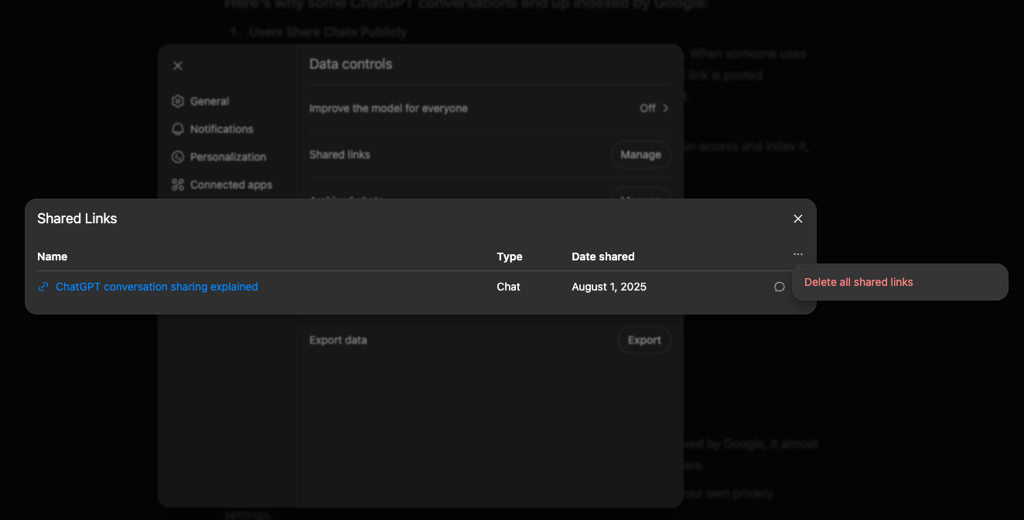
If you’re unsure whether you’ve shared conversations in the past, you can check under Settings → Data Controls → Shared Links. From there, you can delete individual shared conversations or remove them all at once.
"It’s usually possible to mitigate this problem by modifying web crawler rules for your site, typically the "robots.txt" file,” the Cybernews research team explained.
“However, it's been increasingly common to ignore these rules, especially by operators of LLMs. Maybe that's why they chose to fix the problem by removing the feature entirely."

xAI’s Grok went the extra mile in this privacy nightmare by making all shared conversations indexable by search engines by default.
If you've previously shared a Grok conversation, like with ChatGPT, attempt to delete the shared link. While this may not immediately remove it from Google's index, it can help prevent further exposure.
Grok users should also check their privacy settings and disable the use of their posts to train the model.