Best AI search engines: chat-first, smarter search
Being behind major reports like The Mother of All Breaches and RockYou2024, our in-house cybersecurity experts and journalists provide unbiased, real-world testing and in-depth analysis.
We maintain complete transparency by openly sharing our testing methodologies with our audience.
Learn more

AI search engines are a type of software that uses artificial intelligence to respond to user queries. Recent studies show that this way of finding information is gaining popularity, with the US leading the shift from googling information to chatting with AI.
This shouldn’t come as a surprise. I often refer to ChatGPT or Google AI Mode myself, knowing I will get a more complete answer. I also appreciate their citations, the ability to track AI’s multi-step reasoning, summaries, and easy follow-ups through chatting.
The team at Cybernews and I have tested multiple solutions to create the following list of the 8 best AI search engines. See the detailed analysis below.
9 best AI search engines – shortlist
- nexos.ai – best businesses AI search engine
- Perplexity AI – best AI search engine overall for most uses
- Microsoft Copilot (Bing) – AI search engine with additional features
- You.com – top AI search engine for research
- Google AI Mode – great addition to everyday browsing using Google Search
- Phind – best AI search engine for developers
- Kagi – privacy-first AI search engine for general browsing
- Brave Search – AI search engine that doesn’t collect your data
- DuckDuckGo AI Chat – AI search engine for anonymous use of AI models
What is an AI search engine?
An AI search engine is a tool that utilizes large language models (LLMs) to search the web and provide more complex answers along with sources.
Suppose a regular search engine is like a telephone book, where you look at lists of contacts from a given category to find the service you need. In that case, an AI-powered search engine is your personal research assistant who gathers relevant data and returns with a report. You can review the findings, ask questions for clarification, and follow the references.
With a regular search engine, you type in a few keywords or phrases in Google or Bing, and in response, you receive a list of links. With AI search engines, you typically input a question or a more detailed query, and the output usually includes a summary, accompanied by images, videos, and a selection of links for further reading.
Most AI search engines offer both paid and free versions, with the free versions typically imposing limitations on the number of uses or the effectiveness of the search. For example, the Perplexity Pro subscription unlocks access to advanced AI models, as well as image and video generation.
AI search engine types
There are different categories of AI search engines:
- Answer-first engines. These tools are built specifically to provide answers to user queries, and you can typically access them through a web browser. They use LLMs to analyze and interpret user queries, gather information from the internet, and provide comprehensive answers that often include tables, images, sources, and useful links. Examples include Perplexity AI and You.com chat.
- AI layers in traditional search engines. In this case, the AI component acts as an add-on to the classic search engine. It typically appears as a summary that occupies a portion of the screen. Some search engines, such as Google, have this feature activated automatically, while others need the user to enable it while browsing (e.g., DuckDuckGo).
- Niche/vertical AI search. While popular AI search engines cater to a wide variety of needs, vertical AIs provide more specialized, industry-specific knowledge. They are designed with a specific user in mind, such as lawyers, scientists, or programmers. A good example is Phind, which is used for coding and highly technical subjects. In the niche category, it’s also worth mentioning privacy-first AI search engines, like Brave Search or Kagi.
Real-time browsing vs index-only search
It’s worth highlighting the two ways in which AIs access data. With real-time browsing, the tool accesses the most up-to-date information straight from the live internet. Conversely, the tools that apply index-only search retrieve data from a periodically updated, pre-indexed database. I organized a more detailed comparison for you in the table below:
| Real-time browsing | Index-only search | |
| Data freshness | Recent, often not yet indexed. | How recent the data is depends on the time it was crawled or indexed. |
| Relevance/use | Better for recent contexts, when new data matters, e.g., current weather, prices, flights. | Consistent for static information that does not change often, e.g., historical data, glossaries. |
| Data accuracy | Recent data, but may be acquired from unverified or low-quality sources. | Higher chance of using verified information, but it may be outdated when compared to real-time browsing. |
None of the solutions I researched for this article uses purely real-time or index-only search. To provide the most comprehensive answers possible, the best AI search engines, including Perplexity AI and Microsoft Copilot, utilize a hybrid approach.
Why use an AI search engine instead of the classic search?
There are several advantages to using an AI search engine. First, you’ll no longer have chaos in your tabs with dozens of websites open and bits of information scattered throughout the browser. All of the data is synthesized in a single tab, and you open a new one only if you want to follow one of the links provided in the answer.
Often, you don’t even need to switch tabs. A brief follow-up chat with AI is enough to complete the answer. It’s also a more effective way to acquire information about complex issues, as you provide more input than just a few keywords and can always clarify if the search goes in the wrong direction.
AIs now provide references to the sources from which they get the information. This makes it a lot easier to verify the data. Much of my early criticism regarding AI answers focused on the lack of citations, which made it difficult and time-consuming to evaluate the accuracy of the results.
However, there are disadvantages to AI search engines that you should be aware of. Despite becoming increasingly advanced, they are still prone to hallucinations, which means the data retrieved can seem believable but in fact be misleading, incomplete, or inaccurate. You should verify the sources, especially when investigating medical, financial, or legal subjects.
Although AI models continue to learn from your input and data for free, more advanced versions often require a subscription fee. There are also other negative aspects, such as regional restrictions or ads.
Features of AI search engines
Below, you’ll find a breakdown of the main characteristics of these new tools when compared to regular search engines.
| Regular search engines | AI search engines | |
| Citation quality and source controls | Mostly links to indexed websites, easy to verify, high probability of accuracy | More encyclopedic or conversation-like answer; higher risk of incorrect answers (hallucinations) |
| Real-time web browsing vs static index | Web crawlers/spiders periodically scan the web and update indexes; how fresh the data is depends on the latest crawl | Most AI search engines now use a hybrid approach |
| Chat refinements and memory | There is no chat in a regular search engine; each new search is made without previous context, with no button to retrieve your previous search history | You can ask additional questions, expand your queries, and request clarification; your chat history is recorded and easily accessible |
| Multimodal inputs (image/voice) | Some support image and voice input for searching purposes (e.g., to find a matching or similar image) | Many support image and audio input, which can be used for more than just searching; e.g., AI can modify the image or provide a description |
| File/document Q&A | Search engines may have special commands for file or document search, e.g., Google’s filetype:pdf; custom, business-oriented search engines may have additional functionalities | Some can analyze uploaded documents in various ways, e.g., count the number of words, answer specific questions, and correct errors |
| Personalization and profiles | Different search options, e.g., the option to specify the time frame, location, or language; often, there are a lot of personalization options after creating an account, e.g., custom themes, search history, and language | Many customization options, sometimes even without account creation; e.g., every chat window can be profiled and set for different contexts; chat history is saved along with its context and any other conditions |
| Privacy controls (logging, opt-outs) | They collect user data to fuel ads; usually, multiple privacy options, e.g., Chrome features SafeSearch to control mature content, limiting possible search results | Companies typically utilize user data to train their AI model, but some tools highlight their increased privacy options |
| Speed and uptime | Generally, very high uptime with well-developed, stable infrastructure; low latency translates to overall good performance and quick answers to search queries | The search time varies between queries and can depend on the overall load at the time; uptime can be chaotic |
| Integrations (extensions, mobile apps, APIs) | Numerous integrations and extensions are available for the most popular search engines, expanding their functionalities; mobile apps are often built-in or available in app stores; documented search APIs | Integrations and extensions available, e.g., Perplexity Lens for new search functionalities; mobile apps and APIs for LLMs |
Best AI search engines in 2026: our top picks
With the help of our research team, I narrowed down the list of best AI search engines to the eight brands listed below. In the following sections, you will find descriptions, unique features, pros and cons of each, pricing plans, best use cases, and any personal impressions I had when using the tools.
1. nexos.ai – overall best AI search engine for businesses
| Notable features: | Comparing responses from different AI models on one screen |
| Best for: | Browsing and deep research protected by guardrails |
| Supported platforms: | Web browser, iOS, and Android |
nexos.ai is the best AI search engine for businesses. I tested it for a few weeks, and it solves a wide range of tasks, from online browsing to deep research – all while keeping the data secure.
What it offers
nexos.ai offers a familiar chat-based interface. This time, however, you can choose from 100+ LLMs, including all the leading models from OpenAI, Perplexity, Gemini, and Claude.
I like that it minimizes the chances of shadow AI usage, as employees no longer need to secretly sign up for unauthorized consumer tools just to find the answers they need – they already have access to the best search and reasoning models in one platform.
Moreover, every search request is secure because you can set your company's guardrails, defining exactly what can and can’t be processed through a specific AI model or across all of them. nexos.ai is SOC 2 Type 2 and ISO 27001 certified, and it explicitly states that it never trains on your business data.
In short, if your marketing manager asks nexos.ai to search the web for competitor pricing and compare it against your company's internal specs, the entire interaction will be strictly protected and won’t be used to train external AI models.
Unique features
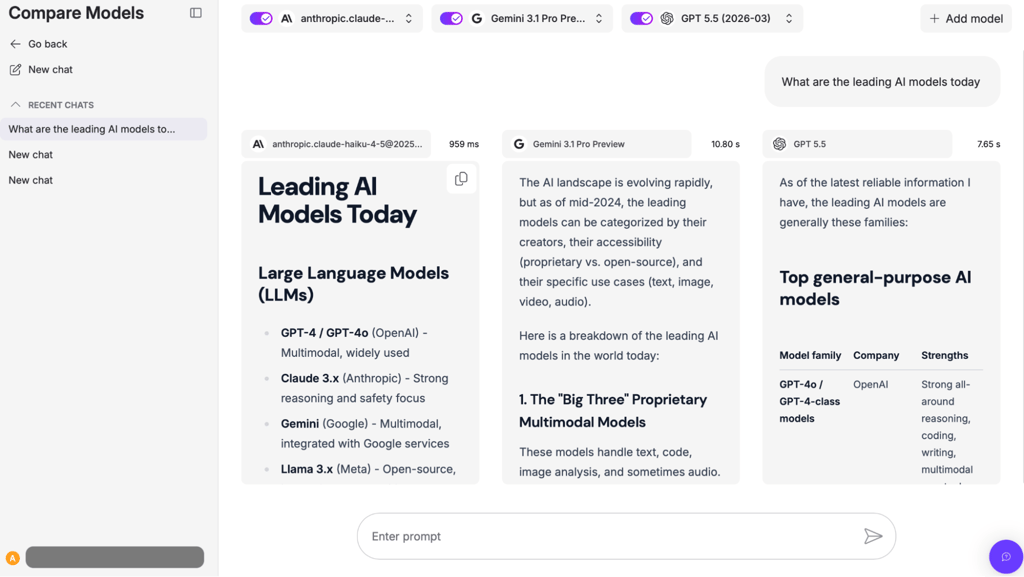
You can not only search for information in nexos.ai but also compare responses from different models side by side from a single promt. This way, you can select the most comprehensive response to your question or choose which model to choose for a specific task.
Pricing tiers
nexos.ai offers a 14-day money-back guarantee and two plans with the same features but different duration:
- 1-month plan: $19.50/month
- 12-months plan: $9.75/month
Best use cases
nexos.ai is best for small and medium-sized businesses that want a powerful AI search engine for marketing, HR, ops, and IT teams. It doesn’t just browse data; it can perform deep research and generate files and slides based on its findings. This makes it a perfect all-in-one business solution for routine tasks.
2. Perplexity AI – the best all-round AI search engine with a free option

| Notable features: | The Discover section |
| Best for: | General browsing, shoppers, specialized needs |
| Supported platforms: | Web browser, Windows, iOS, Android, Chrome, Firefox |
Perplexity AI is at the top of my list of the best AI search engines. It achieved the best results in testing and can be effectively used in both everyday tasks and more specialized cases.
What it offers
I can find everything I need from an AI search engine in Perplexity AI. It accepts different file types as input and provides various modes depending on the type of search I need. With this tool, you receive a thorough answer to your queries, with previews of some of the source links. The complete source list is easily accessible through a separate tab, and you can also follow the app’s reasoning step by step.
Not only can you ask follow-up questions on your own, but you also get the Related section with a few other prompt propositions created on the basis of your query to continue the topic. It’s enough to click either of these for the app to do a follow-up, and by doing so, you may receive more information you didn’t know you needed.

Unique features
What I found particularly interesting is the Discover section. It features recently published articles and allows you to ask follow-up questions within a similar window used for your search queries. This changes the way you consume information from news sources from a passive approach to an active one, where you can interact with the source.
Pricing tiers
Perplexity AI already offers a lot in its free form. Paid versions have separate plans for private, educational, and business use. They remove limitations regarding file uploads and add new functionalities, such as improved AI models, additional sources in answers, and priority support access, among others. The current prices for the paid version are as follows:
- Personal Pro: $20.00/month, or $16.67/month when billed annually
- Personal Max: $200.00/month
- Education Pro: free trial, followed by $4.99/month
- Enterprise Pro: $40.00/per seat each month, or $33.33/per seat each month when billed annually
- Enterprise Max: $325.00/per seat each month, or $270.83/per seat each month when billed annually
Best use cases
After experimenting for several months, I am confident that Perplexity AI can become the go-to AI search engine for both general browsing and more specialized needs. With its deep search capabilities supported by credible links, professionals, scientists, and shoppers alike will find it easy to verify the accuracy of the results.
3. Microsoft Copilot (Bing) – a standalone search engine that shines through integrations

| Notable features: | Great voice assistant |
| Best for: | General browsing and as an add-on to other Microsoft tools |
| Supported platforms: | Web browser, Windows, macOS, Android, iOS, various app integrations (e.g., Xbox, MS Word), Chrome, Firefox |
Microsoft Copilot is a good solution for general browsing and for those who use Microsoft products on a regular basis. Its voice assistant can become an excellent companion in everyday search tasks.
What if offers
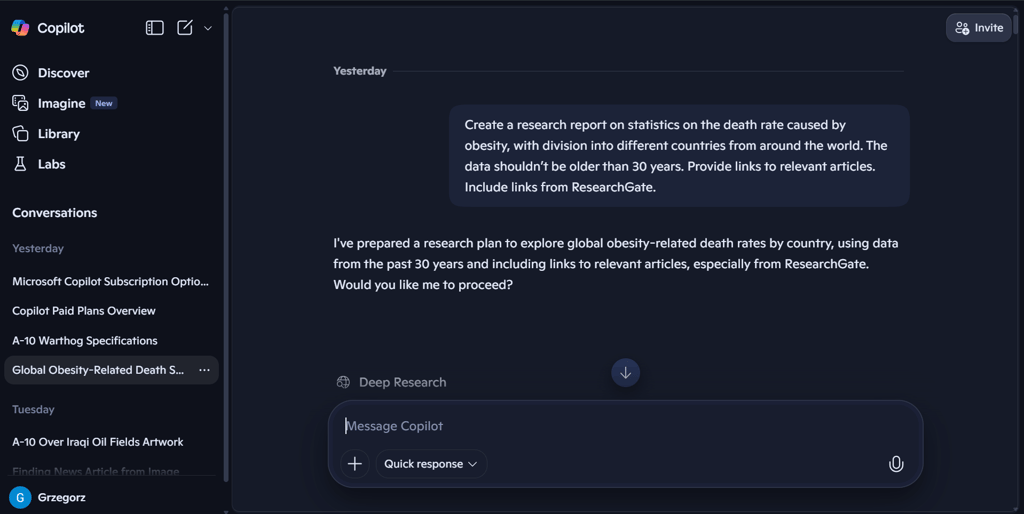
Aside from the chat window, you can use Copilot’s discovery feature to access recent news with source links. You can use its library to save the generated research reports, images, pages, and podcasts. As an official Microsoft solution, Copilot integrates well with other products of the company.
It accepts both image and voice input and can generate images quite well, as it uses DALL-E for this task. I have a Midjourney subscription, so I decided to organize a quick image generation test. The results for Microsoft Copilot were quite impressive. However, it is essential to note that the latter is a subscription-based tool designed explicitly for image creation. This fact puts the free version of Copilot in a positive light.
Unique features
I was particularly impressed by Copilot's voice assistant. My interaction with the tool was as close to a real-life conversation with a specialist as possible. I asked the AI about the specifications for a US warplane, the A-10 Warthog, and followed up with questions about its air-to-air capabilities and the expected time of its removal from service.
Copilot responded nearly without pause, using a natural voice with lively intonation. Honestly, if this had been a phone conversation, I wouldn’t have been able to tell the difference between Copilot and a real person. The information was accurate, and I found myself thanking the AI for its help. The feature works really well.
Pricing tiers
Copilot is available in both free and paid versions. The paid versions are a part of the Microsoft 365 package, and some have a free trial. When you invest in Copilot, you receive the Microsoft 365 environment, including its Office suite and other apps, as well as enhanced Copilot features. The paid versions start at:
- $9.99/month for the Individual plans
- $30.00/user/month, paid yearly, for the Business plans
- $30.00/user/month, paid yearly, for the Enterprise plans
- Pay-as-you-go for the Copilot Studio plans
Best use cases
Copilot is good as a day-to-day assistant and an excellent addition if you use Microsoft products in your work. The integration with other apps and DALL-E makes it a very versatile tool, even if it can sometimes struggle with the most recent data.
4. You.com – a great tool supporting in-depth research

| Notable features: | 30 agents that help with context-specific searches and tasks |
| Best for: | Academic professionals, business specialists, and developers |
| Supported platforms: | Web browser, Windows, iOS, Android, Chrome |
You.com surprised me with its agents who help users in context-specific searches. This feature makes it an excellent choice for those who need assistance with gathering information for professional, specialized purposes.
What if offers
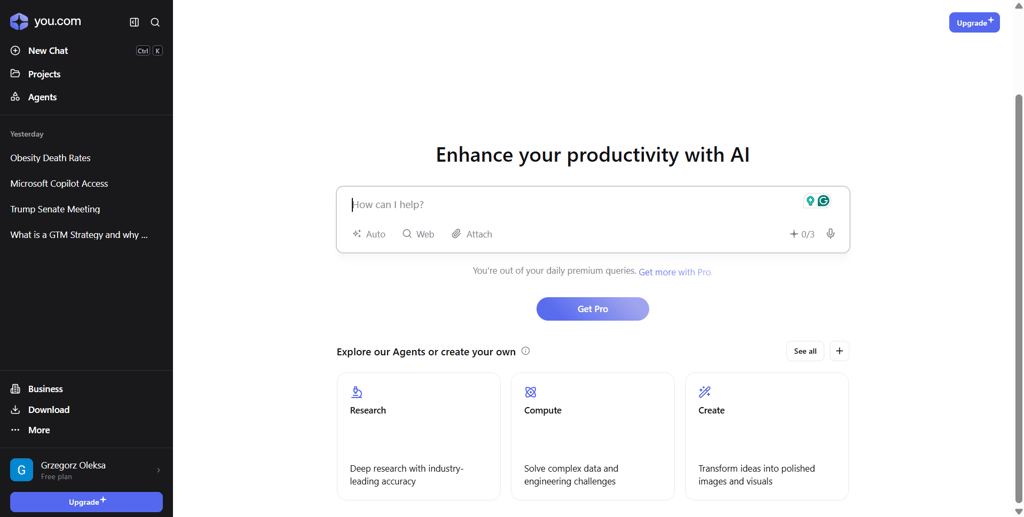
My first impression of You.com was similar to that of Perplexity, except that the latter uses dark mode by default. Every search query returns a summary of the AI’s workflow, followed by the answer, which is enriched by sources, images, videos, and news. These are all easily accessible through individual tabs on the right side of the screen. You can ask follow-up questions, and the tool gives you hints on what to ask.
Unique features
At the time of writing, the tool features 30 agents designed to assist with specific tasks and contexts. For example, for the test that involved the question on an academic topic mentioned earlier in this article, I chose the research agent to assist me in getting a more accurate answer.
The results were impressive. I received a detailed report with precise data supported by citations with links to sources. The agent informed me that it had read a total of 60 sources to provide the report, and I was able to review every single one. The sources also included ResearchGate, which I specified in the input.
There are agents for other, non-academic tasks that make You.com a very versatile tool. Some examples include Strategic Report Generator, Company Profiler, and SEO Content Crafter.
Pricing tiers
You.com is available for free, but it also offers monthly and yearly plans for its AI chat. The fees for yearly plans are as follows:
- Pro: $15.00/month, billed annually
- Max: $175.00/month, billed annually
- Enterprise: custom pricing
Best use cases
You.com is an excellent choice for academic professionals and business specialists, thanks to its AI agents who can perform a variety of tasks. It can also be of help to developers who use SQL and Python, as there are currently three agents available to assist in these areas.
5. Google AI Mode – a valuable addition to Google Search

| Notable features: | Clear and intuitive, with good accuracy |
| Best for: | General browsing |
| Supported platforms: | Web browser, Windows, iOS, Android, and other platforms that support Google Search |
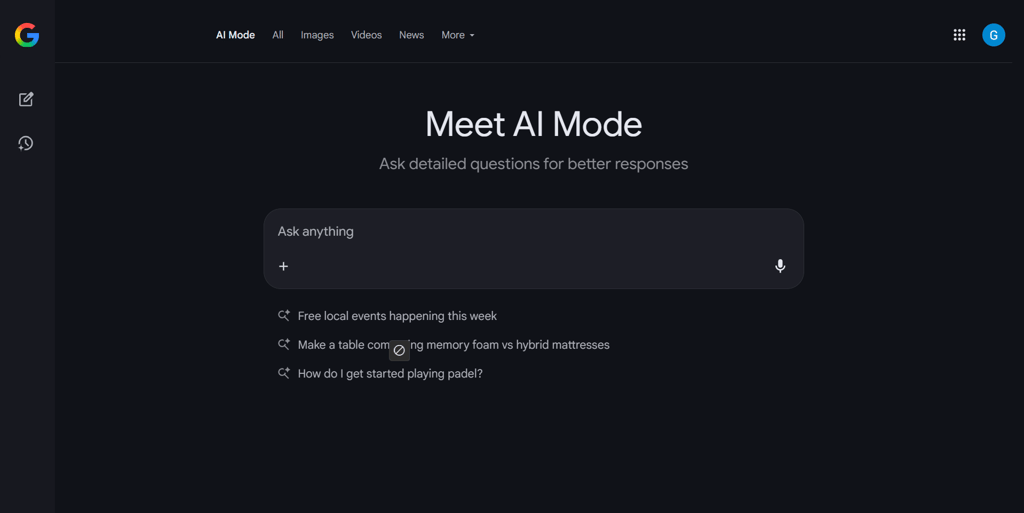
Google AI Mode expands on basic Google Search capabilities by enabling users to ask detailed questions, rather than using keywords. The dashboard focuses on simplicity. The solution is a good choice for daily browsing.
What it offers
Google AI Mode aims to provide a simplified AI chat experience. The dashboard is free of noise, with the main focus on the chat window, inviting you to ask any question. You can easily check your previous queries using the panel on the left side. The app accepts image, file, and voice input.
The output consists of text with links to sources. You receive suggestions for follow-up queries at the bottom of the page. Google AI Mode can also generate images.
Unique features
The strength of Google AI Mode is in its simplicity. The dashboard is clear, allowing you to focus on asking questions without thinking about different options or customizations.
Pricing tiers
Google AI Mode features a free plan and two subscription plans. The paid options give you access to improved AI models, deep research, and video generation. You also receive cloud storage and access to several other Google products. The pricing is as follows:
- Google AI Pro: free for the first month, $19.99/month after the first month
- Google AI Ultra: $124.99 for the first 3 months, $249.99 after the first 3 months
Best use cases
Google AI Mode is an excellent tool for your everyday browsing. However, the lack of search profiling will make it less capable of meeting academic or specialized needs compared to some of the other solutions on this list.
6. Phind - a great solution that supports developers

| Notable features: | Strong support for coding and resolving technical issues |
| Best for: | Developers and those who need help with technical subjects |
| Supported platforms: | Web browser, Windows, macOS, iOS, Android, Chrome, VS Code |
With its focus on coding and technical data research, Phind is one of the best tools to support developers with their daily work. It’s also a good choice for anyone who is looking for help regarding technical matters.
What it offers
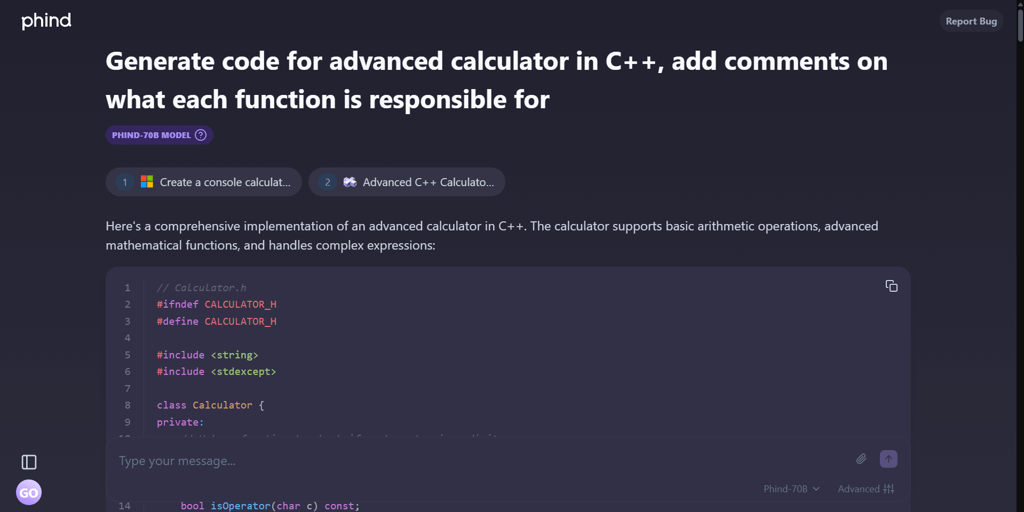
Phind is a specialized tool designed to support developers and answer technical questions. It is capable of returning entire pages of code, making it much faster to design and create applications or websites. It provides explanations for its reasoning, suggestions for further development of the coded part, and additional questions for a deeper dive.
As with all major AI search engines, you can continue the conversation by adding further queries in the same chat window. Although its strength lies in providing technical answers, the tool also works very well for everyday browsing needs, offering links to its sources.
Unique features
The most significant advantage of Phind is its strong support for coding and resolving technical issues. I’ve done a bit of programming in my life, and I appreciate the clear formatting, with a division into lines, indentations, and colors. The comments provided both inside and outside the code perform well as explanations and suggestions for further work. I wouldn’t be surprised if Phind became a coder’s favorite assistant.
Pricing tiers
Phind offers both a free plan and paid options. It’s worth noting that the paid models have the option of not using the data you input to train their AI algorithms, which is a privacy feature some may appreciate. Here are the three available plans:
- Free Plan
- Phind Pro: $20.00/month, or $17.00/month if billed yearly
- Phind Business Plan: $40.00/month per user, monthly billing only
Best use cases
Phind can be a good go-to AI search engine for developers and those seeking answers on technical issues.
7. Kagi – an AI search engine that protects user privacy

| Notable features: | Individual website summaries, source ranking |
| Best for: | Those who value privacy and personalization |
| Supported platforms: | Web browser, Windows, Android, iOS |
Kagi’s focus on privacy and personalization features, combined with an interesting ranking system for sources, makes it a good choice for users who want to browse the internet their own way.
What it offers
While other solutions may aim to incorporate additional functionalities to complement web search, the primary focus of Kagi is on the privacy of its users and strong personalization. Browsing is enhanced by the optional addition of an AI-generated summary, similar to the one provided by Google Overviews. The search returns not only a list of websites, but also separate tabs with images, videos, news, podcasts, and maps.

Unique features
One of the most exciting options is the ability to summarize individual websites from the results page. You can pick an entry in the results and ask the app to summarize the information on the website for you. The text is generated just below the link, and you can investigate further by asking questions in a separate chat box.
You can rank the results you receive. For example, if you consider a source as credible, you can rate it and obtain more results from the website in future searches. Kagi also provides information on the number of ads included in every link that appears in your search results. It also lists basic statistics for each source, including website speed and popularity.
Overall, the number of personalization features is Kagi’s strong suit. The customization options allow you to exclude specific websites from future search results, toggle Safe Search, or switch between light and dark modes. Kagi also boasts no tracking and no ads, being fully supported by its users.
Pricing tiers
With Kagi’s free trial, you receive a limited number of searches. Different plans provide higher thresholds and advanced functionalities:
- Individual Starter: $5.00/month, or $4.50/month if billed yearly
- Individual Professional: $10.00/month, or $9.00/month if billed yearly
- Individual Ultimate: $25.00/month, or $22.50/month if billed yearly
- Duo: $14.00/month, or $12.60/month if billed yearly
- Family: $20.00/month, or $18.00/month if billed yearly
- Team Professional: $10.00/user/month
- Team Ultimate: $25.00/user/month
Best use cases
Kagi is a good solution for all those who highly value privacy and personalization features. It offers a more comfortable user experience for everyday browsing, without a particular focus on any specific area. Its enhanced privacy and collaborative features are a convincing proposition for business organizations.
8. Brave Search – a solution that doesn’t collect your search data
| Notable features: | Independent index, privacy-oriented |
| Best for: | Privacy, general browsing |
| Supported platforms: | Web browser, Windows, Android, iOS, Linux, macOS, extensions, Firefox |
Brave Search is known for its focus on privacy. It’s a good choice for everyday browsing if you value software that doesn’t collect your data.
What it offers
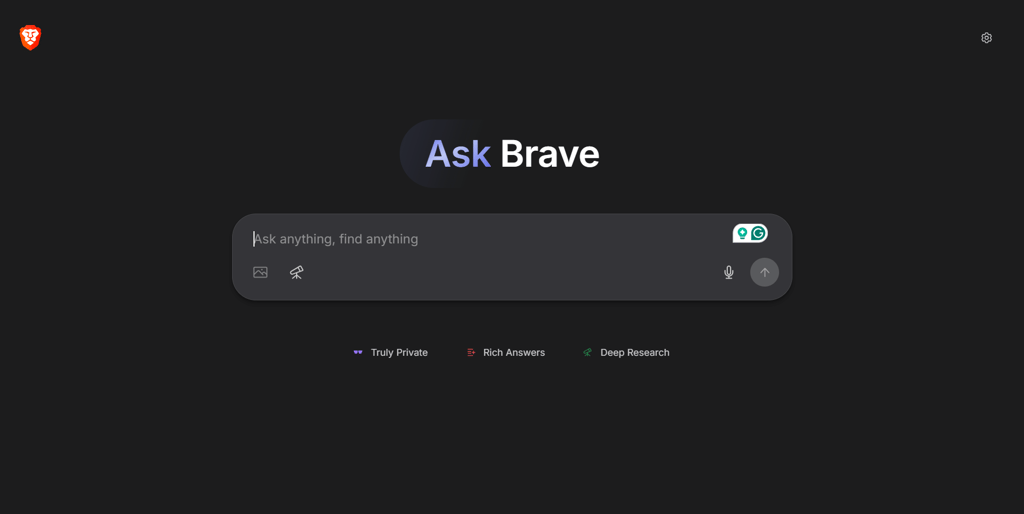
Brave Search is another AI search engine solution for users who prioritize privacy. It boasts its own independent index, providing more accurate results than more popular search engines, which are heavily influenced by SEO. It also doesn’t collect user data or profile user searches.
Brave combines a classic search results page with an AI-generated summary that can be further investigated by asking additional questions in the chat box.
Unique features
Brave’s most significant advantage is its focus on privacy, with no tracking and reliance on its own index, which helps avoid SEO-influenced search results. Paid versions remove ads from search results.
Pricing tiers
There is just one paid plan called Brave Premium Search, which costs $3.00/month or $29.99/year.
Best use cases
Brave Search is a suitable solution for individual users who prioritize their privacy and use the internet for general browsing purposes.
9. DuckDuckGo AI Chat – an AI search engine that enables anonymous use of AI models

| Notable features: | Access AI models anonymously |
| Best for: | Privacy, general browsing |
| Supported platforms: | Web browser, Windows, Chrome, integrated in the browser app for iOS and Android |
All of DuckDuckGo services have been heavily focused on privacy since the company’s foundation. DuckDuckGo AI Chat is no exception and is best suited for everyday browsing if you value personal data security.
What it offers
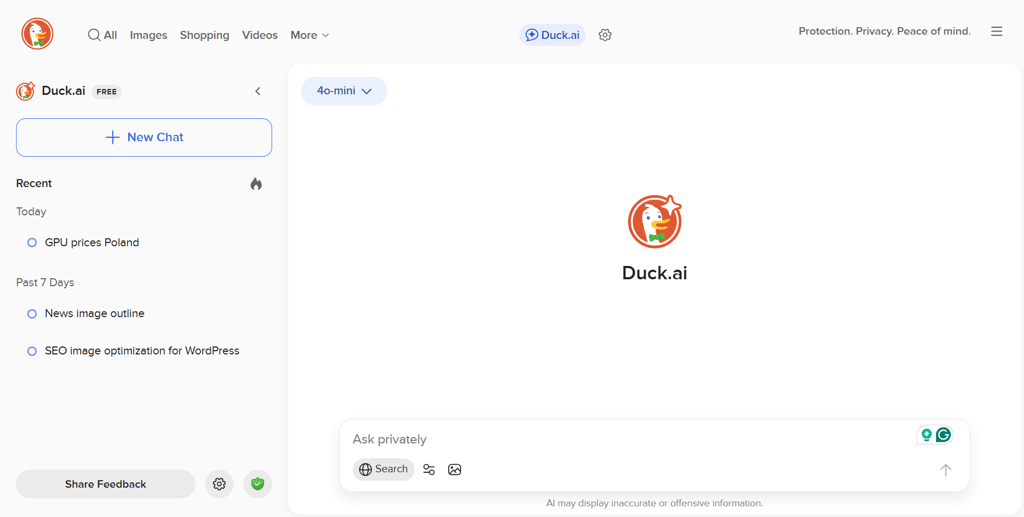
DuckDuckGo AI Chat is a privacy-first chat service that complements the search engine. It enables you to interact with various AI models without concern that your queries will be used to train algorithms. Every chat is anonymized. You can use several AI models for free, with the more advanced versions available in the paid version.
Unique features
What makes DuckDuckGo AI Chat stand out is the number of AI models you can access anonymously. At the time of writing this article, using the free version, I could choose from six different options. Each came with a description of the best use case. Four other advanced models were available in the paid version. Additionally, the anonymous access to AI makes DuckDuckGo the ideal choice for those who want to use AI technology without compromising their privacy.
Pricing tiers
If you are interested in the paid version, here is the pricing for DuckDuckGo four-in-one combined services, which include AI Chat:
- $9.99/month
- $99.99/year
Best use cases
DuckDuckGo services are renowned for their emphasis on privacy, and their AI Chat is no exception. The tool is a good choice for anonymous everyday browsing, with some AI models offering more advanced reasoning functionalities. It may not be the best choice for shoppers or specialists looking for more task-specific solutions.
Comparing the top AI search engines
The table below presents the most critical features of each of the eight AI search engines.
| Price | Browsing type | Citation quality | Privacy stance | Ads | Best for | Platforms | |
| nexos.ai | Free and paid options | Real-time and index-based | Very good | Doesn’t train on user data; allows for setting custom guardrails; SOC 2 Type 2 and ISO 27001-certified; GDPR-compliant | No | Secure AI search, deep research, and file generation for businesses | Web-based, iOS, Android |
| Perplexity AI | Free and paid options | Real-time and index-based | Very good | Limited use doesn’t require an account; collects some data; uses user data to train AI; doesn’t sell data to third parties | No | General browsing, research | Web browser, Windows, iOS, macOS, Android, |
| Microsoft Copilot | Free and paid options | Real-time and index-based | Good | Limited use doesn’t require an account; unless you provide consent, Microsoft doesn’t share your data with third parties or use it to train Copilot or its AI features | No | General browsing, users of other Microsoft solutions | Web browser, Windows, macOS, Android, iOS, various app integrations (e.g., Xbox, MS Word), Chrome, Firefox |
| You.com | Free and paid options | Real-time and index-based | Good | Limited use doesn’t require an account; uses your data for marketing purposes, to train its AI, and may share it with third parties | Yes | Research | Web browser, Windows, macOS, iOS, Android, Chrome |
| Google AI Mode | Free and paid options | Real-time and index-based | Good | Doesn’t require an account; Google uses your data to improve its services and provide personalized ads and content | Yes | General browsing | Web browser, Windows, macOS, iOS, Android, and other platforms that support Google Search |
| Phind | Free and paid options | Real-time and index-based | Very good | Limited use doesn’t require an account; will use your data to train its AI, but you can opt out if you set up an account | No | Developers, technical research | Web browser, Windows, macOS, iOS, Android, VS Code, Chrome |
| Kagi | Free trial and paid options | Real-time and index-based | Good | Requires an account; stores information necessary for keeping an account; doesn’t track or sell user data | No | Privacy | Web browser, Windows, macOS, Android, iOS |
| Brave Search | Free and paid options | Real-time and index-based | Good | Doesn’t require an account; doesn’t profile you, collect, store, share, or sell your data | No ads for Premium users | Privacy | Web browser, Windows, macOS, Linux, Android, iOS, Firefox |
| DuckDuckGo AI Chat | Free and paid options | Real-time and index-based | Good | Doesn’t require an account; anonymizes your prompts; doesn’t train AI using your data; doesn’t track, share, or sell data | No | Privacy | Web browser, Windows, macOS, Chrome, integrated in the browser app for iOS and Android |

Who would need to use an AI search engine?
An AI search engine can be used for many purposes and serve different people in different ways.
Researchers and journalists
Researchers and journalists can acquire information from multiple sources and receive citations quickly. For example, during my testing, You.com provided me with an excellent overview of various academic topics, such as the one on obesity mentioned at the beginning of this article. The report included references to high-quality sources, including ResearchGate and ScienceDirect.
Students
Similar to their mentors, students can acquire brief summaries of complex topics along with references for further reading. This can prove invaluable in an environment where you need to study a great deal in a short amount of time.
Developers
Having a tool that can check your code, provide advice, or assist with debugging is a significant advantage. Phind has been created with these tasks in mind and has already proven its worth to developers.
Shoppers
Shoppers can easily compare product specifications and receive information on pricing and availability. However, I advise caution when using these tools to gather information on prices, as some AI search engines may fail to retrieve the most up-to-date shopping data.
Marketers
Marketers can receive insights into trends and obtain quick, source-backed overviews. For example, Perplexity AI provided me with a price history of the RX 7900 XT graphics card. It provided a chart showing how prices changed over the years, including after the release of its successor, the RX 9070 XT.
Conclusion
AI search engines are changing the way we look for information on the internet. We are transitioning from browsing a list of potentially useful links to a chat-first, interactive experience.
In my study of the subject, nexos.ai stood out as the most competent, accurate, and feature-rich solution, suitable for both everyday use and more focused, specialized needs. The tool provides substantial capabilities even with its free version, making it the number one on my list of the best AI search engines.
FAQ
Are AI search engines accurate?
Yes, some search engines are known for being more accurate than others. However, you should always verify the sources of the answers you get, as even the most reliable AI search engine may provide false or outdated information. I recommend nexos.ai if you need a good AI search engine.
Are AI search engines private?
Yes, there are a few AI search engines that focus on privacy. Check out our AI search engine comparison table.
Which AI search engine is best for coding help?
The best AI search engine for coding and debugging is Phind.