Trend Micro antivirus review
Backed by leading cybersecurity experts and investigative journalists, we deliver independent, real-world antivirus testing and analysis, guaranteeing objective evaluations without undue influence or bias from outside parties.
Our transparent and consistent methodologies ensure objective, up-to-date reviews, empowering readers to make well-informed decisions.
Learn more

Trend Micro has been around for a long time as an antivirus option. It's loaded with features to keep you safe from malware, phishing, ransomware, and other online risks. It also offers real-time protection along with some privacy tools. Whether these features work as intended is a whole different question, though, and this review aims to answer that.
From what I’ve seen, independent lab tests show that Trend Micro is a trustworthy option, especially for blocking online threats and lowering false alarms. That said, compared to the top performers like Norton, which consistently delivers perfect scores, Trend Micro isn't quite as strong when detecting offline threats.
For this Trend Micro review, I worked closely with the Cybernews research team to thoroughly examine its malware detection rates, real-time protection, and firewall performance. My goal was to identify both its strengths and vulnerabilities. Keep reading to see our test results for Trend Micro – they reveal some discrepancies from the findings of independent labs.
| ⭐ Rating: | |
| 🥇 Overall rank: | #12 out of #30 |
| 💵 Price: | From $29.95/year |
| ✂️ Free version: | Yes (Android and iOS) |
| 🖥️ Platforms: | Windows, macOS, Android, iOS, Chromebook |
| 🔥 Coupons: | Trend Micro coupon 50% OFF |




Our team of researchers thoroughly tests antivirus software following a well-established testing process. In unison, our experts combine in-house and independent testing lab findings with first-hand experience to help you make informed decisions about each product. Learn how we test antivirus software.
Trend Micro pros and cons
Is Trend Micro any good?
Overall, Trend Micro is a decent antivirus that’s easy to use and comes with unique extras like Pay Guard and Folder Shield. However, our tests revealed that its malware and phishing detection isn’t quite as strong as some of the top brands. Plus, in my opinion, its Windows setup can also be a bit of a hassle, and the firewall features are pretty basic.
If you want stronger all-around protection, I would go with Norton 360. It blocked every ransomware threat we threw at it and scored top marks in independent lab tests.
What also impresses me about Norton 360 is how tough it is to disable. Even if you try to delete some of its files, stop its processes, or unload its drivers, Norton just keeps running.

How much does Trend Micro antivirus cost?
Trend Micro offers antivirus plans starting at $29.95/year for one device. While this is a reasonable price, it's slightly higher than some alternatives – for example, Bitdefender Antivirus Plus starts at just $12.99/year and provides similar protection for a single device.
The table below provides a closer look at Trend Micro's pricing and what each plan includes. Later in this section, I also explore what each Trend Micro plan offers.
| Antivirus+ Security | Internet Security | Maximum Security | Premium Security Suite | |
| Price | $29.95/year | $59.95/year | $74.95/year | $109.95/year |
| Device coverage | 1 | 3 | 5 | 10 |
| Platforms | Windows | Windows | Windows, macOS, Android, iOS, Chromebook | Windows, macOS, Android, iOS, Chromebook |
| Folder Shield | ✅ Yes | ✅ Yes | ✅ Yes | ✅ Yes |
| Pay Guard | ✅ Yes | ✅ Yes | ✅ Yes | ✅ Yes |
| Parental Controls | ❌ No | ✅ Yes | ✅ Yes | ✅ Yes |
| Social media privacy | ❌ No | ✅ Yes | ✅ Yes | ✅ Yes |
| Password manager | ❌ No | ❌ No | ✅ Yes | ✅ Yes |
| Dark web monitoring | ❌ No | ❌ No | ❌ No | ✅ Yes |
| Remote desktop support | ❌ No | ❌ No | ❌ No | ✅ Yes |
The most basic plan, Antivirus+ Security, protects 1 Windows PC at $29.95/year. It includes essential features like ransomware protection, blocking online scams, AI-powered threat detection, and a secure browser for online browsing.
The next level is Internet Security, which covers up to 3 Windows PCs. For 59.95/year, it adds parental controls, social media privacy tools, and system optimization features to basic protection.
Maximum Security is the most popular option for families or people with multiple devices. It costs $74.95/year and protects up to 5 devices, including Windows, Mac, Android, iOS, and Chromebook. This plan also includes a password manager.
At the highest level, for $109.95/year, Premium Security Suite covers up to 10 devices. It includes all the features of Maximum Security, plus a secure VPN, identity theft protection, and 24/7 premium support. This plan is best for users who want complete protection and extra help across all their devices.
Getting started with Trend Micro
Getting started with Trend Micro took a bit more time and patience than I expected. The installation on Windows wasn’t as smooth as with some other antivirus apps. I had to download the installer, unpack files, and go through a few optional setup steps, like choosing whether to enable notifications and install the password manager.
After that, I was given three ways to get started: entering an activation code, signing in, or starting a free trial. Even then, there were a few more screens to click through, including a system check and an optional email signup.
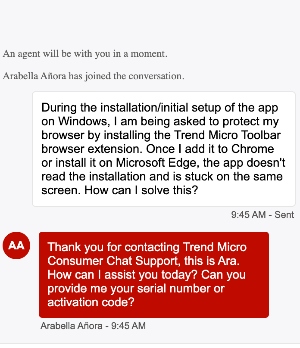
One hiccup I ran into was with the browser protection setup. Trend Micro asked me to install its Toolbar extension for Chrome and Edge, but the app didn’t recognize the installation right away. I actually had to close and reopen the app before I could finish setting things up, which was a little frustrating.
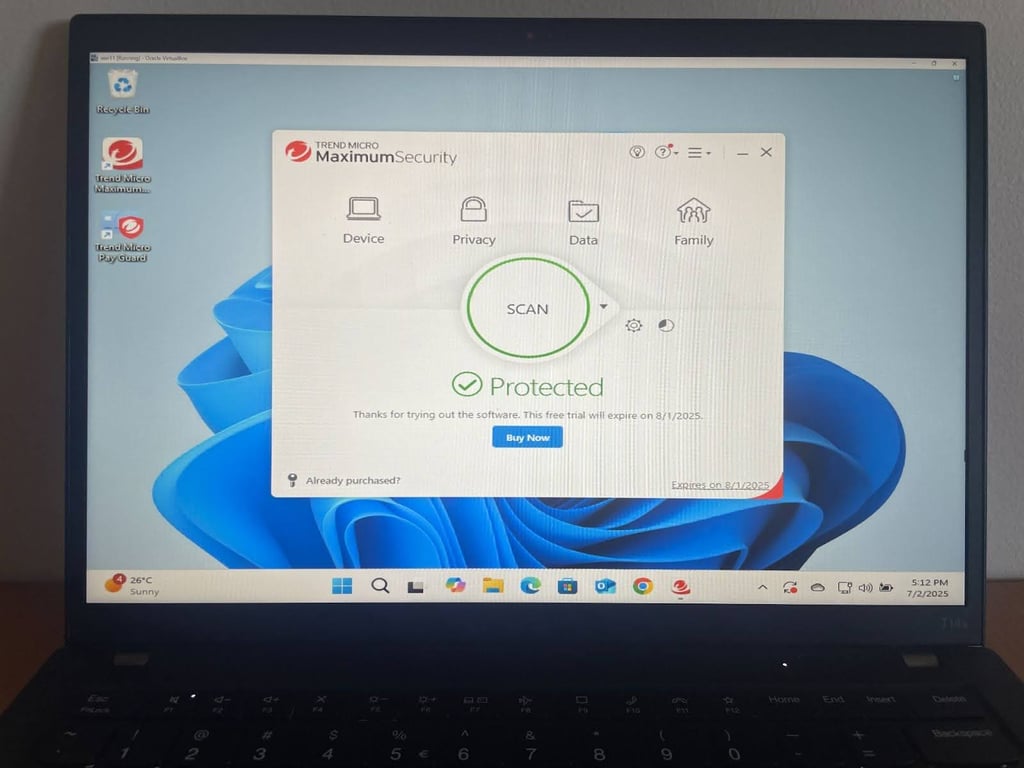
Once everything was finally up and running, the main dashboard felt clean and well organized. The big Scan button is front and center, and you can easily choose between Quick, Full, and Custom scans. I liked that all the features are neatly sorted into Device, Privacy, Data, and Family sections, so it’s really easy to find what you need, even if you’re new to antivirus software.
Trend Micro mobile app
Trend Micro is available both on Android and iOS – that’s a great plus for me. Overall, getting Trend Micro set up on mobile was quick and painless.
I found the Android app easily on the Play Store, and the installation took just a few minutes. The interface isn’t the most modern or visually appealing, but it’s straightforward. I could see every feature listed right on the home screen, so it’s simple to tap through and configure whatever you need.

The Android app introduces the following features on the home page: Feature Tutorials, Security Scan, Web Guard, Fraud Buster, Wi-Fi Checker, Pay Guard Mobile, App Freeze, App Manager, Parental Controls, and Lost Device Protection.
The iOS version was just as easy to install from the App Store. What stood out to me was that the iOS app offers almost the same range of features as the Android version. For the record, it’s quite rare for antivirus apps.
The design could use a refresh, but everything is intuitive and easy to access. For both platforms, having all the important tools right there made my Trend Micro mobile experience quite enjoyable.
Independent lab test results review
From what I saw reviewing Trend Micro’s performance in independent labs, the results were mixed. In the March-April 2025 AV-TEST, it got a perfect 6 out of 6 for protection and performance, plus a decent 5.5 for usability. This shows it can keep your system safe without slowing it down too much.
However, the AV-Comparatives test in March 2025 showed some weaknesses. Trend Micro scored well for online protection, with 98.07% threat blocking and 94.1% online malware detection. When it came to detecting malware offline, it fell short, only hitting 79.0%. On the bright side, it had just 4 false alarms, which shows it has decent accuracy. Overall, Trend Micro seems to provide solid online protection, but there's definitely some work to do to handle offline threats better.
Our in-house testing results
To see how Trend Micro holds up in real-world scenarios, I ran a series of hands-on tests on malware, ransomware, phishing, and firewall protection.
All testing was done on a Windows 11 virtual machine with 4GB of RAM, running on a Lenovo ThinkPad. This setup allowed me to reliably check Trend Micro’s detection and security features across different threat types.
Malware detection test
I wanted to check how well the antivirus could find malware, so I dropped 10 x64 malware samples into the downloads folder and ran both full and quick scans. I turned off real-time protection for these tests just to see how well the scanning engine works on its own.
Trend Micro’s results in our malware detection tests were underwhelming. The quick scan didn’t catch any of the 10 planted malware samples despite taking over 11 minutes to complete.

The full scan performed slightly better, detecting 5 out of 10 threats. However, the initial scan took over an hour to finish, which was way too long.

When testing real-time protection, Trend Micro again detected only half of the malware samples as they were downloaded and extracted.

It looks like Trend Micro's malware detection isn't quite living up to what I'd expect from a high-quality antivirus. Whether I was running scans or relying on real-time protection, the results didn’t impress me.
Ransomware test
For the ransomware test, I planted 10 ransomware samples in the downloads folder and ran a full scan with real-time protection turned off. Trend Micro detected and removed 7 out of 10 ransomware threats, giving it a 70% success rate in this scenario.

While it didn’t catch everything, Trend Micro did manage to catch the majority of ransomware samples during a full system scan. However, a few threats still slipped through.
Phishing test
Testing out the phishing protection, I decided to check out 10 active malware download links from urlhaus.abuse.ch. I tried it with the Trend Micro Toolbar browser extension and cranked up the Web Threat Protection to High. Out of those 10 phishing attempts, Trend Micro only blocked 1, which is pretty disappointing – just a 10% success rate.

This outcome was way weaker than I thought it would be, especially when you compare it to other top antivirus brands like Norton 360 and Bitdefender.
Firewall performance
Trend Micro doesn't include a standalone firewall but instead offers a Firewall Booster that works alongside the Windows Firewall. This booster kicks in automatically when you install the software and adds some extra protection for your network, like scanning for viruses and detecting botnets.

The Firewall Booster includes features such as an Intrusion Detection System (IDS), Generic Stream Scan (GSS), and botnet detection. You can also manually block connections for specific programs, both incoming and outgoing. But keep in mind that it works alongside Windows Firewall instead of taking its place, so you won't have as much control or customization as you would with a standalone firewall.
From what I've seen, Trend Micro's firewall features seem a bit limited. The booster does bring some handy protections, but it doesn't really provide the complete set of firewall controls.
Trend Micro security features
Trend Micro has a range of security features that are quite similar to the features you get with other antiviruses on the market. Alongside a single Windows-only antivirus product, there is a more powerful internet security suite and a high-end product with extra support and functionality for macOS, Chromebook, Android, and iOS devices.
At a base level, Trend Micro offers simple antivirus protection with anti-phishing and malicious URL blocking. Additionally, the Pay Guard feature works to keep your financial details safe.
Let’s take a closer look at the various security features available to Trend Micro users.
Security scans
Trend Micro lets you run quick, full, or custom security scans. In these checks, you can specify particular folders or drives to investigate. Compared to products like Avast that let you add other scan types, you won’t have much control here, but the antivirus scans are easy to use.
It’s worth mentioning that Trend Micro doesn’t support simultaneous scans, which could be an issue sometimes. For example, if you want to run multiple scans or perform other tasks simultaneously, this limitation could lead to inefficiency and inconvenience.

During our recent in-house tests, Trend Micro scan speeds were slower than in previous runs. The initial full scan took 67 minutes, which is noticeably longer than the 44 minutes I recorded in earlier tests with the same antivirus. That’s certainly a downgrade from the last time.
Folder Shield
Folder Shield is another anti-ransomware layer that watches your documents, folders, and cloud services like Microsoft OneDrive, Google Drive, and Dropbox. The tool also monitors any connected USB drives and alerts you about any attempts to modify files.
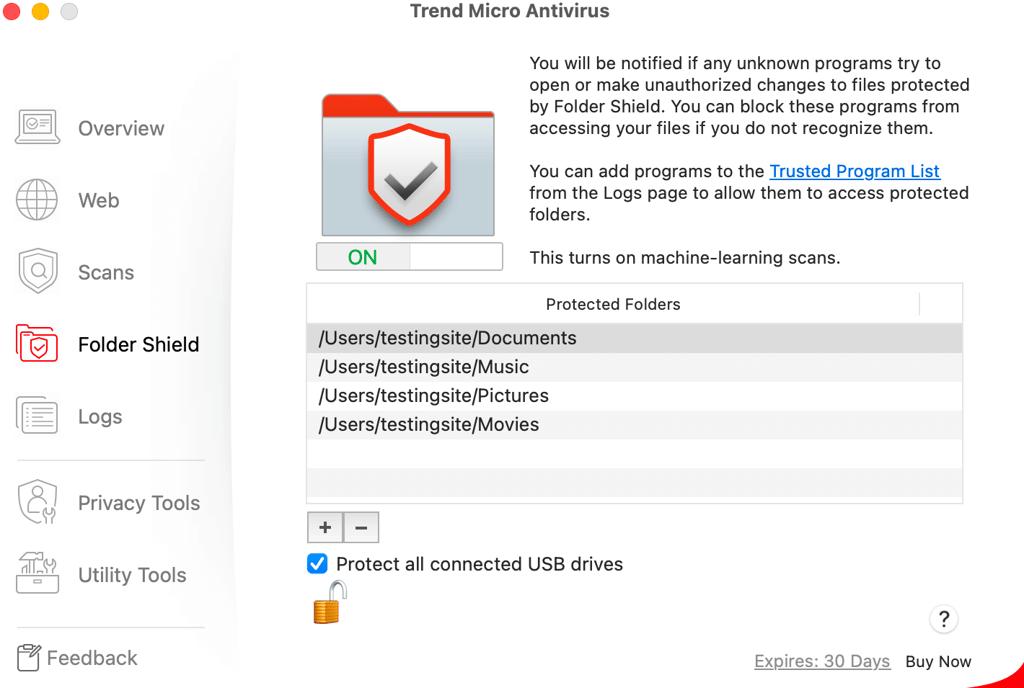
Folder Shield prevents ransomware from maliciously encrypting your files and holding them hostage until you pay the attacker. This is a welcome extra layer of protection that is capable of blocking even the newest, undiscovered ransomware.
Folder Shield prevents unauthorized programs from making changes to your protected files. It protects your documents and pictures by default, and you can add other important folders. It also protects files on USB drives and those in your Dropbox folders, Google Drive, and OneDrive.
I was quite pleased by Trend Micro’s success rate in blocking ransomware, detecting 7 out of 10 ransomware samples during the in-house tests. The best part of the feature is the secure backup of all protected files, so even if ransomware manages to encrypt some files before the antivirus kicks in, the Damage Recovery Engine is ready to restore them.
However, it’s worth noting that the overall malware detection in the full scan was less impressive, with only 5 out of 10 samples detected.
Spam filter
Trend Micro offers a bonus tool within its spam filter. This feature is usually only available in security suites and can be found within your Settings. It is disabled by default and isn’t highlighted on the main dashboard, but you can activate it by clicking the appropriate check box.

It’s worth noting that this isn’t a system-wide filter. It works only with Outlook – scanning POP3, SMTP, and Exchange messages. The filter is also known for flagging legitimate emails as junk, but you can override this by adding trusted addresses to the Safe Senders whitelist or by reducing your filter strength.
URL filters
Trend Micro offers several levels of browsing protection. Social Networking Protection uses browser extensions to display a risk rating of links on popular social sites. The software also automatically checks URLs before you access them. And even if a page passes the test, its content is still scanned by the core Micro Trend engine.
While other antivirus programs generally just allow you to turn URL blocking on or off, this software has a protection strength slider. This lets you choose when to block sites more aggressively and when to reduce false alarms.
However, in my phishing test with 10 malicious URLs, Trend Micro only detected and blocked a single one. While the software often displayed a Dangerous Page warning or a pop-up alert in the browser, its overall effectiveness at catching phishing attempts in real-world testing was quite limited.

Pay Guard
Trend Micro offers Pay Guard, which aims to provide a more secure environment for your online shopping, banking, and sensitive transactions. The idea here is that it becomes harder for spyware to monitor or log what you are doing.
Many other antivirus products create secure payment environments within a custom hardened browser running on a separate desktop. This one, however, uses your default browser with its most secure settings.

I found Pay Guard user-friendly, and I had no trouble setting it up to launch automatically whenever I access sensitive sites, like online banking. Another great aspect of Pay Guard is that it opens in a private browser window, without any extensions, which leaves no trace of any transactions once closed.
Privacy Scanner
You may be sharing more personal information than you realize through your social media profiles. Trend Micro’s Privacy Scanner checks your Twitter/X, Facebook, and LinkedIn settings for any privacy risks and helps to keep your personal information private.

The Maximum Security plan also includes the Data Theft Prevention feature that you can use to keep sensitive data out of web pages and email messages. How this works is you list sensitive data, and then Trend Micro ensures that spyware cannot gain access to it.
Customer support
Trend Micro offers several support options. You can check out its FAQs, join the community forum, or reach out via email, phone, or live chat. Standard phone support is available during business hours, but if you need help at any time of day or night, its Premium support has you covered 24/7.
From my recent experience, getting help via live chat starts with logging into your account. At first, I was dealing with some automated bot replies, but after I asked to talk to a real person and filled out a quick contact form, I finally got connected to a support agent. They answered my questions clearly and were helpful.
If you have the Premium Security Suite, you also get access to remote diagnosis and repair, which can be a real lifesaver if you run into tricky issues. Overall, while the process involves a few extra steps to reach a human, the support team was friendly and effective once I got through.
Video review
Not a fan of written descriptions? Check out this video, where we take a closer look at Trend Micro and its security features, review test results, and discuss whether or not it’s an antivirus worth your while.
Which antivirus is better than Trend Micro?
If you're like me and want to do your research before committing to antivirus software, there are a few other options out there that offer better protection and more features.
Bitdefender
Bitdefender is a solid pick if you want reliable security without breaking the bank. It comes with extras like anti-webcam hijack and customizable user profiles.
In our recent Bitdefender tests, it scored a 91.3% success rate for malware protection and an impressive 95% for phishing detection – both noticeably better than Trend Micro results. So, it’s a great all-around choice for keeping your devices safe.
Norton 360
Norton 360 is another alternative, especially if top-notch malware protection matters most to you. In our in-house Norton tests, it achieved a perfect 100% success rate against malware, which really sets it apart. On top of that, Norton includes extras like webcam protection, dark web monitoring, and a VPN – even in its basic plans.
Trend Micro review – the final verdict
In our recent in-house tests, I found that Trend Micro's protection is quite inconsistent. Its quick and full scans missed many threats, and even its real-time protection only detected about half of the malware samples. Ransomware detection performed slightly better, but my experience with its phishing protection was quite underwhelming.
On the positive side, Trend Micro offers some useful additional features like Pay Guard, Privacy Scanner, and Folder Shield, and the interface is user-friendly. However, these extras do not compensate for the shortcomings I observed in its core malware detection.
Overall, Trend Micro might be sufficient if you want basic protection along with a few extra tools, but for stronger and more consistent defense, I suggest looking elsewhere.
FAQs
Is Trend Micro security good?
Yes. Trend Micro scores well in testing, offers a wide range of security features, and boasts a selection of competitive pricing plans.
Is Trend Micro better than Norton?
Trend Micro and Norton 360 are similar in price, and both offer a selection of strong features. Norton is available for most operating systems, while Trend Micro is more limited with its entry plans. Overall, Norton 360 is the better option.
Which is better – McAfee or Trend Micro?
McAfee is better in terms of malware detection, and it scores a little higher in terms of security, performance, and additional features. However, Trend Micro is a cheaper and more intuitive option than McAfee.
Is Trend Micro a Chinese company?
No, Trend Micro is an American-Japanese multinational company with global headquarters in Tokyo, Japan, and Texas, United States. There are regional headquarters in Asia, Europe, and North America.