Best cheap cloud hosting providers for 2026
Our in-house experts conduct internal independent, hands-on testing and transparent reviews of web hosting providers by using custom-built tools or utilizing industry-recognized tools and methods to ensure impartial and evidence-based assessments.
Using the same criteria for all services, we share our detailed methodologies and practices to help customers make informed hosting decisions.
Learn more

For years, I’ve been testing and using various website hosting services, and have never paid more than $10.00/month for cloud hosting. Given high cloud hosting prices from the most popular providers (Bluehost’s cloud hosting starts at $79.99/month), it might seem difficult to find something that is cheaper. This is especially true if you’re new to cloud hosting – you might not know how to not overpay for features and resources you don’t need.
In this article, I share my top 7 cheap cloud hosting providers of October 2026. Each cloud host on my list offers a starting price below $10.00/month and delivers excellent quality services.
The 7 best cheap cloud hosting services in 2026
- Contabo (from $5.28/month) – best cheap cloud hosting overall for generous VPS resources (Get Contabo for just $5.28/month!)
- Kamatera (from $4.00/month) – cheap usage-based and scalable cloud hosting (Get Kamatera now, starting at only $4.00/month)
- Hostinger (from $9.99/month) – best cheap cloud hosting for small to medium websites (Get up to 83% OFF Hostinger + 3 free months)
- InMotion Hosting (from $6.00/month) – affordable unmanaged Cloud VPS for developers and system administrators (visit site)
- DreamHost (from $4.50/month) – best cloud hosting with flexible OS support (visit site)
- Cloudways (from $8.25/month) – affordable managed cloud hosting with usage-based pricing (visit site)
- HostArmada (from $1.99/month) – cheapest cloud hosting on our list (visit site)




Our in-house research team and expert writers work hand in hand to regularly test hosting services and provide accurate and fact-checked information. Discover the ins and outs of how we test and evaluate website hosting providers.
Not sure which web hosting provider to choose? Answer 3 quick questions, and we’ll help you find the best fit from our tested providers.


Find web hosting match
Three simple questions. We’ll point you the right pick. No email, no sign up.
What type of website are you building?
What matters most to you?
How experienced are you with web hosting?
Best web hosting pick for you

Hostinger
Launch your site quickly with beginner-friendly tools, strong performance, and easy management. A solid choice for business websites and online stores that need speed without extra complexity.
Best web hosting pick for you

WordPress.com
Build and manage your WordPress site without worrying about much of the technical setup. You get a streamlined platform for publishing, updating, and growing your WordPress site from one place.
Best web hosting pick for you

IONOS
A strong choice if you want hosting at a very low starting price. It gives users plenty of flexibility while still keeping the core setup relatively straightforward.
Key points while choosing a cheap cloud host
Choosing a cheap cloud host doesn’t mean you have to settle for the lowest quality. Instead, it’s all about finding a provider that balances cost and quality. For example, when I’m looking for a hosting provider, these are the things I consider:
- Pricing and scalability. Costs should be low with no hidden fees. I look for pay-as-you-go pricing to avoid overpaying. The best hosting providers also make scaling easy, so my hosting can keep up with your needs.
- Resources. I always make sure to get sufficient storage, RAM, and CPU, as some budget hosts limit these.
- Features. Basics like automated backups, firewalls, and one-click installations are non-negotiables for security and convenience.
- Speed. Don’t neglect performance-focused optimizations like SSD storage, content delivery network (CDN), high-speed processors, and server-side caching.
Besides the points above, I also look at user reviews to see whether the host is reliable in terms of uptime. Ease of use and customer support are some other things I ask other users about, since these can either make or break the overall hosting experience.
Best cheap cloud hosting 2026 – detailed review
Together with the Cybernews research team, we thoroughly tested and reviewed 15 providers to identify cloud hosting providers that don’t cut costs at the expense of quality. Here are the top 7 budget-friendly hosts that deliver solid resources, rich features, strong performance, and excellent ease of use.
1. Contabo – best cheap cloud hosting overall

| Rating: | |
| Starting price: | From $5.28/month |
| Money-back guarantee: | ✅ Yes, 14 days |
| Uptime: | 100% |
| Disk space: | 100–600GB |
| CPU: | 4–18 CPU cores |
| RAM: | 8–96GB |
| Best deal: | Get Contabo for just $5.28/month! |
Contabo is my top pick for cheap cloud hosting because it offers far more server resources than most entry-level plans. Rather than offering a managed website-hosting package, Contabo provides self-managed Cloud VPS plans with full root access. This makes it a particularly good fit for developers, experienced users, self-hosters, and businesses that need more control over their environment.
Its entry-level Cloud VPS 4 plan starts at $5.28/month and offers a strong balance of computing power, memory, and storage for the price, making it suitable for multiple low-traffic websites, Docker containers, development environments, databases, and lightweight business applications. You also get a snapshot to save server state before major changes, plus generous traffic allowances for projects with consistent visitor demand.
💸Contabo’s cheapest cloud plans
Contabo’s standard Cloud VPS range starts with resource-heavy configurations:
- Cloud VPS 4 from $5.28/month on a 24-month term. Includes 4 vCPU cores, 8GB RAM, 100GB SSD storage, one snapshot, a 200Mbit/s port, and unlimited traffic subject to Contabo’s fair-use policy.
- Cloud VPS 6 from $7.20/month includes 6 vCPU cores, 12GB RAM, and 200GB SSD storage.
- Cloud VPS 8 from $13.44/month includes 8 vCPU cores, 24GB RAM, and 400GB SSD storage.
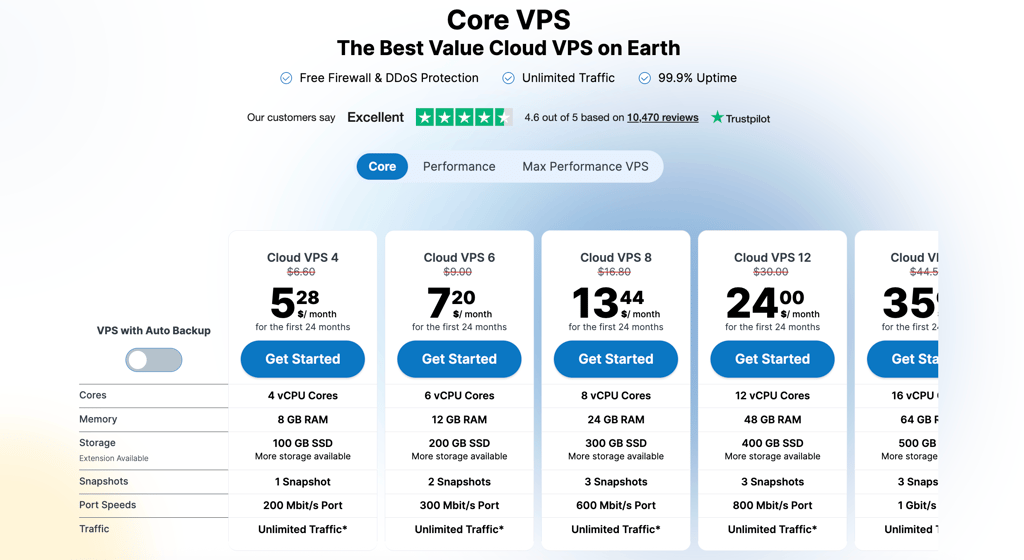
Contabo also has Performance and Max Performance VPS ranges with AMD EPYC processors, NVMe storage, faster ports, and more snapshots. For example, the Cloud VPS Plus 4 plan includes 4 AMD EPYC vCPU cores, 8GB of RAM, 150GB of NVMe storage, 5 snapshots, and a 500Mbit/s port.
My overall experience with Contabo cloud hosting – 4.5/5
Contabo is straightforward to set up, but it is more hands-on than a fully managed cloud host like Hostinger. Once your server is provisioned, you can manage it through the Customer Control Panel, choose an operating system, configure firewall rules, deploy custom images, and access the server through SSH or remote desktop tools.
I particularly liked the amount of flexibility on offer. All Cloud VPS and Cloud VDS plans include a free network-level firewall that you manage in the Customer Control Panel. You can create inbound rules for services such as SSH, HTTP, and HTTPS, then deny other incoming connections.
Contabo also supports Cloud-Init, which can automate first-boot tasks such as installing packages, adding SSH keys, configuring users, and deploying a LAMP stack or Docker environment. It also supports custom images for users who want to deploy their own ISO or QCOW2 file.
Security and backup management are largely your responsibility, though. Contabo includes snapshots on Cloud VPS plans, but it explicitly notes that a snapshot is not a replacement for an independent backup. For important sites and applications, I recommend scheduling separate, off-server backups – for example, to Contabo Object Storage or another compatible backup destination.
Want to know more about Contabo? Read our dedicated Contabo review.
2. Kamatera – cheap usage-based and scalable cloud hosting

| Rating: | |
| Starting price: | From $4.00/month |
| Money-back guarantee: | ✅Yes, a 30-day trial |
| Uptime: | 100% |
| Speed: | 1.232s |
| Disk space: | 20–unlimited GB |
| CPU: | 1–32 vCPU |
| RAM: | 1–128GB |
| Best deal: | Get Kamatera now, starting at only $4.00/month |
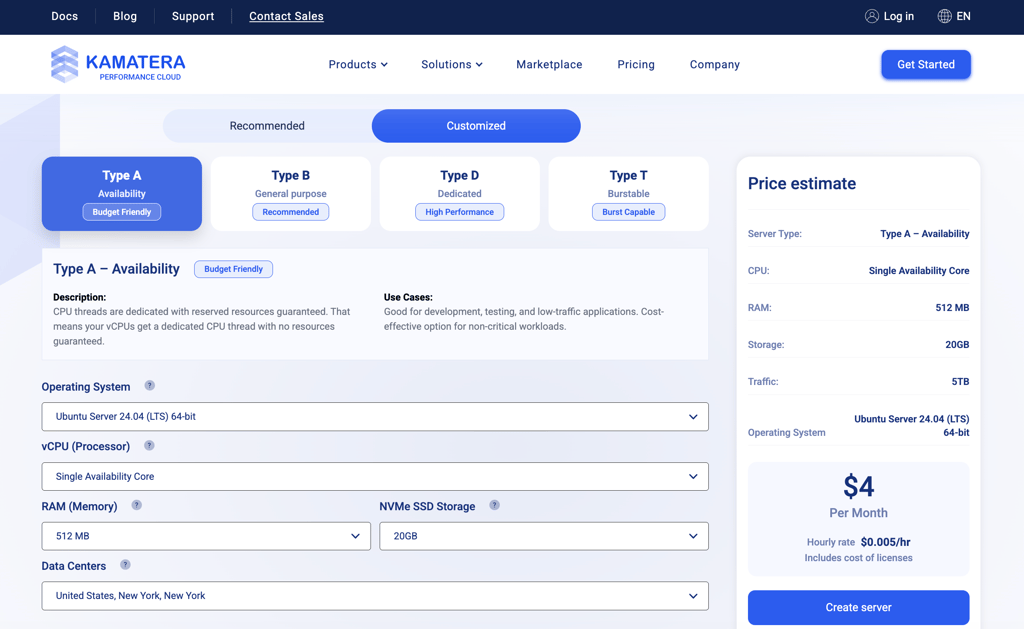
Kamatera is one of the cheapest and most easily scalable cloud hosting providers, with prices starting at $4.00/month. It does not have renewal pricing and offers either 1-month plans with set resources or the option to customize your own server.
💸Kamatera’s cheapest cloud hosting pricing
Here are the cheapest customizable cloud hosting plans Kamatera offers:
- $4.00/ month – includes 1GB RAM, 20GB NVMe SSD storage, 5 TB traffic
- $6.00/month - includes 2GB RAM, 20GB NVMe SSD storage, 5 TB traffic
- $18.00/month – includes 2GB RAM, 30GB NVMe SSD storage, 5 TB traffic.
My overall experience with Kamatera – 4/5
Kamatera is mainly a VPS and cloud hosting provider, and it shows in the setup process. I tested Kamatera using a basic cloud VPS configuration, with 1 vCPU, 2GB RAM, and 30GB NVMe storage.
In my experience, it wasn’t as simple as just signing up, paying, and waiting for the server to be set up. I had to handle most of the setup myself, including choosing the operating system, configuring the stack, and setting up security. That said, Kamatera now has more pre-configured images, so it’s possible to deploy setups like WordPress or Plesk with fewer manual steps.
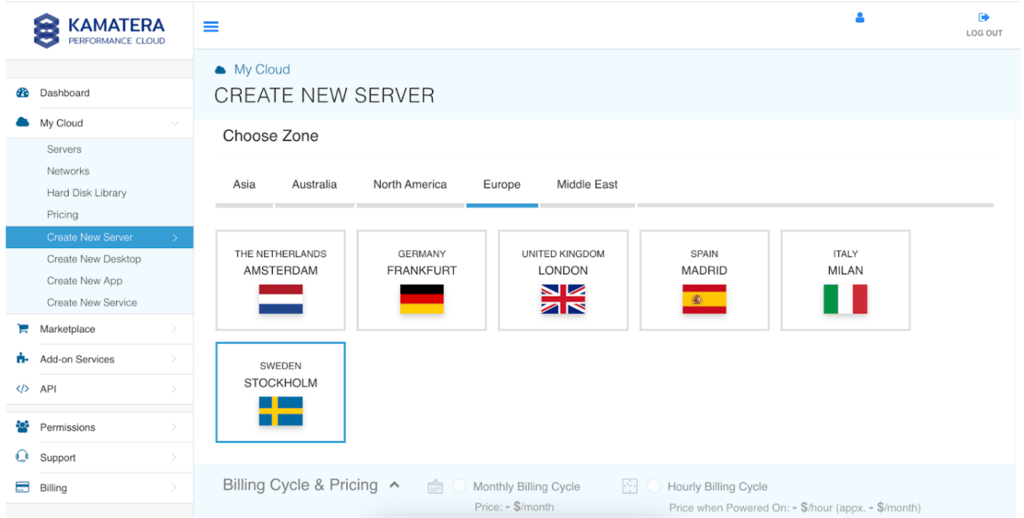
Nevertheless, besides the technical aspects, I enjoyed using Kamatera. It has a clean interface that’s relatively easy to navigate. Plus, the provider showed good performance results when I tested it for two weeks. For example, it had a 100% uptime. However, the stress-testing results were worse than I expected, and the average response time was 736ms, which is not ideal.
If you’d like to learn more about what it’s like to use Kamatera, check out the full Kamatera review.
3. Hostinger – best affordable cloud hosting for growing websites

| Rating: | |
| Starting price: | From $7.19/month |
| Money-back guarantee: | ✅ Yes, 30-day |
| Uptime: | 100% |
| Speed: | 3.561s |
| Disk space: | 200–300GB |
| CPU: | 2–6 CPU cores |
| RAM: | 3–12GB |
| Best deal: | Get up to 83% OFF Hostinger + 3 free months |
Hostinger made my list of the best cheap cloud hosting providers, especially for small to medium-sized and growing websites, because of its well-rounded services. Starting at just $7.19/month, you get a fully managed service, leaving you free to focus on growing your site. Plus, Hostinger doesn’t skimp on features and security tools to keep your site in top shape.
💸 Hostinger’s cheapest cloud plans
Here are all the cloud hosting plans Hostinger offers:
- Cloud Startup – starting at $7.19/month (renews at $25.99/month). 4 CPU cores, 4GB RAM, 100GB NVMe storage, 100 websites
- Professional – starting at $15.99/month (renews at $44.99/month). 5 CPU cores, 6GB RAM, 200GB NVMe storage, 100 websites
- Enterprise– starting at $29.99/month (renews at $64.99/month). 6 CPU cores, 12GB RAM, 300GB NVMe storage, 100 websites
You can also get an additional 10% discount with our Hostinger coupon code CNHOSTINGER. Just enter it at checkout, and save more on already discounted plans.

My overall experience with Hostinger cloud hosting – 5/5
I tested Hostinger’s Cloud Startup plan and had a great experience overall. Hostinger uses its native hPanel control panel for both shared hosting and cloud plans, and it’s one of my favorites in general. It is designed very well, which makes it easy to navigate. I also liked that I could customize the widgets I see on the home page – whether it's performance, storage capacity, or the overall status of my site.
One of Hostinger’s best qualities is its performance, in my opinion. In my tests, which took around 2 weeks, Hostinger showed excellent 100% uptime. Its average response time was also solid, at 246.19ms.

Hostinger isn’t one to sacrifice features, either. Along with basic features like a free domain and automatic updates, you also get extra perks like a drag-and-drop website builder, priority support, 1-click Google integration, and staging tools. I also noticed some new AI features that let you update your site just by describing changes to the AI assistant Kodee, and there’s a one-click AI tool that helps fix WordPress issues.
Security-wise, Hostinger is well-equipped. A quick look shows it offers the essentials and then some – including enhanced distributed denial of service (DDoS) protection, malware scanner, web application firewall (WAF), dedicated IP address, and free CDN and SSL.
Want to know more about Hostinger? Read the full Hostinger review.
4. InMotion Hosting – affordable unmanaged Cloud VPS for developers and system administrators

| Rating: | |
| Starting price: | From $6.00/month |
| Money-back guarantee: | ❌ No |
| Uptime: | 100% |
| Speed: | 1.620s |
| Disk space: | 50–540 GB |
| CPU: | 1–32 vCPU |
| RAM: | 1–32GB |
| Best deal: | Get InMotion Hosting, now 71% OFF |
InMotion Hosting is a reliable hosting provider. One of its solutions is unmanaged Cloud VPS hosting. It is a good provider for small businesses, developers, enterprises, and agencies. The Cloud VPS plans are easy to scale, include a variety of Linux OS options, and offer some customization opportunities.
💸InMotion Hosting’s cheapest cloud hosting plans
InMotion offers managed VPS and cloud VPS plans, which mostly function in the same way, except the cloud plans are unmanaged. The unmanaged Cloud VPS Hosting SSD is the cheapest option. All plans are monthly or usage-based, but you can also pay for 1 year upfront:
- 1GB RAM – starting at $6.00/month. Includes 1 vCPU, 30GB storage, and 2TB transfer
- 2GB RAM – starting at $12.00/month. Includes 2 vCPU, 50GB storage, and 3TB transfer
- 2GB RAM – starting at $18.00/month. Includes 2 vCPU, 60GB storage, and 4TB transfer
- 4GB RAM – starting at $24.00/month. Includes 4 vCPU, 100GB storage, and 5TB transfer

At checkout, InMotion Hosting automatically adds additional features to your cart. The host also doesn’t offer free domains.
My overall experience with InMotion Hosting cloud hosting – 3.5/5
I tested InMotion Hosting using its entry-level Cloud VPS SSD plan, with 1GB RAM, 1 vCPU, and 30GB storage, and my experience with InMotion Hosting was similar to what I had with Kamatera. Since it’s an unmanaged cloud VPS solution, this meant that I had to configure most of the server myself. This included setting up a stack, installing web applications, and setting up security. The downside that I noted was that the InMotion Cloud VPS doesn’t include cPanel or any other graphical user interface. Therefore, this solution is best for experienced users who know what they are doing.
Nevertheless, InMotion Hosting showed relatively good performance in my tests. After the two-week-long monitoring, the uptime was at 100% with an average response time of 772ms, which is a solid result.
Want to know more about InMotion Hosting? Check out the full InMotion Hosting review.
5. DreamHost – scalable cloud hosting solution with multi-OS compatibility ding

| Rating: | |
| Starting price: | Charges based on use, from $4.50/month |
| Money-back guarantee: | ✅ Yes, 30-days |
| Uptime: | 100% |
| Speed: | 1.465s |
| Disk space: | 100GB block storage and 80GB SSD disk with all plans |
| CPU: | 1–4 vCPU |
| RAM: | 512MB–8GB |
| Best deal: | Get DreamHost, now 83% OFF |
If you’re looking for flexibility in your cloud hosting solution, DreamHost is a strong choice, starting at $4.50/month. With its scalable pay-as-you-go billing, adjustable resources, and compatibility with multiple operating systems, DreamHost is the perfect example of flexibility. Plus, you get full root access, giving you complete control over your server environment.
💸DreamHost’s cheapest cloud hosting pricing
Here are all the cloud hosting plans DreamHost offers:
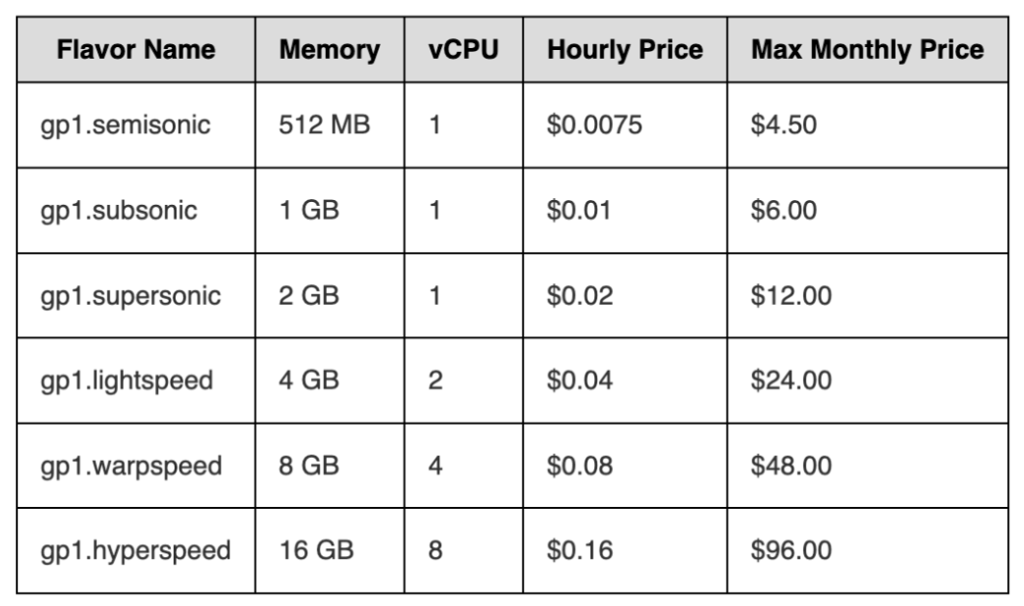
- 512MB RAM Server – starting at 4.50/month. Free bandwidth, 1 vCPU, 80GB SSD storage
- 2GB RAM Server – starting at $12.00/month. Free bandwidth, 1 vCPU, 80GB SSD storage
- 8GB RAM Server – starting at $48.00/month. Free bandwidth, 4 vCPU, 80GB SSD storage
My overall experience with DreamHost cloud hosting – 3/5
For testing I used DreamHost’s cheapest plan that provides 512MB RAM, 1 vCPU, and 80GB SSD storage. I found it flexible, as instead of being locked into a flat rate plan where you pay for resources you don’t use, DreamHost offers a flexible billing model where you’re charged by the hour for each running instance – until you hit the monthly cap.
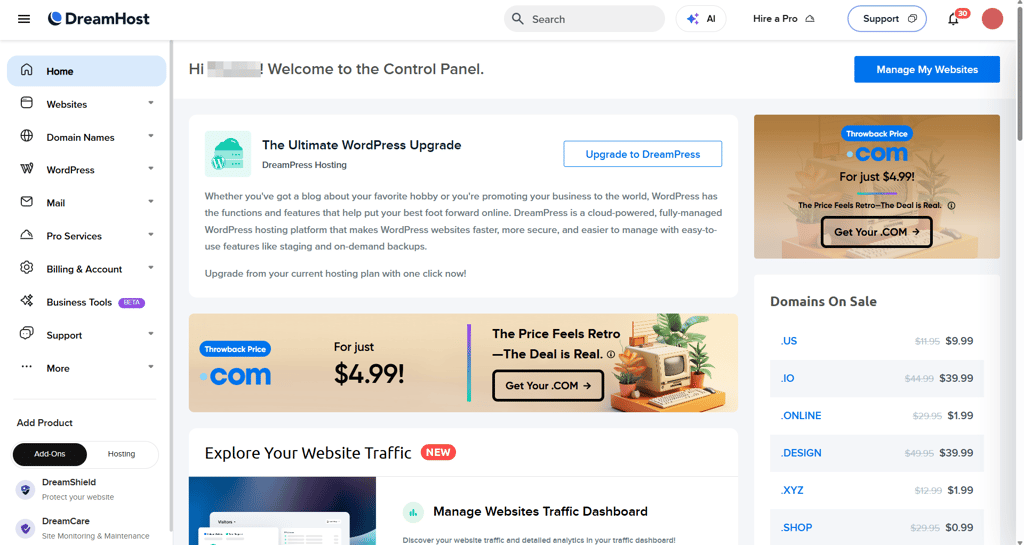
I also see this flexibility extends to its infrastructure. DreamCompute – DreamHost’s cloud computing service – runs on OpenStack (an open-source cloud platform) and includes full root access. Put simply, DreamHost’s broad OS compatibility means you can run Linux or BSD on DreamCompute. If you’re up for the challenge, you can even install Windows manually.
Curious to know more about DreamHost? Check out the full DreamHost review.
6. Cloudways – affordable managed cloud hosting with usage-based pricing

| Rating: | |
| Starting price: | From $8.25/month |
| Money-back guarantee: | ✅ Yes, 3-day trial |
| Uptime: | 99.99% |
| Speed: | 272ms |
| Disk space: | 25–3840 GB |
| CPU: | 1–32 core CPU |
| RAM: | 1–192 GB |
| Best deal: | Get up to 40% OFF Cloudways |
Cloudways offers managed cloud hosting services, with prices starting from $8.25/month. It is a reliable hosting service with easy to use-interface and usage-based pricing model. Besides, it offers a 3-day trial to test out its services.
💸Cloudways’ cheapest cloud hosting pricing
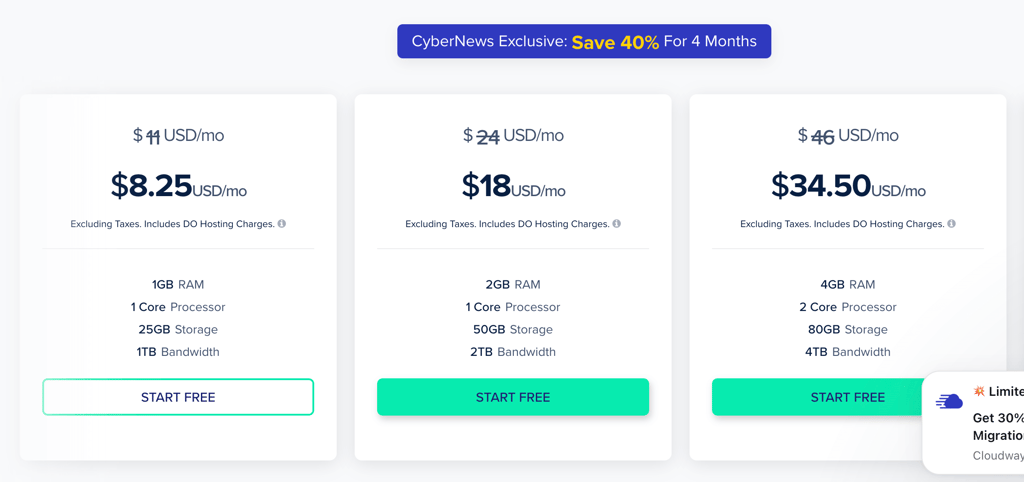
Here are the cheapest cloud hosting plans Cloudways offers:
- $8.25/month – renews at $11.00/month. Includes 1GB RAM, 1 core processor, 25GB storage, and 1TB bandwidth.
- $18.00/month – renews at $24.00/month. Includes 2GB RAM, 1 core processor, 50GB storage, and 2TB bandwidth.
- $34.50/month – renews at $46.00/month. Includes 4GB RAM, 2-core processor, 80GB storage, and 4TB bandwidth.
My overall experience with Cloudways cloud hosting – 3.5/5
To test it, I used the most affordable plan at $8.25/month, which includes 1GB RAM, 1 CPU core, 25GB storage, and 1TB bandwidth. Unlike Kamatera or InMotion Hosting, Cloudways offers a native control panel even for its cloud hosting solutions. Overall, I thought it had a pretty nice and intuitive interface. It’s not as well-organized as Hostinger, but it is quite easy to get used to. Installing applications was quite easy, although I thought the selection of apps for automatic installation was quite narrow. Plus, if you want to add a different PHP-based app, you need to do it manually.
In terms of performance, Cloudways showed quite good results. It showed a 99.99% uptime, and the average server response time was 272ms, which is a really good result.
Do you want to know more about this provider? Read the full Cloudways review.
7. HostArmada – best cloud hosting services for budget-conscious users

| Rating: | |
| Starting price: | From $1.99/month |
| Money-back guarantee: | ✅ Yes, 45-day |
| Uptime: | 100% |
| Speed: | 0.848s |
| Disk space: | 15–40GB |
| CPU: | 2–6 CPU cores |
| RAM: | 2–6GB |
| Best deal: | Get up to 80% OFF HostArmada |
HostArmada offers the cheapest cloud server hosting services on this list, with prices starting at just $1.99/month. But don't be fooled by its low price – it still packs solid resources, a wide variety of features, and strong security. It’s a great choice for individuals, small businesses on a tight budget, and even startups just getting off the ground.
💸HostArmada’s cheapest cloud hosting pricing
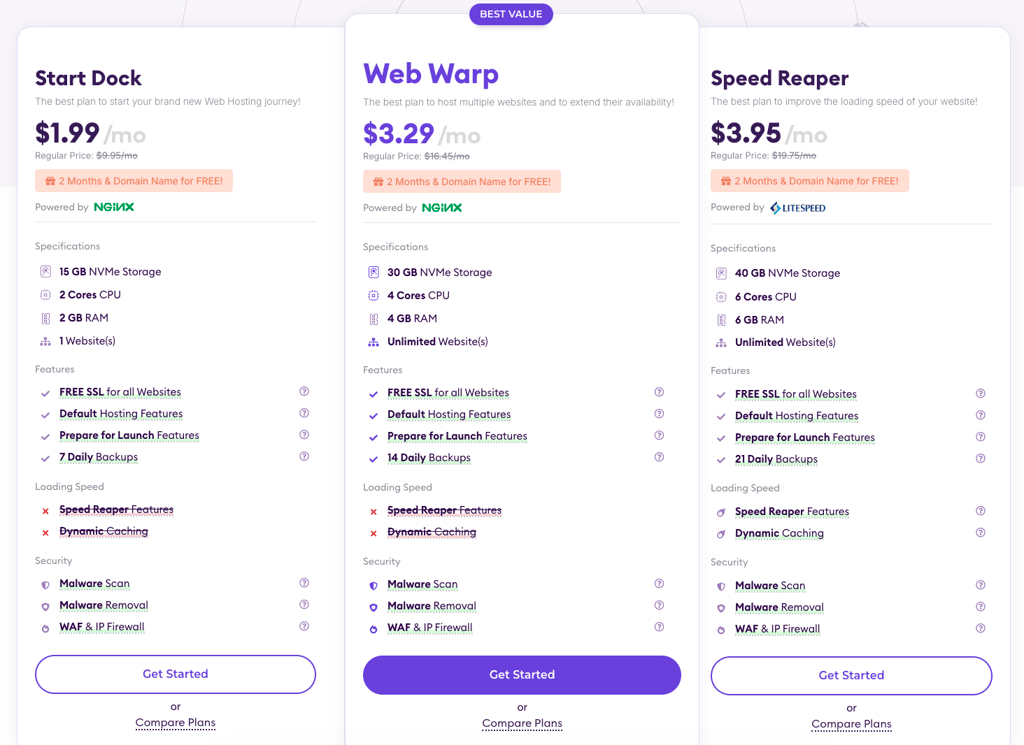
Here are all the cloud hosting plans HostArmada offers:
- Start Dock – starting at $1.99/month (renews at $9.95/month). 1 website, 15GB NVMe storage, 2-core CPU, 2GB RAM
- Web Warp – starting at $3.29/month (renews at $16.45/month). Unlimited websites, 30GB NVMe storage, 4-core CPU, 4GB RAM
- Speed Reaper – starting at $3.95/month (renews at $19.75/month). Unlimited websites, 40GB NVMe storage, 6-core CPU, 6GB RAM
My overall experience with HostArmada cloud hosting – 4/5
With cloud hosting plans starting at just $1.99/month, HostArmada’s pricing is its biggest draw and, from my experience, it doesn’t sacrifice quality. For testing, I used the Start Dock plan, which was enough for my needs.

HostArmada comes with cPanel – one of the most popular control panels on the market. Known for its ease of use and functionality, cPanel makes site management a breeze for beginners and seasoned veterans alike.
You’re not missing out on features, either. HostArmada covers the essentials with a free domain, SSL, website migration, and daily backups. On the security side, you get malware protection, virus scanning, and WAF. Plus, with data centers in 5 continents, you can choose a server close to your audience to reduce latency for a smoother browsing experience.
Is it worth it to get cloud hosting?
In my experience, getting cloud hosting is worth it if you have a large project that requires a lot of computing power. For example, I know that large online stores will benefit from higher storage and bandwidth capacity, especially during sales events such as Black Friday. In such cases, I would look for a cloud hosting provider that offers generous bandwidth and shows the best uptime results.
Some other projects that I’ve used cloud hosting for were web applications, especially those that require a lot of computing power (CPUs, RAM).
Tips on how to get the cheapest deals
Even the best cloud hosting services can be found for a cheaper price if you know how to shop smart. These are the tips I’ve personally used to score the lowest price:
- Long-term plans. Going with an annual or multi-year plan instead of monthly billing can often get you substantial discounts.
- Seasonal sales. Keep an eye out for promotions and special offers. Special events like Black Friday and Cyber Monday promotions often see prices reduced significantly.
- Student discounts. Some hosting providers offer special pricing for students, whether through free hosting credits or discounted rates.
- Promo codes. Make sure to use Cybernews hosting promo codes for the best prices.
- Trial periods and money-back guarantees. Most hosts provide free trials or money-back guarantees. The standard guarantee lasts 30-45 days, but some hosts offer extended ones. For instance, DreamHost has a 97-day money-back guarantee.
- Start small. Start with the cheapest option to save money and upgrade when needed. Many providers also offer a pay-as-you-go model, so you only pay for what you use.
Final thoughts
To sum it up, the best cloud hosting services don’t have to break the bank. There are plenty of affordable options that still offer great resources and features, excellent performance, robust security, and ease of use. The trick is knowing what to look for and where to find it.
For the best cheap cloud hosting solution that doesn’t compromise on resources, Contabo gets my vote. From just $5.28/month, it offers rich features, strong security, and full root access. However, if Contabo doesn’t suit your needs, check out the other options on this list. There’s something for everyone.
Best cheap cloud hosting FAQ
What is cloud web hosting?
Cloud web hosting uses a network of remote servers to host your website, distributing data across multiple servers. If a server goes down, this setup reallocates resources to prevent downtime. It’s ideal if you’re looking for scalability, reliability, and better performance.
Do I need cloud web hosting?
Whether you need cloud web hosting depends on your needs and preferences. It’s ideal if you need scalability, reliability, greater control, and advanced performance. Otherwise, shared or VPS hosting might suffice.
How much does cloud hosting typically cost?
Cloud hosting costs can vary significantly depending on the provider. The most affordable plan on this list is from HostArmada, priced at just $1.99/month. However, generally, cloud hosting tends to be more expensive than shared hosting.
What is the cost of a 1TB cloud server?
The costs of a 1TB cloud server depend on the provider and configuration. For large amounts like this, providers typically require you to contact them directly for a custom quote.
What are the benefits of cloud web hosting?
The benefits of cloud web hosting include scalability, cost-efficiency, and reliability. You can easily adjust resources as needed, pay only for what you use, and experience less downtime thanks to multiple servers supporting your site.