Namecheap vs Bluehost vs Hostinger 2026
Our in-house experts conduct internal independent, hands-on testing and transparent reviews of web hosting providers by using custom-built tools or utilizing industry-recognized tools and methods to ensure impartial and evidence-based assessments.
Using the same criteria for all services, we share our detailed methodologies and practices to help customers make informed hosting decisions.
Learn more

In this Namecheap vs Bluehost vs Hostinger comparison, I take a close look at 3 popular web hosting providers available today. Each company offers shared hosting, website management tools, and features designed for beginners and growing websites, but they differ in several important areas.
To help you make an informed decision, I compare Namecheap vs Bluehost vs Hostinger across the factors that matter most: pricing, performance, ease of use, security, and customer support. By examining these key categories side by side, I aim to highlight their strengths and limitations so you can identify the best fit for your needs.
Namecheap vs Bluehost vs Hostinger 2026: the verdict
Based on my testing, Hostinger is the overall winner. It delivered the best balance between performance, ease of use, and affordability, processing 14,546 requests with 100% uptime and zero HTTP failures in my stress tests. While Namecheap posted the fastest page-speed results and offers the lowest long-term pricing (from $1.88/month, renewing at $5.88/month), Hostinger justifies its higher cost ($2.24/month, renewing at $11.99/month) with stronger performance, a more polished dashboard, and more premium features included by default. Bluehost remains a good option for WordPress integration, but Hostinger provides the most complete package for most users in 2026.
| Hostinger | Bluehost | Namecheap | |
| ⭐ Rating: | |||
| 💵 Price: | From $2.24/month | From $1.99/month | From $1.81/month |
| 📑 Uptime guarantee: | 99.9% | 99.9% | 100% |
| 🔥 Coupons: | Hostinger coupon 83% OFF | Bluehost coupon 78% OFF | Namecheap coupon 71% OFF |
| Storage space (from): | 20GB SSD | 10GB SSD | 20 GB SSD |
| ✂️ Free domain (first year): | Yes | Yes | Yes |
| 💾 Automated backups: | Free (weekly) | Free automatic weekly backups | 2 times/week (without auto backups) |
| 💰 Money-back guarantee: | 30-day | 30-day | 30-day |
Pricing comparison
Pricing is often the biggest factor when choosing a web host, but the advertised monthly rate tells only part of the story. To determine which provider offers the best value, I compared introductory and renewal pricing, along with key inclusions, such as a free domain, SSL certificates, email hosting, backups, and money-back guarantees.

Performance testing
Website performance directly affects user experience, search rankings, and conversion rates. Faster-loading websites typically retain more visitors and handle traffic spikes more effectively, making performance one of the most important factors when choosing a hosting provider.
For testing, I purchased the following plans:
- Hostinger's Business plan
- Bluehost's WordPress Business plan
- Namecheap's Stellar plan
To ensure a fair comparison, I deployed the exact same WordPress website on each host using the default Twenty Twenty-Four theme. No provider received any optimization advantage. This allowed me to measure how each platform performed under identical conditions. The table below summarizes the results from our in-house page speed, stress, and uptime testing.

Ease of use: setup, migration, and more
A hosting provider should make it easy to launch and manage a website, even if you're a beginner. To evaluate usability, I tested the entire setup process with Namecheap, Bluehost, and Hostinger, including WordPress installation, domain connection, email account creation, dashboard exploration, and review of available website migration options. See how they compare.
Compared to Bluehost and Namecheap, Hostinger delivered the smoothest experience overall. Its custom hPanel feels well-organized and keeps almost everything in one place, so I rarely needed to search for settings. Installing WordPress took only a couple of minutes through the Auto Installer, which simply required selecting my domain, choosing WordPress from the application list, and clicking Install. Email setup and domain connections followed clear step-by-step workflows: hPanel guided me through creating a mailbox and pointing my domain to the correct nameservers. All without leaving the dashboard.
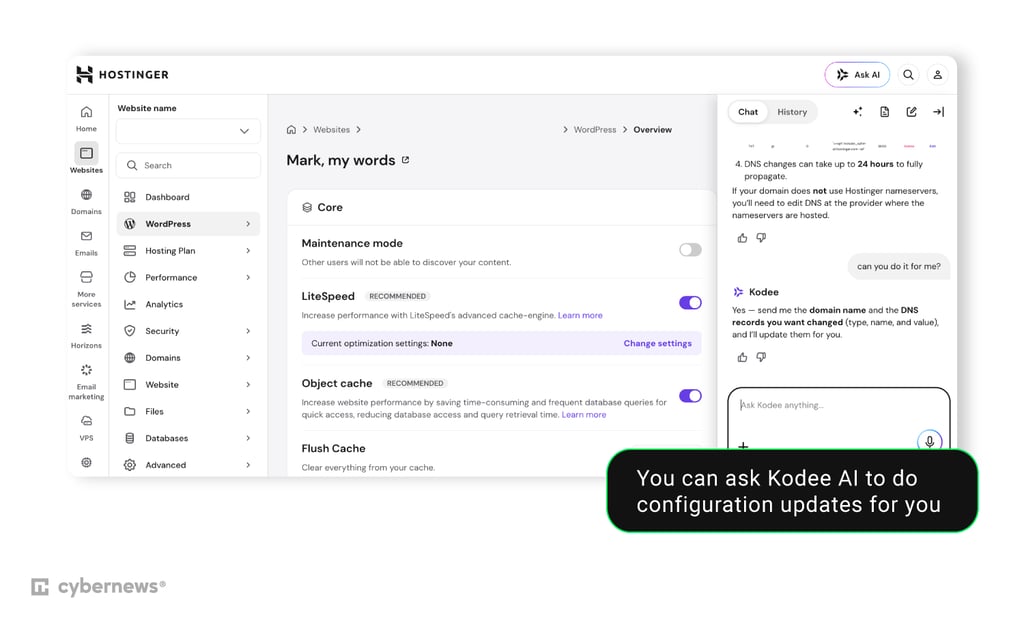
The built-in Kodee AI assistant stood out while setting up my websites because it answered configuration questions directly from the dashboard and could even perform some actions automatically. I also liked the free migration tool, which supports automatic WordPress and cPanel migrations and even lets users preview the process before purchasing. The only drawback is that users already familiar with cPanel may need a short adjustment period.
Bluehost offers a good balance between a modern dashboard and traditional cPanel. Many common tasks, including WordPress installation, SSL management, and cache controls, are accessible directly from the main dashboard, reducing the need to open cPanel. Installing WordPress was quick and uncomplicated during my testing, as Bluehost automatically installed WordPress after new account setup and prompted me to choose a theme, enter my site name, and complete a short onboarding wizard before taking me to the WordPress dashboard.
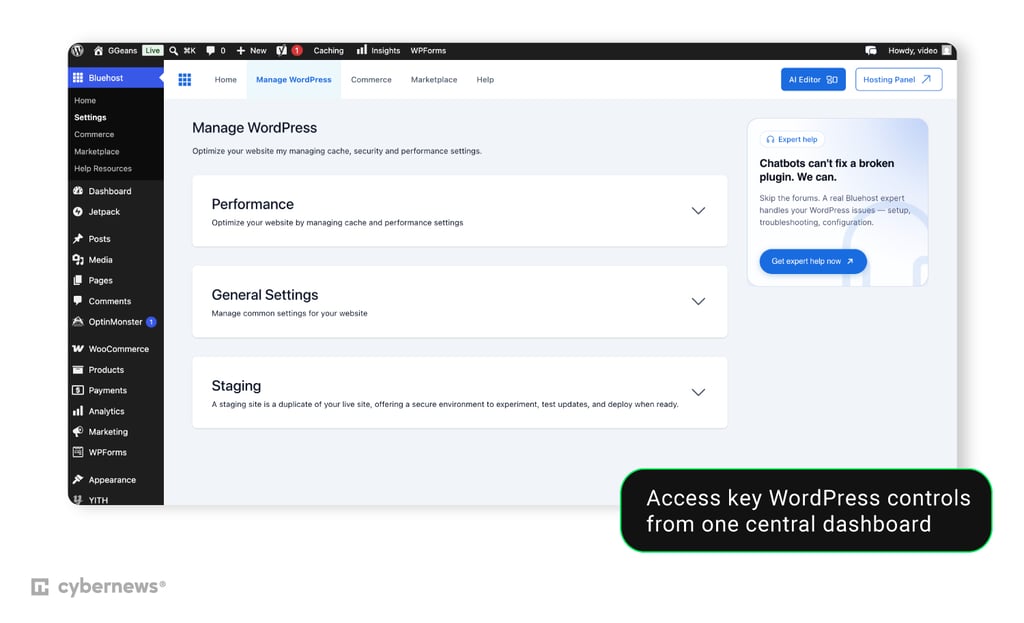
However, Bluehost’s interface occasionally felt less polished than Hostinger's, and some advanced tasks still required switching between different areas. Bluehost also relies on a paid migration service for most websites, making it less convenient than Hostinger. My experience with support has also been inconsistent over the years – sometimes issues were resolved quickly, while other times it took longer to get a clear answer.
Namecheap's interface feels the most dated of the three. WordPress installation via Softaculous is simple and reliable, but most hosting management still happens in cPanel. In day-to-day use, I occasionally had to reconnect because cPanel unexpectedly logged me out.
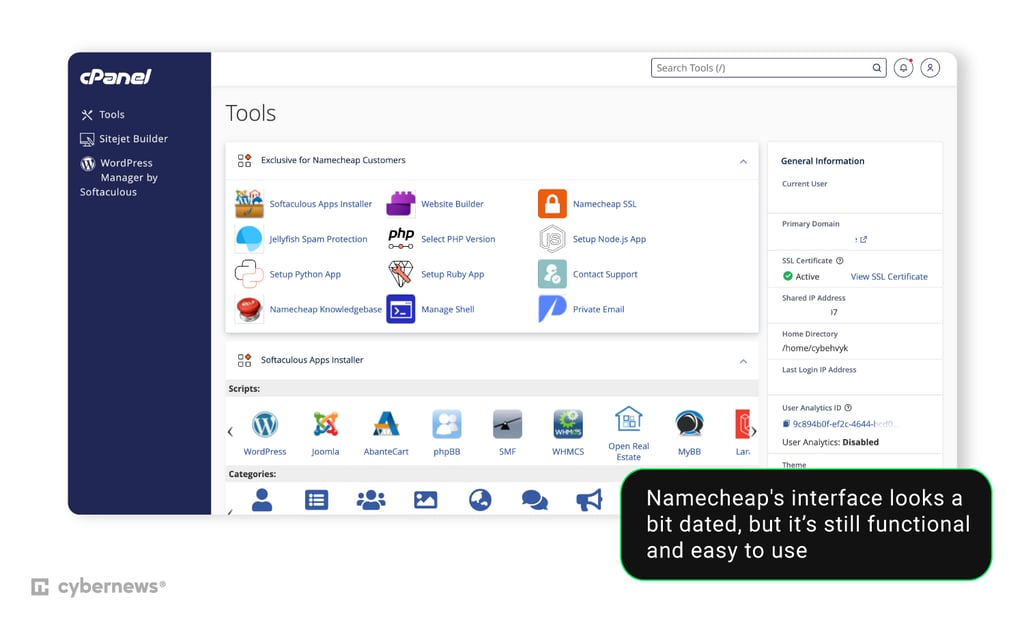
I also ran into unnecessary manual work while configuring DNS. After switching from Namecheap Web Hosting DNS to BasicDNS to install my own SSL certificate, I had to recreate DNS records, including the A record, instead of having them populated automatically. Email setup remains simple, and the migration team can handle transfers, but unlike Hostinger's self-service migration tool, the process requires contacting support.
Security
Strong security features help protect your website from malware, hacking attempts, and data loss. I compared the built-in protections included with each host to see how much security users receive without relying on additional paid tools.
Hostinger offers the most comprehensive built-in security package, with most protections included by default even on shared hosting plans:
- Free unlimited SSL certificates
- Automatic WordPress core and security updates
- Managed WordPress security
- Malware scanner and automatic malware removal
- Web Application Firewall (WAF)
- DDoS protection
- Weekly or daily backups (depends on the plan)
- Secure Access Manager for WordPress permissions
Bluehost includes all core security essentials, although some advanced protections are reserved for higher-tier plans:
- Free SSL certificate
- Automatic WordPress updates
- Malware scanning and malware removal
- Web Application Firewall (WAF)
- DDoS protection
- Weekly backups
- AI-powered malware protection on higher-tier plans
- Domain privacy included for the first year on eligible plans
Namecheap provides solid baseline protection and adds several useful security tools, but some features depend on the hosting service or plan you choose:
- Free SSL certificate
- Imunify360 malware protection
- Supersonic CDN with DDoS protection
- Automatic backups (depends on the plan)
- WordPress auto updates (EasyWP)
- Two-factor authentication for cPanel
- Machine-learning firewall and intrusion prevention
- HackGuardian and MalwareGuardian on higher-tier WordPress plans
Customer support
Hostinger, Bluehost, and Namecheap all offer 24/7 live chat and extensive knowledge bases, with ticket support available when needed.
To compare the quality of assistance, I tested how easy it was to resolve common hosting tasks using each provider's available support resources.
When assessing customer support channels, I intentionally looked for help with three common tasks: installing an SSL certificate, enabling a CDN, and migrating a WordPress website. In every case, Kodee AI was my first stop. It immediately explained where the required settings were located, linked to relevant documentation, and even referred me to some specific WordPress plugins.
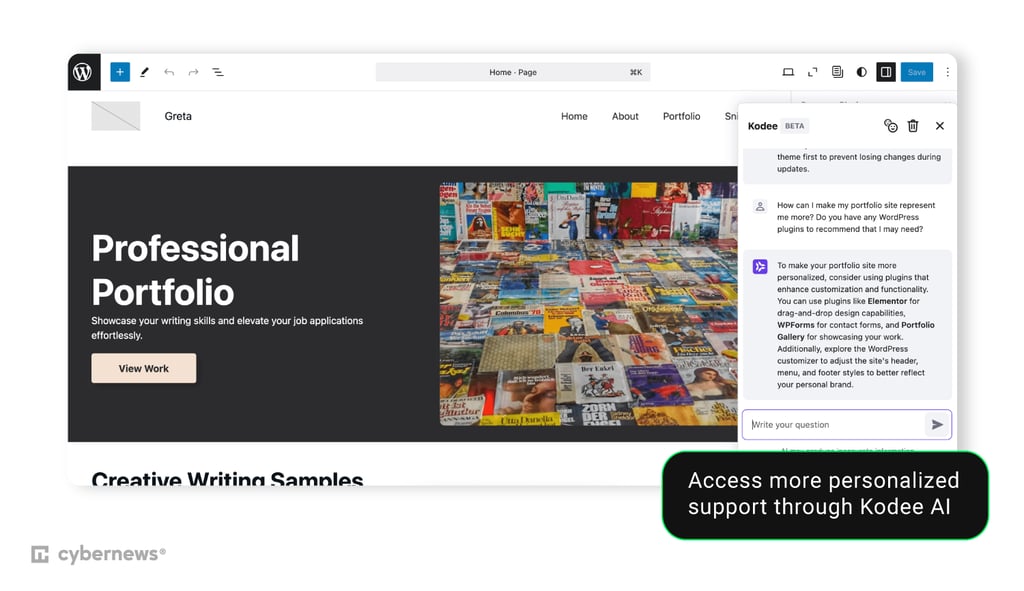
For the migration process, the built-in migration wizard was clear enough that I never needed live chat. I only opened the documentation to double-check DNS propagation steps, and the guides were easy to follow. Overall, I rarely felt the need to contact a human agent because the combination of Kodee, hPanel, and the knowledge base quickly resolved my questions.
I tested Bluehost by looking up SSL installation, enabling Cloudflare, and connecting a domain purchased elsewhere. The knowledge base covered all three topics well, and finding the articles was easy. I also contacted live chat with a beginner-style question about SSL activation. The agent provided the correct steps and pointed me to the relevant articles in the knowledge base for more information.
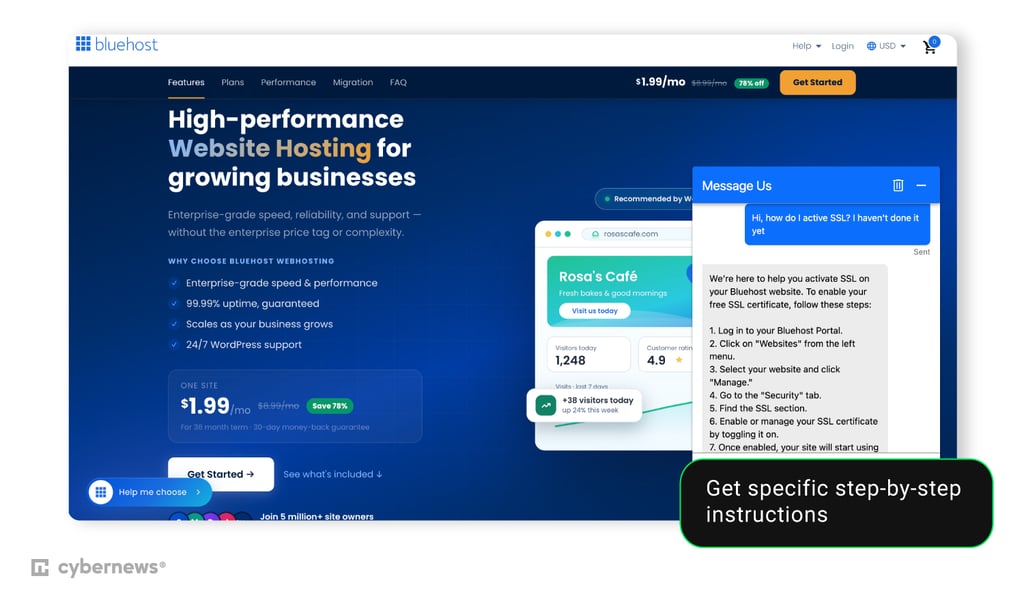
However, based on my broader experience using Bluehost over the years, support quality has been somewhat inconsistent. While availability is excellent and help is always accessible, the depth of answers can vary depending on the agent. Still, Bluehost’s dashboard itself also reduces the need for support by exposing common management tools directly from the main portal.
For Namecheap, I tested SSL setup, DNS configuration, and WordPress installation. The knowledge base contained detailed guides. However, I found Namecheap’s DNS documentation more difficult to follow than that of Hostinger and Bluehost. During my own SSL configuration, switching from Web Hosting DNS to BasicDNS also required manually recreating records that I expected to be generated automatically.
I also contacted live chat to ask about the SSL installation process. However, while I received accurate guidance, the solution was presented in a less structured manner than Bluehost did for the same request. For first-time users, this can make the installation even more confusing.
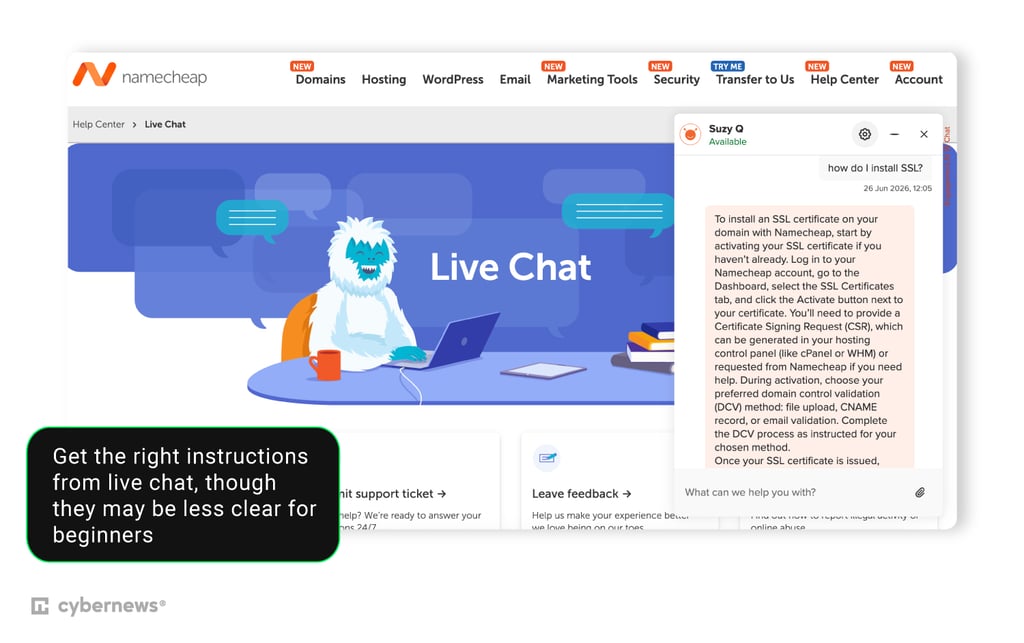
WordPress installation through Softaculous was simple enough that I did not require assistance from Namescheap. Overall, support was knowledgeable, but the underlying workflows sometimes created more manual steps than necessary.
Final thoughts
After comparing Namecheap vs Bluehost vs Hostinger across pricing, performance, ease of use, security, and customer support, I consider Hostinger the best overall choice for most users. If you're completely new to hosting, Hostinger removes more friction than either competitor. I rarely had to leave hPanel or contact support to complete common tasks. While it’s not the cheapest long-term option, its overall value makes the higher renewal price easier to justify.
That said, the best hosting provider still depends on your priorities. I recommend Hostinger if you want the best all-around experience with fast performance, modern tools, and beginner-friendly management. Namecheap is the better option for budget-conscious users who want to keep long-term costs low while still getting solid performance. Bluehost is a good fit for users building WordPress websites who prefer its integrated WordPress experience and don't mind paying slightly more for that convenience. Each provider has its strengths, but Hostinger stands out as the most complete package overall to me.