Secure WordPress hosting for agencies: 2026 comparison guide
Our in-house experts conduct internal independent, hands-on testing and transparent reviews of web hosting providers by using custom-built tools or utilizing industry-recognized tools and methods to ensure impartial and evidence-based assessments.
Using the same criteria for all services, we share our detailed methodologies and practices to help customers make informed hosting decisions.
Learn more
In this article, together with the Cybernews research team, I compare agency WordPress hosting across Cloudways, WP Engine, Kinsta, and Hostinger, focusing on protection, performance, and workflow.
Cloudways’ SafeUpdates, Cloudflare Enterprise, Copilot, client billing, and Agency Partner Program make it the best WordPress hosting for agencies in 2026.
4 best WordPress hosting services for agencies in 2026
- Cloudways – top pick for secure agency WordPress hosting
- WP Engine – secure and easy-to-use WordPress agency hosting
- Kinsta – customizable WordPress agency hosting based on Google Cloud
- Hostinger – secure choice for smaller agencies




Our in-house research team and expert writers work hand in hand to regularly test hosting services and provide accurate and fact-checked information. Discover the ins and outs of how we test and evaluate website hosting providers.
The non‑negotiables of agency‑grade security
Agency-grade security today comes with non-negotiables that cut down on risk and automate protection. Agencies managing multiple WordPress sites should opt for hosts that provide key security features. In this section, you’ll learn about those essential protections – from site isolation and multi-layer security hosting, to intelligent monitoring, backups/recovery, and AI-powered tools.
Isolated server environments
Isolation isn’t an optional perk. It means stopping the spread of risks across multiple clients. Hosting should use containers, virtual machines (VMs), or dedicate resources to minimize this “blast radius” risk.
Many leading managed WordPress hosting platforms achieve this through containerization. As an agency, demanding true isolation to protect client sites independently is crucial, while isolation also plays a key role in performance optimization. With it, server resources are allocated cleanly without noisy neighbor interference – a frequent problem on shared hosting platforms.
Multi-layer security
To fight advanced modern threats, hosting should include a Web Application Firewall (WAF), L3/L4/L7 Distributed Denial-of-Service (DDoS) mitigation, malware scanning, brute-force protection, and access controls like two-factor authentication (2FA) and IP filtering.
Each of these layers prevents attacks at a different point: WAFs block malicious traffic before it hits WordPress; DDoS protection stops traffic floods; scanners flag malware signatures; and access controls stop intrusions. This stack is essential for agencies to fight evolving vulnerabilities – and to avoid relying on vulnerable plugins. Not only that, but this multi-layer approach supports compliance by offering insight into login attempts, blocked threats, and activity logs. Most importantly, multi-layer security shifts security into the hosting platform, away from the team – where it should be.
Automated updates and staging
Mistakes can happen if updates are applied manually, such as a bad plugin that breaks a site or opens a vulnerability. That’s why hosting needs automatic updates. For instance, Cloudways’ SafeUpdates clones sites, runs tests, and only applies vetted WordPress updates.
Staging environments are equally as vital – letting agencies test changes in a sandbox (closed) environment before pushing them live. When combined, automated updates and staging minimize downtime risk, client issues, and manual effort – essential when managing multiple sites at scale.
Backups and recovery
Backups and recovery are akin to an insurance policy – a must. Hosting should offer daily (or more frequent) backups, stored off-site or in different regions, with quick one-click restoration. As such, it’s easy to roll back instantly if there’s a plugin conflict, hack, or human error.
It’s also important to consider recovery objectives: how much data an agency is willing to lose (recovery point objective – RPO) and how fast an agency needs the site restored (recovery time objective – RTO). Agencies with many clients can’t afford long downtime or data gaps – so a well-chosen platform will help hit both targets and restore confidence quickly.
Compliance and data residency
For clients in regulated industries – like healthcare, finance, or legal – agencies should opt for hosting solutions that respect data residency and compliance standards. Choose hosts that store data in specific regions and keep it encrypted as it moves (data in transit) and when it’s stored (data at rest).
The infrastructure should also support HIPAA/GDPR compliance, even if hosting platforms don’t formally guarantee it. Remember, HIPAA requires a signed business associate agreement (BAA). Use access logs, permission controls, and secure backups to support compliance.
Monitoring and AI assistance
Finally, you can’t fix what you don’t see – so real-time visibility is a game-changer. A great hosting platform helps flag downtime, failed logins, or suspicious traffic before clients even notice. Real-time alerts, clear dashboards, and proactive tools save agencies from the task of constant cyber-defense.
It’s even better if there’s smart help available. For example, Cloudways’ Copilot uses AI to pinpoint unusual traffic and suggest next steps – so non-developers can jump into action without escalating the issue to the IT department. Smart monitoring features add context, clarity, and confidence to an agency’s workflow.
The right hosting platform is like a valuable extension of your team, and shouldn’t be a burden – properly minimizing risk, stress, and bad surprises. Agencies should lean toward hosting that’s secure by design, scalable by default, and made for high-stakes, client-facing work.
Best WordPress hosting for agencies – detailed reviews
To help you decide which product is the best for you, I created a detailed breakdown of each product, giving you a look at their respective features.
1. Cloudways – the best WordPress hosting for agencies

| Rating: | |
| Agency plan price: | From $6.60/month |
| Money-back guarantee: | ❌ No, only 3-day trial |
| Best deal: | Exclusive: Save 40% For 4 Months |
Cloudways offers the broadest control here over the hosting environment. Agencies get deeper control through isolated virtual machines per server. Cloudflare Enterprise – included on the Autonomous plan, and optional on the Flexible plan – and the included Imunify360 help secure boundaries between client sites, so if one site goes down, it doesn’t affect others. Workflow-wise, Cloudways has useful features: client billing, server transfers, team role control, and Copilot – an AI system that flags unusual behavior.
Cloudways’ SafeUpdates feature clones a site, runs checks, and allows only updates that pass. Furthermore, one-click staging keeps experimentation safe. Meanwhile, one-click SSL/domain setup, backups with point-in-time restores, and quick app deploys speed up launches.
Cloudways also unifies billing and operations. You get client billing with invoicing and subscriptions, role-based team access, and server transfer for clean hand-offs when site or account ownership changes.
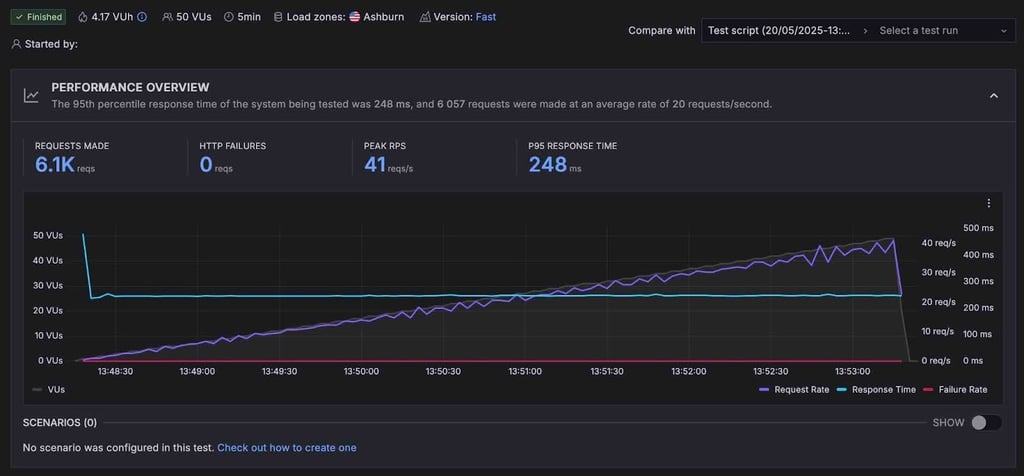
Performance-wise, Cloudways was solid. It can easily handle agency-scale traffic. I saw 100% uptime with zero HTTP failures and 95th percentile response times of 248ms in a 50-user load test. This is due to Cloudways Lightning Stack, which is built for modern, dynamic WordPress and WooCommerce sites that require consistent speed under load. Powered by an NGINX and PHP-FPM architecture, it’s designed to handle real-time requests more efficiently than traditional stacks.
While not the most beginner-friendly to set up, Cloudways is made for agencies that want hands-on control. It’s also our top pick for the best VPS for WordPress, thanks to its flexibility, performance, and agency-focused tooling.
2. WP Engine – easy-to-use WordPress hosting for agencies

| Rating: | |
| Agency plan price: | From $27.00/month |
| Money-back guarantee: | ✅ Yes, 60-day |
| Best deal: | Get up to 10% OFF WP Engine +3 months free |
WP Engine has been around for a while, and is very familiar with WordPress hosting. It’s easy to use and generally dependable.
WP Engine provides multi-layer security hosting features like DDoS protection, malware scanning, and managed WAF. Some of that depends on the plan. Core, PHP, and MySQL updates are built in, while plugin/theme updates use the Smart Plugin Manager – an add-on with visual checks.
Site isolation is at the platform level, which isn’t bad, just not as locked down as VM or container setups (e.g., Kinsta). Regarding backups, they run daily with quick restore options. There are also tools like transferable installs and staging. WP Engine offers an agency program, but it’s not very aggressive on workflow automation. All in all, it’s a familiar system with minimal fuss.
3. Kinsta – secure Google Cloud-based WordPress agency hosting
| Rating: | |
| Agency plan price: | From $284.00/month |
| Money-back guarantee: | ✅ Yes, 30-day |
| Best deal: | Get Kinsta, now up to 17% OFF! |
Kinsta runs everything in isolated containers on Google Cloud. Each WordPress site is isolated with its own resources – good for performance, and even better because it stops one bad site affecting another.
Across Kinsta’s plans, Cloudflare’s WAF and DDoS protection are standard now – so there’s no need to pay extra. Daily backups are included. Plus, if something goes wrong, Kinsta’s “hack-fix” promise means the provider will help resolve your issue.
As for plugin updates, you control the core ones, while plugin/theme updates require Kinsta’s paid Automatic Updates with visual testing. Kinsta’s system isn’t as hands-off as SafeUpdates, but it does the job. Interface-wise, it’s easy to work with, and Kinsta’s reseller-friendly agency tools cover the basics. Overall, Kinsta is reliable and isn’t complicated to set up.
4. Hostinger – secure WordPress hosting provider for small agencies

| Rating: | |
| Agency plan price: | From $29.00/month |
| Money-back guarantee: | ✅ Yes, 30-day |
| Best deal: | Get up to 73% OFF Hostinger VPS |
Hostinger is known for keeping things cheap and simple. It offers basic account or site isolation, some DDoS protection, and CDN access – depending on the plan. Malware scans and backups are included on higher tiers. For plugin updates, the controls are there, but they’re limited compared to the others on this list.
Hostinger’s Pro plan offers simple website management, with separate accounts for each client’s website. It also offers whitelabeled solutions, helping you build your brand. It lacks Cloudways’ or Kinsta’s client billing or deeper agency hosting workflow features, so those running a more complex operation may hit some walls. However, for supporting small sites on tight budgets, it’ll do the job, especially if you're looking for one of the best web hosting options for simple, low-cost projects.
Our performance testing showed 99.52% uptime, with strong performance in North Virginia and London and some lag in the Asia-Pacific region. In the end, Hostinger is an excellent choice for a small, start-up agency to start off with before moving to a scalable solution like Cloudways.
Cloudways vs WP Engine vs Kinsta vs Hostinger (what agencies should evaluate)
You’re bound to run into marketing hype when comparing agency-friendly hosting platforms. What really matters, however, are the built-in features that keep you secure while reducing manual work, and making collaboration a breeze.
In this section, you’ll see what four major players – Cloudways, WP Engine, Kinsta, and Hostinger – actually deliver. In the at-a-glance table below, you’ll find six areas that matter most for agencies: isolation, multi-layer security hosting, backups, automated updates, CDN reach, and client billing or workflow support.
Note: Plan details vary. Confirm WAF, CDN, backups, and update options before choosing a provider.
| Feature | Cloudways | WP Engine | Kinsta | Hostinger |
| Isolation model | VM-based server isolation; app-level separation | Shared platform; isolated resources (higher tiers) | Container isolation | Account/site isolation |
| WAF & DDoS | Imunify360 firewall (included) + Cloudflare Enterprise (included on Autonomous; add-on on Flexible) | Standard CDN; Cloudflare Enterprise add‑on | Cloudflare CDN with managed WAF/DDoS included across plans | DDoS protection; no WAF confirmed; CDN options |
| Malware scanning | Included scanning; malware removal add-on | Included (varies by plan) | Included + remediation policies | Basic/plan‑dependent |
| Auto updates | SafeUpdates (add-on) | Core, PHP, and MySQL auto; Smart Plugin Manager (add‑on) | Core auto; plugins/themes add-on (visual testing) | Core/plugins/themes auto (no testing) |
| Backups and restores | Managed backups + 1‑click restore | Daily + options | Daily + options | Daily/plan‑dependent |
| CDN | Cloudflare Enterprise (included on Autonomous; add-on on Flexible) | Standard CDN; Cloudflare add‑on | Cloudflare Enterprise (included) | CDN (Premium+ plans) |
| Agency tooling | Client billing, team roles, server transfer, Agency Partner Program | Partner program, transferable installs | Agency Partner Program, roles | Basic agency program, allowing for commission earnings |

Performance under pressure = part of security
You don’t want a website to slow down or fail during promo, launch, or attack – that’s not only a performance issue, but also a security issue for agency WordPress hosting. A security issue would incur real costs, like abandoned carts and lower rankings. Performance should be treated as part of the safety plan, so here’s what to watch for – and keep watching:
- Time to First Byte (TTFB): a quick response shows the site is “alive.”
- Tail latency (p95/p99): how the slowest visits feel. If the worst 5% are painful, visitors will remember that.
- Cache hit ratio: the higher the value, the less your database has to work – boosted by object caching such as Redis or Object Cache Pro.
- CDN/edge behavior: the “front door” that should absorb traffic surges and bad bots – especially with Cloudflare Enterprise add-on for WAF and smart routing.
- Uptime and reachability: checks from multiple regions, every minute, with alerts for when anything blips.
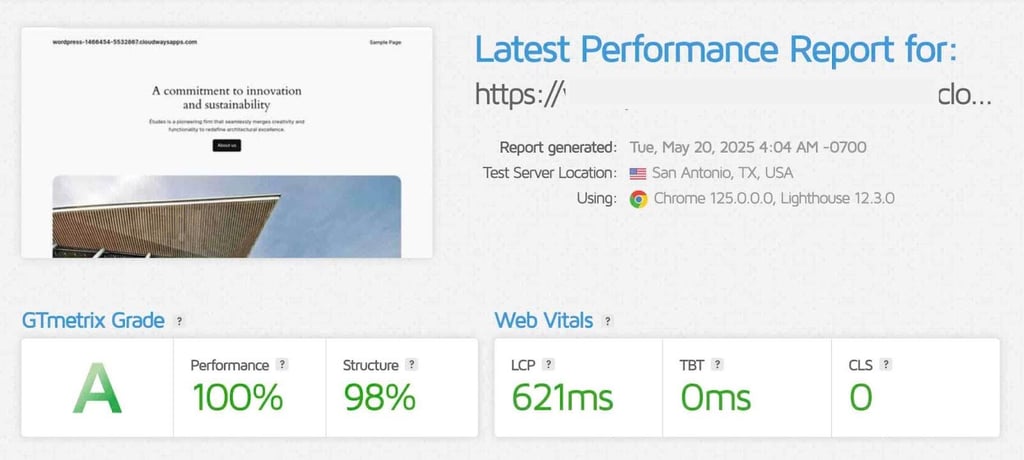
In page-load snapshots, our Cloudways WordPress test site showed snappy results:
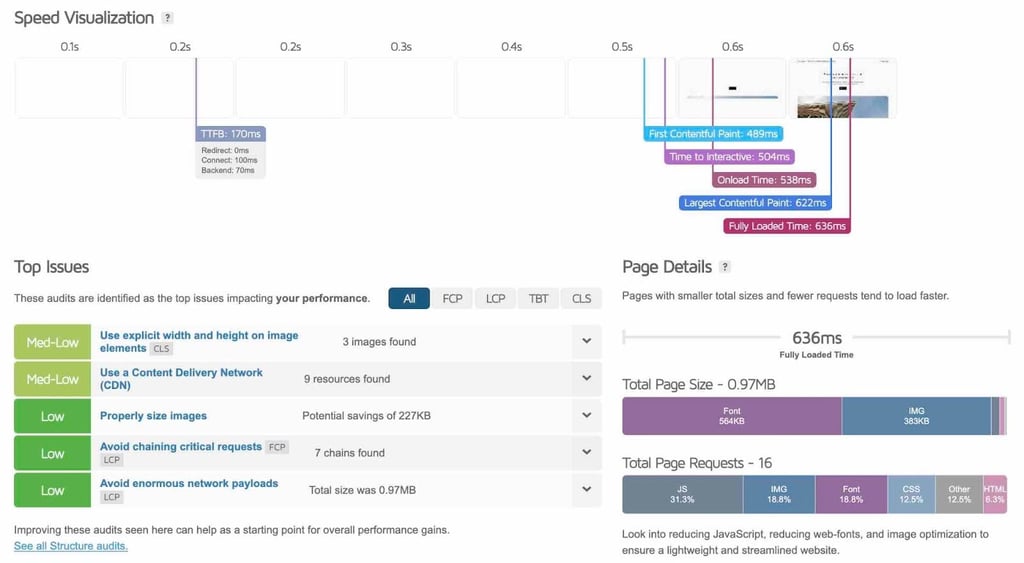
GTmetrix (San Antonio):
- TTFB: 170ms
- LCP: 621ms
- Fully loaded: 636ms
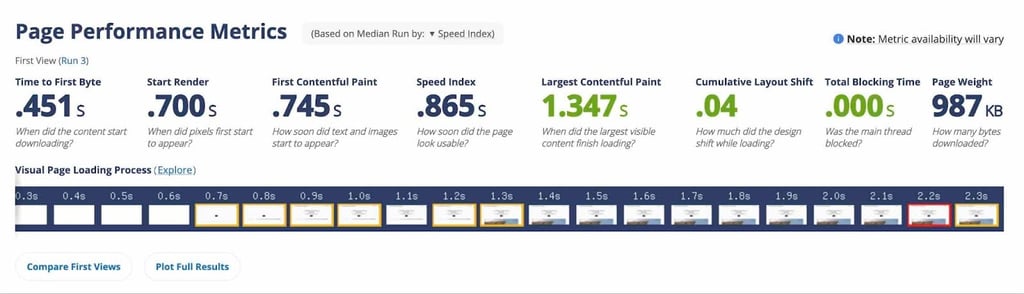
WebPageTest (Dulles):
- TTFB: 0.451s
- LCP: 1.347s
- Fully loaded: 0.865s
Under a 5-minute/50-user load test (Ashburn), performance was steady without any worrying spikes:
- Requests served: ~6,100
- HTTP failures: 0
- p95 latency: ~248ms
Multi-region uptime probes:
- Uptime: 100% observed
What to test in a load test:
- TTFB: under 500 ms.
- p95 latency: under 300 ms.
- Cache hit ratio: > 85%.
- CDN success rate and edge response times.
- Uptime across global probes.
- HTTP failures: 0 (investigate any).
It’s essential to know how to test safely – without harming production. Here’s what to consider:
- Run the first load tests on staging using a copy of the site.
- Start small, and then increase rates and duration. Stop at the first sign of stress you see.
- If you must test on the live site, watch closely with alerts – and be ready to roll it back immediately.
- Don’t test during real campaigns.
- Keep data compliant. Don’t use test data that includes personal information. Always respect provider rate limits.
Finally, use edge and isolation. Edge caching serves content near visitors so fewer requests hit your server. Isolation keeps sites separate so issues don’t spill over.
Implementation checklist
Use this checklist before every launch, and at least once per quarter. Assign someone at your agency to control each task, and make sure you set clear deadlines.
Hosting and region
- Choose the region nearest your audience
- Check latency from 3+ global probes
- Verify data residency and compliance
Isolation and access
- Isolate each app and database per client
- Separate high-risk clients
- Enforce least-privilege access with 2FA
- Revoke and rotate keys on offboarding
Edge, WAF, and CDN
- Enable an enterprise WAF/CDN when needed
- Force HTTPS and set HSTS
- Use HTTP/2-3
- Apply performance-aware cache rules
Backups and recovery
- Automate daily off-site backups
- Retain 14–30 days of snapshots
- Test restores regularly
- Snapshot before major changes
Staging and updates
- Maintain staging per client
- Use SafeUpdates or test-before-apply so only tested updates go live
Monitoring and alerts
- Monitor uptime every 1–5 minutes
- Alert on TTFB/p95 latency, cache hit ratio, and CDN usage
- Monitor for malware and WAF issues
Compliance and business ops
- Map GDPR/CCPA/HIPAA needs to regions/providers
- Document encryption, retention, deletion, and incident response
- Centralize billing and roles; maintain a DR contact tree per client
Conclusion
You now understand just how important secure WordPress hosting for agencies is, and why it’s non-negotiable today. A successful agency wants protected clients, smoother delivery, and healthier margins.
One weak site can ruin months of hard work. Security isn’t just firewalls and scans, especially when managing busy portfolios and multiple clients today. When you’ve got tight security inside your hosting platform, you won’t stress about everyday tasks like updates, staging, backups, and access. Your team ships faster and spends less time firefighting – which becomes your competitive edge.
Evaluate your current setup: isolation, WAF/CDN, backups, staging and update flow, monitoring, and access controls against the checklist. If you find a gap, try out the trials agency-ready platforms offer for a low-pressure experience – or migrate entirely. Explore the Agency Partner Program for valuable perks and features. Don’t wait for a breach to write your security plan – bake it into your hosting today.

FAQ
What is the best secure WordPress hosting for agencies?
Look for multi-layer security, isolated server environments, automated updates, and agency-specific workflows. This guide compares Cloudways, WP Engine, Kinsta, and Hostinger; Cloudways pairs secure WordPress hosting with SafeUpdates, Cloudflare Enterprise, Copilot, client billing, and an Agency Partner Program.
Why do agencies need isolated server architecture?
Isolation prevents one compromised site from affecting others, a critical safeguard in multi-client WordPress hosting. Containers/VMs and permissioned access reduce cross-site risk.
How do Cloudways, WP Engine, and Kinsta approach security?
Leading hosts layer WAFs, DDoS protection, malware scanning, staging, and backups. Cloudways also offers Cloudflare Enterprise as an add-on plus SafeUpdates to test and apply WP updates safely.
What does “multi-layer security hosting” include?
Network- and app-level protection: WAF, DDoS mitigation, login hardening, malware scanning, backups, and real-time monitoring – ideally with isolation and automated patching.
Is Cloudways good for compliance (GDPR/HIPAA)?
Agencies can choose regions and underlying clouds to help meet data residency and compliance needs. Position it as “supports compliance efforts” with encryption, backups, and access controls; verify formal requirements per client.
What is Cloudways SafeUpdates?
Cloudways SafeUpdates is an automated process that clones, tests, and only applies WordPress updates when checks pass, reducing breakage and boosting security posture for agencies.
What is Cloudways Cloudflare Enterprise?
Cloudways Cloudflare Enterprise is an add-on providing enterprise-grade WAF, DDoS mitigation, and global CDN acceleration for secure web hosting and performance at the edge.
What does Cloudways Copilot do?
Cloudways Copilot is an AI assistant that surfaces insights, monitors resources, and can suggest or apply common fixes. It is mostly helpful for busy agency teams.
Do I need a separate billing tool for hosting clients?
Cloudways includes client billing and invoicing so agencies can centralize payments alongside hosting operations.
What performance features matter for agency hosting?
When it comes to agency hosting, Edge/CDN, object caching, PHP optimization, and autoscaling paths, and DDoS absorption are crucial, as these core functionalities keep sites fast during traffic spikes.
How often should backups run for client sites?
Backups for client sites should run daily (or more frequently for high-change sites) with easy one-click restores. I suggest aiming for clear RPO/RTO targets per client SLA.
Is Hostinger suitable for agencies?
Hostinger offers budget-friendly options and basic protections. That said, it lacks more advanced solutions. Agencies needing multi-layer security and advanced workflows often opt for Cloudways, WP Engine, or Kinsta.
What agency-specific hosting features save the most time?
Staging, SafeUpdates, client billing, server transfer, team roles/permissions, and an Agency Partner Program for priority help and co-marketing.
How do I migrate a client’s WordPress site securely?
Use a trusted migrator tool or managed migration, enable SSL, verify DNS/TTL, and test on staging before switching traffic.