Russian spies hijack hotel WiFi worldwide to infect travelers with malware, Microsoft warns
Russia's Midnight Blizzard is using fake Windows and browser updates to infect business travelers with malware and steal Microsoft 365 credentials.
Image by ymgerman | Shutterstock

 Follow us
- Russian spies are hijacking hotel and conference WiFi networks worldwide to infect corporate travelers with malware.
- The malware can steal passwords and files, log keystrokes, and activate a victim’s camera and microphone.
- Microsoft warns travelers to avoid unexpected update prompts and use private hotspots whenever possible.
Key Takeaways by nexos.ai, reviewed by Cybernews staff.
Russian hackers have hijacked hotel and conference WiFi networks worldwide, using fake login portals and software updates to infect travelers with malware and steal sensitive data, Microsoft warned Friday.
Microsoft says Russian hackers are ramping up espionage attacks on Western organizations, but instead of going after enterprise networks directly, they’re targeting the corporate employees who travel the globe on their behalf.
The threat actor behind the nation-state campaign, Midnight Blizzard, has been compromising legitimate WiFi networks at hotels, conference centers, and other hospitality venues worldwide to spy on unsuspecting business travelers, the tech giant says.






Primarily focused on the US and Europe, the threat group is said to typically target governments, diplomatic entities, NGOs, and IT service providers – all to gain long-term access to corporate and government networks.
Hotel WiFi becomes a Russian spy trap
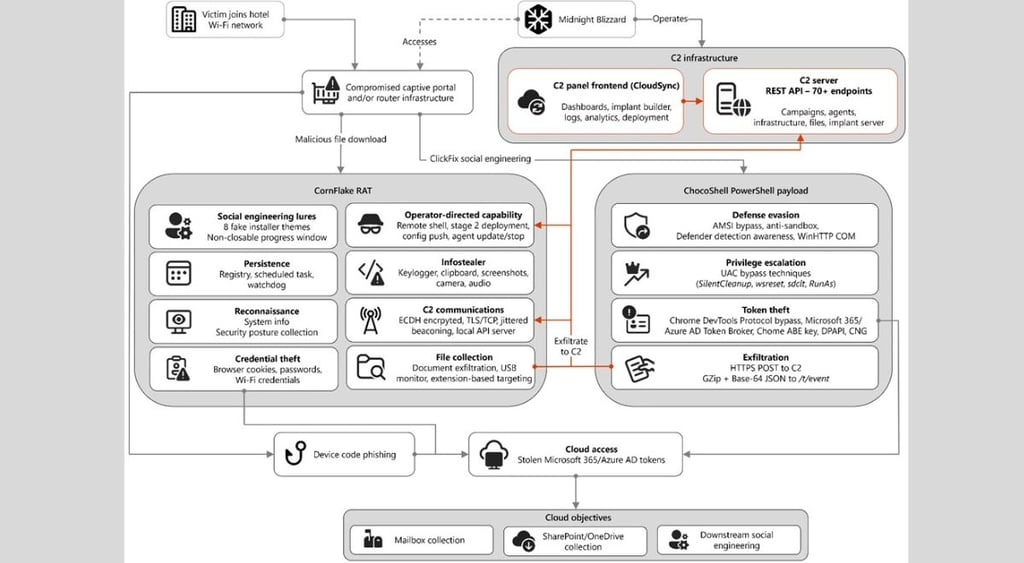
Dubbed "CaptiveCrunch," Microsoft says the campaign has been active since at least May and relies on compromised captive portals – the login pages travelers use to access hotel WiFi.
Once the WiFi network is compromised, Storm-2945 – a Midnight Blizzard sub-cluster linked to NOBELIUM and Cozy Bear – steals Microsoft 365 credentials and deploys malware through fake login pages and fraudulent software update prompts.
What’s more, researchers warn the Microsoft findings could be just the tip of the iceberg.
They say the espionage campaign could extend to any organization using captive portal WiFi networks, including airports, universities, and healthcare facilities.
“By compromising hotel WiFi infrastructure, attackers can intercept traffic, harvest credentials, and silently monitor high-value targets while they travel, turning trusted hospitality networks into platforms for long-term espionage rather than opportunistic cybercrime,” says Michael Centrella, Head of Public Policy at SecurityScorecard.
“Business travel has become an extension of the enterprise attack surface,” he says.
“Executives, government officials, and employees routinely access sensitive corporate resources from hotels, often assuming the network is legitimate,”Centrella says.
Threat actors know this and are shifting from direct attacks on corporate networks to attacks on environments where employees naturally let their guard down, he explains.
Fake updates unleash powerful malware
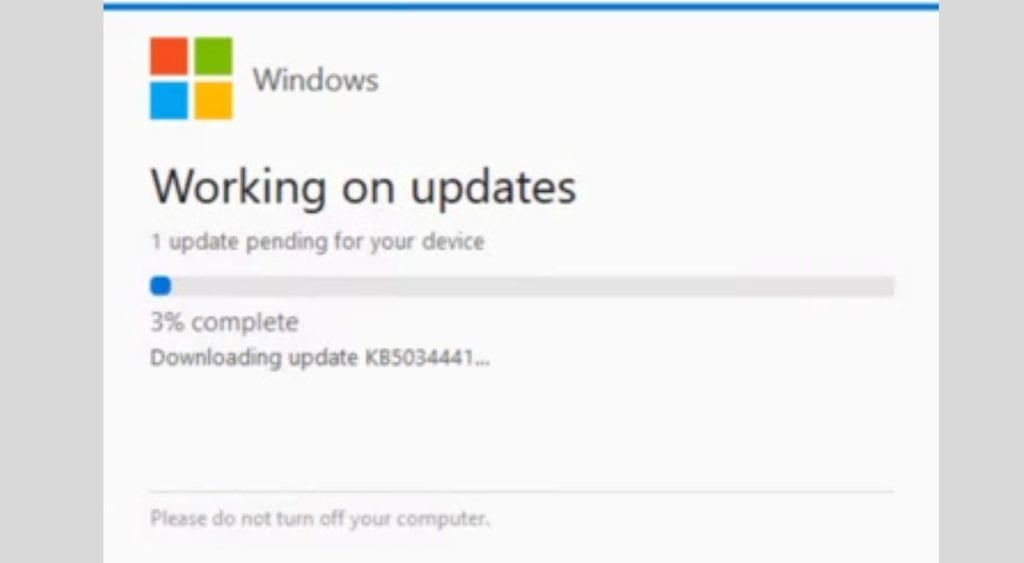
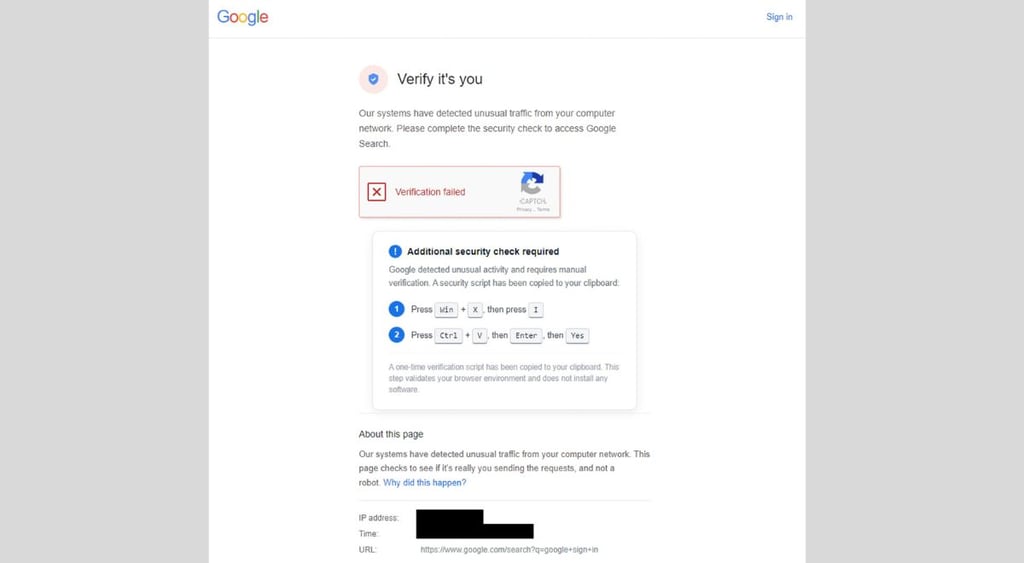
Microsoft says the attackers, instead of creating fake wireless networks, hijack legitimate infrastructure, allowing them to redirect victims to convincing Microsoft sign-in pages or prompt them to install fake Windows or browser updates that secretly deliver malware.
“Campaigns like this show that attackers are investing in persistent access through third-party infrastructure, allowing them to collect intelligence long before an organization detects unusual activity within its own environment,”Centrella says.
Using ClickFix tactics, the attackers trick victims into installing CornFlake, a Windows remote access trojan (RAT), and ChocoShell, a PowerShell infostealer.
Together, the malware can steal Microsoft 365 credentials, session cookies, files, and passwords – all while maintaining persistent access to remotely monitor activity on the infected devices.
The malware can also log keystrokes and activate microphones and cameras. In some cases, Microsoft also observed the attackers targeting Android devices.
How corporate travelers can stay secure
Microsoft reminds travelers to avoid installing software updates when connected to a public WiFi network and instead install updates only when prompted by trusted operating system mechanisms rather than pop-up messages or website alerts.
The Cybernews community is talking about this. Be a part of the conversation.
The same rules should apply to downloading certificates, browser updates, network troubleshooting tools, and security utilities.
Microsoft says users should verify WiFi login pages before entering credentials, and rely on enterprise-managed travel routers or hotspot devices instead of public wireless networks whenever possible.



Stay updated with our latest stories and follow us on social media
Be the first to discover new stories, ideas, and updates from our team.
Centrella, also a former assistant director for the US Secret Service cybercrime and fraud unit, says organizations should always treat travel-related connectivity as an elevated-risk scenario.
He recommends companies “enforce phishing-resistant multi-factor authentication, require encrypted VPN connections on untrusted networks, continuously monitor for anomalous login activity, and limit privileged access for traveling employees.”
“As espionage-focused operations continue to evolve, organizations must extend security visibility beyond their own networks to account for the external environments where business is conducted,” Centrella said.