KrispCall review 2026: features, pros and cons, pricing
Being behind major reports like The Mother of All Breaches and RockYou2024, our in-house cybersecurity experts and journalists provide unbiased, real-world testing and in-depth analysis.
We maintain complete transparency by openly sharing our testing methodologies with our audience.
Learn more

KrispCall is an AI-powered cloud telephony solution for your business which provides virtual numbers, SMS, and unified communications – all in one place. Together with the Cybernews research team, I deeply researched KrispCall, because demand is growing for remote teams, global customers, and unified communications tools in 2026. For me, tools like KrispCall are increasingly relevant.
In my KrispCall review, you can expect an honest, in-depth evaluation covering the tool’s features, pricing, pros and cons, and use cases. I’ve also compared it to alternatives. If you’re wondering whether KrispCall is legitimate, read on below.
KrispCall overview
KrispCall unifies several phone tools into one work area – such as calls, SMS, and various contact workflows. My Cybernews colleagues and I found the platform capable for the price.
My research tells me that call quality is stable, routing options are flexible, and the unified Callbox view keeps conversations accessible to anyone who shares a number. Furthermore, agents can process calls, SMS, voicemail, and notes from the same thread. Meanwhile, managers get access to analytics, live call monitoring, and even AI summaries and AI rephrasing.
To me, KrispCall is much more than a business phone app. However, it’s not perfect – since some advanced features need diligent setup – but generally it’s functional and scalable if you’re a growing team that needs modern voice, SMS, and collaboration features. The KrispCall team clearly tried to make the tool intuitive and usable.
| Product name | KrispCall |
| Category | VoIP, cloud telephony, virtual phone system, unified communications |
| Availability | Virtual numbers in 100+ countries, including the US, Canada, UK, Australia, Germany, France, Brazil, and Singapore |
| Platforms | Web app, desktop apps, iOS, Android, Chrome extension |
| Starting price | From $15/user/month |
| Money-back guarantee | 14-day refund if you cancel within 14 days of purchase (and notify support) |
| Free plan / trial | No free tier, free demo can be scheduled |
| Best for | Startups, SMBs, remote teams, sales/support desks, and multi-country call centers |
| Key features | Shared numbers, Callbox collaboration, IVR (Interactive Voice Response), call recording, analytics, AI rephrasing, call transcription, power dialer (beta), bulk SMS |
| Integrations | 100+ integrations including HubSpot, Pipedrive, Zoho, ActiveCampaign, Freshsales, Microsoft Teams, Zapier |
| Support | 24/7 human support (live chat/email), knowledge base |
| Company HQ | Singapore |
| Alternatives | Aircall, JustCall, CallHippo, Dialpad, OpenPhone, CloudTalk |
What is KrispCall
KrispCall is a cloud-based VoIP (Voice-over-IP) telephony solution offering virtual numbers from over 100 countries. Voice calls, SMS and MMS, voicemails, call recordings, and conversation history for each business number lives in one unified workspace.
The core idea is to bring calls, texts, voicemails, and global numbers into a single, virtual interface – so your team doesn’t have to shift between separate apps or devices. This service is entirely cloud-based – meaning teams log in from web, desktop, or mobile apps and start calling without requiring extra phone hardware on the premises.
KrispCall combines global numbers, routing rules, team collaboration, and perks like Bulk SMS and AI-assisted messaging – so it’s attractive for remote teams, as well as global or distributed teams.
In my view, KrispCall’s target customers are startups, SMBs, support/sales teams, and generally any global customer-focused organization that needs customizable phone and messaging tools in many countries.
Key features and capabilities
KrispCall’s key features include its virtual and global coverage, unified callbox, and rich integrations. I’ve broken these down in-depth below.
Virtual and international numbers plus global coverage
KrispCall’s key offering is the global numbers – available as local, mobile, and toll-free virtual numbers in over 100 countries. This helps you appear local to customers.
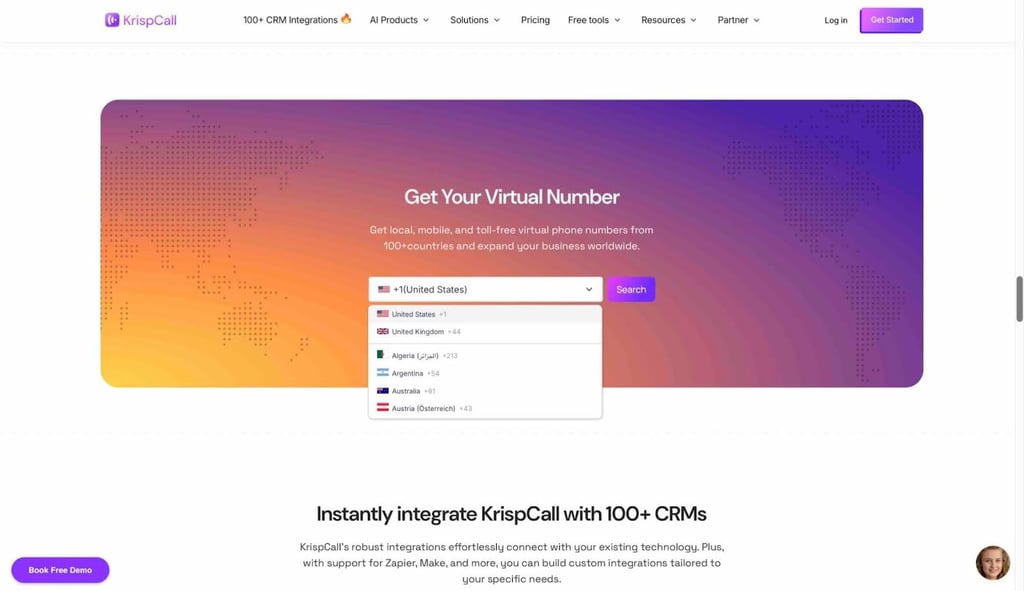
You can also use different numbers per team or situation when you need them.
Unified Callbox and centralized communications interface
In the Unified Callbox, every interaction is related to a number – calls, SMS and MMS, voicemails, internal notes, tags, and call logs.
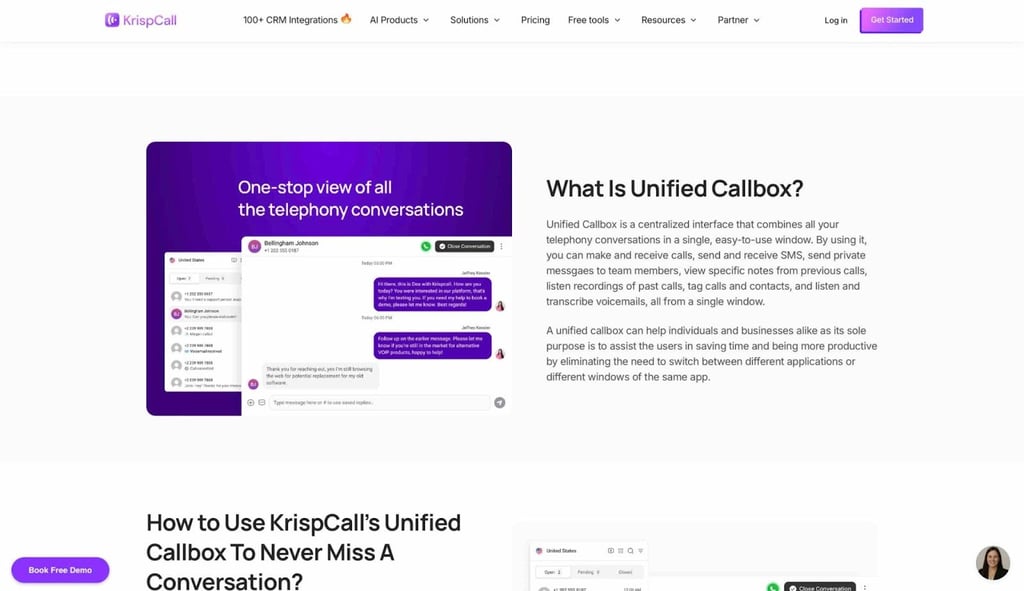
Here, agents can pin important conversations, mark them as open or closed, and even enable Do Not Disturb for a number – removing tab-hopping.
VoIP calling and call center features
KrispCall is much more than basic calling – you get cloud VoIP, automatic and on-demand call recording, and routing rules. Plus, you can build multi-level call flows with phone trees and IVR menus.
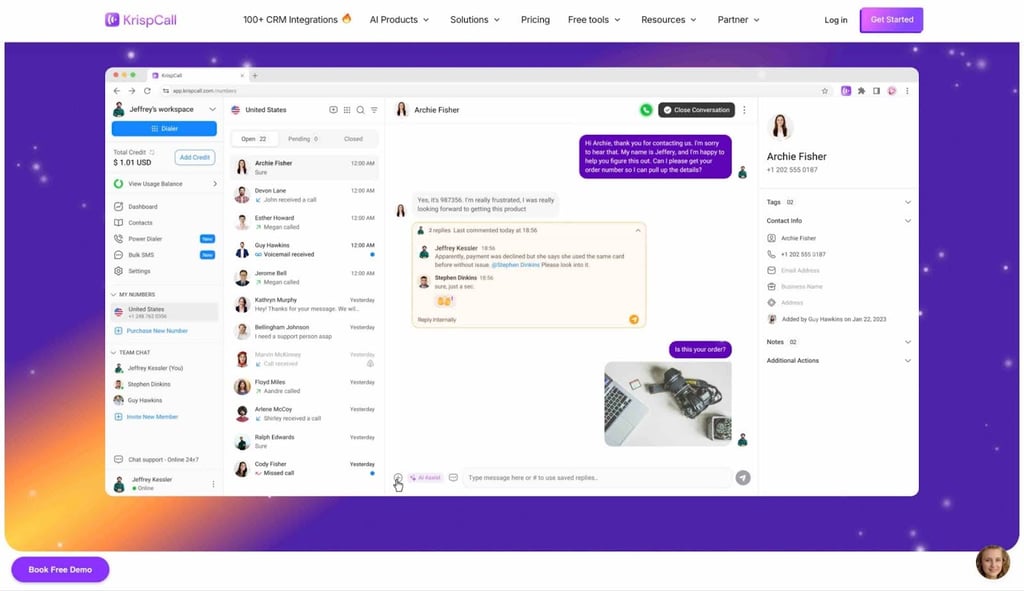
Call queuing is rolling out for peak periods. Furthermore, the Power Dialer – in beta – automates campaigns. Finally, managers use Call Listening, Whispering, and Barging to train agents.
CRM and third-party integrations
KrispCall has over 100 integrations including sales and support tools. Some CRM (Customer Relationship Management) integrations include HubSpot, Pipedrive, Zoho, ActiveCampaign, and Freshsales.
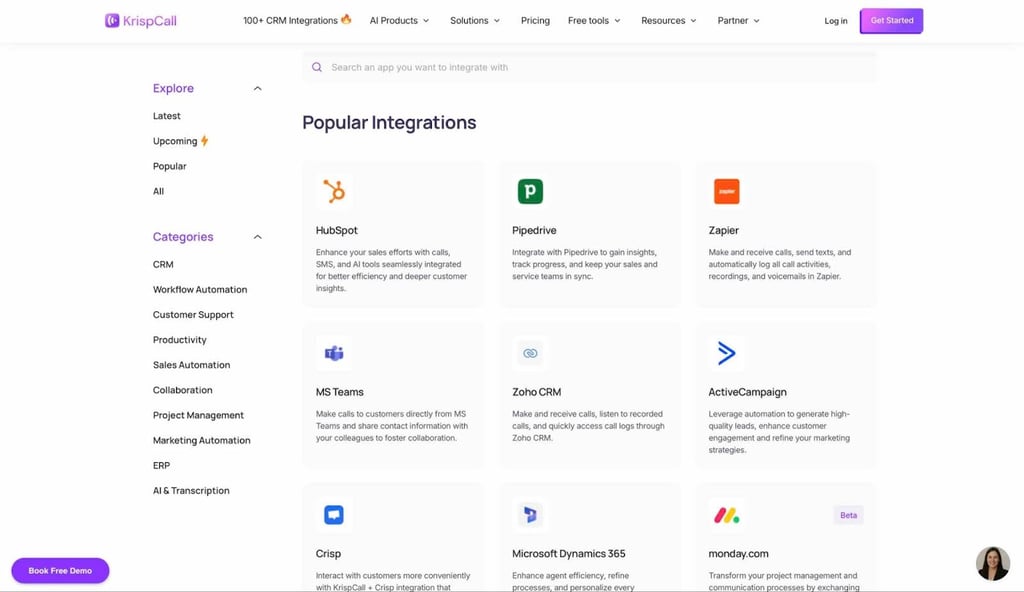
The tool also integrates with automation platforms like Zapier and Make. Essentially, calls, SMS, recordings, and notes sync into your CRM of choice. You can also combine synced contacts with the SMS feature for outreach campaigns.
Scalability and flexibility
I found that KrispCall is built for growing teams. For instance, freelancers and smaller businesses can pick the Essential plan, while larger groups opt for Standard or Enterprise. Everything runs through the web app, mobile apps, and Chrome extension – so distributed teams can work from anywhere while serving global customers.
Pros and what users like
The Cybernews research team and I found over 300 5-star KrispCall reviews, and it’s important to note a few highlighted strengths. First, it’s the ease of use: KrispCall’s demo walks you through signup, buying numbers, inviting team members, and configuring IVR or forwarding in quite a linear way. Most changes are visible on the dashboard – so even non-tech-savvy teams can tackle setup and everyday call management.
I also found the feature set is very rich – for a cloud phone app – with VoIP calling, recording, IVR and phone trees, call queuing (rolling out), analytics, global numbers, shared numbers, and several contact-center tools like Call Barging. Plus, you get Bulk SMS, Business Text Messaging, AI SMS, AI rephrasing, call transcription, and call summaries (also rolling out) – among others.
I can safely say the tool is solid value for SMBs looking for quick, no-equipment global reach. With entry pricing at $15/user/month, the money-back guarantee, and pay-as-you go usage for calls and SMS.
Finally, reviewers like that KrispCall is remote-friendly and all-in-one – connected to over 100 CRM and other workflow integrations. Teams can work from web and mobile apps while taking calls, SMS/MMS, voicemails, and AI-assisted messages in one Callbox.
Limitations and what users dislike
Every tool has limitations and negative user reviews. For KrispCall, reviewers note call quality issues, dropped calls or instability – concerning if your business relies on calls. Secondly, I found issues surrounding the mobile app and the platform – namely, KrispCall app might not be as polished or fully-featured as the desktop or web version. There’s some feedback about missing features – especially on mobile.
Furthermore, reviews left by smaller business teams reveal concerns over pricing and value for money. For example, some feel that the cost is high when making numerous international calls.
There are also complaints about missing advanced analytics or reporting tools. While there is call recording and basic call data, some more advanced use cases – like deep analytics – aren’t fully covered or require additional external tools.
Finally, I saw reports of potential onboarding or setup friction. Here, a few reviews mention delays in number assignment or activation – or minor friction when first setting things up.
For me, none of these potentially negative effects ruin the experience – but this does mean you have to test aspects like call routes, mobile workflows, and analytics needs. I suggest you test during the refund period before committing.
Pricing and plans
KrispCall has a straightforward approach to pricing and plans. The platform’s non-enterprise tiers follow the per-user, per-month model, as follows:
| Plan | Price (monthly) | User limit | Best for | Notes |
| Essential | $15/user/month | 5 | Freelancers, very small teams testing KrispCall | Core features, pay-as-you-go calls/SMS (applies to all plans) |
| Standard | $40/user/month | Unlimited | Growing SMBs, sales/support desks, call centers | Adds advanced reporting, recordings, more call-center tools |
| Enterprise | Custom | Unlimited | Complex workflows needing customization | Contact sales for customized pricing, professional support, extra enterprise features |
In all cases, calling and SMS are billed separately on a pay-per-minute/segment basis – and US/Canada messaging requires “10DLC” registration and small recurring fees. There’s no free plan/trial as such, but you can book a free demo on KrispCall’s website.
Overall, more features or heavy international use will push the costs up – so small teams or occasional users should factor cost per user vs usage. I suggest you evaluate your specific use case.
Who is KrispCall for and ideal use cases
KrispCall is best suited for startups, SMBs, remote-first teams, and globally distributed teams requiring international telephony – like freelancers or SMEs needing flexibility, global reach (multiple numbers) and cost-effective VoIP. The platform is often used by sales and customer support teams that need unified call/SMS/CRM integration.
If you’re a business looking to stop relying on traditional phone hardware on your premises, you can manage communications in one cloud-based platform with KrispCall. With shared numbers, the Callbox interface, and several integrations, it’s genuinely practical for collaboration around customer conversations.
On the other hand, very large or complex operations might find KrispCall limiting – if you need deep analytics, strict regulatory compliance, very high call volumes, guaranteed uptime, or complex on-premise Private Branch Exchange (PBX) setups. Still, KrispCall strikes a good balance for small and mid-sized teams.
Alternatives and comparison
There are other VoIP/cloud telephony/business phone systems available on the market. From user reviews, I usually see KrispCall compared with VoIP services like Aircall, JustCall, CloudTalk, RingCentral, Dialpad, or even lighter options like Google Voice or OpenPhone. Generally, all of these services offer cloud-based calling and messaging – but the prices, features, user interface, and target customer vary a lot between them.
Also, some alternatives will cost more, but may offer high-end workforce management, omnichannel analytics, and enterprise-grade uptime. However, these products are also often overkill for a 10-50 seat team. Leaner tools – like KrispCall – usually strike a good balance between simplicity, ease of setup, and affordable monthly cost. For me, I like that KrispCall increases its overall value by adding genuinely practical AI features with its AI Copilot – including AI Rephrasing, Call Summary, and Call Transcription – to make your workflow more efficient, faster, and more inspired overall when interacting with customers.
Overall, I recommend you compare features, pricing, and support against your actual communication needs when choosing a solution. The most expensive or complex platform is rarely the right choice for all business types, so choose based exclusively on what you actually need.
Verdict
In this KrispCall review, I thought about what matters most – whether this service helps today’s customer-facing teams process calls and messages efficiently. For me, the answer is yes – if you’re a remote-first smaller or globally distributed growing business – it’s worth testing. If you’re enterprise-level, I’d suggest looking at more complete, robust solutions.
KrispCall has some good strengths: virtual numbers in over 100 countries, Callbox threads, SMS/bulk tools, and AI-assistance in one, approachable program. The pricing is attractive too, as is the 14-day refund policy – which allows you to fully test it before committing.
However, there are user-reported trade-offs – like call quality issues and mobile app limitations, plus increasing costs resulting from international calling. Finally, I highly suggest you book a free demo with KrispCall to get acquainted with the product and see if it meets your business demands. If you end up feeling stuck, feel free to refer back to this review.
FAQ
Is KrispCall suitable for small teams or solo freelancers?
Yes, price-wise and scope-wise. KrispCall’s Essential plan starts at $15/user/month with support for up to five users – so this plan fits freelancers and very small teams perfectly. You get core VoIP features, virtual numbers, and shared call management at an affordable price and without needing on-premise telephony hardware.
Does KrispCall work on mobile and desktop?
Yes, KrispCall exclusively lives on the cloud – and has a web app plus mobile apps for iOS and Android. You can make and receive calls, customize SMS, check Callbox threads, and adjust other settings on a laptop or on a phone. Therefore, you can manage your workflows seamlessly across devices.
Can I get international phone numbers?
Yes, KrispCall explicitly states that it provides virtual phone numbers in 100+ countries – including in the US, Canada, UK, Europe, Australia, and parts of Asia and Latin America. Therefore, you can mix local, toll-free, and mobile numbers for your customer-facing business. All of this can be done from one workspace.
Does KrispCall offer call recording?
Yes, KrispCall includes automatic and manual call recording features on its Standard and Enterprise plans only. To activate these helpful features, you enable automatic recording in each number’s settings and use in-call controls like pause and resume to manage your recordings. However, the entry-level Essential plan doesn’t include this feature.
Is KrispCall legit?
Yes, KrispCall is definitely a legitimate business that’s based in Singapore and used by thousands of businesses around the world – with modern AI features, many positive reviews, and responsive human customer support. The company also offers a 14-day money-back guarantee and free demo with which you can test the service.
How much is KrispCall per month?
KrispCall starts at $15/user/month for up to five users. The next plan is $40/user/month with unlimited users. Finally, the Enterprise tier unlocks features like developer support and a dedicated account manager – and requires speaking to sales. All of these plans charge additionally for calls and SMS.