That “credit card security” email might be a trap
A warning from your credit card company might be a scam to drop password-stealing malware onto your device.

Image by Cybernews

 Follow us
A warning from your credit card company might be a scam to drop password-stealing malware onto your device.
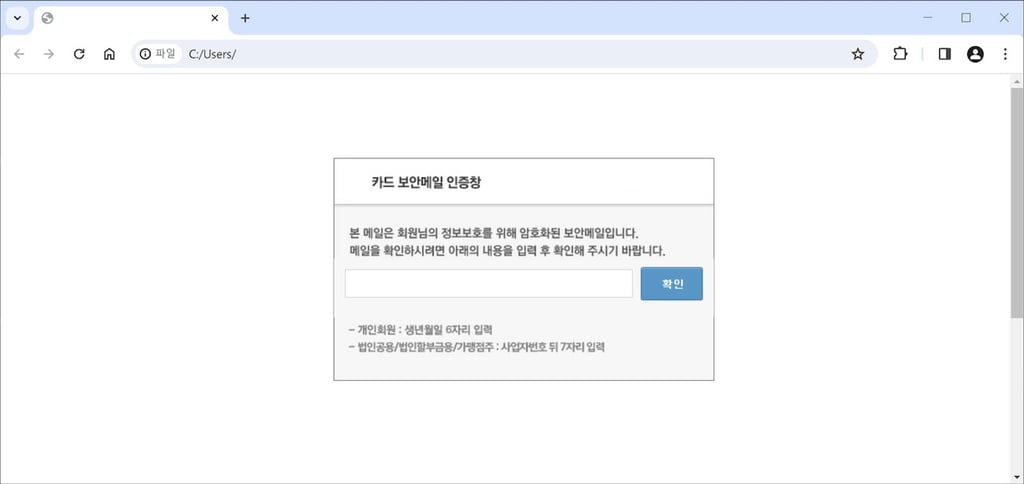
Cybercriminals are now using a malicious shortcut file (or LNK file) that disguises itself as a legitimate credit card authentication pop-up, a fresh report from South Korea’s AhnLab Security Intelligence Center (ASEC) has claimed.
You get what looks like a totally normal email – say, from Visa or Mastercard – asking you to confirm a recent purchase. Inside is an attachment. It’s disguised as a pop-up or HTML page, but actually, it is an LKN file, typical for shortcuts or links.
It opens a legit-looking security page to keep you distracted. In the background, it runs a multi-stage malware process that slips into your system unnoticed. While you open the page, an HTA file downloads. This is a file made up of HTML web page code, but hackers use it as a popular malware delivery method.
The HTA file drops a DLL file on the victim’s system. This type of file is used by Windows programs to share code and functions, but hackers often use malicious DLLs to sneak their code into your system.The malware is injected directly into your Chrome browser using a technique called Reflective DLL Injection. It loads the code straight into your computer’s memory.


Why is this malware attack dangerous?
- Keylogging: malware can capture everything you type.
- Data theft: malware can save and send to the threat actors your login credentials, credit card info, and browser history.
- Backdoor access: it can keep a hidden line into your system for future attacks.
Researchers have listed these malicious URLs involved in the threat campaign:
- https[:]//cdn[.]glitch[.]global/b33b49c5-5e3d-4a33-b66b-c719b917fa62/app64[.]log
- https[:]//cdn[.]glitch[.]global/b33b49c5-5e3d-4a33-b66b-c719b917fa62/main64[.]log
- https[:]//cdn[.]glitch[.]global/b33b49c5-5e3d-4a33-b66b-c719b917fa62/net64[.]log
Malware attacks on the rise
The first quarter of 2025 saw a sharp increase in the overall volume of ransomware attacks listed on data leak sites. According to a Cybernews report, in the first quarter of 2025 there has been a 101.8% increase in ransomware attacks from last year.
Infostealing malware remains one of the most dangerous cyber threats. Huntress’s analysis of over 2 million endpoints showed a 104% year-over-year increase in infostealer detections, with small and medium-sized businesses hit hardest due to limited resources.
Infostealers are dangerous as they silently log and ship sensitive information from victims' systems. In June, Cybernews researchers discovered one of the largest data breaches in history, totaling 16 billion exposed login credentials. The data most likely originated from various infostealers.
How to stay safe from malware?
- Don’t open attachments you weren’t expecting, even if they look official – especially those with .lnk, .hta, or .html extensions.
- Double-check the sender. Hover over email addresses and links, look for typos or weird domains.
- Use multi-factor authentication. Even if a hacker gets your password, they’ll hit a wall.
- Keep your software updated, including your browser, OS, and antivirus.
- Be paranoid in a good way. If something feels off, it probably is.