Google’s synced passkeys can be easily stolen with basic malware, researchers find
Google’s unbreakable passkeys cracked with a plain-text key from Chrome logs.
Image by Cybernews.

 Follow us
- Unit 42 researchers found malware can exploit Google-synced passkeys without a PIN, biometric check, elevated access, or user interaction.
- Three attacks enabled account takeovers, including extracting the secret needed to decrypt every passkey synced to a victim’s account.
- Some services trusted a verification flag without confirming the user’s identity; eBay fixed this issue after researchers reported it.
- Google removed one secret from Chrome logs, but researchers say device memory remains vulnerable and stronger verification is needed.
Key Takeaways by nexos.ai, reviewed by Cybernews staff.
Passkeys are replacing passwords because they’re supposed to protect users from phishing – they can’t be shared, stolen, or accidentally exposed. However, malware on the device can use them without ever needing a PIN, biometric, or other unlock, bypassing multi-factor authentication.
Palo Alto's Unit 42 researchers warn of novel attacks expected to hit passkey users. Hackers can abuse passkeys to compromise all the victim’s credentials in Google’s synced passkey ecosystem, without ever triggering a genuine second-factor check (2FA), such as biometric or PIN.
The researchers devised 3 separate account takeover attacks, with the worst one leading to the complete extraction of all the victim’s synced passkeys.
One big caveat – malware needs to be present on the device. However, this is also often trivial to achieve with automated phishing attacks, such as ClickFix, that target the masses.






“An attacker takes over an account protected by a Google-synced passkey using malware running on the victim’s device, without requiring privilege escalation, device unlock, or user interaction,” Unit 42 warns in the new report.



Stay updated with our latest stories and follow us on social media
Be the first to discover new stories, ideas, and updates from our team.
One could argue that it’s just as trivial for malware to steal all the passwords stored on the victim’s machine. But then the victim is generally required to approve authentication with a 2FA method, often from a separate device, like a smartphone – meaning hackers wouldn’t immediately gain complete control over the account.
With passkeys, it’s different – many services simply trust passkeys and don’t verify that the second check has ever happened.
How does the attack work?
The report specifically focuses on the widely used Google’s synced passkey implementation.
Malware running on a device can easily gain visibility into how passkeys are used within the victim’s account.
“Chrome locally stores synced passkey data as part of its synchronization process,” the Unit 42 researchers explain.
Accessing these records does not require elevated privileges.Unit 42
So the attacker immediately can see where the victim uses passkeys, along with associated usernames, credential identifiers, and the encrypted private key.
Google generates and stores the actual passkeys in an isolated cloud-enclave environment, which they never leave. User machines access them using 2 hardware-backed (TPM/Secure Enclave) keys stored on the device.
When the user signs in to the service, the biometrics or PIN unlocks the first key – the user verification (UV) key. The second key – an identity (ID) key – proves that the request is coming from the genuine device.
Both keys are sent to Google’s cloud authenticator, which verifies them and signs the user in using the correct passkey.

Check if your data was exposed
Find out if your email and related personal information have appeared in known data breaches.
The only thing stopping malware from directly using the 2 most important keys is that they live in the TPM chip and never leave in usable form. So the malware has to ask the TPM to sign things for it.
The ID key is easy to obtain: malware can trivially generate the ID signature by mimicking Chrome’s actions.
“Chrome creates the conditions that allow it to request a signature while running as a user without elevated privileges and without triggering device unlock protections,” the researchers write.
In the first attack, dubbed Pass-ta-key, researchers didn’t even use the UV key at all.
Have thoughts about this topic? Others do, too. Join them in the discussion.
They initiated a login with an unspecified web service and completed the challenge by simply extracting the ID key and presenting it to Google Cloud Authenticator. A victim’s TPM signature was all it took to compromise the online account.
“From the cloud authenticator’s perspective, the request appears to be a trusted device making a valid request, so it produces a valid assertion response. This assertion is then forwarded to the relying party, completing authentication and giving the attacker full control of the victim’s account,” the report explains.
Many online services, including eBay, didn’t check if the user was actually verified and simply trusted a single bit in the assertion – User Verified (UV) flag set to true, which malware can craft. eBay has now fixed the issue.
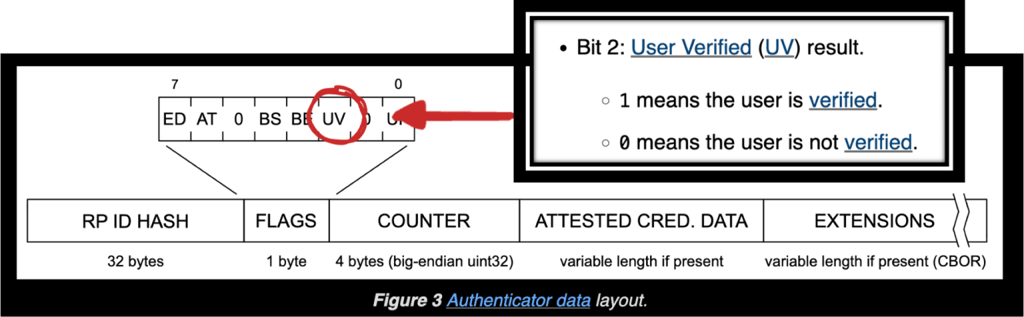
“We identified relying parties that accepted authentication because they did not properly validate the UV flag. This allowed the attack to succeed despite the absence of user verification.”
Achieving complete compromise
The researchers went further and demonstrated that the UV key can also be hacked, leading to complete compromise even when stronger authentication requirements are enforced.
The second attack relies on deceiving the Google Cloud Authenticator into believing that the user has unlocked their device.
Instead of checking the user’s mug to obtain the genuine UV signature, malware can simply force the device to re-register with Google using the “device/forget” command, invalidating the existing UV key.
Malware forges a new UV key, and Google’s cloud authenticator accepts it and onboards the device without checking whether a genuine hardware chip signed it.
This attack unlocks many very sensitive accounts, including those in banking and federal systems.

But the third attack is even worse. It enables attackers to steal and decrypt all passkeys synced with Google.
Google protects passkeys with “the master key,” known as the security domain secret (SDS), which is not directly accessible. Users store an encrypted version of it, but only Google’s cloud service can decrypt it.
“If an attacker is able to obtain the SDS, they effectively gain the ability to decrypt all synced passkeys for that account. This allows them to authenticate as a fully verified user and take over every service where the victim relies on passkeys.”
How did researchers obtain SDS? It was unexpectedly found in the Chrome logs.
The most secret key was found leaking in plain text during device onboarding.

Google removed this secret from Chrome’s logging output following Unit 42’s report, but the researchers warn that the SDS is still sent to the client and remains accessible in Chrome's process memory, as part of the recovery flow. This SDS vulnerability can still be abused to steal synced passkeys.
“If the attacker forces the victim to re-register with the cloud authenticator and knows the pattern to look for, they can extract the SDS directly from memory.”
The report urges services to stop trusting the UV flag and to enforce strict validation that the user was actually verified. Google should also verify that new devices and UV keys are genuine before registering them. The researchers also call for hardening registration/recovery flows and list other recommendations.
While passkeys make some account theft attacks harder, they don’t eliminate the risk – attackers are likely to pivot to these new emerging techniques.
“A central takeaway is that endpoint compromise remains a critical part of the threat model,” the research concludes.