Tor launches new Android app for volunteers to share their internet connections and help millions to access the open internet
146,000 users already voluntarily contribute their internet connection for those who can’t access the open internet.

Image by Shutterstock.

 Follow us
- The Tor Project launched an Android app that lets volunteers help people bypass state-controlled internet blocks.
- Snowflake disguises Tor traffic as video calls and routes it through short-lived volunteer proxies, making censorship harder.
- The network already uses 146,000 active IP addresses daily; more volunteers could further weaken government blocking efforts.
- The app collects no data, but volunteers may experience higher data use, battery drain, and slightly slower connections.
Key Takeaways by nexos.ai, reviewed by Cybernews staff.
The Tor Project, a non-profit behind the anonymity network and browser, has launched a Snowflake app on Android whose sole purpose is to share an internet connection with someone in distress behind state-controlled firewalls. Tor is asking users to voluntarily join and become nodes in a massive proxy network.
The Tor browser has become a staple tool for anonymous web surfing, bouncing encrypted traffic through a series of IP addresses.
However, censors in rogue countries are increasingly blocking VPN and other proxy servers, including Tor nodes. The solution – Tor Project invites users to voluntarily install the Snowflake Volunteer app, currently on Android only.
The app essentially turns the device into one of the proxies, helping Tor users to reach the network.






“It disguises a user's traffic to look like a video call and routes it through volunteer-run proxies using short-lived connections, making the traffic harder to detect and block,” the Tor project explains in a blog post.
Snowflake app allows other Tor users to connect to the Tor network, where it’s otherwise impossible because the Tor network itself is blocked.
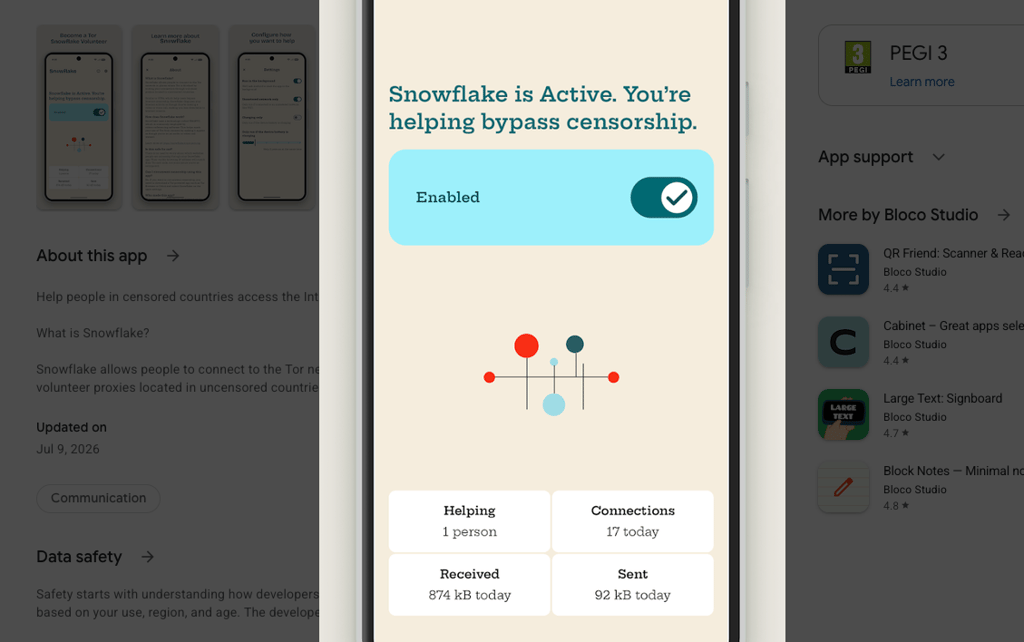
Even before the app was released, Snowflake amassed 146,000 active IP addresses every day. Additional participants would make any blocking efforts nearly impossible.
Currently, roughly a third of the active IPs are associated with Orbot’s Kindness mode. Orbot is a Tor browser alternative for mobile devices – users can use it to access the web anonymously.
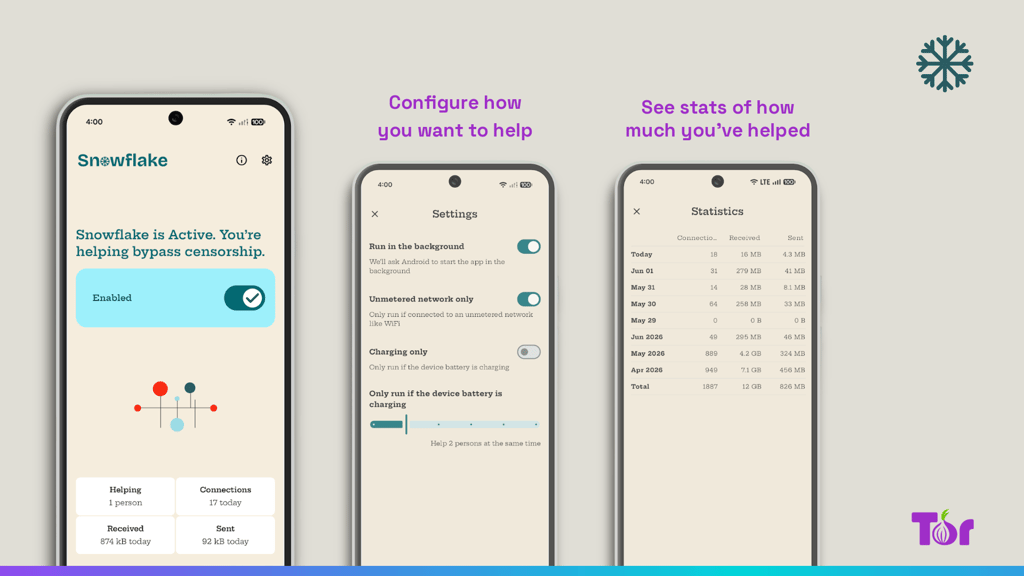
Snowflake app has no such capabilities – it simply runs a proxy agent in the background routing traffic. Users can see statistics such as the number of connections made and the amount of data transferred. They also have options to limit the app's battery drain, restrict its use of the cellular connection, or completely disable it.
To blend in with general internet traffic, Snowflake uses Web Real-Time Communication (WebRTC), a technology developed for peer-to-peer audio, video, and data sharing.
To censors, the traffic appears to be a general video or voice call.
“It therefore becomes costly for censors to consider blocking such circumvention tools since it would require blocking large parts of the internet in order to achieve the initial targeted goal,” the description reads.



Stay updated with our latest stories and follow us on social media
Be the first to discover new stories, ideas, and updates from our team.
The Tor Project ensures that using the app is safe: all activity is invisible, and whatever other users are doing on the network will have Tor’s exit node IP address attached to it.
The Snowflake app, currently available on the Google Play Store, F-Droid, and as an open-source repository, was built by Portuguese Bloco Studio with the help of the Open Observatory of Network Interference (OONI). Currently, it has over 100 downloads on Play.
Meanwhile, the Orbot app has already amassed over 10 million downloads.
The conversation on this topic is live. Join in the discussion.
The Snowflake app collects no data but requires 10 permissions to work, including network access, running in the foreground, posting notifications, running at startup, reordering running apps, ignoring battery optimizations, preventing the phone from sleeping, and others.
The app should be used on WiFi or an unlimited data plan, and users should be aware that proxying might slightly slow the connection, but the network limits the number of devices that can connect at a time. Developers have put effort into ensuring the app runs while using as little battery as possible.
How to enable Snowflake on Tor?
Snowflake is by default already embedded in Tor Browser, Orbot app, Onion Browser on iPhone, and Ricochet-Refresh, a peer-to-peer messenger app that allows private and anonymous instant messaging.
But it is not enabled by default. Users who can’t access the Tor network need to manually select this bridge.
To enable Snowflake on Tor browser, go to Settings and select “Connection” (alternatively, type ‘about:preferences#connection’ in the address bar).
“Under the ‘Bridges’ section, locate the option ‘Choose from one of Tor Browser’s built-in bridges’ and click on ‘Select a Built-In Bridge’ option. From the menu, select ‘Snowflake,’” Tor support page explains.
Similarly, Snowflake can be activated through other apps’ settings page.