Best VPNs for DAZN - How to use VPN to watch DAZN from anywhere
Our in-house cybersecurity experts and journalists, renowned for major reports like The Mother of All Breaches, conduct transparent, unbiased VPN testing and in-depth analysis.
With 750+ articles crafted based on real-world research, we empower readers to make informed purchasing decisions through first-hand expertise.
Learn more

-
NordVPN – the best overall VPN for DAZN, offering the best reliability and consistent speeds when streaming, from $3.49/month
-
Surfshark – fast and reliable budget-friendly DAZN VPN with simultaneous connections, starting at $2.49/month
-
IPVanish – great middle-ground VPN for DAZN with solid speeds and unlimited device connections, starting at $2.49/month
When looking for the best VPN for DAZN in 2026, you have to consider a few key aspects. DAZN, like many other well-known sports-streaming services, is geo-restricted.
DAZN is available worldwide. However, due to its licensing agreements, such as the one with FIFA for the World Cup, its content varies by location. That’s why, while you’ll be able to watch the 2026 World Cup in Spain or Italy, you won’t be able to do so in Germany. If you’re an NFL fan, on the other hand, you’ll be able to watch the NFL in Germany, but access will be restricted in the United States. This can be frustrating on many levels, particularly if you’re traveling.
Luckily, many of these issues can be avoided by using a reliable VPN, which will spoof your IP address and change your location to one where the content you want to access is available. Unfortunately, DAZN has gotten pretty good at detecting VPNs, which is why a free VPN is unlikely to work. To help you get around this, I prepared a list of the 5 best VPNs for DAZN currently on the market.
Best DAZN VPNs – shortlist
In order to find the best DAZN VPNs, we evaluated 41 VPNs, coming up with 5 products offering reliable access to DAZN’s various regional libraries.
- NordVPN – best VPN for DAZN with the fastest speeds for streaming
- Surfshark – fast streaming VPN offering unlimited simultaneous connections
- IPVanish – budget-friendly VPN for DAZN
- Proton VPN – open-source VPN for privacy-conscious users
- ExpressVPN – reliable streaming VPN


We spare no effort to test the products & their features. All information is gathered by our in-house research team & fact-checked by our team of experts. Discover the ins and outs of our testing procedures.
Best VPNs for DAZN: detailed list
Since DAZN has robust VPN detection systems, finding a VPN that works with it was no easy task. Luckily, I managed to find the 5 best VPNs that work well with DAZN and overcome its geo-restrictions.
1. NordVPN – overall best VPN for DAZN in 2026

| Servers and countries: | Thousands of servers in 225 locations |
| Simultaneous connections: | 10 |
| Best server locations for DAZN: | All/Any |
| Current offer: | Get 75% OFF NordVPN + 3 months free |
NordVPN is my pick for the best VPN for streaming DAZN. It performed consistently in all of my tests and easily unblocked DAZN in every location I tried, including the US, the UK, Japan, and Canada. I also tested specifically for the 2026 World Cup and found I could watch Canada vs Bosnia and Herzegovina from Italy without any trouble.
I tested the provider’s connection to servers in Spain, and on average, NordVPN retained 851Mbps on a 940Mbps baseline, giving it an excellent 90% download speed retention. I didn’t have any trouble with disconnections and buffering, managing to watch entire games without any problems for both the World Cup and NFL games.

Security-wise, NordVPN ensures that your VPN usage won’t be detected by DAZN or anyone else by using DNS leak protection. Your privacy is ensured by NordVPN’s independently audited no-logs policy. Its base plan also offers scam protection and dark web monitoring, with the higher tier also adding a password manager, which you can use to securely store passwords for DAZN and other streaming websites. You can learn more in our NordVPN review.
NordVPN plans start at $3.49/month, which is slightly more expensive than the other providers on the list. However, its excellent speed and reliability definitely make it worth it. Every plan includes a 30-day money-back guarantee so you can test it against DAZN risk-free.
2. Surfshark – fast DAZN VPN with unlimited simultaneous devices

| Servers and countries: | 4,500+ servers in 100 countries |
| Simultaneous connections: | Unlimited |
| Best server locations for DAZN: | The United Kingdom, Germany |
| Current offer: | Now up to 85% OFF Surfshark + 3 months FREE |
Surfshark gave me access to servers in multiple locations wherever DAZN works, with unlimited simultaneous connections, letting me share my account with my family. I was able to connect to servers in Spain to watch Switzerland vs Qatar, as well as servers in Germany for NFL coverage, with no problem.
In our tests, Surfshark performed just as well as NordVPN, with a 859Mbps download speed retention on a 940Mbps baseline on its Spanish server, meaning it retained an excellent 91% of its speed. This was more than enough to watch the World Cup game without any buffering or disconnections.

As we described in our Surfshark review, the software is also bundled with an ad and tracker blocker, protecting your comfort and privacy online. Your privacy is also ensured by Surfshark’s independently audited no-logs policy.
Surfshark costs only $2.49/month for the cheapest plan, which is more than enough to stream on DAZN. Each plan comes with a 30-day money-back guarantee to let you test the service risk-free.
3. IPVanish – reliable and affordable VPN for DAZN for multiple devices

| Servers and countries: | 3,400+ servers in 112 countries |
| Simultaneous connections: | Unlimited |
| Best server locations for DAZN: | Japan |
| Current offer: | Now up to 83% OFF IPVanish |
IPVanish is a safe and private VPN for DAZN with an excellent offer for users on a budget. While it’s slower than Surfshark and NordVPN, I was still able to connect with servers in Italy to watch Mexico vs South Africa without any problems. It also offers unlimited connections, just like Surfshark.
My tests connecting to Italian servers showed that IPVanish retained 769Mbps out of 940Mbps on average. This is a solid 81% retention – slightly slower than NordVPN and Surfshark but still more than enough to watch live sports on DAZN – just remember to use the WireGuard protocol.

Security and privacy-wise, IPVanish offers industry-standard AES-256 and has an independently verified no-logs policy. Unlike Surfshark and NordVPN, IPVanish doesn’t offer any additional features, instead focusing on giving you access to the best VPN features possible. You can read more about the product’s exact specifications in our IPVanish review.
IPVanish is an excellent budget option, being the cheapest VPN on our list, starting at $2.49/month. This gives you access to unlimited simultaneous connections, ensuring connectivity for you and your entire household. In case you don’t feel IPVanish is good enough, the provider offers a 30-day money-back guarantee.
4. Proton VPN – privacy-focused DAZN VPN

| Servers and countries: | 20,700 servers in 149 countries |
| Simultaneous connections: | 10 |
| Best server locations for DAZN: | The Netherlands |
| Current offer: | Get up to 70% OFF Proton VPN |
Proton VPN is a privacy-focused provider that enabled me to watch DAZN from abroad without any problems. I connected to servers in Spain, and managed to watch the US vs Paraguay game without any buffering issues. I also didn’t have to worry about my data being in danger, as Proton VPN is based in privacy-friendly Switzerland, and offers Secure Core servers held on-premises in their Swiss office, which can be used for absolute privacy.
In terms of speed testing, I connected to a server in Spain, and Proton had a solid performance, retaining 760Mbps off a 940Mbps baseline, for 80% speed retention, which is slightly weaker when compared to NordVPN and Surfshark’s results. This speed meant I had no trouble browsing the internet or watching DAZN in the highest available quality.

Proton’s biggest selling point is its privacy. Based in Switzerland and offering Secure Core servers, ProtonVPN is unmatched if you want to be sure your data isn’t going anywhere. The software itself is open source and audited, and Proton adds a malware and ad blocker to its VPN for extra security. If you want to learn more about Proton’s features and track record, you can read our Proton VPN review.
Proton offers a free version that can access servers in 10 countries. However, this version often struggles with connecting to DAZN and is considerably slower. That’s why I recommend getting the premium version for $2.99/month. You can also try it out to see the difference between Proton VPN plans thanks to the provider’s 30-day money-back guarantee.
5. ExpressVPN –fast and reliable VPN to stream DAZN

| Servers and countries: | Servers in 113 countries |
| Simultaneous connections: | 14 |
| Best server locations for DAZN: | Italy |
| Current offer: | Now up to 80% OFF ExpressVPN + 4 months FREE |
ExpressVPN is one of the most popular VPNs for DAZN on the market and for good reason. It offers excellent speeds and privacy at an affordable price. Thanks to ExpressVPN’s servers in 105 countries, I was able to easily connect to servers in Italy and watch the Netherlands vs Japan game live.
Performance-wise, ExpressVPN’s proprietary Lightway protocol (a variant of WireGuard) performed relatively well, with its Italian servers being slightly slower compared to NordVPN and Surfshark, retaining 761Mbps out of a 940Mbps baseline for a solid 80% speed retention. This is more than enough to have a consistent connection with DAZN.
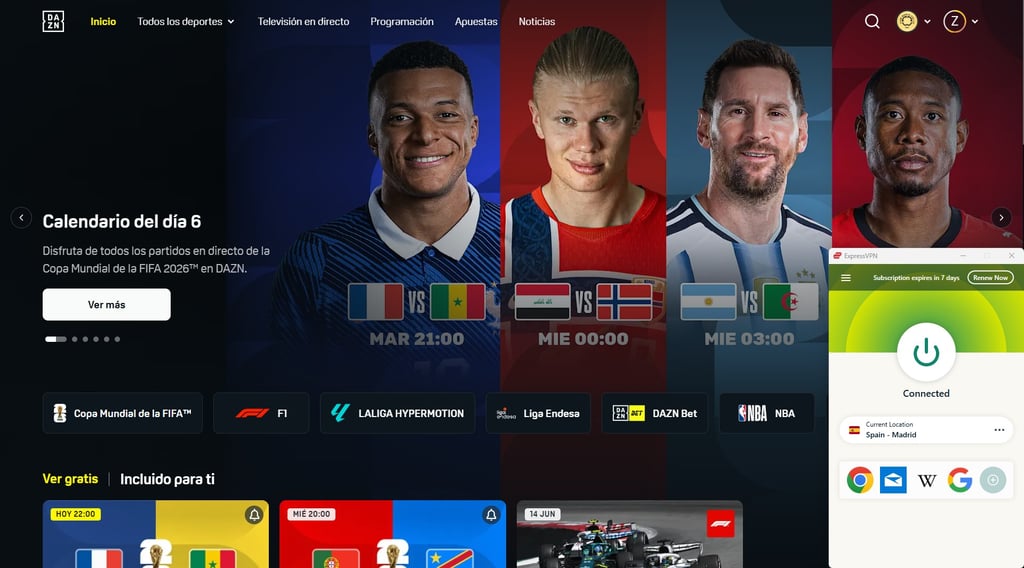
In addition to the VPN, which features AES-256 encryption and an audited no-logs policy, ExpressVPN offers a few handy features. On its Basic plan, it offers an ad blocker and 10 email aliases to help you maintain privacy when signing up for various services like DAZN. You can learn more about the provider’s features in our ExpressVPN review.
ExpressVPN pricing starts at $2.99/month, with 10 simultaneous connections (going up to 14 on the Express Pro plan). With affordable prices, excellent server coverage, and solid speeds, I feel that’s an appropriate price point.
How to use VPN with DAZN – setup guide
Using a VPN with DAZN is a straightforward process that allows you to get the most out of your streaming subscription. Here’s a detailed guide explaining how to combine the two for the best results:
-
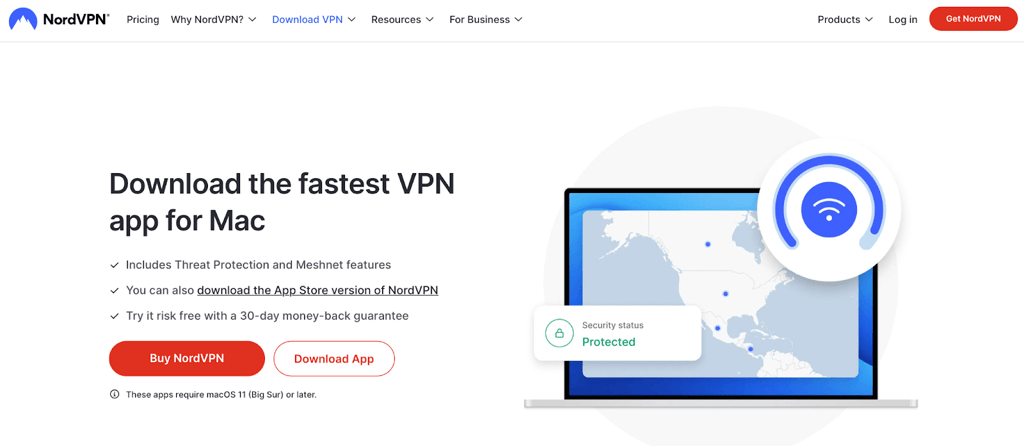
Download and install the NordVPN app on your computer
-
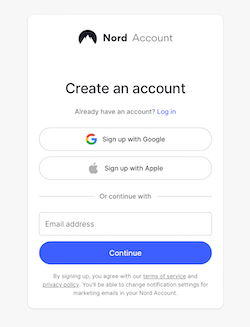
Open the NordVPN app and log in/sign up
-
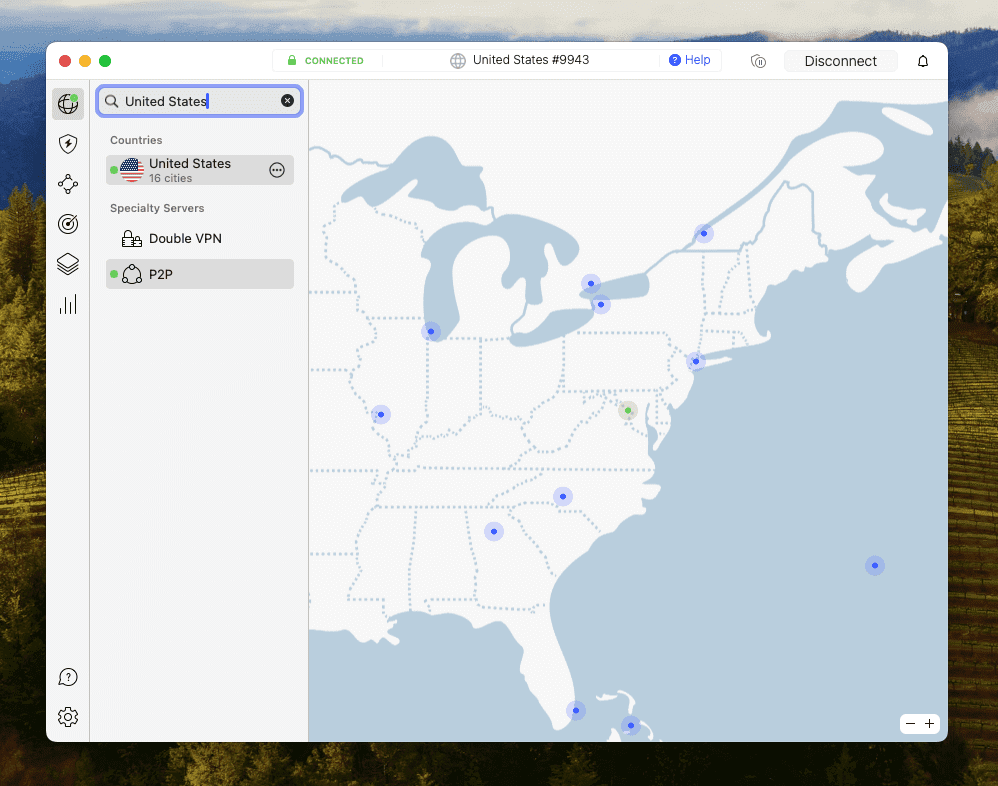
Connect to a server in the United States
- Go to the DAZN website, log in to your account, and start watching
Does DAZN block certain VPNs, and how can I avoid it?
DAZN does not support the use of any VPN to access its international content libraries. If your VPN is unsuitable, outdated, or incompatible with streaming, DAZN trackers will detect that you’re using it and block your access. However, that can be easily avoided by subscribing to a reliable streaming VPN. VPNs with multiple IP-hiding features and streaming-optimized servers can bypass DAZN’s trackers and access content as if you were physically located elsewhere.
Are there any risks to my account when using a VPN for DAZN?
DAZN has one of the strictest VPN prevention systems out of all streaming platforms. So, if your VPN use is detected, you will be blocked from accessing your account and DAZN’s content. While I couldn’t find any information about anyone’s account being banned for the use of a VPN, it’s fair to say that getting detected will be as good as being banned, as you won’t be able to access anything.
Which devices work best with VPNs for DAZN?
DAZN is a flexible streaming service that works with a wide range of devices to accommodate different user needs. Similarly, VPNs are also compatible with various gadgets, although combining the two can be tricky in certain circumstances. As such, I’ll provide some insights into the most common VPN and DAZN device combinations so you’ll know how to utilize the two without trouble.
Here’s a table with a quick rundown, while the finer details are explained further below.
| Device or operating system | Compatible with DAZN | VPN app available | Solution |
| Windows and macOS | ✅ Yes | ✅ Yes | Use the dedicated VPN app |
| iOS (iPhone and iPad) | ✅ Yes | ✅ Yes | Use the dedicated VPN app |
| Android smartphones and tablets | ✅ Yes | ✅ Yes | Use the dedicated VPN app |
| Amazon Fire TV Stick and Fire TV | ✅ Yes | ✅ Yes (most VPNs) | Use the dedicated VPN app |
| Android TV | ✅ Yes | ✅ Yes (most VPNs) | Use the dedicated VPN app |
| tvOS (Apple TV) | ✅ Yes | ✅ Yes (some VPNs) | Use the dedicated VPN app, install VPN on a router, or use AirPlay |
| Smart TVs (Samsung, LG, Sony) | ✅ Yes | ❌ No | Install VPN on a router or use Smart DNS |
| Roku | ✅ Yes | ❌ No | Install VPN on a router or use Smart DNS |
| Sony PlayStation | ✅ Yes | ❌ No | Install VPN on a router or use Smart DNS |
| Microsoft Xbox | ✅ Yes | ❌ No | Install VPN on a router or use Smart DNS |
As you can see, you should have no issues running DAZN and a VPN on popular desktop and mobile devices, such as Windows, macOS, Android, and iOS. All you have to do is install the dedicated VPN app, connect to a suitable server, and then open DAZN to enjoy content from another region.
The situation is similar if you want to watch DAZN on Android TV or Amazon TV devices. The best VPNs on the market have apps for these devices, but you should double-check just to be certain. This also applies to Apple TV (tvOS) devices, although VPN apps for this platform are pretty rare. VPNs with Apple TV apps include NordVPN, Surfshark, and IPVanish.
Next, we have devices that don’t have native VPN apps. In this category, we have smart TVs, gaming consoles, and proprietary media devices like Roku. Since there are no apps for these devices, you’ll have to employ a workaround if you want to unblock DAZN.
One option is to configure your home router with a VPN, which is possible with most VPN services. Basically, this approach will change the virtual location of your home network, thus affecting every device in your household. We have a guide explaining how to install a VPN on your router.
Another option is to use the Smart DNS feature to unblock content, but this feature isn’t available with all VPNs. This tool alters your DNS addresses in a way that tricks DAZN into thinking that you’re in another location. It lacks some perks of a regular VPN connection, but it’s a good solution for unblocking video content.
It’s crucial to be familiar with these details if you want to stay up-to-date with DAZN while traveling abroad. The easiest way to do that is to travel with a laptop or smartphone, install a VPN on it, and unblock DAZN that way. Alternatively, you could take something like an Amazon Fire TV Stick with you, but that will only work if the place you’re staying at has a suitable TV. That’s why I recommend the first option, but ultimately it’s your choice.
DAZN portability features
Unavailability when traveling is a common problem for DAZN users. Luckily, DAZN made some changes, and users can now easily watch sports when abroad. This has also made it easier for all DAZN users to access content.
For example, now you can log on to your account no matter where you are in the world, and you won’t receive an error message.
This change also allows users to access all free content regardless of where their account was made. All you have to do is connect to a server in that region, and you will be able to watch region-specific free content even with an account from another country.
Please note that paid region-specific content is only available to users who purchased a subscription in that specific region. Therefore, if you want to access region-specific content, you can do so with the help of a reliable VPN such as NordVPN.
If you have an account made in the US and are traveling, you can still access US-specific content with the help of a VPN. Simply connect to a US server and log in to your account.
Considering that DAZN doesn’t support VPNs, you may get an error message; however, in this case, I suggest switching between different servers until you unblock the DAZN platform.
How we ranked the best VPNs for DAZN
At Cybernews, we perform our own in-house tests. Each VPN is thoroughly tested to find out the effectiveness of its IP-masking and security features, as well as tested for speed, reliability, and more. Our research team uses our standard methodology to determine which VPNs are the best. In addition to regular tests, I performed evaluations to determine the best VPNs specifically for DAZN. Here are my criteria:
- Wide server network. A DAZN VPN with many servers worldwide ensures that you’ll be able to access the streaming service’s many different libraries anywhere. For this article, I focused on VPNs with servers in the US, Canada, Germany, and Brazil since those are the most popular and comprehensive DAZN libraries.
-
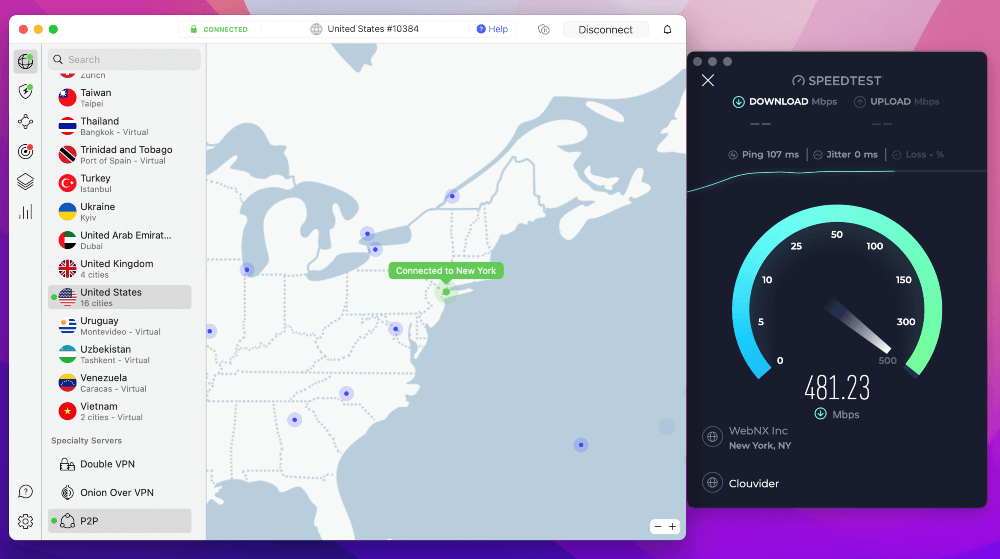
High-speed servers for uninterrupted streaming. Popular streaming services like Netflix claim that you need connection speeds of at least 15Mbps if you want to stream in UHD video quality. That’s why we only recommend VPNs with high speed retention rates (more than 80% retention) so that you’d be able to watch DAZN in high quality even if your baseline connection speeds are low.
- Streaming reliability. We tested various VPNs with DAZN to find the ones that can consistently unblock different regional libraries without much difficulty.
- Strong security features. While streaming compatibility is essential, a quality VPN should also offer strong security features, like a kill switch and DNS leak protection, to protect your identity.
- No-logs policy. A VPN is not truly private unless it doesn’t keep logs of your online activity. I checked that each selected provider would have an independently audited no-logs policy.
- Responsive customer support. If there are any issues with your service, you want them to be resolved quickly. That’s why I prioritized those VPNs that have multiple customer support options, mainly email and live chat.
FAQ
Can I use a VPN to stream on DAZN?
Yes, you can use a VPN to stream content on DAZN. However, this is against DAZN’s Terms of Service, and DAZN has systems in place to detect and block access to VPN users. That’s why you need a VPN with obfuscation technology to avoid detection, like NordVPN.
How to watch DAZN in the USA?
DAZN is available in the USA. Simply visit the DAZN platform, log in, and stream. If you want to access country-specific content, you will have to connect to a VPN server in that country, create an account, and buy a subscription.
Can I use DAZN in different countries?
Yes, you can watch DAZN anywhere in the world with a VPN. All you have to do is install a VPN app and connect to a server in the US, UK, Canada, or any other unrestricted country. Keep in mind that due to DAZN’s strong trackers, not all VPN servers and locations might work.
Can I use DAZN Canada in the USA?
Yes, you can watch DAZN Canada in the USA by connecting to a VPN server located in Canada, creating a Canadian account, and purchasing a DAZN subscription.
Why does DAZN think I'm in another country?
DAZN may think you’re in another country if you’re living near the border or using a VPN. This can make it difficult to access its website. Make sure to use a reliable VPN, such as NordVPN, with thousands of servers around the globe, to avoid this message.
Will using a VPN slow down my DAZN streaming quality?
It’s possible and seems to depend on individual cases. Some servers might be slower than others or not work with DAZN at all. Some VPNs are also faster than others. For example, you are more likely to encounter buffering or network speed issues if you use a free or weak VPN.