Symphony by Wix review: what it is and what makes it stand out

Running a small business requires doing multiple jobs at once. You’re writing marketing copy, chasing an unpaid invoice, rebooking a cancelled appointment, fixing a checkout error, and trying to answer a customer message. None of these tasks are hard on their own. The problem is volume: too many small jobs, spread across too many disconnected tools, with no one but you to hold it all together. Symphony by Wix is the answer to this problem.
Symphony by Wix is the ultimate AI-agent platform built around a coordinated team. In practice, it means you describe what you need in one conversation, and a group of specialized agents do the work across marketing, scheduling, finance, and customer communication.
I tested Symphony by Wix in my day-to-day workflows and thoroughly assessed the AI team to see if it actually delivers on the promise to make the operations of a small business run smoother. In this review, I cover what Symphony is, how it actually works under the hood, its main features, pricing, where I think it falls short, and who it’s genuinely built for.
What is Symphony by Wix?
Symphony by Wix is an AI-agent platform designed for independent business owners who need help building, managing, and growing a business from a single place. Wix launched the platform in August 2026 as a standalone product, separate from the core website builder. I was happy to find that it works for you no matter where you built your site. If you already use Wix, Symphony connects to your site, domain, and hosting. If you don’t, you can still use it on its own or connect it to the tools you already rely on.
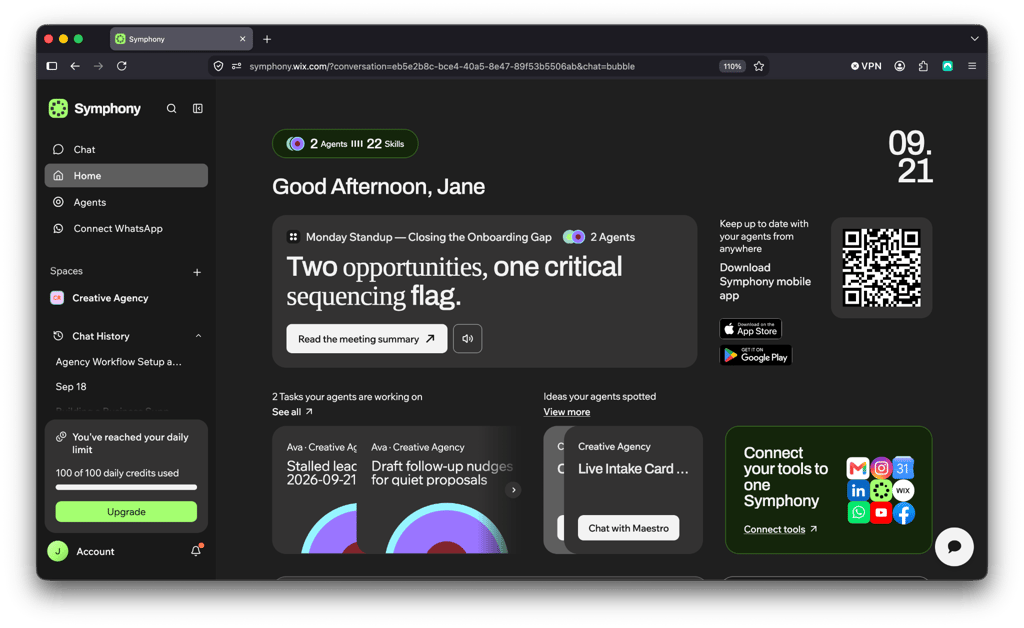
The distinction that mattered most to me once I started using it is that Symphony by Wix is built for operations and processes. Instead of focusing on one singular task, Symphony is built to notice that a customer hasn’t paid an invoice, draft the follow-up, flag a drop in weekend bookings, and suggest a discount to fill the gap, all from the same running conversation.
Most people would come to expect just content generation from something billed as an AI platform. In reality, Symphony by Wix is intended to support real business operations, not just produce content on request. In my opinion, that’s the more useful framing for what it actually relieves.
A small business often doesn’t have the resources, in headcount, in hours, or in budget, to staff someone whose whole job is overseeing each small yet important task. Symphony steps in with a team of AI agents that take on that ongoing, background work directly.
How Symphony by Wix works
Symphony’s operating model is worth breaking down plainly, because the term “AI agent” has become vague recently. In the sections below, I walk through each aspect of the platform.
The central AI orchestrator
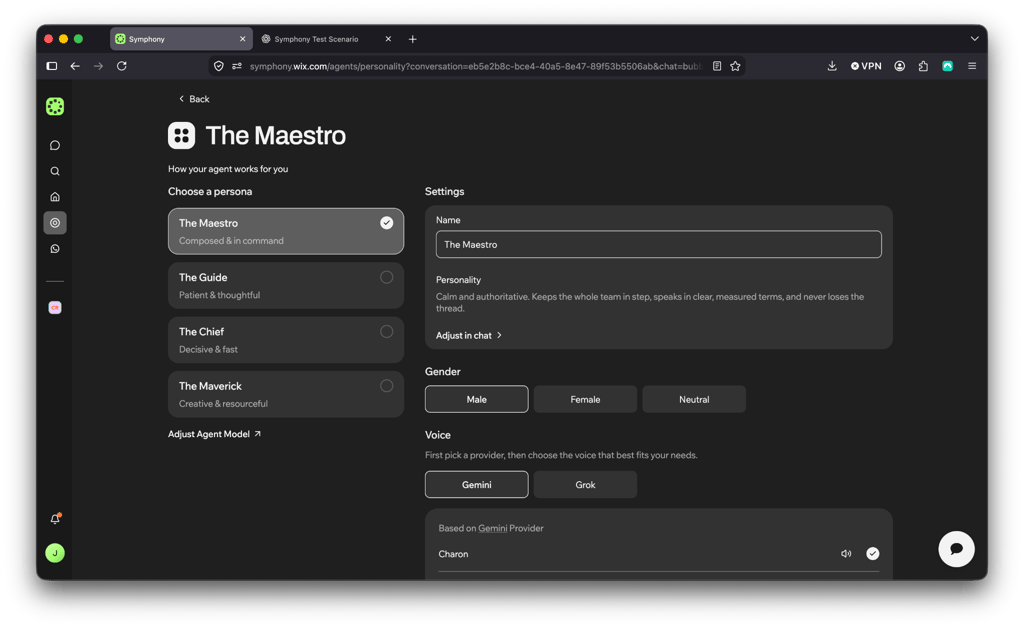
The routing is handled by a central orchestrator, Maestro. It is the main intelligence layer that interprets what you’re asking for, understands the context of your specific business, and decides which specialized agent should handle each part of the job.
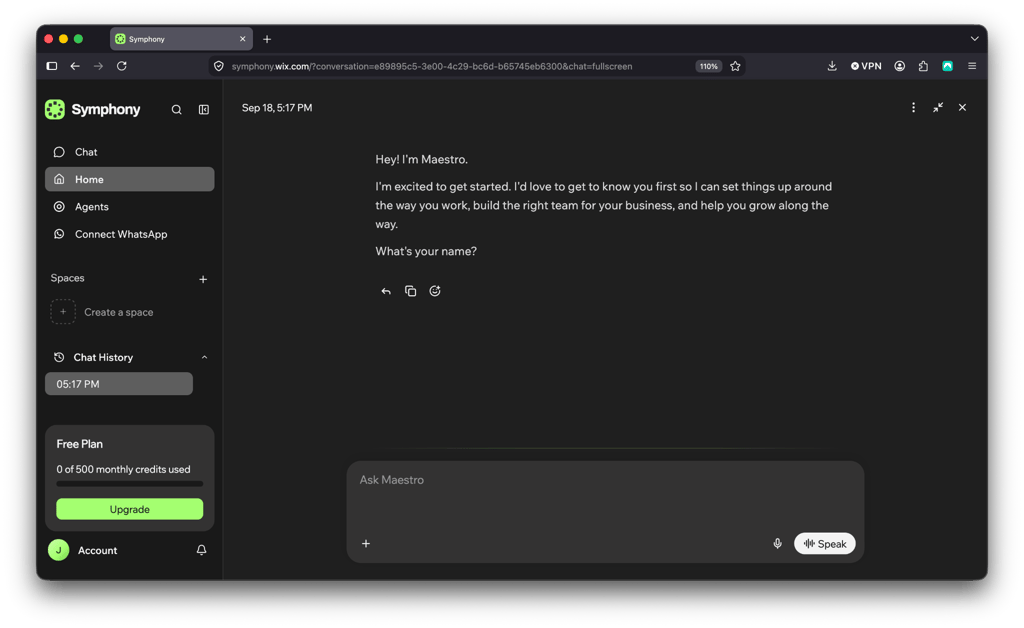
Symphony describes it as functioning like a chief of staff. That means you tell it what you need, and it delegates, builds workflows around your goals, and comes back to you when something needs a decision.
When I tested this, I was never manually deciding which tool to open or stitching together outputs from three different apps myself.
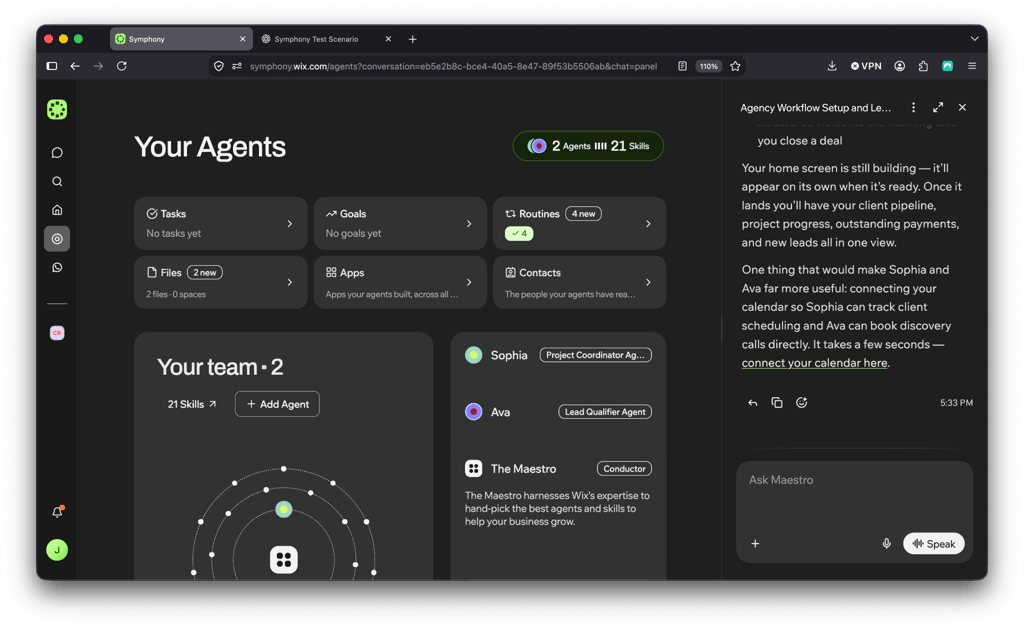
Built-in, custom, and external agents
Beyond Maestro, Symphony runs three categories of agents:
- Built-in agents. Ready to use immediately, covering core functions like marketing, outreach, scheduling, research, finance, and design.
- Custom agents. Configured to follow your own rules and preferences, which I found useful for a workflow quirk that didn’t match the generic default.
- External agents. Extend the system by connecting to third-party tools you may already use, such as Shopify or Zendesk, so I wasn’t being asked to abandon my existing stack.
Shared context across tasks
One of the most important things is that Symphony’s agents share context. Information the marketing agent learns about a customer segment can inform how the follow-up agent handles a lead, which can inform how the scheduling agent prioritizes a booking request.
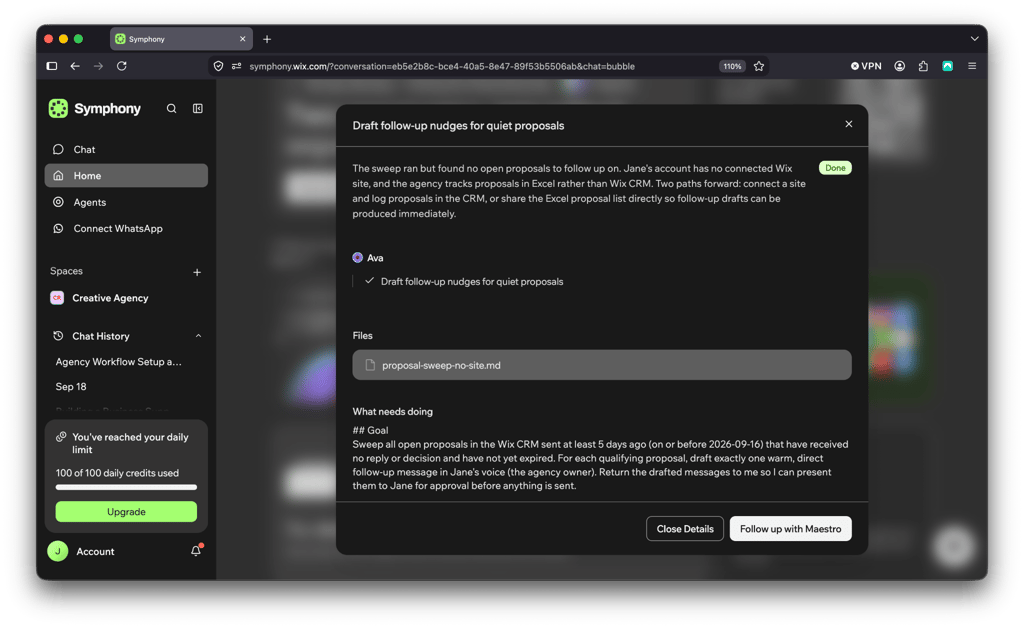
In a stack of disconnected point tools, that cross-pollination doesn’t happen automatically. Someone has to notice the connection and manually carry it from one tool to the next. With Symphony by Wix, I was surprised to learn that it carries the context on its own.
Approval before action
The model also includes a built-in quality-review step. During testing, a separate review layer checked most outputs for accuracy before they reached me.
And critically, Symphony by Wix is not autonomous. Significant actions, such as sending a customer message, launching a campaign, touching anything financial, or changing a workflow, were surfaced for my approval before they happened. Symphony frames this explicitly: agents propose, you approve.
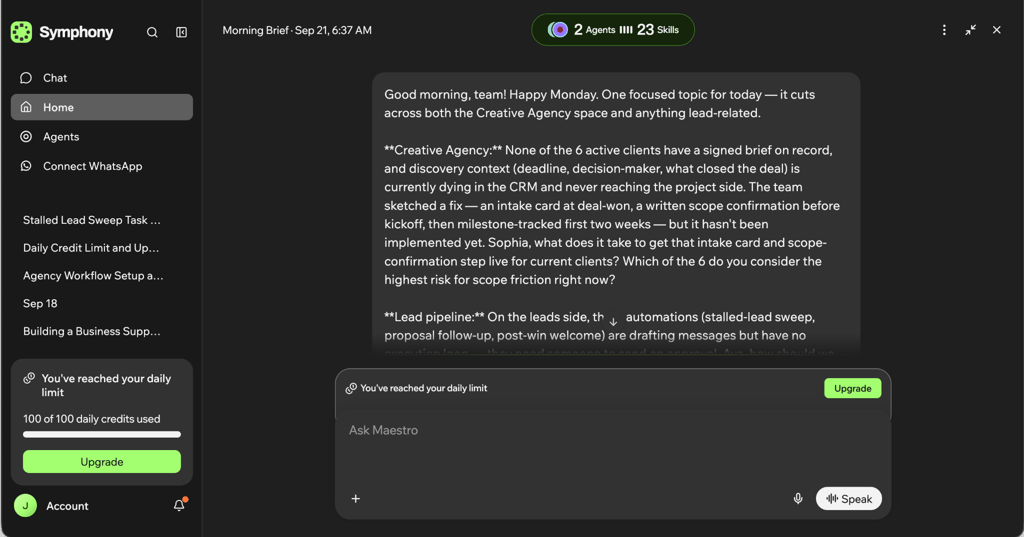
Each day, the system also runs a daily recap, like a quick stand-up, summarizing completed work and surfacing what needs attention next, rather than waiting for me to go looking for problems.
Symphony by Wix features
Symphony packs a lot into one platform, and there are plenty of features that changed how I ran my test business day to day. In the sections below I cover the most prominent ones.
One conversation for multiple business functions
The most prominent Symphony by Wix feature is consolidation. Instead of separate logins for email marketing, a scheduling app, a bookkeeping tool, and a customer-support inbox, I worked from one conversation that touched all of them.
That mattered less for the novelty of it and more for the time it saved. In practice, it showed up in fewer context switches, fewer tools to check for updates, and one place to see what was actually happening across the business.
Proactive recommendations and problem detection
In my experience, most AI tools are reactive because they wait for a prompt. What stood out to me about Symphony by Wix is that it surfaced issues and opportunities on its own.
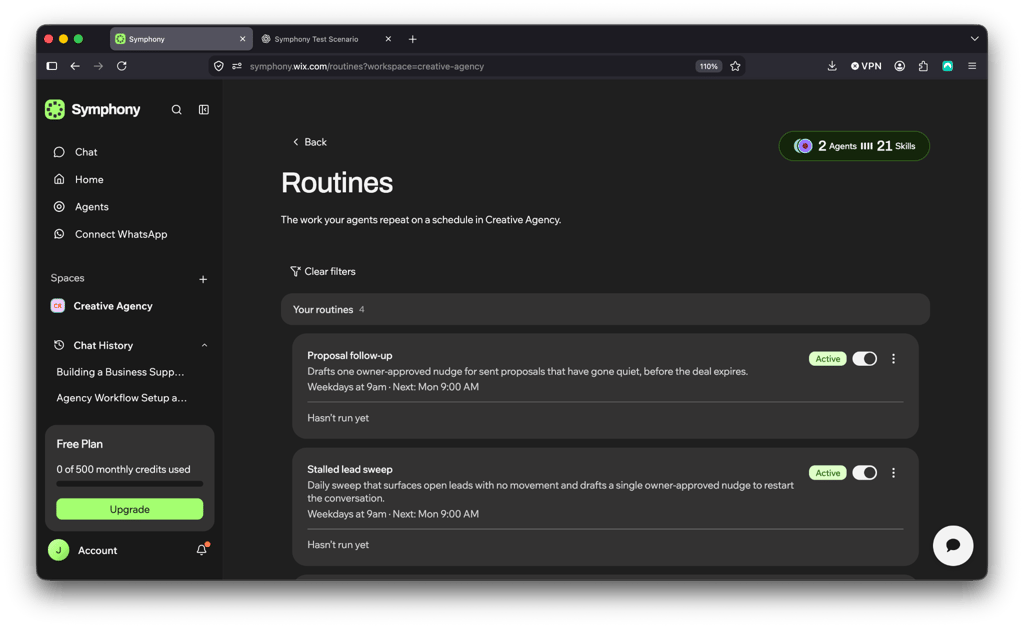
For instance, it flagged a drop in checkout conversions, a batch of overdue invoices, a lead that had gone quiet, and a scheduling gap worth filling with a promotion. I didn’t have to know the right question to ask, since the system had already flagged what it noticed on its own.
Support for marketing, outreach, scheduling, finance, and communications
Symphony’s built-in agents are mapped to the functions a small business actually runs day to day. When I tested it, that included drafting and scheduling marketing campaigns, following up with leads who hadn’t responded, managing appointment calendars, chasing overdue invoices, and triaging customer messages. These are concrete, recurring tasks, not the abstract AI assistance most tools try to sell you.
Business learning over time
Symphony by Wix is described as building a knowledge base of its own as it runs, learning a business’ customers, goals, preferences, and operating patterns.
In practice, I noticed the system getting more specific to my test business the longer I used it, rather than giving the same generic output every day.
No technical setup required
To my surprise, there was no workflow builder to configure and no automation logic to wire up before I could use Symphony by Wix. Onboarding was conversational: I described my business, and Symphony started working from there.
For a solo operator without the time or inclination to learn a new piece of software, that’s a real point of difference from tools that require upfront configuration before they’re useful.
Works with Wix infrastructure
Symphony is designed to work alongside your existing Wix website, domain, and hosting, plus other Wix business tools, rather than asking you to replace them. Moreover, the same goes to other platforms like Shopify – Symphony can integrate with whichever tool you are already comfortable with.
Symphony also notes that its built-in agents draw on patterns accumulated from supporting millions of businesses, which is the kind of operational knowledge a brand-new, single-purpose AI tool simply hasn’t had the chance to accumulate.
What makes Symphony by Wix stand out?
Plenty of AI tools can draft an email or summarize a report. What sets Symphony apart is how its agents work together and how much control stays with the owner.
Coordinated AI team vs single-purpose AI tool
A tool like ChatGPT is extremely capable. However, in my experience, it’s reactive and single-threaded: you prompt it, it responds, and it’s on you to carry that output into whatever tool actually executes the work.
With Symphony, I found its agents coordinated by design. That means the Maestro assigns work, agents share context, and a review layer checks results before they reach me.
Proactive AI vs reactive prompting
For a solo founder, the cost of reactive AI is that you still have to know about something before you can ask about it. A standard AI tool won’t inform you about issues in your workflows.
Symphony is built to close that gap. Its agents surface the bottlenecks on their own, through the daily stand-up recap and the routines running in the background. So, it doesn’t wait for you, the owner, to remember to go looking. Small businesses lose the most time and money in the space between the thought of checking and someone actually checking.
Small-business focus instead of enterprise complexity
Symphony by Wix’s core audience is businesses of up to ten people, not enterprise organizations with dedicated operations teams. I consider that a deliberate scope decision, and it showed in my testing.
With Symphony, there are no role-based permission trees, no multi-department workflow builder, no implementation period. The tradeoff is real. It’s not meant to replace an enterprise operations suite. For the intended audience, that simplicity is the selling point, not a limitation.
Owner control instead of black-box automation
A small business owner’s name is on every customer email, every invoice, and every public post. So, there’s no distance between what the business sends and who gets blamed when it’s wrong. An enterprise can absorb an AI tool sending the wrong email to a handful of customers, while a solo founder can’t.
This is also where a coordinated multi-agent system has more to go wrong than a single chatbot, not less. Once several agents are drafting campaigns, following up with leads, and touching invoices at the same time, a mistake can compound across more surface area in a single afternoon than one person prompting one tool ever could.
Full autonomy without a review step turns that coordination into a liability instead of an advantage. By routing every meaningful action back through the owner before it goes out, Symphony keeps the speed of running multiple agents at once without handing over the judgment calls that actually carry risk.
How to use Symphony by Wix
Using Symphony follows a fairly consistent pattern. Here’s how to get started with Symphony by Wix:
-
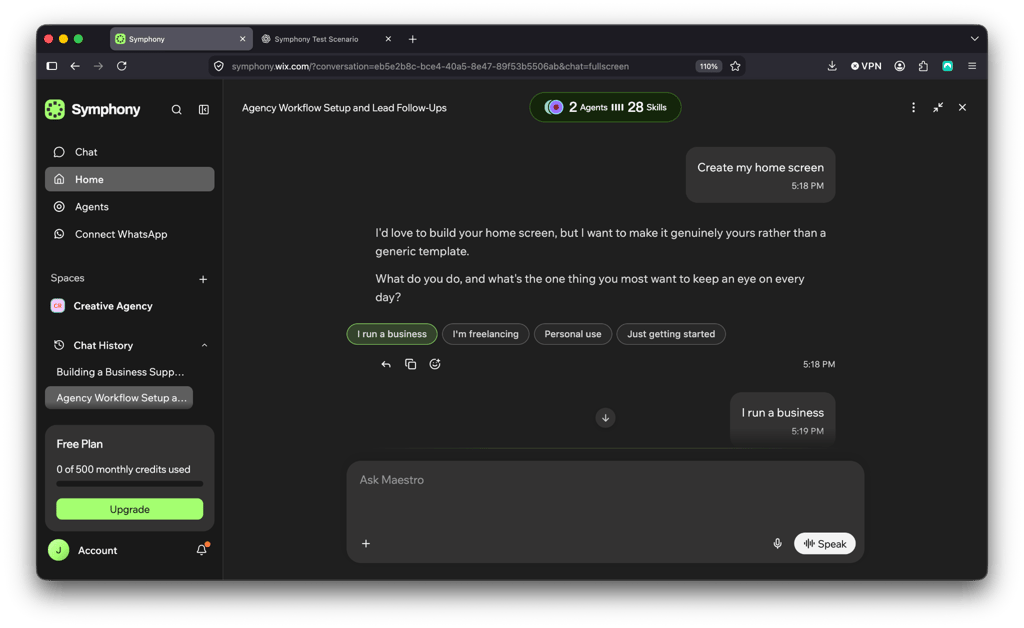
Tell Maestro what you want in plain language.
-
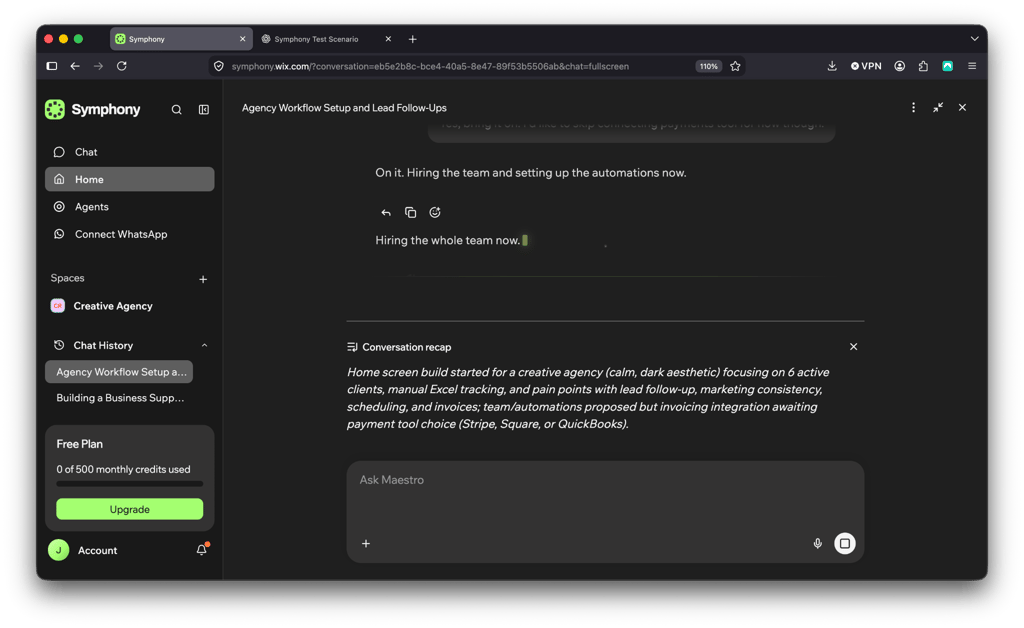
Answer Maestro’s follow-up questions about your business. Maestro sums up the context, proposes a team and automations, and starts setting them up once you approve.
-
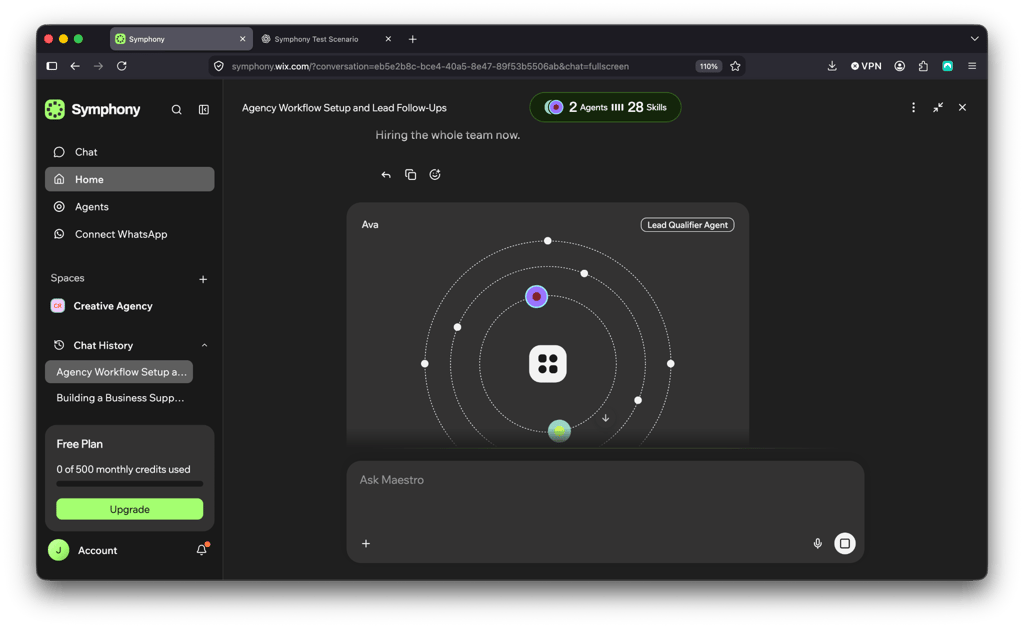
Maestro assigns the work to the right agents. Each new agent appears as a card in the chat.
-
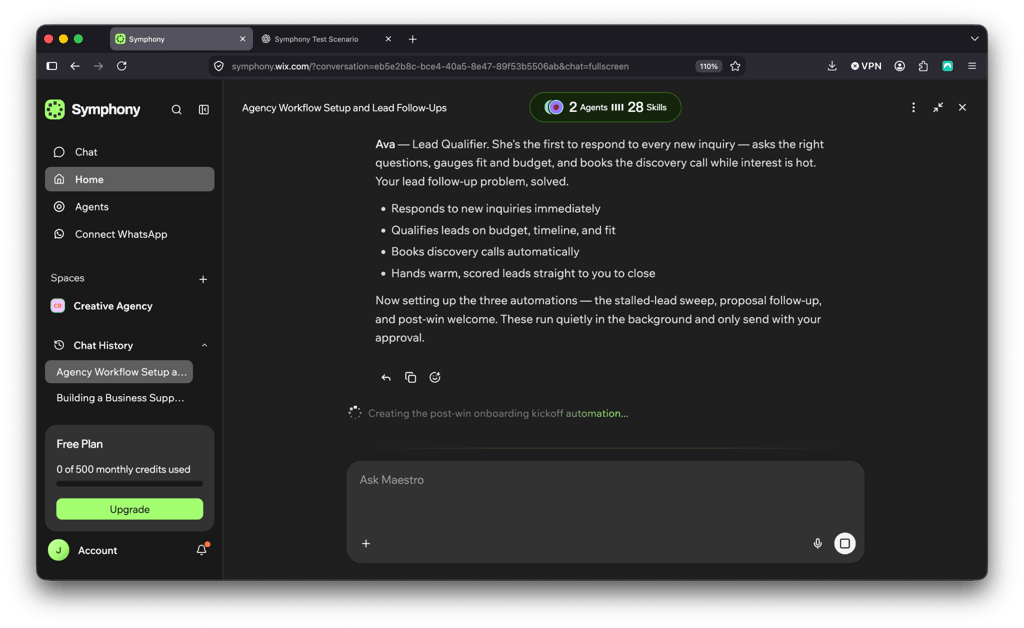
Maestro explains what each agent does and creates the automations that support them.
-
Check the summary of the agents and automations that are now running.
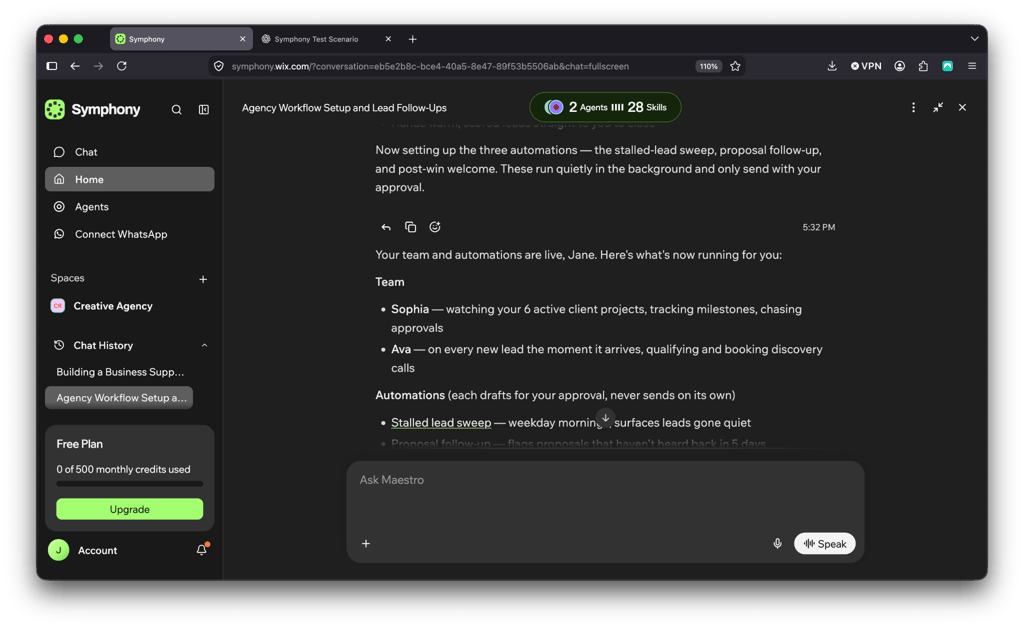
-
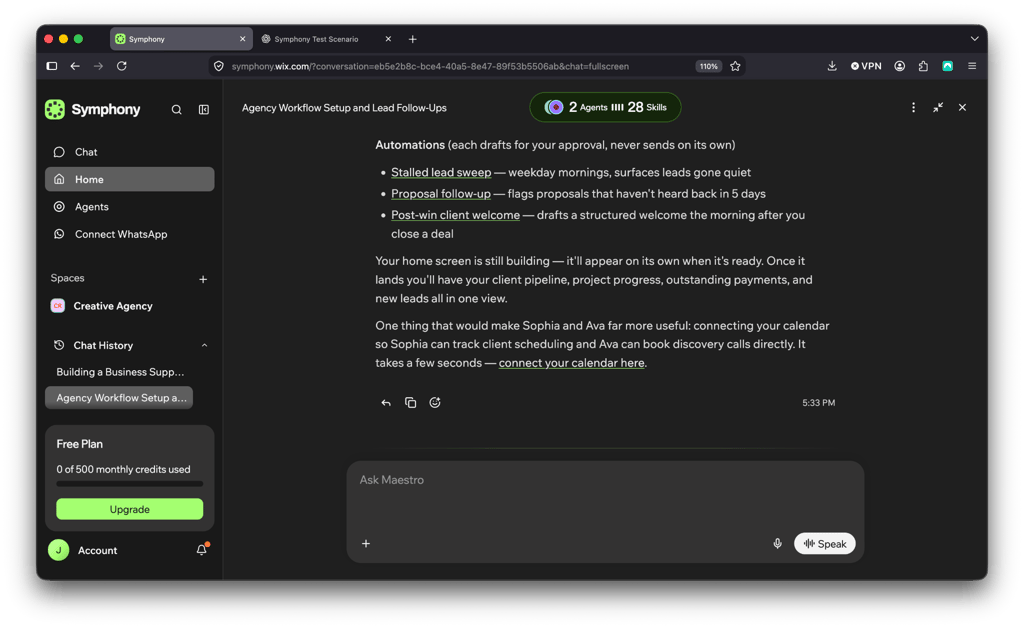
Look over the automations. Each one prepares drafts for your approval and never sends anything on its own. Maestro may also suggest next steps, such as connecting a tool.
-
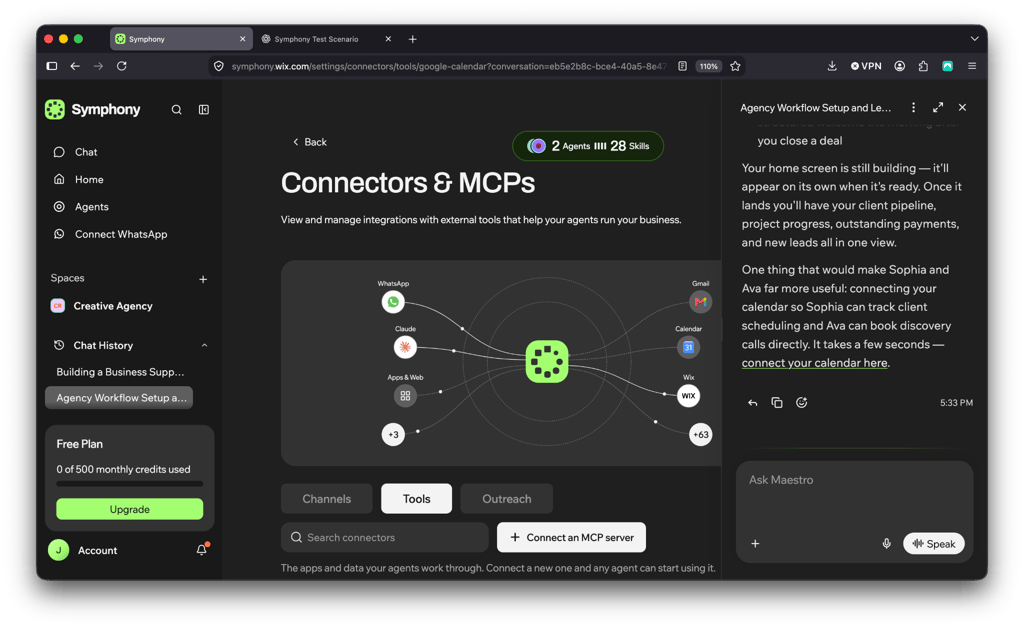
Connect your tools on the Connectors & MCPs page. The chat stays open beside it, so you can keep refining things in the same conversation.
Example use cases worth knowing before you start using Symphony by Wix include:
- Diagnosing website or checkout issues. Catching broken flows or drop-off points before a customer has to report them.
- Building out an online store’s structure. Setting up categories, collections, and navigation rather than building the layout by hand.
- Configuring large product catalogs. Adding or updating product data in bulk instead of one listing at a time.
- Automating invoice follow-ups. Chasing unpaid invoices on a schedule without someone manually tracking due dates.
- Creating customer discounts. Drafting and launching a promotion to fill a slow period or move excess inventory.
- Preparing marketing campaigns. Covers the channels a small business actually runs, including email marketing, SEO, and social content, not just a single ad format.
- Following up with stalled leads. Re-engaging a prospect who went quiet before the opportunity goes cold.
- Managing appointment schedules. Handling bookings, rescheduling, and gaps without someone watching the calendar all day.
- Processing bulk product data. Cleaning up or importing large sets of product information at once.
Symphony by Wix pricing
Symphony runs on a credit-based model with 4 tiers available.
| Plan | Starting price | Credits | Best for |
| Free | $0.00/month | 500/month with 100/daily cap | Testing what the agents can actually do before committing to anything |
| Basic | $16.00/month | 2,000/month | A solo operator handling a steady but modest volume of marketing, scheduling, and follow-up tasks |
| Pro | $40.00/month | 5,000/month | A growing business running more frequent campaigns, more customer communication, and more day-to-day operational tasks |
| Max | $80.00/month | 12,000/month (a 30,000-credit tier is also available at $100/month) | Businesses leaning on Symphony as a core part of daily operations rather than an occasional assist |
Chatting with Maestro doesn’t use credits, only the actual background work does. That includes drafting a message, running a task, or pulling data.
How many credits an action uses depends on the complexity of the request. You can track usage in real time, as well as upgrade mid-cycle if you need more.
If you run out of credits, your agents pause until the next renewal. However, nothing is lost, and even if your agents pause, your work, history, and projects stay exactly as you left them.
It’s also important to note that if you cancel within 14 days of your billing date, you can get a refund for the unused portion of your plan.
Symphony by Wix pros and cons
Who Symphony by Wix is for, and who it is not for
Although Symphony by Wix is a fairly versatile tool that almost everyone can use in their day-to-day lives, some audiences will get more out of it than others. While I was trying out Symphony by Wix, I was able to identify key groups that I could and would personally recommend it to.
Who I recommend Symphony by Wix to:
- Solo founders and freelancers
- Service-based businesses
- Small retail shops
- Creators and small teams
- Anyone drowning in follow-ups, scheduling, and invoice chasing
Who I don’t recommend Symphony by Wix to:
- Businesses needing enterprise-grade workflow orchestration
- Teams needing deep custom automation from day one
- Anyone wanting full autonomy, no human approval
Symphony by Wix vs traditional AI assistants
From what I was able to gather during my time testing the tool, Symphony’s difference from other AI tools on the market isn’t raw model capability, but the scope and coordination.
Here’s how it stacks up against the tools most small business owners have already tried:
- ChatGPT vs Symphony by Wix. ChatGPT is a single point of intelligence. In practice, it means you ask, it answers, and you’re responsible for carrying that answer into whatever tool actually does the work. Meanwhile, Symphony by Wix routes the work itself, to agents built for the task, and follows up without being asked again.
- Shopify Sidekick vs Symphony by Wix. Sidekick has gotten more proactive too, with Sidekick Pulse surfacing store recommendations on its own. But it’s still built around one store’s dashboard: product listings, discounts, theme content, basic analytics. Symphony’s agents work across invoicing, scheduling, and outreach at the same time, not just the storefront.
- Zapier vs Symphony by Wix. A classic Zap still runs on a trigger-action structure you build yourself, step by step, which can be quite daunting for beginners. Zapier’s newer AI agents do close some of that gap, letting you describe a goal in plain English instead of wiring the logic by hand. Symphony by Wix skips the setup entirely: there’s no Zap or agent to configure before it starts noticing what needs attention.
- Intercom Fin vs Symphony by Wix. Fin is a genuinely capable agent, and internal documentation claims it resolves 50 to 70% of support conversations on its own. However, it’s built for one job: customer support. Symphony’s agents cover support alongside marketing, scheduling, and finance, and let what one agent learns inform what another does.
Verdict: is Symphony by Wix worth it?
After testing it, Symphony by Wix is definitely worth it for small business owners losing real time to the operational side of running a business. It earns its keep on a list of concrete strengths: an orchestrator that delegates instead of just answering, agents that surface problems before you ask, an approval step that keeps the owner in control of anything customer-facing, and a setup that took minutes instead of a configuration project.
Symphony by Wix doesn’t claim to do and solve everything, though. Enterprise-scale workflow orchestration and deep custom automation from day one aren’t what it’s built for. But for the operational grind every small business owner already knows, Symphony’s feature set is built around exactly that, and it delivers on it.
FAQ
What is Symphony by Wix?
Symphony by Wix is an AI-agent platform built for independent business owners and small teams. It coordinates a team of specialized AI agents through a central orchestrator, called Maestro, to handle tasks across marketing, scheduling, finance, and customer communication from one conversation.
What features does Symphony by Wix include?
Symphony by Wix core features include a central orchestrator that delegates work, built-in agents for common business functions, custom agents you can configure yourself, external agents that connect to third-party tools, shared context across tasks, proactive issue detection, an approval step before actions execute, and conversational onboarding with no technical setup required.
Does Symphony by Wix take actions automatically?
No, Symphony by Wix doesn’t take actions automatically. Symphony can draft, prepare, and recommend actions on its own, but anything significant, such as sending a message, launching a campaign, touching finances, changing a workflow, is surfaced for your approval before it happens.
How much does Symphony by Wix cost?
Symphony by Wix pricing varies according to your needs. It has a four-tier subscription model based on credits: Free ($0.00/month, 500 credits with a daily cap of 100 credits), Basic ($16.00/month, 2,000 credits), Pro ($40.00/month, 5,000 credits), and Max ($80.00 or $100/month, 12,000 or 30,000 credits).
Who should use Symphony by Wix?
Symphony by Wix is built for solo entrepreneurs, freelancers, service businesses, small shops, creators, and small teams, generally businesses up to around ten people, who want coordinated AI help with day-to-day operations without enterprise-level complexity.
Is Symphony by Wix good for small businesses?
Yes, Symphony by Wix is specifically scoped for small business operations rather than enterprise workflows, with practical support for marketing, scheduling, finance, and customer communication, and a setup process that doesn’t require technical configuration.
Does Symphony by Wix work with a Wix website and business tools?
Yes, Symphony by Wix complements existing tools and resources of the Wix ecosystem including an existing website, domain, and hosting, as well as other Wix business tools, rather than requiring you to replace your current setup.