monday.com review 2026: features, pricing, pros and cons
Being behind major reports like The Mother of All Breaches and RockYou2024, our in-house cybersecurity experts and journalists provide unbiased, real-world testing and in-depth analysis.
We maintain complete transparency by openly sharing our testing methodologies with our audience.
Learn more
Managing projects, tracking tasks, and keeping teams on the same page can get complicated, especially when you rely on multiple tools. monday.com brings all your work into one customizable platform, with project management, team collaboration, workflow automations, and AI features.
In this monday.com review, I tested the platform to see how easy it is to organize projects, manage tasks, and automate everyday workflows. I also looked into its separate CRM and development products to see what they offer for sales and product teams.
Overall, monday.com is a flexible work management platform with plenty of customization options. However, some useful features are locked behind more expensive plans, and its pricing structure can get confusing as your team grows. Read on to learn about its features, pricing, pros and cons, and whether it's worth considering in 2026.
monday.com at a glance
| Category | Details |
| Best for | Project management, team collaboration, workflow automation, and sales management |
| Main products | monday.com AI work platform, monday.com CRM, monday.com dev, and monday.com service |
| Free plan | ✅ Yes, for up to 2 users (work platform only) |
| Starting price | $9.00/seat/month (annual billing) |
| Project views | Table, Kanban, Gantt, Timeline, Calendar, Workload, and more |
| AI features | AI assistant, AI agents, AI workflows, AI columns, and AI Notetaker |
| Integrations | Slack, Google Workspace, Microsoft Teams, GitHub, and more |
| Mobile apps | iOS and Android |
| Customer support | Help center, tutorials, and customer support options depending on the plan |
Who is monday.com best for?
monday.com is best for teams that want to organize projects, track tasks, and automate repetitive work in one place. Its customizable boards and different project views make it suitable for various workflows, from simple task tracking to more complex project management. However, monday.com isn't limited to project management. It has several dedicated products for different business needs:
- Small businesses and startups: Manage everyday tasks, deadlines, and team responsibilities using customizable boards and templates
- Project managers: Plan projects, monitor progress, assign tasks, and manage resources using timelines, Gantt charts, and dashboards
- Marketing and creative teams: Coordinate campaigns, content calendars, and creative projects while keeping communication in one place
- Sales teams: Use monday.com CRM to manage leads, track deals, and automate sales activities
- Product and development teams: Use monday.com dev to organize sprints, track bugs, and manage product roadmaps
That said, monday.com might not be the best choice for individuals or very small teams that only need basic task management. The free plan is limited, while some advanced features require a paid subscription.
monday.com project management review
monday.com uses customizable boards as the foundation of its project management system. Instead of forcing you to follow one predefined structure, it lets you organize information using different columns, groups, and views.
You can create separate boards for projects, tasks, clients, or internal processes. This flexibility makes the platform suitable for different teams, although it can take some time to understand how everything fits together.
Task management features
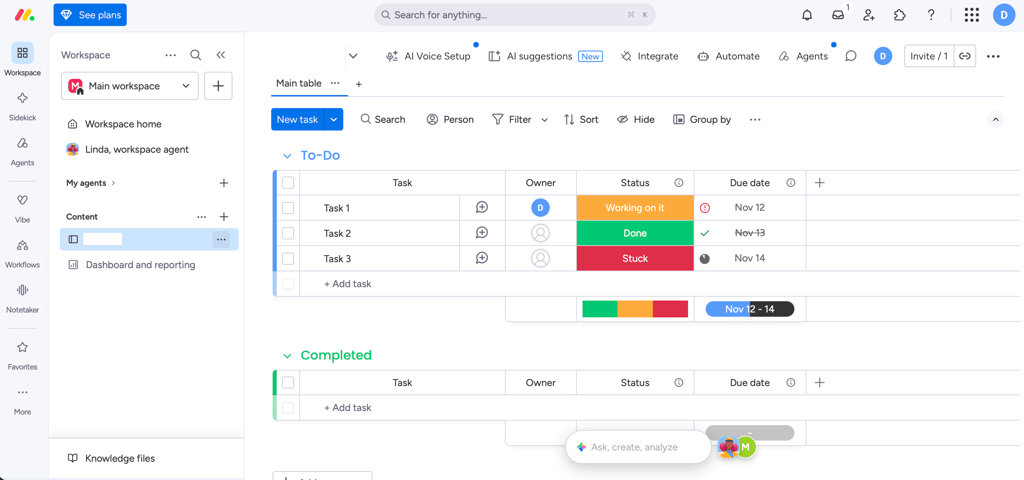
monday.com's task management tools let you create tasks, assign team members, set deadlines, and track progress. Each task appears as an item on a board. You can add different columns to display information such as:
- Task owner
- Status
- Due date
- Priority
- Timeline
- Progress
- Dependencies
You can also create subitems to break larger tasks into smaller steps. This is useful when a project involves multiple responsibilities or requires input from different team members.
Status labels make it easy to see which tasks are still pending, in progress, or completed. You can customize these labels to match your team's workflow.
Another useful feature is task dependencies. They help you identify which tasks need to be completed before others can begin. This makes it easier to plan projects with multiple stages and avoid scheduling conflicts.
Overall, monday.com provides a flexible task management system. However, its many customization options can feel overwhelming if you only need a simple to-do list.
Boards, project views, and dashboards
Boards are where most of the work happens in monday.com. You can start with a blank board or use one of the available templates, then customize it by adding groups, items, and columns. What I like about this approach is that you don't have to stick to one way of viewing your work. monday.com offers several project views, including:
- Table view: A traditional spreadsheet-style layout for organizing tasks and project information
- Kanban view: Displays tasks as cards across customizable workflow stages
- Gantt view: Shows project timelines, task dependencies, and milestones
- Timeline view: Helps you visualize task durations and upcoming deadlines
- Calendar view: Displays tasks and deadlines by date
- Workload view: Helps managers monitor team capacity and distribute work
You can also create dashboards to bring information from different boards into one place. Dashboard widgets help visualize project progress, deadlines, workloads, and other metrics.
However, not every view is available on every subscription. For example, Timeline and Gantt views are included in the Standard plan, while more advanced project management capabilities are available on higher tiers.
Team collaboration and reporting
monday.com includes several tools that help teams communicate without constantly switching between applications. You can leave comments on individual tasks, mention colleagues using @mentions, and attach files to relevant items. This keeps discussions connected to the work instead of scattered across separate email threads.
The platform also includes Workdocs, where team members can create and collaborate on documents. You can connect information from boards to documents, making it easier to turn project notes into actionable tasks.
For managers, dashboards and reporting tools provide an overview of team activities. Depending on the plan, you can combine information from multiple boards and track project progress using different widgets.
Guest access is another useful feature. It allows external collaborators to access specific shared boards without giving them access to your entire workspace.
One limitation is that advanced reporting and dashboard capabilities depend on your subscription. Teams that need more detailed insights may have to upgrade.
Workflow automations and integrations
monday.com offers no-code automations that help reduce repetitive administrative work. You can create automation recipes using triggers and actions. For example:
- When a task's status changes to Done, notify the project manager
- When a deadline arrives, send a reminder to the assigned team member
- When a new item is created, automatically assign it to someone
- When a status changes, move an item to another group
- When a task is completed, update related project information
You can customize these workflows without writing code, although the number of automation actions depends on your subscription.
The platform also supports integrations with external applications. Some examples include Slack, Google Calendar, Microsoft Teams, and Dropbox. These integrations help teams connect their existing tools to monday.com and reduce manual data entry.
However, integrations and automation limits are worth checking before subscribing. The Standard plan includes 250 automation and integration actions per month, which may not be enough for teams with more complex workflows.
monday.com AI features: what can you automate?
monday.com has expanded its AI capabilities beyond basic text generation. Its AI tools can help teams summarize information, automate tasks, analyze data, and build custom workflows. Some of the main AI capabilities include:
- monday.com Sidekick: An AI assistant that can understand your work context, answer questions, and help carry out tasks
- AI columns: Use AI to summarize text, classify information, extract details, and generate content directly within boards
- AI workflows: Create AI-powered workflows to automate processes using natural-language instructions
- AI agents: Configure specialized agents to handle recurring tasks across different workflows
- AI Notetaker: Capture meetings, generate summaries, and identify action items
- monday.com Vibe: Build custom business applications using AI prompts
These tools can be useful for teams that handle large amounts of information or repeat similar tasks regularly. For example, an AI column can summarize lengthy updates, while an AI workflow can process information and trigger actions based on its contents. Sidekick can also help users interact with their work using natural language instead of manually searching through boards.
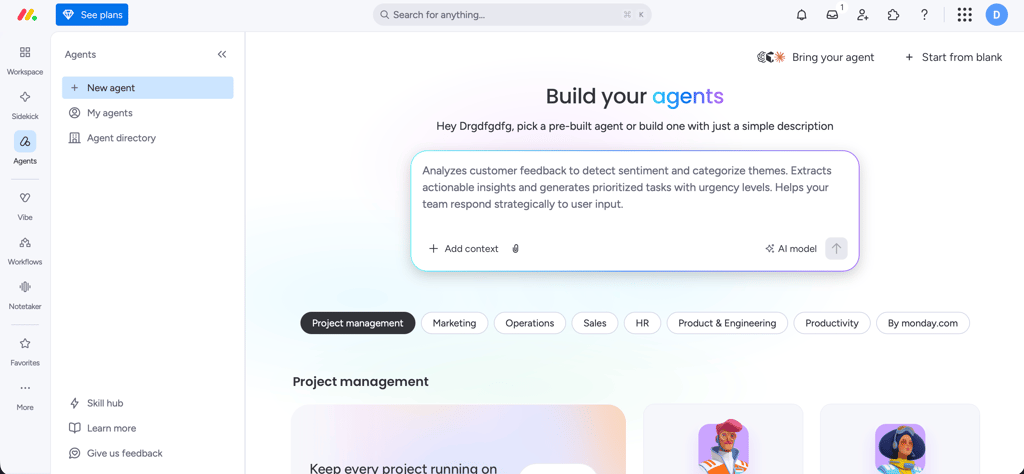
However, there is an important limitation: monday.com AI uses a credit-based system. Different features consume different amounts of credits, depending on the task and its complexity. You can monitor usage and purchase additional credits when needed. Some basic AI enhancements are included without consuming credits, but more advanced capabilities can increase your subscription costs.
I would consider monday.com's AI features a useful addition rather than a replacement for its core project management tools. Teams should also check their expected credit consumption before relying on AI for high-volume workflows.
monday.com CRM review: sales automation and integrations
monday.com CRM software is a separate product designed to help sales teams manage customer relationships, track leads, and organize their sales pipelines. Like the main work management platform, it uses customizable boards. However, its features are tailored to sales activities, including contact management, deal tracking, communication, and reporting.
Contact management and sales pipelines
monday.com CRM lets you organize leads, contacts, accounts, and deals in dedicated boards. You can store customer information, assign sales representatives, track communication, and monitor where each deal stands in your pipeline.
The platform also offers customizable sales pipeline views. These help sales teams see which opportunities are new, qualified, under negotiation, or closed. You can customize deal stages to match your sales process and use dashboards to monitor pipeline performance.
Another useful feature is the centralized communication history. Depending on your plan, you can track emails, calls, meetings, and notes associated with individual contacts. This makes it easier for sales representatives to understand previous interactions before contacting a lead.
Sales CRM automation features
monday.com CRM includes automation tools designed to reduce manual sales work. For example, teams can automate lead assignments, update deal statuses, and create follow-up activities when specific conditions are met.
Its more advanced features include sales sequences, which help automate multi-step outreach. You can combine automatic emails, manual messages, calls, and follow-up tasks into a scheduled process.
monday.com CRM also offers AI-powered sales agents. These can help with lead sourcing, qualification, outreach, and meeting preparation, depending on the subscription. However, some of the more advanced sales automation tools are limited to higher-tier plans. For example, sales sequences are available on Pro and Enterprise plans.
CRM integrations for marketing and sales
monday.com CRM supports integrations that help sales teams connect their existing communication and business tools. Some examples include:
- Google Calendar: Connect meetings and calendar activities
- Outlook: Integrate email and calendar workflows
- Zoom: Support meeting-related activities
- QuickBooks: Connect financial and customer information
- Crunchbase: Enrich CRM data with company information
You can also connect monday.com CRM with other applications through its integration options and automation workflows. The main benefit is having customer information and sales activities in one place. However, integration availability and automation limits depend on your plan, so it's worth checking the feature list before committing.
monday.com dev review: tools for product and development teams
monday.com dev is a dedicated product development management platform. It provides tools for software teams that need to coordinate product planning, development tasks, and release workflows. The platform includes features such as:
- Sprint management: Plan sprints, assign tasks, and track progress using Agile workflows
- Roadmap planning: Organize product priorities and visualize upcoming development work
- Bug tracking: Record issues, assign responsibilities, and monitor their resolution
- Burndown charts: Track remaining work throughout a sprint and identify potential delays
- Agile insights: Monitor sprint performance and identify bottlenecks
- Git integrations: Connect development workflows with GitHub and other supported tools
- Engineering dashboards: Track development performance and team activities
One of monday.com dev's main advantages is that it connects product and development workflows with the rest of the business. Product managers can coordinate with designers, developers, and other departments without relying on completely separate project management systems.
However, monday.com dev isn't a replacement for every specialized development tool. Teams that need advanced coding environments, repository management, or technical development capabilities will still need dedicated tools for those tasks.
I would consider monday.com dev a useful project coordination layer for development teams rather than a complete software development environment.
monday.com ease of use and setup
monday.com has a visual interface that makes it relatively easy to understand how projects and tasks are organized. Its boards use familiar spreadsheet-like structures, while status labels and color-coded elements help users identify important information quickly.
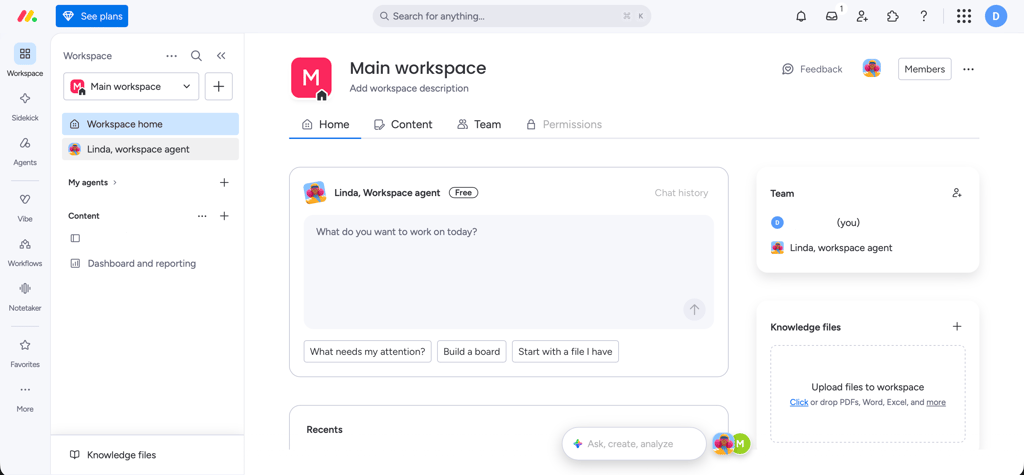
You can start with a template or build a workspace from scratch. The templates are particularly useful for beginners because they provide ready-made structures for common workflows, such as project tracking, content calendars, and sales pipelines.
However, customization comes with a learning curve. There are many board settings, column types, automations, views, and integrations to explore. New users may need some time to understand which features they actually need.
I also think the platform works best when teams establish consistent workflows. Without clear naming conventions and board structures, it can become difficult to navigate multiple projects and workspaces.
Overall, monday.com is beginner-friendly once you understand its basic structure, but mastering its advanced features takes more time.
monday.com mobile app review
monday.com offers mobile apps for both iOS and Android. They let users access boards, check notifications, update tasks, and stay connected with their teams while away from their computers. The mobile experience is useful for quick updates and checking project progress. You can access task information, change statuses, and communicate with colleagues.
The platform also supports offline mode. Some board actions can be performed without an internet connection, with changes synced once you reconnect. However, offline functionality is limited and differs between iOS and Android.
I would use the mobile app for checking updates and making quick changes rather than managing complex projects. The desktop version is more convenient for configuring boards, building dashboards, and setting up automations.
monday.com pricing and plans
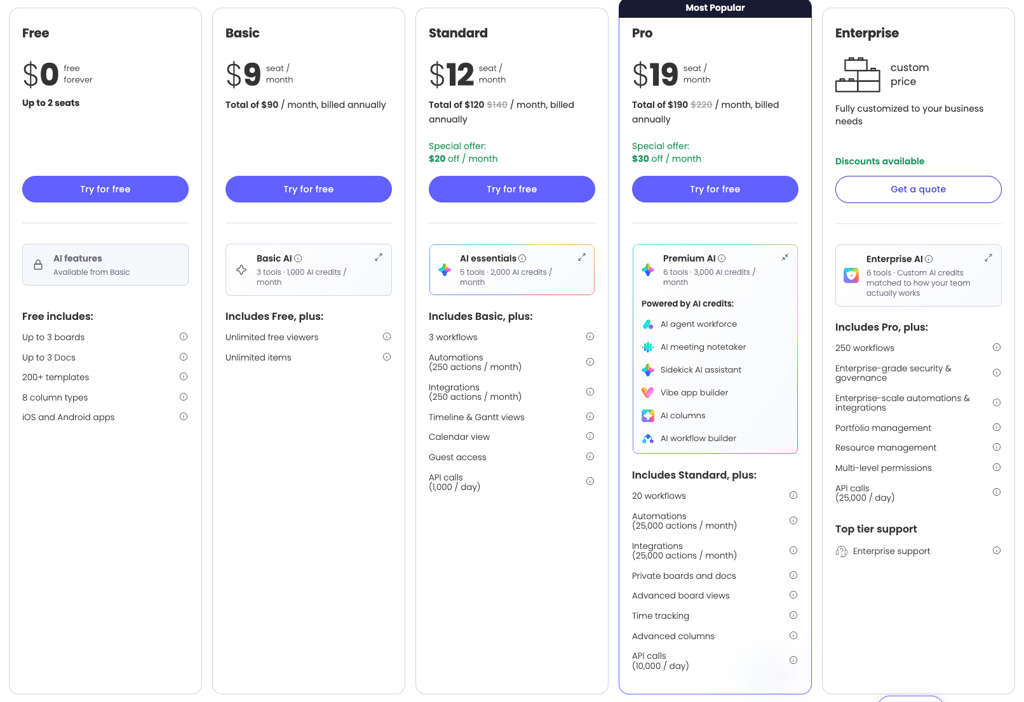
monday.com pricing depends on which product you choose, the subscription tier, and the number of users. The main work management platform has a free plan and four paid tiers: Basic, Standard, Pro, and Enterprise. monday.com CRM and monday.com dev have separate pricing structures. Here's how the main subscriptions compare.
monday.com free plan: what's included?
monday.com offers a Free plan for its main work management platform. It supports up to two users and includes:
- Up to three boards
- Up to three Workdocs
- 200+ templates
- Eight column types
- iOS and Android apps
The free plan is suitable for individuals and very small teams that want to try the platform or organize a few basic projects. However, it has several limitations. You don't get the full range of project views, advanced automations, or integrations available on paid plans. The two-user limit is also restrictive for businesses that need to collaborate with larger teams. It's worth noting that monday.com CRM and monday.com dev don't have permanent free plans. Instead, you can try these products through their free trials.
Paid plans compared: features and limits
Here is an overview of monday.com work management pricing.
| Plan | Annual price per seat/month | Main features |
| Free | $0.00 | 2 seats, 3 boards, 3 Docs, templates, basic columns |
| Basic | $9.00 | Unlimited free viewers, unlimited items, basic AI features |
| Standard | $12.00 | Timeline and Gantt views, Calendar, guest access, 250 automation and integration actions/month |
| Pro | $19.00 | Private boards, advanced reporting, workload management, more automation capabilities |
| Enterprise | Custom | Advanced security, governance, analytics, and enterprise-level controls |
The Basic plan is a reasonable starting point for teams that need more than the free version offers. However, I would recommend looking at Standard if you need more advanced project management features.
The Standard plan includes Timeline and Gantt views, guest access, and 250 monthly automation and integration actions. These features can make a noticeable difference when managing several projects.
The Pro plan is more suitable for larger teams that need advanced reporting, private boards, and more extensive workflow management.
The Enterprise plan is designed for organizations that require advanced security, permissions, and analytics.
How much does monday.com cost for your team?
One thing to remember is that monday.com pricing is based on seats, and paid subscriptions generally start with three seats. This means that the advertised price per user doesn't necessarily represent the total amount you'll pay. For example, here's how the annual subscription costs add up for a three-person team:
| Plan | Monthly equivalent | Annual cost |
| Basic | $27.00 | $324.00 |
| Standard | $36.00 | $432.00 |
| Pro | $57.00 | $684.00 |
If your team grows, the subscription cost increases accordingly. monday.com also sells seats in bundles, so the available seat options may not match your exact team size. I recommend calculating the total subscription cost before choosing a plan, especially if you expect to add more users later.
Work management, CRM, and dev pricing differences
monday.com has separate pricing for its dedicated products. Here's how their starting prices compare:
| Product | Entry-level paid plan | Standard plan | Highest listed paid plan |
| monday.com AI work platform | $9.00 | $12.00 | $19.00 |
| monday.com CRM | $12.00 | $17.00 | $28.00 |
| monday.com dev | $9.00 | $12.00 | $20.00 |
monday.com AI work platform is designed for general project and work management. It includes customizable boards, task tracking, collaboration, dashboards, and workflow automation.
monday.com CRM focuses on sales processes. Its plans include contact and deal management, sales pipelines, communication tracking, and sales automation. The higher tiers add more advanced AI sales agents and automation capabilities.
monday.com dev is designed for product and software development teams. It includes sprint management, roadmaps, bug tracking, Git integrations, and development-focused reporting.
monday.com pros and cons
After reviewing its features, product options, and pricing, here are the main advantages and disadvantages of monday.com.
Verdict: is monday.com worth it?
Yes, monday.com is worth considering if you need a flexible platform to manage projects, collaborate with colleagues, and automate everyday workflows. Its customizable boards, different project views, and integrations make it suitable for teams with different working styles.
I particularly like that monday.com isn't restricted to basic task management. You can use its dedicated CRM and development products to organize sales pipelines and product workflows, while keeping different teams connected through the same platform.
However, the pricing structure is one of its main drawbacks. The free plan is limited to two users, and more advanced project management features require paid subscriptions. If you also need CRM or development tools, you'll have to account for their separate costs.
For smaller teams, I would start with the free plan or Basic subscription and upgrade only when you need additional views, automations, or reporting. Teams managing multiple projects will likely benefit more from Standard or Pro.
Overall, monday.com is a good choice for businesses that value customization and want to bring different workflows into one platform. However, if you only need a simple task manager, you may find it more complicated and expensive than necessary.
FAQ
Is monday.com good for project management?
Yes, monday.com is a flexible project management platform with customizable boards, task assignments, multiple project views, dashboards, and workflow automations. It works well for teams that need to coordinate projects and track progress, although some advanced features require higher-tier subscriptions.
Can you use monday.com as a CRM?
Yes, monday.com CRM is a dedicated product for managing contacts, leads, accounts, and sales pipelines. It also includes communication tracking, sales automation, and AI-powered tools for lead generation and qualification.
Is monday.com free?
Yes, monday.com offers a permanent Free plan for its main work management platform, supporting up to two users, three boards, and three Docs. However, monday.com CRM and monday.com dev offer free trials rather than permanent free plans.
Is monday.com suitable for small businesses?
Yes, monday.com can work well for small businesses that need to organize projects, manage tasks, and coordinate teams. Its free and Basic plans provide a starting point, although the two-user free plan limit and additional subscription costs may become restrictive as a business grows.
What is the difference between monday.com work management, monday.com CRM, and monday.com dev?
monday.com work management (now presented as monday.com AI work platform) focuses on general project and task management, team collaboration, and workflow automation. monday.com CRM is designed for sales teams that need to manage contacts, deals, and customer interactions. monday.com dev focuses on product development, offering tools for sprint management, roadmaps, bug tracking, and engineering workflows.