Best Safari ad blockers in 2026
Our trusted in-house research experts conduct independent, unbiased testing of ad blockers, combining internal and external evaluation data and tools for comprehensive reviews.
We maintain full transparency by sharing our methodologies and technical insights, empowering readers to make informed, independent decisions.
Learn more

Pop-ups, pop-unders, and data-tracking technology are the common practices of the online advertising business. Made to grab your attention, these invasive ads are nothing but an annoyance. If you're tired of advertisers invading your field of focus, it's time to get a quality ad blocker for your Safari browser.
There are many good reasons to use an ad blocker for Safari. First and foremost, no more ads will be displayed right in front of your screen. You may even notice an increase in loading speed for those add-cluttered websites. Also, you'll be able to watch videos immediately without ad breaks. Oh, and those intrusive cookie notifications? Ad blockers will remove them too.
But how do you choose the best Safari ad blocker? We ran some extensive ad blocker tests, so you don't have to. Continue reading for the results!
Top 5 best Safari ad blockers for 2026
- Surfshark CleanWeb – the best ad blocker and VPN duo
- Total Adblock – a great Safari ad blocker with powerful performance
- NordVPN Threat Protection – well-rounded Safari ad blocker
- IPVanish Threat Protection – budget-friendly Safari ad blocker
- Proton VPN NetShield – good ad blocker with several layers of protection
What to look for in the best ad blocker for Safari?
There are many different ad blockers available on the market. But it's important to choose an ad blocker that works well with the Safari browser and also efficiently blocks unwanted content.
Here are some things to consider when choosing an ad blocker:
| Types of ads blocked: | Pop-ups, banners, notifications, social media ads, etc. |
| Compatibility: | Apps, Safari extension |
| Features: | Whitelisting, filters, tracker blocker |
| Security: | VPN, antivirus |
- Blocking features. A simple ad blocker can handle ads and trackers with ease. But an excellent ad blocker also detects pop-ups, cookie consent notifications, and fake close-ups, greatly improving your browsing experience. The more types of intrusive ad content the provider removes, the better protected you'll be.
- Compatibility. The best ad blocker for Safari is the one that offers the best compatibility. It's essential to evaluate if a Safari ad blocker offers smooth integration, is easy to set up, and delivers frequent updates.
- Customization. With efficient customization, you'll have more control over your privacy settings. Customization ensures that the software blocks everything except what you want to see – whether it's YouTube ads that help support your favorite creators or social media notifications.
- Additional features. Some providers offer additional features at a similar price point as their competitors. So why not choose a provider that offers a VPN, malware and malicious website detection on top of the ad-blocking feature?
- Price. An ad blocker should be worth the money. Feel free to consider the value you’ll get for the purchase. Does the provider offer a wide variety of blocking capabilities? Do they include a VPN? These features may come at a slightly higher price point, but they will tremendously improve your browsing experience.
The best Safari ad blockers – detailed list
An overabundance of ads is annoying, and that's why using an ad blocker can improve your browsing experience. But if you need help finding a Safari ad blocker, our list will help you. We analyzed a dozen providers based on our testing results, pricing, features, and other criteria. So let's take a look at our top picks.
1. Surfshark Cleanweb – the best overall ad blocker and VPN duo

| Free version: | Yes (Free 7-day trial) |
| Supported platforms: | Chrome, Firefox, Edge, Windows, macOS, Linux, Android, iOS, FireTV, Android TV |
| Customer support: | 24/7 live chat, email, guides and articles, FAQs |
| Current deal: | 87% OFF Surfshark CleanWeb + 3 months FREE |
The Surfshark CleanWeb is the best ad blocker with well-rounded protection for your Safari browser. It removes all sorts of annoying adware, such as pop-ups, banners, cookie pop-ups, and trackers, among others. The ad blocker also includes malware removal to keep you safe while browsing.
Cleanweb is much more than just a good ad blocker. It is a part of something bigger – a Surfshark VPN service that encrypts your personal data. Clearly, the tool covers all of the bases to ensure safe and pleasant web scrolling.
Features. Surfshark CleanWeb gives you full control over what you want to see online. It effectively blocks various annoyances, such as cookie pop-ups and trackers. But if you don't mind seeing ads on a particular website, CleanWeb allows you to include it in a bypass list.
What's more, Surfshark CleanWeb has a Data Breach Alert feature which notifies you whether the website you're visiting has recently had a data breach. This can help you decide whether you want to share your data with that website.
A VPN works great in conjunction with an ad block. Surfshark VPN encrypts your internet traffic, anonymizing your browsing activity. Moreover, the VPN makes it impossible to gain unauthorized access to your data with advanced AES-256 encryption.
But VPNs are not for security only, they also enable you to access geo-restricted content. Our tests have shown that Surfshark easily unblocks Netflix, Disney+, Amazon Prime Video, and other popular streaming platforms. It also maintains great speed, providing you with a seamless streaming experience.
Test results. When it comes to ad blocking, Surfshark CleanWeb works very well with the Safari browser. It blocks YouTube video ads with no hassle. The AdBlock Tester showed that CleanWeb is great ad blocking all sorts of ads. The only areas where it comes short are Google Analytics tools, Gif images, static images, and error monitoring. Thus it received 74/100 points.
Pricing. Surfshark is one of the most budget-friendly providers with a 7-day free trial. The ad blocker and VPN prices start at $2.49/month for unlimited devices and come with a 30-day money-back guarantee.
For more information check out our Surfshark CleanWeb review.
2. Total Adblock – affordable and well-performing Safari ad blocker

| Free version: | Yes (Free 7-day trial) |
| Supported platforms: | Android, iOS |
| Customer support: | 24/7 live chat, FAQs, guides, email |
| Current deal: | Get 80% OFF Total Adblock |
Total Adblock is an effective and reliable Safari ad blocker. Unfortunately, it lacks a dedicated Safari extension and only has an iOS app for Apple devices, leaving Mac computer users empty-handed (unless they opt for a different browser). Despite this, it’s a worthwhile option if your primary use-case is using Safari on your iPhone or iPad.
Features. You can customize Total Adblock to fit your ad-blocking needs using its whitelisting and filter settings. Adjustable preferences include ad blocking filter, annoyances filter, and the security filter for blocking spam and other malicious web pages.
Test results. We used a combination of in-house and third-party test results to conclude that Total Adblock is a great ad blocker for Safari and other platforms. For example, the service blocked all adverts served by the Can You Block It site. Additionally, Total Adblock garnered 97/100 points on the AdBlock Tester service. However, it did struggle with error trackers.
Pricing. Potential customers can get a taste of Total Adblock using its 7-day free trial, which includes a handful of limitations. Meanwhile, the complete package starts at only $1.59/month and includes a 14-day money-back guarantee if you’re unsatisfied with the results.
Learn more about this service in complete Total Adblock review.
3. NordVPN Threat Protection – well-rounded Safari ad blocker

| Free version: | Yes (Free 3-day trial) |
| Supported platforms: | Windows, macOS, Linux, Android, iOS, Chrome, Firefox, Safari, Brave, Opera, and Edge |
| Customer support: | 24/7 live chat, email, guides and articles, FAQs |
| Current deal: | Up to 75% OFF + 3 months extra with built-in next-gen antivirus |
Consider NordVPN Threat Protection if you need a well-established and reliable ad-blocking solution for Chrome. The service effectively removes third-party cookies, pop-ups, malicious banners, malware, and autoplay video ads from your sight.
Known for its effectiveness and reliability, the Threat Protection ad blocker comes in a complete NordVPN bundle, including malware detection. For the price of one, you get an ultimate package of all the necessary tools to maintain a pleasant and ultra-safe browsing experience.
Features. NordVPN is a feature-rich provider, so its Threat Protection comes with full-scale security. Not only will it block ads on your Safari browser, but the tool also protects from malicious websites and scans for infected files on your device.
Additionally, protection features are customizable. Users can stay in complete control of the tool by disabling any feature, such as DNS filtering or web trackers. Additionally, users can stay on top of past incidents with a 7-day summary of all infected files, blocked ads, trackers, and other threats.
Test results. Threat Protection test results on Safari browser are glowing. The ad blocker didn't miss a single autoplay ad on YouTube and effectively blocked Facebook trackers. We were pleasantly surprised with the Can you block it test results – NordVPN Threat Protection did exceptionally well. It hasn’t blocked only the direct link ad. Meanwhile, AdBlock Tester scores Threat Protection with 92/100 points.
Pricing. You can try out the Threat Protection ad blocker with a free 3-day trial. Once you're ready to commit, you can get the ad blocker with every NordVPN plan. The prices start at as $3.49/month. You'll get a 30-day money-back guarantee if you change your mind later.
Learn more in our NordVPN Threat Protection review.
4. IPVanish Threat Protection – budget-friendly Safari ad blocker

| Free version: | Yes (Free 7-day trial) |
| Supported platforms: | Chrome, Firefox, Safari, Android, iOS, macOS, and Windows |
| Customer support: | 24/7 live chat, email, phone line, guides, articles, FAQs |
| Current deal: | Now up to 83% OFF IPVanish |
IPVanish Threat Protection is another VPN and adblocker duo that doubles down on protection. It is capable of blocking ads, trackers, and video ads. To ensure the highest level of protection, it shields you from malicious websites.
Paired with a VPN service, IPVanish Threat Protection will deliver full-on protection. It ensures that your Safari browser, device, and traffic are safe from malware and the prying eyes of the advertisers.
Features. IPVanish Threat Protection keeps your Safari browser as well as your device safe by blocking malware, trackers, and cookies. Anytime you’ll visit a malicious website, IPVanish Threat Protection will block it automatically preventing any harm head-on.
Test results. IPVanish Threat Protection works well with Safari. During our test, the ad blocker managed to block all YouTube video ads. It also handled Facebook trackers efficiently. During the Can you block it test, the provided missed page push ads and pop-under ads.
Pricing. Threat Protection comes with any IPVanish subscription, which starts at $2.49/month. There's also a 30-day money-back guarantee.
Learn more in our IPVanish review.
5. Proton VPN NetShield – good ad blocker with several layers of protection

| Free version: | No (Only the VPN has a free version) |
| Supported platforms: | Chrome, Firefox, Safari, Android, iOS, Linux, macOS, and Windows |
| Customer support: | 24/7 live chat, email, knowledge base, FAQs |
| Current deal: | Get up to 70% OFF Proton VPN NetShield |
Proton VPN is another reliable virtual private network service with an ad blocker called NetShield. Not only does it hide trackers and annoying ads, but it also protects your data from unauthorized access.
Features. The NetShield comes with three levels of protection. First, you can choose not to block ads at all. Second, you can block malware only. Third allows you to block all malware and ads, including trackers. However, whitelisting is not included.
Test results. There's no doubt that NetShield efficiently blocks YouTube video ads in the Safari browser. When it comes to other types of ads, the ad blocker handles them well too. AdBlock tester scores NetShield 74/100 points. That's because it didn't pass the Gif image, static, and error monitoring tests.
Pricing. While Proton VPN has a solid free version, you'll need to upgrade to get NetShield. The price starts at $2.99/month. If you decide it's not worth the money, there's a 30-day money-back guarantee.
For more information, head over to our Proton VPN review.
How we selected and tested Safari ad blockers
After testing over a dozen providers, we compiled the best Safari ad blockers. Only the most reliable and efficient ad blockers were included.
Here are the main factors that we looked at:
- Ad blocking tests. All ad blockers claim they are good at blocking ads, but not all deliver what they promise. Thus, we tested the software to see how it performed. We used tests that have become the gold standard for the ad block industry – Can You Block It and AdBlock Test.
- Compatibility. Only 9.7% of all desktop users choose Safari as their primary browser. As a result, many ad blocker providers prioritize more popular browsers such as Chrome. That's why we paid special attention to compatibility when testing the best Safari ad blockers. We looked at update frequency, integration, usability, and other important factors.
- Features. Good ad blockers have a lot to offer. They include pop-up and cookie notification blocking as well as whitelisting for trusted websites. Malware detection and integrated VPN service will provide even more protection for your data.
- Price. While these days, ad blockers are necessary to guarantee an adequate browsing experience, they shouldn't cost a fortune. We made sure to include budget-friendly and best-value providers in our list.
Why do you need to block ads on your Safari browser?
It has been estimated that 42.7% of internet users worldwide use ad blockers. There's a simple explanation for their popularity: ad blockers are an efficient way to protect your privacy, increase security and improve your browsing experience.
It's common knowledge that advertisers have become increasingly sophisticated in their attempts at deceiving users into clicking on their ads. Thus, it's not always obvious that an ad is malicious. For example, advertisers can use deceptive tactics to make ads look like content by adding text or images that appear related to the site it's promoting. So, without an ad blocker, users may be unaware of malicious ads.
Most browsers offer a built-in content blocker, Safari included. However, they do not usually offer well-rounded protection. Safari’s content blocker is designed to block pop-ups and provide warnings on fraudulent websites. However, it does not even compare with some of the best ad blockers on the market.
A good ad blocker can help protect your privacy because it blocks third-party tracking cookies from loading onto websites. If someone visits a site without turning off their cookies settings first, there will be no record of where they went afterward.
Speaking of cookies, regulations require websites to notify you about their intentions to track you. But most of the time, these notifications are simply annoying. Large and intrusive pop-up consent forms can easily frustrate and distract you.
Not only do ad blockers help to get rid of annoying ads and cookie notifications, but they also detect malicious ads that may contain malware. The ad blocking software ensures overall protection when browsing online.
Is Safari's built-in ad blocker any good?
No, Safari's built-in adblocker isn't all that good and can't replace ad blocker software. The Safari browser only provides the pop-up blocking feature. It will not remove intrusive ads, trackers, or cookie consent notifications. For this reason, we recommend using a reliable and well-known ad blocker.
According to our tests, the best ad blocker for Safari is Surfshark CleanWeb. It is very efficient at removing advertising junk, such as third-party cookies, pop-ups, malicious banners, malware, and autoplay video ads, from your sight.
You can try it out for free using its 7-day free trial but remember that this version isn't fully equipped. You can test the full version by paying only $2.49/month and utilizing the 30-day money-back guarantee if your needs aren't met.
How to set up NordVPN Threat Protection
Setting up the top Safari ad blocker, NordVPN Threat Protection, is not complicated. However, there are several important steps you’ll need to take, to ensure that everything works smoothly. So, let's take a look at the setup process for NordVPN Threat Protection.
- Download and install the NordVPN application on your device. Once you're signed in, move to another step
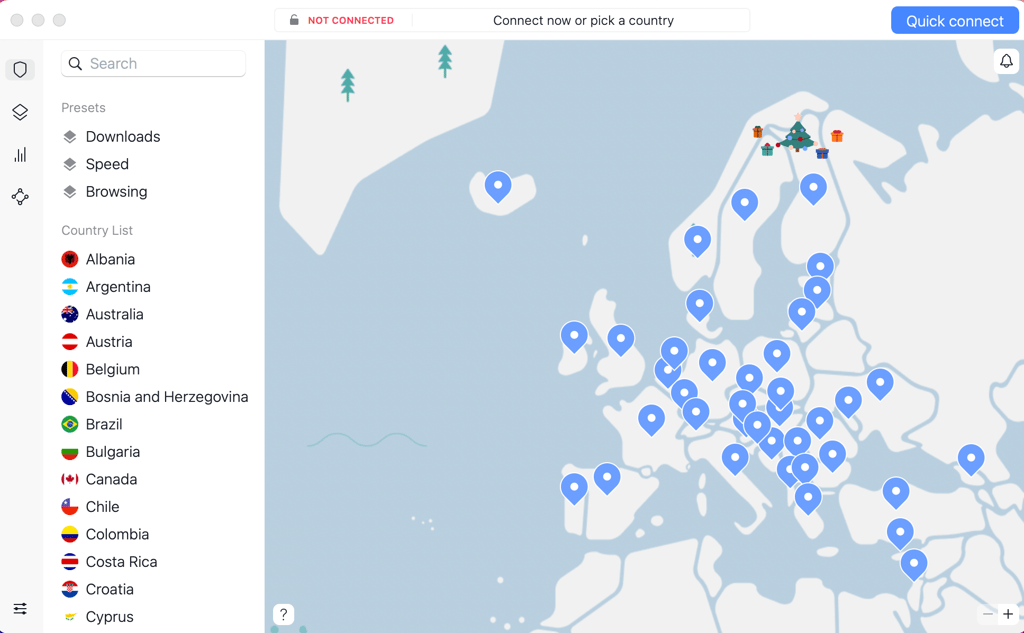
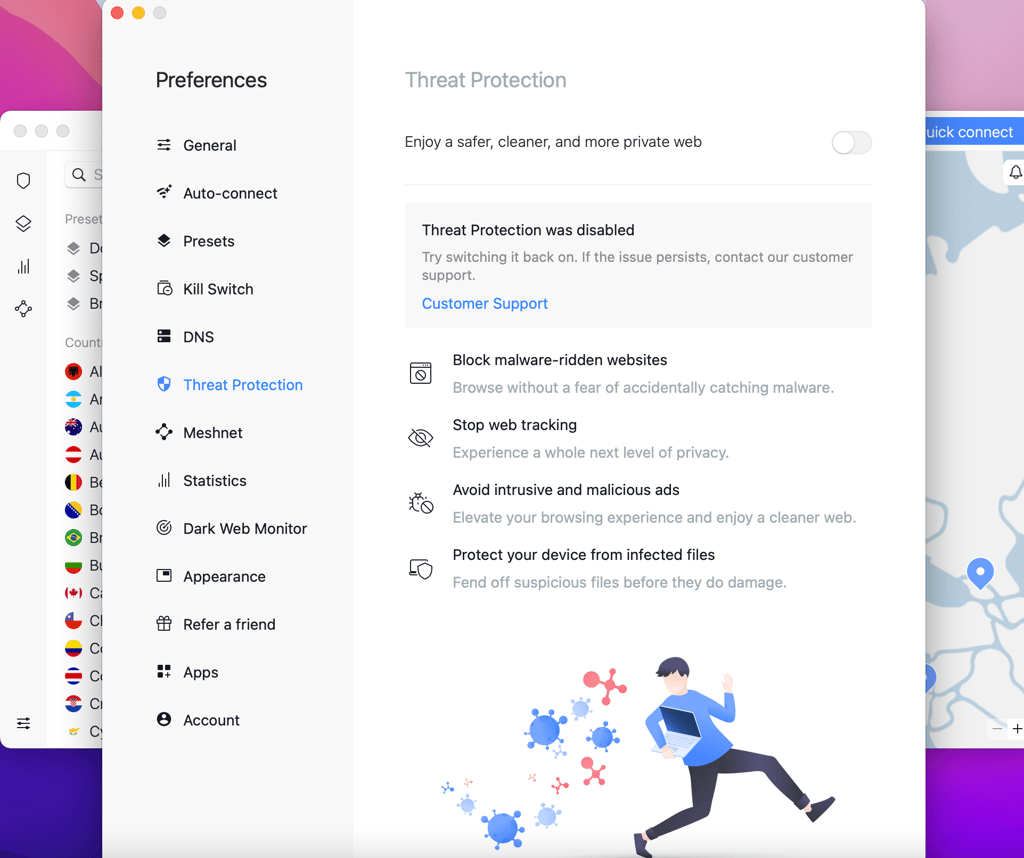
- Connect to VPN, click on a small shield icon in the top left corner, and click on the Threat Protection feature
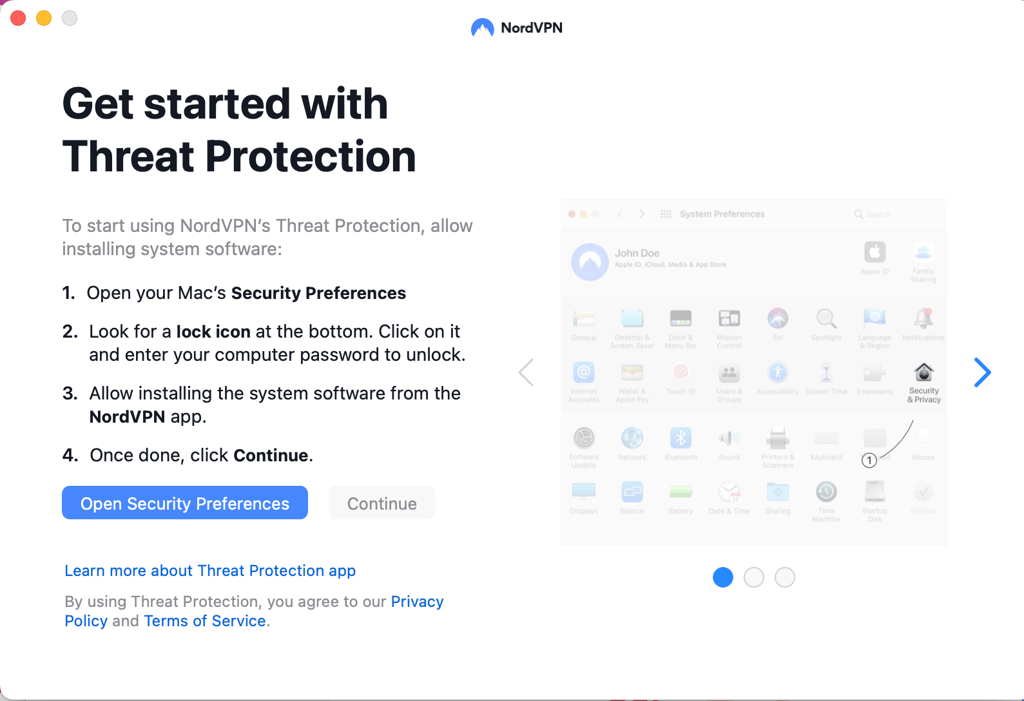
- When you're signing in for the first time, you'll be asked to approve the permission request by following the steps provided by NordVPN
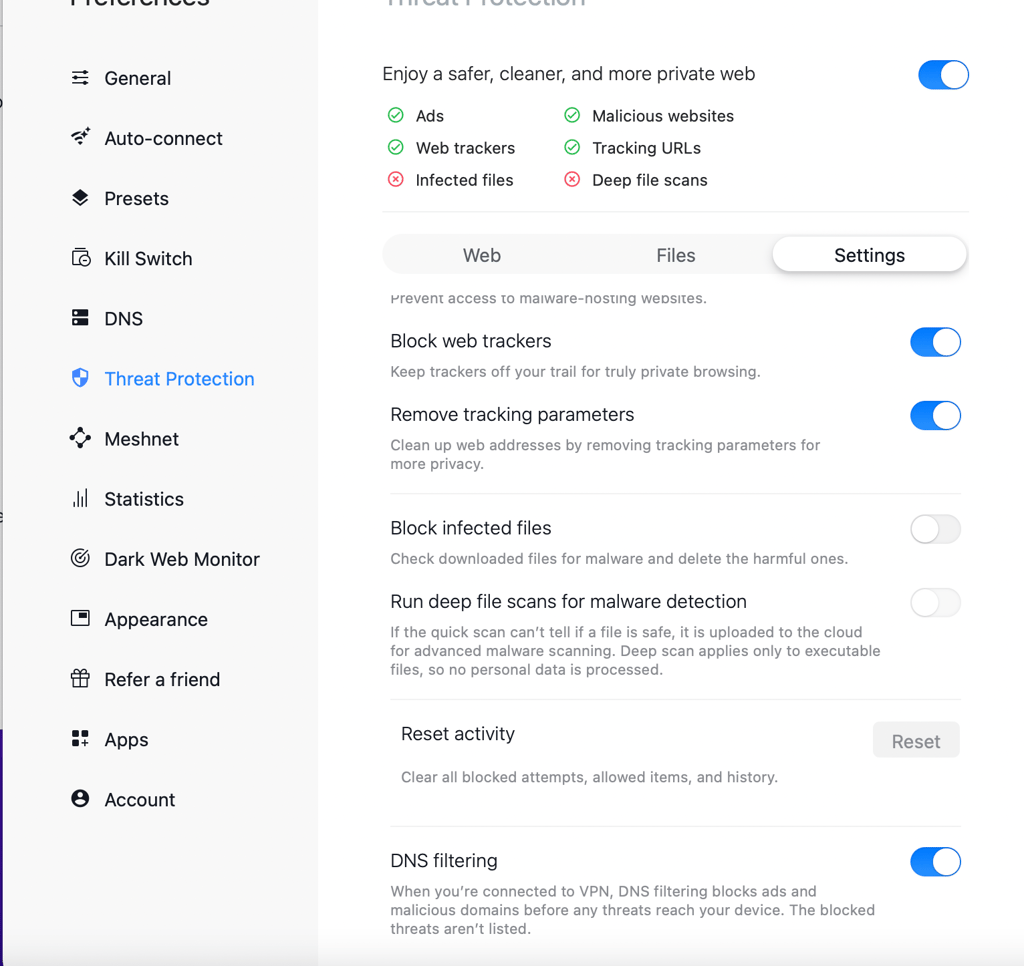
- Now, in the Threat Protection window, click on the settings tab. Here you can choose your preferred ad-blocking settings to enable the service
Blocking YouTube ads on Safari
Just like many other services out there, YouTube relies on advertising to gain profit. That's why we see ads pretty much on every video. But no one can deny that these ads are anything but annoying. Powered with autoplay, YouTube ads intrude on your videos, often even without an option to skip them. So, how do you get rid of them?
If you're wondering how to block YouTube ads on Safari, you will need an ad blocker. Keep in mind that not all ad blockers are compatible with this browser. Don't be surprised if your search results for YouTube ad blocker for Safari come back scarce.
While the top providers typically ensure full compatibility with the desktop and mobile devices and all browsers, smaller providers may forgo some of them. Thus, compatibility and integration are the first criteria to consider when choosing a YouTube ad blocker for Safari.
It would be best to consider whether the ad blocker works. We tested a dozen of providers to ensure that they block YouTube ads. Some of them failed miserably, and only those with the best results made it to our list.
Once you choose your favorite provider, follow a few simple steps to see how easy it is to enable an ad blocker on Safari.
Video review
Check out our detailed video review of the best Safari ad blockers out there:
Are free ad blockers for Safari safe?
No, free ad blockers are not safe and may pose serious security risks. Lack of revenue may result in poorly developed and scarcely updated software. As a result, many free ad blockers are susceptible to hacks and vulnerability exploits.
In 2020 users of Nano Adblocker experienced this firsthand. After buying the adblocker, new developers decided to tamper with users' Instagram accounts by adding malicious code to the Nano Adblocker. Similarly, in 2019 an AdblockPlus design flaw was discovered, which allowed criminals to push malicious code to vulnerable users.
We suggest getting a reliable and reputable ad blocker if you want to preserve your privacy and safety online. Check out our shortlist for recommendations.
Conclusion
If you're ready to get rid of those annoying ads and pop-ups, it's time to get an ad blocker. This way, your browsing experience won't be interrupted, and you'll protect your privacy from trackers. But that's not all that ad blockers are capable of. They can also protect you from malware and malicious websites, ensuring well-rounded security.
However, picking the right Safari ad blocker can be a daunting task. Since not all ad blockers are created equal, you need to research and test both the compatibility and efficiency as well as many other factors. You can always refer to our list if you're short on time.
At the top of our lineup is Surfshark CleanWeb. It's a top-performing ad blocker with various extra features. Our in-house tests and independent testing show that Threat Protection is one of the best-performing ad blockers o the market. Furthermore, it increases your security by providing a VPN service and malware detection.
More Ad blocker guides from Cybernews
How to block ads on Android in 2026: protect your Android from online threats
How to block ads on iPhone in 2026: prevent annoying ads
How to get rid of ads on Instagram in 2026: browse Instagram ad-free
Best ad blockers for iPhone and iPad in 2026: block ads to protect your device
Best ad blockers for Mac in 2026: secure your Mac from online threats
FAQ
Do ad blockers work on Safari?
Yes, several good ad blockers work very well with the Safari browser. For instance, Surfshark CleanWeb is compatible with the Safari browser and demonstrates excellent ad-blocking results. Check out our best Safari ad blocker shortlist.
What ad blocker does Apple recommend?
Apple's Safari browser has an implemented content-blocking feature. However, it can block some pop-ups while leaving ads, trackers, and other types of content behind. To ensure an excellent browsing experience, we recommend considering providers included in our list following extensive testing.
How to disable an ad blocker on Safari?
To disable the content blocker, launch Safari and go to 'Preferences'. Then go to the 'Websites' tab and choose the 'Content Blockers' option from the sidebar. Here you can disable content blocking for any particular website or all websites by choosing "when visiting other websites' and clicking the 'off' option.